
Table of Content
How do you track who enters your building without creating a bottleneck at reception? Visitor management replaces outdated paper logbooks with a secure digital process that verifies guests, prints badges, and logs entry data instantly. This guide covers how modern systems work, why they matter for security, and the tools you need to manage the flow of people efficiently.
In busy corporate and industrial environments, managing access is a daily operational requirement. It is no longer just about writing a name on a sticker; it is about reliable data, meeting legal obligations, and creating a professional first impression. Whether you run a city office or a secure production facility, controlling visitor flow is essential for modern business success.

What Is Visitor Management?
What Does a Visitor Management Process Involve?
A complete visitor management workflow tracks the guest journey from invitation to departure. It often begins with pre-registration, where an employee invites a guest and sends details like parking information or safety rules in advance. This forward planning reduces delays at the front desk and allows security teams to review visitors before they arrive.
When the visitor enters, the process moves to check-in. This typically includes confirming identity, capturing a photo, and printing a temporary badge. During the visit, the system tracks status-who is in the building, where they are allowed to go, and who they are meeting. The cycle ends with a formal check-out, ensuring the guest has left and their access rights are removed.
How Has Visitor Management Evolved from Paper to Digital?
For decades, visitor management relied on spiral-bound logbooks. While familiar, paper systems created issues: illegible handwriting, private information visible to other guests, and data that was impossible to search quickly during an emergency. It was a passive method that offered little actual security.
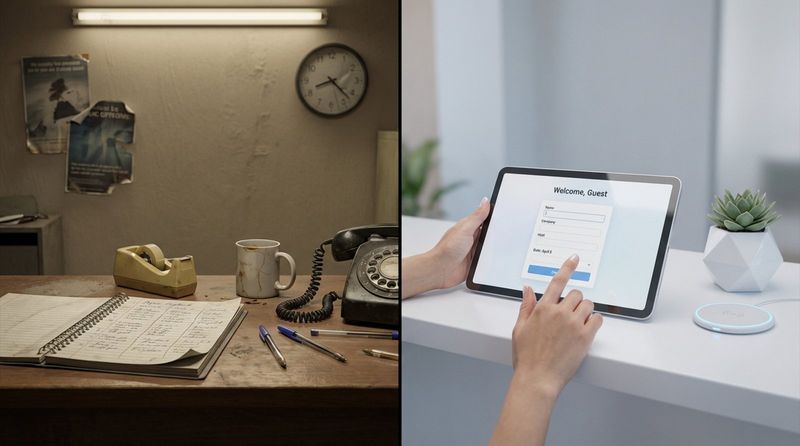
Moving to digital visitor management turns this into an active, smart process. Modern systems use tablets, kiosks, and mobile apps to collect accurate data in minutes. Digital records are searchable, encrypted, and easily linked to other security tools. This shift aligns with the broader move toward smart buildings, where operations are data-driven and efficient.
Why Do Organizations Need Visitor Management?
Security is the primary driver. Knowing exactly who is on-site at any moment is critical. Without a formal system, unauthorized people could access sensitive areas, and emergency responders might lack accurate headcounts during an evacuation. A Visitor Management System (VMS) acts as a digital gatekeeper to mitigate these risks.
Visitor management also supports a professional image. A guest greeted by a smooth, modern check-in process feels respected and welcomed. Additionally, many industries must follow strict regulations-such as ITAR, HIPAA, or GDPR-regarding facility access and data handling. A VMS provides the necessary audit trails to prove compliance.
What Is a Visitor Management System?
How Does a Visitor Management System Work?
A Visitor Management System (VMS) is software that automates the entire visitor journey. It typically consists of a front-end interface (often a tablet or kiosk), a management dashboard for admins, and integrations with tools like calendars or Slack. When a visitor approaches the kiosk, the system guides them through steps like entering their name, selecting their host, and signing legal forms.
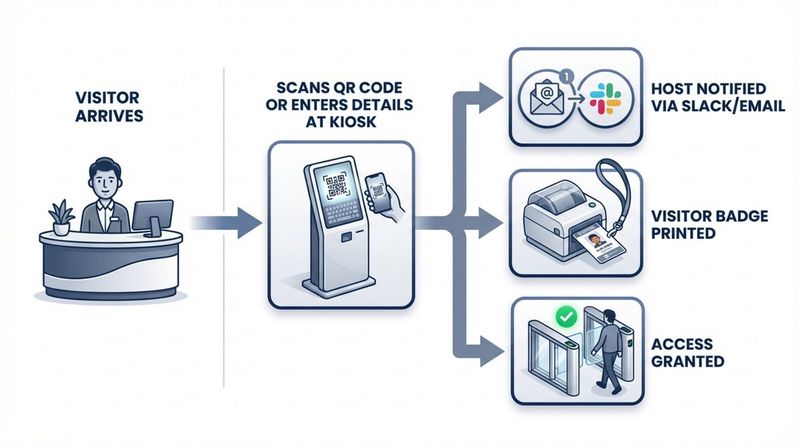
Once submitted, the system works in the background. It may check the name against watchlists, notify the host instantly, and trigger a badge printer. Information is stored in a secure cloud or local database, viewable by security staff in real time. This automation frees reception staff to focus on greeting guests rather than manual data entry.
What Is the Purpose of a Visitor Management System?
The main purpose of a VMS is to provide a single source of truth for all non-employee presence. By digitizing entry, the system confirms that every person inside has a valid reason to be there and has agreed to site rules. It connects physical security with digital records, offering oversight that manual methods cannot match.
A VMS also improves operational efficiency. Automatic notifications alert hosts the moment guests arrive, cutting wait times in the lobby. For management, visitor data offers insights: you can identify peak visit times, adjust staffing, and understand how external guests utilize your space.
What Are the Key Features of Visitor Management Systems?
Visitor Registration and Check-In
The core of any VMS is a clear, simple registration screen. Visitors should be able to complete the process without assistance. Many systems scan driver’s licenses or passports to populate fields automatically, reducing errors. Returning visitors are often recognized immediately, making subsequent check-ins faster.
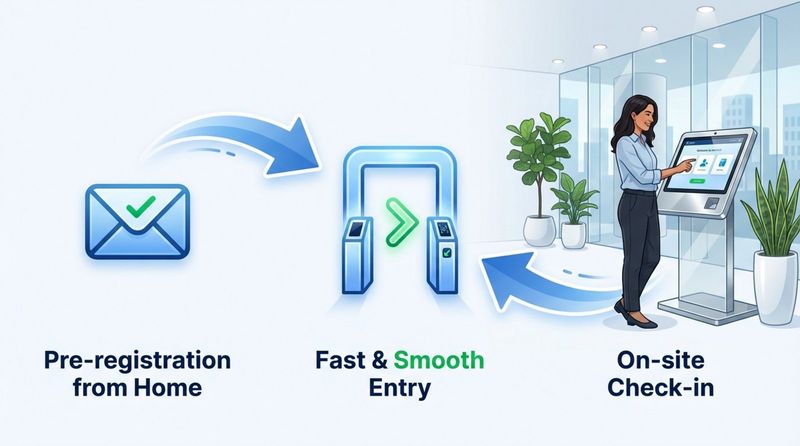
Pre-registration is another valuable feature. Hosts can email guests a link beforehand to complete forms and upload photos. This "express" check-in prevents lines from forming at reception during busy periods.
Badge Printing and Identification
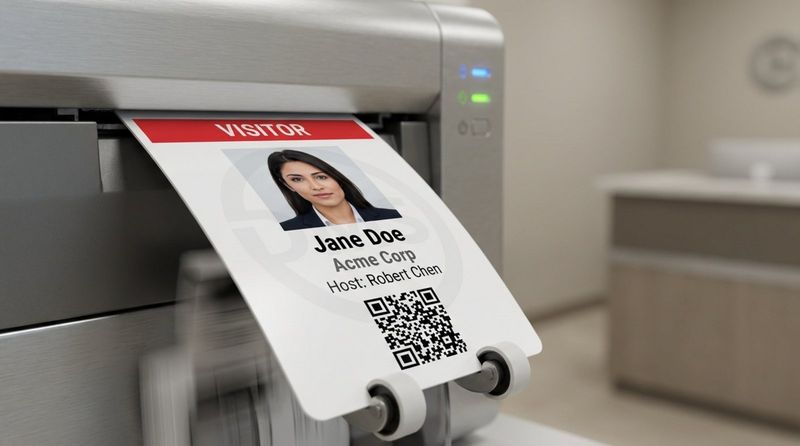
Badges provide immediate visual confirmation of a visitor's status. A modern VMS connects to printers to generate badges upon check-in, displaying the visitor’s name, photo, host, and expiration time. Some setups use self-expiring badges that change color after a set period to prevent reuse.
Digital badges are increasingly common. Stored on a smartphone, they often include a QR code that grants access to specific doors or turnstiles, ensuring visitors are restricted to approved areas.
Access Control Integration
Advanced systems integrate directly with building access control systems (ACS). Instead of a receptionist buzzing people in, the VMS issues a temporary digital credential compatible with your elevators or security gates.
This integration keeps the journey smooth while maintaining high security. If a visitor is meeting on the 5th floor, their credential can be limited to that specific floor. Once checked out, those access rights are revoked automatically.
Host Notifications and Communication
A VMS acts as an automated receptionist. Upon check-in, it instantly alerts the host via email, SMS, or business messengers like Microsoft Teams or Slack. The host knows their guest has arrived regardless of where they are in the building.
Two-way messaging allows hosts to reply directly to the kiosk if they are delayed, keeping the guest informed and reducing uncertainty in the lobby.
Data Storage, Reporting, and Analytics
Every visit generates data. A VMS centralizes this information, allowing managers to run reports on visitor volume, frequency, and duration. This data supports decisions regarding space planning and staffing.
From a security perspective, these logs are vital. In the event of an incident, security teams can review exactly who was on-site at a specific time. Reporting tools can also flag attempted entries by blocked individuals.
Compliance and Privacy Management
Handling visitor information requires adherence to privacy laws like GDPR and CCPA. A capable VMS offers features like custom privacy notices and consent forms. It can also be configured to anonymize or delete data after a specific retention period.
Compliance extends to health and safety. The system can present safety videos or health questionnaires during check-in. Capturing a digital signature ensures you have a binding record that the visitor acknowledged your site rules.
Mobile Accessibility
Touch-free options have become a standard expectation. Mobile-friendly visitor management allows guests to scan a QR code at the entrance and complete registration on their own device, avoiding shared touchscreens.
Employees also benefit from mobile apps, using them to pre-register guests, receive arrival alerts, and view upcoming schedules from anywhere. This flexibility supports hybrid work environments where staff may not always be at their desks.
How Does Visitor Management Benefit Organizations?
Improves Security and Safety
The most direct benefit is enhanced security. Requiring ID and a photo creates a clear audit trail and deters bad actors. verifying visitors against internal or external watchlists helps stop known risks at the door.
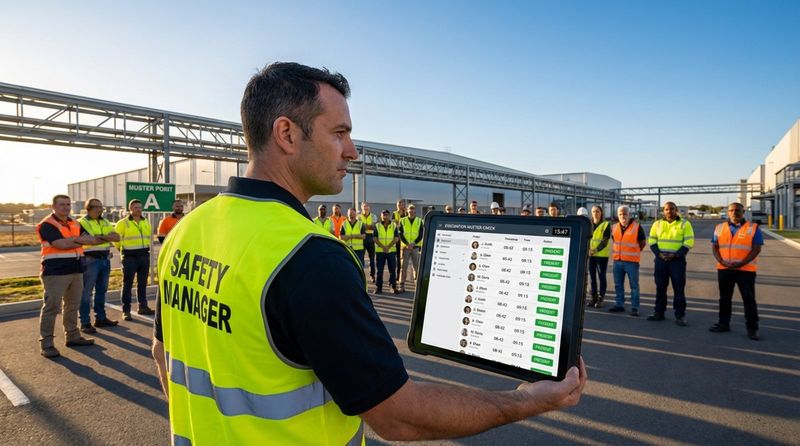
In emergencies, a VMS is indispensable. During an evacuation, the system can generate a real-time muster list accessible on mobile devices, allowing fire marshals to account for every visitor-a task that is nearly impossible with a paper logbook.
Supports Regulatory Compliance
Many sectors require precise access records. Whether complying with FSMA in food production or HIPAA in healthcare, a digital VMS creates accurate, time-stamped logs that demonstrate compliance.
It also protects visitor privacy. Unlike a paper book where previous entries are visible, a VMS keeps data secure and encrypted, accessible only to authorized personnel.
Enhances Visitor Experience and Professional Impressions
The visitor experience begins at the lobby. A sleek kiosk and a fast, automated workflow signal that your organization is efficient and respectful of guests' time. It eliminates the awkwardness of waiting for attention at a busy front desk.
Personalization adds value. When a returning visitor is recognized instantly, it creates a welcoming atmosphere. This positive first impression supports sales meetings, interviews, and executive visits.
Reduces Costs and Overhead
While a VMS involves an initial investment, it often reduces long-term operational costs. Automating check-ins relieves pressure on reception staff, allowing them to focus on other tasks. Some companies utilize a "virtual reception" model to manage multiple sites efficiently.
Reducing paper usage and storage needs also contributes to savings. More importantly, the efficiency gained by staff not waiting in the lobby translates to productive time recovered.
Provides Real-Time Visibility
Leaders need visibility into site activity. A VMS dashboard shows exactly how many visitors are present, who they are, and their intended destination. This helps facilities teams manage capacity and security teams monitor multiple entrances.
Real-time data allows for immediate action. If visitor volume spikes unexpectedly, managers can adjust staffing or security protocols instantly, ensuring the lobby remains a managed, controlled environment.
What Types of Visitor Management Systems Exist?
Cloud-Based vs. On-Premise Deployment
Cloud-based systems are the standard for most modern businesses. They are accessible from anywhere, require minimal local IT setup, and receive automatic updates. They scale effortlessly, making them ideal for multi-location networks.
On-premise systems are preferred by organizations with strict data sovereignty requirements or unstable internet connectivity. These solutions host data on local servers, offering maximum control but requiring more internal maintenance.
Kiosk and Tablet-Based vs. Mobile App Solutions
Kiosk setups serve as the dedicated "face" of the system. Located at reception, they handle high-quality photo capture and badge printing effectively. They provide a clear destination for arriving guests.
Mobile app solutions rely on the visitor’s device, often via a web browser or specific app. This supports a contactless workflow. Many organizations deploy a hybrid model: kiosks for new guests and mobile check-in for frequent contractors.
Standalone Tools vs. Integrated Platforms
Standalone tools focus exclusively on visitor tracking. They are often simpler and more affordable, fitting the needs of smaller businesses. However, they may lack deep integration with other building systems.
Integrated platforms function as part of a larger security or workplace ecosystem. They connect with access control, room booking, and HR databases, enabling complex workflows like triggering a camera recording upon specific check-in events.
Industry-Specific Visitor Management Solutions
Certain industries require specialized features. Schools may need integration with sex offender registries, while healthcare facilities require tools for patient privacy and health screening.
Industrial and logistics sites often need rugged hardware capable of withstanding dust and outdoor conditions, along with features for tracking vehicles and delivery drivers. These solutions address regulatory and operational needs that general office systems might miss.
How to Choose the Right Visitor Management System for Your Organization
Key Evaluation Criteria
Start by distinguishing between must-have features and nice-to-haves. Consider your daily visitor volume and specific security requirements. A system suitable for a creative agency may not meet the standards of a corporate headquarters. Seek a balance between a simple user interface for guests and robust controls for administrators.
Reliability is critical. A VMS failure impacts both security and brand image. Evaluate the vendor’s uptime history and support responsiveness to ensure help is available when you need it.
Integration with Existing Systems
A VMS should fit into your existing digital ecosystem. Verify compatibility with calendar tools like Outlook or Google Calendar for pre-registration, and communication platforms like Slack. These integrations make visitor management a seamless part of the workday.
Physical security integration is equally important. If you use access control systems like HID or Gallagher, choose a VMS that can issue compatible credentials. This unifies your security operations rather than creating a disconnected data silo.
Data Security and Privacy Considerations
Given the sensitivity of visitor data, robust security is non-negotiable. inquire about encryption standards and data storage locations. Ensure the system complies with relevant frameworks like SOC 2.
Privacy features should allow you to define data retention policies easily. The system must support the ability to delete visitor data upon request, helping you comply with modern privacy regulations.
User-Friendliness for Staff and Visitors
Complexity hinders adoption. For visitors, the check-in interface must be intuitive, asking only necessary questions. For staff, the backend dashboard should be straightforward, allowing for easy reporting without extensive training.
Test the software on the actual hardware you intend to use. Ensure buttons are accessible and text is legible. Clear on-screen instructions can significantly reduce the need for staff intervention.
Scalability and Support
Select a system that grows with you. Whether you are adding new locations or increasing visitor volume, managing everything from a central account saves time. You might start with basic features and enable advanced integrations later.
Access to reliable support is vital. Look for vendors offering comprehensive documentation and responsive help channels. Reviews from other users can provide insight into the vendor’s long-term reliability.
Cost Considerations
Pricing models vary, with charges based on location, check-in volume, or employee count. Calculate the total cost of ownership, including hardware, badges, and integration fees. Avoid solutions that appear cheap initially but require expensive add-ons for essential features.
Consider the ROI in terms of time saved and risk reduction. A higher-tier system that automates complex workflows often pays for itself by reducing administrative burden.
Common Red Flags to Avoid
Be wary of vendors who do not offer a live demo or trial. You need to verify the user experience firsthand. Vague documentation regarding data privacy is another warning sign; transparency is essential when handling personal data.
Check the update frequency. Stagnant software may harbor security vulnerabilities. Additionally, avoid vendors that lock you into proprietary hardware; flexible systems that run on standard tablets typically offer better long-term value.
What Are the Leading Visitor Management Tools to Help You Succeed?
Proxyclick
Proxyclick is often selected by large enterprises requiring high customization and strict compliance. It integrates well with access control and internal systems, making it a strong candidate for multi-national organizations.
Envoy
Envoy is widely recognized for its user-friendly iPad check-in experience. It is easy to set up and scales well for modern offices. Beyond visitors, Envoy offers tools for desk booking and mailroom management, functioning as a broader workplace platform.
iLobby
iLobby targets high-security and regulated industries like manufacturing and defense. It emphasizes compliance features, such as watchlist screening and detailed audit logs. Its hardware options include rugged kiosks designed for industrial environments.
Sign In Enterprise
Sign In Enterprise (formerly Traction Guest) is designed for complex, multi-site deployments. Its "Experience Editor" allows admins to create unique check-in workflows for different locations or visitor types, offering central control over global security policies.
ROLLER
ROLLER serves the leisure and entertainment market, combining visitor check-in with ticketing and point-of-sale. It is built to handle high volumes of guests at venues like museums and parks, integrating waivers and bookings into one flow.
Look Digital Signage for Enhanced Visitor Communication
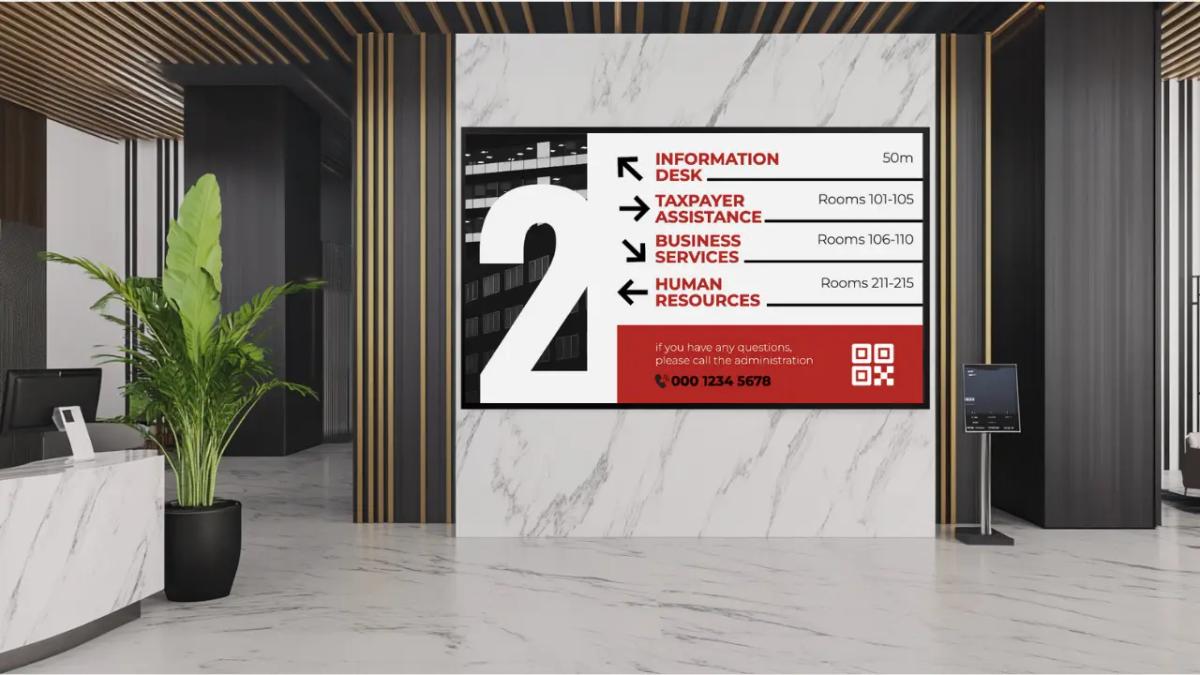
While a VMS handles the data and check-in logic, Look Digital Signage manages the visual communication that guides visitors once they are inside. Look DS integrates seamlessly into your lobby and building environment to ensure guests feel welcome and informed.
- Screen Layouts and Welcome Screens: Use the Look CMS to design dynamic lobby dashboards. You can integrate data sources to display personalized "Welcome" messages on screens the moment a VIP guest checks in at the kiosk.
- Interactive Scenarios: For complex buildings, you can deploy Interactive Scenarios on touchscreens. This allows visitors to navigate wayfinding maps or browse directories without staff assistance.
- Reliable Playback: Using the Look Player or the Look App on your existing screens ensures that critical safety information and directions play reliably, even if the internet connection drops (thanks to offline playback capabilities).
- Integrations: Connect your digital signage to your wider ecosystem using Integrations (API/Zapier) to trigger emergency alerts or room schedule updates automatically across your screen network.
By pairing a robust VMS with Look Digital Signage, you cover both the security of the check-in and the quality of the on-site experience.

Best Practices for Successful Visitor Management Implementation
Assessment and Planning
Before selecting software, audit your current process. Identify bottlenecks and security gaps. Consult with reception and security staff to define necessary features. Establishing clear policies regarding data collection and legal agreements early on simplifies the setup.
Configuration and Customization
Configure the system to reflect your brand. Add logos and ensure on-screen instructions are friendly and clear. Set up notification workflows carefully-ensure the right people receive alerts to avoid communication gaps. Testing internally before a full launch allows you to refine the process.
Staff Training and Rollout
Effective use requires training. Front-desk staff should know how to assist guests with the kiosk while maintaining a welcoming presence. Inform all employees about the new process so they know how to invite guests and what notifications to expect.
Consider a phased rollout. implementing the system at one location or entrance first allows you to gather feedback and make adjustments before expanding to the entire organization.
Ongoing Optimization
Visitor management is not a "set and forget" task. Review data regularly to identify improvements. If check-ins are slow during specific times, investigate the cause. Stay updated with your vendor’s new features to ensure your system remains secure and efficient as technology evolves.
Frequently Asked Questions about Visitor Management
Who Needs a Visitor Management System?
Any organization that receives external guests benefits from a VMS. This includes corporate offices, schools, manufacturing plants, and healthcare facilities. Even small businesses with low visitor volume can use these tools to automate greetings and maintain secure records without a dedicated receptionist.
How Do Visitor Management Systems Support Data Privacy Laws?
Modern VMS platforms are designed to support compliance with laws like GDPR. They enable secure data capture, encryption, and automated deletion policies. Unlike paper logs that expose visitor names, a VMS keeps information private and accessible only to authorized administrators.
Can These Systems Handle Multiple Locations?
Yes. Cloud-based solutions allow you to manage multiple sites from a single dashboard. This ensures consistent security policies and branding across all locations. Centralized reporting provides visibility into visitor activity across the entire network, while local managers retain control over daily operations.
Visitor management continues to evolve with automation and intelligence. Future systems will likely leverage more integrations with building management systems, creating a "smart lobby" where lighting, access, and room preparation happen automatically as a guest checks in. By adopting the right tools now, you prepare your organization for a more secure and efficient future.


