
Table of Content
Before looking at any spec sheet, you need a solid understanding of your specific environmental conditions, the viewing distance and angles needed for clear viewing, and a well-mapped-out content strategy and update frequency for your outdoor digital menu boards. These factors will determine the brightness, screen size, IP and IK ratings, operating ranges, and content management requirements your deployment will need.
In general terms, an outdoor menu board is a weatherproof, IP-rated commercial-grade screen with reinforced enclosures and thermal management systems to protect against vandalism and extreme temperatures. The intensity of these features comes down to the first two factors we mentioned.
In this article, we’ll provide a detailed breakdown of all these features, and you’ll walk away knowing exactly what to look for. We'll cover:
- The different types of outdoor menu boards
- Essential specs like weatherproofing, brightness, and resolution
- Real cost breakdowns, including installation and ongoing expenses
- Software features that matter for day-to-day operations
- Installation considerations and maintenance requirements
- Common mistakes and how to avoid them
3 Types of Outdoor Digital Menu Boards
Drive-Thru Menu Boards
Since customers are ordering from their cars in fully outdoor conditions, drive-thru displays are completely exposed to the elements. These displays are all-weather rated with IP65 or higher ratings, meaning they're sealed against water and dust. Most screens come from LG, Peerless, and Samsung in 55-inch sizes with brightness levels around 2,500 to 3,000 nits.
Did you know?
Nearly 95% of the 14,000 McDonald’s restaurants in the U.S. have a drive-thru.
According to the NAR, drive-thrus now account for 75% of restaurant traffic. Two-thirds of Gen Z and Millennial consumers say takeout is essential to their lifestyle, and nearly 6 in 10 use a drive-thru at least weekly.
Food Trucks & Mobile Vendors
Menu boards for food trucks and mobile vendors are typically mounted on the exterior of the truck or set up on portable stands nearby. These setups use 32 to 43-inch displays that are light enough to transport but still visible from a distance. The displays are shatter-resistant to handle bumpy roads and constant movement between locations.
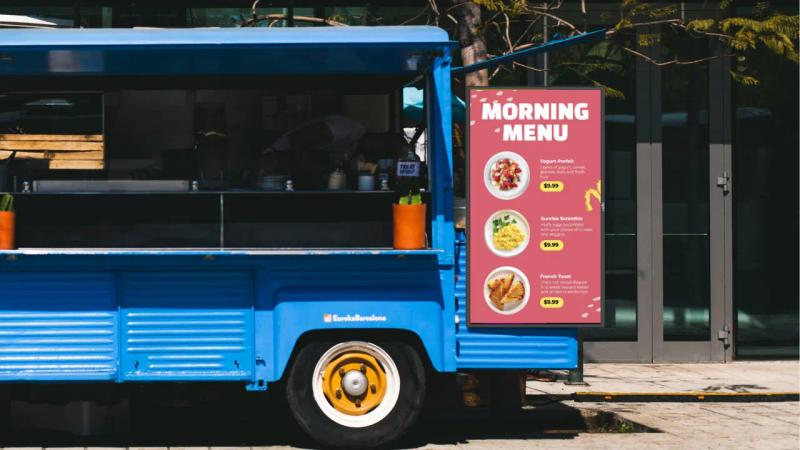
Food truck operators deal with fully outdoor conditions just like drive-thrus, so the displays have IP65 weatherproof ratings to handle rain, humidity, and varying temperatures. Power comes from the truck's generator or battery system, so most setups use LED displays for energy efficiency. Some models include built-in batteries for events where external power isn't available or reliable.
Outdoor Patios & Cafés
Menu boards for outdoor patios and cafés are usually mounted on walls, placed on stands near the entrance, or positioned at the edge of the seating area where they're visible to pedestrians. These displays serve double duty as both menu information and branding elements to attract passersby. Screen sizes typically range from 43 to 55 inches, depending on viewing distance.
Unlike drive-thrus, where customers are always in the same spot, patio displays need to account for varying viewing angles and distances. The displays need weatherproofing similar to drive-thru setups since they're exposed to sun, rain, and temperature changes, but brightness requirements can be slightly lower if the display is under an awning or partial shade.
A Hardware Buying Checklist With Critical Specs
Weatherproofing & Durability Standards
Outdoor displays use IP ratings to indicate their level of protection against water and dust. The rating has two numbers. The first indicates dust protection, and the second indicates water protection. IP65 is the minimum you should consider for outdoor use. The 6 means the display is completely sealed against dust, and the 5 means it can handle water jets from any direction.
For harsher environments, IP66 or IP67 ratings provide better protection. Some manufacturers also reference NEMA ratings, which is an American standard. NEMA 4 or 4X ratings are roughly equivalent to IP65 or IP66, with the X designation adding corrosion resistance for coastal or industrial locations.
For more details, here's an in-depth guide on the best waterproof monitors.
UV Protection
UV protection is separate from weatherproofing. Direct sunlight degrades plastic components and causes yellowing over time. Quality outdoor displays use UV-resistant coatings on the front glass and enclosure materials to prevent this degradation. Anti-yellowing coatings are especially important if your display will be in direct sunlight for most of the day.
Operating Temperature
The operating temperature range tells you the extremes your display can handle. Most outdoor displays operate between -40°C to 40°C, but verify this matches your climate. Displays designed for extreme temperatures include internal heating elements to prevent freezing and cooling fans to manage high temperatures.
Impact resistance
The IK rating system measures impact resistance, with IK10 being the highest level of protection against physical impact. IK10-rated displays can withstand impacts equivalent to 20 joules of force, roughly the same as being hit with a 5kg weight dropped from 40cm. Safety glass or polycarbonate shields add another layer of protection.
Brightness Requirements
Brightness is measured in nits, and outdoor displays need significantly more than indoor screens. A typical indoor TV outputs 300 to 500 nits. Outdoor displays range from 1,500 nits for partial shade locations up to 3,000 nits or more for full sun exposure. Without adequate brightness, your content washes out and becomes unreadable during daylight hours.
Read on the Look Blog: What Are Displays Nits and How Many Are Needed Outdoors?
It's become standard for manufacturers to include auto-brightness sensors in an effort to lower energy costs and extend display lifespan. These sensors detect ambient light conditions and adjust output accordingly. The display runs at full brightness during the day, then automatically dims at night.
Most quality outdoor displays now come with anti-glare and anti-reflective coatings to reduce the mirror effect you see on standard screens in bright light. These coatings work by diffusing reflected light rather than bouncing it directly back at the viewer.
Screen Size and Resolution
A simple rule for sizing screens is to take your viewing distance in inches and divide by three. That gives you the minimum screen size. So if your customers are 15 feet away, that's 180 inches, which means you need at least a 60-inch screen.
Read this detailed guide: Find the Ideal Digital Menu Board Size for Your Restaurant
Industry Standard Sizes:
| Use Case | Typical Viewing Distance | Standard Screen Size |
|---|---|---|
| Drive-thru menu boards | 10–15 feet | 49–55 inches |
| Walk-up ordering stations | 5–8 feet | 43–49 inches |
| Outdoor patio menus | 6–10 feet | 43–49 inches |
| Preview boards (drive-thru) | 15–20 feet | 32–43 inches |
For most outdoor menu boards, Full HD (1080p) provides sufficient clarity at typical viewing distances. A customer standing 10 feet away won't perceive much difference between Full HD and 4K on a 55-inch screen.
All-in-One vs. Display + Enclosure
All-in-one outdoor displays integrate everything into a single weatherproof unit. The screen, media player, and protective enclosure come as one sealed package. These units are simpler to install since there's no separate enclosure to mount or internal components to assemble. Manufacturers like Samsung and LG offer commercial-grade all-in-one models designed for 24/7 operation, also known as System-on-Chip displays.
If you already have a high-brightness commercial display with 1,500-2,000 nits, like a Samsung QLED, you can install it in a partially shaded outdoor location using a weatherproof enclosure. Companies such as Armagard manufacture NEMA 4/IP65-rated enclosures with integrated climate control (heating, cooling, ventilation) that maintain internal temperatures and protect against rain, dust, and vandalism. This method works best for covered patios, awning-protected areas, or locations that get morning/evening sun but not midday direct exposure.
Serviceability favors the display plus enclosure method. If the screen fails, you can remove it and send it for repair or replacement while keeping the enclosure in place. With all-in-one units, the entire assembly may need to come down for servicing. On the other hand, all-in-one units have fewer potential failure points since there are no separate seals or connections to maintain between components.
Cost Breakdown for Outdoor Digital Menu Boards
Hardware Costs
All-in-one outdoor displays: $4,000+ for 49/55-inch, depending on manufacturer and specs.
Some expert-recommended models you can check out:
- Peerless-AV XHB554 Xtreme High Bright at $ 4,500 (2,500 nits, IP66, IK10 impact resistance, operating temp -31°F to 140°F)
- LG 55XE4F-M at $ 4,667 (49”) (4,000 nits, IP56, IK10, operating temp -30°C to 50°C, HDBaseT support)
- Samsung OH55F at $ 4,999 (2,500 nits, IP56, IK10)
Commercial outdoor displays usually have a minimum 3-year warranty.
Professional Media players: $300+ (IP65+ rating, operating temperature range -40°F to 140°F, fanless/sealed design to prevent moisture ingress, 24/7 operation with hardware-accelerated video decoding, solid-state storage, and reliable connectivity options like Ethernet plus optional LTE failover.)
A good example is the SW-101-N waterproof player with an IP68 rating from iBase.
Installation Costs
- Basic wall mounting: $150–$300
- Drive-thru installations (concrete work, trenching, electrical): $2,000–$5,000+
- Concrete footers for pedestals: $500–$1,500 per footer, depending on size and soil conditions
Software:
- CMS subscription: $13.5/screen/month with Look DS (templates, dayparting, scheduling, offline caching, remote management, and built-in apps and integrations) – the more screens you add, the lower your per-screen cost drops, down to as low as $6/screen/month for larger deployments.
Installation & Maintenance
Ongoing Maintenance
Locations near busy roads accumulate dust and grime faster than displays in protected areas. Plan on cleaning the screen surface monthly at a minimum, weekly if you're in a high-dust environment. Use a microfiber cloth with water or screen cleaner specifically made for displays.
Seal inspections catch water intrusion before it damages electronics. Check gaskets and seals quarterly for cracks, gaps, or deterioration. Pay special attention to where cables enter the enclosure and around any access panels. Plan on resealing penetrations every 2 to 3 years, even if you don't see obvious problems.
Your CMS provider updates their software with new features and security patches. Schedule updates during off-hours and always have a rollback plan in case something goes wrong.
Check our Digital Signage Maintenance Checklist
Networking & Security
Wired Ethernet connections provide the most reliable network for outdoor displays. Wi-Fi signals degrade over distance and can be blocked by building materials or weather conditions.
Tamper-proof enclosures protect outdoor displays from theft and vandalism. Look for enclosures with internal locks that can't be accessed without tools. The enclosure should also protect cable connections so someone can't simply unplug your display.
Security vulnerabilities happen when displays ship with default passwords that never get changed. Manufacturers often set generic admin passwords like admin or 1234 and assume you'll change them. Many operators don't, which leaves the system wide open. First thing after installation, change all default passwords to something strong and unique.
Placement & Installation
- Mount the center of your screen at average eye level. That's 5 to 6 feet for drive-thrus where people are sitting in cars, or 5.5 to 6.5 feet for pedestrian traffic at outdoor cafés
- The point displays toward where customers are ordering from rather than running parallel to your building. Drive-thru customers approach from a curve, so angling the display helps. Tilting screens down 5 to 10 degrees also cuts glare from overhead sun
- Landscape orientation works for full menus and matches how we naturally read left to right. Portrait fits narrow spaces and lets you stack items vertically, which is why a lot of drive-thrus now use it to show more content at once
Accessibility & Readability Standards
- Body text needs to be 24 to 32 pixels minimum for readability from 10 feet away, with item names and prices going larger at 40 to 60 pixels - anything smaller gets tough to read in bright sunlight or for older customers
- Your smallest text should be at least 1 inch tall when displayed, which works out to roughly 100 to 120 pixels in height on a 55-inch Full HD screen
- About 8% of men and 0.5% of women have color blindness, most commonly red-green. Don't use red and green as the only way to distinguish information - add icons or text labels as backup
- ADA compliance for digital signage specifies interactive elements between 15 and 48 inches from the floor for wheelchair accessibility. For non-interactive menu boards, people read from a distance, standard eye-level mounting around 5 to 6 feet works fine
- For every 10 feet of viewing distance, increase your minimum text height by about 1 inch. So if customers view from 20 feet away, your smallest readable text should be at least 2 inches tall on screen
Software & Content Management System (CMS) Requirements
Remember when we said you need to map out your content strategy and update frequency beforehand? An outdoor digital menu board is powered by a digital signage software that lets you manage your menu boards from anywhere with an internet connection.
You log into a web interface, make your changes, and push them to your displays instantly. This is a big shift from older systems, where you had to physically visit each location with a USB drive to update content. For multi-location operators, this alone justifies the monthly subscription cost.
Here is a list of non-negotiable features:
Ready-made menu board templates – save time, reduce design errors, and make it easy to roll out new screens quickly. Look DS offers 300+ professionally designed templates, including layouts specifically built for menus, promotions, and seasonal updates. They adapt to both vertical and horizontal screen orientations, so you can use the same design across different display setups without manual reformatting.
Dayparting and scheduling – set menus and promos like Taco Tuesday and holiday specials to run automatically at specific times. You can group your screens with tags and replace content on specific screens or branches on the fly without affecting your entire network.
Offline caching – stores a local copy of content so menus keep displaying during internet outages; syncs updates once the connection is restored.
Multi-zone layouts for multi-screen setups – divide screens into zones to show main menus, combos, promos, or rotating content simultaneously; drag-and-drop layout control.
POS and automation connections – integrates via Zapier or APIs to auto-update prices, hide sold-out items, and sync menu changes.
Remote monitoring – tracks screen status, alerts for offline or malfunctioning displays with proof of play reports.
Service Level Agreements (SLAs) and uptime guarantees – Enterprise-level CMS platforms typically include 99.9% uptime guarantees and 24/7 technical support. This makes a huge difference when screens go down during peak hours, and you need immediate assistance to get them back online.
Making the Right Choice for Your Restaurant
If you’ve made it this far, you now have the know-how to start making a short list of hardware solutions that fit your restaurant.
Just to recap, the most important specs to remember are:
- IP56 minimum weatherproofing - ensures protection against water and dust
- 2,500+ nits brightness - for full sun visibility
- IK08 or higher impact rating – protects against physical damage like knocks and hits
- Full HD resolution (1920x1080) or higher – ensures clear, readable text and images
- Operating temperature range: -40°F and 140°F – ensures reliable performance in extreme weather
And in case you’re wondering whether your setup will still work as you add more locations, you needn’t look any further than Look Digital Signage. Grupo MYT, a multi-concept restaurant group in Mexico, successfully scaled to 50+ locations, all managed remotely after switching to Look Digital Signage.
We went with Look because it gave us that one thing we needed most: full control of the content that we were streaming to our locations, and it also gave us the scalability. We could start with a few locations and then grow to the whole 50 locations.” — Alfredo Meriteran, CFO and Strategic Planning Officer, Grupo MYT
Ready to get started? Start a 14-day free trial with Look Digital Signage. No credit card required and no functional limitations.
Frequently Asked Questions on Outdoor Menu Boards
What IP rating do I need for outdoor menu boards?
IP65 is the minimum rating you should consider. The 6 means the display is completely sealed against dust, and the 5 means it can handle water jets from any direction. For harsher environments, IP66 or IP67 provides additional protection.
How bright should an outdoor digital menu board be?
Brightness depends on the sun's exposure at your location. Displays in partial shade can work with 1,500 to 2,000 nits. For full sun exposure, like most drive-thrus, you need 2,500 to 3,000 nits minimum.
How long do outdoor digital menu boards last?
Quality outdoor displays last 5 to 10 years with proper maintenance. The actual lifespan depends on operating hours, climate conditions, and how well you maintain them. LED backlights gradually dim over time, and most manufacturers rate them for 50,000 to 100,000 hours of operation.
Can I integrate my POS system with digital menu boards?
Yes, most CMS have built-in integrations. With Look DS, you can use their API connection or Zapier. When connected, price changes in the POS automatically update on the displays. If you mark an item as sold out, it disappears from the menu board.


