


Table of Content
Creating a digital menu for your food truck is more than a passing fad; it’s a smart business choice that can greatly improve how you work and how customers see your brand. Traditional menu boards need frequent reprinting, wear out quickly, and are hard to change. Digital menus, by contrast, are flexible, portable, and easy to update. They let you change items in real time, display bright images, and interact with customers in ways that printed boards cannot. This guide explains everything you need, from choosing hardware and software to designing an attractive layout and fixing common problems.
Success with a digital menu starts with knowing its main parts and what it can do for your business. Food trucks operate in fast, constantly changing conditions, so you must be quick and flexible. A digital menu fits this style perfectly, helping you adjust to new places, events, and customer needs with very little effort.
What Is a Digital Menu for Food Trucks?
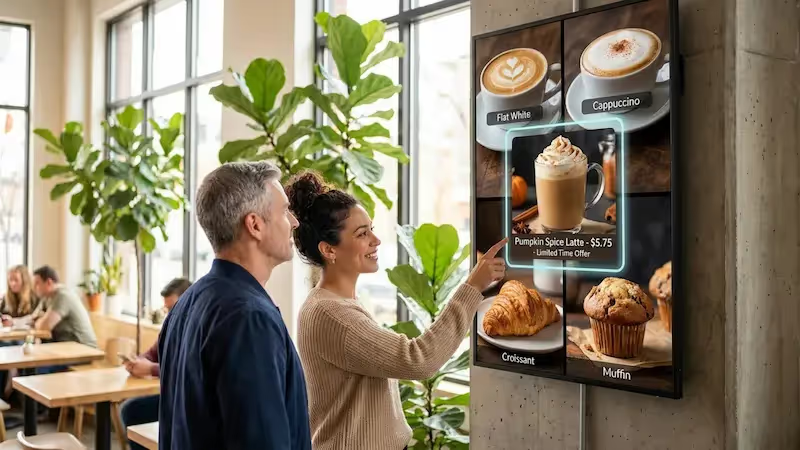
A digital menu for food trucks is an electronic screen that shows your food, deals, and important messages in a moving, visual way. Think of it as your online storefront on a screen, always ready to catch people’s attention with bright photos and clear descriptions. These menus usually use LCD, LED, or projection screens and are controlled with cloud-based software, giving you much more freedom than paper menus.
The real strength of a digital menu is how it can turn a simple list of items into a lively experience. It’s more than listing prices; it helps tell your food truck’s story, promote your best dishes, and leave a strong impression on customers. In a crowded food truck scene, where you must stand out to survive, a digital menu board can be a big advantage.

How Does a Digital Menu Differ from Traditional Menu Boards?
The difference between digital and traditional menu boards is clear. Traditional menus-chalkboards, posters, or printed boards-are fixed. Once printed, they are slow and costly to change. If you need to update prices, remove sold-out items, or add a daily special, you often have to erase, reprint, or rewrite the whole board. This takes time, looks messy, and often leads to old or wrong information, missed sales, and an unprofessional look.
Digital menus are flexible and easy to change. They replace static text with attractive images, animations, and videos that you can update instantly. You can change prices, add items, highlight offers, or switch between breakfast, lunch, and dinner menus with a few taps on a phone or tablet. This quick control helps food trucks stay in step with stock levels, customer demand, and different locations. Digital menus also let you add rich visuals that grab attention and make your food look far more appealing than any chalkboard can.
Why Switch to a Digital Menu for Your Food Truck?
Moving to a digital menu is a clear business decision with many benefits that go far beyond looks. Customers today want speed, clarity, and engaging experiences, and a digital menu delivers all three. It helps you modernize your brand, smooth your daily work, and increase your profit.
Food trucks deal with different crowds, venues, and conditions every day. A digital menu gives you the flexibility to handle these changes. It solves common problems with printed menus and opens up new ways to grow sales and build stronger relationships with customers.
Improves Customer Engagement and Experience
Digital menu boards naturally draw more attention than old-style boards. They use sharp photos, motion graphics, and sometimes videos to catch the eye and make ordering easier. A short clip of a sizzling burger or an animated highlight for a daily special can create an instant emotional pull and make your dishes look irresistible. Clear, well-structured digital menus also help people choose faster, which shortens lines and improves order accuracy. This clarity and visual appeal make your food truck look modern and professional, creating a strong, positive impression.

Enables Real-Time Menu Updates
One of the biggest strengths of digital menus is the ability to update them instantly. For food trucks, this flexibility is extremely useful. Sold out of a popular dish? Remove it with a tap. Want to push a quick discount during slow periods? Put it front and center. Need to go from lunch to dinner items? Schedule it to switch automatically. These instant changes save time and money and remove the need for printing or tedious manual edits. With cloud control, you can even update the menu when you’re away from the truck, so it always matches what you actually serve.
Reduces Errors and Increases Efficiency
Traditional menus often lead to mistakes: spelling errors, old prices, or specials that never get written on the board. A digital system cuts these issues down by giving you one central place to manage content. That makes it easier to keep pricing and items consistent. Clear layouts and visuals also help customers order faster and more accurately. This speeds up service and lowers the chance of mistakes, leading to smoother operations and happier guests.
Supports Upselling and Promotions
Digital menus are great sales tools. Their flexible design lets you feature high-profit items, combos, and limited-time deals in a smart way. You can highlight them with motion, color, or prime screen placement. For example, you can easily show a “Make it a Combo” option under popular items or flash a “Today’s Special” banner to nudge customers to spend a bit more. By adjusting what you feature and when, your menu becomes an active sales assistant, not just a static list.
Which Hardware Works Best for Food Truck Digital Menus?
Choosing the right hardware is key because it forms the base of your digital menu system. Food trucks face constant movement, vibration, heat, cold, and sometimes rain, so your gear must be tough, flexible, and easy to see outdoors. You are not just buying a screen; you are investing in equipment that must survive life on the road while still looking bright and clear.
Regular indoor screens are not built for shaking vehicles or harsh weather. You need equipment meant for outdoor or mobile use so your system stays reliable and works well over time.
Display Size and Type for Mobile Environments
Screen size and type are important choices. The display should be large enough to read from a few feet away but not so big that it crowds your limited space. Many food trucks use screens between 24 and 32 inches for a good middle ground. Larger screens, like 43 inches or more, can work if you have extra room. The goal is easy reading from typical customer distance. A 43-inch display might overwhelm a tiny coffee trailer, while a 24-inch screen might be too small for a busy lunch truck with a wide menu.
Type matters too. Choose commercial displays with sturdy cases and reinforced parts, rather than cheap home TVs. Consumer TVs are not designed for constant vibration or rough handling. Features such as tempered glass and metal housings add durability. Go for at least 1080p (Full HD) resolution; 4K can make photos and text even sharper. High resolution makes your dishes look rich and appealing.
Brightness and Weatherproof Features
Because you operate outdoors, sunlight, rain, dust, and changing temperatures are part of daily life. High brightness and weather protection are must-haves. Standard indoor TVs are too dim outside and look washed out in direct sun. Aim for screens with 1500-2500 nits brightness so the menu stays readable on bright days. Auto-brightness sensors are helpful too; they adjust the screen to match daylight or evening conditions.
Weather protection is just as important. Look for displays with an IP rating of at least IP65. This means the screen is fully protected against dust and can handle water jets. In wetter areas, IP66 offers even more water resistance. Also consider displays with cooling fans or heat-resistant design if you work in hot climates, so the screen does not overheat. Anti-glare coatings or polarized glass help cut reflections and keep colors crisp from different viewing angles.

Power and Connectivity Considerations
Running a digital menu in a moving truck requires some planning around power. Most digital menu hardware can run on a standard 110-240V outlet or 12V DC. Make sure your screens and media players match your truck’s electrical system. Some portable menu boards can run on batteries, and some setups can work with solar panels as a green option. All wiring should be installed safely inside your truck’s power system, so talking with a licensed electrician is often a smart idea.
Staying connected is also important. Strong Wi-Fi or Ethernet allows you to update content remotely, change menus on the fly, and sync with your POS system. Wireless options like Wi-Fi or Bluetooth let you edit menus from a phone or tablet, even if you’re not standing at the truck. Some media players support cellular networks, which is very helpful at events where Wi-Fi is unreliable. Having more than one connection method-Wi-Fi, cellular, Ethernet-gives you backup options so your menu stays online.
How to Choose Digital Menu Software for Food Trucks?
While durable hardware gives you the physical screen, software is what controls how your menu looks and behaves. The right software makes it easy to design, update, and manage your digital menu so it stays in step with your fast-moving business.
Good digital menu software should be simple to use, full of useful features, and fit the special needs of a food truck-quick changes, strong visuals, and easy remote access.
Essential Features: Content Management, Updates, and Templates
A strong Content Management System (CMS) is the base of any good digital menu. It should be clear and easy to use, even if you’re not tech-savvy. Look for drag-and-drop tools so you can place text, photos, and videos quickly. Built-in templates and ready-made layouts are also very helpful. They give you a professional starting point without hiring a designer.
The software should also make updates quick and easy. You need to be able to change items, adjust prices, and add or remove specials instantly. Scheduling is especially helpful for food trucks. You can set your breakfast menu to switch to lunch at a set time, or show seasonal deals during certain weeks. This kind of timing, often called “dayparting,” helps you match your offers to different times of day. Support for images, videos, and animations is also important so you can show your dishes in the best possible way.
User-Friendly Design Tools
You don’t need to be a designer to create a good-looking digital menu. The software should help you do it easily. Look for tools that offer editable fonts, a wide range of colors, and image libraries. Being able to change font style, sizes, colors, and images lets you match the menu to your brand.
Some software includes animated templates where you can change items, prices, and pictures without losing the motion effects. This is useful if you want attention-grabbing menus without learning animation yourself. A layout editor that lets you move sections around and test different visual orders can help you spot which designs are easiest for customers to read and which items stand out most.
Cloud-Based vs. Local Solutions
You will usually pick between two software types: cloud-based or local (installed on your own device). For food trucks, cloud-based systems often work better. They let you manage your menu from anywhere with internet access, whether you’re on a phone, tablet, or laptop. This is especially handy if you run more than one truck and want all menus to match.
Local systems run on your own hardware and give you more direct control, but they usually need more tech skills and sometimes extra equipment. This can be hard for a small, mobile team. Many cloud platforms also support offline playback, so if your internet drops, your last saved menu still shows. For most food trucks, the ease and flexibility of cloud-based software makes it the better choice.
What Are the Step-by-Step Methods to Create a Digital Menu?
Building a strong digital menu is more than writing down what you sell. It involves clear planning, smart layout, and good use of visual elements to guide customers and increase sales. Your menu works like a silent salesperson, so every design choice matters.
The steps below will help you build a menu that fits your brand and excites customers.
Define Food Truck Branding and Visual Goals
Before listing items, think about your food truck’s personality. Are you fun and playful, sleek and modern, or warm and homestyle? Your digital menu should match that style. Look at your logo, main colors, and usual fonts, if you have them. If you are just starting, decide what kind of feel you want-bright and bold or clean and simple. Your menu is a key part of your identity and helps people remember you. Clear branding at this stage will guide all other design choices.
Write and Organize Menu Items and Descriptions
Next, write down everything you sell: main dishes, sides, drinks, extras, and add-ons. For a taco truck, list each protein, topping, and extra. For a coffee truck, include milk options and flavor syrups. Also note any secret menu items or deals you plan to offer.
Then group items into clear categories, such as “Mains,” “Sides,” “Drinks,” and “Specials.” Even a small menu benefits from clear sections because it helps customers find things faster. Decide how you want to describe items: short and clear, fun and humorous, or more detailed with ingredients. Plan how to mark items with allergens or dietary tags using simple icons or a legend.
Set Menu Categories and Pricing
With items and categories ready, set your prices. Avoid guesswork. Your prices must match your target customers and also cover your costs-ingredients, staff, fuel, truck upkeep, and permits-while leaving profit.
Check what other food trucks and local spots charge for similar items so you know the local price range. Then decide if you want to position your truck as premium, budget-friendly, or in between. Place high-profit items in spots where customers look first, such as the top of categories or in highlighted boxes.
Design for Visibility: Fonts, Colors, and Layout
Good visual design is critical, especially outside. Choose fonts that are easy to read from a distance. Simple sans-serif fonts work well. Use large sizes: main items around 30pt or larger, headers even bigger. For colors, aim for strong contrast. Light text on a dark background is often easiest to see outdoors. Use bright colors like red or yellow sparingly to highlight key items or specials.
Keep the layout clean. Break the menu into clear sections, usually in a vertical layout for food trucks. Put your best sellers or signature items near the top or center where eyes naturally go first. Avoid cramming too much text on one screen-leave empty space so the design feels clear rather than crowded.

Add High-Impact Photos or Icons
In food service, visuals can make or break a sale. High-quality photos of your menu items will often increase orders. Use well-lit, sharp images with good composition. Aim for at least 1080p resolution so they look clear on HD screens.
If you prefer a simpler or more graphic style, consider illustrations or icons. Icons work well for tagging vegetarian, vegan, or gluten-free items in a way that customers recognize quickly. Short looping videos, such as a close-up of a dish being prepared, can add movement and interest. Avoid bad or blurry photos; it’s better to have no image than one that makes your food look unappealing.
Preview and Test Your Menu on Different Devices
Before using your digital menu in public, test it carefully. View it on different screens and under different lighting conditions. Stand where your customers would stand and ask yourself: Can I read everything? Do the colors stand out? Does the layout feel simple and clear?
Make sure any timed changes and animations work as planned. Ask staff, friends, or other business owners for honest feedback. If they struggle to read or find items, adjust font sizes, colors, or layout. Fixing these issues early will give your customers a smoother experience from day one.
How Can You Add Interactivity and Real-Time Updates to Your Menu?
The biggest value of a digital menu is that it can change and react, instead of staying fixed. For food trucks, this flexibility is extremely helpful. You can respond to stock levels, weather, and crowd size in real time. Adding interactive and live features also makes the customer journey smoother and more interesting.
By using the right tools, your menu can become an active part of your marketing, not just a background sign.
Highlight Daily Specials and Limited-Time Offers
Digital menus are perfect for showing off specials and time-limited offers. Instead of writing on a whiteboard or printing a flyer, you can give these items prime space on your screen. Use bold colors, simple motion, or a dedicated section for “Today’s Specials.”
Most digital signage software lets you pre-schedule these items. For example, you can set a “Monday Special” to appear only on Mondays, or “Happy Hour” deals to show at certain hours. This automation keeps your menu fresh, encourages impulse buying, and helps move high-margin or seasonal items.
Integrate QR Codes for Ordering and Payment
Adding QR codes to your digital menu is a simple way to create interaction and speed up service, especially during peak times. Many platforms let you create QR codes inside the software and place them wherever you like on the screen.
When customers scan the code, they can go to an online ordering page, a full menu with detailed info, or a payment system. This lets people browse and place orders from their phones, which reduces lines at the window and cuts down on order errors. You can also link QR codes to loyalty signups or feedback forms to build long-term relationships with your guests.

Enable Social Media Feeds or Customer Reviews
Social proof is powerful for food trucks. Your digital menu can show a live stream of your brand activity and customer love. Many systems integrate with social media so you can display your Instagram posts, customer photos, or a hashtag feed right on the screen.
Customers enjoy seeing their own content appear, which encourages more sharing. You can also show ratings and short reviews from sites like Google. By filtering for higher star ratings, you display your best comments and build trust. Rotating customer photos and quotes helps your menu feel alive and community-focused.
What Are the Best Practices for Setting Up and Displaying Digital Menus Outdoors?
Food trucks face special challenges when using digital menus outside. You must deal with weather, sun glare, and busy event spaces while still keeping the screen readable and safe. Good planning for setup, protection, and visibility is key to making your investment pay off.
The tips below will help you avoid common mistakes and create a setup that works in many different outdoor settings.
Optimal Placement for Maximum Visibility
Where you place your screen matters a lot. In most cases, the best location is on the customer-facing side of the truck, at or slightly above eye level. This makes it easy to read from several feet away and grabs attention naturally.
Think about where your line usually forms. If people line up along one side, place the menu near the start of the line so they can decide before they reach the window. At large events, you might place a freestanding screen slightly out from the truck to catch people walking by. For fixed mounts, make sure they’re firmly attached to handle bumps while driving and to reduce theft risk. If your truck design doesn’t allow in-body screens, you can use portable screens on wheels or stands so you can move them based on each event layout.
Screen Protection and Theft Prevention
Because your truck and menu are always on the move, you need to protect both the screen and your investment. Choose displays with at least IP65 ratings for water and dust. Strong materials like tempered glass and metal cases help prevent damage from bumps or weather.
If your screen is not weatherproof on its own, put it in an IP65-rated enclosure. Look for ones that resist tampering or impact, which is helpful at crowded events. For mobile stands, choose models with heavy bases to prevent tipping in wind. Locking brackets, security screws, or cable locks can discourage theft. UV protection on the screen or enclosure also helps avoid fading from constant sunlight.
Adjusting Brightness and Anti-Glare Features
Outdoor lighting changes all day long, and your screen must cope with midday sun, cloudy skies, and evening use. High-brightness displays (1500-2500 nits) are often necessary so the menu stays visible even under direct sun. But brightness alone is not enough; glare control matters too.
Anti-glare films or coatings reduce reflections from the sun or nearby lights, making the text easier to read. Some screens use polarized or anti-reflective glass to keep colors strong without needing to run at full brightness all the time. Auto-brightness features that sense ambient light and adjust the screen help save energy and extend the life of your display, while keeping it readable in all conditions.
Common Challenges and Solutions with Digital Food Truck Menus
Digital menus are powerful, but running them on a food truck comes with unique hurdles. You’re dealing with a moving workspace, outdoor weather, and changing power and network setups. Planning ahead for these challenges helps keep your menu reliable and avoid downtime during busy service.
Typical problem areas include power stability, internet access, and hardware or software glitches. Addressing them early protects both your system and your customer experience.
Managing Power Supply and Connectivity On-the-Go
Unlike fixed restaurants, food trucks often rely on generators, batteries, or event power hookups. These can be inconsistent. Make sure your screens and media players match your power setup (12V DC or 110-240V AC). A good power inverter and backup battery can prevent sudden shutdowns.
For network access, weak Wi-Fi can interfere with live updates and remote control. If your menu is not updating or content is stuck, check your internet first. Sometimes a simple router restart helps. When you have access to wired connections at certain venues, use Ethernet for more stable service. To stay connected on the road, consider a mobile hotspot or a cellular modem. Some media players include built-in cellular support, so your menu isn’t tied to local Wi-Fi. Having more than one connection method-Wi-Fi, cellular, Ethernet-gives you backup options so your menu stays online.
Troubleshooting Software or Display Issues
Even with good gear, you may see occasional issues such as lagging videos, frozen content, or unresponsive screens. To avoid this, choose a media player with enough power-at least a modern quad-core processor, enough RAM, and 32GB or more storage. If you use very high-resolution images or video, compress or resize them for smoother playback, or upgrade your hardware.
Keep your software and firmware up to date; updates often fix bugs and add stability. For display problems like a black screen or odd colors, first check power cables, HDMI or DisplayPort wires, and input settings. Try another cable or another source device to see if the screen itself is the problem. If you can’t solve it alone, contact your hardware or software provider’s support team. Regular checks for loose cables, worn parts, and software updates will help you avoid many issues before they affect service.
Transforming Your Food Truck Business with Digital Menus
Switching to digital menus is a big step forward for any food truck. It puts you in line with modern expectations and gives you tools to serve customers better, work faster, and market more effectively. Instead of a static board, you get a flexible system that can grow and change with your business.
The real value comes from ongoing use-updating content, testing designs, and using customer feedback and data. Over time, your digital menu can become one of your most important assets for both service and sales.
Quick Tips for Ongoing Menu Management
To keep your digital menu working well, treat it as a living part of your business:
- Update items regularly: add new dishes, remove discontinued ones, and adjust prices as needed.
- Use remote update tools so you can make changes even when you’re not at the truck.
- Listen to customer feedback about readability, layout, and clarity, and tweak designs accordingly.
- Review performance data from your software if available (e.g., which items are most viewed or ordered).
- Keep a basic printed menu as backup in case of power or technical problems.
Resources for Menu Templates and Software Assistance
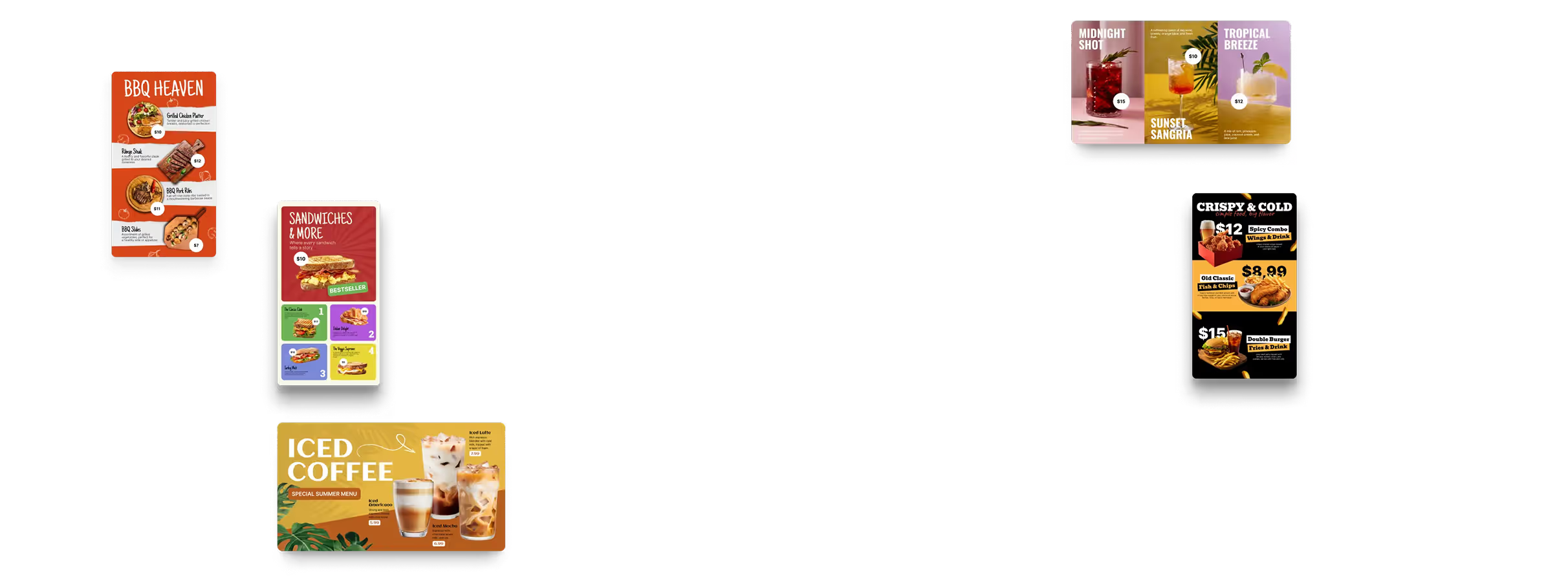
You don’t need advanced design or tech skills to build a strong digital menu. Many digital signage services, such as Look Digital Signage, provide ready-made templates and customer support. These templates give you a polished base you can edit with your own text and images.
Design tools like Canva or Adobe Creative Suite are also helpful for creating graphics and layouts without expert training. You can find online courses and guides on menu design and “menu engineering” that explain how placement, wording, and pricing influence what customers buy. Online groups and forums for food truck owners and digital signage users are good places to ask questions, share experiences, and discover new tools.
Many software providers offer free trials. Use these to test features, template quality, and ease of use before you commit. This helps you choose a solution that fits your style, budget, and the way you run your food truck.


.avif)