
Table of Content
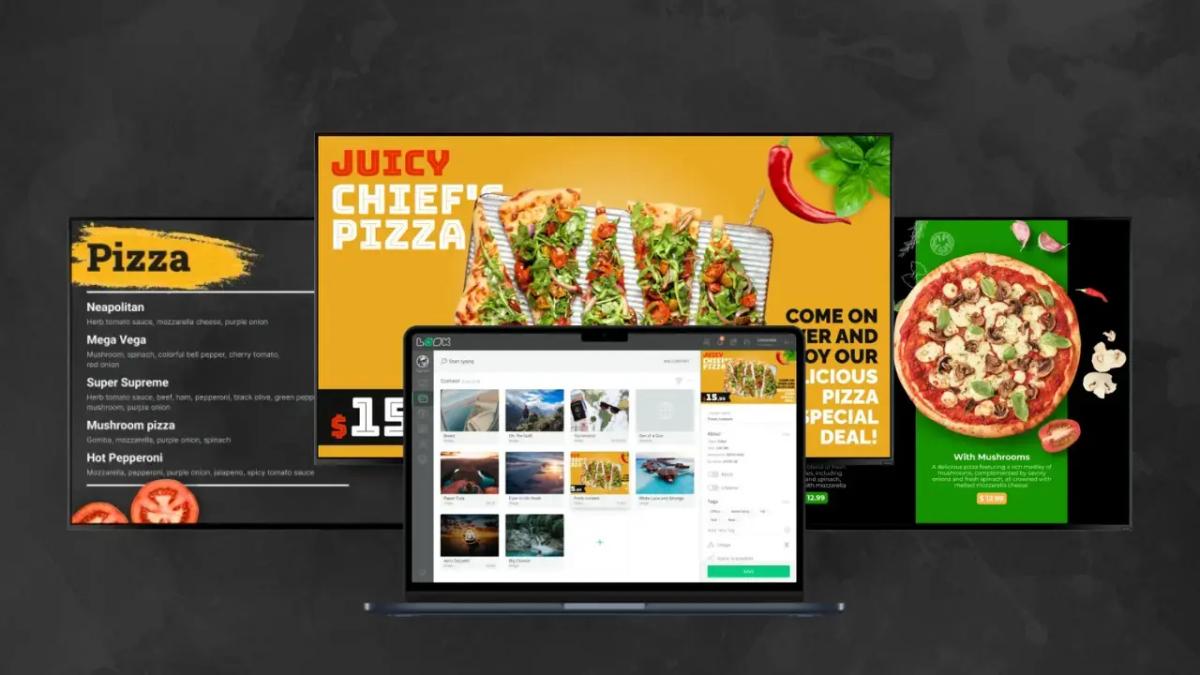
Creating engaging pizza digital menu boards with free signage templates is not only possible but also a very effective way for pizzerias to improve customer experience and increase sales. In today's fast-paced world, static, outdated menus just don’t work anymore. Digital menu boards, especially those built with free templates, offer a lively, low-cost option that lets pizzerias show off their pizzas, promote specials, and share key information with great flexibility and strong visual impact. This article will explain how you can use these free tools to completely refresh your pizzeria’s display so your menu looks as tempting as your pizzas taste.
Why Use Digital Menu Boards in Pizzerias?
The food business is highly competitive, and pizzerias are always looking for new ways to stand out. Digital menu boards turn a simple list of items into an active marketing tool. Beyond listing items and prices, these screens catch customers’ attention, help your staff work more smoothly, and support better profits.
Increases Sales with Engaging Visuals
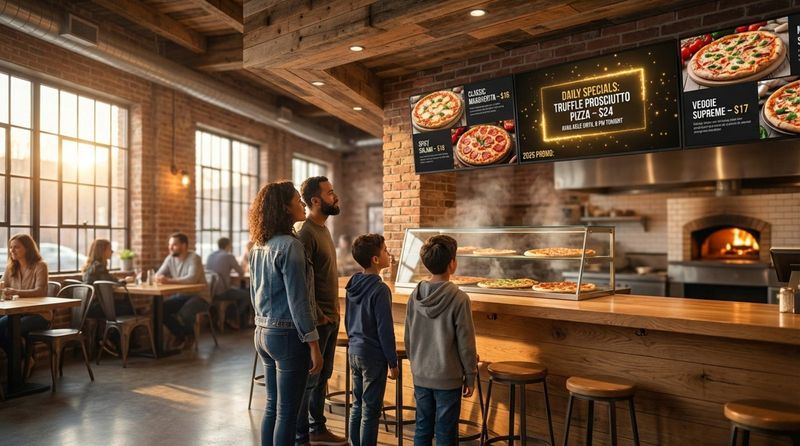
People “eat with their eyes” first, and this is especially true for pizza. Clear, high-quality images of pizzas with golden crusts, melted cheese, and colorful toppings create a strong craving. Digital menu boards are ideal for this, allowing you to show off stunning visuals that can raise the average customer order by up to 30%. A rotating slideshow of your bestsellers and daily specials, each more appetizing than the last, can strongly influence what customers decide to buy.
Improves Order Accuracy and Efficiency
A clear, well-structured menu is key to fast service, especially in a busy pizzeria. Digital menu boards remove the confusion that often comes with cluttered or hard-to-read printed menus. With clear categories and organized content, customers can quickly see what they want, which means staff spend less time explaining items. This speeds up ordering and cuts down on mistakes, creating a smoother experience for everyone. When items are grouped under headings like “Classics,” “Veggie Lovers,” or “Combos,” staff can focus more on making food and less on answering the same questions.
Reduces Printing Costs and Manual Updates
Constantly printing new menus for every price change, new item, or seasonal pizza is expensive and time-consuming. Digital menu boards remove this ongoing cost. After the first setup, you can update content in minutes with a few clicks. You can react quickly to price changes, ingredient shortages, or new deals without extra printing bills. It also reduces paper waste, making your business more eco-friendly.
Improves Customer Experience with Dynamic Content
Digital menu boards can do much more than show still images. You can add moving elements such as simple animations to highlight daily specials, countdown timers for limited-time deals, or short video clips of ingredients being prepared or pizzas going into the oven. These moving elements draw attention and keep customers interested. Digital boards can also show real-time allergen and nutrition details, giving clear information to people with special dietary needs. You can add QR codes that link to online ordering, loyalty programs, or reviews, creating a richer overall experience.
Key Elements of Effective Pizza Digital Menu Boards
A great digital menu board is more than just text and pictures thrown onto a screen. It needs careful design and smart content placement to have real impact. The aim is to create a display that is visually appealing, easy to understand, and persuasive.
Clarity and Readability for Fast Decision-Making
In a busy pizzeria, customers choose quickly. The menu must be easy to read at a glance. Use clear fonts, large enough text, and enough space between items. Separate sections for pizzas, sides, drinks, and desserts help guide the eye and make choices faster. Keep the layout simple so customers don’t have to think too hard to understand what you offer.
Mouthwatering Pizza Imagery and Animations
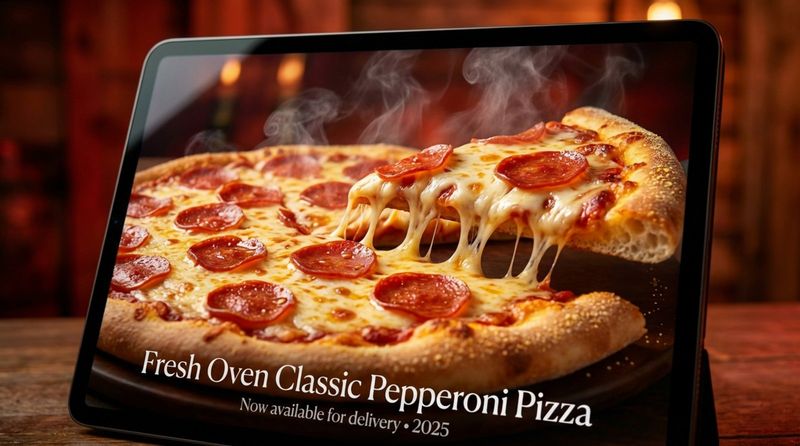
High-quality visuals are key. Use good photos that show how tasty your pizzas are-close-ups of bubbling cheese, crispy edges, and fresh toppings. These images should be bright and sharp to spark hunger. You can also add light animations, like gentle steam rising from a pizza or a quick zoom on a topping. Small animated touches make the board feel more alive and can strongly increase appeal.
Strategic Layouts Highlighting Specials and Combos
A smart layout helps guide customers to the items you most want to sell. Place bestsellers and combo deals in prime spots, such as the top of the board or in a highlighted section. Use larger fonts, different colors, or borders to draw the eye. The aim is to guide customers naturally toward items that offer good value for them and good profit for you.
Smooth Display of Allergen and Nutrition Information
Many customers now look for allergen and nutrition details. Digital menu boards are perfect for showing this information clearly. Instead of separate binders or tiny fine print, you can show this data on a rotating slide, through icons that open more details, or via QR codes. Clear information builds trust and makes customers feel safe and welcome.
Inclusion of Branding and Unique Identity
Your menu board should reflect who you are as a pizzeria. Add your logo, use your brand colors and fonts, and choose a visual style that fits your space-rustic, modern, playful, or classy. Keeping the same style across your signs, menus, and online presence makes your brand easier to recognize and builds trust over time.
Popular Free Template Features and Layout Options
One big advantage today is the large number of free, editable templates available for digital signage. Even small pizzerias without designers can create professional-looking menu boards. Many of these templates are built with restaurants in mind and include useful features for food displays.
Wide Selection of Pizza-Themed Designs
Many digital signage tools offer libraries of templates made for pizzerias. These designs often include pizza images, suitable color schemes, and layouts that work well for different pizza sizes, toppings, and categories. Whether your shop feels like a classic Italian trattoria, a sleek modern space, or a family-friendly place, you can usually find a template that matches your vibe and helps you get started quickly.
Options for Single-Screen or Rotating Slideshows
Free templates usually give you a choice in how you show your menu. A single-screen layout works well for smaller menus or small spaces. Rotating slideshows let you show more items, cycle through specials during the day, or feature customer quotes and photos. This movement keeps the board fresh and gives more menu items time on screen.
Templates with Room for Daily Specials or Limited-Time Offers
Digital menu boards are perfect for showing short-term deals. Many free templates include special zones where you can quickly edit and display daily specials or limited-time offers. You can easily change a “Pizza of the Day,” add a seasonal topping, or promote a weekend deal. Showing these offers clearly encourages impulse buys and keeps customers curious about what’s new.
Editable Zones for Drinks, Desserts, and Extras
A strong pizzeria menu includes drinks, desserts, and extras. Free templates usually come with ready-made sections for sodas, beers, desserts, salads, or appetizers. This structure helps present everything clearly and encourages customers to add more to their order. You can rename and adjust these sections to match your actual menu and branding.
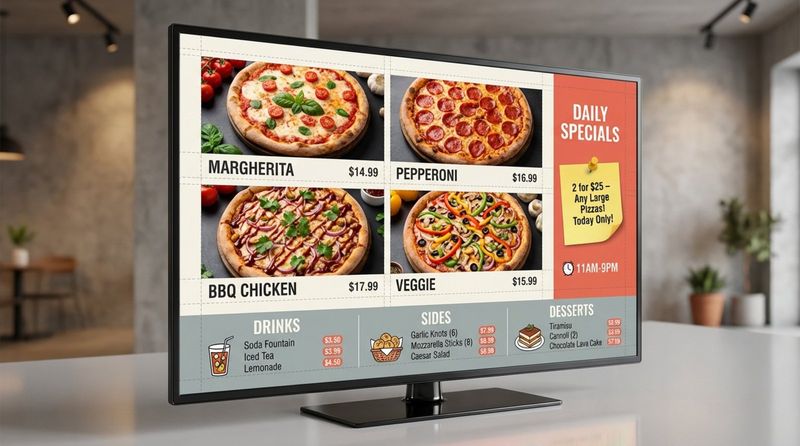
Menu Boards Optimized for Displays and TVs
All templates are created to look good on digital screens. They are adapt for common screen sizes and resolutions so your menu looks sharp whether it’s on a large display or a standard smart TV. You can often choose between portrait and landscape layouts to fit your wall space. This setup avoids blurry images or stretched layouts and keeps your menu looking professional.
How to Create Pizza Digital Menu Boards Using Free Signage Templates
Turning a free template into a custom digital menu board for your pizzeria is easier than it might seem. You usually follow a few simple steps that give you control over how your menu looks and feels.
Select a Suitable Pizza Menu Board Template
Start by browsing the free template gallery offered by your digital signage platform. Look for designs created for pizzerias or restaurants, since these are already shaped for food menus. Think about your brand style-rustic, modern, fun, or elegant-and pick a template that fits that feel and your customers’ expectations. Many platforms group templates under labels like “pizza,” “restaurant,” or “offers” to help you narrow the search.
Customize Text, Pricing, and Menu Items
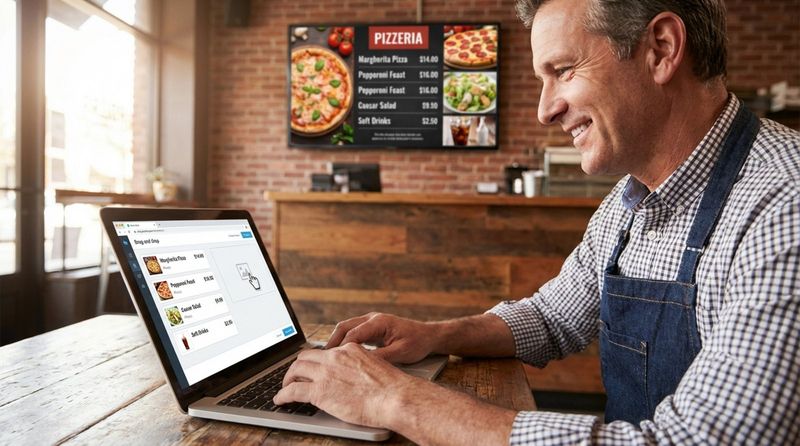
After choosing a template, start editing it to match your menu. Most editors are drag-and-drop or click-to-edit. Change item names, short descriptions, and prices. Add new pizzas, remove items you no longer sell, and adjust details. Keep text clear and to the point. You can also choose fonts, sizes, and colors that fit your brand while staying easy to read.
Add Your Logo and Branding
Upload your pizzeria’s logo and place it where it can be seen without blocking menu items. This makes your screen instantly recognizable. Adjust the color scheme of the template to use your brand colors for backgrounds, titles, and highlights. A steady look across all your visuals makes your brand feel more solid and memorable.
Upload High-Quality Pizza Photos
Great photos are key for a pizza menu board. Replace any stock or placeholder images with high-resolution pictures of your own pizzas. Focus on shots that show melted cheese, crisp crusts, and rich toppings. Good food photography has a direct impact on what customers choose to order. Some platforms offer stock photos, but images of your actual products give a more honest and appealing view.
Adjust Colors and Fonts for Readability
Brand style matters, but readability is even more important. Pick font sizes and styles that are easy to see from across the room. Use strong contrast between text and background-such as light text on a dark background or dark text on a light one. Avoid overly fancy fonts for item names and prices; save decorative fonts for headings or special areas. Your goal is to make the menu quick and comfortable to read.
Preview and Download or Launch Your Digital Menu
Before you go live, always use the preview feature to see how your menu will look on a screen. Check for spelling mistakes, layout issues, or areas where the text is hard to read. Adjust as needed. When you’re happy with the result, you can usually download it as an image or video file or send it directly to your connected screens through the signage software. This final review helps make sure the finished menu looks polished and ready for customers.
Tips for Designing Pizza Digital Menu Boards That Drive Orders
A good digital menu board is about more than looks. It’s about clear communication that encourages customers to buy, and to pick items that are good for your profits. By following a few simple design rules, you can turn your screens into strong sales tools.
Prioritize High-Margin and Bestseller Items
Place your most profitable and most popular items where customers will notice them first. That might be the center or top of the screen, or in a highlighted box. Use larger text, bright colors, or icons like “Customer Favorite” or “Best Value.” Review your sales data regularly to see which pizzas sell well and bring in good profit, and give those items the best real estate on your board.
Use Contrasting Colors for Easy Reading
In a busy environment, customers don’t have time to struggle with hard-to-read text. Use high-contrast color pairs for background and text so everything stands out clearly. Avoid busy patterns behind text and keep the color palette simple. This helps customers read faster and reduces confusion at the counter.
Keep Descriptions Short and Compelling
Menu descriptions should be brief but appealing. You don’t need to list every ingredient. Instead, focus on key flavors and textures. For example, instead of just “Pepperoni Pizza,” use “Pepperoni with zesty tomato sauce and melted mozzarella.” Short phrases or bullet points can help customers scan the menu quickly while still getting a strong sense of taste and quality.
Highlight Upsell Opportunities and Combos
Digital menu boards are perfect for gently suggesting add-ons. Show options for extra toppings, dipping sauces, cheese-stuffed crusts, or side dishes next to your main pizzas. Feature combo meals-like “Large Pizza + 2 Drinks + Dessert”-in a special section with clear pricing. Simple animations or highlighted frames can draw attention to these offers and raise the average order value without feeling pushy.
Include Customer Reviews or Ratings
Customer opinions can strongly influence new visitors. If you have excellent ratings, show short quotes, star ratings, or a “Most Loved” badge next to certain items. A rotating slide with brief testimonials can also work well. This kind of social proof builds confidence and can help first-time customers choose what to order.
Digital Menu Scheduling and Playlist Management
One of the biggest advantages of digital menu boards over printed menus is the ability to schedule content and manage playlists. This lets pizzerias adjust their displays automatically based on time of day, day of the week, or season.
Set Up Different Menus for Lunch, Dinner, and Late Night
Customer needs change throughout the day. With scheduling tools, you can show a lighter, fast-service lunch menu during midday, switch to a dinner menu with family deals and premium pizzas in the evening, and move to a late-night board focused on delivery and snack-style items later on. Automated switching keeps your menu relevant all day without manual changes.
Automate Seasonal Promotions and Limited Offers
Scheduling tools make seasonal and short-term campaigns easy. You can set your “Fall Special” pizza to appear on screens from a specific start date to an end date. Holiday offers, game-day deals, or weekend specials can be pre-programmed to show up and then disappear automatically. This saves time, keeps your promotions well-timed, and lets you test new ideas with little extra work.
Create Playlists for Slideshow Presentation of Menu Items
Playlists let you rotate through multiple slides on the same screen. You might show your top pizzas on one slide, sides and desserts on another, then a promo slide, and finally a customer review page-all looping in order. This keeps the content active and gives more items a chance to catch customers’ attention instead of showing the same static view all the time.
Frequently Asked Questions About Pizza Digital Menu Boards
When pizzerias think about switching to digital menu boards, they often have similar questions. Here are answers to some of the most common ones.
What Hardware Do I Need for a Digital Pizza Menu Board?
You usually need three main parts:
- A screen: A commercial digital display or a smart TV.
- A media player: A small device that connects to the screen (some smart TVs have this built in).
- Digital signage software: The online or desktop platform where you design and control your menu.
The software sends your content to the media player, which shows it on the screen. For outdoor setups, such as drive-thrus or walk-up windows, you can get weather-resistant screens and protective cases.
Are Free Signage Templates Truly Free for Commercial Use?
Yes. Many digital signage services, such as Look Digital Signage, DotSignage, OptiSigns, and Nento, provide free templates that you can use in a business setting. The templates themselves usually cost nothing, but you may need an account on the platform. Some services offer a free trial and then charge a subscription for advanced features like remote updates and scheduling. Always read each platform’s terms of service to see what is free and what might require payment later.
Can Menu Boards Include Animated Content or Videos?
Yes, they can. Digital menu boards can show moving content such as simple animations and full videos. You can use animations to draw attention to specials, add countdown timers for limited-time offers, or show short clips of pizzas being made or customer reactions. Moving content tends to catch the eye more than static images and can make your menu area feel more lively.
How Can I Keep My Menu Up to Date Remotely?
Most digital signage platforms use cloud-based dashboards. You can log in from any device with internet access-computer, tablet, or smartphone-and change prices, add new items, or swap out specials. Updates can go live instantly or at scheduled times. This means you can manage your menus from the back office, from home, or even while traveling.
Can I Display Drinks and Desserts on the Same Board?
Yes. In fact, including drinks, desserts, and sides on the same digital board as your pizzas is a smart way to encourage larger orders. Most free templates come with separate sections you can fill in for beverages, sweets, and add-ons. Clear, organized sections help customers see everything you offer and make it easier for them to add a drink or dessert to their pizza order.


