

Table of Content
Choosing where to place digital signage is much more than picking an empty wall. It directly affects how well your message works, how much people engage with it, and how much value you get from your screens. Just putting displays up is not enough. You need to think carefully about who will see them, what you want to say, and which spots will attract the most attention. A screen tucked away in a dark, low-traffic corner will deliver poor results and waste money. On the other hand, a well-positioned display can become a strong communication point that drives real engagement and results.
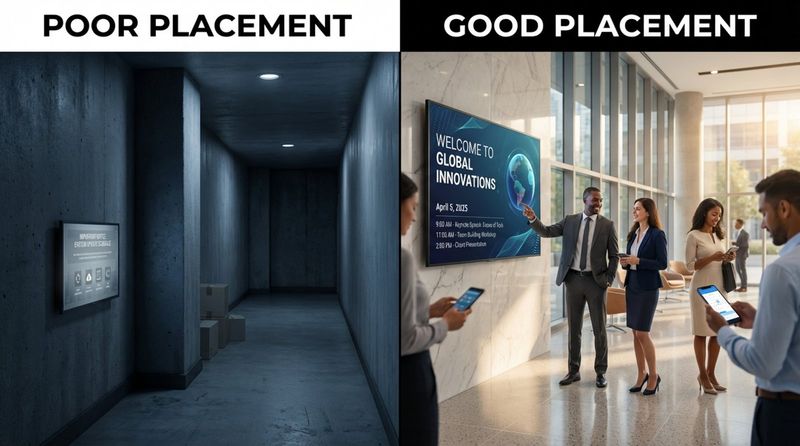
Good placement is based on understanding how people behave, using technology wisely, and making ongoing improvements. The goal is to reach the right people at the right time, in the right place-whether in stores, factories, schools, hospitals, or offices. Every decision about where to put a screen is a chance to improve communication, create better experiences, and support your organization’s goals.
What is digital signage placement?
Digital signage placement is the planned positioning of electronic displays in a physical space so they can show dynamic content to a specific audience. It is more than just hanging a screen. It involves looking at how the space is laid out, how people move through it, and what you want your messages to do. The aim is to create an active communication point that gives the right information to the right people at the right time, instead of a display that people walk past without noticing.
This planning matters because it affects how visible, clear, and interesting your content will be. It means paying attention to the surroundings, how people move, and lighting conditions so the display can catch and hold attention. Think of it like setting up a stage for your message: a better stage leads to a stronger performance. Careful thought about placement is what turns a simple screen into a useful communication tool.
Why does good placement matter for digital signage?
Good placement sits at the center of a successful digital signage strategy. Without it, even great content may be ignored or missed. Screen location is not just about looks; it directly affects how well your message works, how much people interact with it, and the financial results you get. A well-placed display acts like a live communication center that helps your message reach the right people.
Getting placement right is extremely important. Poorly placed screens may be barely noticed, wasting the entire investment. Screens placed with clear intent, however, drive engagement and support your goals. Whether you want to lift sales, improve internal communication, support customers, or increase productivity, smart placement is a key part of success. Research from the University of California found that well-placed digital signs can raise customer engagement by up to 33%.
How does signage location affect visibility and engagement?
Where you put your digital signage strongly affects how visible it is and how much people engage with it. Visibility is the first step: if people cannot see a sign easily, it cannot do its job. Direct line of sight, viewing distance, and lighting all matter. For example, a screen placed where sunlight causes heavy glare may be almost impossible to read.
Placement also affects how people interact with the sign. Busy areas are often good choices, but it is not just about the number of people passing by. You also need to think about how long they stay in that spot. Areas where people wait-like elevator lobbies, queues, or reception areas-are often better for engagement because viewers have more time to look at the screen. Content also works best when it matches the location. For example, a digital menu board showing daily specials in a cafeteria will draw more attention than a generic company message in that same space.
Which factors influence the best digital signage placement?
Picking the best place for your digital screens calls for planned and careful thinking. You need to look at people, the physical space, and the technical setup. Ignoring any of these can reduce the impact of your signage and lower your return on investment.
Before you plan your layout, you need a basic understanding of how people move through your building. This idea, taken from architecture, looks at how people walk, pause, turn, and move from one area to another. Knowing common paths, where people tend to stop, and how they switch between spaces helps you put screens where they will work best. With this knowledge, you can turn your digital signs into useful, engaging tools that improve the experience for visitors, students, customers, and staff.
Identifying your target audience and behavioral patterns
Clear knowledge of your audience is the base of effective digital signage placement. Before deciding where to put a screen, ask: Who do you want to reach? What are their age groups, roles, needs, and interests? This helps you choose locations that attract their attention and make real impact. For example, student announcements belong in student areas, not in staff-only offices, and employee incentive messages should not be shown to general visitors.
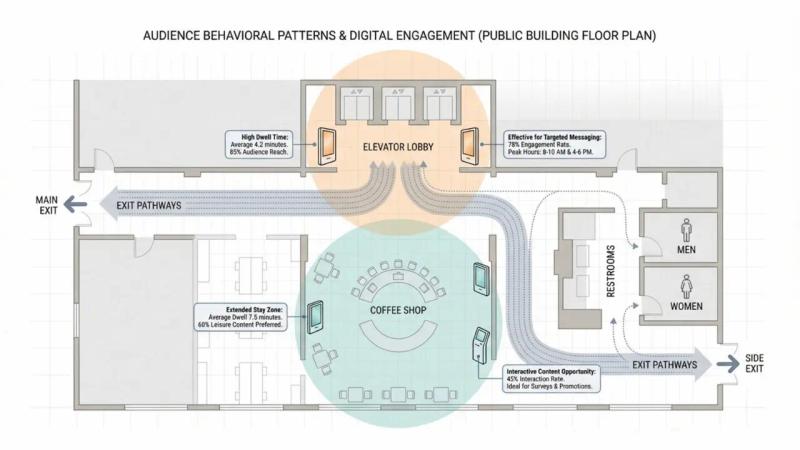
You also need to think about how this audience behaves in the space. Where do they naturally look? Where do they pause? What information do they need at each step of their visit? When you match your signage to these behavior patterns, you increase the chance that people will both see and care about your message. This leads to better placement decisions and more engaging content.
Evaluating foot traffic and dwell zones
Foot traffic is a basic factor. You want your screens where many relevant people will pass by. This usually points to entrances, lobbies, and main hallways. Areas like these in malls, hospitals, and government buildings often work well because so many people move through them.
But traffic volume alone is not enough. You also need to look for “dwell zones”-areas where people naturally stop or wait. Examples include elevator lobbies, queues, cafes, food courts, and reception areas. In these spots, people spend more time, making them more open to watching and reading your content. By choosing locations that combine high traffic with longer dwell time, you give your messages a better chance to be noticed and remembered.
Considering lighting conditions and glare
Lighting is a key factor that many people overlook. Light levels affect whether people can see and read your content. A great display can be almost useless if the screen faces harsh glare or sits in a space that is too dark. Direct sunlight can cause heavy reflections, while low light can make text hard to read.
Before you install a screen, walk the area and study both natural and artificial light. Check how light changes during the day. Glare from windows, glass doors, or overhead lights can make content unreadable. Test the spot at different times, and if needed, change the screen angle, add anti-glare film, or adjust room lighting to improve clarity and comfort.
Reviewing viewing distance and angles
How far away viewers stand and at what angle they see the screen are key to readability. If text or images are too small for the viewing distance, people will not bother trying to read them. Measure the typical distance between viewers and the screen, then choose screen size, font size, and layout that work from that farthest point.
Angles matter too. If viewers must bend or twist their necks to see the display, many will ignore it. Think about typical head height and natural sightlines. Try to place screens at or slightly above eye level for most viewers. Test each location from different spots and in different lighting to check if the content is clear and comfortable to read.
Choosing screen size and mounting height
Screen size and mounting height go hand in hand with viewing distance and angles. Large spaces often need larger screens so people can read them from farther away. Smaller spaces may work better with smaller screens that fit the room without feeling out of place or overwhelming.
Mounting height is just as important. Screens placed too close to the ceiling or too low near the floor will be easy to miss or hard to read. Aim for the normal line of sight for the expected viewer-usually at or just above eye level for people who are standing. For interactive screens, choose a height that all users can reach, including wheelchair users, and follow ADA guidelines. Always check for possible obstructions that could block the view.
Addressing environmental and architectural constraints
The physical layout and architecture of your location can help or limit where you put digital signage. Structural columns and beams, for example, can be turned into striking features if you wrap or band them with digital displays, making good use of space that might otherwise seem awkward.
At the same time, these features can restrict what you can do. You must consider wall and ceiling strength for mounts, as well as access to power and network connections. You should also think about how the screens look within the space. The design of your signage should match the surroundings and not clash with them. Think about sound as well-using audio in a noisy lobby may add to the chaos, while in quiet areas it may feel disruptive.
Planning for power, connectivity, and hardware compatibility
Behind the visuals and location choices, practical items like power supply, internet access, and hardware compatibility are basic needs. Without them, even the best-placed screen will sit blank. Reliable, fast internet is important if you want to push updates, show live data, or stream content. Whether you run your system on local servers or use cloud-based software, you need a solid network to support it.
You also need the right hardware. Choose screens with suitable size, resolution, and durability for your environment. Pick media players that can handle your content types and that work with your software. Mounts and brackets should be strong, safe, and allow easy access for maintenance. These technical details form the base of a dependable and effective signage setup.
Where are the most effective digital signage locations?
The best locations for digital signage are those that match your goals, reach your intended audience, and give your content good visibility and impact. While busy areas are often strong choices, digital signage shines when used in specific locations along the visitor journey, from entry to exit.
From the first step into a building to the moment someone leaves, there are points where people naturally slow down, look for help, or wait. These range from entrances that shape first impressions to quiet corners suited for more detailed messages. Walk your space, watch how people move, and test different locations to find the spots where your signage can do the most good.
Entrances and building facades
The entrance to a building is the point where people move from outside to inside and start forming an opinion of your organization. This is where they often need quick, helpful information. Large LED screens or video walls on facades and at entrances can show brand messages, current offers, or key updates. These areas usually see a lot of traffic, so they are strong locations for high-impact displays.
It can be tempting to put a screen directly in front of the door for instant access to directories or maps, but this can block movement. If people stop right at the entrance to use a screen, they can quickly cause a clog. It is better to place the display slightly off to the side or a few steps inside, where it is still easy to see but does not get in the way. Entrance screens are also ideal for welcome messages, brand values, and community or social impact stories.
Reception areas and lobbies
Reception areas and lobbies are natural candidates for digital signage. They are usually busy and often serve as the first stop for visitors and staff. Screens here can share news, directions, schedules, and other updates. In an office lobby, for example, displays can show meeting room schedules, internal announcements, or the company’s mission.
People also tend to wait in these spaces, giving them more time to pay attention to screens. In hotels, for example, interactive lobby displays can share local weather, news, hotel services, and nearby attractions. In large lobbies, you can use digital wayfinding, floor markings, or a main video wall to guide people smoothly towards reception desks, elevators, or kiosks.
Elevators, escalators, and vertical circulation points
Elevators, escalators, and stairwells are special locations because they guide movement and often cause short pauses. Elevator waiting areas are especially useful for signage because people usually stand still and look around while they wait. This makes them good points for general building information, updates on programs, events, or building services.
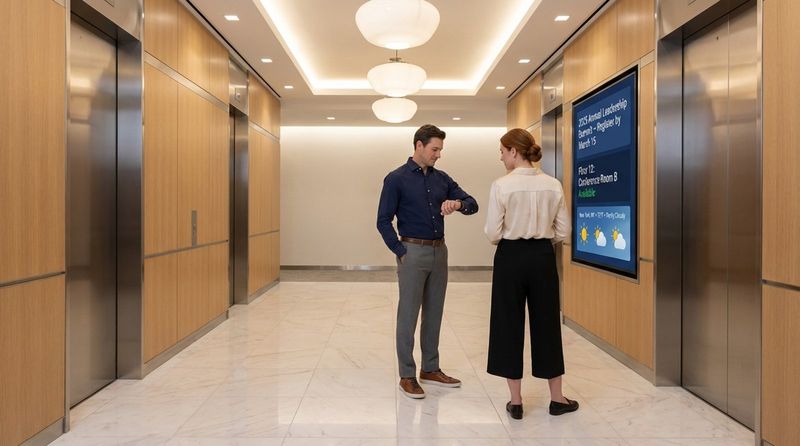
In elevator waiting areas, smaller screens usually work best. Very large screens may feel too close and uncomfortable. Inside elevator cars, small displays can show quick messages such as floor information, short news clips, or internal updates. For escalators and stairs, place screens to the side, clear of walkways, and use short, simple messages that can be read at a glance. Always follow ADA requirements in these areas, since they are key routes for people of all mobility levels.
Corridors, choke points, and transitional zones
Hallways and internal transition areas that lead to specific departments, classrooms, or common spaces are great for targeted messages. Here, the content should relate directly to what people are heading toward. For example, signs near a training room can show the day’s sessions, while signs near a clinic can show health information or check-in steps.
“Choke points” are narrow areas where people bunch up-like tight corridors, doorways, or sharp turns. These spots have a lot of traffic, but placing screens right in the middle of them can worsen congestion. It often works better to place signage just before or after these narrow spots, so people can step aside to view content without blocking others. Extra wayfinding kiosks at large intersections inside a building can also reduce confusion and the need for staff to give directions.
Waiting areas, cafes, and food courts
Waiting areas, cafes, and food courts are classic dwell zones. People there usually have spare time, making them more open to longer or more detailed messages. In food courts, digital screens can show menus, daily specials, and promotions, encouraging customers to try new items.
In cafes, screen placement should match the layout and flow. The entrance or order counter is often a strong location for menu boards and promotions, but the screens should still fit the look and feel of the space. In general waiting rooms, digital signage can share health reminders in clinics, event notices in student lounges, or tips and updates in corporate reception areas. Furniture and decor, like seating or plants, can be used to create comfortable viewing spots that naturally guide eyes toward the screens.
Information desks and customer service counters
Information desks and customer service counters are natural homes for digital signage because people go there specifically to ask questions and get help. Screens in these spots can share important information, updates, offers, and answers to common questions. This can shorten wait times and help staff work more efficiently.
For example, a medical office can show office hours, contact details, and instructions near the front desk. In transport hubs, screens near service counters can show store locations, departure times, and special offers. The goal is to support staff, reduce confusion, and improve the customer experience with clear, helpful messages.
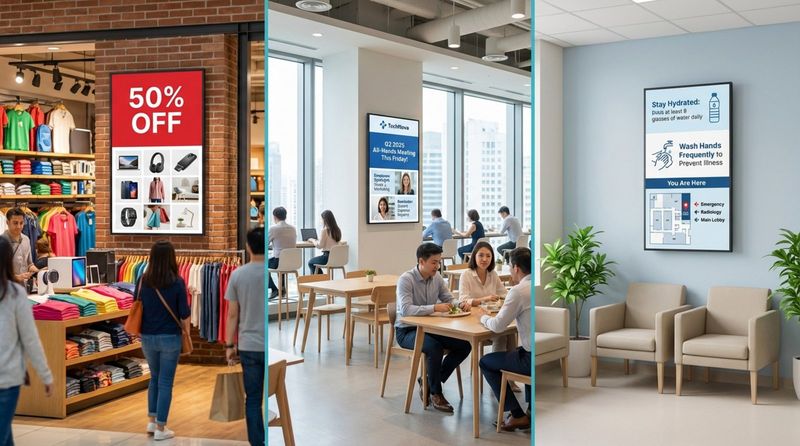
Retail, workplace, and healthcare environments
Different industries use digital signage differently, and placement choices reflect these aims:
Retail: The focus is on driving sales and telling brand stories. Good locations include:
- Store entrances for promotions and brand messages
- Point-of-sale areas for last-minute offers
- Busy aisles or corridors with screens every 75-100 feet
- Menu boards in food outlets that can be read from the queue
Workplaces: The aim is better internal communication and a connected culture. Typical placements:
- Entrance areas to welcome guests and display key updates
- Open-plan spaces with one screen per roughly 20-25 desks
- Outside meeting rooms to show bookings and availability
- Cafeterias and break rooms for company news and social content
- On factory floors, one or more screens per line for metrics, targets, and safety messages
Healthcare: The main goals are guidance, education, and comfort.
- Lobbies and entrances for check-in steps and wayfinding
- Waiting rooms for health tips, clinic updates, and calming content
- Hallways for directions and department information
- Exam rooms or patient rooms for education and reminders
Education: Schools, colleges, and universities use screens to share news and build community.
- Lobbies and main entrances for campus-wide announcements
- Cafeterias and student centers for events and club news
- Busy corridors for schedules and alerts
- Classrooms for teaching aids and timetable information
How to test and improve digital signage placement
Digital signage is not a “set it and leave it” project. It works best when you keep reviewing and adjusting it. Even a well-planned setup needs testing and fine-tuning. By watching how people respond and how conditions change, you can keep raising the impact of your screens.
Think of it as a simple loop: put the screens in place, watch what happens, study the results, then adjust. Doing this regularly helps your network stay effective even if your building layout, audience, or technology changes.
Conducting visibility and accessibility checks
After you choose a location, the next step is to test how well people can see and reach the screen. Do more than just a quick glance. Walk the space as if you were a visitor. Look at the screen from different angles and distances and at different times of day. Note any glare, shadows, or blocked views.
Also consider physical access. Can everyone, including wheelchair users and people with limited mobility, comfortably see and use the screen (if it is interactive)? Follow ADA rules in public areas. Ask colleagues, users, or visitors what they see and think. Their comments can reveal problems you missed, such as hard-to-read text, confusing placement, or blocked walkways.
Testing audience interaction and dwell time
Watching how people react to your screens in real life is one of the best ways to judge placement. This is about more than counting how many people walk by. Look for signs of engagement. Do viewers slow down or stop? Do they read the content? Do they touch the screen, scan a QR code, or follow a prompt?
Track how long people look at the screen (dwell time) and what they do afterward. In a store, for example, does a screen near a product lead to more interest in that product? For interactive screens, you can track how often they are used and which buttons or paths people choose. If a screen rarely gets noticed or used, you may need to change the position, the content, or both.
Monitoring lighting changes and environmental impacts
Light in a space changes during the day and across seasons, so one-time checks are not enough. Keep an eye on your screens at different times-morning, midday, afternoon, and evening. Watch for glare, washed-out colors, or areas that become too dark for clear viewing.
Other environmental factors can also affect performance: heat, cold, humidity, dust, and, for outdoor displays, rain and snow. Regular checks help you spot problems early, like overheating, clouded screens, or fading panels. Solutions might include repositioning screens, adding shades or anti-glare film, changing brightness settings, or improving ventilation.
Making ongoing placement and layout changes
Testing should lead to real changes, not just notes. Be ready to adjust screen height, angle, or exact location based on what you observe. In some cases, you may decide a screen should move to an entirely different part of the building.
You can also improve the space around the screen. For example:
- Add benches near screens with longer content to encourage viewing.
- Give interactive kiosks enough space so people can gather without blocking others.
- Rearrange furniture or signage that hides or distracts from the display.
A flexible mounting system and content platform makes it easier to move screens and update messages quickly when changes are needed.
Best practices for impactful digital signage placement
Impactful digital signage comes from a clear plan, not just finding any available wall. You need to think about your audience, the messages they need, and how your screens fit into daily activity. Good practices help you turn each screen into a useful tool that supports your goals.
Strong placement ties together the space, the viewer, and the content. The viewer should feel that messages appear at just the right time and place. When you plan with this in mind, your screens feel like a natural part of the environment, not visual noise.
Maximizing audience engagement opportunities
To get people to engage with your screens, place them where viewers are most open to receiving information-especially in moments of waiting or change. Elevator lobbies, queues, cafes, break rooms, and lounges are all good examples.
Think beyond passive viewing. You can add:
- Touchscreens for browsing information
- Voice interfaces for hands-free use
- Gesture-controlled displays
- QR codes that send people to websites, apps, or downloads
The immediate surroundings can also encourage engagement. Comfortable seating, pleasant decor, and clear floor space all make it more likely that people will stop and interact.
Aligning content relevance with location context
Content works best when it matches where the viewer is and what they are doing at that moment. Even visually strong content will fail if it feels out of place. Always ask: “What does someone standing here need or want to know right now?”
Examples:
- At entrances: welcome messages, maps, and quick guides.
- In hallways leading to departments: updates and alerts specific to that department.
- In cafeterias: menus, specials, nutrition facts, and internal news.
- Near exits: transport updates, safety reminders, and thank-you messages.
Keep messages focused on the people likely to be in that location, and avoid posting unrelated content that does not help them.
Maintaining safe, unobstructed viewing areas
Good visibility should never make your space harder or less safe to move through. Keep viewing zones clear. Do not put interactive screens directly in doorways or narrow walkways where small crowds can quickly form.
For escalators and stairs, place screens to the side so they do not distract people in motion or create stops where people might block others. Whenever you add seating, kiosks, or stands, check that there is enough room for wheelchairs, strollers, and people with canes or guide dogs. Follow ADA rules to keep your environment accessible for everyone.
Adapting to changing foot traffic patterns
Traffic patterns shift based on the time of day, day of the week, seasons, and special events. Morning rush hours, lunch breaks, and event days can all look different. Effective digital signage placement plans for these changes.
Review data from your content management system (if available) and simple observation notes. If a screen gets lots of attention at lunchtime but none in the evening, you might:
- Change the content schedule to fit the audience at each time.
- Repurpose the screen for different messages during quieter periods.
- Move the screen if long-term patterns shift.
A flexible system lets you stay aligned with how people are actually using the space.
How to measure the success of digital signage placement
To know if your screens are truly effective, you need clear ways to measure performance. It is not enough that the screens are “up and running”-they should help you reach your goals. This means tracking key metrics, gathering feedback, and using data to guide changes.
Measurement turns guesses into clear insight. With the right data, you can show the value of your signage, fix weak spots, and invest more confidently in locations and content that work.
Tracking impressions, dwell time, and conversion rates
Several metrics help you judge placement quality:
| Metric | What it means | Why it matters |
|---|---|---|
| Impressions | How often content is shown or how many people might see it | Gives a sense of reach |
| Dwell time | How long viewers look at the content | Shows how engaging the content and placement are |
| Conversion rate | How many viewers take a desired action after seeing the screen | Connects signage to real outcomes (sales, sign-ups, visits, etc.) |
Track these numbers together with location data. If a screen shows high impressions but low dwell time or conversion, it might be in the wrong place or showing the wrong message for that area.
Collecting audience feedback and behavioral data
Numbers tell part of the story, but direct feedback and observation help explain why something is working or not. Ask users and staff how useful they find the screens and whether the information is easy to see and understand. Short surveys, comment boxes, or digital feedback tools can all help.
Also watch how people behave around screens. Do they stop and watch? Do they look confused or interested? For interactive setups, check which features people use most and where they drop off. These insights can help you improve both placement and content to better match what people actually need.
Using analytics for ongoing improvement
Most modern digital signage platforms include analytics tools. Use these regularly to check:
- Which screens get the most engagement
- Which content performs best in which locations
- Which times of day show the highest interaction
If one screen consistently scores lower than others, test new content, then adjust the placement if needed. Over time, this approach lets you build a layout based on real results instead of guesswork. A system that allows quick changes to content schedules and even screen locations will help you keep improving performance.
Frequently asked questions about digital signage placement
How does placement impact the effectiveness of digital signage?
Placement largely decides whether your digital signage works. It affects if people notice the screen, if they can read it easily, and whether they feel the message is helpful at that moment. A beautiful design in a quiet corner with bad lighting will have little impact. A simple message in a busy, well-chosen location can have a strong effect.
Good placement supports visibility, readability, and relevance. It fits the screen into the viewer’s path and helps them with what they need at that point in their visit. When this happens, people spend more time looking at the screen and are more likely to act on what they see.
What are the common mistakes in digital signage placement?
Some frequent mistakes include:
- Placing screens in low-traffic areas where few people pass.
- Ignoring lighting, causing glare or poor visibility.
- Using screens that are too small or mounting them too high or too low.
- Blocking walkways or creating bottlenecks around interactive kiosks.
- Showing content that does not match the location (for example, company history videos at a busy checkout instead of quick offers).
These errors can all reduce engagement and weaken the impact of your signage.
Should placement strategies differ by industry or venue type?
Yes, they should. Different spaces have different goals, audiences, and layouts, so their placement strategies need to reflect that.
- Retail: Focus on influencing purchase decisions and promoting products. Key spots are entrances, aisles, fitting rooms, and checkout areas.
- Healthcare: Focus on guidance, comfort, and education. Key spots are entrances, waiting rooms, corridors, and treatment areas.
- Corporate offices: Focus on internal news, culture, and visitor information. Key spots are lobbies, lift areas, meeting room fronts, and shared spaces.
- Education: Focus on announcements, events, safety, and learning support. Key spots are main entrances, cafeterias, libraries, busy corridors, and classrooms.
By matching placement to the needs and behavior of each environment, you give your digital signage the best chance to succeed.


