
Table of Content
In today's fast-moving business environment, efficiency and cost control are constant priorities. Every dollar and every minute matter, especially in a tough economy. So, can digital signage really save time and money? Yes, it can. Digital signage is much more than a bright screen on a wall. It is a flexible tool that simplifies processes, cuts expenses, and greatly improves communication and engagement in many different sectors. By replacing old, static signs with colorful, instantly updateable screens, businesses can gain real savings and new efficiencies that directly support profits and long-term growth.
What Is Digital Signage and How Does It Work?
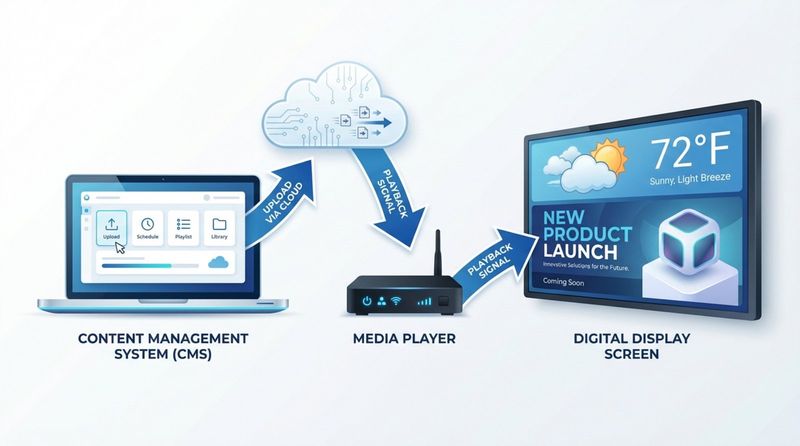
Digital signage uses screens to show many types of changing content, such as images, videos, text, web pages, and live data. Think of almost anything you would normally print on paper, now shown on a screen with movement, sound, and instant changes. A typical setup has three main parts: a display screen (like a smart TV, standard TV, or touchscreen), a media player that sends content to the screen, and a content management system (CMS) that you use to create, schedule, and publish content.
The strength of digital signage comes from its flexibility and impact. After you upload content to the CMS, it goes to the media player, which shows it on the screen. This happens automatically in the background, so videos, slides, and updates play smoothly and on time. Whether you are showing daily menu items in a restaurant, safety rules in an office, or directions in a large building, digital signage helps you communicate more clearly and attractively.
How Digital Signage Differs from Traditional Signs
The difference between digital signs and traditional printed signs is clear right away. Printed signs are fixed. After you design, print, and install them, every change needs new design work, more printing, and physical replacement. This process can take days and involves sending files back and forth, checking proofs, waiting for printing, and then installing everything again.
Digital signage allows instant, remote changes. You can edit or replace messages with a few clicks from a laptop or phone, no matter where you are. A manager in New York can change a screen in Los Angeles in seconds. You can also change what appears based on the time of day, type of audience, or special events. For example, a school can show class schedules in the morning and event reminders later in the day, with the switch happening automatically. This flexibility makes digital displays much more engaging and effective. Studies show that digital screens get about 400% more views than static signs, making them far more powerful for getting your message noticed and remembered.
Key Features of Modern Digital Signage Systems
Modern digital signage systems are advanced communication tools with many features that save time and increase impact. They support the needs of today's businesses and give users high levels of control and flexibility over the messages they show.
Automated Content Scheduling and Updates
One of the biggest benefits of digital signage is automated scheduling and updates. This frees businesses from constant manual content changes. You can plan content weeks or months ahead and schedule it to appear at certain times or on specific dates. Your messages stay timely and consistent without daily effort. A retail store, for example, can plan holiday promotions long before the season and know they will appear at exactly the right time. This "set and forget" approach cuts down the work usually required to manage posters, flyers, and other printed materials.
Remote Management and Access
Remote control is especially helpful for businesses with several locations or busy managers. Digital signage software lets you manage every screen from anywhere with an internet connection. You can log in from your computer or phone to change what each screen shows, make instant updates, or fix simple problems without visiting each site. This helps keep branding consistent, allows fast responses to changes or emergencies, and gives better oversight of performance, all without needing to be on-site.
Integration with Business Tools and Data
Modern digital signage becomes even more powerful when it connects to other tools and data sources. Leading platforms can link with systems you may already use, such as Point-of-Sale (POS) systems, calendars, booking tools, or social media feeds. This creates a single, connected communication system. For example, live sales data from a POS can trigger specific offers on screens, or updates to a shared calendar can appear automatically on staff information displays. This cuts double work and reduces errors. It also allows very dynamic content, such as messages based on customer profiles, purchase history, or even the weather, and uses analytics to improve content based on real behavior.
Industry Applications: Where Digital Signage Delivers Value
Digital signage is flexible enough to fit many situations rather than being a single standard solution. It works well in busy retail stores, quiet office spaces, hotels, hospitals, schools, and many other environments.
Retail: Dynamic Promotions and Queue Management
In retail, getting and keeping customer attention is key. Digital signage is very effective here, showing attractive product visuals and live offers. Displays can show flash sales, new arrivals, and interactive catalogs where customers can browse options or check stock levels. This informs shoppers and can boost sales-research shows that 68% of customers who see digital signage campaigns go on to make a purchase. Screens can also help control queues, guide customers at busy times, and improve movement around the store. In grocery stores, for example, screens can show nutrition facts, recipes, or supplier stories in each aisle, helping shoppers make choices and increasing basket size.

Corporate: Internal Communication and Wayfinding
In offices, digital signage improves internal communication and helps staff feel informed and included. Company news, policy changes, and updates can appear instantly on screens, reducing email overload and keeping everyone aligned. Displays can also show meeting room schedules, interactive maps for wayfinding, and shout-outs for employee wins and milestones. Public recognition on screens can be a strong motivator, especially for younger teams. Digital signage can reduce the need for long meetings by showing training content and key information on large displays that everyone can review when needed, improving communication and workplace experience.
Hospitality: Guest Interactions and Event Information
Hotels, resorts, and venues use digital signage to improve guest service and promote their offerings. Interactive screens can share current information, entertainment options, and customized services. Hotels can show event schedules, amenity availability, and last-minute offers in real time. This may include local attraction guides, restaurant menus, or personal welcome messages. Interactive kiosks can show directories and maps, which reduces the load on reception staff and lets guests find information on their own. This leads to smoother visits and a stronger impression of the brand.
Other Sectors: Healthcare, Education, Transportation
Many other industries benefit from digital signage as well:
- Healthcare: Shows waiting times, health tips, patient instructions, and emergency notices, which improves communication and patient flow.
- Education: Displays class schedules, campus news, event details, and urgent alerts, helping students and staff stay informed and engaged.
- Transportation: In airports, stations, and bus terminals, screens show live arrivals, departures, delays, and wayfinding, improving both passenger experience and operations.
- Manufacturing and Warehousing: Shows production data, targets, safety reminders, and quality alerts, supporting higher productivity and safer workplaces.
How Digital Signage Saves Time for Organizations
Time is valuable in any organization, and digital signage helps recover many hours that would otherwise be spent on slow or manual work. The time savings affect everyday tasks as well as urgent situations.
Faster Message Deployment and Updates
Updating a printed sign involves designing, printing, shipping or delivering, and installing. This may take days or weeks, and any late change causes trouble and extra cost. With digital signage, you can update all your screens in minutes. If you need to change business hours, add a new promotion, or share an urgent policy update, you can do it quickly from any device connected to the internet. Your information stays current, and you avoid delays and confusion from old messages. Scheduling content in advance also cuts down on last-minute rush work.
Reducing Repetitive Employee Tasks
Many employees spend time on small, repeating tasks, like updating bulletin boards, printing flyers, and sending reminder emails. Digital signage can handle many of these tasks. Instead of changing price tags or posters by hand, staff can update a playlist or template once. Birthdays, service anniversaries, or monthly targets can be pre-scheduled on screens. This lets HR, marketing, and operations teams spend more time on meaningful work that adds value, rather than simple admin tasks. Over time, this supports higher productivity and better morale.
Real-Time Communication and Emergency Alerts
Fast communication is especially important in emergencies. Digital signage can show alerts instantly on every screen: weather warnings, security notices, fire evacuation routes, or urgent operational messages. This improves safety and reduces confusion because important information appears in clear view where people already are, not buried in email inboxes. It also helps daily operations by announcing delivery times, maintenance work, or schedule changes in real time.
How Digital Signage Saves Money for Businesses
Digital signage also helps businesses cut costs in several ways, from lowering material use to making marketing spend more efficient.
Reducing Printing and Paper Expenditures
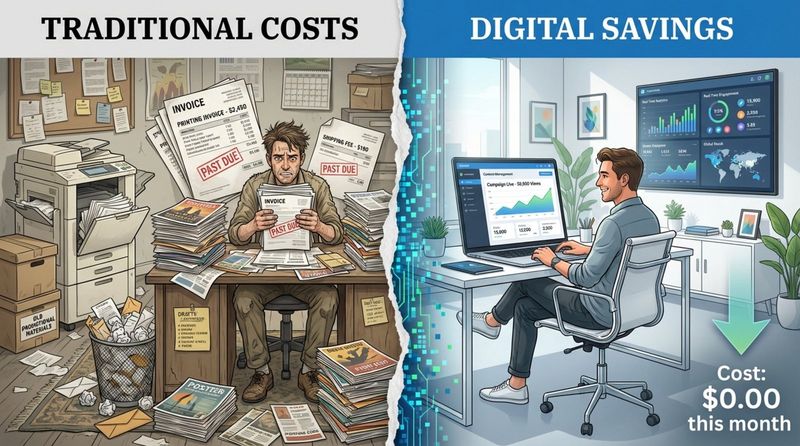
One of the clearest savings comes from cutting back on printing. Many businesses still pay heavily for menus, posters, brochures, and notice boards. Costs for paper, ink, design, printing, and distribution add up quickly. With digital signage, most of this goes away. A restaurant can stop reprinting menus each time prices change. A retailer can skip new posters every time a sale changes. An office can replace printed memos and notices with screens. Over a year, these changes can save large amounts of money. At the same time, using less paper supports environmental goals and can improve your public reputation.
Lowering Ongoing Operating and Maintenance Costs
Printed signs also bring steady costs for replacement and upkeep. Items fade, tear, or go out of date. Any content change means printing and installing new materials. Digital signage has an upfront cost for screens and players, but ongoing expenses are usually much lower. Once set up, you mainly pay for software and electricity. Modern LED screens use relatively low power, which helps keep energy bills reasonable. Because you can manage content remotely, you need fewer site visits and less manual work, further cutting labor and travel costs. Maintenance often involves simple checks, cleaning, and software updates rather than reprinting and reinstalling signs.
Budget-Friendly Advertising and Promotions
Advertising can be costly, especially with billboards, print ads, and static signage. Digital signage offers a much more flexible and less expensive option. You can run many different campaigns on the same screen, change offers on short notice, and show different content at different times of day without extra printing fees. You can also test several messages and track which ones work best. This lets you focus your budget on what actually drives results, rather than locking money into fixed, unchangeable ads.
Consolidating Tools for Efficiency (All-in-One Solutions)
Many digital signage platforms bring content creation, scheduling, and management into a single solution. This means you do not need separate design tools, file-sharing services, and scheduling systems. Built-in templates and editors make it simple to create professional-looking graphics and videos without hiring outside designers. This reduces software and agency costs and gives your team more control. Centralizing everything in one place also makes training easier and cuts the time needed to manage content.
Best Practices for Maximizing ROI with Digital Signage
Digital signage can be a strong investment, but to get the best return, you need a clear plan for how you will use it and how you will measure results. Screens alone are not enough; how you manage content and track performance matters just as much.
Measuring Performance and Return on Investment
To improve ROI, you need data. Many digital signage platforms include analytics that track views, how long people watch, interaction levels, and sometimes even conversions. By connecting signage with tools like POS systems, you can see how certain messages affect sales. For example, a grocery chain using digital screens for flash offers might see a 30% lift in sales of featured items in a week. By checking results regularly, you can adjust messages, timing, and placement. You might find that some promotions work better in the evening, or that interactive content outperforms static slides. This kind of feedback turns digital signage from a guess into a controlled and improving marketing and communication channel.
Content Repurposing and Creative Asset Management
Creating new content from scratch all the time is costly. A smart approach is to reuse and adapt what you already have. Digital signage supports many formats: video, images, text, and web pages. You can take existing ads, product photos, social posts, and website elements and rework them for your screens. Setting up a central library for assets helps keep everything organized and consistent. You can also design content in flexible pieces that are easy to adjust for different campaigns or locations. This cuts creation time, lowers design costs, and speeds up how quickly you can respond to new opportunities or changes in demand.
Practical Steps to Set Up Digital Signage for Your Organization
Starting with digital signage does not have to feel overwhelming. A clear, step-by-step plan will help you roll out your system smoothly and get real results.
Goal Definition and Audience Identification
Begin with clear goals. What do you want digital signage to achieve? Examples include increasing sales, improving customer experience, speeding up information sharing inside the company, or building brand awareness. Make your goals specific and measurable, such as "raise sales of product X by 15% using digital promotions" rather than "sell more product X."
Next, identify who will see your screens. Think about their age, role, where they are in your building, how often they pass by the screens, and what problems you can solve for them. Are they shoppers, employees, visitors, or patients? This will guide what you show, where you place each screen, and how you write your messages. Messages that match the needs and interests of the audience will always perform better.
Selecting the Right Hardware and Software
The next step is choosing your screens, media players, and software.
Hardware (Screens and Players)
- Pick screen size and resolution based on viewing distance and content detail.
- Check brightness and contrast so content is easy to see in your lighting.
- Choose sturdy hardware for outdoor or high-traffic areas.
- Decide on mounting style: wall-mounted, ceiling-hung, freestanding, or touch-enabled kiosks.
- Use reliable media players to keep playback smooth and stable.
Software (CMS)
- Look for an easy-to-use interface that staff can learn quickly.
- Choose strong tools for content creation, scheduling, and playlists.
- Pick a cloud-based CMS so you can manage screens from anywhere.
- Make sure analytics and reports are available to track how content performs.
- Consider platforms that include templates and built-in editors to avoid separate design tools.
Content Creation and Scheduling Strategies
Once your system is ready, focus on content and timing. Keep messages short and clear. Use large fonts, high-quality images, and simple layouts. Motion can help attract attention, but avoid cluttered screens. Always include a clear next step, such as "Order at the counter," "Scan this code," or "Visit our website."
Plan your schedule based on when and where your audience is most active. Use different content blocks for different times of day (for example, breakfast offers in the morning and dinner deals in the evening). Plan content cycles ahead of time but refresh them often enough that regular visitors do not tune them out. Where it makes sense, use QR codes or touchscreens to invite people to interact and take action immediately.
Frequently Asked Questions about Time and Cost Savings with Digital Signage
How does digital signage improve efficiency and productivity?
Digital signage improves efficiency and productivity in several ways. It automates routine updates such as prices, offers, and internal notices, so employees do not have to print and post materials by hand. Real-time messages mean staff and customers get important information quickly, which reduces confusion and delays. Inside a company, screens act as a central source of truth for news, targets, and schedules, so employees spend less time looking for information. All of this frees people to focus on higher-value tasks and reduces wasted effort.
What are the most impactful ways digital signage reduces business expenses?
Digital signage cuts costs mainly by reducing printing and paper use, trimming labor and transport for posting and replacing signs, and lowering the cost of running promotions. It also replaces or reduces spending on other advertising channels by allowing messages to change often without extra printing fees. When it comes as an all-in-one system, it can also reduce what you pay for extra design software and outside creative support.
Is digital signage a smart investment for small businesses?
Digital signage can be very effective for small businesses. After the initial purchase, ongoing costs can be kept low, and even a single screen can make a big difference. Small businesses can start with one or two screens and expand later if needed. Easy updates help them react quickly to local events, stock levels, or customer feedback. This can lead to higher sales and stronger customer relationships. At the same time, less printing and more targeted advertising free up budget. Modern systems with templates and simple interfaces make it realistic for small teams without expert designers to run their own content.
Making the Case: Is Digital Signage Right for Your Business?
Digital signage is not just a short-term fad; it is a useful business tool that offers clear time and cost savings and also supports better communication and engagement. In a noisy information landscape, digital displays stand out and share messages more clearly and more quickly than paper or static signs.
Whether you run a store, office, hotel, school, or clinic, the benefits include faster updates, lower printing and maintenance costs, and more targeted, flexible messaging. The decision to adopt digital signage depends on your goals, budget, and audience. But with rising pressure to work efficiently, reduce waste, and connect more effectively with customers and staff, digital signage is a strong option to consider. By using this technology wisely, you are investing in faster communication, smoother operations, and better results for your organization.


