
Table of Content
How can businesses turn passive screens into active revenue drivers and communication tools without complex IT setups? Digital signage solves the problem of static, outdated messaging by allowing you to publish high-definition video, live data, and targeted promotions to any screen, anywhere, in minutes.
In a market where speed matters, waiting days for printed posters is no longer an option. Digital signage brings the flexibility of the web into physical spaces, allowing you to change your message instantly. Whether you run a retail chain, a corporate office, or a healthcare facility, this technology helps you deliver the right message at the exact moment it counts, streamlining operations and connecting with your audience more effectively.
What Is Digital Signage and How Does It Work for Businesses?
Digital signage is a network of digital displays-such as LCD screens, LED walls, or tablets-managed centrally to show multimedia content. Unlike a printed banner, these screens are powered by a combination of hardware and software that enables you to display videos, social media feeds, dashboards, and emergency alerts. It is a cloud-based communication system designed to replace static noise with dynamic, manageable content.
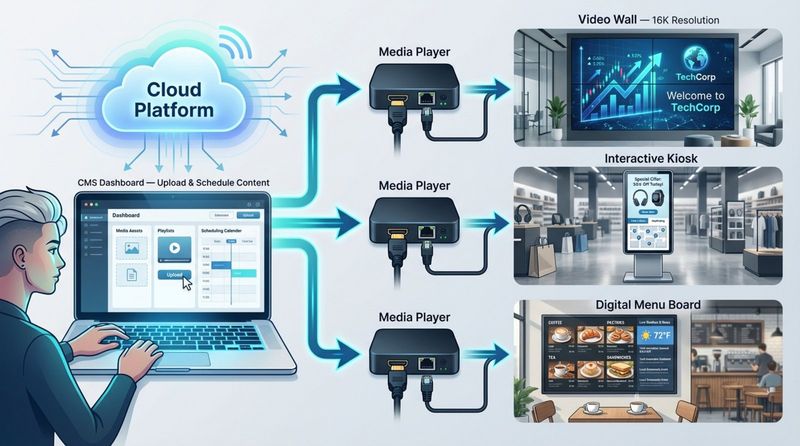
The system relies on a Content Management System (CMS) that communicates with media players connected to each screen. This setup allows a marketing manager or business owner to upload content from a laptop in one location and publish it to hundreds of screens globally. This remote management capability removes the need for manual USB updates and ensures every location stays aligned with your brand standards.
Key Features of Digital Signage Solutions
Modern digital signage platforms are designed for efficiency and ease of use. The core feature is the cloud-based CMS, which provides a single dashboard to manage playlists and schedules. Leading solutions offer a simple setup process, often allowing teams without technical skills to get screens running quickly. With drag-and-drop layouts and built-in design tools, creating professional visuals is a straightforward, in-house task.
Another essential capability is integration. Advanced software can connect with existing business tools like Point of Sale (POS) systems, calendars, and live weather feeds. For example, a restaurant’s digital menu can automatically remove out-of-stock items, or an office screen can display live Power BI dashboards. These automated data connections turn a standard display into a responsive business asset.
What Are the Main Benefits of Digital Signage for Any Business?
Switching to digital screens creates immediate operational improvements. From customer-facing displays to internal staff updates, the impact is measurable. By leveraging motion and bright visuals, digital signage overcomes the "ad blindness" common with traditional print media.
Increases Brand Visibility and Recognition
In crowded environments, capturing attention is the first hurdle. Digital screens are significantly more effective than static signage, with industry data suggesting they receive up to 400% more views. High-definition video and subtle motion naturally draw the eye, making screens particularly effective for storefronts and high-traffic areas. Many shoppers report entering a store specifically because digital content caught their attention.
These screens also enforce brand consistency. By deploying high-quality content across multiple locations from a central account, you ensure your brand voice and visual identity remain uniform. This consistency builds trust, as customers encounter a professional, modern experience wherever they interact with your business.

Drives Customer Engagement and Influences Purchasing
Digital signage acts as a silent salesperson. Since a vast majority of purchasing decisions occur at the point of sale, a strategically placed screen can influence the final choice. Shoppers often switch to a promoted product or add an item to their basket after seeing it highlighted on a display. It converts passive browsing into active buying by showcasing limited-time offers or complementary products in real time.
Relevance drives engagement. With scheduling tools, you can automate content to match the time of day-promoting coffee in the morning and dinner specials in the evening. This targeted approach creates a personalized experience that often leads to a higher average purchase value.
Reduces Perceived Wait Times and Improves Experience
Waiting in line is a major friction point for customers. Digital signage mitigates this frustration by providing entertainment or valuable information. When customers are engaged with news feeds, trivia, or interesting video content, their perceived wait time drops significantly.
This improved experience directly impacts satisfaction scores. In environments like medical clinics or government offices, screens can also display queue management information. This transparency reduces anxiety and signals that the organization respects the visitor's time.
Delivers Cost Savings and Streamlines Operations
While the initial hardware investment is higher than buying a poster frame, the long-term savings are substantial. Mid-sized companies often spend significant budget annually on designing, printing, shipping, and disposing of paper signs. Digital signage eliminates these recurring costs. You can correct a typo or launch a new campaign in seconds without spending a dime on printing.
Operationally, this technology frees up staff time. Instead of employees spending hours manually swapping out physical posters, updates are pushed remotely. This reduction in manual labor and paper waste lowers operational costs and supports sustainability initiatives.
Enables Real-Time Content Updates Across Locations
The ability to update content instantly is a critical advantage. If inventory runs low on a promoted item, a manager can remove it from playlists across all locations immediately to prevent customer frustration. This feature is equally vital for safety; screens can instantly switch to emergency alerts or evacuation guides if needed.
This agility allows businesses to react to external factors, such as weather or local events. A retail store can trigger rainy-day promotions the moment a storm hits, keeping marketing efforts aligned with the immediate context of the customer.
Supports Consistent and Targeted Messaging
Maintaining a unified message across scattered locations is a challenge that centralized digital signage solves. Head office can mandate "global" content that plays on every screen, while granting local managers permission to add specific updates, such as community events or site-specific hours. This structure balances corporate control with local relevance.
Targeting also applies within a single facility. A screen in the staff breakroom can display internal KPIs and HR updates, while the lobby screen focuses on welcoming guests. This ensures that every audience segment receives information relevant to them.
Provides Performance Tracking and Insights
Unlike a billboard, digital signage offers data-driven feedback. Modern CMS platforms track proof-of-play, logging exactly what content played and when. By correlating these logs with sales data or tracking QR code scans, marketing teams can determine which messages drive results.
Advanced setups can provide deeper insights into screen uptime and network health. This visibility allows businesses to optimize their playlists continuously, treating their physical locations with the same analytical rigor as their digital channels.
Improves Team Communication and Training
For internal communications, digital signage is a powerful tool to keep teams aligned. Clear communication correlates with higher employee engagement. Screens in warehouses, offices, or breakrooms can display real-time production metrics, recognize top performers, and celebrate milestones. When employees feel informed and recognized, motivation improves.
Screens also reinforce training and compliance. By looping safety protocols or product knowledge snippets, you can keep critical information top-of-mind without flooding email inboxes. This consistent visual reinforcement supports a culture of safety and continuous learning.
Industry Examples: How Businesses Use Digital Signage
Digital signage is highly adaptable, serving different goals across various sectors. While the core benefits-efficiency and engagement-remain constant, the specific applications vary by industry.
Retail: Boosting Promotions and Sales
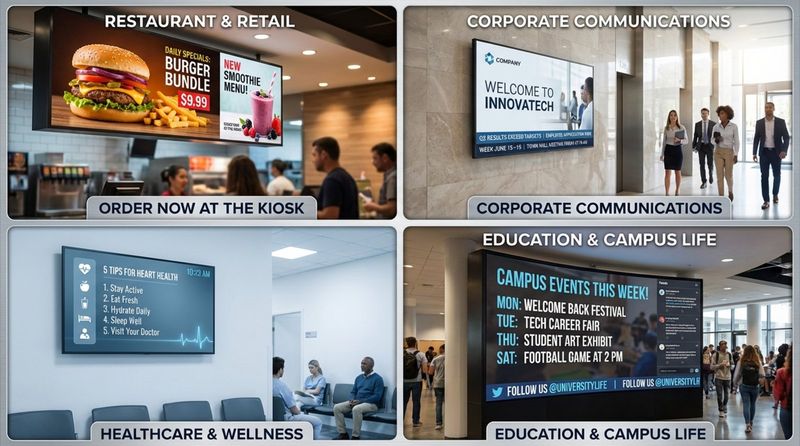
Retailers leverage screens to extend the brand experience. Video walls highlight seasonal collections, creating an immersive atmosphere. Smaller displays at the checkout serve to drive impulse purchases and cross-sells, reminding shoppers of items they may have missed.
Retailers also use screens to bridge the gap between online and offline shopping. Interactive displays allow customers to check inventory, view product variations, or order out-of-stock items for home delivery, keeping the transaction within the brand ecosystem.
Restaurants: Dynamic Menus and Upselling
Digital menu boards are standard for modern Quick Service Restaurants (QSR). These screens allow for seamless transitions between dayparts (breakfast, lunch, dinner) without manual intervention. They also enable dynamic pricing and the ability to highlight high-margin combos with appetizing animations, which can lift sales on promoted items.
Beyond the menu, screens enhance the dining atmosphere. displaying social media feeds or branded content helps modernize the space. In drive-thru lanes, digital boards improve order accuracy and speed, directly impacting throughput and customer satisfaction.
Healthcare: Patient Information and Safety Messaging
In healthcare settings, digital signage focuses on comfort and clarity. Waiting room screens share wellness tips, provider bios, and clinic policies, helping to educate patients while they wait. Engagement is typically high in these environments, ensuring key health messages are seen.
Hospitals utilize signage for wayfinding to reduce congestion and confusion. Interactive kiosks facilitate self-check-in, relieving administrative burden. Crucially, digital signage serves as an emergency communication channel, broadcasting alerts and safety instructions instantly across the facility.
Corporate Offices: Internal Communications
Offices use digital signage to declutter internal communication channels. Dashboards in common areas keep teams focused on company goals and real-time metrics. Screens also foster culture by highlighting new hires, internal events, and town hall streams.
In hybrid work environments, digital signage assists with space management. Screens display meeting room availability and desk booking information, helping employees navigate flexible workspaces efficiently.
Education: Campus News and Alerts
Schools replace cluttered bulletin boards with digital networks to improve campus safety and communication. Students are more likely to notice dynamic content on a screen than a paper flyer. Digital signs streamline the sharing of schedules, deadlines, and campus resources.
Safety is a primary driver for education. In the event of an emergency, the entire network can be commandeered to show lockdowns or weather alerts. On standard days, screens promote extracurricular activities and achievements, building a stronger campus community.
Digital Signage vs. Traditional Signage: What Sets Them Apart?
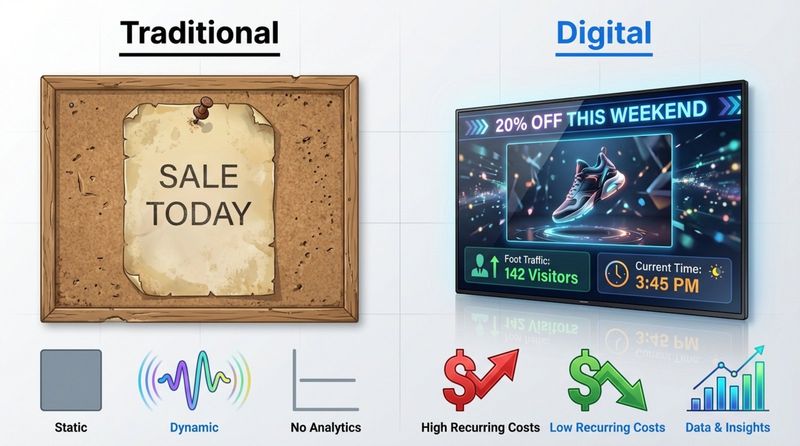
Comparing digital and traditional signage is a comparison between static and dynamic communication. Traditional signs are fixed the moment they are printed, while digital signage is a living channel that adapts to your business needs.
Comparing Flexibility and Content Control
Traditional signage requires lead time. Changing a price or image involves design, proofing, printing, and distribution-a slow process prone to errors. Digital signage offers flexibility; changes happen in a few clicks via the cloud. This supports strategies like "day-parting," where content shifts automatically to suit different times of day.
Digital signage also allows for unlimited content depth. A single screen can cycle through multiple messages, videos, and data feeds, whereas a printed sign is limited to one image. This rotation combats "sign blindness," ensuring the content remains fresh and noticeable.
Cost Efficiency Over Time
While digital hardware requires an upfront investment, it eliminates the recurring costs of print. Traditional signage appears cheaper initially but accumulates costs with every new campaign. Digital signage stabilizes expenses-once the hardware is in place, the cost of changing content is virtually zero. Many businesses see a return on investment within 18 to 24 months through savings on materials and labor.
When you factor in the labor hours saved-staff no longer need to physically replace signs-the financial argument for digital becomes even stronger.
Impact on Audience Engagement
Motion attracts attention. Static signs often fade into the background, while digital screens use brightness and animation to stand out. Studies consistently show higher recall rates for digital content compared to print.
Furthermore, digital signage enables interactivity. Touchscreens and QR codes transform a passive viewing experience into an active engagement, allowing customers to request information or download coupons directly to their mobile devices.
Digital Signage ROI: Measuring Business Value
Calculating ROI involves looking at tangible cost reductions and performance improvements. You can measure the elimination of print costs easily, while increased engagement and efficiency require analyzing sales data and operational metrics.
Calculating Savings on Printing and Labor
The most direct ROI comes from stopping the print cycle. By auditing annual spend on posters, shipping, and installation labor, businesses can project their savings. These funds can often offset the cost of the digital signage software and hardware over time.
Labor efficiency is also a key factor. Centralized management allows a small team to manage hundreds of screens, which frees up on-site staff to focus on customer service rather than facility maintenance.
Measuring Increased Sales and Brand Lift
Retail and hospitality businesses track ROI by monitoring "lift" on promoted items. Comparing sales data during digital campaigns against baseline periods reveals the direct impact of the displays. Revenue increases on featured products are a common outcome of well-executed digital merchandising.
Brand lift is measured through customer feedback and dwell time. Improved customer experience scores and longer visit durations often correlate with an engaging digital environment.
Tracking Employee Productivity and Training Outcomes
In corporate and industrial settings, ROI is seen in workforce alignment. Visualizing KPIs can lead to productivity gains. HR teams can measure the effectiveness of internal communications by tracking safety compliance and training participation before and after signage implementation.
Reducing turnover is another hidden benefit. Public recognition on screens helps employees feel valued, contributing to retention efforts that save significant recruitment costs.
Considerations and Challenges of Digital Signage Implementation
Successful deployment requires planning beyond just buying a TV. To get the most out of your network, you need reliable tools and a clear strategy.
Initial Investment and Ongoing Costs
It is important to select the right hardware. Commercial-grade screens are built to run 16 to 24 hours a day, whereas consumer TVs may fail quickly under business use. While the upfront cost is higher, commercial displays offer better brightness and longevity.
Software costs are typically subscription-based. Choosing a scalable SaaS (Software as a Service) model allows you to pay only for the screens you use, keeping ongoing expenses predictable.
Selecting the Right Platform
The software you choose determines how easy it is to manage your network. Complex systems often lead to stale content because staff find them too hard to use. For a solution that balances professional features with simplicity, Look Digital Signage is a strong fit for many businesses. It provides a centralized Look CMS to manage screens remotely, ensuring you can update playlists from anywhere.
Look DS specifically addresses common operational challenges with features like Smart Scheduling, which automates when content plays, and Offline Playback, which ensures your screens keep running even if the internet connection drops. Additionally, the Ready-made Templates library helps teams without designers create professional content quickly.

Technical Issues and Security Concerns
Stability is critical. You need a system that ensures screens don't go black if the network fails. Security is also paramount; your signage network should be isolated from critical business data. Using a trusted, cloud-based provider with distinct user permissions helps mitigate these risks and keeps your network secure.
Scalability for Growing Businesses
Avoid platforms that lock you into proprietary hardware. A scalable solution should work with various players and operating systems. This flexibility allows you to expand your network smoothly, adding new locations without overhauling your entire infrastructure.
Frequently Asked Questions About Digital Signage Benefits for Businesses
Is Digital Signage Worth It for Small Businesses?
Yes. Digital signage is scalable and effective for single-location businesses. A single screen can replace multiple printed posters, display a social media feed, and promote daily specials simultaneously. The ability to update offers in minutes helps small businesses react quickly to inventory changes. Look Digital Signage supports this growth, allowing you to start with one screen and scale as you grow.
How Do I Update Digital Signage Content?
Updates are handled through a web-based dashboard. You simply log in, upload your media, and assign it to a playlist. With platforms like Look DS, you can schedule content to play at specific times or dates. This "set and forget" capability ensures your messaging is always current without requiring constant manual attention.
What Are the Best Practices for Digital Signage Deployment?
Start with clear objectives. Determine if your goal is to inform, entertain, or sell. Place screens in high-traffic areas where they are easily visible. Keep content short and legible, and always include a clear call to action (CTA), such as a QR code. Using Look CMS, you can easily monitor your screen status to ensure your content is playing correctly.
| Feature | Traditional Signage | Digital Signage |
|---|---|---|
| Update Speed | Days to Weeks (Printing/Shipping) | Instant (Remote Cloud Update) |
| Content Type | Static Image/Text | Video, Animation, Live Feeds |
| Engagement Rate | Low (Static) | High (Motion/Vibrant) |
| Long-term Cost | High (Recurring Print Costs) | Low (One-time Hardware + Software) |
| Analytics | None | Proof of Play, Viewer Metrics |
The shift to digital communication is accelerating. With technologies enabling lower power consumption and smarter data integration, digital signage is becoming more accessible and sustainable. By adopting a platform that is easy to manage and ready to scale, businesses can future-proof their communication strategy and drive real results from their physical spaces.


