


Table of Content
Good content examples for dynamic digital signage turn passive screens into active, helpful communication tools. These include interactive product catalogs, live social media walls, and menu boards that change automatically based on stock levels. To truly inspire, content must be more than a digital poster. It should use live data, motion, and interaction to grab attention in the first three seconds. From the busy halls of Heathrow Airport to the modern lobbies of Microsoft, the strongest digital signage content informs, entertains, or persuades, while staying visually smooth and relevant to what viewers are doing right now.
Effective digital signage content connects the physical space with digital information. Whether it’s a flash-sale countdown in a store or a wayfinding map in a large hospital, the aim is to give people a smooth, simple experience. With tools like Look DS, businesses can control many content formats, 4K video loops, real-time news tickers, social feeds, so every frame helps tell a clear brand story and supports higher audience engagement.

Good Content Examples for Dynamic Digital Signage
What Makes Content Effective on Digital Signage?
Digital communication is fast, and you have only a short time to make an impact. A 2013 study from the University of Ljubljana showed that moving content gets more attention (about 0.9 seconds) than static content (0.6 seconds. In this small gap, the “3-second rule” applies: if people can’t understand your main message in three seconds, it’s probably too complicated. Clear and short messages are the foundation of success here.
Beyond speed, strong content depends on good visuals and solid technical setup. Images and videos should ideally be in Full HD (1920 x 1080) or higher so they look sharp and professional. Use visual hierarchy: place the key information in the center, use bold sans-serif fonts, and keep contrast high so text is readable from a distance. Light motion, like simple animations or scene changes, can gently guide the viewer’s eye toward the call-to-action (CTA), helping turn views into actions.
Top Benefits of Compelling Digital Signage Content
Switching from printed signs to digital screens brings many clear benefits. One of the biggest is the ability to update in real time. Static signs need manual replacement, but digital screens can change instantly through a central dashboard. This flexibility lets businesses react to stock changes, weather, or emergencies within minutes, keeping information up to date and accurate.
Strong content also helps increase sales and brand awareness. Data from 2025 shows that shoppers are 80% more likely to enter a store that uses digital screens, and 84% of retailers say digital signage works better than print for building brand recognition. By creating an engaging environment with stories and interactive features, businesses build a closer bond with their audience, which leads to higher satisfaction and long-term loyalty.
Dynamic Digital Signage Content Types by Industry
Retail: Engaging Shoppers and Driving Sales
In retail, digital signage acts like a silent salesperson, leading customers from the window display to the checkout. Moving screens can turn simple window browsing into an engaging brand experience that shows off key products and promotions.
Product Promotions and Interactive Displays
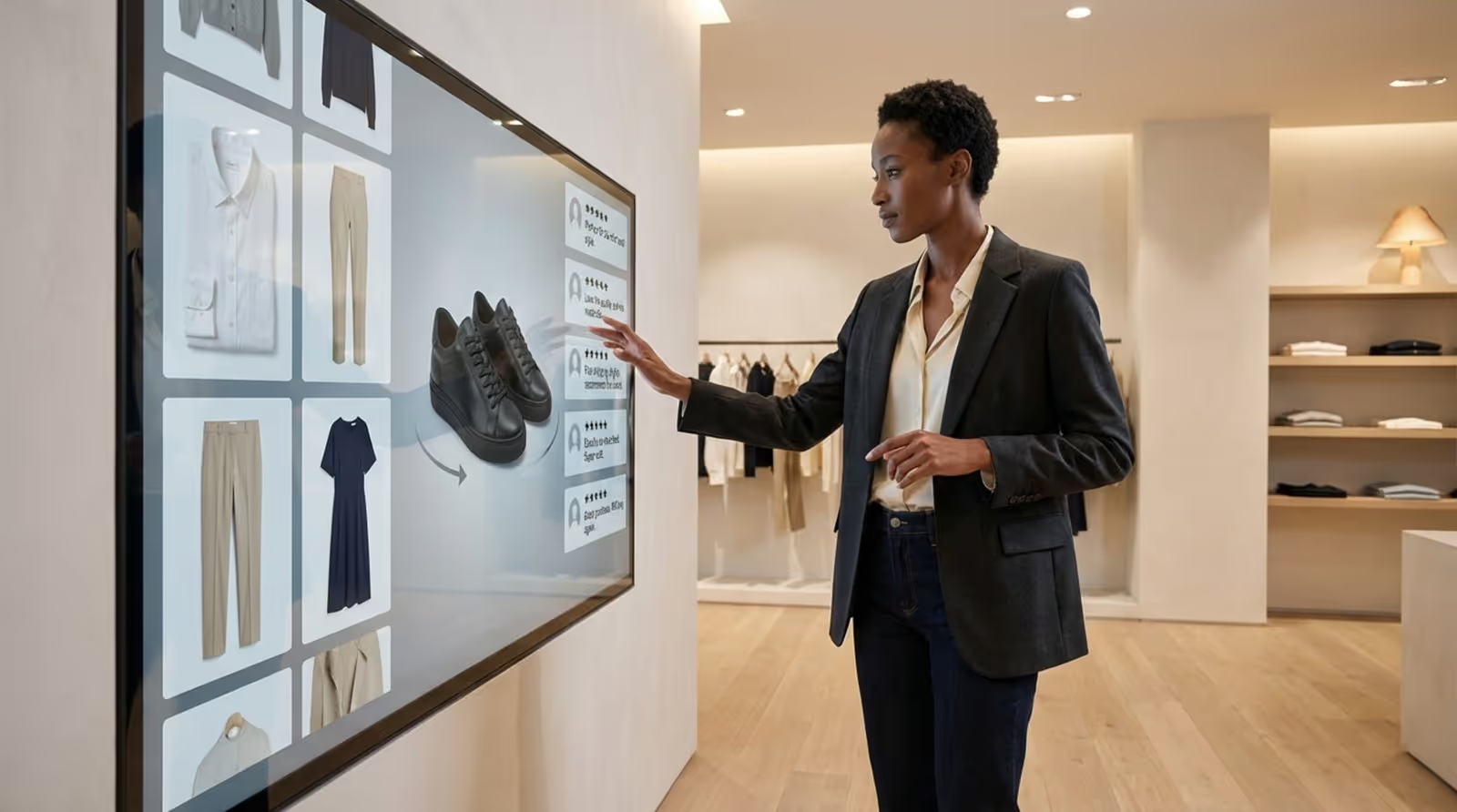
Interactive touchscreens let customers explore product details, view high-quality demos, or rotate 3D models. Zara’s London flagship store, for example, uses interactive screens to connect online and in-store shopping. This kind of engagement informs shoppers and reduces decision fatigue by showing information in a clean, visual way instead of long text.
Real-Time Deals and Countdown Countdown Offers
A ticking clock quickly builds urgency. Flash-sale countdowns and limited-time offers linked to POS data push impulse buys. By showing live stock levels, retailers can sell the last units of popular items, using scarcity to encourage fast decisions. These messages can update automatically so that when an item sells out, the promotion switches to a “restock soon” notice.
Customer Reviews and Loyalty Program Highlights
Social proof is a strong driver. Showing verified reviews and star ratings right on the shop floor grows trust faster than classic ads. Screens can also explain loyalty program benefits, highlight live rewards, or show point milestones to nudge shoppers to sign up and stay active with the brand.
Restaurants: Upgrading Menus and Customer Experience
For restaurants and cafes, digital signage improves operations and boosts visual appeal. It offers flexibility that printed menus cannot match.
Digital Menus with Live Updates
Brands like McDonald’s use digital menu boards to promote meal deals and limited-time items. These boards can switch automatically between breakfast, lunch, and dinner based on time. When connected with POS systems, they always show correct prices and availability, which helps avoid frustration when items sell out.
Chef’s Specials and Nutrition Displays
Highlighting high-margin dishes with vivid, “steaming” food animations can tempt customers to try new items. Showing clear nutrition facts and ingredient lists supports health-focused guests and people with specific dietary needs (like gluten-free or vegan), building trust and a sense of care.
Customer Feedback and Social Media Integration
Live social media feeds or “Question of the Week” screens can build a sense of community. When guests see their own food photos featured, they feel noticed and appreciated. Simple feedback panels near the exit can gather real-time opinions on service and food quality.
Corporate: Internal Communication and Employee Engagement
In offices and corporate campuses, digital signage is a key tool for internal communication and for keeping teams aligned around shared goals.
Announcements and KPI Dashboards
Lobbies, corridors, and breakrooms are ideal spots for company news, event announcements, and real-time KPI dashboards. At Microsoft’s headquarters, dynamic displays show live data and internal updates, helping employees stay informed and connected to the company’s mission and performance.

Employee Recognition and Milestone Highlights
Public recognition of birthdays, work anniversaries, and project achievements lifts morale and output. Digital “Employee Walls” with photos and short bios help people get to know each other and encourage peer recognition, building a more positive and supportive workplace.
Sustainability and Company Values Displays
Many workers and customers want to support businesses that care about the environment and social issues. Digital signage can show live stats on energy savings, recycling, or volunteer work. This brings company values to life through visible numbers and stories instead of just written statements.
Banking and Finance: Building Trust and Informing Clients
Banks and financial institutions use digital signage to turn waiting areas into useful information centers that offer real value while people wait.
Market Updates and Financial News Tickers
Live stock quotes, interest rate charts, and economic headlines help position the bank as a knowledgeable partner. These feeds keep clients engaged and give them information to support better financial decisions.
Branch Services and Compliance Announcements
Showing branch hours, service lists, and security alerts (like scam warnings or data privacy tips) builds trust and clarity. Simple visual breakdowns of mortgage options or loan products can also make complex choices easier, improving the client experience.
Healthcare: Patient Support and Efficient Navigation
In hospitals and clinics, digital signage helps lower stress and improve patient flow.
Appointment Queues and Wayfinding Maps
Large facilities such as the Mayo Clinic use digital screens to show live queue status and interactive maps. Knowing their place in line and how to reach the next department reduces confusion and tension for patients and visitors.
Health Tips and Emergency Alerts
Waiting rooms are perfect for a mix of short entertainment and practical health advice. In emergencies, screens can instantly switch to clear safety instructions or evacuation routes, forming an important part of the site’s safety system.
Transportation: Real-Time Information for Travelers
Busy locations like airports, train stations, and bus hubs depend on digital signage to keep people moving and informed.
Arrival and Departure Boards
Live flight status, gate changes, and schedule updates are key for a smooth trip. Systems like those at Heathrow Airport guide travelers through complex terminals while also promoting local shops, attractions, and services.
Service Changes and Safety Announcements
During delays or breakdowns, digital signs deliver fast updates on cancellations, new routes, or replacement services. This helps travelers adjust plans and reduces confusion, while also supporting safety messages when needed.
Hospitality and Entertainment: Inspiring Visitors and Guests
Hotels, cinemas, and entertainment venues use digital signage to build excitement and give visitors a modern, polished experience.
Event Promotions and Ticketing Information
Cinemas and theaters show trailers, showtimes, and special offers on bright, moving screens, which helps drive ticket sales and concession purchases. Promoting upcoming events or guest appearances with bold visuals generates buzz that static posters struggle to match.
Interactive Guest Services and Virtual Tours
Hotels can install self-service kiosks for check-in and offer virtual tours of rooms, conference spaces, spas, gyms, and pools. These tools let guests explore options themselves, improve their stay, and reduce pressure on reception staff.
Innovative Ideas to Inspire Your Digital Signage Content
Rotating Product Spotlights and Inventory Boards
Instead of showing one static list, use scheduling tools to rotate product groups every few minutes. Link screens to your inventory system so “low stock” or “last items” notices appear automatically, nudging customers to buy before items run out.
Seasonal Campaigns and Holiday Themes
Keep content timely by matching it with seasons and holidays. Use themed graphics, colors, animations, and even synced music to create a festive mood. Build a simple “storyline”: start with teasers, move to feature promotions, and finish with a reward, such as a holiday discount code.
Personalized Greetings and Welcome Messages
Personal messages make people feel noticed. Use screens to greet specific groups: “Welcome to the Smith Wedding” or “Welcome, ABC Corp Team.” In offices, connect your CRM or HR system with signage to trigger birthday or work anniversary messages automatically.
User-Generated Content and Social Media Walls
Invite customers to post with a certain hashtag and show approved posts on a live wall. This gives you free, authentic content and makes people feel part of your brand community. Use moderation tools to filter out anything off-brand or inappropriate.
Live Polls, Surveys, and Interactive Games
Turn screens into two-way tools. Add QR codes that open polls, quick surveys, or simple games on visitors’ phones. Show live results on the screen to build interaction and keep people engaged for longer.

Behind-the-Scenes Videos and Interactive Tutorials
Honest, behind-the-scenes content builds trust. Share short clips of how products are made or introduce staff members. In retail locations, short “how-to” videos near products can show use cases, helping customers picture how items fit into their daily lives.
Environmental Impact Metrics and Community Updates
Show how your brand contributes to society and the planet. Display live data from sensors or tracking tools that measure energy savings, waste reduction, or donations. Highlight local sponsorships and events to show support for the community.
Emergency Alerts and Critical Messaging
Digital signage should be part of your emergency plan. Prepare ready-made templates for fire alarms, lockdowns, severe weather, or other incidents. Trigger them with one action so all screens show clear instructions that help keep people safe.
Tips to Maximize Impact for Dynamic Digital Signage Content
Engage Viewers with Visual Hierarchy and Animation
Place the main message at eye level, usually near the center of the screen. Use gentle motion, like subtle borders or fade effects, to catch attention without distracting from the message. Avoid too many moving elements, which can confuse or annoy viewers.
Optimize Content for Screen Placement and Resolution
Location shapes what should be on screen. A display at a mall entrance should focus on directions and general greetings. A screen at the checkout should highlight add-on products and loyalty offers. Always match content size, aspect ratio, and resolution to the display to avoid distorted or blurry visuals.
Maintain Brand Consistency and Clear Messaging
Your digital signs should clearly reflect your brand identity. Use the same colors, fonts, and tone of voice across all content. Keep layouts simple: limit each slide to one main idea and one clear CTA, such as “Scan to Join,” “Order Now,” or “Visit Aisle 3.”
Leverage Real-Time Data and Contextual Triggers
Advanced setups use rules based on data. For example, if a weather API shows rain, screens can switch to ads for umbrellas or hot drinks. If it’s hot and sunny, they might show cold beverages or outdoor gear. This makes content feel timely and helpful.
Use Multilingual Rotations for Diverse Audiences
In big cities or international locations, language diversity matters. Rotate messages in different languages to reach more people. Use language tags in your CMS to automate which language appears at what time or in which area, based on audience patterns.
Frequently Asked Questions about Digital Signage Content Creation
Which Content Types Perform Best for Dynamic Screens?
Video and motion graphics tend to perform better than static images. Short clips of 15-30 seconds work well in busy areas where people are moving quickly. In waiting areas, longer content or live feeds are more suitable because people stay longer. Interactive touches such as QR codes also work well, as they link the screen to the viewer’s phone.
How Often Should You Refresh Digital Signage Content?
To avoid “screen fatigue,” you should update content regularly. For internal communication in offices, weekly updates work well. In retail and restaurants, daily changes-or even hourly ones using automated rules-keep repeat visitors interested. At a minimum, change seasonal or campaign content every 10-14 days.
What Are Common Mistakes with Digital Signage Content?
Frequent mistakes include too much text, poor-quality images, and no clear call-to-action. Many organizations also forget about viewing distance; text that seems fine on a laptop may be unreadable on a high-mounted large screen. Another problem is letting content go stale, which leads people to ignore the screens over time.
Looking ahead to 2026 and beyond, AI-driven content creation and deeper personalization will likely become standard parts of digital signage. For those just starting, using a strong platform like Look DS, with a 14-day trial, can help explore these options without heavy upfront effort. Beyond hardware choice, success depends on having a clear plan: every pixel should have a purpose, and every message should improve the experience for customers or employees. By focusing on high contrast, timely content, and straightforward calls-to-action, any organization can turn digital displays into a powerful tool for growth and connection.





