

Table of Content
Digital signage works best when the content on screen is fresh, interesting, and relevant. One of the simplest tools to keep it that way is the RSS feed. RSS (Really Simple Syndication) lets websites send new content to other systems automatically. For digital signage, this means your screens can show the latest updates without anyone having to upload new files all the time. This guide explains how RSS feeds can improve your displays and lists some of the best feeds in different categories so your screens stay lively and useful.
What Are RSS Feeds and Their Role in Digital Signage?
An RSS feed is a standard XML file that lists the latest content from a website. You can think of it as an automatic internet news ticker that sends headlines, short summaries, and sometimes images to any system that subscribes. On digital signage, this lets you show a steady stream of new information, keeping viewers informed and interested while cutting down on manual work.
This automatic content flow helps move digital signage from simple, static slides to live, real-time displays. News, weather, sports, and industry updates can all come through RSS feeds, so your screens always have something new and useful to show, which makes them much more effective.
How Do RSS Feeds Deliver Real-Time Content to Digital Screens?
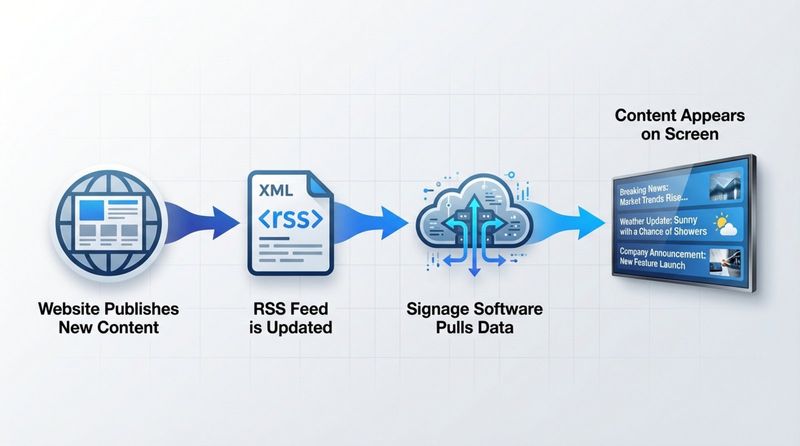
RSS feeds work because they follow a simple, shared format. When a site publishes new content, it updates its RSS feed in XML. Your digital signage software, using an RSS reader or app, connects to the feed’s URL and pulls the latest items. This usually happens on a schedule you set.
The software reads the XML, grabs the headlines, summaries, links, and sometimes images, and then shows them on your screens. When the source posts something new, your screens can show it within minutes. This turns a fixed display into a live information board, often using layouts like scrolling tickers or small news panels on the screen.
Why Use RSS Feeds for Digital Signage Displays?
RSS feeds offer several strong advantages for digital signage. They keep content fresh, so viewers don’t keep seeing the same messages day after day. Because the feeds update themselves, your team doesn’t have to log in every day to make changes, saving time and effort.
They also help pull in more attention. Real-time news, fun facts, local updates, or sports scores make your screens a place people actually want to look at, rather than something they ignore. This builds on ideas old-style billboards used (like showing the current time and temperature) and expands them with richer and more varied content.
Benefits of Displaying the Best RSS Feeds on Digital Signage
Using RSS feeds on digital signage gives you a strong edge in a fast-moving information environment. Automatic updates keep your content active while reducing manual work for your staff. At the same time, viewers enjoy more useful and timely information, which makes your screens more valuable.
Increases Audience Engagement and Attention
Digital signage that shows RSS-based content tends to grab more attention. People are naturally drawn to screens that show new and relevant updates. Breaking news, local happenings, or live scores give people a reason to stop and watch, even if only for a few seconds.
Because the content keeps changing, people may check the screens again and again. Digital signage already has better recall than static posters, and adding live RSS feeds strengthens that effect, making your messages easier to remember.
Delivers Timely Information Instantly
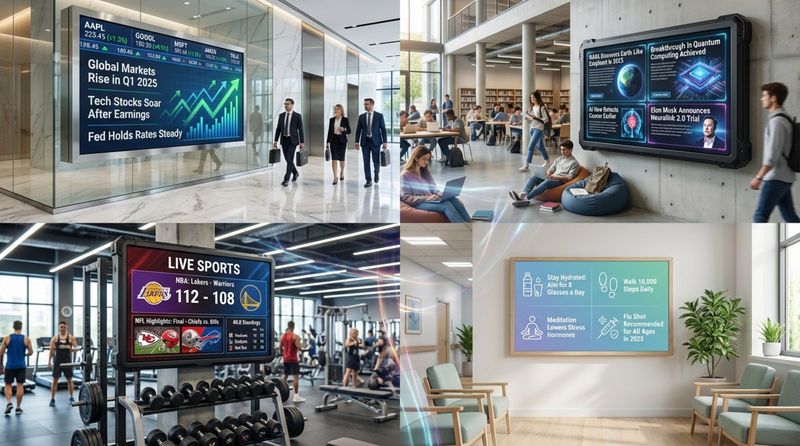
RSS feeds shine when timing is important. In a corporate lobby, you might show live stock prices or market headlines. In a hospital, you could show health news and safety tips. In a store, you could show quick promotions or product updates. Feeds cut out the delay between a source publishing information and your signage showing it.
This is especially helpful in fast-moving industries like finance and tech, where today’s news can quickly become outdated. RSS feeds can also carry public-interest updates such as severe weather alerts or emergency notices, giving your screens a useful public service role.
Simplifies Content Automation and Scheduling
Once you set up an RSS feed in your signage system, it keeps bringing in new items without more work from you. Content managers no longer need to upload new slides every day just to keep things from going stale.
This automatic flow keeps your screens active even when no one is around to manage them. Many platforms let you schedule different feeds at different times or on different screens, so you can show the right type of information at the right moment or in the right location.
Keeps Content Diverse and Relevant
RSS feeds give you access to a wide range of content, so your screens can appeal to many types of viewers. Instead of relying only on internal messages, you can mix in news, weather, sports, industry insights, and light entertainment from well-known sources.
This variety helps prevent viewers from getting bored and positions your screens as a helpful information point. People learn they can glance at your displays to catch up on the latest, making your signage a habit instead of a background element.
Criteria for Selecting the Best RSS Feeds for Digital Signage
Choosing the right feeds is key. You want feeds that match your goals, fit your audience, and work smoothly with your signage system. Several points matter when you pick which ones to use.
Content Reliability and Frequency of Updates
Good RSS feeds come from reliable sources and update often enough to stay useful. If a site posts rarely or has a poor record for accuracy, the feed will drag down the value of your screens. Look for large, well-known organizations with strong reputations for correct, timely information, such as BBC News or Reuters.
Match the feed’s update pattern to your needs. Breaking news feeds should refresh many times a day. Specialty or analysis feeds may only need daily or weekly updates. Always review how often the source posts and how trustworthy its content is.
Feed Compatibility with Digital Signage Software
The feed must work with your signage system. Most modern platforms support standard RSS, but you should still test any new feed before rolling it out widely. Some systems, such as Look DS, provide built-in apps for big-name news services, making setup very simple.
If you use a custom or less common feed, test whether your system can read its XML and show the text and images properly. Some feeds carry images or formatting that might not display well on all platforms. Running a short trial prevents surprises later.
Legal and Usage Permissions
RSS is made for sharing, but there are still legal limits. Most publishers allow their feeds to show headlines and short summaries in public or semi-public spaces. However, displaying full articles, full-size images, or video clips on commercial screens may require permission.
To avoid problems, check the site’s terms of use, especially if you want to show more than short excerpts. If needed, contact the publisher to confirm what is allowed. Always respect copyright rules and choose sources that openly allow or encourage signage use, or whose content clearly fits fair use in your region.
Categories of Top RSS Feeds to Play on Your Digital Signage
To get the most from digital signage, mix several types of RSS feeds. Different locations and audiences respond best to different content. Below are key categories and examples you can add to your playlists.
News and Current Affairs Feeds
Many digital networks use news as a core content type. Live news feeds catch the eye and keep people informed. Large news outlets offer wide coverage of world and local issues.
For global news, BBC News and CNN are popular choices. BBC News offers sections like “education & family,” “health,” “politics,” and “business,” so you can pick the most relevant topics. CNN allows filtering by location and category. Reuters Top News is another strong option, giving short, timely summaries of world events, politics, and business stories.
Business and Finance Feeds
In offices, banks, and financial firms, business and finance feeds are especially useful. They address professionals who care about markets, economies, and investments.
Forbes covers finance, tech, business, and entrepreneurship, making it well suited for corporate and banking displays. Bloomberg is a major source of global business and market data, and its Bloomberg Markets feed offers numbers, charts, and analysis. CNBC is known for live stock market coverage and investment advice. The Wall Street Journal adds detailed reporting on business, economics, and policy.
Technology and Innovation Feeds
Tech and innovation feeds work well in tech companies, co-working spaces, universities, and any place that wants to show a forward-looking image.
TechCrunch is a leading source on startups, new products, and tech business news. Wired focuses on how technology, science, culture, and business intersect and can feed stories on AI and future trends. The Verge mixes tech with science fiction, gadgets, and pop culture. Other useful feeds include ARS Technica for hardware and IT updates, MIT Technology Review for in-depth stories on tech and science, and VentureBeat for AI, gaming, and cybersecurity news.
Entertainment and Media Feeds
Entertainment feeds add light, fun content, ideal for waiting rooms, retail spaces, and lounges.
Entertainment Weekly covers celebrities, movies, TV, and pop culture. E! Online brings celebrity news, red-carpet fashion, and exclusive interviews. Variety focuses on the professional side of film, TV, music, and theater. BuzzFeed offers culture, lifestyle, quizzes, and short features that can quickly catch the eye. The New Yorker, with its mix of culture, humor, and commentary, adds a more refined entertainment option.
Health and Wellness Feeds
Health feeds are well suited to hospitals, clinics, gyms, and workplaces that promote wellness. They share tips that can help people improve their daily lives.
Healthline provides clear health and medical information, often with visuals like maps and videos. WebMD offers news, wellness tips, medication guides, and information about common conditions, making it strong content for healthcare screens. MindBodyGreen focuses on lifestyle and holistic health, including topics such as relationships, mindfulness, and nutrition. MedlinePlus Health News, maintained by the U.S. National Institutes of Health, covers diseases, treatments, and wellness advice. The CDC’s feeds give updated public health guidance and disease-prevention information.
Sports Scores and Updates
Sports feeds work particularly well in bars, gyms, campuses, and any place with fans who want live updates.
ESPN provides wide sports coverage, including news, scores, and highlights for football, basketball, baseball, soccer, and more. Yahoo Sports offers headlines and stats across many leagues, including NBA, MMA, and college sports. FOX Sports also provides feeds with game recaps, interviews, and analysis.
Education and School-Centric Feeds
Schools, colleges, and universities can use education feeds to share knowledge and motivate students.
NASA offers stories about space, science, and innovation, which fit especially well in STEM-focused areas. The U.S. Department of Education blog shares policy news, school programs, and events. Science Daily posts updates on a wide range of scientific fields. For younger students, Nerdy Book Club provides book ideas, Storytime Magazine focuses on children’s literature, and TinkerLab shares creative DIY and science projects. Campus Technology reports on tech use in higher education, while Discovery Education highlights digital tools and trends in teaching.
Travel, Weather, and Local Updates
Hotels, transit hubs, and community centers benefit from travel, weather, and local information that helps visitors plan their day.
National Geographic Travel offers strong visual content and stories about nature, science, and exploration. Lonely Planet shares travel guides, tips, and stories, including ecotourism and budget or luxury travel. Travel + Leisure provides destination reviews, news, and trip ideas. For weather, many TV stations and local news sites publish RSS feeds that include forecasts. For traffic, tools such as Google Maps and Traffic.com can report congestion and incidents, helping people plan their routes.
Examples of Highly Recommended RSS Feeds for Digital Signage
Below are some specific RSS feeds that work especially well on many kinds of displays. These sources are known for reliable content and broad appeal.
1. BBC News RSS Feed
The BBC News feed is one of the most trusted sources for global news. It covers a wide range of areas, including world events, politics, business, health, and science. The feeds update often and let you choose specific sections that match your audience, whether they’re in a lobby, waiting room, or public area. The BBC name also gives your screens added credibility.
2. CNBC Business News Feed
The CNBC Business News feed suits environments where finance and business matter most. CNBC delivers quick updates on stock markets, company news, and the wider economy. Its analysis is popular with managers, investors, and anyone watching financial trends. Showing CNBC content in banks, trading floors, or corporate offices helps keep viewers current on important market shifts.
3. TechCrunch Technology Feed
The TechCrunch Technology feed is ideal for spaces that care about today’s tech scene. It covers startups, apps, major tech firms, and product launches. TechCrunch is widely read by the tech community, so its headlines and summaries are naturally interesting to developers, entrepreneurs, and tech-savvy customers. Adding this feed can give your screens a modern, innovative feel.
4. ESPN Sports Updates Feed
The ESPN Sports feed is a strong choice anywhere fans gather. It offers scores, headlines, and highlights for many sports and leagues. In sports bars, gyms, student centers, or break rooms, ESPN content provides constant activity on screen and gives viewers a quick way to see what’s going on in the sports world.
5. NASA Education and Science Feed
The NASA Education and Science feed works well in schools, museums, and science-related workplaces. It features stories and images about space missions, discoveries, and research. The visuals are striking, and the topics often inspire curiosity in students and adults alike. Showing NASA updates can help spark interest in science and technology.
6. The Guardian World News Feed
The Guardian’s World News feed offers global coverage with a European viewpoint. The publication is known for deep reporting and careful investigation. This feed suits audiences interested in politics, society, and world issues. Including The Guardian on your signage adds another angle to your news mix and helps present a wider range of opinions and reports.
How to Add and Display RSS Feeds on Your Digital Signage
Adding RSS feeds to most modern digital signage systems is fairly simple. You pick the feed you want, add its URL in your content management system (CMS), and then choose how it should look on screen.
Connecting RSS Feeds to Popular Digital Signage Platforms
To connect an RSS feed, first find its URL. Many sites show an RSS icon (often an orange square with white curves) or a link labeled “RSS” or “Feeds,” often near the footer or help pages. Copy that feed link.
Next, log in to your signage CMS. Go to the “Apps,” “Widgets,” or similar section and choose the RSS option. Paste the feed URL into the appropriate field. On some platforms, such as EasySignage or Look DS, you can simply pick a well-known source (like BBC or CNN) from a list, and the platform handles the URL behind the scenes. You should then see a preview of how the feed will appear. Once it looks right, save and assign it to your layout or playlist. From that point on, the system checks the feed on a set schedule and updates your screens automatically.
Customizing RSS Feed Layouts and Tickers
After connecting a feed, you can adjust how it appears so it matches your brand and layout. Common options include:
- Layouts: Show the feed full-screen, in a smaller region alongside other content, or as a scrolling ticker along the top or bottom of the display.
- Visuals: Change text size, color, and font. Adjust background colors or add a branded background image. Some systems, like EasySignage with its RSS Image Automation, can automatically fetch and display images from the feed.
- Scrolling behavior: For tickers, set the scroll direction, speed, and animation style (e.g., smooth scroll or fade-in).
- Content filtering: Filter by keyword or category, and set how many stories appear at once or in rotation.
The main goal is to keep the feed readable and visually aligned with your other content, without crowding the screen or making it hard to follow.
Troubleshooting Common Integration Issues
Sometimes RSS feeds don’t work as expected. Here are common problems and quick checks:
- Feed not loading: Check for typos in the URL. Make sure you’re using the actual feed link (often ending in
.xmlor/feed/), not just the website’s home page. Confirm the feed opens correctly in a browser or RSS reader. - Content not updating: Review your refresh settings in the CMS; shorten the update interval if needed. If the feed itself hasn’t posted anything new, you might just be seeing a slow source. Cache settings in the signage player can also delay updates.
- Formatting issues: If text looks broken or images are odd sizes, adjust font and image settings. Some feeds contain complex HTML that your platform might not handle well. In those cases, try a simpler feed from the same publisher.
- “No content” message: This usually means the feed is empty, broken, or the URL is wrong. Test the link outside your signage system to confirm it works.
- Legal or copyright problems: If a source blocks you or complains, you may be displaying too much of its content or using it in a way the publisher doesn’t allow. Review the terms and adjust how you use that feed.
If issues continue, check your platform’s help guides or contact their support team for details specific to your software.
Tips for Maximizing the Impact of RSS Feeds on Digital Signage
Simply adding feeds is only the first step. To get real value, think about how, when, and where the content appears so it supports your communication goals and keeps people watching.
Rotating Feed Categories for Variety
Rotate different feed types over time to keep your screens interesting. For example, in a corporate office, you might show business news and markets in the morning, technology and industry updates mid-day, and lighter content such as lifestyle or entertainment in the late afternoon.
In a retail store, you might alternate entertainment news, style or lifestyle tips, and local weather or events. Many signage platforms let you schedule specific feeds for certain times of day or days of the week. This keeps your display feeling alive and better matches the changing interests of your audience throughout the day.
Combining Visuals with Feed Text for Higher Engagement
Text-only feeds can feel dry if they dominate the screen. Where possible, add images, icons, or short videos to support the text. Many advanced RSS apps can pull images directly from the feed and show them next to headlines.
If your software doesn’t support automatic images, you can still design templates that pair plain text headlines with stock photos, icons, or background graphics that match the topic (such as city skylines for business, stadium shots for sports, or nature images for travel). Even small visual touches can make it easier for viewers to notice and absorb the information.
Ensuring Readability and Accessibility
Feed content should be easy to read from a distance. Use clear fonts, large enough sizes, and high-contrast color combinations. Avoid patterned or very bright backgrounds behind text that make reading difficult.
Set ticker speeds so people can comfortably read each line before it moves off screen. Feeds usually work best when they display short headlines or brief summaries, not long paragraphs. Keeping things concise helps more people follow along, including those who only glance at the screen for a few seconds.
Frequently Asked Questions about Using RSS Feeds for Digital Signage
As you start using RSS feeds, some common questions may come up. The answers below can help you build an effective setup.
Should I Use Custom or Public RSS Feeds?
Public feeds from big news sites, industry publications, and entertainment outlets are easy to start with. They usually update often and cover topics that many people care about. Many signage platforms offer ready-made connections to these sources.
Custom feeds, such as ones from your own website or intranet, let you control the messages completely. You can show internal news, staff announcements, or very niche topics that matter only to your specific audience. They may take a bit more effort to set up, but they give you very focused content. Many organizations use a mix of both: public feeds for general interest and custom feeds for internal or branded messaging.
What Feed Update Frequency Is Ideal?
The best refresh rate depends on the type of content and your environment. For fast-changing topics like breaking news or stock prices, you might set your signage software to check the feed every few minutes. For content that changes less often, such as educational articles or lifestyle tips, updating every 30-60 minutes, or even once or twice a day, might be enough.
If you update too often, you might waste bandwidth or processing power without real benefit. If you update too rarely, your screens may look out of date. Start with a reasonable refresh rate based on the source’s own posting pattern, then adjust based on how quickly you see new stories appearing.
Are There Privacy or Security Concerns with Feeds?
RSS feeds from known publishers are generally safe because they mostly carry text and images rather than active code or user data. Even so, you should still apply basic security habits:
- Use trusted sources: Stick to well-known websites with good reputations, especially for news and finance.
- Filter content if needed: If you’re worried about inappropriate links or topics, choose feeds that fit your audience or use filtering tools built into your CMS.
- Keep software updated: Regularly update your digital signage platform and operating systems so you benefit from new security patches.
- Protect your network: Use strong passwords and, if possible, keep signage players on a separate network from your main business systems.
By following these steps, you can safely use RSS feeds without adding major risk to your setup.
Key Takeaways for Success with Digital Signage RSS Feeds
RSS feeds offer a simple way to keep your digital signage active, timely, and relevant. They reduce manual effort by pulling in new content automatically while giving viewers reasons to keep looking at your screens. You can treat your displays as live information points that always reflect what’s happening in the wider world and in your own organization.
By choosing reliable sources, mixing different content types, and presenting them in clear, attractive layouts, you turn passive screens into valuable communication tools. Regularly review which feeds get attention and adjust your mix when needed. With the right approach, RSS-driven signage can help inform, entertain, and guide your audience for a long time to come.


