
Table of Content
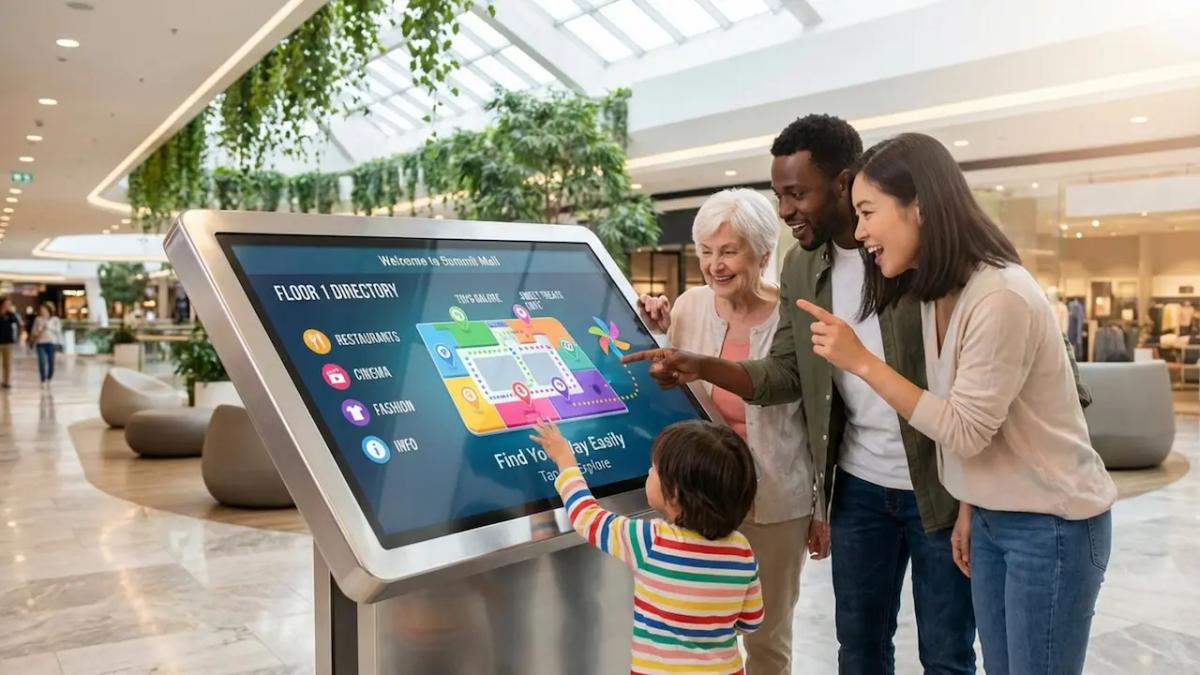
How often do shoppers leave a mall simply because they feel overwhelmed or cannot find what they need? A better mall directory UX transforms that frustration into a smooth experience. By replacing static maps with interactive digital guidance, you answer the question "Where do I go?" instantly. Unlike rigid printed boards, digital directories provide live communication that adapts to visitor needs, reducing navigation friction and turning a confusing maze into a manageable, pleasant journey.
Modern shoppers expect the same search speed in physical spaces that they get online. Digital signage bridges this gap, creating a form of "physical SEO" for your building. For mall operators, this technology does more than show a map-it provides data on visitor behavior that can help optimize traffic flow, improve tenant visibility, and support a better return on investment (ROI).
What is a Better Mall Directory UX With Digital Signage?
Differences between Traditional and Digital Mall Directories
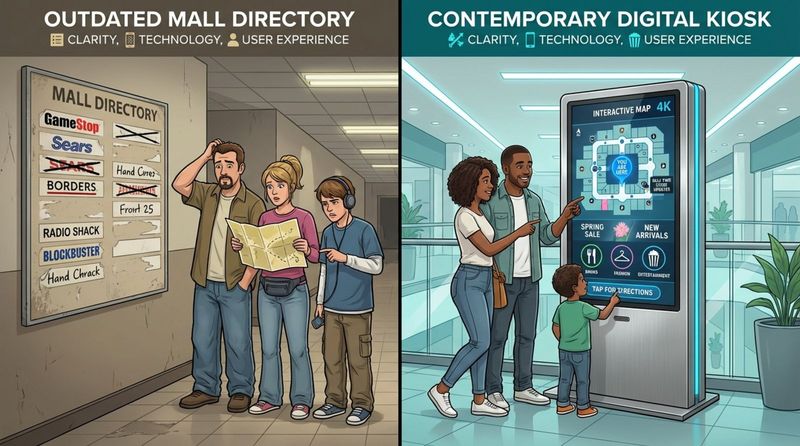
Traditional directories are static assets. Once a poster or board is printed, it is effectively obsolete. If a tenant moves or a new store opens, the signage becomes inaccurate, leading to confused visitors and wasted staff time answering basic questions. Updating these physical assets requires reprinting and manual installation, which is slow and costly.
Digital directories, by contrast, are dynamic. You can update content across your entire network in minutes using a cloud-based platform like Look Digital Signage. High-definition screens catch the eye far better than paper, and the ability to display motion graphics prevents "banner blindness." This flexibility allows you to highlight flash sales, event changes, or emergency routes instantly, making the directory an active part of your operations.
How User Experience Shapes Mall Navigation
User experience (UX) defines how a visitor feels from the moment they enter. In large complexes, navigation issues can quickly cause stress. Effective digital signage UX reduces mental load by layering information. Instead of forcing a user to scan a dense alphabetical list, interactive kiosks allow for focused searches by brand, category, or product.
When visitors feel in control, they relax. Relaxed shoppers tend to dwell longer and visit more stores. A responsive, easy-to-use interface reflects well on the mall's brand, shifting the perception of the visit from a chore to a leisure activity.
Key Benefits of Digital Signage for Mall Directories
Clearer Visuals and Lower Mental Effort
A primary goal of digital signage is to simplify the visual field. Static signs often clutter the view with too much data. Digital kiosks solve this through "progressive disclosure"-showing only what the user asks for. A visitor can type "shoes" and see only relevant stores, rather than scanning hundreds of names. This clarity preserves their energy for shopping.
Using bright, high-contrast displays ensures readability. Consistent icons and color-coded paths create a visual language that is easy to process. This efficiency helps keep crowds moving and reduces congestion in high-traffic entryways.
Real-Time Directory Updates
Outdated info is a major friction point. Retail tenants change, hours shift, and promotions rotate. Cloud-based tools, such as the Look CMS, allow facility managers to update directories from anywhere. Whether you are managing a single location or a network of malls across different regions, your screens can always reflect the current reality.
This capability is also vital for safety. In an emergency, you can instantly override standard content to display evacuation routes or safety alerts. This rapid response capability builds trust and demonstrates a commitment to visitor safety.
Interactive Wayfinding and Touch Features
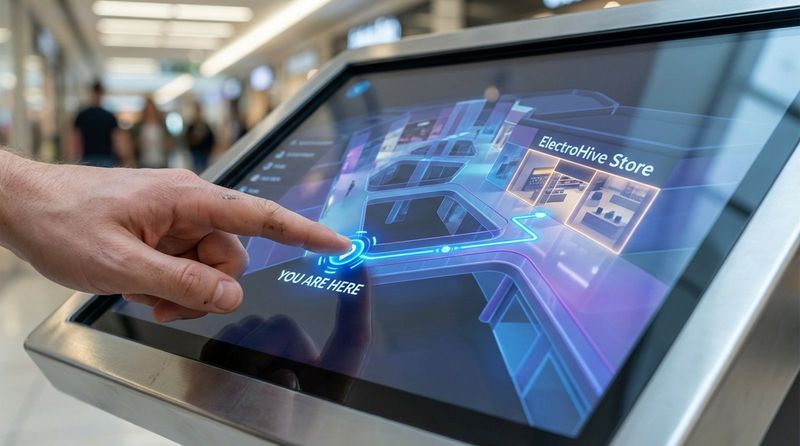
Interactivity transforms a passive screen into a helpful tool. Touch capabilities allow users to zoom, rotate maps, and trace paths. This level of control helps visitors orient themselves quickly using "You Are Here" markers. With Interactive Scenarios in Look DS, you can build these engaging experiences without complex coding, linking buttons and triggers to specific maps or store details.
Beyond maps, these kiosks can serve as information hubs. Visitors can check cinema times, browse restaurant menus, or scan QR codes to take information with them. This turns a simple directional search into an opportunity for discovery.
Support for Multiple Languages and Accessibility
In diverse retail environments, language barriers can limit spending. Digital directories can offer multi-language support with a simple toggle, welcoming tourists and residents alike. This inclusivity ensures that every visitor can navigate confidently.
Accessibility features are equally important. Software can include modes that lower the interface elements for wheelchair users or increase contrast for those with visual impairments. Designing for inclusivity ensures that your space is welcoming to everyone.
Personalization and Adaptive Content
Digital signage can adapt to the environment. Using data integrations, screens can shift content based on external factors. On a rainy day, the system might highlight indoor entertainment or coffee shops; on weekends, it might prioritize family activities. This relevance makes the signage feel helpful rather than intrusive.
While strict privacy is essential, general usage patterns can guide content. If analytics show that morning visitors prefer quick services, the directory can prioritize those categories on the home screen during those hours, streamlining the experience for early risers.
Higher Engagement and Shopper Satisfaction
Interactive screens can inject fun into the shopping experience. Gamified elements, such as scanning a QR code for a digital treasure hunt, can guide flow to under-visited areas. These moments of delight encourage visitors to explore more of the property.
Data suggests that efficiently guided shoppers are more satisfied. When navigation is intuitive, frustration drops, and dwell time increases. This positive sentiment benefits tenants directly, as happy shoppers are more likely to make purchases.
Cost Savings Compared to Printed Directories
While digital screens require an initial hardware investment, the total cost of ownership often favors digital over time. You eliminate the recurring costs of printing, shipping, and manually installing paper updates. Additionally, reliable hardware like the Look HDMI Player ensures stable performance without frequent technical interventions.
Furthermore, digital screens open new revenue streams. You can sell ad space to tenants or external brands, running promotions alongside directory content. This turns a cost center into a revenue-generating asset.
Core Features of Modern Digital Mall Directory UX
Map-Based Routing and Step-by-Step Directions
Modern wayfinding offers more than a static picture. It provides dynamic, step-by-step routing that accounts for elevators, escalators, and multi-floor navigation. Screen Layouts within the CMS allow you to display the map alongside written instructions or promotional banners, maximizing the utility of the screen real estate.
Integrations with specialized mapping engines ensure accuracy. Detailed models of the floor plan help users navigate complex junctions, reducing the "where am I?" hesitation that blocks flow.
Location-Based Services and Indoor Positioning
Advanced setups may use indoor positioning technologies (like beacons or Wi-Fi triangulation) to provide a "blue dot" experience similar to GPS. This real-time orientation helps users track their progress as they move toward their destination.
These services can also trigger proximity-based messaging. As a shopper enters a specific wing, the nearest directory can display offers relevant to that zone, connecting the digital guide with the physical journey.
Store Search and Categories
A robust search function is the heart of a digital directory. Users should be able to search by store name, category (e.g., "Kids," "Dining"), or even specific products. This flexibility helps visitors discover new tenants they might have otherwise missed.
Smart categorization improves speed. Quick-access buttons for "Restrooms," "Parking," or "ATMs" resolve immediate needs in seconds, improving the overall perception of facility management.
Mobile Integration and QR Codes
The "mobile handoff" is a critical feature. By generating a QR code on the kiosk, visitors can transfer the map and directions to their smartphones. This allows them to walk away from the screen while keeping the guidance active. Look's Content Creator makes it simple to generate and embed these QR codes directly into your layouts.
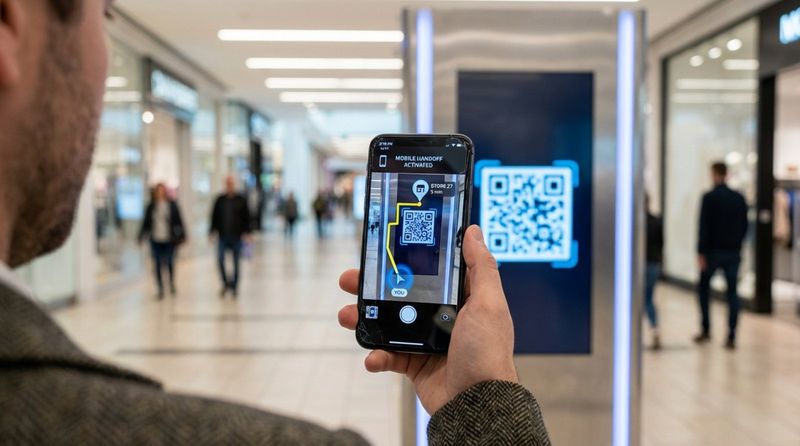
This integration also drives app adoption. Use the directory to encourage app downloads for loyalty points or exclusive coupons, creating a bridge between your physical and digital presence.
Favorites, Wish Lists, and Smart Suggestions
Advanced interactive scenarios allow users to build temporary plans. A visitor might select three stores they intend to visit, and the system can plot the most efficient route. This utility transforms the directory from a passive map into a planning tool.
Smart suggestions can also upsell. If a user searches for a cinema, the system might suggest a nearby restaurant for a pre-movie meal, driving cross-tenant traffic.
Live Inventory and Event Highlights
Through API integrations, digital signage can display live data. If a tenant's inventory system is connected, the directory could theoretically show product availability. More commonly, this feature is used for event schedules-showing real-time movie start times or workshop slots.
Promoting events on high-traffic screens builds atmosphere. Countdowns to holiday light shows or live performances encourage visitors to stay longer, reinforcing the mall as a community hub.
Accessibility and Inclusion Considerations
Design for Visual and Physical Accessibility
A good directory works for everyone. Controls should be placed within reach of wheelchair users (often called "accessible mode"). High-contrast visual modes and clear, sans-serif fonts help those with low vision read the screen easily.
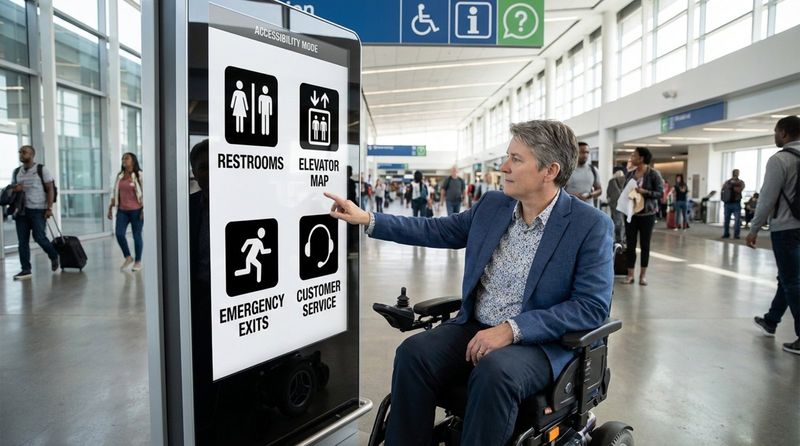
Software flexibility is key here. Features like text-to-speech or simplified routing that avoids stairs should be readily available. This attention to detail reduces anxiety for visitors with mobility challenges.
Multiple Languages and Plain Language
Avoid jargon. Directions should be simple and direct. Icons and pictograms are universal; a fork and knife icon is understood globally, reducing the reliance on translated text. However, for deeper content, offering a language menu is a best practice in international hubs.
Adaptive Interfaces for Different Needs
Interfaces can adapt to the user. A "Staff Mode" hidden behind a passcode might reveal service corridors or maintenance logs, while the public mode remains focused on shopping. Voice command integration is also emerging as a way to support touch-free or visually impaired navigation.
Data Insights and Marketing Opportunities
Understanding Visitor Behavior and Movement
Digital directories are powerful data collection points. Playback Analytics and interaction logs can reveal what visitors are searching for most often. If "Vegetarian Food" is a top search but you have few options, that is valuable intelligence for your leasing team.
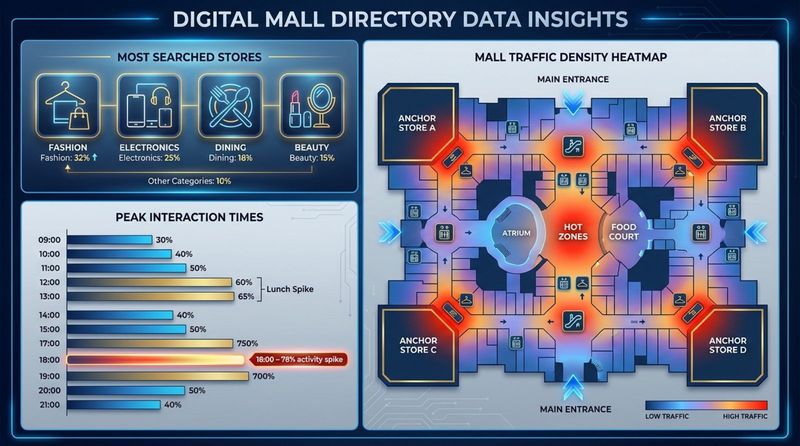
Tracking "zero result" searches helps identify gaps in your tenant mix. This data-driven approach removes guesswork from layout planning and tenant acquisition.
Targeted Ads and Store Promotions
Digital signage is an advertising engine. You can schedule content to match foot traffic patterns-showing coffee ads in the morning and dinner specials in the evening. With Smart Scheduling, these changes happen automatically across the network.
For tenants, this is a premium value add. Being able to promote a flash sale on a high-traffic lobby screen can significantly boost their daily revenue. The ability to prove that ads ran via Proof-of-Play reports makes selling this inventory easier.
Feedback and Constant Improvement
Simple feedback buttons (e.g., "Was this helpful?") provide immediate insight into directory performance. Monitoring this feedback allows you to refine the user interface (UX) continuously, ensuring the system remains helpful rather than frustrating.
Best Practices for Deploying Digital Signage in Mall Directories
Smart Screen Placement and Hardware Choices
Placement dictates usage. Kiosks should be located at natural decision points: entrances, escalator landings, and central atriums. Hardware must be durable enough for public spaces. Look Digital Signage supports a wide range of hardware, including the plug-and-play Look HDMI Player for easy deployment, or you can run the Look App on compatible touch screens you may already own.
Central Content Management
To manage a mall network efficiently, a central CMS is non-negotiable. Look digital signage is designed for this exact scenario, allowing you to manage screens across multiple floors or buildings from a single dashboard. This centralization ensures consistent branding and prevents out-of-date content from lingering on forgotten screens.
Role-based access is also important. You can grant marketing teams access to upload promos while restricting system settings to IT staff, ensuring security and stability.
Regular Maintenance and Technical Support
Reliability is critical. Screens that are black or displaying error messages damage confidence. Look DS includes Offline Playback, which ensures your directories keep running even if the internet connection drops. This local caching is a vital feature for maintaining uptime in large concrete structures where Wi-Fi can be spotty.
Security and Privacy
Public kiosks must be secure. Lock down the operating system to prevent unauthorized access (kiosk mode). When collecting data, ensure it is anonymized and compliant with local regulations. Transparency about data use builds trust with your visitors.
Measuring ROI and Performance
To validate the investment, track specific KPIs using your analytics dashboard:
- Total number of interactions/sessions.
- Most searched categories/stores.
- Dwell time per session.
- Ad interaction rates (QR scans).
These metrics help you prove the value of the system to stakeholders and guide future content strategies.
Future Trends in Mall Directory UX with Digital Signage
AI-Powered Personalization and Suggestions
The Look AI Wizard is already helping teams generate content faster, but the future holds even more predictive power. AI will eventually analyze aggregate crowd data to adjust layout priorities in real-time, perhaps highlighting umbrella shops automatically when it starts raining.
Touchless and Sensor-Driven Experiences
Hygiene concerns have accelerated the adoption of touchless tech. Gesture control and voice search are becoming more reliable, offering visitors a way to interact without physical contact. This also adds a "futuristic" feel that appeals to tech-savvy shoppers.
Green and Energy-Efficient Displays
Sustainability is a priority. Modern screens and players are becoming more energy-efficient. Scheduling screens to power down automatically during closing hours via the CMS not only saves energy but extends the lifespan of your hardware.
Omnichannel and Immersive Experiences
The gap between digital and physical is closing. Future integrations may involve Augmented Reality (AR), where users hold up their phones to see arrows overlaid on the real world, guided by the directory system. This seamless blend of tech creates memorable experiences that online shopping cannot replicate.
Frequently Asked Questions about Mall Directory Digital Signage
Can digital signage be customized for individual stores?
Yes. While the main directory serves the whole mall, individual stores can use digital signage for their own branding. Look DS allows for multi-user environments where a tenant could theoretically manage their specific ad slot, or the mall management can simply schedule tenant-provided content into the main playlist.
What are the costs of deploying and maintaining digital directories?
Costs vary based on screen size and hardware quality. However, software costs are predictable. Look Digital Signage offers transparent subscription pricing that scales with your network. You can start with a single screen to test the concept. Ongoing costs are generally lower than print because you eliminate the labor and materials associated with physical sign replacement.
How can malls assess the success of directory signage upgrades?
Success is measured through analytics. Look CMS provides detailed reports on playback and uptime. By correlating this data with foot traffic and tenant sales during specific campaigns, you can build a clear picture of ROI. High interaction rates generally correlate with improved visitor satisfaction scores.
Are there content restrictions for digital mall directories?
Content should always align with the mall's code of conduct and local laws. Since these are public screens, avoiding controversial or age-inappropriate content is standard practice. Technically, the system allows you to publish whatever you need, but a defined approval workflow in the CMS helps prevent accidental or off-brand posts.


