
Table of Content
How do you ensure hundreds of screens across a shopping center remain relevant without dedicating a full-time staff member to manage them? A mall digital signage content calendar is the strategic roadmap that answers this question. It outlines exactly what content plays, when it appears, and on which displays, transforming static screens into a responsive communication network that drives foot traffic and supports tenants.
Without a plan, even impressive video walls become digital wallpaper-ignored by shoppers and difficult for teams to manage. A well-structured calendar ensures a balanced mix of promotions, wayfinding, and entertainment. It allows marketing teams to align on-screen messaging with seasonal events, store openings, and daily traffic patterns, creating a cohesive experience from the parking garage to the checkout line.
What Is a Mall Digital Signage Content Calendar?
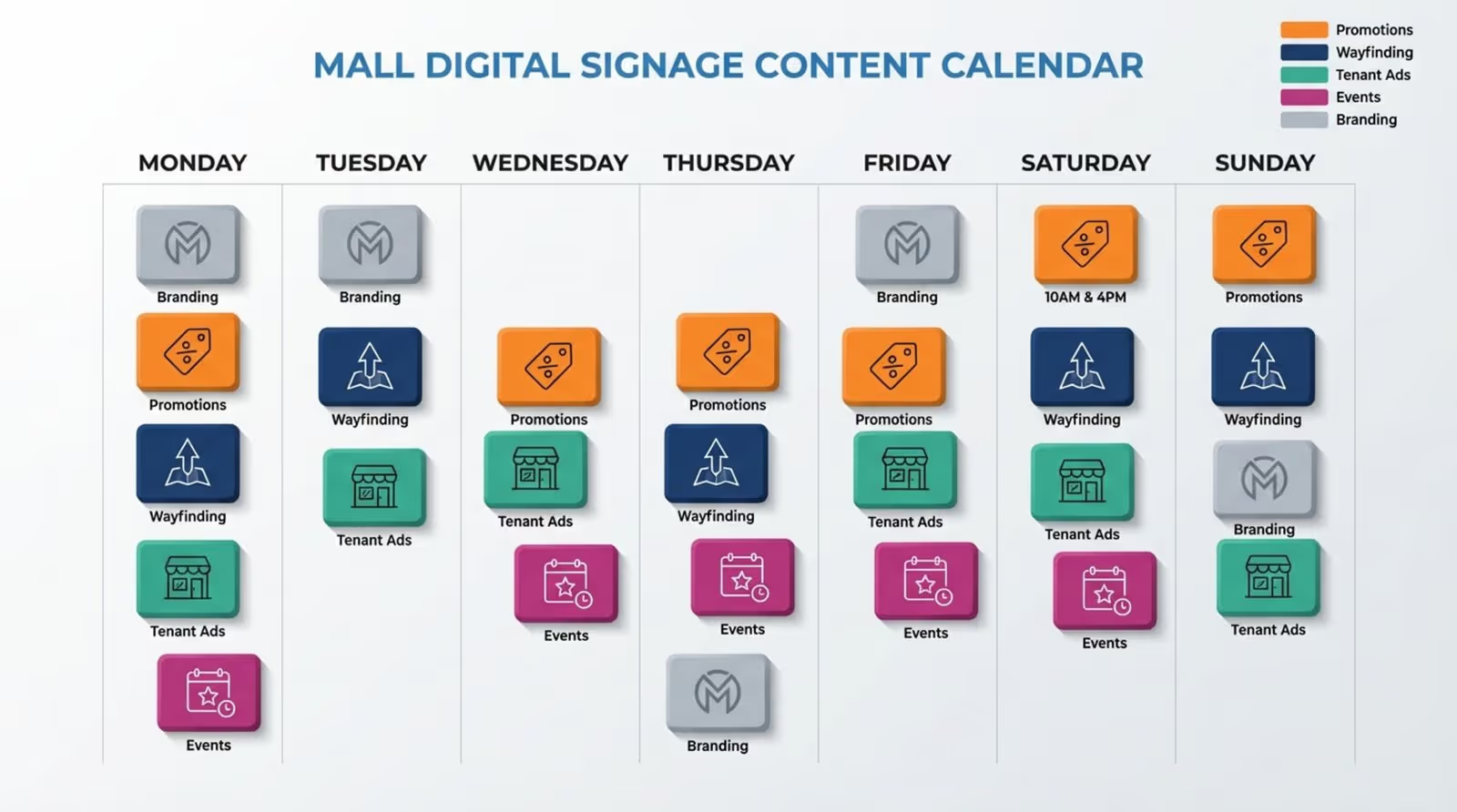
A mall digital signage content calendar is an organizational tool for managing the lifecycle of your visual communications. It is more than a folder of images; it is a timeline that coordinates specific content types across different zones of the property. For example, an interactive kiosk in the food court requires different assets than a large-format LED display at the main entrance. The calendar provides the structure needed to manage these differences efficiently.
Modern malls are mixed-use destinations featuring retail, dining, entertainment, and workspaces. A content calendar supports this complexity by moving beyond simple slideshows. It connects property-wide goals-such as sustainability initiatives or holiday events-with the operational needs of tenants. Using a central planning document helps managers keep content fresh, professional, and consistent with the mall's brand identity.
How Does a Content Calendar Improve Shopping Mall Communications?
Communication in large retail properties can often feel fragmented. A content calendar solves this by acting as a single source of truth for all visual messaging. It improves information flow by ensuring visitors see relevant content at the right time. For instance, scheduling transit schedules or traffic updates to appear only during evening rush hour helps shoppers plan their departure without clogging screens earlier in the day.
A calendar also supports a more welcoming tone. Instead of a repetitive loop of advertisements, you can schedule community-focused content, such as welcome messages for new store openings or trivia about local history. This variety combats "screen blindness," where shoppers ignore displays that never change. Regular updates build trust and position the mall as a modern community hub.
Why Schedule Content for Mall Digital Signage?
Scheduling transforms screens from passive displays into active marketing tools. In retail environments, timing is critical. A breakfast special is irrelevant at 4:00 PM, just as a late-night cinema schedule offers little value at 9:00 AM. Proper scheduling allows operators to maximize the value of their network, reaching specific audiences when they are most likely to take action.
Planning ahead also stabilizes operations. Teams can build schedules for an entire month or year, which is vital during high-pressure seasons like Black Friday or the holidays. This proactive approach eliminates last-minute scrambles and ensures the visual environment remains polished, even when staff are occupied with other tasks.
Reduces Manual Work and Human Error
Relying on manual updates often leads to inconsistency. If a staff member forgets to remove a "Valentine’s Day" promo on February 15, the mall looks outdated. Modern digital signage software allows you to set precise start and end dates for every media file. A campaign ending at midnight can automatically disappear from every screen without requiring manual intervention.
Automation also handles recurring events efficiently. If a mall hosts a weekly "Senior Discount Day," that content can be scheduled to run exclusively on specific mornings and remain hidden the rest of the week. This "set and forget" capability frees up staff to focus on tenant relationships rather than daily playlist management.
Keeps Messaging Timely and Relevant
Relevance drives engagement in physical retail. Digital signage offers flexibility that print cannot match. A content calendar helps teams leverage this by aligning content with external factors. For example, if a heatwave is forecast, a prepared "Summer Cooling" playlist featuring ice cream vendors and air-conditioned cinema offers can be deployed immediately.

Timeliness also aligns with the daily rhythm of the mall. Content can adapt to the energy of different times of day. High-energy, fast-paced visuals work well during busy weekend afternoons, while calmer, information-heavy content may be better suited for quiet weekday mornings.
Boosts Shopper Engagement and Tenant Satisfaction
Tenants are the lifeblood of the mall, and digital signage is a powerful amenity to offer them. By integrating tenant offers, such as flash sales or loyalty program sign-ups, into the calendar, management directly supports tenant revenue. Tenants see the mall investing in their success, while shoppers discover deals they might otherwise miss.
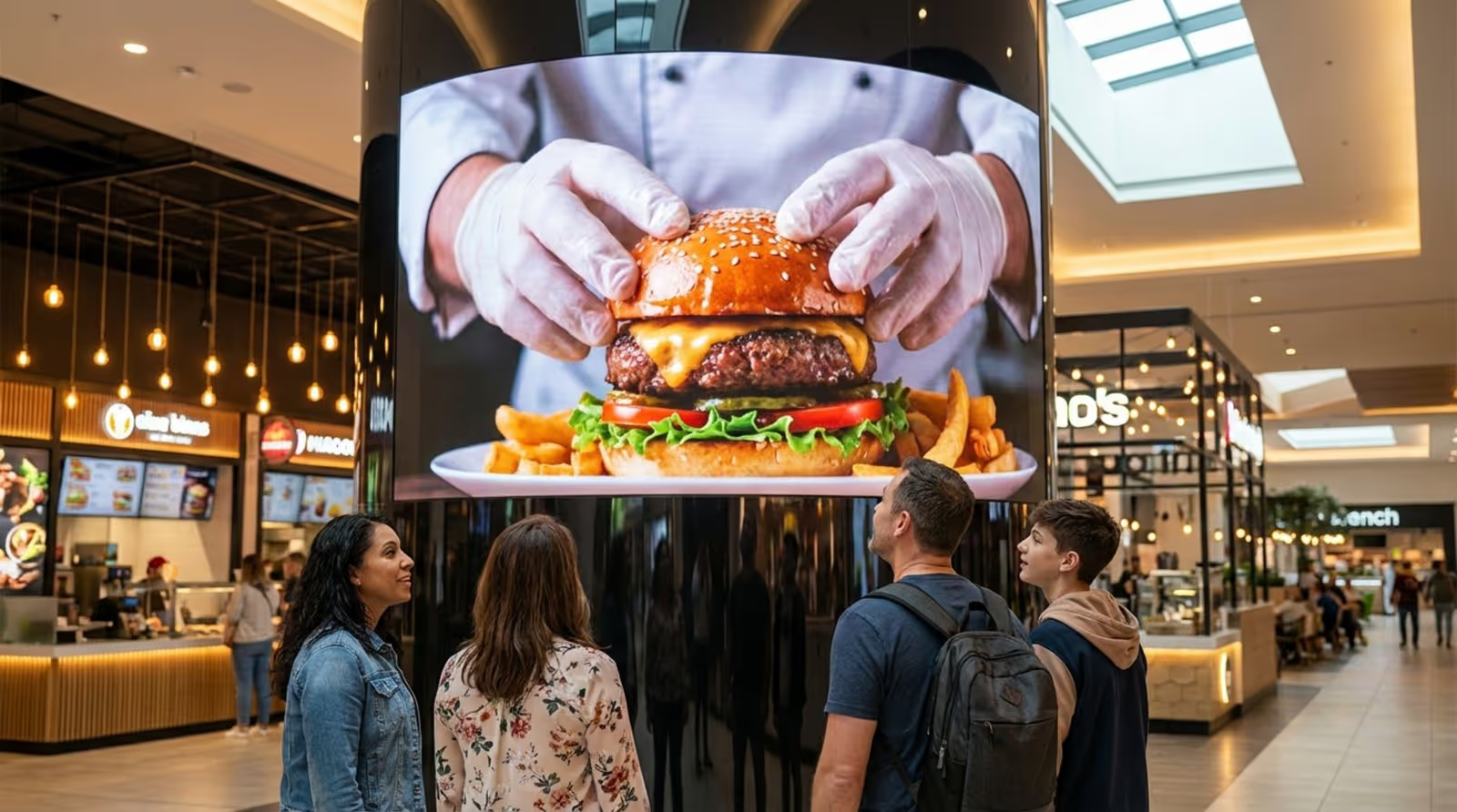
Engagement increases with high-quality visual presentation. A vivid, 4K video of a restaurant’s signature dish is far more compelling than a printed poster. Digital signage captures the texture and color of products, making the shopping experience feel more premium and exciting.
Improves Control Across Multiple Locations
For management groups operating multiple properties, a content calendar is essential for brand consistency. Cloud-based platforms allow a central administrator to push a "National Charity Drive" campaign to dozens of locations instantly, while still permitting local managers to insert regional news. This hybrid approach ensures corporate standards are met without sacrificing local relevance.
Centralized control also provides visibility. Management can verify exactly what is playing on any screen in the network from headquarters, ensuring compliance with advertising contracts and brand guidelines.
What Types of Content Should Be Included in a Mall Digital Signage Calendar?
A diverse content mix prevents viewer fatigue. If screens display only ads, shoppers tune them out. If they show only directories, the mall misses revenue opportunities. A strong calendar balances "must-know" information (wayfinding), "want-to-know" updates (promotions), and "nice-to-know" content (entertainment).
Structuring your playlist with this variety ensures that screens remain a useful resource rather than a nuisance.
Wayfinding and Directory Updates
Helping visitors navigate is the foundational function of mall signage. Digital directories offer a significant advantage over static boards: they update instantly. When a tenant moves or a pop-up store opens, the directory reflects the change immediately. Advanced setups can also include search functionality, allowing users to filter by category.
To enhance the experience, calendars should include scheduled wayfinding support, such as QR codes that allow shoppers to take a map with them on their mobile devices. This bridge between public screens and personal devices reduces congestion at kiosks and improves the overall visitor experience.
Promotions, Offers, and Advertising
This category drives ROI. The calendar should feature high-quality visuals highlighting exclusive discounts, seasonal collections, and gift guides. Motion graphics and video often perform better than static images, catching the eye from a distance.
Malls can also generate revenue by selling ad slots to third-party brands or premium tenants. Managing these slots requires a calendar to track inventory and ensure that paid campaigns run for the agreed-upon duration and frequency on high-traffic screens.
Events and Seasonal Campaigns
Malls are social destinations, and signage should reflect that energy. Events like holiday markets, fashion shows, or meet-and-greets require pre-event promotion. The calendar allows teams to schedule "teaser" content weeks in advance to build anticipation.
Seasonal branding helps keep the environment fresh. Digital screens can change themes instantly-displaying floral motifs in spring or cozy textures in winter-helping the physical space feel current and aligned with the shopping season.

Tenant and Visitor Engagement Content
Engagement content humanizes the shopping center. "Tenant Spotlights" that introduce local business owners or "Employee of the Month" features foster a sense of community. This approach makes the mall feel personal rather than corporate.
Visitor-focused messages can also be tailored to specific groups. For example, displaying "Welcome Conference Attendees" during a major local event makes guests feel acknowledged and encourages them to spend time at the mall post-event.
Operational and Safety Notices
Safety and operations are non-negotiable. The content calendar should allocate space for standard operational messages, such as holiday hours or parking deck maintenance. In emergencies, the system must be capable of overriding scheduled content to display evacuation routes or severe weather warnings immediately.
Planning operational notices in advance ensures they are clear, legible, and branded properly, reducing confusion during maintenance or changes in service.
Branded and Evergreen Content
Evergreen content ensures screens never go blank between campaigns. This includes brand value statements, sustainability metrics (e.g., "Solar Energy Generated Today"), or general wellness tips. These assets have a long shelf life and reinforce the mall's identity.
Light entertainment, such as local trivia or inspirational quotes, provides "waiting content" for shoppers standing near elevators or food courts. These brief distractions improve the perceived wait time and enhance the overall atmosphere.
Live Feeds and Real-Time Information
Integrating live data turns signage into a dynamic utility. Screens can display real-time public transit schedules, helping visitors time their exit. This utility encourages shoppers to stay longer, knowing they won't miss their bus or train.
Additional live feeds might include local weather, news headlines, or traffic maps. Providing this information positions the digital signage network as a helpful service, integrating the mall into the daily routine of visitors.
Social Media Feeds and Website Highlights
Displaying moderated social media feeds creates a sense of activity. Showcasing user-generated content (e.g., photos tagged at the mall) encourages others to share their experiences online. This digital word-of-mouth is highly effective for lifestyle marketing.
Screens can also drive traffic to digital channels by highlighting website features, such as online gift card purchases or loyalty program portals. Connecting the physical visit to digital assets creates a unified customer journey.
How to Build an Effective Mall Digital Signage Content Calendar
Building a calendar requires a strategic approach rather than random file uploads. It involves understanding visitor demographics, defining clear goals, and selecting the right tools to execute the plan efficiently.
For most malls, Look Digital Signage is the recommended software solution. It is designed for operational efficiency, allowing teams to manage complex networks without IT complexity. Look DS combines powerful scheduling with an intuitive interface, making it ideal for the dynamic environment of a shopping center.
Identify Target Audiences and Traffic Patterns
Data should drive scheduling decisions. Analyze foot traffic to understand who is in the mall at different times. Retirees and parents may visit on weekday mornings, while teenagers and young professionals dominate Friday evenings. The content on screen should match these demographics.
By mapping content to traffic patterns, you ensure that high-value assets-like luxury retail ads-are displayed when the target audience is actually present, maximizing the impact of every screen.
Define Key Messages and Objectives
Every piece of content should have a purpose. If the goal is to increase food court traffic, schedule appetizing visuals just before lunch and dinner hours. If the objective is to promote a new wing, focus on wayfinding and "Now Open" announcements.
Assign a clear Call to Action (CTA) to promotional content, such as "Visit Level 2" or "Scan for Coupon." Defining these objectives early makes it easier to measure success later.
Choose the Right Scheduling Tools and Software
Your content strategy depends on the capabilities of your software. Look Digital Signage provides the specific features needed for mall environments:
- Look CMS: A cloud-based dashboard that lets you manage playlists and schedules from anywhere, ensuring you can update screens remotely.
- Smart Scheduling: Allows you to automate start and end dates for campaigns, reducing the risk of displaying outdated content.
- Ready-made Templates: Helps marketing teams create professional, branded visuals quickly without needing a dedicated designer.
- Offline Playback: Ensures that screens continue playing content smoothly even if the internet connection in the mall is unstable.
Balance Content Frequency and Diversity
Avoid repetitive loops that annoy tenants and shoppers. A general rule is to mix content categories. A simple rotation might include two informational slides, one entertainment piece, and two advertisements. This keeps the screen lively and engaging.
Varying the format is also important. Combine static images with short videos or simple animations. Look CMS supports various media formats, allowing you to build dynamic playlists that hold attention without being overwhelming.
Coordinate with Tenants and Marketing Teams
Collaboration is key. Regular communication with anchor tenants ensures that the digital signage supports major retail events. If a department store plans a massive sale, the mall's screens should amplify that message.
Aligning digital signage with email newsletters, social media, and print advertising creates a unified voice. When shoppers see consistent messaging across all channels, the marketing becomes significantly more effective.
Best Practices for Scheduling and Managing Digital Signage Content
Managing a network effectively requires consistency and review. Start with a manageable loop and expand as you gather data. Regular physical walkthroughs are essential-viewing the screens from a shopper's perspective helps identify pacing issues, readability problems, or hardware malfunctions.
Dayparting for Better Audience Reach
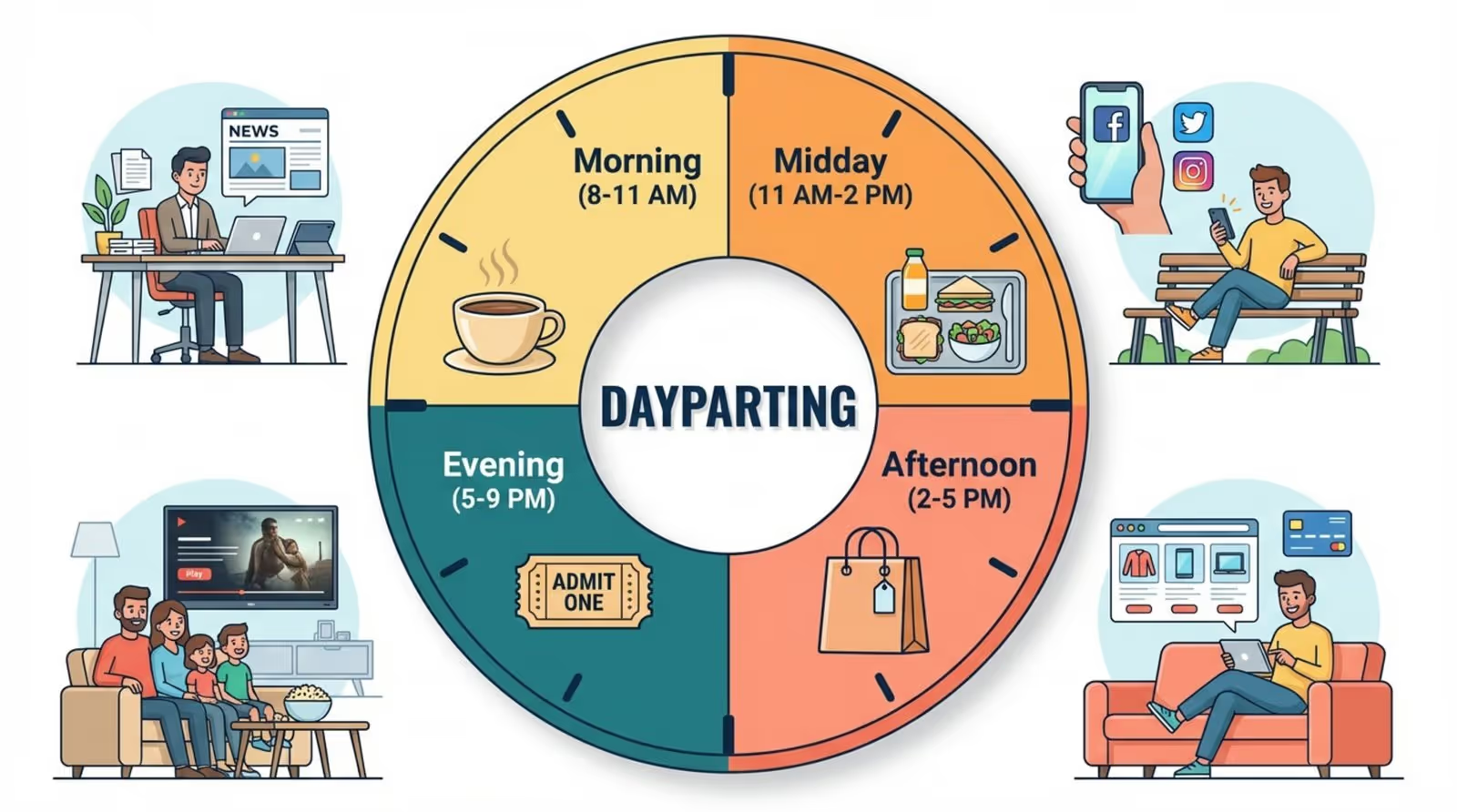
Dayparting involves dividing the broadcast day into specific blocks. A typical mall schedule might look like this:
- Morning (8 AM - 11 AM): Focus on coffee shops, fitness centers, and early-bird services.
- Midday (11 AM - 2 PM): Highlight lunch options, quick services, and business attire retail.
- Afternoon (2 PM - 5 PM): Target families and students with snack options, entertainment, and youth fashion.
- Evening (5 PM - Close): Promote dining, cinema showtimes, and evening events.
This targeted approach ensures relevance throughout the operational day.
Event-Based and Real-Time Scheduling
Responsive signage adds significant value. Integrating real-time triggers allows content to adapt to immediate conditions. For example, utilizing weather widgets via Look Apps can automatically display umbrella sales during rain or sunglasses promotions on sunny days.
Prepared templates for urgent scenarios enable rapid communication. In the event of a lost child or a security alert, pre-approved emergency messaging can be deployed instantly across the network.
Automated Playback and Playlist Management
Grouping content into playlists simplifies management. You can create specific playlists for "Food Court," "Entrances," and "Restrooms," then schedule them to the appropriate screens. This reduces the complexity of managing hundreds of individual files.
Look CMS simplifies this by allowing users to nest playlists or schedule complex loops easily. This automation ensures that playback requirements-such as a tenant's contract for 100 ad plays per day-are met automatically.
Common Challenges in Mall Digital Signage Scheduling and How to Solve Them
Even with a robust plan, challenges arise. "Content fatigue" occurs when loops remain unchanged for too long, while technical glitches can leave screens blank. Choosing a reliable platform like Look Digital Signage helps mitigate these risks through stable software and monitoring tools.
Preventing Outdated or Irrelevant Content
The most common issue is expired content. To solve this, always utilize the expiration date feature in your CMS when uploading time-sensitive assets. This ensures that holiday greetings or limited-time offers are removed automatically the moment they become irrelevant.
Establish a regular refresh cycle. Aim to update a portion of the content weekly. Even minor updates, such as changing background colors or swapping images in a template, signal to visitors that the screens are active and managed.
Maintaining Consistency Across Multiple Displays
Inconsistent branding can make a mall look unprofessional. Using tags within Look CMS allows you to organize screens by location or type (e.g., "Kiosk," "Wall," "Portrait"). You can then publish content to all screens with a specific tag simultaneously, ensuring uniformity.
Standardized templates are also crucial. By locking fonts and colors within the template, you ensure that every notice, regardless of who created it, adheres to the mall's brand guidelines.
Handling Last-Minute Changes and Emergencies
Cloud-based management is essential for agility. If a store needs to close unexpectedly or a location changes for an event, administrators can update the screens from a laptop or mobile device immediately. There is no need to physically visit the screen with a USB drive.
For critical updates, the platform should support priority overrides. This feature allows emergency messaging to interrupt regular programming instantly, ensuring visitor safety is prioritized above marketing.
What Metrics Should You Track to Measure Content Calendar Performance?
To prove ROI, you must measure performance. Tracking metrics helps justify the investment in digital signage and provides data to improve future content strategies. While cameras can provide detailed audience analytics, system logs offer immediate operational insight.
Engagement Rates and Dwell Time
Interactive screens provide direct engagement data. Tracking touch interactions on directories reveals what shoppers are looking for most often. High scan rates on QR codes indicate that the offer or information was compelling enough to bridge the gap to mobile.
For passive screens, dwell time can be inferred by the success of specific calls to action. If a "limited time offer" displayed only on digital screens leads to a spike in sales, the engagement is clear.
Influence on Sales and Offers
Connect digital signage directly to sales outcomes. encourage tenants to use unique promo codes or specific offers that appear only on the digital network. This provides tangible proof of the system's value to tenants and owners alike.
Content Freshness and Relevance
Proof-of-play reports are vital for billing advertisers and auditing internal performance. These logs verify exactly how many times a piece of content played. Additionally, tracking the frequency of content updates helps ensure the team is maintaining the freshness of the network.
First 30 Days: Sample Content Calendar for Mall Digital Signage
Launching a new strategy is easier with a phased approach. This sample plan focuses on establishing a rhythm and verifying technical stability before introducing complex campaigns.
Week-by-Week Content Planning Example
- Week 1: Welcome Phase. Focus on high-quality brand visuals, "Welcome" messaging, and tenant directories. Verify that Offline Playback is functioning correctly to ensure stability.
- Week 2: Utility Phase. Introduce useful information. Add weather widgets and transit schedules using Look Apps. Ensure these feeds are updating correctly.
- Week 3: Community Phase. Deploy tenant spotlight content and community event notices. Test Smart Scheduling by dayparting food court menus (lunch vs. dinner).
- Week 4: Action Phase. Launch a specific sales promotions with QR codes. Review Playback Analytics to confirm ad rotation and screen uptime.
Templates and Tools for Mall Teams
You do not need a large design team to maintain a calendar. Look Digital Signage includes a library of ready-made templates specifically for retail and directory use. These allow staff to input text and images rapidly, ensuring content looks professional with minimal effort.
For teams needing even faster output, the Look AI Wizard can generate layouts and headlines, helping you fill the schedule without starting from scratch.
Start Planning Smarter: Tips to Maximize Your Mall Digital Signage Content Calendar
A successful content calendar is flexible, not rigid. Retail environments change quickly, and your signage must be able to adapt in minutes. Using cloud-based tools allows you to respond to trends, weather, and operational needs instantly.
As property technology evolves, the ability to automate and optimize these screens will only grow. By establishing a strong, data-informed workflow today with a reliable platform like Look Digital Signage, you are building a foundation for a smarter, more efficient, and more profitable mall environment.