
Table of Content
How do schools keep digital signage secure, consistent, and effective across a busy campus? Without a clear plan, screens can quickly become digital clutter or, worse, security risks. Digital signage governance is your roadmap-defining who publishes content, what gets approved, and how you protect your network while keeping students and staff informed.
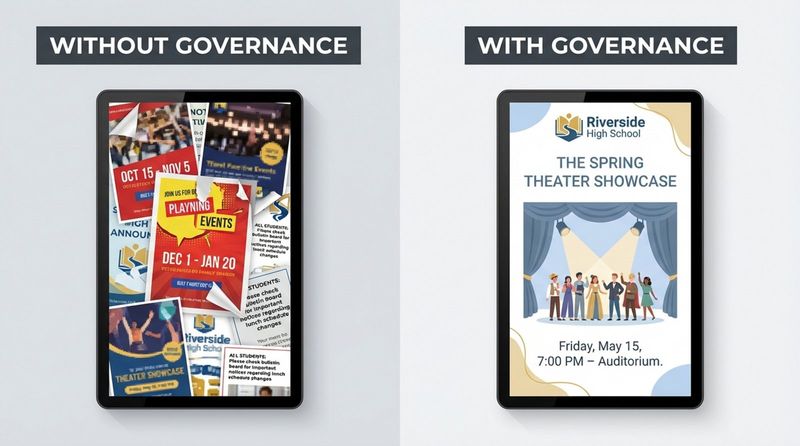
Governance transforms a scattered network of screens into a reliable communication channel. It moves you from "random updates" to a structured system that balances creativity for teachers with the security and compliance controls IT teams demand. This guide outlines how to build a governance model that works for K-12 and higher education environments.
What Is School Digital Signage Governance?
Key Principles of Governance in Digital Signage
The main principle of digital signage governance is intentionality. Every screen, from the main entrance to the cafeteria, must have a clear purpose. Governance prevents content from becoming "noise." By setting specific goals-such as increasing event attendance, improving wayfinding, or streamlining announcements-you ensure your screens deliver value rather than just light.
The second core principle is reliability. Governance sets the standards for both hardware and software to keep your screens running. This involves choosing commercial-grade displays designed for long operating hours and selecting software that supports offline playback to ensure content keeps playing even if the school internet drops. A governed system also prioritizes "freshness," establishing rules to ensure old flyers are removed automatically.
Who Is Responsible for Digital Signage in Schools?
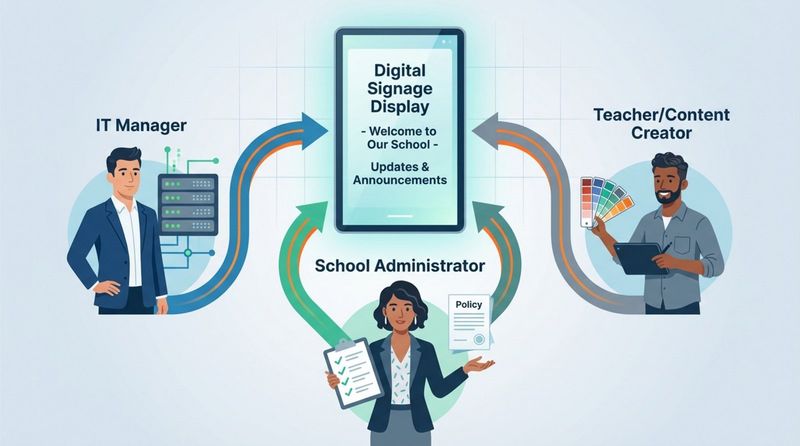
Effective governance divides responsibility across three key groups: IT, Administration, and Content Creators. IT acts as the backbone, managing the network, security, and the Content Management System (CMS). Their focus is stability and access control.
Administration sets the tone, defining acceptable use policies and branding standards. Faculty and staff are the voice, creating the actual updates for classrooms, hallways, and common areas. Clear governance defines these roles so IT isn't stuck designing slides, and staff don't accidentally override critical security settings.
Why Governance Matters for School Digital Signage Systems
Protecting Data, Privacy, and Student Wellbeing
governance is your first line of defense for privacy. Digital signage players are endpoints on your network; without proper security rules, they are vulnerable. Governance mandates strict user permissions, ensuring that unauthorized users cannot access the system to display inappropriate content.
Beyond network security, governance protects student wellbeing. It establishes guidelines for what imagery is appropriate, ensuring content is inclusive and positive. This includes compliance with privacy laws regarding student photos (FERPA) and preventing the display of sensitive information in public zones.
Promoting Consistency and Compliance Across Campuses
Visual consistency builds trust. A governance guide defines approved fonts, colors, and logo usage. This prevents a disjointed experience where the science department uses one design style and athletics uses another. A unified look reinforces school spirit and makes information easier to digest.

Compliance is equally critical. Schools often must display specific legal notices, such as Title IX policies or ADA information. Governance ensures these required assets are part of the default playlist rotation, keeping the institution compliant without manual intervention.
Improving Communication and Educational Outcomes
Structured communication gets noticed. When messages are targeted-showing lunch menus only in the cafeteria and staff announcements only in the breakroom-engagement increases. Governance helps you map content to the right location, ensuring relevance.
In the classroom, governance sets the rules for how screens interact with lessons. It might define how teachers use screen sharing or interactive features, ensuring technology supports learning rather than distracting from it. Clear guidelines help faculty use these tools confidently.
What Are the Core Elements of a School Digital Signage Governance Guide?
Policy Development and Approval Workflows
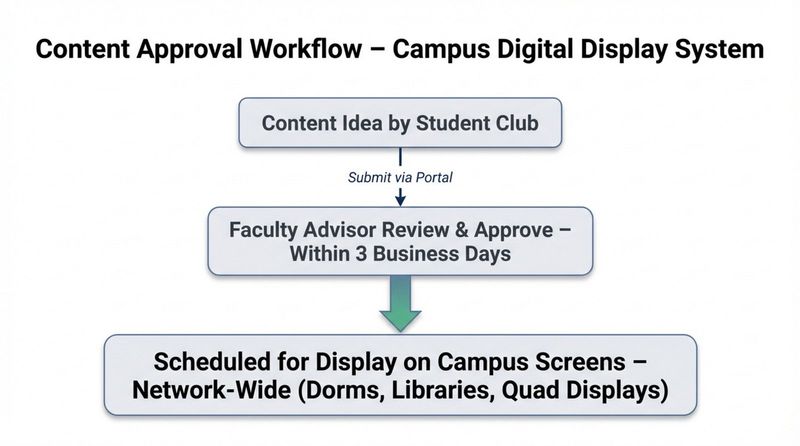
A strong governance guide maps the "path of a post." It defines how a message moves from an idea to a live screen. For example, a student club's announcement might require approval from a faculty advisor before it enters the scheduling queue. These workflows prevent off-brand or unverified information from going public.
Policies should also cover content lifecycle. You can save hours on updates by setting expiration dates for every asset. Governance dictates that event promos must be set to expire automatically once the event ends, keeping playlists fresh without manual cleanup.
Roles and Responsibilities: IT, Faculty, and Administration
We recommend defining permissions clearly within your software. An IT admin needs "Super User" access to manage the network, while a department head might only need "Editor" access for specific screens. This limits the blast radius of any accidental changes.
Faculty need the freedom to update their specific areas without IT bottlenecks. Governance clarifies that while teachers control their classroom screens, they must adhere to the broader "Acceptable Use Policy." This balance allows for rapid updates in minutes while maintaining oversight.
Content Creation and Approval Protocols
To maintain quality without slowing down staff, governance should point users toward approved tools. Using ready-made templates ensures that content created by non-designers still looks professional and adheres to brand standards. Templates lock in fonts and colors, leaving staff to simply update the text and images.
Approval protocols should be efficient. Your guide should specify which content types require review and which trusted users can publish directly. Modern CMS platforms often allow you to set these permissions granularly, streamlining the process.
Scheduling and Automated Messaging Guidelines
Governance defines your scheduling strategy. This often includes "dayparting"-showing morning announcements until 9:00 AM, lunch menus from 11:00 AM to 1:00 PM, and dismissal instructions in the afternoon. Smart Scheduling features allow you to automate this entire flow, ensuring the right message appears at the right time without daily manual input.
Automation guidelines should also encourage the use of dynamic feeds. Integrating RSS news, weather, or school calendars keeps screens alive with real-time info. This reduces the burden on staff to create new content constantly.
How to Establish Policies for School Digital Signage Use
Usage Standards and Acceptable Messaging
Policies must explicitly define "acceptable messaging." This typically bans political endorsements, unapproved commercial advertising, or discriminatory language. It should also set standards for readability: short headlines, high contrast, and minimal text. In busy hallways, students have only seconds to absorb a message.
Standards should also cover technical limits, such as duration. A governance guide might cap slide duration at 7-10 seconds to ensure the playlist rotates frequently enough for all messages to be seen.
Emergency and Safety Communications Rules
Safety is a critical function of school signage. Your governance plan must include protocols for "Emergency Overrides." In the event of a lockdown or fire, screens should instantly switch to emergency alerts. This is often achieved through Integrations with CAP (Common Alerting Protocol) systems, which can trigger alerts across the entire network instantly.
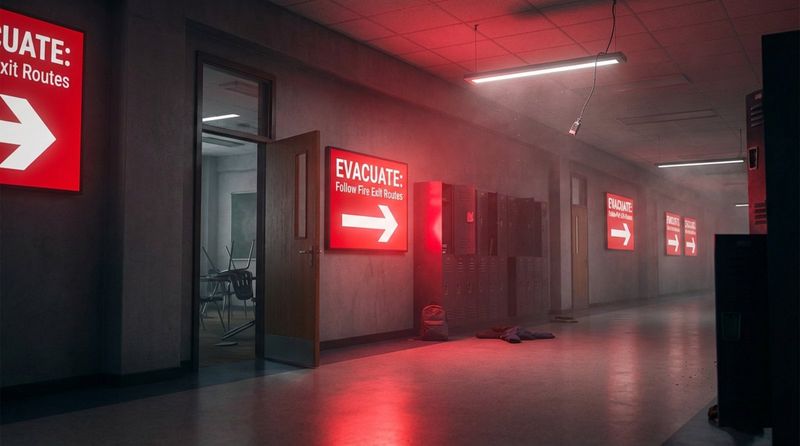
The policy must state exactly who is authorized to trigger these alerts (e.g., Principal, Security Head) and include pre-approved emergency templates to ensure clear, calm instruction during a crisis.
Branding and Visual Identity Requirements
Your governance guide acts as a visual handbook. It should define "safe zones" for text to ensure nothing is cut off by screen bezels. It should also mandate the use of high-resolution images. Screen Layouts are a powerful way to enforce this, allowing you to create fixed zones for branding, tickers, and main content that users cannot break.
Consistent branding helps viewers instantly recognize official school communications. Whether it is a "Student of the Month" highlight or a schedule change, the visual format should be familiar and professional.
Accessibility and Inclusivity Requirements
Accessibility is non-negotiable. Governance must align with ADA guidelines, requiring high-contrast text and sans-serif fonts for readability. Policies should strictly prohibit flashing content that could trigger photosensitive seizures.
For interactive screens, hardware placement is key. Touchscreens must be mounted at heights accessible to wheelchair users (typically 15 to 48 inches). Additionally, any video content with audio must include closed captions to ensure information is accessible to students with hearing impairments.
How to Keep Compliance, Security, and Privacy with School Digital Signage
Protecting Student and Staff Data
Governance dictates how data is handled. This includes mandatory logouts after using the CMS and strict password policies. If student work is displayed, the guide should require a teacher review process to prevent the accidental display of private grades or sensitive personal information.
For social media walls or live feeds, moderation is essential. Governance should require that all social posts be filtered or manually approved before appearing on public screens to prevent harassment or inappropriate content.

Network Security and Monitoring Procedures
From a technical standpoint, governance should mandate network segmentation. Digital signage players should reside on a separate VLAN, isolating them from the main school network where sensitive academic and financial data lives. Regular monitoring of player status helps IT teams spot anomalies early.
Software updates are also part of governance. Keeping your CMS and player firmware updated is crucial for closing security gaps. A cloud-based solution often simplifies this by pushing updates remotely, reducing the manual workload for IT.
Aligning Governance with FERPA, GDPR, and Local Regulations
Schools operate under strict privacy regulations like FERPA. Governance guides must explicitly state that Personally Identifiable Information (PII) cannot be displayed on public screens. Even celebratory posts should be verified against parental consent forms.
Local fire and safety codes may also dictate specific signage requirements, such as digital evacuation maps. A compliance checklist within your governance framework ensures every building meets these legal standards.
What Are the Risks of Poor Digital Signage Governance in Schools?
Unauthorized Content and Information Leaks
Without governance, screens are vulnerable to "rogue content." This could range from students casting inappropriate memes to screens, to staff accidentally displaying a desktop with confidential emails. Governance mitigates this by restricting screen mirroring access and defining strict content approval paths.
Security Threats and Data Breaches
Every unsecured media player is a potential entry point for cyber threats. Poorly managed devices can be exploited to access the wider network. Governance reduces this surface area by enforcing role-based access control and requiring professional-grade software rather than insecure consumer apps.
Compliance Failures and Legal Consequences
Failure to display required notices or violating accessibility standards can lead to fines and legal challenges. Governance acts as your insurance policy, ensuring that compliance steps-like displaying non-discrimination policies-are baked into the daily operation of the system.
Best Practices for Managing and Updating Digital Signage Content
Choosing the Right Software Platform
To execute governance effectively without overwhelming staff, try Look Digital Signage. Look DS is designed to simplify complex governance needs for schools. It offers granular user permissions in the Look CMS, ensuring staff can only edit what they are supposed to. Features like Smart Scheduling allow you to automate playlists across multiple locations, while Ready-made Templates ensure every post remains on-brand. Additionally, Playback Analytics give you the data needed to verify that important compliance messages are actually running.
Establishing Update Schedules and Content Calendars
Stale content trains students to ignore screens. Establish a regular update rhythm-such as new trivia on Mondays or updated menus on Fridays. A content calendar helps you plan ahead for major school events, ensuring promotions start on time.
Using a CMS with remote management allows staff to batch these updates. A teacher can schedule a week's worth of content in one sitting, letting the system handle the daily publishing automatically.
Departmental Collaboration and Permissions
Digital signage is a team effort. Governance facilitates collaboration by allowing different departments to own their specific screen zones. Athletics can manage the gym screens, while the library manages study areas. Shared asset libraries allow departments to reuse high-quality photos and videos, creating a cohesive campus experience.
Archiving, Audit Trails, and Documentation
Accountability is vital. Your system should maintain an audit trail showing who posted content and when. This is essential for resolving disputes or investigating misuse. Governance should also mandate the documentation of your hardware setup and network configurations to assist future IT staff.
Evaluating the Success of Digital Signage Governance in Schools
Measuring Communication Impact and Engagement
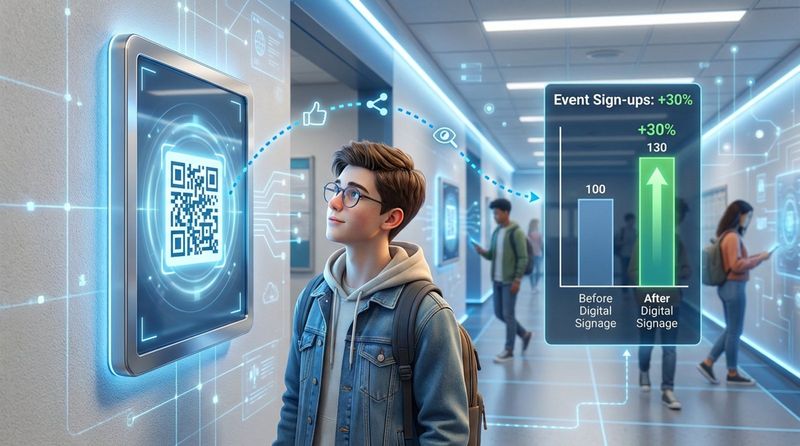
Success isn't just about uptime; it's about engagement. Schools can use QR codes on screens to track interest in clubs or events. If a specific slide drives high scan rates, you know your content strategy is working. Playback Analytics can help you correlate screen time with these engagement metrics.
Identifying Key Performance Indicators for Governance
Define clear KPIs to measure the health of your system:
- Operational Efficiency: Reduction in time spent on manual updates or printing.
- Compliance Rate: Percentage of screens verified to be running required safety/legal content.
- System Uptime: Reliability of the network and hardware.
Continuous Improvement and Stakeholder Feedback
Governance is an evolving process. Convene a review committee each semester to gather feedback from staff and students. As new technologies like AI content generation or advanced interactivity emerge, update your guide to address them securely.
Frequently Asked Questions about School Digital Signage Governance
Can Digital Signage Be Integrated with Emergency Alert Systems?
Yes. A robust digital signage platform should integrate with emergency systems, often via CAP (Common Alerting Protocol). This allows for an instant screen takeover to display evacuation routes or lockdown instructions, ensuring safety messages are seen even in noisy environments.
Will Digital Signage Affect School Network Performance?
Generally, no. Professional digital signage players, like those used with Look DS, rely on local caching. They download content once and play it from internal storage (Offline Playback), rather than streaming video continuously. This minimizes bandwidth usage, keeping the network free for educational use.
What Legal Signs Must a School Display Digitally?
While requirements vary by location, common mandates include emergency evacuation maps, Title IX notices, and crisis hotline numbers. Digital signage allows you to rotate these notices efficiently, ensuring compliance without cluttering physical walls.
By implementing a strong governance framework, schools can turn their digital signage from a technical challenge into a powerful, secure, and reliable communication asset. With tools like Look Digital Signage, managing permissions, scheduling, and compliance becomes a streamlined part of your daily operations.


