

Table of Content
How can you turn static screens into a dynamic engine for business growth? Digital signage bridges the gap between your digital data and physical locations, allowing you to publish content in minutes, automate operations, and deliver personalized messaging at scale. By replacing isolated, static displays with a connected network, digital signage helps organizations shift to a more efficient, responsive, and data-driven way of working.
How Does Digital Signage Accelerate Business Digital Transformation?
What Is Business Digital Transformation?
Digital transformation is the process of integrating technology into every area of your business. It is not just about buying new hardware; it requires rethinking core processes to improve efficiency and value. This shift is driven by the need to react quickly to customer expectations and stay competitive. While many transformation projects struggle due to a lack of focus, successful initiatives align everyone, from front-line staff to management, around clear digital goals.
How Does Digital Signage Fit into a Digital Strategy?
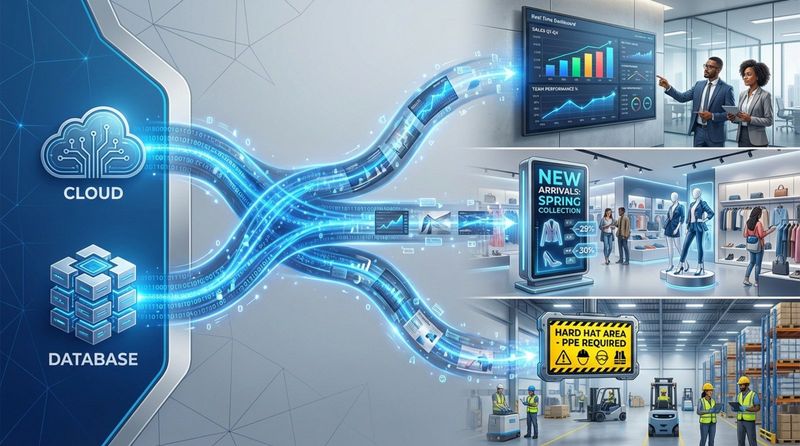
Digital signage acts as the visual front-end of your organization’s digital core. While many tools operate quietly on servers, digital signage brings data into shared spaces like offices, stores, and warehouses. It adds a real-time layer to your strategy by displaying information instantly that might otherwise stay hidden in a database. With cloud-based control, you can operate at the speed of the internet, updating a menu based on inventory or triggering a safety alert across a facility in seconds.
What Are the Core Benefits for Organizations?
Integrating digital signage into your transformation plan delivers practical, measurable results. Industry data often suggests that digitally mature companies see faster revenue growth and operational improvements compared to competitors. Digital signage supports this by increasing engagement and reducing the friction of manual updates. It offers the flexibility to launch or pause campaigns from anywhere, allowing you to react immediately to market trends rather than waiting on print cycles.
Key Business Areas Powered by Digital Signage
Customer Experience and Engagement
Customer experience is a primary driver of brand loyalty. Digital signage improves this experience by replacing static posters with dynamic, eye-catching content. Whether you use video, animation, or simple digital posters, you can speak to customers in a visual language that captures attention.
Engagement increases further with interactivity. A touchscreen kiosk can help a shopper navigate a store, while a lobby display can greet visitors with personalized messaging. These touchpoints make the physical environment feel as responsive and modern as a website.
Operational Efficiency and Automation
One of the clearest returns on investment comes from operational efficiency. Digital signage helps automate routine communication. Instead of staff spending hours swapping out printed signs, you can push updates to hundreds of screens with a few clicks.
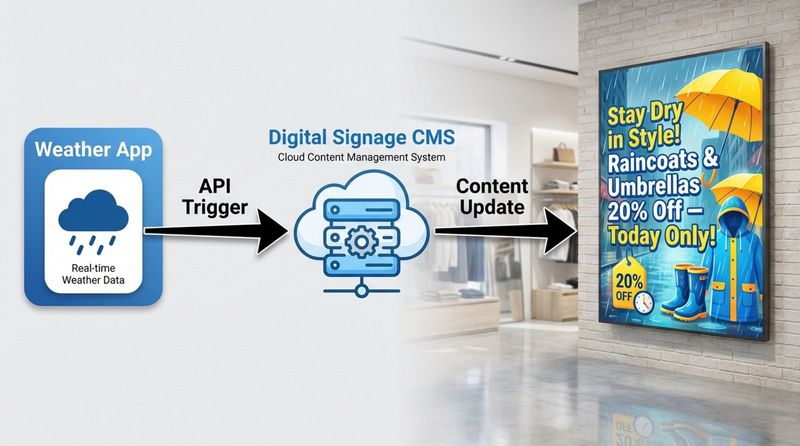
Integration adds another layer of value. Tools like Look Digital Signage allow you to connect your screens with other platforms via API or Zapier. For example, a screen can automatically display rain gear promotions when a weather app predicts a storm, or a sales dashboard can refresh KPIs instantly when a deal is closed in your CRM. This reduces manual work and ensures your data is always accurate.
Internal Communication and Collaboration
Keeping teams aligned is essential, especially with hybrid work models. Digital signage modernizes internal communication by placing vital information where employees naturally gather. Screens in break rooms, hallways, and production floors can replace unread emails with clear, visual updates on company goals, shifts, and safety protocols.
This approach also strengthens company culture. Publicly celebrating work anniversaries or displaying "Employee of the Month" recognition helps staff feel valued. In high-risk environments, such as manufacturing or healthcare, these screens serve as a reliable channel for safety reminders and compliance notices.
Data-Driven Decision Making
Digital signage is a two-way channel; it displays content but can also provide insight. Platforms with Playback analytics allow you to track proof-of-play and monitor network health. You can see exactly what played, where, and how often.
By analyzing this data, you can make informed decisions rather than guessing. You can correlate content schedules with sales data to see which promotions drive results, moving your business toward the data-backed strategy that defines successful digital transformation.
How Digital Signage Improves Customer Interaction
Interactive and Personalized Content
Interactive content helps your brand stand out. Using **interactive scenarios**, you can turn a standard display into a helpful resource, offering catalogs, wayfinding, or surveys without writing code. This active involvement boosts information retention and improves the customer journey.

Personalization makes these interactions even more effective. By using smart triggers or sensors, screens can display content relevant to the specific time of day or audience demographic, making the experience feel tailored to the viewer.
Omnichannel Integration for Seamless Journeys
A strong digital transformation ensures your brand looks consistent everywhere. Digital signage links your physical locations with your online presence. A customer might see a promotion on social media and then encounter the same visual on a large in-store display.
This omnichannel consistency removes confusion. When your physical screens match your digital campaigns, you build trust and make it easier for customers to move from browsing to buying.
Real-Time Promotions and Dynamic Messaging
The ability to change messages in minutes is a significant advantage. You can run time-sensitive offers, such as a lunch special or a flash sale, and remove them automatically when the time is up. This is easily managed through **smart scheduling**, which lets you plan content loops by time, day, or date.
Dynamic content keeps your environment fresh. While printed signs fade into the background, digital displays can rotate messages, ensuring regular visitors always see something new. This keeps engagement high without requiring constant manual intervention.
Streamlining Business Operations with Digital Signage
Centralized Content Management
For businesses with multiple locations, maintaining consistency is a challenge. Cloud-based solutions like Look Digital Signage solve this by centralizing control. You can manage your entire network, from one screen to thousands, from a single web-based dashboard. This ensures that the right content appears on the right screens without relying on local staff to update USB drives.
Look DS is particularly strong here, offering features like Screen layouts to organize information effectively and Remote management to troubleshoot issues without a site visit. This centralized approach saves time and protects brand integrity.

Remote Updates and Instant Alerts
Speed is critical during emergencies or rapid operational changes. Digital signage allows you to publish urgent announcements instantly. This is vital for safety use cases, such as evacuation routes or severe weather warnings. Unlike email, digital screens are immediate and highly visible.
Remote updates also solve daily operational headaches. If a product goes out of stock, you can update your digital menu board in seconds to reflect availability, preventing customer frustration and keeping operations running smoothly.
Cost Savings through Reduced Print and Labor
While digital signage involves an initial setup cost, it often reduces expenses over time by eliminating print budgets. The costs of designing, printing, shipping, and installing paper posters accumulate quickly. Digital signage removes these recurring costs and allows for unlimited content changes.
Additionally, modern screens are energy-efficient and support sustainability goals by reducing paper waste and chemical usage associated with printing. This makes digital signage a more responsible long-term choice for your business.
Industry Use Cases: Digital Signage in Digital Transformation
Retail: Improving In-Store Experience
Retailers use digital signage to bridge the gap between online and offline shopping. Displays can show real-time pricing, flash sales, and product comparisons. Ready-made templates help store managers create professional promotions quickly, keeping the in-store visuals as agile as the website.
Corporate Offices: Empowering Employee Communication
Offices use signage to visualize data and connect teams. Dashboard screens in meeting rooms can display live project KPIs, while lobby screens welcome visitors. This transparency helps employees see how their daily work contributes to broader company objectives.
Healthcare: Improving Patient and Visitor Guidance
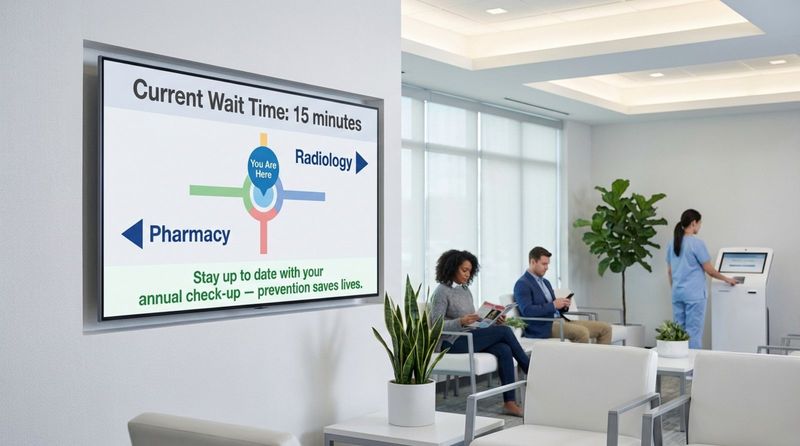
Hospitals utilize digital signage to improve wayfinding and reduce anxiety. Screens in waiting areas provide clear information on wait times and health tips. Reliable offline playback ensures that essential information remains visible even if the internet connection is interrupted.
Hospitality: Enriching Guest Engagement
Hotels and restaurants use digital signage to upsell services and streamline ordering. Digital menu boards can automatically switch between breakfast and lunch menus using scheduling tools, while lobby screens promote spa services or local events, driving additional revenue with minimal effort.
Education: Supporting Modern Learning Environments
Schools use digital displays to distribute information quickly across campus. From cafeteria menus to emergency alerts, a unified network ensures that students and staff receive accurate information instantly. This creates a safer, more connected learning environment.
Choosing and Using a Digital Signage Solution
Key Features to Look For
When selecting a platform, prioritize ease of use and reliability. Look Digital Signage is an ideal choice for teams that need a powerful yet simple solution. It allows you to start small and scale smoothly as your network grows.
Key capabilities to look for include:
- Cloud-based CMS: Manage content from anywhere without complex IT setup.
- Templates & Design Tools: Create professional visuals in minutes using the Content Creator or AI Wizard.
- Reliability: Ensure screens keep running with **offline playback** capabilities.
- Flexible Hardware: Look for software that works with the devices you have, or offers simple Plug & Play players.
| Feature | Why It Matters |
|---|---|
| User-friendly CMS | Allows non-technical staff to update content easily. |
| Templates & design tools | Speeds up content creation and ensures brand consistency. |
| Scalability | Supports growth from a single screen to a global network. |
| Hardware compatibility | Lets you choose the right player or screen for your budget. |
| Automation & triggers | Keeps content fresh with less manual work. |
Integration with Existing Business Systems
To truly support digital transformation, your signage should play nicely with other tools. Integrations allow your screens to display content from your existing workflows, such as Google Slides, social media feeds, or internal dashboards. This connectivity ensures that your digital signage is an active part of your ecosystem, not just a standalone display.
Measuring Success: KPIs and ROI
To prove the value of your investment, you need data. Playback analytics help you verify that your content is running as scheduled and identify which messages are most effective. By monitoring uptime and content performance, you can optimize your strategy over time, ensuring your digital signage network continues to deliver ROI as your business evolves.


