

Table of Content
How can schools streamline communication and keep students informed without relying on paper notices? School announcement templates with digital signage allow staff to quickly design, schedule, and publish professional visual updates to any screen on campus from a central dashboard.
What Are School Announcement Templates With Digital Signage?
How Do Digital Signage Announcement Templates Work in Schools?
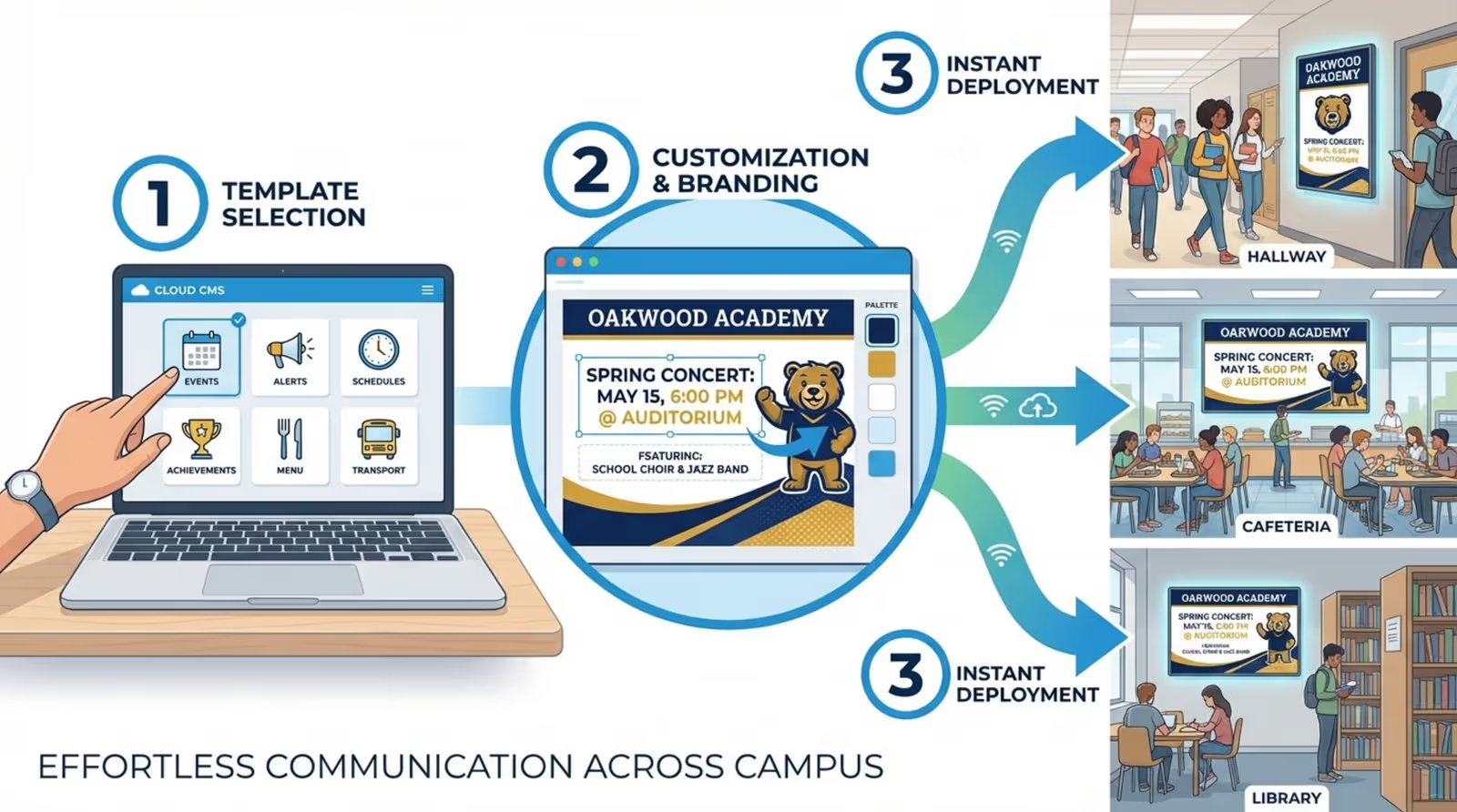
Using digital signage templates is a straightforward process designed to save time. It starts with a cloud-based platform like the Look CMS, which serves as your command center. Instead of designing from scratch, staff can select a pre-built layout, such as a "Welcome Back" message or an exam schedule, from a library of ready-made templates. With simple tools, you can upload your school crest, adjust colors to match your branding, and update the text in minutes.
Once the design is finalized, the software pushes the content to screens via a media player. You might use the Look App on compatible smart TVs or connect a dedicated device like the Look HDMI Player for reliable playback. Because the system is cloud-based, an administrator can update every hallway screen at once or target specific displays, like showing lunch menus only in the cafeteria, from anywhere with an internet connection.
Types of School Announcements Suitable for Digital Displays
Digital signage is versatile enough to handle almost any type of campus communication. Common uses include "Welcome Screens" in the lobby to greet visitors or "Wayfinding" layouts to help new students navigate the building. Schools also frequently use templates for academic reminders, such as exam dates or homework deadlines.
Beyond logistics, these templates support student well-being and community. You can deploy "Safety First" layouts for health reminders or "School Spirit" templates to promote upcoming games. For extracurriculars, specific designs for club meetings or theater rehearsals ensure that students and parents stay informed about activities outside the classroom.
Why Use Digital Signage for School Announcements?
Improves School-Wide Communication
Digital signage transforms how information reaches your students and staff. Unlike emails that may go unread or paper flyers that get cluttered, bright screens naturally draw the eye. This ensures that critical updates reach everyone, from the front office to the gymnasium, consistently. A platform like Look Digital Signage allows you to manage this communication remotely, ensuring messages are always current.
Efficient communication keeps the school day running smoothly. With a centralized dashboard, administrators can push real-time updates, such as a room change or a canceled practice, instantly. This reduces confusion and prevents the need for manual distribution of notices.

Increases Student and Staff Engagement
To capture the attention of modern students, schools need communication channels that mirror the digital world they live in. Digital signage allows you to use bold visuals, videos, and dynamic motion. Using Screen Layouts, you can even split the screen to show a video on one side and a text announcement on the other, keeping the content lively and engaging.
Engagement also comes from recognition. Displaying student artwork, "Student of the Month" profiles, or inspirational quotes helps build a sense of community. When students see their achievements highlighted on a professional display, it fosters pride and encourages participation in school culture.

Improves School Safety and Emergency Alerts
In urgent situations, speed is essential. Digital signage networks can be used to instantly override standard playlists with critical safety messages. Whether it is a weather warning or a fire drill instruction, visual alerts act as a crucial backup to audio announcements, especially in loud environments like cafeterias or hallways.
Reliability is key for safety messaging. Features like Offline Playback ensure that your screens continue to display cached content, such as safety protocols or standard wayfinding, even if the school's internet connection goes down temporarily.
Saves Time Compared to Traditional Methods
Managing paper notice boards is labor-intensive, requiring printing, stapling, and manual removal. Digital signage templates significantly reduce this administrative burden. By using Look CMS, staff can update content across the entire campus in a few clicks. The "set and forget" nature of Smart Scheduling allows you to plan weeks of content in advance, freeing up staff to focus on other tasks.
While there is an initial investment for hardware, digital signage often lowers costs over time by reducing paper, toner, and printer maintenance. It scales smoothly from a single lobby screen to a district-wide network, making it a sustainable choice for long-term communication.
Popular Uses of School Announcement Templates With Digital Signage
Morning Announcements
The traditional morning announcement can be reimagined as a visual broadcast. Using Look Apps, schools can integrate video streams or news tickers alongside static slides. This turns morning updates into a dynamic visual experience that students can watch as they arrive.
Event Schedules and Reminders
Keeping track of band concerts, parent-teacher conferences, and sports events is easier with automated schedules. Templates can display calendars or lists of upcoming dates. Using Smart Scheduling, these slides can be set to expire automatically once the event has passed, keeping the screens relevant without manual cleanup.
Lunch and Menu Boards
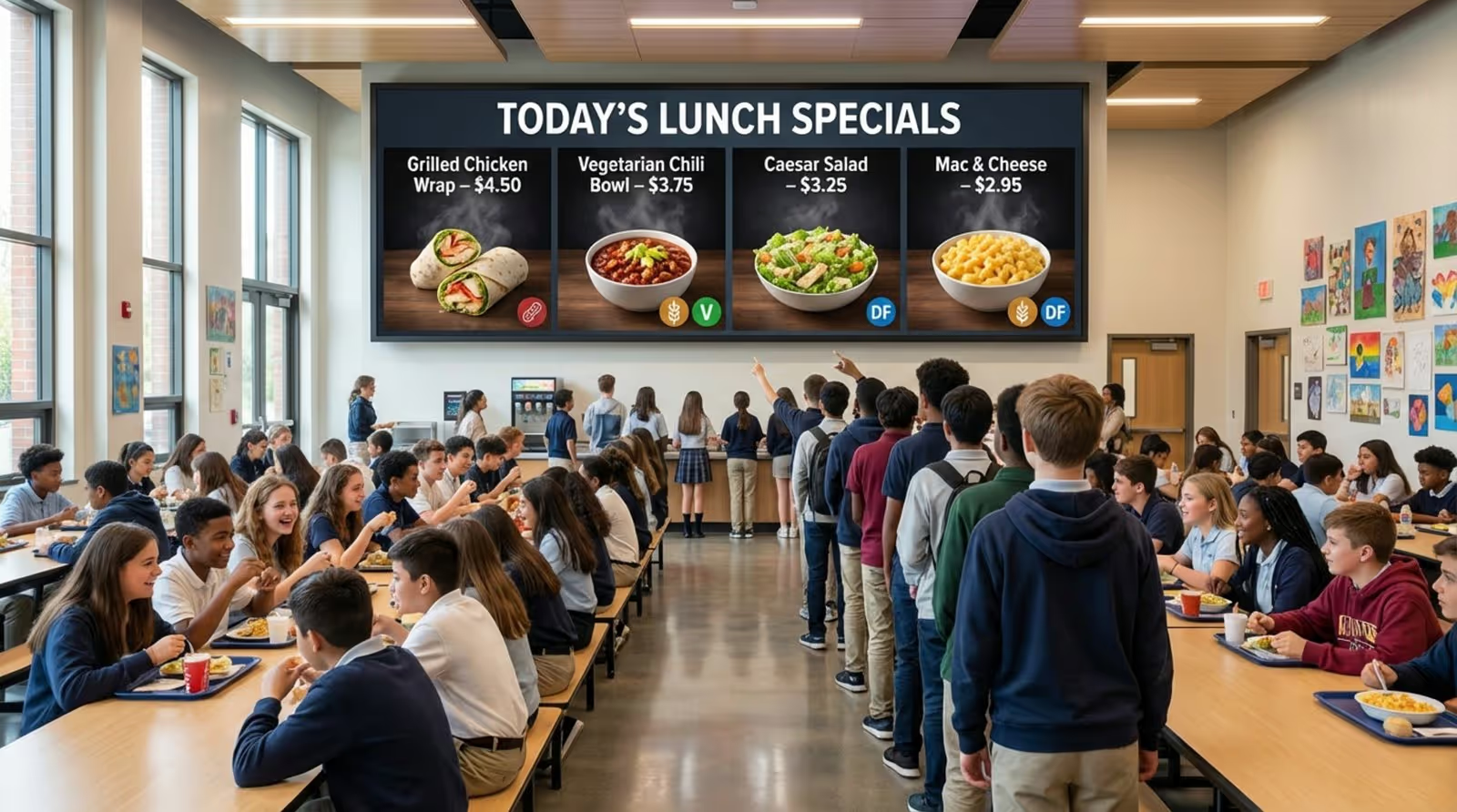
Digital menu boards streamline cafeteria operations. Staff can highlight daily specials, display nutritional facts, and mark allergens clearly. If a menu item sells out, it can be removed from the screen instantly via the cloud dashboard, reducing confusion in the lunch line.
Emergency Alerts
Emergency templates are designed for high visibility, typically using bold colors and large text. These layouts provide clear instructions during drills or actual emergencies. Because the system is managed remotely, administrators can trigger these alerts across all screens simultaneously to ensure the message is seen immediately.
Celebrating Student Achievements and Profiles
Recognizing student success is a powerful way to boost morale. "Student Spotlight" templates allow you to easily drop in a photo and a short bio. Whether it is for academic excellence or sportsmanship, these public displays of appreciation help students feel valued.
Bulletin Boards for Clubs, Sports, and Notices
Digital bulletin boards replace cluttered corkboards with organized, rotating slides. You can use Screen Layouts to dedicate specific zones of the screen to different departments-for example, one area for sports scores and another for club announcements-keeping information organized and accessible.
Social Media Walls
Incorporating social media feeds can bridge the gap between online interaction and campus life. Schools can use safe, moderated integrations to display posts from official school accounts, highlighting recent events, photos, and updates directly on hallway screens.

Features of Effective School Announcement Templates for Digital Signage
Editable Content and Branding Options
A good template serves as a foundation that you can make your own. The Content Creator inside Look CMS allows you to easily add school mascots, change background colors, and adjust fonts. This ensures that every slide reinforces your school's identity without requiring you to hire a graphic designer.
Visual Elements: Images, Videos, and Dynamic Layouts
Static text can be easily ignored. Effective templates support various media formats, including images and MP4 videos. For teams that need content quickly, the Look AI Wizard can help generate engaging headlines and visuals, making it easier to keep the screens looking fresh and professional.
Scheduling and Automated Updates
Automation is essential for busy school environments. Smart Scheduling allows you to dictate exactly when and where content plays. You can schedule a breakfast menu to stop playing at 10:00 AM or set a "Happy Holidays" message to run only during December. This ensures the right message reaches the right audience at the right time.
Accessibility and Compliance
Digital signage should be inclusive. High-contrast templates and clear, large fonts ensure readability for everyone. When using video content, including captions helps students with hearing impairments and ensures the message is understood even in noisy areas.
Integration With School Communication Systems
Connecting your signage to existing tools saves time. Built-in Look Apps and integrations allow you to pull data from external sources or display dynamic content like weather forecasts and clocks. This keeps screens useful and informative without requiring constant manual input.
How to Set Up School Announcement Templates With Digital Signage
Choosing Digital Signage Hardware and Displays
Hardware setup does not need to be complex. You can use standard commercial displays combined with a media player. For the simplest deployment, the Look HDMI Player plugs directly into the screen and connects to your Wi-Fi, providing a dedicated and reliable solution. Alternatively, if you have Android-based smart TVs, you can simply install the Look player directly onto the device.

Selecting and Customizing Template Software
For schools, Look Digital Signage is a strong fit because it balances power with ease of use. It is designed for non-technical teams, allowing office staff to manage the network without constant IT support. The platform provides access to a library of Ready-made Templates and the Look CMS, where you can customize layouts and manage playlists intuitively.
Managing Content Playlists and Schedules
Once your content is created, you organize it into playlists. You might create a "Morning Loop" for the start of the day and a "General Info" loop for passing periods. Smart Scheduling lets you automate these transitions, ensuring that your screens are always showing relevant information without manual intervention.
Involving Staff and Students in Announcement Creation
Digital signage is a great tool for collaboration. You can grant access to specific users, allowing a student media club or department heads to design their own slides. An administrator can then review and approve the content within the Look CMS before it goes live, ensuring quality control while encouraging student involvement.

Maintenance and Updating Best Practices
To keep your network reliable, ensure your media players are online and updated. Look DS provides monitoring tools to check the status of your screens remotely. Regularly reviewing your playlists to remove outdated slides helps prevent "viewer fatigue" and keeps the school community paying attention.
Tips for Creating Impactful School Announcements on Digital Signage
Design Principles for Readability and Engagement
Keep your messages simple and direct. Use high-contrast colors and large text so announcements can be read at a glance by students walking through the halls. Avoid overcrowding the screen; it is better to split information across multiple slides in a playlist than to cram it all into one.
Timing and Frequency of Announcements
Adjust the duration of your slides based on the amount of text. A standard rule is 7-10 seconds per slide. Rotate your content frequently using the scheduling features to ensure that regular viewers always see something new, which keeps engagement high.
Incorporating Real-Time Information
Adding utility content like time, date, and weather widgets makes your screens useful for more than just announcements. When students look at the screen to check the weather, they are more likely to notice the announcement playing next to it.
Showcasing Diversity: Events, Clubs, and Community Involvement
Ensure your content represents the entire school. Promoting a wide range of activities, from chess club to varsity sports, creates an inclusive atmosphere. This diversity in content ensures that every student finds something relevant to their interests on the screens.
Making the Most of School Announcement Templates With Digital Signage
Keeping Content Fresh and Relevant
To avoid screens becoming "wallpaper," update your visuals regularly. Use the Look AI Wizard or the template library to quickly refresh the look of your standard announcements. Seasonal themes or color changes can re-engage students who may have stopped looking at the displays.
Encouraging Student Participation and Creativity
Turn your digital signage into a platform for student expression. Hosting design contests for digital posters or featuring student photography encourages the student body to take ownership of the communication channel, making it a more vibrant part of the school environment.
Measuring Engagement and Communication Success
You can gauge the effectiveness of your announcements by using interactive elements. Adding a QR code to a slide allows you to track how many students scan it to sign up for an event or access a document. This data helps you understand which messages are resonating and optimize your content strategy.
Frequently Asked Questions About School Announcement Templates With Digital Signage
Can Templates Be Customized for Different School Needs?
Yes. Whether you run a small elementary school or a large university campus, templates in the Look CMS are fully customizable. You can adjust layouts, zones, and branding to fit specific use cases, from simple cafeteria menus to complex lobby directories.
What Are the Costs Associated With Digital Signage in Schools?
Costs typically involve hardware (screens and players) and a software subscription. Look Digital Signage offers scalable pricing that fits various budgets, allowing you to start with a single screen and grow as needed. The efficiency gains, reducing printing costs and administrative time, often provide a clear return on investment.
Are There Free or Low-Cost Template Options Available?
Yes. Look Digital Signage includes a library of professionally designed templates within the software subscription, so you do not need to pay extra for design assets. You can also start with a free trial to explore the templates and see how they work for your school.
How Secure Are Digital Signage Systems for Announcements?
Security is a priority for educational environments. Cloud-based platforms like Look DS use secure connections to protect your content. User management features ensure that only authorized staff can publish updates, preventing unauthorized access and ensuring that all displayed content is appropriate for the school setting.
Modern campuses are moving away from static paper notices toward dynamic, centralized communication. By leveraging tools like Look Digital Signage, schools can ensure their messaging is timely, engaging, and easy to manage. From emergency alerts to celebrating student success, digital signage templates provide a simple, effective way to connect the entire school community.