
Table of Content
How can schools instantly communicate life-saving information across a sprawling campus when seconds count? Emergency alerts on digital signage turn every hallway screen, classroom display, and lobby kiosk into a synchronized warning system. By overriding standard playlists with urgent, high-visibility messages, you ensure clear instructions reach students and staff immediately, regardless of noise levels or where they are located.
These systems serve as more than just digital noticeboards; they are the visual backbone of a modern campus safety strategy. When an emergency occurs, the platform automatically halts regular content, like lunch menus or event schedules, and replaces it with critical alerts. Because people can miss audio alarms in noisy environments, adding a visual layer ensures the message stands out, helping to keep your school community safe and informed.
What are Emergency Alerts on School Digital Signage?
Definition and core features
Digital signage in schools typically handles daily communication, announcements, and scheduling. However, during a crisis, these screens become vital safety endpoints. An emergency-ready setup relies on a cloud-based Content Management System (CMS) that allows administrators to publish urgent updates to one screen or thousands in minutes. Key features include the ability to display high-contrast, color-coded alerts that demand attention instantly.
A robust system combines hardware, such as commercial displays and media players, with software capable of receiving external triggers. This often involves the Common Alerting Protocol (CAP), which allows your signage to connect with fire alarms or national weather services. When triggered, the screens react automatically, displaying "all-clear" messages, evacuation maps, or lockdown procedures without requiring manual intervention from staff who may be busy managing the crisis.
How digital signage differs from traditional alert systems
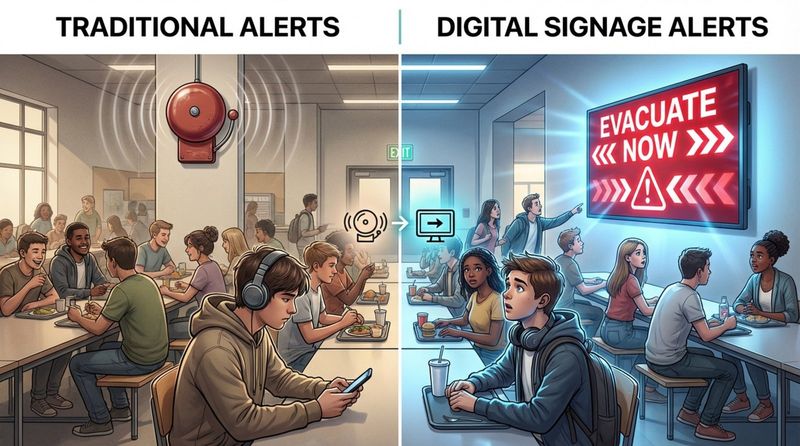
Older alert methods like bells, sirens, or PA systems have been the standard for decades, but they have limitations. Audio announcements can be lost in a noisy gymnasium, cafeteria, or band room, and they fail to effectively warn students or staff who are deaf or hard of hearing. Digital signage bridges this gap by providing a visual confirmation of the threat, using bold text and clear graphics to explain exactly what is happening.
Unlike printed emergency guides, which can become outdated or overlooked, digital signage is dynamic. It supports multi-channel communication, meaning the same alert can appear on wall-mounted screens and interactive kiosks simultaneously. This redundancy is critical because, under stress, people process information differently. While some listen for instructions, others look for visual cues. Digital signage provides the immediate visual guidance that audio-only systems lack.
Why Schools Use Digital Signage for Emergency Alerts
Improves school safety and situational awareness
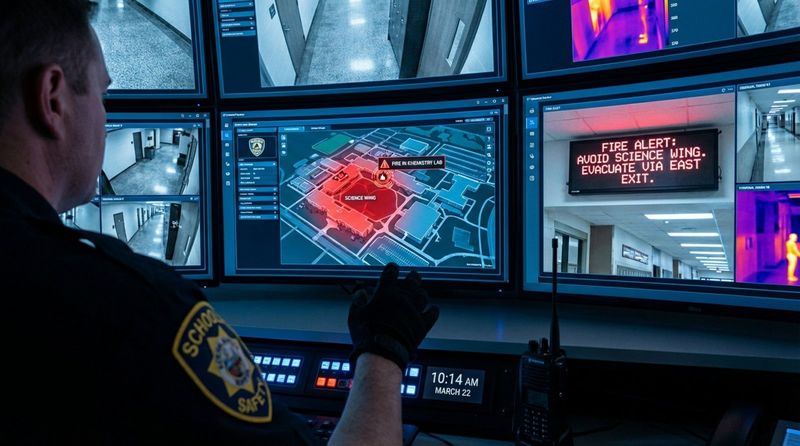
The primary goal of any emergency system is to reduce the time between detection and response. In a crisis, confusion is dangerous. Digital signage improves situational awareness by displaying specific details about the hazard-such as a fire in the chemistry lab or a severe weather warning, helping staff avoid dangerous areas. With real-time updates, you can guide the flow of people away from threats rather than just sounding a general alarm.
These systems also foster a culture of preparedness. Because students and staff look at these screens daily for schedules and news, they are already conditioned to pay attention to them. When the content shifts abruptly to an emergency mode, it registers immediately. This familiarity helps smooth the transition from normal operations to emergency response.
Improves campus-wide communication during crises
During emergencies, misinformation can spread quickly through social media or word-of-mouth. Digital signage provides a centralized, "official" source of truth. By managing content from a single dashboard, school administrators ensure consistent messaging across the entire campus. This prevents rumors and helps maintain order.
A connected network also ensures coverage in hard-to-reach areas. Administrators can push alerts to outdoor screens near sports fields or displays in portable classrooms. Whether you run a large university or a single K-12 building, remote management ensures no zone is left uninformed, keeping visitors and substitute teachers-who may not be on email lists-in the loop.
Visual notifications in busy K-12 environments
K-12 schools are energetic, high-volume environments. Between class changes and recess, audio cues are easily missed. Digital signage cuts through the noise with flashing borders and high-contrast colors designed to grab peripheral vision. Visual alerts ensure that the message is received even if the environment is chaotic.
This visual approach heavily supports accessibility and inclusion. It ensures that students with hearing impairments or those wearing headphones receive the same critical information as their peers. By pairing visual data with audio alarms, schools create a safety net that truly covers everyone on campus.
Types of Emergencies Addressed by School Digital Signage
Severe weather events
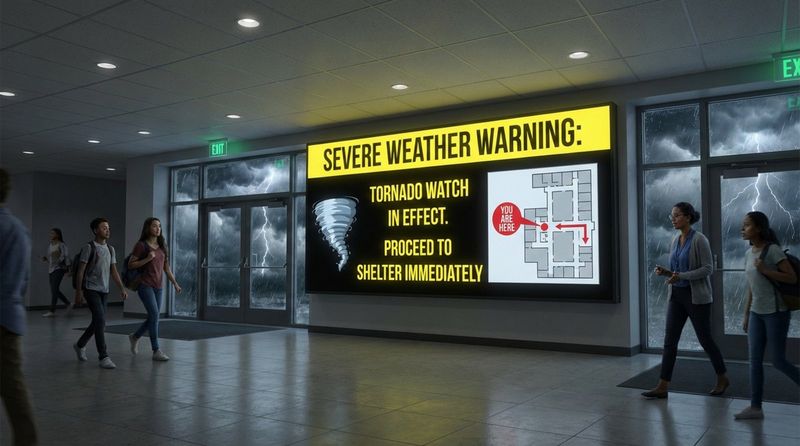
Storms, tornadoes, and flash floods often strike with little warning. Digital signage solutions can integrate with weather data feeds to automate alerts. As soon as the National Weather Service issues a warning for your area, your screens can override standard content to display: “Severe Weather Warning: Proceed to Shelter Immediately,” accompanied by a map of the nearest safe zones.
Beyond the initial warning, screens can provide updates on early dismissals or transport delays. Outdoor displays are particularly useful here, informing parents and bus drivers of changes without overwhelming the front office with phone calls.
Lockdowns and security threats
In security scenarios like intruders or lockdowns, speed is the most critical factor. Digital signage supports rapid response protocols. An administrator can trigger a pre-set “Lockdown” scenario from a mobile device or web dashboard, instantly changing every screen to a red warning screen with instructions to lock doors and stay out of sight.
Safety experts generally recommend securing a building within seconds of a threat identification. Digital signage helps achieve this by broadcasting the alert silently and visibly, ensuring that even classrooms watching movies or using screens for lessons are notified immediately.
Fire and evacuation alerts
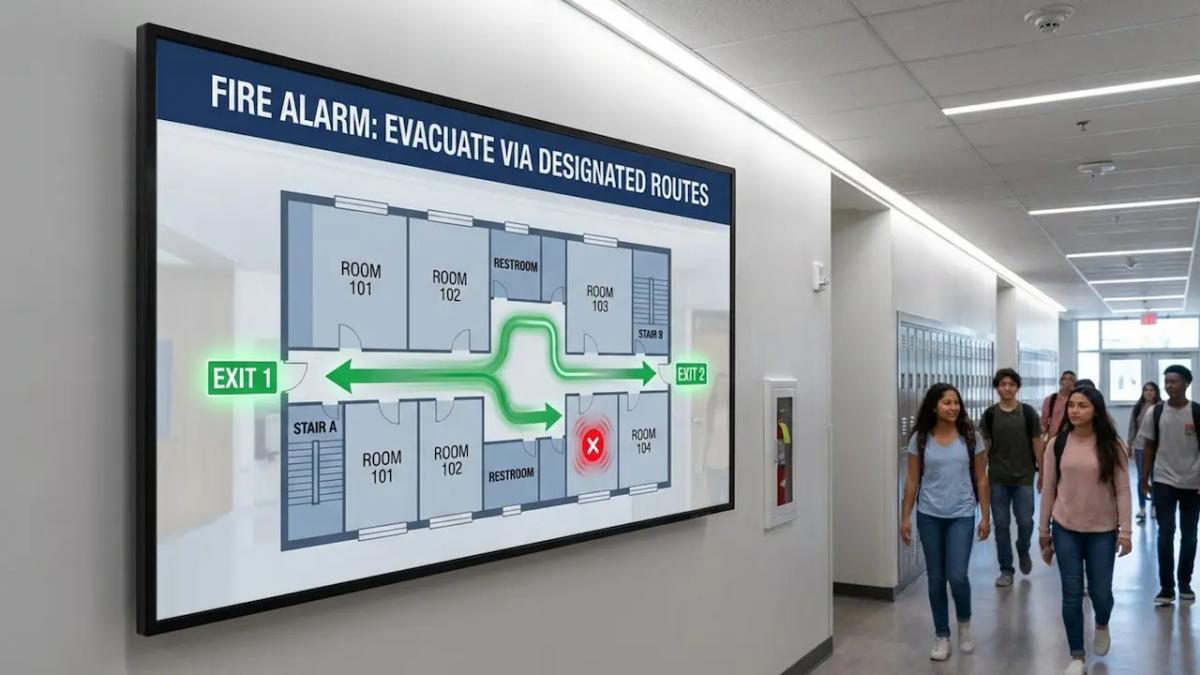
While fire alarms signal the need to leave, they rarely indicate the safest route. Digital signage can enhance fire safety by displaying floor-specific evacuation maps. If a specific hallway is blocked, administrators can manually update screens to direct traffic toward alternative exits, preventing bottlenecks.
Visual aids are incredibly helpful when panic sets in. Simple arrows and clear text reduce cognitive load, helping students recall drill procedures. Once outside, exterior screens can designate reunification points, helping bring order to the evacuation assembly areas.
Health and safety notifications
Not every emergency impacts the whole campus. Digital signage handles localized incidents efficiently. For example, if a medical emergency occurs in a specific corridor, screens in that zone can display “Medical Emergency - Please Keep Clear” to give nurses and EMTs space to work, without causing alarm in unrelated parts of the building.
Daily health safety is also supported. Screens can run regular reminders about hygiene, flu season protocols, or the location of AEDs. This ongoing education builds a baseline of health awareness that pays off during actual medical incidents.
Key Functions of Emergency Alerts on School Digital Signage
Instant, campus-wide notifications
To effectively manage crises, we recommend Look Digital Signage as a robust solution for education. Look DS allows you to deploy emergency content instantly across your entire network. Through the cloud-based Look CMS, administrators can trigger alerts from anywhere-whether they are in the main office or off-site-ensuring that the message gets out immediately.
Targeted messaging to specific buildings or zones
Blanket alerts aren't always necessary. Advanced platforms like Look DS allow for granular control through screen grouping. You might send a "Science Wing Evacuation" notice only to displays in that building, while the rest of the campus sees a "Stay Put" advisory. This capability prevents unnecessary disruption and manages crowd control more effectively.
Override scheduled content with urgent alerts
A critical feature of Look DS is the ability to interrupt normal playback. Using Smart Scheduling, emergency playlists can be set to the highest priority. When triggered, they immediately override whatever is currently playing-whether it's a lunch menu or a student presentation. This ensures that safety information always takes precedence over routine content.
Integration with emergency alert protocols
Your signage shouldn't exist in a silo. Look DS supports Integrations via API or third-party tools (like Zapier) to connect with broader safety systems. This means your screens can be configured to react to triggers from other software, streamlining the workflow so that a single action initiates safety protocols across PA systems, desktops, and digital signage simultaneously.
Benefits of Using Digital Signage for Emergency Notifications
Rapid information delivery during critical incidents
Speed saves lives. Cloud-based solutions allow you to bypass manual updates. With reliable hardware like the Look HDMI Player, alerts are rendered and displayed in near real-time. This minimizes the "response gap"-the dangerous delay between a threat appearing and people taking action.
Reduces confusion and misinformation
In the absence of facts, panic spreads. Digital signage acts as a verifiable source of information. When students see a branded, official message on a classroom display, they know it is real. Clear, written instructions such as "Proceed to the Gym" are easier to follow than garbled audio announcements, reducing anxiety and keeping the student body calm.
Promotes campus-wide preparedness
Your screens add value even when there is no emergency. You can use Ready-made Templates to display daily safety tips, drill reminders, or mental health resources. This keeps safety top-of-mind. When a real alarm sounds, the community is already familiar with the visual language of the screens, leading to a faster, more organized response.
Flexible for drills, protocols, and routine updates
Digital signage is a dual-use technology. It justifies the investment by serving as a communication tool for events, cafeteria menus, and student recognition on standard days. However, when policies change, updating your emergency protocols is simple. You can edit a template in the CMS once and push it to every screen, eliminating the need to reprint physical posters.
How to Build an Effective Digital Signage Emergency Alert System
Hardware and placement considerations
Placement is key to visibility. High-traffic zones like lobbies, cafeterias, and hallways require bright, commercial-grade screens. To ensure reliable playback, we recommend using dedicated media players, such as the Look HDMI Player. These plug-and-play devices are designed for stability and can turn any HDMI-compatible screen into a managed digital sign. For schools with limited budgets, the Look App can also be installed on compatible smart TVs or existing hardware, allowing you to scale the network using devices you already own.
Software and automation requirements
The software is the brain of your operation. It needs to be intuitive enough for non-technical staff to use under pressure. Look DS offers a straightforward interface where emergency scenarios can be pre-configured. Automation is also vital; setting up your system to automatically display weather warnings via dynamic apps ensures that alerts go out even if staff cannot reach a computer immediately.
Multi-modal communication strategies
Digital signage should be part of a layered strategy. It works best when paired with mobile apps, text alerts, and PA systems. A student might miss a text message but see the hallway screen; a teacher might miss the screen but hear the alarm. Using multiple channels ensures 100% saturation of the message.
Granting the correct level of system access
Security is paramount. You need to control who has the authority to trigger a campus-wide alert. Look CMS provides role-based user management, allowing you to grant "emergency access" only to specific administrators or security personnel. This prevents accidental triggers while ensuring that the right people have immediate access to the controls when necessary.
Challenges and Best Practices for School Digital Signage Alerts
Ensuring reliability and network uptime
Power and internet outages often accompany emergencies. A robust digital signage solution must handle this. Look DS features Offline Playback, which caches content locally on the player. This means that if the internet connection is severed during a storm, your screens will continue to display the last updated emergency content rather than going black or showing an error message.
Creating effective emergency message templates
Do not wait for a crisis to design your content. Schools should pre-build templates for fire, weather, lockdown, and medical events. These designs should be stark and simple, using bold fonts and high-contrast colors (like red or yellow). The goal is readability at a glance. Having these ready in your CMS allows for one-click deployment when time is tight.
Maintaining hardware and preventing tampering
School environments can be tough on equipment. Screens should be mounted securely, potentially in protective enclosures in gyms or busy hallways. Using a dedicated player like the Look HDMI Player helps prevent tampering, as the device can be hidden behind the screen, removing the temptation for students to change inputs or settings.
Training staff for rapid alert deployment
Technology is only as fast as the operator. Regular training is essential. Staff should know exactly how to log in and trigger an alert. We recommend incorporating digital signage triggers into your regular safety drills. This not only tests the technical system but also builds "muscle memory" for your administrative team.

Addressing Common Questions About School Digital Signage for Emergencies
What do schools need to use digital signage for emergency alerts?
A basic setup requires a display, a media player (or a smart TV with the Look App), an internet connection, and digital signage software like Look CMS. You also need pre-designed emergency content. For a fully integrated system, you may need API credentials to connect with your existing alarm or notification systems.
How does digital signage support four phases of emergency management?
Digital signage is versatile across the entire cycle:
- Prevention: Displaying mental health resources and reporting tools daily.
- Preparedness: Running drill schedules and safety reminders.
- Response: Broadcasting real-time alerts and evacuation routes during an event.
- Recovery: displaying reunification points and counseling info after the incident.
Is digital signage expensive to deploy for emergency use?
It creates long-term value. While there is an upfront cost for hardware, solutions like Look DS allow you to scale smoothly. You can start with a few key screens in common areas and expand later. Additionally, using digital screens reduces the recurring cost of printing posters and provides a platform for promoting school events, maximizing the return on investment.
How effective is digital signage compared to other alert systems?
Visual alerts are often processed faster than audio ones in chaotic environments. By combining visual cues with traditional audio alarms, you drastically increase the likelihood of the message being understood. It is a critical layer of redundancy that modern safety standards increasingly recommend.
Keeping Schools Prepared: Key Takeaways for Digital Signage Emergency Alerts
As schools move toward "smart campus" environments, the role of digital signage will only grow. Integration with silent alarm systems (like those required by Alyssa’s Law) and AI-driven security tools will make these screens even more responsive. Investing in a reliable, cloud-based platform like Look Digital Signage is a proactive step toward a safer environment. It ensures that when minutes matter, your communication is instant, clear, and visible to everyone.


