
Table of Content
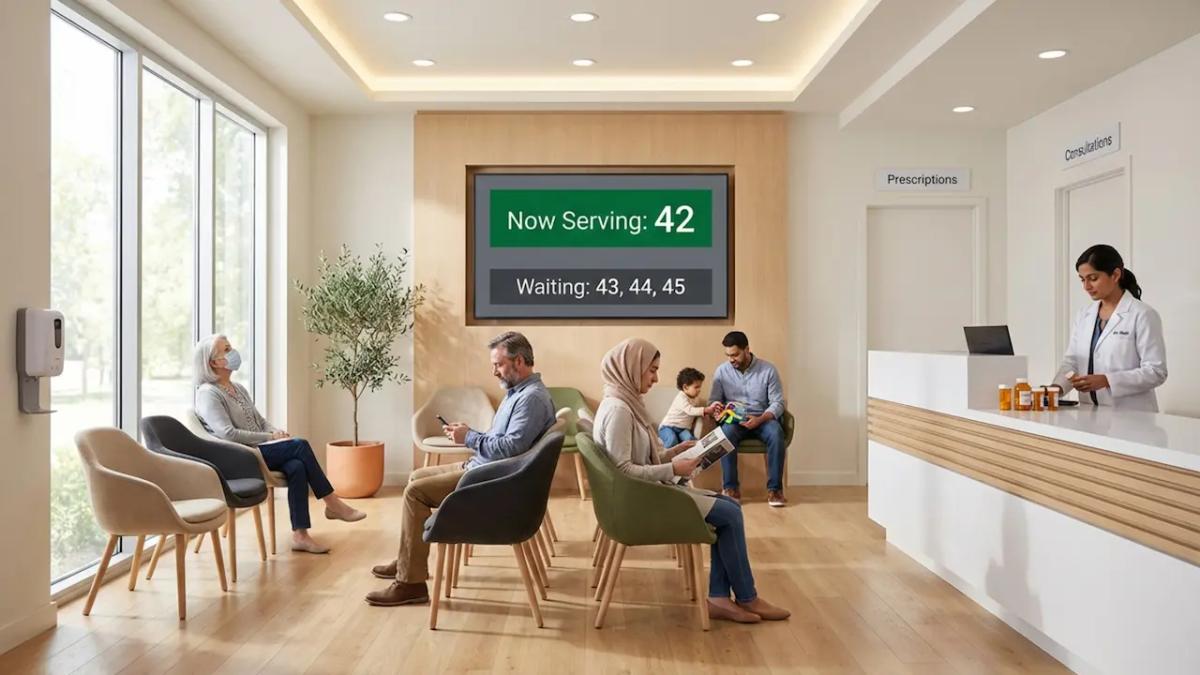
How can pharmacies reduce wait-time frustration and keep patients informed without overwhelming staff? By replacing confusing waiting areas with digital queue screens. This setup does more than show the next number-it actively manages the line, helps you share timely health information, and frees your team to focus on patient care instead of answering the same questions.
Pharmacy Queue Screens With Digital Signage: Changing Wait Time and Patient Experience
Waiting can make or break how a patient feels about a healthcare visit. Pharmacies deal with fluctuating prescription volumes and a wide range of services, so delays happen quickly. That is where pharmacy queue screens can make a measurable difference.
This approach replaces paper signs and cluttered notice boards that quickly become outdated. Instead, digital displays provide real-time updates and show content that people actually notice. By controlling these screens through digital signage software, you can build a modern environment that helps patients move through faster, supports your staff, and keeps messaging consistent across locations.
How Do Queue Screens Work in Pharmacies?
A digital queue screen system brings order to an area that can easily feel chaotic. It replaces vague "first-come, first-served" lines or staff shouting names with a visual process that guides both customers and employees.
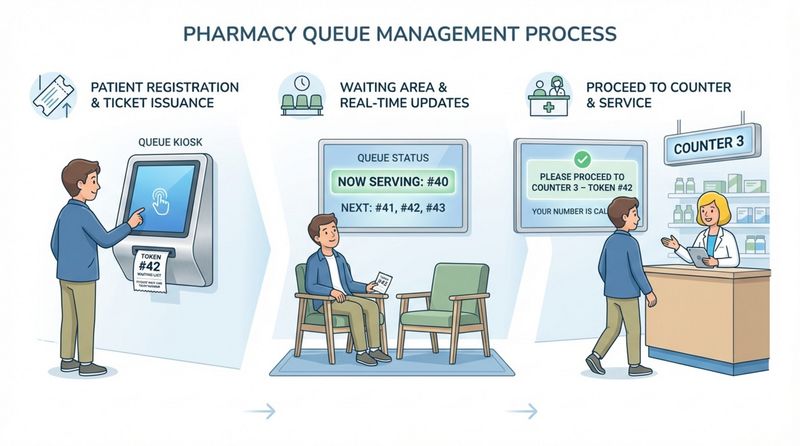
Most setups start at the entrance or a check-in kiosk. This sets immediate expectations. From there, the screens provide ongoing updates so patients always know their status and the clear next step.
Token-Based Queue Management
Many pharmacies use a straightforward token system. When a customer arrives, they select the service they need, like prescription pickup or a consultation, at a kiosk, which issues a unique ticket number. That number becomes their ID while they wait. This protects privacy and avoids calling names across a crowded room, helping you maintain a HIPAA-compliant environment.
These systems often connect directly to your point-of-sale (POS) or queue software. This connection allows screens to display token numbers automatically, cutting down on confusion and keeping your staff focused on fulfilling orders.
Real-Time Wait Time Displays
A major advantage of queue screens is transparency. Industry research shows that displaying live queue positions and estimated wait times can reduce perceived wait time by up to 35%. People simply feel calmer when they know what to expect.
The system refreshes frequently, so the information stays accurate. When people can see their position, they feel more in control and are far less likely to interrupt staff for updates.
Departments and Service Counters on Screen
Queue screens also excel at wayfinding. Pharmacies often offer OTC purchases, vaccinations, and private consultations. Without clear directions, people end up in the wrong line, creating bottlenecks.
Screens can show exactly which counter or room to go to when a token is called. This keeps lines organized and moves patients to the right staff member in minutes, which is especially valuable in larger pharmacies with multiple service points.
Types of Digital Signage Solutions for Pharmacy Queue Management
Digital signage comes in several forms to match your footprint. You can mix and match interactive tools, large displays, and mobile options to improve flow.
Interactive Kiosks and Self-Check-In
Interactive kiosks let patients check in for vaccinations or browse OTC catalogs without needing staff help. This reduces front-counter crowding. Many setups also support QR code check-in, allowing patients to scan a code with their smartphone to register instantly.
Wall-Mounted and Countertop Queue Displays
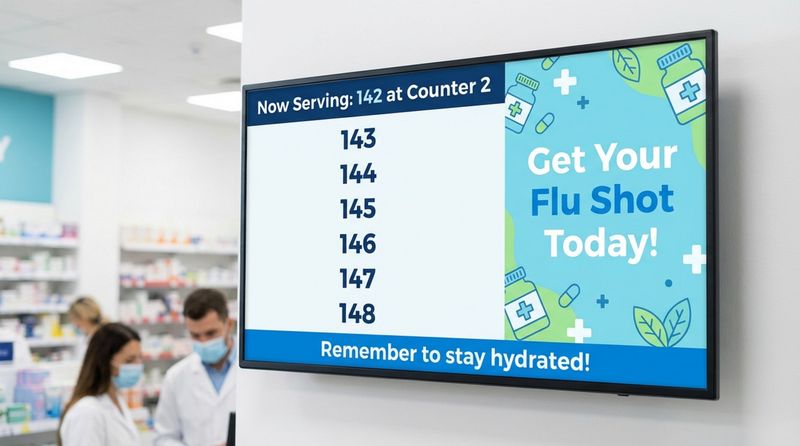
Wall-mounted screens are the most common queue displays. Positioned in waiting areas or above counters, their primary job is to show live token numbers and wait times. Because content can be updated from anywhere, you can also seamlessly rotate health education and seasonal reminders without printing new posters.
Mobile and Virtual Queue Integration
Virtual queues let patients join the waitlist from a distance. Patients can see a wait estimate on their phone and get a text when it's their turn. This gives them the freedom to wait in their car or run a quick errand, reducing crowding and making the visit feel much more convenient.
Key Features of Pharmacy Digital Signage Software
Your screens are only as powerful as the software running them. When choosing a platform, you need something that is secure, stable, and simple to manage, built for real-world business needs, not just for IT experts.
Centralized Management and Analytics
Strong software lets you manage every screen from one dashboard, whether you run a single independent pharmacy or a nationwide chain. This ensures your messaging stays consistent. Advanced platforms also offer analytics to prove ROI, helping you track screen uptime and content playback so you know your network is running smoothly.
Automated and Manual Queue Updates
Queue screens rely on accurate data. The best platforms use integrations (like API connections) to pull live data from your existing queue management tools automatically. However, staff also need a manual override option to adjust the queue status right away if something unexpected happens.
Integration with Existing Pharmacy Systems
Digital signage works best when it speaks to the tools you already use. By connecting to POS and inventory databases, you ensure promotions match what is actually in stock. Connecting to appointment scheduling tools triggers prescription-ready alerts automatically, removing the guesswork from daily operations.
Content Scheduling and Personalization
Scheduling allows you to show different messages at different times. You can set and forget morning content focused on daily wellness, while afternoons highlight allergy relief. This keeps content relevant to whoever is in the store at that moment.
HIPAA Compliance and Data Security
Privacy is non-negotiable. Public screens should never show protected health information (PHI) like patient names or diagnoses, which is exactly why token numbers are the standard. Trusted solutions use secure, cloud-based setups to protect data. For organizations with strict internal IT requirements, on-premise deployment options can provide maximum control over infrastructure.
What Should Pharmacies Display on Queue Screens?
While queue management is the primary goal, your screens can also educate and inform. A smart content strategy balances practical updates with helpful tips.
Live Queue Position and Estimated Wait Times
This is the core function of the screen. When people know where they stand, anxiety drops. Updates should run often to give patients the clearest picture possible.
Wayfinding and Navigation Instructions
Queue screens can act as digital directories, guiding customers to prescription pickup, consultation rooms, or payment spots. Simple maps and arrows reduce the time patients spend searching and the time staff spend pointing the way.
Health Campaigns and Seasonal Promotions
Pharmacies are community wellness hubs. Screens are a great place to display infographics about blood pressure or looping videos on diabetes care. You can also promote seasonal offers, such as sun care in the summer or flu shots in the fall, in a helpful, low-pressure way.
Patient Reminders and Appointment Notifications
Share prescription readiness alerts so customers know exactly when to approach the counter. For scheduled services like vaccines, screens can display basic steps to follow before the consultation, helping patients feel prepared.
Emergency Alerts and Important Announcements
If store hours change, new services are added, or a severe weather warning occurs, you can push real-time updates to your screens instantly. This transparency builds trust and keeps everyone safe.
Benefits of Digital Queue Screens in Pharmacies
Adding digital queue screens is a highly practical investment. It improves operations today and scales easily as your business grows.
Improving Patient Satisfaction and Reducing Perceived Wait Times
Wait-time frustration is a universal pain point. Clear, transparent queue screens can significantly reduce how long a wait feels. When paired with engaging health content, patients feel informed and respected, leading to higher satisfaction and repeat visits.
Improving Operational Efficiency for Staff
How much time does your team spend answering "Is my prescription ready yet?" Queue screens can eliminate those repeated questions. Better patient flow means your staff can spend more time on high-value tasks like counseling and inventory management.
Supporting Real-Time Communication and Service Updates
Pharmacy information changes fast. Digital signage allows you to push updates across your entire network in minutes. This drastically reduces the cost and waste associated with printing and shipping paper signs.
Custom Content for Health Education and Promotions
Turn waiting time into learning time. You can promote new supplements, vaccines, or screenings without being overly salesy. This increases awareness and often drives add-on purchases.
Improving Accessibility and Multilingual Support
Good signage communicates clearly to everyone. Showing content in multiple languages or using clear visual icons helps reduce communication barriers and makes your pharmacy more welcoming to the entire community.
How Digital Signage Prevents Long Wait Perception and Overcrowding
Lack of clarity makes short waits feel painfully long. Real-time queue positions remove the stress of guessing. Furthermore, useful content, like a 60-second health video, distracts customers and makes the wait feel productive.
Signage also physically manages your space. Wayfinding directions prevent people from clustering around a single counter. When combined with virtual waitlists, digital signage actively reduces the number of people standing in your aisles, maintaining a calmer environment during peak hours.
Practical Considerations for Setting Up Digital Queue Screens
Setting up your network does not require a complex IT project. The goal is to deploy a simple, reliable system that saves time.
Selecting Hardware and Software
When selecting your setup, it is an ideal solution for healthcare teams that want a professional system without a complicated deployment. Using the cloud-based system, you can manage content across one or thousands of displays from anywhere.
If you want to use existing smart TVs, you can easily install the free. For a dedicated, high-performance setup, the plug-and-play ensures reliable playback and keeps your screens running smoothly.
Integration with Pharmacy Workflow
To avoid manual data entry, your signage should integrate directly with your existing POS and queue tools. Features like allow Look DS to pull your queue data automatically. This ensures your screens are always accurate without adding tasks to your staff's to-do list.
Cost Factors and Return on Investment
Digital signage is highly scalable. You can start small with a single-screen pilot and scale smoothly across multiple branches. ROI typically comes from:
- Reducing perceived wait time by up to 35%
- Saving staff time previously spent answering queue questions
- Increasing add-on sales through highly visible seasonal promotions
- Eliminating the cost of printing and shipping physical posters
Future Trends in Pharmacy Queue Management and Digital Signage
As technology evolves, pharmacy signage will continue to become more intuitive, acting as a true digital health tool.
AI-Powered Content and Predictive Analytics
Future setups may use data-driven insights to adjust messaging dynamically. For example, screens might display different health tips based on the general foot-traffic patterns of a specific time of day, helping managers optimize content completely hands-free.
Voice-Activated Displays and Accessibility Improvements
Voice-activated kiosks could allow patients to ask for directions or store hours without touching a screen. Combined with screen-reader support, this ensures critical health information is accessible to patients with limited mobility or vision issues.
Augmented Reality for Health Education
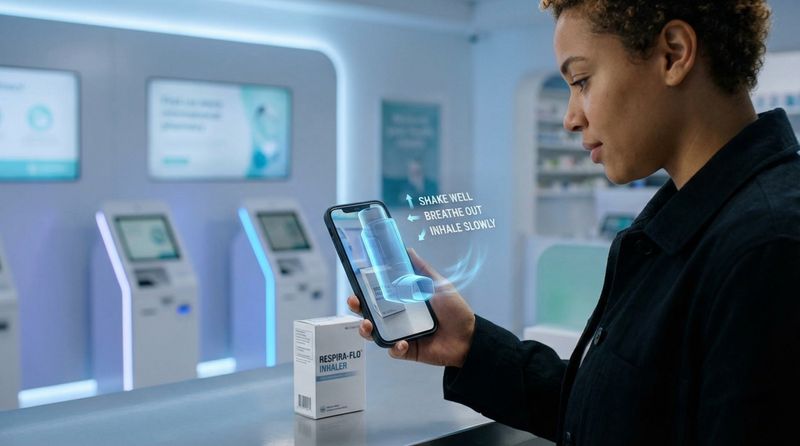
We may soon see Augmented Reality (AR) used to explain complex medications. A patient could scan a QR code on the screen to view a 3D guide on their phone explaining how to properly use a medical device.
Green and Energy-Efficient Display Solutions
As sustainability becomes a larger focus, hardware is improving. We expect to see more energy-efficient screens and smarter power-saving schedules that help pharmacies reduce their energy footprint while maintaining constant communication.
Frequently Asked Questions about Pharmacy Queue Screens With Digital Signage
Can patient names be displayed securely on queue screens?
In most cases, displaying full patient names is not recommended due to HIPAA regulations. Using anonymous ticket numbers is the standard best practice. Always check with your compliance team to ensure your setup follows local privacy rules.
How much does digital queue signage cost for pharmacies?
Pricing is typically subscription-based and scales with the number of screens you operate. Whether you need one screen or a nationwide rollout, you can choose a setup that fits today and grows with you.
Is pharmacy digital signage suitable for small independent pharmacies?
Absolutely. You do not need a massive IT budget. Cloud-based software and plug-and-play hardware make it incredibly easy to start with just one screen to manage your waiting area.
What content should be prioritized on pharmacy displays?
Balance is key. Using flexible screen layouts, you should prioritize:
- Live queue positions and wait times
- Prescription readiness alerts
- Store hours and service updates
- Health education (e.g., flu prevention tips)
- Featured promotions
How often should queue information be updated?
Queue data should refresh continuously. Systems that pull data via API usually update every 30 to 60 seconds, which ensures the information is reliable and helps keep patients calm.
Are pharmacy digital queue screens HIPAA-compliant?
They are designed to support privacy-first communication. By displaying ticket numbers instead of protected health information (PHI) and using secure, cloud-based platforms, you can safely communicate with patients. Always confirm your specific deployment with your internal compliance guidelines.


