

Table of Content
How can colleges keep thousands of students informed without cluttering hallways with outdated paper flyers? The answer lies in moving from scattered noticeboards to a centralized, cloud-based digital signage network. By using a platform like Look Digital Signage, administrators can manage every screen from a single dashboard, ensuring that safety alerts, class schedules, and event promotions reach the right audience instantly.
Managing a campus network is less about the hardware and more about a clear content strategy. Whether you are updating a dining menu based on inventory or broadcasting a weather warning, success depends on reliable tools and simple workflows. With the right software, you can cut through the noise of crowded inboxes and turn your screens into a helpful, real-time communication channel.

What Is Campus Digital Signage?
How Does Digital Signage Work in Higher Education?
In a university setting, digital signage connects three main elements: the screen, the media player, and the content management system. Unlike static posters, these systems are "live" and cloud-based. This allows IT or marketing teams to publish content to any screen, anywhere on campus, in minutes.
Modern solutions like Look Digital Signage make this setup simple. You log into a web-based dashboard (the Look CMS) to upload images, videos, and messages. You then build playlists and schedule them to play at specific times. The media player-whether it is a dedicated Look HDMI Player or a smart TV running the Look App-downloads this content and plays it back. This ensures that even if the internet goes down, offline playback keeps your screens running without interruption.
Where Can Digital Signage Be Used on Campus?
Digital signage is versatile enough to fit almost anywhere students gather. In academic buildings, screen layouts can display split-screen content featuring live class schedules alongside departmental news. Student centers often use screens to highlight club meetings, while libraries display quiet-hour reminders and available study room slots.
Beyond the classroom, high-traffic areas are prime spots for screens. Dining halls use digital menu boards to make quick price or item updates. Gyms can broadcast live game stats or facility rules. Dormitories often use screens for mental health resources and community announcements. The goal is to place information exactly where students need it, reducing the need for printed handouts.

Key Benefits of Managing Campus Digital Signage
Improves Campus-wide Communication
Students today are often overwhelmed by mass emails. Digital signage cuts through this digital clutter by placing visual messages in the physical space. A bright, well-designed screen in a hallway is often more effective for announcing registration deadlines or housing updates than another message in a full inbox.
Centralizing your signage with Look CMS prevents the "silo effect," where different departments struggle to share news. It keeps messaging consistent and allows administration to push critical updates to every screen instantly. This creates a unified voice across campus, helping students feel informed rather than confused.
Boosts Student Engagement and Experience
Digital signage shifts communication from passive to active. By showcasing student art, research highlights, or campus achievements, schools create a stronger sense of community. This is more than just decoration; it is about validating student efforts and building school spirit.
You can also use interactive scenarios and QR codes to drive action. A student might see a promo for a guest lecture, scan a QR code on the screen, and register immediately on their phone. This connects the physical campus with digital resources, making the environment feel modern and responsive.
Supports Safety and Real-time Emergency Alerts
One of the most practical uses of a managed network is public safety. During severe weather or security incidents, digital signage can act as a mass notification system. Because Look DS supports integration with other tools, screens can be triggered to override regular playlists and display emergency instructions instantly.
Even when there isn't an emergency, screens support safety by displaying shuttle schedules, campus security numbers, and health tips. Reliable uptime and offline playback capabilities ensure these critical messages remain visible even if network connectivity fluctuates.
Streamlines Wayfinding and Visitor Navigation
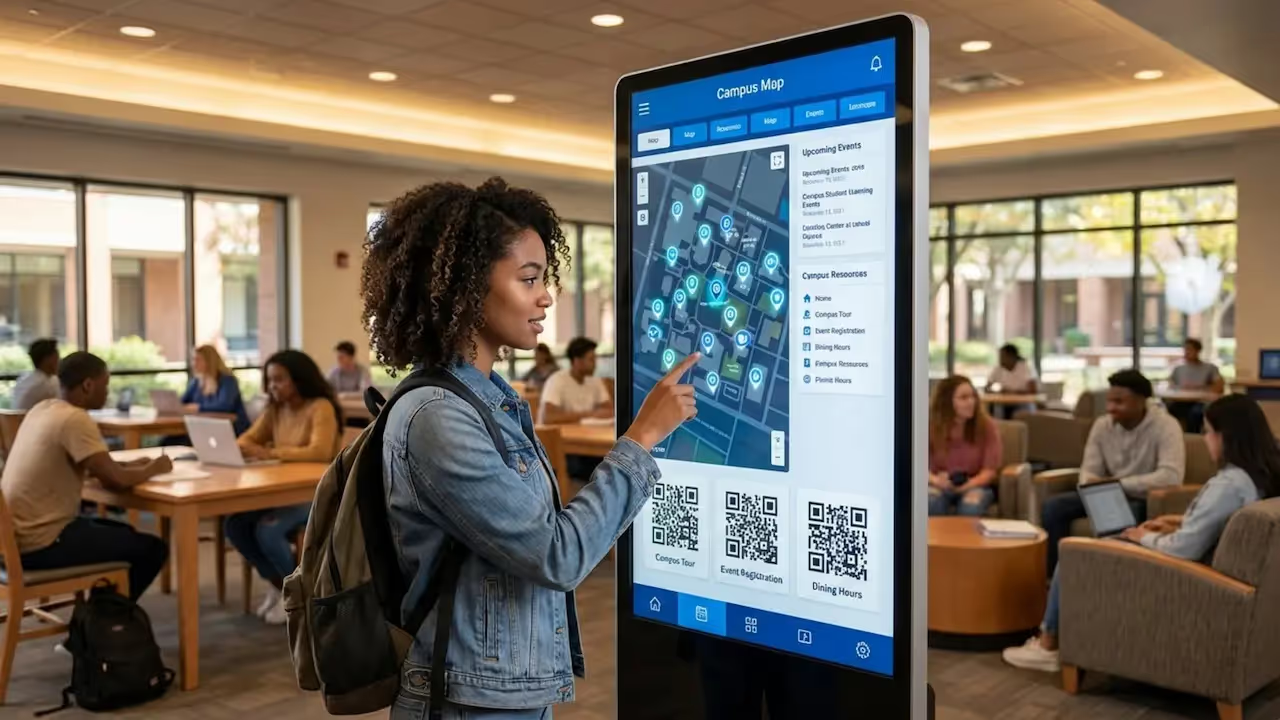
Navigating a large campus can be stressful for new students and visitors. Digital wayfinding stations and interactive maps provide clear, up-to-date directions. Unlike printed maps, digital versions can be updated in seconds to reflect construction detours or room changes.
These tools also support inclusivity by clearly marking accessible routes and elevators. By making navigation easier, schools create a more welcoming environment and reduce the workload on reception staff who often have to provide directions.
Enables Dynamic Content and Interactivity
Static signs fade into the background; dynamic content grabs attention. Modern platforms allow you to integrate Look Apps and widgets directly into your layouts. This means your screens can display live weather, social media feeds, or transit times without manual updates.
Interactivity takes this further. Touchscreens in bookstores can help students check textbook availability, while kiosks in student unions can allow for quick room bookings. This turns signage into a useful utility rather than just a display board.
Essential Features for Effective Campus Digital Signage Management
Centralized Content Management Systems
A cloud-based CMS is the foundation of a scalable network. Look CMS allows a small team to manage hundreds of screens across different buildings from one location. This ensures brand consistency and efficiency. You can design content once and publish it to a single lobby or the entire campus with a few clicks.
Central management also simplifies "bulk actions." If a snow day closes the campus, an administrator can push a closure notice to every display immediately. Once the alert expires, the system automatically reverts to the standard schedule, saving staff from manual resets.
Role-based Permissions and Access Control
While management is centralized, content creation often involves many departments. Role-based permissions allow you to grant specific access to different teams. For example, dining services can be given access to update menu screens, while the athletics department manages the gym displays, all without risking changes to the main university branding.
This setup empowers departments to keep their own content fresh while maintaining overall network security. It ensures that the right people have the tools they need without overwhelming them with technical settings.
Integration with Emergency Notification Systems
Effective signage must play a role in campus safety. The best platforms offer integrations (via API or tools like Zapier) that connect with emergency alert systems. This automation ensures that when a safety alert is triggered, screens instantly switch to emergency mode to show evacuation routes or shelter-in-place warnings.
Visual alerts complement auditory alarms, ensuring safety messages reach everyone, including those who may be wearing headphones or have hearing impairments.

Scheduling and Automation of Content
Smart scheduling is essential for keeping screens relevant without constant manual work. You can schedule content to play only during specific weeks, days, or hours. For instance, a "Welcome Back" message can be set to expire automatically after the first week of classes, or cafeteria menus can switch from breakfast to lunch at 10:30 AM automatically.
Automation keeps the screens dynamic. By connecting to calendar feeds, meeting room signs can update automatically as bookings change, reducing administrative overhead and keeping room availability accurate.
Interactive Maps and Wayfinding Tools
Interactive wayfinding helps reduce confusion on sprawling campuses. Using interactive scenarios within the CMS, schools can build touch-enabled directories that let users search for professors, departments, or buildings.
These kiosks can serve dual purposes. When no one is using the map, the screen can loop standard campus announcements, ensuring the hardware is always delivering value.
Data and Social Media Integration
To keep content lively, use Look Apps to pull in live data. Displaying a moderated social media feed with a campus hashtag encourages students to engage and share their own content. This provides a steady stream of fresh visuals without requiring a designer to create new slides every day.
Data integration can also be practical. Screens can show real-time computer lab availability or shuttle wait times. When signs provide utility, students pay more attention to them.
Best Practices for Deploying Campus Digital Signage
Choosing the Right Locations for Displays
Placement is critical. Screens should be located in high-dwell areas where students naturally pause, such as elevator banks, cafeteria lines, and lounges. A screen placed in a hallway where people walk briskly will only get a glance, so keep messages there short.
Consider the environment. Library screens should be silent to respect study zones, while student union displays can be larger and brighter. Using the digital signage hardware catalog from Look can help you match the right player and screen to each specific environment.

Maintaining Consistent Branding and Messaging
A common issue on campus is visual clutter caused by mismatched fonts and colors. To solve this, use digital signage templates within Look CMS. These ensure that even non-designers in different departments can create professional-looking slides that align with university branding guidelines.
Consistent branding builds trust. When students see a familiar layout and font, they instantly recognize the information as official and reliable.
Involving Multiple Departments in Content Creation
A successful network requires collaboration. IT manages the infrastructure, marketing oversees the brand, and departments like student affairs provide the actual content. Tools like the Content Creator inside Look CMS make it easy for these diverse teams to build simple graphics without needing expensive design software.
Encourage facilities teams to use screens for maintenance notices, while career centers can post job opportunities. This shared ownership ensures the screens remain a valuable resource for the entire campus population.
Establishing Policies for Content Approval and Updates
To prevent stale content, establish clear policies. Decide how long a slide should run, typically no more than two weeks for standard announcements, and who approves it. This prevents "digital litter," such as a homecoming promo still playing in December.
Structured approval workflows help maintain quality. They ensure that all content is accurate, spell-checked, and visually clear before it goes live on the network.
Training Staff and Student Contributors
The Look CMS is designed to be approachable for non-technical users, but basic training is still helpful. Teach contributors the basics of digital design: use high contrast, keep text minimal, and include a clear call to action.
Involving students can also be highly effective. Work-study students or marketing interns can help create content that resonates with their peers, bringing an authentic voice to the network.
Common Challenges When Managing Campus Digital Signage
Balancing Security and Access Permissions
Giving access to many users can create security risks if not managed well. It is important to use a platform that supports secure login practices. Look DS provides a secure environment where administrators can control exactly which screens and features a user can access.
By restricting permissions-for example, allowing a user to only update a specific playlist rather than the entire system settings-you minimize the risk of accidental errors or unauthorized content.
Managing Content Across Multiple Buildings
What matters in the engineering building may not be relevant in the arts center. To manage this, organize your screens into groups or use tags within the CMS. This allows you to publish global messages (like "Campus Closed") to everyone, while letting local managers publish specific updates (like "Guest Artist Lecture") only to relevant screens.
This targeted approach ensures that content remains relevant to the viewer, which keeps engagement high.
Ensuring Accessibility and ADA Compliance
Digital signage must be inclusive. Text should be large enough to read from a distance, and color contrast should be high to assist those with visual impairments. Interactive kiosks should be placed at heights accessible to wheelchair users.
Following accessibility standards is not just about compliance; it ensures your communication strategy reaches every member of the campus community effectively.
Dealing with Hardware and Software Maintenance
Technology requires maintenance. Screens can lose internet connection or power. Using reliable hardware like the Look HDMI Player is designed for plug-and-play simplicity, reduces technical headaches. Additionally, monitoring features in the CMS allow IT teams to check the status of screens remotely.
Look DS includes proof-of-play and device health monitoring, so your team can spot an offline screen and fix it before anyone complains. Investing in commercial-grade hardware ensures longevity and reliable performance compared to standard consumer TVs.
How to Measure the Success of Campus Digital Signage
Tracking Engagement Metrics and KPIs
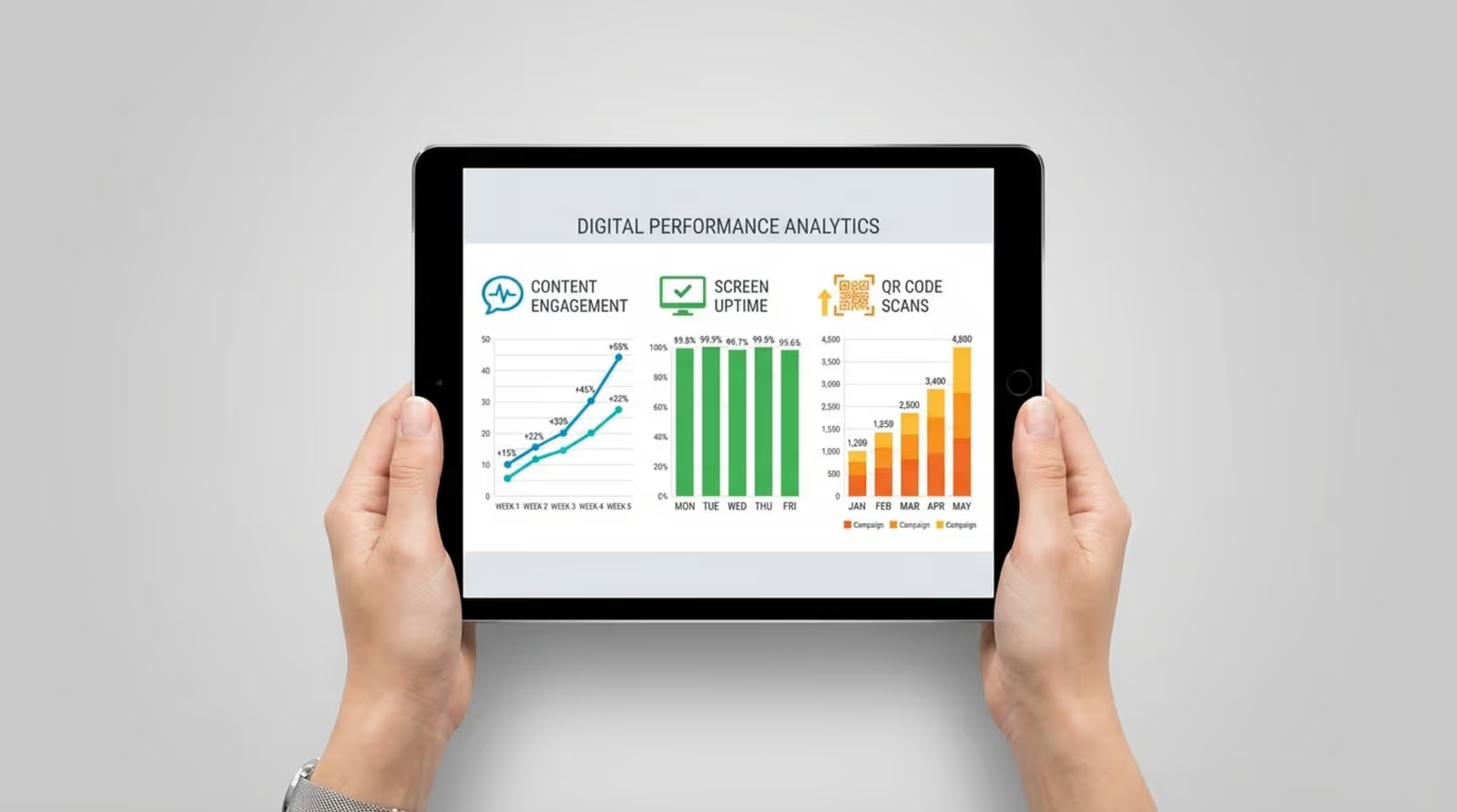
To understand if your signage is working, look at the data. Playback Analytics in Look CMS can show you exactly what played and how often. To measure engagement, use QR codes on your slides. If a "Register for Classes" slide generates 500 scans, you have clear proof that the screen drove action.
For interactive kiosks, track metrics like how often the map is used or which search terms are most popular. This data helps you refine your content strategy over time.
Collecting Feedback from Students and Staff
Data tells you "what," but feedback tells you "why." Conduct short surveys to ask students if they find the screens helpful. Do they rely on the bus schedule screen? Is the cafeteria menu easy to read? Listening to this feedback ensures the system evolves to meet actual needs.
If staff members report fewer repetitive questions at the front desk, it is a strong sign that the digital signage is successfully answering common queries.
Measuring Impact on Campus Safety and Communication
Success can also be measured by operational improvements. After an emergency drill, review how quickly the alert appeared on screens and if the instructions were followed. Fast, accurate dissemination of safety info is a key success metric.
In daily operations, success looks like a smoother flow of information, fewer missed deadlines, better attendance at events, and a more informed student body.
Maximizing the Impact of Your Campus Digital Signage Strategy
Aligning Digital Signage with Institutional Goals
Your digital signage should support the university's broader mission. If a primary goal is student retention, use screens to promote tutoring services and mental health resources. If the goal is alumni engagement, use digital donor walls to celebrate contributions.
When your content strategy aligns with strategic goals, the signage network becomes a powerful asset for the entire institution.
Planning for Growth and Scalability
Start with a manageable setup, but plan for expansion. Look Digital Signage is designed to scale from one screen to thousands. As your network grows, you can easily add new players and licenses without overhauling the system.
Consider future needs regarding budget and infrastructure. A scalable subscription model allows you to expand the network pace with your funding, ensuring sustainable growth.
Future Trends in Campus Digital Signage
The future of campus signage is increasingly automated and personalized. We expect to see more AI-driven content tools, like the Look AI Wizard, which helps teams generate visuals faster. Integration with mobile devices will also deepen, allowing students to "take" information from a screen to their phone seamlessly.
As campuses become smarter, digital signage will serve as the central visual interface for the connected university, blending physical spaces with real-time digital information.
Frequently Asked Questions about Campus Digital Signage
What Types of Content Work Best on Campus Signage?
Visual, concise content works best. Students are often on the move, so a slide should be readable in 3-5 seconds. Use high-quality images and bold headlines. Mix informational content (deadlines, schedules) with community content (event photos, student spotlights) to keep viewers interested.
Always include a clear next step. A slide promoting a club is good; a slide with a QR code to join the club is better.
Should Digital Signage Replace Traditional Bulletin Boards?
Digital signage is a powerful replacement for cluttered corkboards. It eliminates the mess of staples and torn paper, reduces waste, and ensures content is always current. While you may keep some physical boards for specific uses, moving to digital significantly cleans up the campus aesthetic.
Transitioning to digital allows you to prioritize messages. Unlike a bulletin board where every flyer competes for space, a digital playlist ensures every message gets its turn in the spotlight.
How Do Emergency Alerts Override Scheduled Content?
Look Digital Signage handles this through priority settings or API integrations. When an emergency trigger is received-either manually from the dashboard or automatically from a safety system-the player immediately interrupts the current playlist to show the alert.
This override happens in seconds. Once the alert is cleared, the screens automatically return to their scheduled programming, ensuring normal operations resume without delay.







