
Table of Content
ADA compliance for digital signage means making sure these common communication tools are fully accessible to everyone, including people with disabilities. It is based on the Americans with Disabilities Act (ADA), a civil rights law passed in 1990. The main goal is to give people with disabilities the same rights and access to information and functions on digital screens as everyone else. This is a legal requirement, not a suggestion, and it exists to stop discrimination and support inclusion. From people who are blind or have low vision, to those who are deaf or hard of hearing, and those with cognitive or mobility disabilities, ADA rules affect how digital signs are designed, installed, and used so they can truly serve all users.
Digital signage is now common in modern businesses and is used for marketing, sharing information, and internal communication in many sectors such as retail, healthcare, education, and hospitality. But in the rush to adopt these tools, many organizations overlook ADA compliance. This can lead to serious legal and reputation problems. Because accessibility standards keep changing, organizations need to stay informed and active so their digital signage meets current rules and is ready for future updates.

Who is Required to Follow ADA Standards for Digital Signage?
ADA standards apply to almost any organization that serves the public. Title III of the ADA, “Nondiscrimination on the Basis of Disability in Public Accommodations and Commercial Facilities,” covers any building or business that deals with the general public. This includes commercial buildings, public services, and private places open to the public. A retail store using digital screens for promotions, a hospital using screens for wayfinding, or a university with interactive campus directories are all covered.
Title II of the ADA applies to state and local government facilities, and Title I applies to employers with 15 or more employees. So, no matter an organization’s size or type, if it uses digital signage, it must follow ADA rules. The basic idea is “reasonable accommodation”-making changes that allow people with disabilities to have the same chance to get information and take part as people without disabilities. This focus on access is both good practice and a legal duty.
Which Types of Digital Signage Are Affected by ADA Regulations?
ADA rules apply to many kinds of digital signage, not just simple static screens. Any digital sign that shares information or allows user interaction is covered. This includes interactive touchscreens and kiosks, video walls, digital menu boards, wayfinding screens, and even basic information displays in lobbies or waiting rooms.
The rules apply both to how the signs are installed and to the content they show. For example, a digital directory in a lobby must consider mounting height for wheelchair users, clear floor space, and readable text. Interactive kiosks, with touch or gesture controls, must offer alternate input options and be usable by people with different disabilities. Video content, which is common on digital signs, must include features like closed captions and audio descriptions to comply. While some signs are exempt from tactile and visual rules (for example, temporary signs used for 7 days or less, building addresses, nameplates, logos, menus, seat numbers in assembly areas, and some signs in non-public areas of detention or correctional facilities), most digital signs used for public communication must meet ADA requirements.
Why ADA Compliance Matters in Digital Signage
Following ADA rules for digital signage is about more than avoiding fines; it is about creating inclusive communication that works for everyone. Legal risk is a strong motivator, but the benefits go well beyond that, helping brand reputation and audience reach.
Today’s customers value inclusivity. Businesses that genuinely support accessibility are seen more positively, gain more customers, and build stronger trust. As the population ages, the number of people with disabilities is increasing, making accessible digital signage a practical need if you want to reach a large and growing group. Ignoring accessibility can mean pushing away many potential users and losing important interaction and revenue.
Benefits for Users with Disabilities
The main people who benefit from ADA-compliant digital signage are those with disabilities. For people with visual impairments, clear, high-contrast text in readable fonts, along with audio descriptions of visual content, can turn a hard-to-use screen into a useful tool. Tactile and Braille features on or near digital displays offer another way to get information, especially for permanent items like room numbers.
For people with hearing impairments, closed captions and transcripts for video content help them follow announcements and messages. Interactive screens that support alternate input methods such as switches, joysticks, or voice commands, plus haptic feedback, give people with motor disabilities the ability to use the system on their own. Proper placement of screens-such as correct mounting heights and open floor space-helps wheelchair users see and use displays comfortably. ADA compliance makes digital signage do what it should: communicate clearly with everyone and support equal access.
Risks and Legal Consequences of Non-Compliance
Ignoring ADA rules can lead to serious legal and financial trouble. In 2023, there were 4,605 ADA digital accessibility lawsuits, a 14.1% increase from 2022. The total cost of an ADA digital accessibility case can reach $200 million, a level that can severely damage or shut down many businesses.
These lawsuits are becoming more common as people learn more about their rights and push for inclusion. Beyond fines and legal costs, failing to comply can harm a company’s reputation. In a time when customers care about fairness and inclusion, a business that is not accessible can face public criticism and a damaged brand image. This can reduce customer loyalty, bring bad press, and lower market share. The ADA uses the term “easily achievable”: if you can make your digital signage ADA compliant “without much effort or expense,” then choosing not to do so is a direct violation of the law.

Key ADA Standards and Requirements for Digital Signage
Understanding ADA rules for digital signage can seem complex, but breaking them into main standards makes the process easier. These rules cover everything from how content looks, to where signs are placed, to how interactive features work-always with the goal of making access possible for everyone.
The ADA Standards cover both visual and tactile content. While some signs are exempt (such as temporary signs or building addresses), signs that mark permanent rooms and spaces, give directions, or offer interactive functions must follow specific rules. This includes text, colors, tactile elements, audio support, and where signs are placed in a building.
Visual Accessibility Standards
Visual accessibility makes sure people with different levels of vision can read and understand information. The ADA sets specific rules about how text and graphics should appear.
Character Height, Contrast, and Legibility
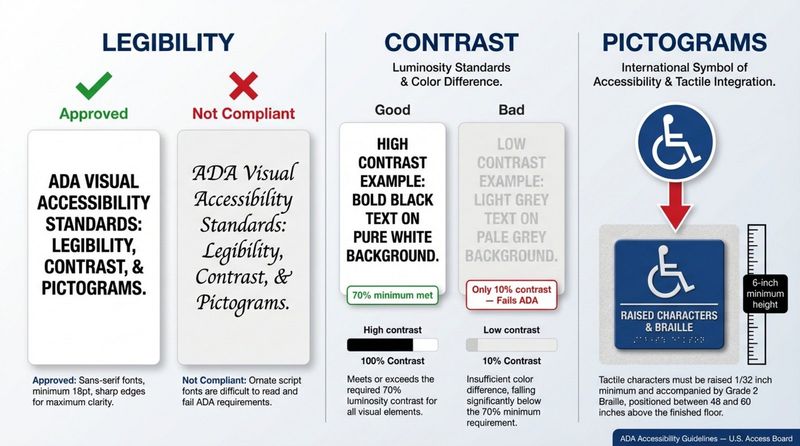
Text on digital signs must be clear and large enough to read. The ADA recommends character heights between ⅝ and 2 inches, with a maximum width of 12 points for standard text. Required character height also depends on viewing distance. For example, text seen from less than 6 feet away, at a height of 40-70 inches above the floor, needs at least ⅝-inch characters. Fonts should be simple and sans-serif; ADA-approved fonts include Times New Roman, Calibri, and Helvetica. Italic, oblique, script, decorative, or oddly shaped fonts are usually not allowed because they make reading harder.
Contrast is also key. The background color should clearly differ from the text color. A contrast ratio of at least 3:1 is often used for larger text (18pt or bigger, or 14pt if bold), but a 70% contrast difference between background and text is recommended in general. For body text and smaller copy (under about 18pt), a higher contrast ratio of 4.5:1 is required. Screens should have non-glare finishes to cut down on reflections and keep text readable in different lighting. Flashing or fast color changes should be avoided because they can distract users and may trigger seizures for people with photosensitive epilepsy.
Use of Pictograms and Accessibility Symbols
Pictograms and universal icons help many users, especially people with cognitive disabilities or those who do not read the language on the sign. These symbols are often recognized worldwide and can share information quickly. Examples include the International Symbol of Accessibility (ISA), the International Symbol of TTY, and the symbol for hearing access.
When pictograms mark permanent rooms or spaces (such as restrooms or cafeterias), they must be at least 6 inches high and include text labels in raised characters and Grade 2 Braille directly under the pictogram area. These pictograms and their background must have a non-glare finish and strong light-on-dark or dark-on-light contrast. For informational or directional pictograms, tactile text may not always be required, but the symbols still must meet finish and contrast rules to remain visible.
Tactile and Braille Requirements
For people who are blind or have low vision, tactile and Braille features are key for reading static information. While digital screens are mainly visual, fixed elements connected to them-such as room ID signs-often need tactile features.
Raised Characters and Braille Specifications
Where tactile signs are needed, they must include raised characters and repeat the same information in Grade 2 Braille. Raised characters must be uppercase, sans-serif, and raised at least 1/32 inch. Character height must be between ⅝ inch and 2 inches. If visual characters appear elsewhere, raised characters can be as small as ½ inch. Italic, oblique, script, decorative, or unusual styles are not allowed for raised text. Line spacing for raised characters should be 135%-170% of character height.
Grade 2 Braille (which uses contractions for common words and letter groups) must appear below the related raised characters, with at least ⅜-inch space on all sides from other tactile elements. Braille dots must be rounded, with specific size and spacing rules. In Braille, capitalization is limited to the first word of sentences, proper names, single letters, initials, and acronyms, even if the printed text is all caps. Raised characters and their background must have a non-glare finish and clear contrast (light on dark or dark on light). These finish and contrast rules do not apply to the Braille itself.
Installation Height and Location for Tactile Features
Where tactile signs are placed is very important. The baseline of the lowest raised character must be at least 48 inches above the floor or ground, and the baseline of the highest raised character must be no more than 60 inches above the floor or ground. This range supports touch reading for most users.
Tactile signs must be located next to the door on the latch side. There must be clear floor space of at least 18 inches by 18 inches centered on the tactile characters, free of obstacles up to 80 inches high. This lets users approach and read the sign by touch. This space must also be outside the swing of any door opened to 45 degrees. If there is no wall space on the latch side, the sign should be placed on the closest nearby wall. For double doors with one active leaf, the sign should go on the inactive leaf; for doors with two active leaves, the sign should be on the right side of the doorway.
Auditory Accessibility and Alternative Formats
Audio access is another key part of ADA compliance for digital signage, especially for users who are blind or have low vision, and for those who are deaf or hard of hearing. Offering information in different formats creates a more inclusive experience.
Providing Audible and Captioned Content
For digital signage with visual content, the ADA requires audio descriptions when they are needed. This is important for videos or active visual displays that share key information. The ADA also recommends installing assistive listening options, such as built-in speakers or universal headphone jacks with volume controls, to help users with hearing loss.
All video content should include transcripts and closed captions to support people who are deaf or hard of hearing. Captions share spoken words and important sound cues in text form. At the same time, location matters: placing heavily audio-based signage in noisy spaces can cut down its usefulness and irritate users. A good setup offers audio options along with strong visual and tactile alternatives.
Physical Placement and Reach Ranges
Where and how digital signs are installed is just as important as what they display. Correct heights and clear paths help people with mobility disabilities, especially wheelchair users, use the signs.
Mounting Height and Clear Floor Space
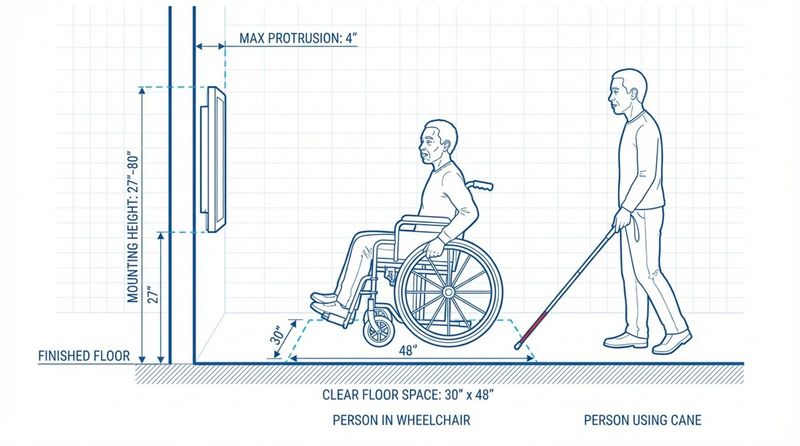
Digital signage frames should be mounted between 27 and 80 inches from the floor, measured from the highest flooring point. This height range supports visibility for many users. For interactive touchscreens, the bottom of the active area should be no higher than 40 inches from the floor. A practical reach range for touchscreens is 15-48 inches above the floor, with a maximum horizontal reach of 10 inches, so wheelchair users can reach the screen comfortably.
There must be at least 30 inches by 48 inches of clear floor space in front of an interactive display, with no obstacles, so wheelchair users can approach and use it. For wall-mounted screens placed between 27 and 80 inches high, the screen cannot stick out more than 4 inches from the wall. This helps people with visual impairments using canes avoid walking into the screen. Thin mounts or recessing screens into the wall often help meet this requirement. These rules also apply to video walls.
Accessible Navigation on Interactive Signage
Interactive digital signage offers more engagement but also adds access challenges. Touchscreens and other interactive parts must be usable by people with different types of disabilities.
Touchscreen Usability and Assistive Technology Support
Interactive touchscreens must be set up so people with disabilities can use touch and gesture controls. Often, this means adding other input options for those who cannot use touch directly. Switches, joysticks, and voice commands can all serve as alternate input devices. For voice control, the system must respond accurately and reliably to spoken commands.
The user interface also needs to be clear and simple. Instructions should be easy to understand, and navigation should be straightforward. Features like zooming, tactile or haptic feedback, and audio signals that confirm user actions help people with visual, motor, or cognitive disabilities. Keeping design patterns consistent across all screens in a network reduces confusion and makes the system easier to use. This way, Interactive digital signage is engaging and accessible at the same time.
Best Practices for Designing ADA-Compliant Digital Signage
Building ADA compliance into digital signage starts at the design stage and continues over time. Starting with accessibility in mind makes displays both legally compliant and genuinely user-friendly for all visitors.
Content Considerations for Inclusion
For digital signage content, readability comes first. Use ADA-friendly fonts and follow text size guidelines to keep text easy to read. Aim for at least 70% contrast between text and background, especially for users with low vision. Avoid fast flashing or quickly changing images, which can confuse users or trigger seizures.
Content should account for many types of disabilities-not just physical, but also autism, cognitive and learning disabilities, hearing loss, mental health conditions, and sensory processing issues. Pictograms and universal icons can help because they take up less space and are often easier to understand than long text blocks. Offering key messages in multiple languages, or letting users change the on-screen language via a touch hotspot, can also improve comfort and inclusion. Overall, content should be clear, simple, and available in more than one format.
Design Layout for Visual and Physical Accessibility
Layout and physical design strongly affect accessibility. Screens should have non-glare finishes to stay readable under different lighting. For static signs, provide enough clear space around the screen and choose a screen size that allows people to read from a safe distance.
For interactive touchscreens, design with wheelchair users in mind. Install screens at an accessible height and angle, often with a slight upward tilt of 15-20 degrees, and make sure kiosks can be approached without barriers. Adding an ADA accessibility icon or button in the interface can bring controls and content down to a reachable area for wheelchair users. Wall-mounted displays in busy hallways or lobbies must extend 4 inches or less from the wall to protect people with visual impairments who use canes. Plan the entire space around the screen-height, depth, and nearby traffic paths-carefully so people can move safely and access the sign without obstacles.
Regular Auditing and Maintenance for Ongoing Compliance
ADA compliance needs regular review. Audits and maintenance help keep both hardware and content aligned with current standards. Check installations and content from time to time to confirm they still match ADA requirements, especially as technology and guidelines change.
Maintenance includes more than fixing broken screens. It should cover checks on brightness, contrast, assistive technology functions, and the readability of text and icons. Interactive systems should be tested regularly to confirm that alternate input devices, zoom, haptic feedback, and audio cues still work correctly. Working with accessibility specialists for periodic audits can reveal gaps and improvement areas. This ongoing review reduces legal risk and keeps digital signage welcoming and usable for everyone.
Implementing ADA Compliance: Steps for Digital Signage Providers
For digital signage vendors and integrators, building ADA compliance into their offerings is now a basic requirement. Doing this well calls for planning, working with the right experts, and upgrading older systems where needed.
Planning and Assessing Compliance Needs
The process starts with clearly understanding the organization’s needs and which ADA rules apply. This early planning stage involves looking at what types of digital signage will be used, where they will go, and who will use them. For example, an interactive wayfinding kiosk in a public building will need different features than a static display in a staff-only office. Providers must know how different ADA titles affect different types of spaces and organizations.
This planning should also review what is already in place. Questions include: What fonts are used now? How high are the screens mounted? Are there flashing or moving elements? Finding possible problem areas early helps with planning budgets and upgrades. Understanding the ADA’s “easily achievable” idea-that changes should be made when they can be done “without much effort or expense”-helps set priorities and timelines.
Collaborating with Accessibility Experts
Because ADA rules can be detailed and change over time, working with accessibility experts is strongly recommended for digital signage providers. These professionals know the ADA Standards for Accessible Design in depth and can advise on visual, tactile, audio, placement, and interactive requirements. They can explain the different rules for room-identification signs versus directional or informational signs.
Experts can also help choose the right technologies and practices. They may suggest certain screen types with better non-glare performance, help pick font and color combinations that meet contrast rules, or guide the setup of assistive listening systems and alternative control methods for kiosks. With their support, providers can build solutions that meet current rules and are more likely to stay compliant if standards change later.
Upgrading and Retrofitting Existing Digital Signage
Many organizations already have digital signage that may not fully follow current ADA rules. For these setups, upgrading and retrofitting is an important step. These changes may range from simple software updates to more involved hardware work.
Retrofits might include changing mounting heights to meet reach standards, switching to thinner wall mounts, recessing screens to meet the 4-inch protrusion rule, or clearing space in front of displays. Content changes can include updating layouts to use ADA-friendly fonts, improving color contrast, and adding captions and audio descriptions to videos. Interactive screens may need alternate input devices, or software updates to support zoom and haptic feedback. While it is easier to include accessibility from the start in new projects, upgrading existing signage is often “readily achievable” and is both a legal duty and an ethical responsibility.
Ensuring Ongoing ADA Compliance for Digital Signage
Reaching initial ADA compliance is only the beginning. Technology, standards, and user expectations change over time, so organizations must keep checking and improving their digital signage to stay compliant and accessible.
Conducting Regular Accessibility Reviews
Ongoing accessibility reviews are key to long-term compliance. These checks should look at both the physical setup and the content, not just technical uptime. Periodically review mounting heights, clear floor areas, and how far signs stick out from walls to confirm nothing has shifted or been blocked. Check content for font choices, character sizes, color contrast, and removal of flashing or fast-moving elements.
For interactive screens, test all accessibility features-alternate input devices, zoom, audio and haptic feedback, and language options. Where possible, have people with ADA expertise and users with disabilities take part in reviews to provide real-world feedback. Setting a regular review schedule-such as every quarter or year, depending on how often content changes-helps catch and fix issues before they lead to complaints or legal challenges.
Staff Training and User Feedback
People play a major role in long-term ADA compliance. Staff who manage or update digital signage must know why accessibility matters and what their responsibilities are. Training should cover how to create and upload accessible content, how to use and explain assistive features, and how to respond when users raise accessibility concerns. Staff should also learn about different types of disabilities and how various features-such as captions, contrast, or alternate controls-support different users.
Feedback from users is just as important. Clear ways for people-especially users with disabilities-to share their experience with the signage can highlight issues that audits might miss. This feedback can lead to ongoing improvements and better design choices. With well-trained staff and open feedback channels, organizations can move beyond basic compliance and build a culture that values and supports accessibility for everyone.


