
Table of Content
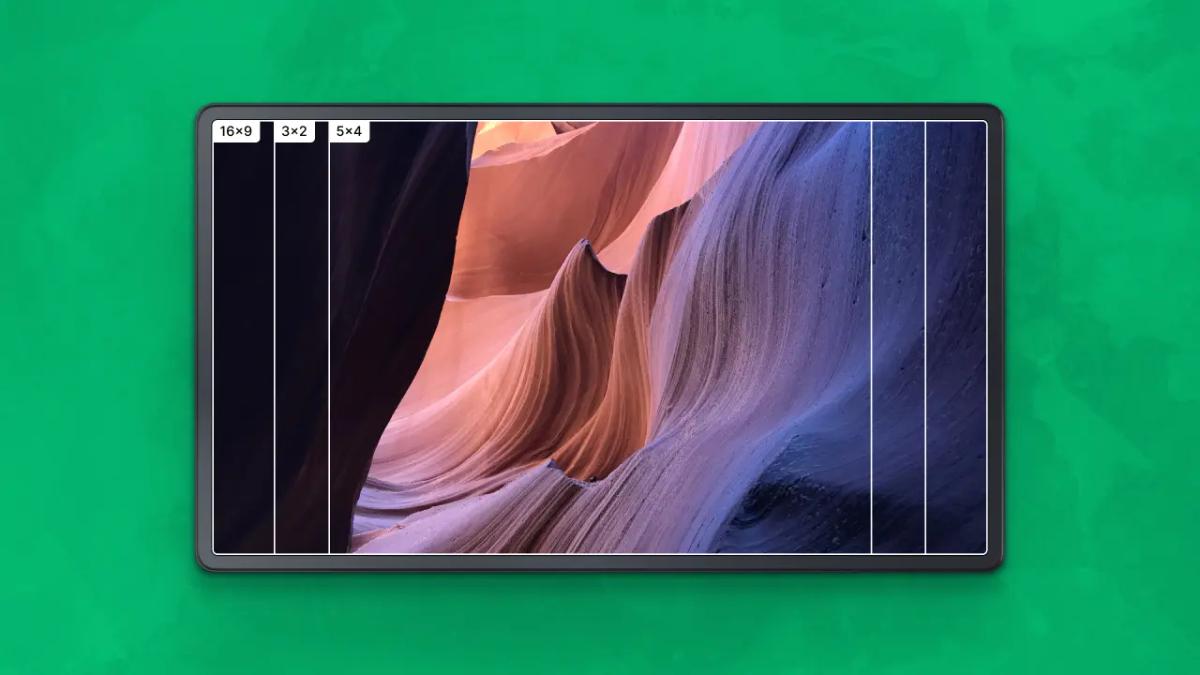
Why does some content look perfectly crisp while other images appear stretched or boxed in by black bars? The answer usually lies in the display aspect ratio-the proportional relationship between the width and height of a screen. Understanding this ratio is the first step to ensuring your digital signage, presentations, and media look professional on any device.
Whether you are setting up a menu board, a video wall, or a simple office display, matching your content to your screen’s shape is critical. In the modern landscape, ratios have evolved far beyond the old "square" TV boxes to include widescreen, ultrawide, and vertical formats that businesses rely on every day.
What Is the Display Aspect Ratio?
How Is Display Aspect Ratio Defined?
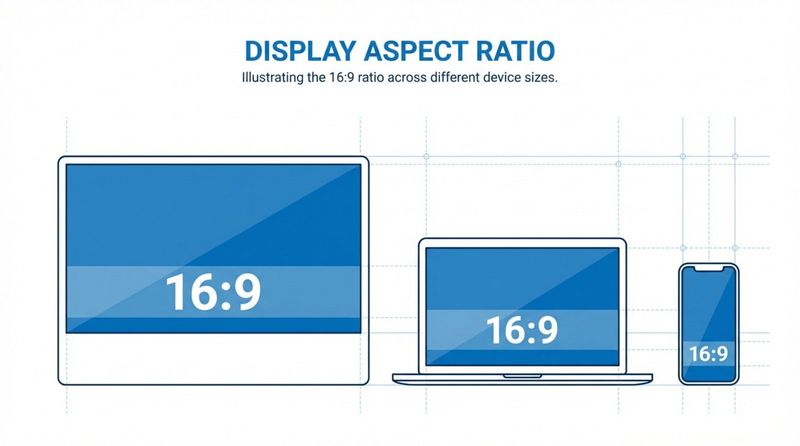
The display aspect ratio is a simple mathematical expression describing a screen's shape, written as two numbers separated by a colon (e.g., 16:9). It is not about the physical size in inches or the resolution; it is strictly about the proportion of width to height. A small smartphone screen and a massive 85-inch digital signage display can both share a 16:9 ratio.
Previously, hardware limits dictated these shapes. Today, manufacturers design screens for specific purposes. You determine a ratio by taking the resolution (width and height in pixels) and simplifying them to their lowest common numbers. These numbers tell you the "shape" of the viewing window-whether it is a wide rectangle, a tall vertical totem, or a square box.
Why Does Aspect Ratio Matter for Displays?
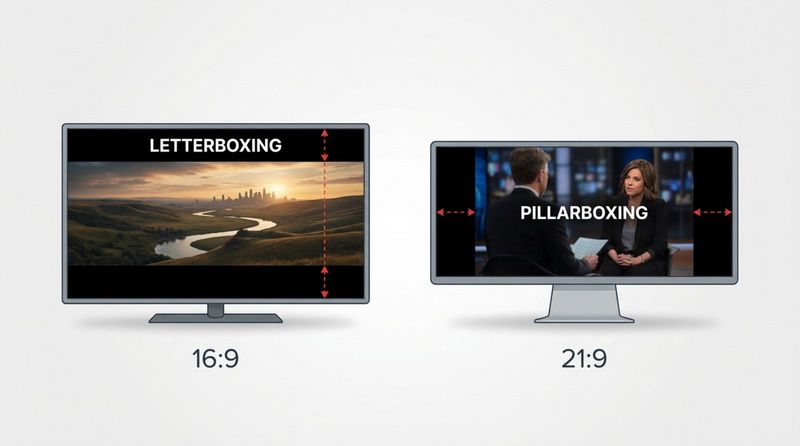
Aspect ratio determines how efficiently your content fills the screen. If you play a standard 16:9 video on a wider 21:9 screen, you will see black bars on the sides ("pillarboxing"). Conversely, putting wide cinema content on a standard TV results in bars at the top and bottom ("letterboxing").
In a business context, this affects readability and impact. A mismatch makes logos look squashed and text hard to read. Choosing the right ratio ensures your message is clear, whether you are displaying KPIs on a dashboard or running promotional videos in a retail window.
How to Calculate Display Aspect Ratio
Measuring Screen Dimensions
To identify the aspect ratio of a physical monitor or TV, measure the width and height of the actual visible screen area-do not include the plastic frame or bezel. Importantly, the "diagonal size" (like 55-inch) used in marketing tells you how big the screen is, but not its shape.
For digital content management, reliance on native resolution is more accurate. If a screen has a resolution of 3840 x 2160 pixels, 3840 is the width and 2160 is the height. Dividing these numbers helps you confirm the exact aspect ratio needed for your content creation.
Aspect Ratio Calculation Example
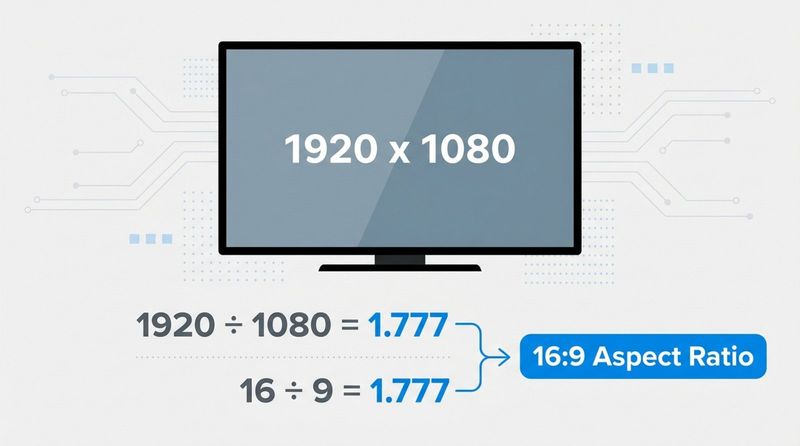
Let's look at a standard Full HD screen: 1920 x 1080. Divide the width by the height: 1920 / 1080 ≈ 1.777. If you divide 16 by 9, you get the same number (1.777). This confirms that 1920 x 1080 is a 16:9 ratio.
For an older monitor with a resolution of 1024 x 768: 1024 / 768 ≈ 1.333. Since 4 / 3 equals 1.333, that screen is 4:3. Understanding this math helps you verify if your content assets will fit your screens without distortion.
What Are the Most Common Display Aspect Ratios?
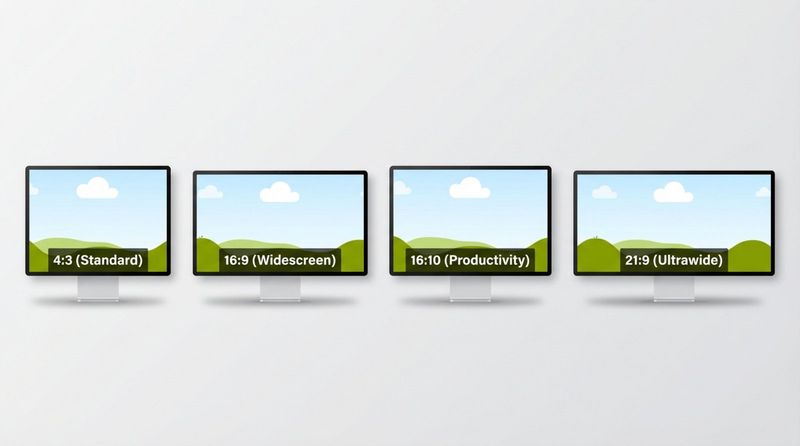
4:3 Aspect Ratio
The 4:3 ratio, often called "standard definition," was the norm for televisions and monitors throughout the 20th century. It is nearly square, a legacy of early CRT (cathode-ray tube) manufacturing limits.
While rare in modern televisions, 4:3 is still relevant in specific sectors. You will see it on iPads (and similar tablets) and in legacy industrial or medical equipment. Content on these screens needs to be designed specifically to avoid looking cramped.
16:9 Aspect Ratio
Currently, 16:9 is the universal standard for digital signage, HDTVs, and online video platforms. It strikes a balance between the old boxy formats and wider cinematic shapes. If you buy a standard commercial display or consumer TV today, it is almost certainly 16:9.
Most content creation tools default to this ratio. Whether you are using Look Digital Signage software or a basic slide editor, 16:9 is the "safe" zone that works across the majority of modern hardware.
16:10 Aspect Ratio
The 16:10 ratio provides slightly more vertical space than 16:9. It is a favorite for productivity monitors and business laptops because that extra height allows for viewing more rows of a spreadsheet or lines of code without scrolling.
While less common for public-facing advertising screens, 16:10 displays are often found in corporate meeting rooms and on interactive touch panels used for room booking systems.
21:9 Aspect Ratio
Known as "Ultrawide," the 21:9 ratio mimics cinematic movie formats. It offers significant horizontal space, making it excellent for immersive video experiences or side-by-side multitasking.
In digital signage contexts, ultrawide screens are often used as "stretch" displays for wayfinding headers or menu boards where vertical height is limited but horizontal space is available.
32:9 and Other Ultrawide Ratios
The 32:9 ratio is essentially two 16:9 screens fused side-by-side into one seamless curved display. These "Super Ultrawide" monitors are visually striking and eliminate the bezel gap you would get with a dual-monitor setup.
Businesses use these for high-impact panoramic content in lobbies, specialized control rooms, or flight simulators. They require high-resolution content to ensure the image remains sharp across such a wide canvas.
1:1 and Square Displays
Square (1:1) displays are niche but visually distinct. Historically used in radar and aviation, they have seen a resurgence in artistic video walls and a modern retail displays driven by the popularity of social media grids (like Instagram).
While rare for a standard monitor, you can achieve a 1:1 look on a standard screen by using software Screen Layouts to partition a specific square zone for your content.
Comparing Display Aspect Ratios
4:3 vs 16:9
The shift from 4:3 to 16:9 changed how we consume media. 4:3 feels boxy and focuses the eye on the center, which was fine for news anchors but poor for landscapes. 16:9 aligns better with human peripheral vision.
For businesses, moving from 4:3 to 16:9 meant more room for sidebars, tickers, and split-screen content without cluttering the main visual.
16:9 vs 21:9
The choice between 16:9 and 21:9 is often about immersion versus compatibility. 16:9 is universally compatible; your content will play anywhere. 21:9 offers a unique "premium" look but requires custom content creation.
If you run 16:9 content on a 21:9 screen, you waste screen real estate on black bars. However, if you use a CMS with flexible layout tools, you can fill that extra space with a weather widget or news ticker.
Widescreen vs Square and Vertical Displays
Perhaps the most critical distinction in digital signage is orientation: Landscape (16:9) vs. Portrait (9:16). Smartphones and social media have made vertical video (9:16) a dominant format.
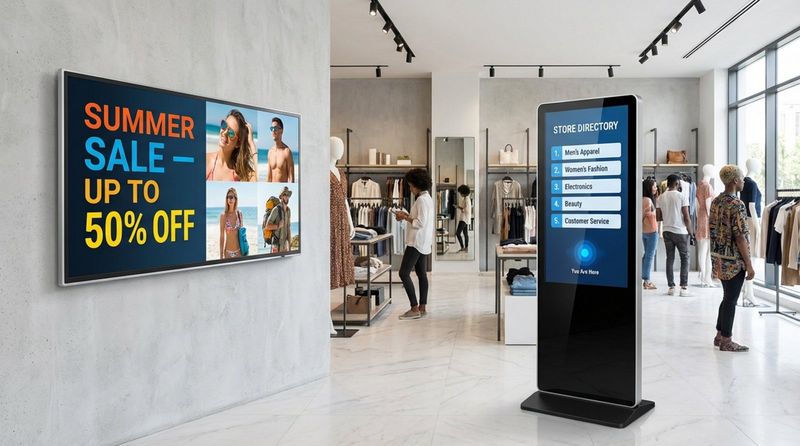
Digital posters, totems, and kiosk displays often use 9:16 orientation. It is essential to know if your screen is mounted vertically or horizontally before creating content, as rotating text 90 degrees is rarely a good user experience.
How Does Aspect Ratio Affect Resolution and Screen Size?
Relationship Between Aspect Ratio and Resolution
Resolution counts the pixels; aspect ratio describes the shape. However, they are locked together. A 4K resolution (3840 x 2160) inherently forms a 16:9 rectangle. If you force that resolution onto a 4:3 screen, the image must either squash or crop.
When upgrading hardware, ensure the native resolution of the new screens matches the aspect ratio of your existing content library, or be prepared to update your media assets.
Diagonal Measurement and Area Considerations
Screens are sold by diagonal inches, which can be misleading regarding total surface area. A 29-inch ultrawide monitor is actually shorter vertically than a standard 27-inch 16:9 monitor. It is wider, but has less total screen area.
Check the actual height and width dimensions (not just the diagonal) to ensure the display fits your physical space and offers enough visibility for your audience.
Display Aspect Ratio Applications by Device Type
Televisions
Televisions are overwhelmingly 16:9. This standardization makes them an affordable and reliable hardware choice for digital menus and general information screens. Since broadcast and streaming content is mastered for 16:9, these screens require zero configuration for standard video playback.
Computer Monitors
Monitors offer the most variety. While 16:9 is standard, 16:10 and 21:9 are common in professional settings. If you are repurposing computer monitors for signage, double-check their native resolution to avoid slight stretching of your images.
Smartphones and Tablets
Mobile devices have pushed ratios to extremes, often using 19.5:9 or 20:9 to fit large screens in a hand-held form factor. This makes them great for scrolling feeds but tricky for standard video. Tablet kiosks (often 4:3 or 3:2) are popular for check-in desks and interactive surveys.
Projectors and Home Theater
Projectors are flexible. While the chip inside usually has a native ratio (often 16:9 or 16:10), the projected image can be adjusted to fit various screen shapes. This flexibility is useful for projecting onto non-standard surfaces like gallery walls or architectural features.
How Does Aspect Ratio Influence Content?
Video and Cinema Formats
Filmmakers choose ratios for artistic reasons. When displaying cinematic content on commercial screens, you must decide whether to letterbox (keep the whole image with bars) or crop (fill the screen but lose the edges). Consistent formatting is key to a polished look.
Gaming and Interactive Content
In interactive scenarios, a wider ratio lets you display more peripheral information. For touchscreen kiosks, the ratio dictates where you place clickable buttons. Buttons placed too high on a tall vertical screen might be unreachable for some users.
Productivity and Multitasking
Wider ratios (21:9) are productivity powerhouses, effectively replacing dual-monitor setups. In a signage context, this width allows for multi-zone layouts-playing a video on one side while displaying a live data feed or schedule on the other.
Social Media and Digital Art
Social platforms drive the demand for vertical (9:16) content. Many businesses now repurpose Instagram Reels or TikTok videos for their digital signage. Using a platform that supports vertical rotation ensures these assets look native and professional on your screens.
Can Aspect Ratio Be Changed or Adjusted?
Changing Aspect Ratio Settings on Devices
Most displays allow you to adjust how they handle non-native signals (e.g., "Fit to Screen," "Stretch," or "Just Scan"). However, you cannot change the physical pixels. "Stretching" content to fill the screen is rarely the right answer, as it distorts people and products.
Cropping and Letterboxing Effects
Letterboxing (black bars) preserves the original image but leaves screen space unused. Cropping fills the screen but risks cutting off text or essential visual elements. The best approach is always to create or render content at the screen's native ratio.
Tools and Software to Adjust Aspect Ratios
Modern content management systems (CMS) can help you adapt. For instance, Look Digital Signage provides tools to manage these mismatches effectively:
- Screen Layouts: You can divide a screen into multiple zones. If you have a wide screen but 16:9 content, you can play the video in one zone and use the remaining space for a sidebar, utilizing 100% of the display.
- Look CMS: The built-in editor and Content Creator allow you to build scenes that fit your specific resolution perfectly, ensuring no distortion.
Which Aspect Ratio Should You Choose?
Selecting an Aspect Ratio For Home Viewing
For general media consumption, 16:9 remains the best choice. It covers 99% of TV shows, streaming content, and console games without issues. It is the path of least resistance.
Best Aspect Ratios for Work and Study
For productivity, taller is often better. A 16:10 or 3:2 ratio helps you see more document text at once. If you multitask heavily, a 21:9 ultrawide can simplify your desk by replacing two screens with one.
Recommendations for Content Creators and Business Teams
If you are managing a network of screens-perhaps a mix of landscape TVs and vertical menu boards-keeping your aspect ratios consistent is a challenge. Using a dedicated platform like Look Digital Signage can simplify this workflow significantly.
With Look DS, you can use ready-made templates that are already optimized for both landscape (16:9) and portrait (9:16) formats. If you have unique screen sizes, the Screen Layouts feature lets you create custom zones so your content always fits perfectly. Whether you are using a professional player or the Look App on existing hardware, the software ensures your playlists render correctly across every location.
Display Aspect Ratio: Frequently Asked Questions
Can Aspect Ratio Affect Image Quality?
Yes. If the aspect ratio does not match the screen, the image must be scaled. Stretching an image reduces sharpness and introduces distortion. Always match your content creation settings to your hardware specifications.
Does Changing Aspect Ratio Impact Text Readability?
Absolutely. If text is squashed or stretched to fit a different ratio, it becomes harder to read and looks unprofessional. Non-native scaling can also make fine text look blurry (aliased). Native resolution is always best for text.
What Aspect Ratio Do Most Modern TVs and Monitors Use?
The vast majority of modern displays use 16:9. It is the industry standard for manufacturing panels. However, vertical 9:16 (portrait) is increasingly common for commercial advertising displays and digital menu boards.
How Does Aspect Ratio Affect Image Cropping?
If ratios don't match, something has to give. You either lose part of the image (cropping) or lose screen space (black bars). When designing content, it is smart to keep text and logos away from the extreme edges-this "safe zone" ensures your message survives even if minor cropping occurs.
While 16:9 is the current king, the future of displays is flexible. From modular video walls to creative LED ribbons, the shape of the screen is becoming a creative choice. Regardless of the hardware you choose, ensuring your content fits the frame is the key to professional, effective communication.


