

Table of Content
4K resolution describes a picture with a horizontal width of about 4,000 pixels. For TVs and most consumer devices, the main format is 3840 x 2160 pixels, called Ultra High Definition (UHD). This has four times as many pixels as standard 1080p Full HD. With around 8.3 million pixels, 4K offers very high detail, sharpness, and realism, changing how we watch movies, play games, and do professional visual work.
People often use “4K” as a general term for high-end screens, but it actually covers several formats used in both cinemas and home devices. To understand 4K, you need to look beyond the pixel numbers. It is also about how resolution works together with color systems and frame rates to create a more engaging viewing experience. By 2026, 4K has gone from a premium upgrade to the normal standard for most mid- to high-range digital screens.
What Is 4K Resolution?
What Does 4K Mean?
The “K” in 4K stands for “kilo,” which means one thousand. So 4K refers to a horizontal width of roughly 4,000 pixels. This is different from older labels like 720p or 1080p, which are based on the vertical pixel count. The focus on horizontal pixels follows the naming style used in professional digital cinema since the early 2000s.
In practice, when a TV or monitor is sold as 4K, it means the pixels are packed tightly enough that you cannot see individual dots from a normal viewing distance. This happens because about 8.3 million tiny pixels are working together. Whether it’s a “4K Photo” mode on a camera or a “4K UHD” video stream on a tablet, the aim is to give you enough detail that textures look real and edges look smooth.
Comparison with HD and Full HD
To see how big a step 4K is, it helps to compare it with earlier formats. Standard High Definition (720p) has 1280 x 720 pixels, around 0.9 million pixels. Full HD (1080p), the main standard for many years, has 1920 x 1080 pixels, or about 2.1 million pixels. 4K UHD (3840 x 2160) doubles both the width and height of 1080p, which results in four times as many pixels overall.
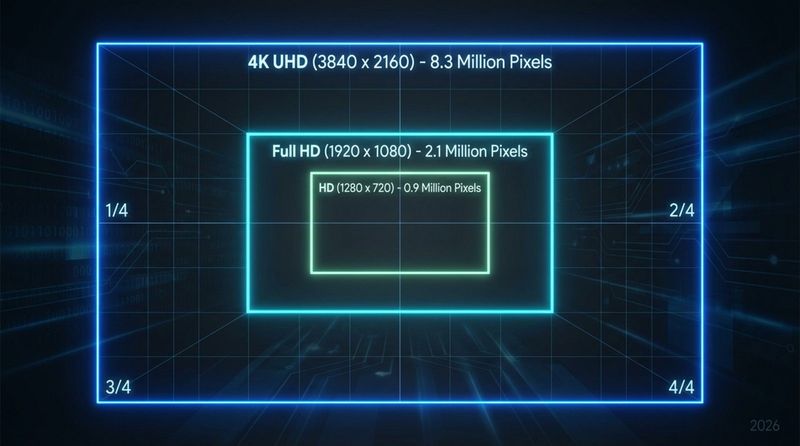
This fourfold increase matters because it allows for much bigger screens without lowering image quality. On a 1080p display, as the size goes up, pixels need to be larger, which can cause a “screen door effect” where you start seeing the grid of pixels. 4K keeps the pixels much smaller and closer together, so even a 75-inch or 85-inch TV can look as sharp as a smaller 1080p screen once did.
Common 4K Resolution Formats
There is not just one 4K size. There is a group of resolutions that sit around 4,000 horizontal pixels but use different shapes (aspect ratios). The most common is 3840 x 2160 in a 16:9 ratio, used for TVs, monitors, and most streaming services. In professional cinema, the standard is DCI 4K at 4096 x 2160, which is a bit wider to fit the ~1.90:1 aspect ratio used in theaters.
Other formats work for special screens. Ultra-wide monitors might use 3840 x 1600 (often called UW4K or WQHD+), giving a 21:9 “cinema-style” width. Some premium laptops use “4K Ultra HD+” at 3840 x 2400, which adds more vertical space for work apps. Each of these serves a specific use case, but they all sit in the 4K family with a horizontal width around 4,000 pixels.
Technical Standards and Terminology
DCI 4K vs UHD 4K: What’s the Difference?
The difference between DCI 4K and UHD 4K is one of the things that often confuses people. DCI 4K (4096 x 2160) was created by Digital Cinema Initiatives, a group of major movie studios. It is the native format for digital cinema projectors and built for theater screens. Because it is wider than a regular home TV, true DCI 4K content on a home set usually shows thin black bars or gets slightly cropped.
UHD 4K (3840 x 2160) is the standard for consumers. It was set to be exactly four times the pixel count of 1080p, which makes it easier to scale up older HD content. While marketing often mixes the terms, “Ultra HD” is the correct name for home equipment, and “4K” originally applied to cinema. Today, people use “4K” casually for both, and the difference is usually only important in professional work.
3840 × 2160 vs 4096 × 2160 Pixel Counts
The pixel gap between the two main formats is 256 horizontal pixels. A 3840 x 2160 panel has 8,294,400 pixels, while 4096 x 2160 has 8,847,360 pixels. That is about 6% more pixels. The extra width can be very important to filmmakers who rely on that space for certain framing and compositions.
Some high-end consumer monitors support the full 4096 width and are sold as “true 4K,” mainly to colorists and video editors. For everyday users, the 3840-width, 16:9 ratio is standard because it matches modern TV broadcasts and most streaming platforms like Netflix and YouTube.
SMPTE, ITU-R, and CEA 4K Standards
Several standards bodies define how 4K should work. The Society of Motion Picture and Television Engineers (SMPTE) set early rules for UHDTV. The International Telecommunication Union (ITU-R) then released Recommendation BT.2020. This document is important because it goes beyond resolution: it also includes color range (gamut) and frame rate targets that 4K equipment should meet to qualify as “Ultra HD.”
The Consumer Electronics Association (CEA), now called the CTA, set a marketing definition for “Ultra High-Definition.” Their rules require at least 3840 x 2160 pixels, a minimum 16:9 aspect ratio, and at least one HDMI input that can carry that full signal. These basic rules help buyers know that a “4K” TV meets a certain level of picture and connectivity.
CinemaWide 4K and Other Variations
As screen technology develops, brands have created new 4K shapes. Sony’s “CinemaWide” smartphones, for example, use a 21:9 aspect ratio with resolutions like 3840 x 1644. Here the vertical pixel count is lower than standard UHD, but the shape fits wide movies without black bars, giving a theater-style picture in phone form.
Another format is 3840 x 1080 “Dual Full HD” (DFHD), used on some super-ultrawide gaming monitors. This is like having two 1080p screens merged without a visible border. These are sometimes placed under the 4K label because of the 3840 width, but in total pixels they only match half of a true 4K UHD display. This is why checking the actual resolution numbers matters more than just the “4K” name on the box.
Key Features and Benefits of 4K Resolution
Increased Pixel Density and Sharpness
The clearest upside of 4K is how sharp the image looks. Pixel density, measured in pixels per inch (PPI), shows how smooth the picture appears. On a 4K display, pixels are so small that you cannot see them as separate dots from a reasonable distance. This reduces jagged edges on text and graphics and avoids the “blocky” look in fast-moving content, making the image feel more like a printed photo.
For visual professionals, this level of detail is extremely helpful. Photographers can view an 8.3-megapixel image at full size and see fine details like skin texture or fabric patterns without zooming. In games, the higher resolution makes distant objects clearer, helping both with immersion and, in some cases, with competitive play.
Vivid Colors and Improved Contrast
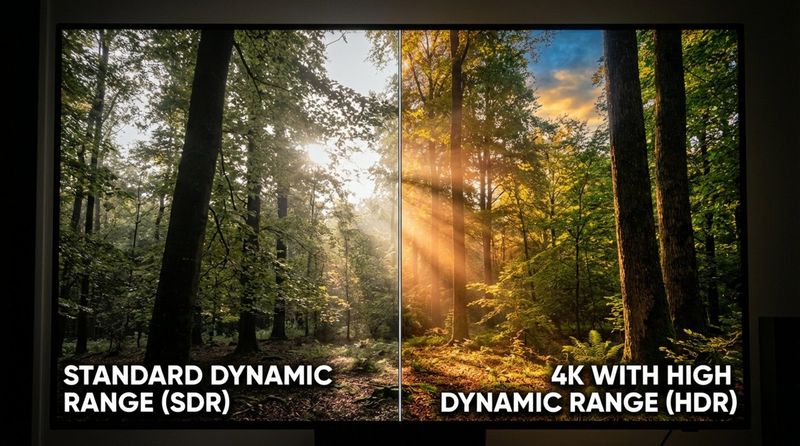
While 4K itself is about pixel count, it usually comes with modern extras like High Dynamic Range (HDR) and Wide Color Gamut (WCG). Standards such as ITU-R BT.2020 allow screens to show a much wider range of colors than older TVs. This leads to deeper reds, richer greens, and more shades overall, making images closer to how scenes look in real life.
4K combined with HDR is especially powerful. With many more pixels, the screen can control bright and dark areas very precisely. This creates darker blacks, stronger highlights, and more detail in shadows. Things like sunlight reflections, flames, or dim interiors look more natural, with subtle details that would otherwise be lost.
Better Performance on Large Screens
Back in the 1080p era, buying a TV over 50 inches often meant putting up with a softer picture. As screens grew, 1080p did not have enough pixels to keep images crisp. 4K removes most of that limit. Because a 4K screen has four times the detail, you can choose a much larger TV or sit closer to it without seeing visible pixels.
This shift has helped popularize large “home cinema” setups, with 75-inch and 85-inch screens now common. At those sizes, extra resolution is needed, not just nice to have. 4K gives big screens the detail they need so the experience feels immersive, not blurry.
Future-Proofing Your Display
Buying a 4K display helps keep your setup up to date as new content appears. Most new blockbuster films, big TV series, and AAA games are prepared in 4K. With a 4K screen, you see this work at its native detail level, instead of having it scaled down to fit an older HD display.
Broadcast standards like ATSC 3.0 are also moving toward 4K for free over-the-air channels and live sports. As 1080p slowly fades the way standard definition once did, a 4K device will stay relevant for much longer. It is a strong long-term choice for anyone who cares about picture quality.
How Does 4K Resolution Work?
Detail Benefits and Image Clarity
4K works by making each pixel much smaller and packing more of them into the same space. Moving from 2.1 million pixels (1080p) to 8.3 million (4K) cuts the size of each pixel by a large margin. This lets the screen draw thinner lines and finer textures. For example, in a 4K image of a forest, you may see single leaves and bark detail on far-away trees that would blur together at 1080p.
Another plus is that single frames from 4K video are around 8.3 megapixels, which is high enough for many print and web uses. By comparison, a 1080p frame is only about 2.1 megapixels. This gives videographers the option to pull sharp still images directly from footage instead of needing separate photo shots.
Chroma Subsampling Explained
4K video carries a lot of data, so engineers use a method called chroma subsampling to reduce file size. Human eyes see brightness changes better than color changes, so video systems store full detail for brightness (luma) and lower detail for color (chroma). You’ll see this written as 4:4:4, 4:2:2, or 4:2:0.
Most streaming services and 4K Blu-rays use 4:2:0 subsampling. In this format, brightness is kept at full 4K resolution, but color data is kept at a lower resolution (often close to 1080p in each direction). Because our eyes are less sensitive to color detail, this cutback is hard to notice in real viewing, but the bandwidth savings are huge, making 4K streaming practical on home internet connections.
Bit Rates and Frame Rates in 4K
Resolution is only one factor. Bit rate and frame rate also matter for a good 4K experience. Bit rate is how much data is sent per second. 4K needs higher bit rates than 1080p to avoid visible compression problems like blocks, smearing, or random noise. Many 4K streams use around 15-25 Mbps, while 4K Ultra HD Blu-rays can go up to around 100 Mbps for higher quality.
Frame rate controls how many images per second you see. Movies usually use 24 frames per second (fps), which gives a familiar “cinematic” motion. For sports and games, 60 fps or even 120 fps looks smoother and more responsive. High frame rate 4K at 120Hz or 144Hz is now common on newer displays, giving very fluid movement that matches the detail of the picture.
Where Is 4K Resolution Used?
Televisions and Home Theater Systems
The TV market was the first to adopt 4K at a large scale. Today, almost all mid-size and large TVs are 4K as standard. These TVs sit at the center of many home theater systems, paired with 4K Blu-ray players, streaming boxes, and sound systems to bring a cinema-like experience into the living room.
4K projectors are also popular for home cinemas, delivering images 100 inches or larger. Native 4K projectors used to be very expensive, but pixel-shifting models now offer a more affordable way to get 4K-like clarity. They move pixels very quickly to simulate a full 4K image that looks almost the same as true 4K from a normal seating distance.
Computer Monitors and Laptops
For work, 4K monitors have become very useful. Developers can see more lines of code at once, editors can view timelines and tools side by side, and office workers can keep several windows open without overlapping. This extra “screen space” is one of the most practical uses of 4K.
Many high-end laptops now ship with very high-resolution displays, often labeled “Retina,” “UHD,” or similar marketing names. On 13-15 inch screens, 4K makes text smoother and reduces eye strain during long sessions. Creators in photo and video work use these panels to check fine detail and color before publishing.
Mobile Phones and Cameras
True 4K screens on phones are still rare, but 4K video recording is standard on most modern smartphones. Since around the mid-2010s, phones have been able to capture 4K at 30 or 60 fps. This allows everyday users to record footage with clarity that used to require dedicated cameras, feeding the growth of high-quality content on video platforms.
Dedicated digital cameras, from mirrorless models to action cameras like GoPros, also focus heavily on 4K. Many offer “4K Photo” modes that let you record short clips and then pick out high-res still frames. This helps photographers capture fast action and choose the perfect moment afterward.
Broadcasting and Video Streaming
Online streaming brought 4K content to mainstream audiences. Netflix, Amazon Prime Video, Disney+, YouTube, and other services now host large libraries of 4K movies, shows, and videos. This became possible with the HEVC (H.265) codec, which compresses large 4K files into sizes that home broadband can handle while still keeping high image quality.
Traditional broadcasters were slower but are catching up. Major sports events, such as Super Bowl LIX in 2025, have been delivered in native 4K with HDR and advanced audio formats like Dolby Atmos. Satellite and cable providers in many regions now offer dedicated 4K channels for sports and special programs, giving viewers a very detailed picture.
Professional and Cinema Applications
The film industry led the move to 4K. Most large productions now shoot in 4K, 6K, or 8K. Some movies are still finished at 2K for faster post-production work, but full 4K workflows are becoming more standard. Keeping a 4K master means films can look sharp both in theaters and on high-resolution home screens for years to come.
Outside entertainment, 4K is used wherever detail matters. Medical imaging uses 4K displays so doctors can spot small features in X-rays, MRIs, or live surgery feeds. Security systems and flight simulators use 4K to help operators and pilots see small or distant objects clearly. In these areas, resolution helps decision making and safety, not just visual appeal.
What Devices Support 4K Resolution?
Televisions and Projectors
Major TV makers like Samsung, LG, Sony, and Hisense now center most of their lineups on 4K. Models range from low-cost LED sets to premium OLED and QLED screens. Many include “AI upscaling” features that take lower-resolution video (like 720p or 1080p) and use processing to fill in extra detail so it looks closer to 4K.
4K projectors are also widely available. Native 4K projectors sit at the higher end, ideal for serious home cinemas, while “4K UHD” pixel-shifting projectors bring similar clarity at lower prices. These are popular for backyard movie nights, classrooms, and large meeting rooms where screen size matters more than a traditional TV can offer.
Monitors and Laptops
4K desktop monitors typically range from 27 to 32 inches. Brands like Dell, HP, and LG make different types: IPS panels for accurate colors and wide viewing angles (good for design and editing), and high-refresh panels aimed at gamers. Many monitors now use USB-C to send 4K video while also charging a laptop and connecting peripherals.
Laptop lines such as Dell XPS, MacBook Pro (with high-density Liquid Retina screens), and HP Spectre often include 4K or near-4K options. These machines appeal to students, creatives, and professionals who want a sharp, detailed display for both work and entertainment on the go.
Streaming Devices and Game Consoles
To watch 4K content on a TV, you need a 4K-compatible source. Streaming boxes and sticks like Apple TV 4K, Chromecast with Google TV, and Amazon Fire TV Stick 4K support 4K output and modern HDR formats. They are built to handle services that stream 4K content smoothly.
Game consoles are a big part of 4K’s growth. The PS4 Pro and Xbox One X were early steps, using techniques like checkerboard rendering to reach near-4K. The PlayStation 5 and Xbox Series X go further, offering native 4K gaming at higher frame rates. They also double as 4K Blu-ray players (except the PS5 Digital Edition) and media hubs, making them multi-purpose 4K devices.
Cameras, Smartphones, and Tablets
Modern smartphones from Apple, Samsung, Google, and others act as powerful 4K cameras. Many can shoot 4K at 60 fps, with advanced stabilization that keeps video smooth even while moving. Tablets like the iPad Pro use very high-resolution displays that, while sometimes slightly different from 3840 x 2160, match or exceed 4K in clarity and are great for video editing and movie watching.
Dedicated cameras have followed the same path. Mirrorless systems from Sony, Canon, Nikon, and others now offer full-featured 4K video recording, log color profiles, and high bit rates that used to be confined to cinema cameras. Even budget-friendly vlogging cameras often include 4K recording so new creators can produce videos that look sharp on any modern display.
Is 4K the Right Choice for You?
Screen Size and Viewing Distance Considerations
Whether 4K is worth it depends on your screen size and how far away you sit. On a small 24-inch monitor at a typical distance, the jump from 1080p to 4K may be subtle. As you move up to 32-inch monitors or 55-inch TVs and larger, 1080p starts to look soft, while 4K still looks crisp and clean.
Viewing distance matters just as much. If you sit 15 feet from a 50-inch TV, you may not notice extra detail from 4K. But if you watch from 6-10 feet (a common living room distance) or sit close to a desk monitor, 4K can make a big difference and feel more like looking through a window. A simple guideline: the bigger the screen or the closer you sit, the more benefit you get from 4K.
Hardware Requirements for 4K Playback
4K puts more load on your hardware than 1080p. To play 4K video, your device needs a processor that can handle HEVC or similar high-bitrate codecs, and a port like HDMI 2.0 (or newer) or DisplayPort 1.2 (or newer) that supports 4K at your desired frame rate. For gaming, you need a strong graphics card-such as higher-end NVIDIA RTX or AMD Radeon GPUs-to keep frame rates smooth at 4K resolution.
Your internet speed also matters for streaming. Most services suggest around 25 Mbps per 4K stream. If multiple people are streaming, downloading, or gaming at once, a faster connection can help. Because 4K files and streams are large, people with strict data caps should watch their usage to avoid extra charges.
4K Content Availability
A 4K screen is only fully useful if you feed it 4K content. By 2026, this is no longer a problem. Most original shows and movies from Netflix, Disney+, Amazon Prime Video, and other big services are available in 4K. YouTube offers huge amounts of free 4K and even 8K videos. For maximum quality, Ultra HD Blu-ray discs still offer the highest bit rates and best audio.
On traditional TV, support is mixed. Big sports events, major live shows, and some premium channels are in 4K, while many local broadcasts and older programs are still HD or even lower. Modern 4K TVs use advanced upscaling to clean up these lower-resolution sources, so they usually look better than they would on an older HD set.
Budget and Value Assessment
4K is now very affordable. Entry-level 4K TVs can cost only a bit more than basic 1080p sets did a few years ago. That said, higher-priced models often bring better brightness, stronger HDR, deeper blacks, and faster processors for smart apps and upscaling.
When judging value, think about how long you plan to keep your TV or monitor. Since 4K has become the main standard and will likely stay that way for some time, choosing 4K now usually makes more sense than saving a small amount on a 1080p model. For most users, the extra sharpness and better overall quality justify the price difference.
What Is the Future of 4K Resolution?
Growth in Content and Broadcast Adoption
4K is moving toward being everywhere. After winning in the streaming and disc markets, the next big step is over-the-air broadcast TV. Standards like ATSC 3.0 (NextGen TV) let stations send 4K channels through a simple antenna, bringing higher resolution to local news, weather, and daily shows.
4K is also spreading through live events beyond sports. Concerts, award shows, and political coverage are more often produced in 4K as the number of 4K homes grows. As 4K cameras and gear get cheaper, smaller broadcasters and production houses can also switch over, pushing 1080p further into the background.
Emerging 4K Technologies in Gaming and Media
In gaming, the new goal is 4K at high frame rates instead of just hitting 4K resolution. With HDMI 2.1 and fast GPUs, 4K at 120Hz or 144Hz is becoming more common, offering both high detail and extremely smooth motion. Features like Variable Refresh Rate (VRR) and hardware-based Ray Tracing are being tuned to work better at 4K, bringing more lifelike lighting and more responsive play.
4K is also growing in Virtual Reality (VR) and Augmented Reality (AR). Because VR screens sit so close to your eyes, higher resolution is needed to avoid seeing the pixel grid. As chips improve, headsets that offer “4K per eye” are becoming more realistic targets, greatly improving clarity and immersion. While 8K systems are starting to appear, 4K remains a practical balance between quality, cost, and performance for most users and devices for the coming years.


