Table of Content
How can parks keep visitors informed and reduce manual updates across large outdoor spaces? Park schedule boards with digital signage replace easily damaged printed posters with dynamic, cloud-based screens. By switching to a digital signage software platform, park staff can schedule daily events, display interactive maps, and broadcast safety alerts to any screen in minutes, from anywhere.
What Are Park Schedule Boards With Digital Signage?
Definition and Main Functions
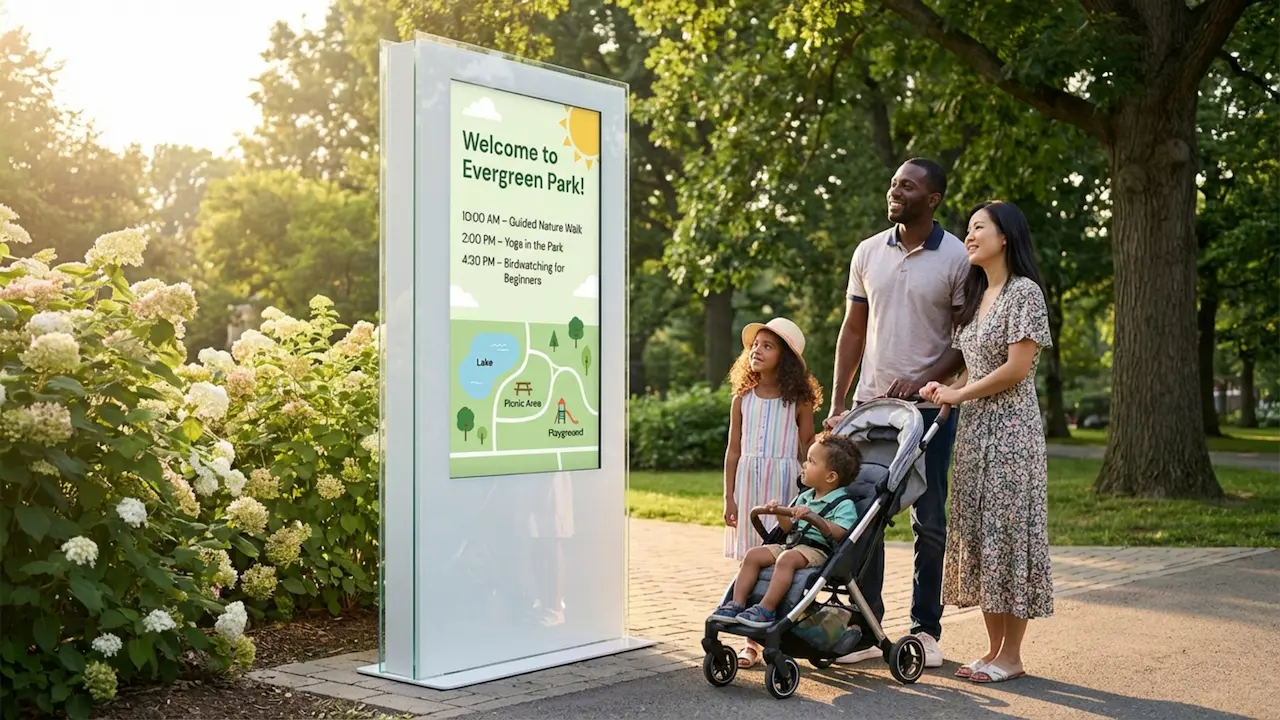
A park schedule board with digital signage is a connected display system that manages and presents changing information in a recreational setting. Instead of relying on printed signs that require staff to manually replace them, digital signage uses a central cloud-based content management system (CMS). Park teams can build playlists, set schedules, and publish content to one or hundreds of screens remotely. This typically includes daily activity lists, facility hours, special event promotions, and public safety announcements.
These boards function as comprehensive information hubs. Beyond basic schedules, they can display interactive maps, local wildlife facts, and real-time weather updates. By supporting various media formats, they help operations teams share practical guidance so visitors can navigate the park easily.
Comparison to Traditional Schedule Boards
Traditional boards rely on corkboards, chalkboards, or printed posters. These static displays only change when a staff member physically visits the board to pin up new materials or rewrite information. This manual process wastes staff hours and often leaves the public looking at outdated schedules, leading to visitor frustration.
Paper signs also degrade quickly due to rain, sun exposure, and vandalism. Digital schedule boards offer a simple setup with high durability. Because updates are published from anywhere via a web dashboard, the messaging remains perfectly consistent across all locations. Protected by weather-rated enclosures, these screens provide reliable playback of dynamic videos and layouts that capture visitor attention far more effectively than fading paper.

Key Benefits of Digital Schedule Boards for Parks
Better Visitor Communication
Digital schedule boards fundamentally improve how parks communicate. Bright, structured screen layouts draw the eye, ensuring visitors actually read crucial details like trail closures, open hours, and park rules. Clear communication leads to higher participation in park programs and fewer missed opportunities.
When information is accessible and readable, it reduces the burden on your staff. Instead of answering the same basic questions-such as "Where is the main trailhead?" or "When does the nature walk begin?"-staff can focus on maintaining the park and improving the guest experience.
Real-Time Updates and Alerts
Operations teams deal with constant changes. Severe weather rolls in, facilities close for emergency maintenance, or event times shift. Updating printed signs across a massive park takes hours. With digital signage, staff can update every screen on the network in minutes.
This rapid deployment is critical for safety. Parks can push severe weather alerts or missing person notices to screens instantly. For daily operations, simple schedule adjustments are automated, ensuring visitors always base their plans on accurate data.

Improved Wayfinding and Getting Around
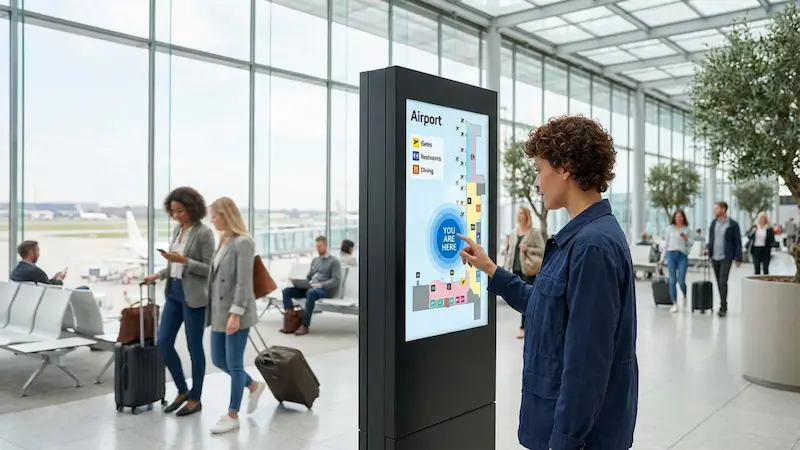
Navigating a large park with scattered trails, picnic zones, and visitor centers can be difficult. Digital schedule boards equipped with interactive scenarios and digital maps provide clear orientation. Visitors can find their current location and map the best route to restrooms, parking, or specific events.
Advanced setups can even display live updates on trail congestion or parking availability. This targeted guidance gives visitors the confidence to explore further without getting lost.
Supports Community Engagement
Digital boards serve as a modern community hub. Parks can promote volunteer days, highlight local artists, and share community milestones. Adding QR codes to the screen layouts allows visitors to instantly download event calendars or sign up for newsletters directly on their phones.
By transforming a static noticeboard into a dynamic communication channel, parks encourage active participation and strengthen their connection with local residents.
Helps Generate Revenue Through Advertising
Digital signage provides a clear path to prove ROI through secondary revenue streams. Parks can allocate specific zones on their screen layouts or insert sponsored slides into their playlists for local businesses. These might include nearby restaurants, outdoor gear shops, or regional tourism services.
Because the scheduling is automated, ad loops can run unobtrusively alongside regular park information. This income can be reinvested into park maintenance and programs, offering a cleaner, more professional alternative to hanging vinyl sponsor banners.
Core Features of Park Digital Signage Systems
Editable Templates for Park Events and Schedules
Managing content should not require a dedicated graphic designer. Quality digital signage software includes ready-made templates tailored for different layouts and screen orientations. Park staff can simply select a template, drop in text and images, and publish.
This ensures a consistent, on-brand look across every display. Whether you are building a daily event schedule or a seasonal promotion, templates speed up the process from creation to screen-ready.
Interactive Maps and Wayfinding Displays
Interactive maps elevate standard signage into a self-service kiosk. Using touch-enabled displays, visitors can zoom into specific park sectors, search for amenities, and review trail difficulty ratings.
Particularly in expansive environments, these interactive scenarios reduce confusion and improve the flow of foot traffic. If a specific path is closed for maintenance, the map can visually reflect that in real time.

Remote Content Management and Scheduling
Managing screens remotely eliminates unnecessary site visits. Using a cloud-based dashboard, a single administrator can build playlists and target content to specific screens-updating the visitor center display differently than the remote trailhead screen.
Smart scheduling allows teams to automate these changes. You can set morning yoga schedules to play early in the day, then automatically switch the playlist to evening amphitheater events by the afternoon. This "set and forget" approach drastically reduces daily administrative work.
Automated Alerts and Emergency Notifications
When emergencies happen, standard content needs to step aside. Digital signage platforms allow administrators to deploy priority alerts that instantly override scheduled playlists. Using bold colors and large fonts, these alerts provide immediate instructions during extreme weather or security events, keeping visitors safe.
Types of Digital Display Hardware for Parks
Outdoor Screens and Weatherproof Enclosures
Hardware deployed in parks must be engineered for the elements. Standard displays fail outdoors. Park signage requires high-brightness screens (typically 1,500 to 3,000 nits) to remain legible in direct sunlight.
These commercial screens are housed in rugged, IP-rated weatherproof enclosures that block out rain, dust, and insects while regulating internal temperatures. Investing in the right outdoor hardware ensures reliable playback and protects your initial investment.
Kiosks and Touchscreen Displays
For high-traffic areas, freestanding touchscreen kiosks invite direct interaction. Visitors can navigate digital menus for park services, view detailed plant catalogs in botanic gardens, or take brief feedback surveys.
Kiosks can be integrated into existing architecture or placed as standalone units near entrances, serving as a 24/7 digital concierge for guests.
Free-Standing Versus Wall-Mounted Options
Hardware placement dictates the mounting style. Free-standing totems work well in open plazas, trailheads, and near parking lots where wall space is unavailable. They command attention and capture foot traffic naturally.
Wall-mounted screens are ideal for visitor centers, administrative offices, and concession stands. They integrate cleanly into the building's design. The optimal choice depends entirely on your location’s layout and where visitors naturally pause.

Digital Schedule Boards for Different Park Settings
City Parks and Recreational Facilities
Municipal parks juggle sports leagues, public pools, and community classes. Digital boards simplify this by displaying current court allocations, fitness schedules, and facility hours. Clear, timely updates reduce front-desk inquiries and ensure participants know exactly when and where their activities begin.
Amusement and Water Parks
High visitor volume requires rapid information turnover. Digital signage in amusement settings broadcasts live ride wait times, show schedules, and parade routes. If a ride requires unexpected maintenance, operators can update the screens instantly, managing crowd expectations and promoting alternative attractions or food and beverage offers via digital menu boards.
Botanic Gardens and Nature Reserves
In environments focused on education and conservation, screens provide quiet, informative guidance. Schedule boards at botanic gardens can display rotating bloom times, guided tour hours, and seasonal plant spotlights. For nature reserves, screens provide vital daily updates on trail conditions and wildlife safety practices.
National Parks and Historical Sites
Large-scale heritage sites use digital signage to orient thousands of daily visitors. Displays at ranger stations highlight guided walk schedules, safety protocols, and museum hours. At historical points of interest, screens can run short documentary clips or show archival photographs, deepening the educational value of the visit.
How to Implement Digital Signage for Park Schedules
Review Visitor Flow and Choose Display Locations
Effective implementation requires strategic placement. Map out where visitors naturally congregate, wait, or seek direction. Entrances, ticketing lines, restroom exteriors, and major trail forks are prime locations.
Position displays at an accessible height and angle them to minimize sun glare. Putting screens where the audience naturally lingers ensures maximum dwell time and engagement with your messaging.

Pick Hardware and Software That Work Well Together
Your hardware and software must operate seamlessly. Select outdoor-rated displays paired with robust media players capable of handling dynamic content. Match this hardware with an intuitive software platform that prioritizes remote management.
Look for a solution that supports offline playback so that if the park’s internet connection drops, the cached schedules and maps continue running without displaying blank screens or error messages.
Set Up Content and Plan Remote Management
Before launching, establish your baseline content: everyday schedules, park rules, maps, and emergency templates. Keep text concise and fonts large. Establish a workflow outlining who is responsible for daily updates and who approves new content.
Training your core team on the CMS ensures that when sudden changes occur, anyone on duty can adjust the schedule quickly.
Connect with Park Apps and Notification Systems
Integrate your screens with broader operational tools. If your park uses a mobile app, ensure that scheduling data is consistent across both the app and the digital signage.
Using built-in integrations, you can pull live weather feeds, social media updates, or RSS alerts directly onto the screen layouts, keeping the content fresh without requiring constant manual data entry.
Challenges and Considerations for Park Digital Signage
Upfront Spending and Ongoing Costs
Deploying outdoor commercial screens and weather-rated enclosures requires a notable initial budget. Beyond the hardware, teams must account for software subscriptions, connectivity, and power usage.
However, parks often offset these costs over time by eliminating the recurring expenses of printing, laminating, and distributing paper signs, while reclaiming hours of staff labor previously spent manually updating notice boards.
Technical Support and Maintenance
Outdoor technology requires baseline maintenance. Screens need occasional cleaning, and hardware requires monitoring. It is critical to select a digital signage platform that offers built-in device monitoring, allowing you to check screen health from your dashboard.
Ensure your software provider offers accessible technical support so your team can resolve issues quickly without requiring dedicated IT staff.
Sunlight Visibility and Power Use
Combating solar glare demands high-brightness screens, which naturally draw more electricity. To manage long-term energy costs, many parks utilize ambient light sensors that automatically dim the displays on cloudy days or during the evening.
For remote trailheads, energy-efficient displays paired with solar power setups offer a sustainable way to keep screens running off the grid.
Accessibility and ADA Compliance
Digital information must serve all visitors. When installing touch kiosks, ensure the height and interface are accessible to wheelchair users. Content should feature high-contrast colors and legible fonts for visitors with visual impairments.
By designing screen layouts with clear, plain language and obvious visual cues, parks can guarantee their critical information is easily understood by everyone.
Tips for Selecting a Park Digital Signage Solution
Compare Cost and Real Value
Prioritize reliability over the lowest initial price tag. Consumer-grade televisions or restrictive, difficult-to-use software will ultimately cost more in replacement hardware and wasted staff hours.
When choosing a platform, Look Digital Signage is designed to scale efficiently from a single visitor center display to a sprawling network of outdoor boards. Look CMS allows your operations team to control every display from a centralized dashboard without complex setup. By utilizing Ready-made Templates, staff can deploy professional park schedules in minutes. You can rely on Smart Scheduling to shift content automatically from daytime activities to evening alerts, and ensure reliable performance with Offline Playback-meaning your screens keep running your cached playlists even if the park’s internet connection drops.
Customization and Design Options
Your signage should reflect your park’s identity. The right software allows you to customize templates with your specific logos, colors, and typography.
Ensure the platform provides flexible screen layouts, giving you the freedom to divide the screen into zones-for instance, showing a schedule on one side while rotating sponsor ads or weather widgets on the other.
Long-Term Support and Software Updates
Digital signage is a foundational operational tool. Partner with a software provider that continuously updates its platform with new features, security patches, and performance enhancements.
Review their support channels and resources. Having access to responsive chat support directly within your dashboard ensures your staff can get help exactly when they need it.
Future Trends in Park Schedule Boards with Digital Signage
More Interactivity and Better Mobile Connection
The gap between public screens and personal devices is closing. Scanning a QR code on a digital schedule board allows visitors to take the map, event calendar, or trail safety guide with them on their smartphones.
This seamless handoff between the public display and the visitor's device makes the information more actionable and reduces crowding around the physical boards.
Sustainable and Energy-Saving Improvements
As park management focuses increasingly on environmental impact, the signage industry is responding with lower-power hardware and smarter scheduling tools. The ability to automatically turn screens off during park closure hours directly supports sustainability initiatives.
These energy-saving practices not only lower operational costs but also align perfectly with the conservation goals at the heart of the park and recreation industry.