Table of Content
How do food trucks keep lines moving and menus up to date during a busy lunch rush? Food truck menu setup with digital signage replaces messy chalkboards with bright screens that let you update items and prices in minutes, from anywhere. With reliable playback and no complex setup, digital menus grab attention and help you serve customers faster.
What Is Food Truck Menu Digital Signage?
Food truck menu setup with digital signage is the use of electronic screens to show your menu. Instead of crossing out items by hand, you can make real-time updates in seconds. You can also use clean layouts and sharp photos to make your menu easier to follow.
A basic system usually includes:
- One or more screens
- A media player (like the plug-and-play Look HDMI Player) or a smart display
- Cloud-based digital signage software to build and update the menu
Together, these parts turn your menu into a clear visual display that keeps your screens running smoothly and supports your brand.
How Does Digital Signage Differ from Traditional Menu Boards?
Traditional menu boards are fixed. Any change takes time, and crossing out a sold-out item mid-rush can look unprofessional. Digital signage lets you change items instantly. You can update prices, spotlight a seasonal special with a strong photo, or use smart scheduling to switch from breakfast to lunch automatically. That level of control simply isn't possible with static boards.
Key Features of Food Truck Digital Menu Systems
A strong digital signage software helps you run daily service smoothly without wasting staff hours. Using a cloud-based tool like Look CMS lets you build and update menus from a laptop or phone, so you don't even need to be inside the truck.
Common features include:
- Support for images, video, and text
- Screen layouts with multiple sections (menu, specials, and promos running at the same time)
- Cloud access so you can update from anywhere
- Playback analytics to see what runs when and help prove ROI
Advantages of Using Digital Signage for Food Truck Menus
Upgrading to digital screens improves how customers order and how quickly your team can react. In a crowded food truck park, a bright digital menu helps you stand out and share information clearly.
Visual Appeal and Flexibility
People eat with their eyes. Digital menus let you show sharp photos and videos of your food, grabbing attention in ways plain text cannot. You get total flexibility to change colors, fonts, or the full screen layout for special events without paying to reprint anything.

Seamless Updates and Real-Time Customization
A major benefit is making quick updates on the fly. If you run out of tacos at noon, you can mark them sold out right away. You can also adjust prices instantly if ingredient costs change. These real-time updates prevent ordering frustration and keep the line moving fast.
Better Customer Experience and Engagement
A backlit screen is much easier to read outdoors. Photos and motion graphics also keep people engaged, making their wait feel shorter. A clean, modern setup makes your truck look professional and builds trust with new customers.
Promotional and Upselling Opportunities
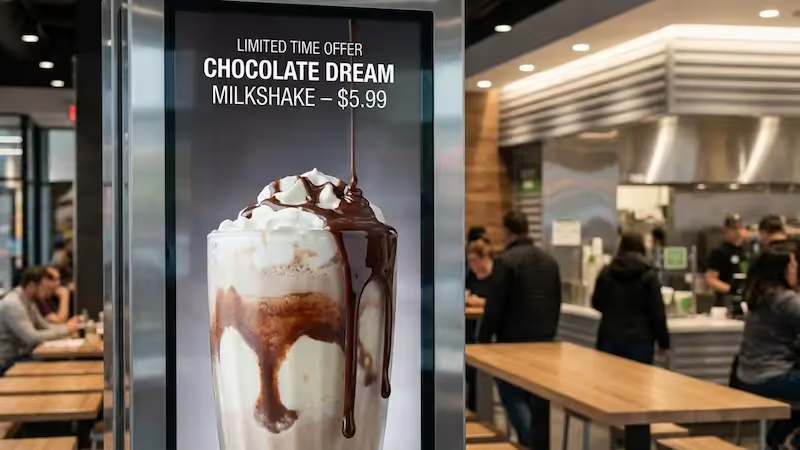
Digital menus make it simple to highlight high-profit combos or limited-time offers. You can schedule a happy hour promo to play only during slow afternoon shifts. Placing these offers right at the ordering window encourages add-ons without your staff having to push sales.
Faster Order Processing and Reduced Queue Times
When your menu is easy to read, people decide faster. Using clear text and logical sections guides the eye. Shorter decision times mean shorter lines, helping you take more orders during peak hours.
Types of Digital Menu Boards for Food Trucks
Digital signage comes in several styles. The right choice depends on your budget, truck layout, and how you want to interact with customers.
Truck-Top Digital Menu Boards
Screens mounted on the roof pull customers in from a distance at busy events. These screens need to handle weather and vibration well. Trucks often use them for looping videos or "best sellers," while keeping the detailed text menu closer to the order window.
Wireless and Portable Digital Menu Boards
Portable screens or tablets can run on batteries and connect via Wi-Fi. This reduces cable clutter and makes a simple setup even easier. You can place them near the line to promote specials while people wait.
Interactive Digital Menus
Touchscreen displays let customers tap to see ingredients or allergen info. Some act as self-order kiosks. They require sturdier hardware, but they can reduce order errors and speed up service.
QR Code Enabled Menu Displays
You can show a large QR code on your screen for customers to scan. This opens a detailed menu right on their own phones. It is a cost-effective setup that keeps the main screen clean while giving people plenty of time to browse.

Selecting the Right Digital Menu Display for Your Food Truck
Food trucks deal with heat, grease, vibration, and limited power. Choosing the right hardware upfront saves money and prevents blackouts during a rush.
Screen Size and Type for Mobile Use
Pick a screen size that fits your service window. LED commercial displays handle long hours, heat, and outdoor brightness much better than standard home TVs, which are not built for commercial environments.
Brightness, Readability, and Outdoor Visibility
Outdoor screens need high brightness (measured in nits). Look for screens ranging from 1,000 to 2,500+ nits so they do not fade in the sun. Anti-glare coatings and strong color contrast also keep your menu readable from any angle.
Weatherproof and Vandal-Resistant Design
Your screen will face rain, dust, and bumps. Look for an IP65 rating for dust and water protection. Strong metal casings and locking mounts also help prevent theft when the truck is parked.
Power and Connectivity Considerations
Food trucks run on limited power, so pick energy-efficient displays. For internet, Wi-Fi or cellular routers work best. To keep your screens running no matter what, Look Digital Signage provides offline playback. This ensures your cached menu keeps showing perfectly even if the internet drops completely.
Choosing the Best Digital Signage Software
The screen is just the hardware; the software is what runs the show. Look Digital Signage is an ideal solution for teams that want reliable tools without needing an IT department.
Essential Features: Content Management, Templates, and Scheduling
A good digital signage platform lets you upload photos and drag them directly into place. Using Look DS, you get access to ready-made templates for fast design and smart scheduling to automatically change your menu from morning to afternoon.
User-Friendly Design Tools
You need tools that are quick to learn. Platforms built for non-technical teams let you resize items, change colors, and fix typos in minutes, without needing a graphic designer.
Cloud-Based vs. Local Software Solutions
Most platforms fall into two main categories:
Cloud systems are the most popular choice because they let you push updates from your phone while standing outside the truck.
Step-by-Step Setup Guide for Digital Food Truck Menus
Getting started is easier when you take it step by step. With a clear plan, you can go from unboxing to screen-ready in no time.
Defining Branding and Menu Visuals
Match your screen to your truck's vibe. Pick colors and fonts that match your logo so your brand feels consistent and professional.
Organizing Menu Items, Categories, and Pricing
Group items into sections like "Mains," "Sides," and "Drinks." Use clear headings so hungry customers can scan the options quickly and find prices easily.
Incorporating High-Impact Images or Icons
High-quality photos sell food faster than words. If you lack photos, use clean icons for diet labels (like gluten-free or spicy). Keep the layout uncluttered.
Previewing and Testing Menu Displays on Multiple Devices
Before opening the window, preview your content. Check the contrast in bright sunlight. If using QR codes, scan them with your phone to make sure they load instantly.
Installation and Placement Tips for Food Truck Digital Menus
Proper installation ensures your screens stay safe on the road and easy for customers to read.
Optimal Screen Placement for Visibility and Safety
Mount the screen around eye level (5-7 feet high) near the order window. Make sure it does not block access panels or stick out dangerously into the walkway.
Mounting Hardware and Theft Prevention
Use heavy-duty, anti-vibration mounts built for commercial use. Hidden cables and security screws help prevent theft and keep things looking neat.
Managing Power Supply and Cabling in Tight Spaces
Keep wiring away from hot cooking equipment and moisture. Mount your media player in a ventilated spot to prevent overheating during long summer shifts.
Adjusting Brightness and Reducing Glare
Angle your display slightly to cut down on sun glare. Test the screen at different times of day to ensure the text is always crisp and visible.
Best Practices for Managing and Updating Food Truck Digital Menus
A static screen is just an expensive digital poster. The real value comes from updating your content often.
Highlighting Specials and Limited-Time Offers
Dedicate a zone on your screen layouts specifically for daily specials. Rotate these often so regular customers always see something fresh.
Real-Time Menu Changes During Service
When you sell out of a popular item, mark it off immediately in your CMS. It takes seconds and prevents ordering delays at the window.
Promoting Upsells and Combos
Place add-on items right next to your main dishes. Visually grouping a burger, fries, and a drink together naturally increases ticket sizes.
Using Analytics to Optimize Menu Performance
Some software includes playback analytics. This helps you track which promos ran when, so you can compare your screen data against your sales numbers to see what actually works.
Common Challenges and Solutions With Digital Menu Boards
Taking screens on the road brings unique challenges. Planning ahead keeps your screens running without interruptions.
Maintaining Reliable Power and Connectivity
Solutions: Use quality inverters and deep-cycle batteries. If the internet is weak at a festival, rely on your signage software's offline playback feature to keep the menu visible using cached files.
Troubleshooting Display and Software Issues
Solutions: Choose a simple setup built for non-technical teams. Know how to quickly restart your media player, and use platforms that offer remote monitoring to spot issues early.
Weather and Environmental Protection
Solutions: Invest in IP65 outdoor screens. Wipe away grease and dust regularly, and ensure the screen has enough airflow so it doesn't overheat in tight spaces.
Food Truck Digital Menu Board FAQ
Here are practical answers to common questions about setting up a mobile digital menu.
Should You Add Interactivity or Mobile Ordering?
Touchscreens let customers browse details, while QR codes let them order directly from their phones. QR codes are often a highly cost-effective way to speed up the line without buying expensive touch-capable hardware.
How Often Should You Update Digital Menu Content?
Update daily for sold-out items or specials, and seasonally for major menu changes. The goal is to keep your messaging accurate and useful.
Can Digital Menus Integrate With Point of Sale Systems?
Yes. Many platforms allow you to connect your POS. This means when you update a price in your register, the screen updates automatically, saving you time.
Next Steps for Transforming Your Food Truck With Digital Signage
Adding digital signage helps you serve customers faster and keeps your branding sharp. The setup is just the start; the biggest benefits come from keeping your content fresh.
Quick Tips for First-Time Setup
Start simple. Focus on clear text, accurate prices, and one or two great photos. You can always add smart scheduling or split-screen layouts later once you are comfortable with the basics.
Resources for Templates and Software Support
You don't need to be a designer to build a great menu. Look Digital Signage provides ready-made templates built specifically for food service, making it easy to get a polished look fast. To see how quickly you can go from logging in to getting your first menu live, start a free trial or try it on a demo screen today.