

Table of Content
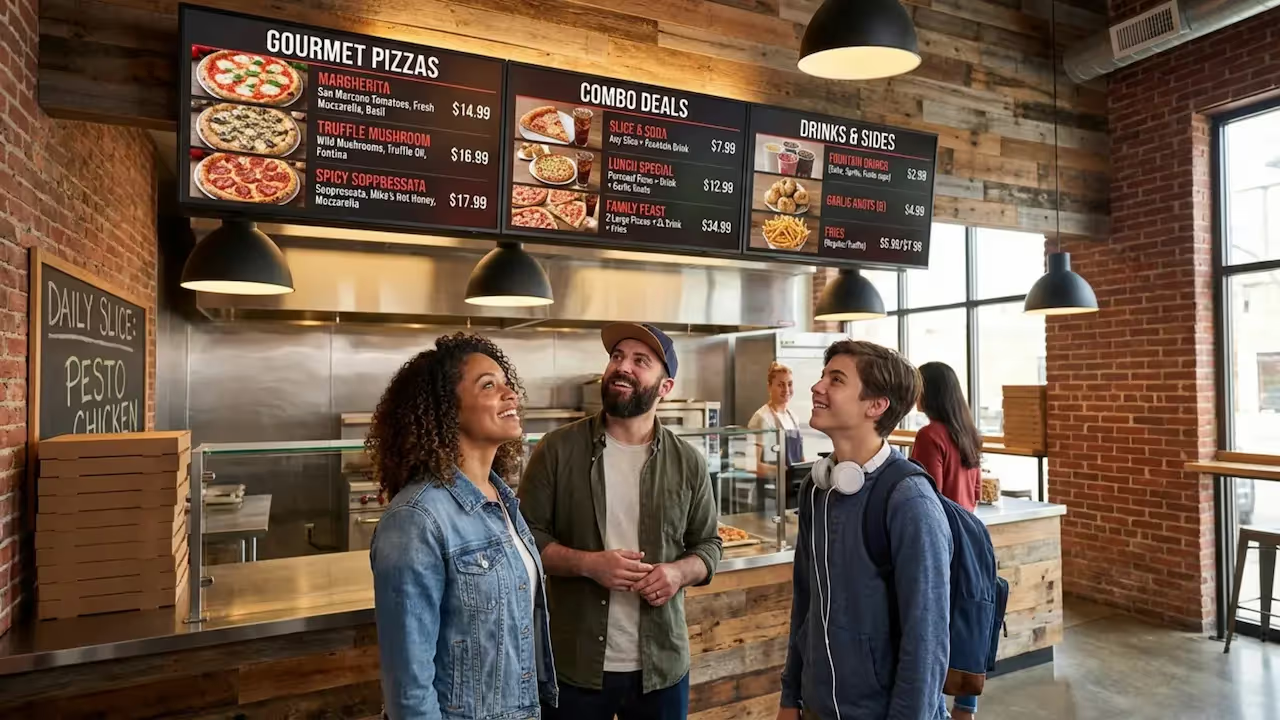
How can pizzerias speed up ordering and keep pricing accurate without constantly reprinting menus? A digital menu layout uses cloud-based digital signage software to display your items, prices, and promotions on screens that you can update in minutes, from anywhere. Instead of erasing chalkboards or taping up paper signs, your team can rely on digital menu boards to show high-quality images, highlight combos, and remove sold-out items instantly.
How Digital Menu Boards Differ from Traditional Static Menus
Traditional menus, like chalkboards, magnetic boards, or printed posters, take manual work to change. If ingredient costs shift or a popular topping sells out, staff must reprint materials, relaminate signs, or physically rewrite the board. This takes time and slows you down during busy shifts.
Digital menu boards provide fast, remote updates. You can pull unavailable items immediately and adjust pricing across one or multiple locations without any complex setup. This keeps your operations running smoothly, eliminates the need to apologize for sold-out items at the register, and gives staff more time to focus on customers.
Elements Included in Digital Pizzeria Menu Layouts
A strong digital pizzeria menu layout goes beyond basic text. Using dynamic screen layouts, you can display high-quality photos or short videos of popular pizzas, which often helps drive add-on sales.
Digital layouts also make it easy to feature:
- Combo meals
- Daily specials
- Limited-time deals
- Promotions placed strategically to support upsells
You can also dedicate sections of the screen to nutrition and allergen details, which helps customers with food restrictions order confidently. When linked with scheduling tools, your menu becomes an active display that rotates messaging to fit the time of day.
Benefits of Using Digital Signage for Pizzeria Menus
Switching to digital signage is a practical business choice designed to save time, reduce printing costs, and improve the ordering experience. Pizzerias of all sizes use digital screens to keep messaging consistent and make their front-of-house look more organized.
Customers are used to looking at screens for information. Providing a bright, easy-to-read digital menu meets that expectation and sets a professional standard for your shop.
Increases Sales and Upsell Opportunities
Great visuals capture attention. Showing crisp photos or videos of your best-sellers can often trigger cravings and support suggestion selling. You can build playlists to rotate promotions for happy hour deals, garlic knots, or extra drinks.
When connected to your point-of-sale data, you can even time your offers to push fresh items during busy rushes or discount items nearing expiration to reduce waste. Clear, well-timed pricing often feels like a helpful deal to the customer rather than an upsell.
Improves Menu Flexibility and Real-Time Updates
Digital signage eliminates the need for manual menu updates and expensive reprints. If a supplier raises costs or a topping runs out, you can adjust your menu in real time. This reduces frustration for both your customers and your team.
With tools like Smart Scheduling, you can also set your menus to change automatically based on the time of day. This "dayparting" lets you feature lunch combos at noon and switch to family-size dinners in the evening, ensuring reliable playback of the right offers at the exact right time.
Improves Customer Experience and Brand Perception
A clear, well-designed digital menu board helps customers decide faster, cutting down on counter confusion and speeding up lines. Moving visuals and clean layouts make the wait feel shorter and give your shop a modern, welcoming feel.
When your menu is easy to read and highly organized, it builds trust and encourages repeat visits.
Supports Compliance with Menu Labeling Laws
Food transparency regulations are increasingly common, often requiring calorie counts and specific nutrition details. With a printed menu, adding this data means a full redesign and reprint.
A digital signage platform lets you update nutrition and allergen info across all your screens in minutes, helping you support compliance without ongoing printing fees.
Reduces Costs and Saves Time for Staff
While screens and media players require an upfront budget, they can reduce total costs over time by eliminating graphic design fees, shipping, and printing for every menu change. You also cut down on paper waste.
More importantly, it gives your staff their time back. Using remote management, you can handle the menu from a back office or even your phone, leaving employees free to focus on making great food and serving customers.
Key Design Principles for Pizzeria Menu Layouts on Digital Signage
A digital menu should act as a quiet, helpful guide for your customers. To work well, the design needs to be clean, organized, and easy to read from the line. Customers see polished digital interfaces all day, so your menu should feel just as intuitive.
Optimal Section Organization: Pizzas, Sides, Drinks, and Deals
Structure is critical to prevent screens from feeling overwhelming. Customers should be able to find their favorites fast. A common approach is to split the menu into distinct screen areas:
- Classics
- Veggie Lovers
- Meat Feast
- Build Your Own
- Combos
- Sides
- Desserts
- Beverages
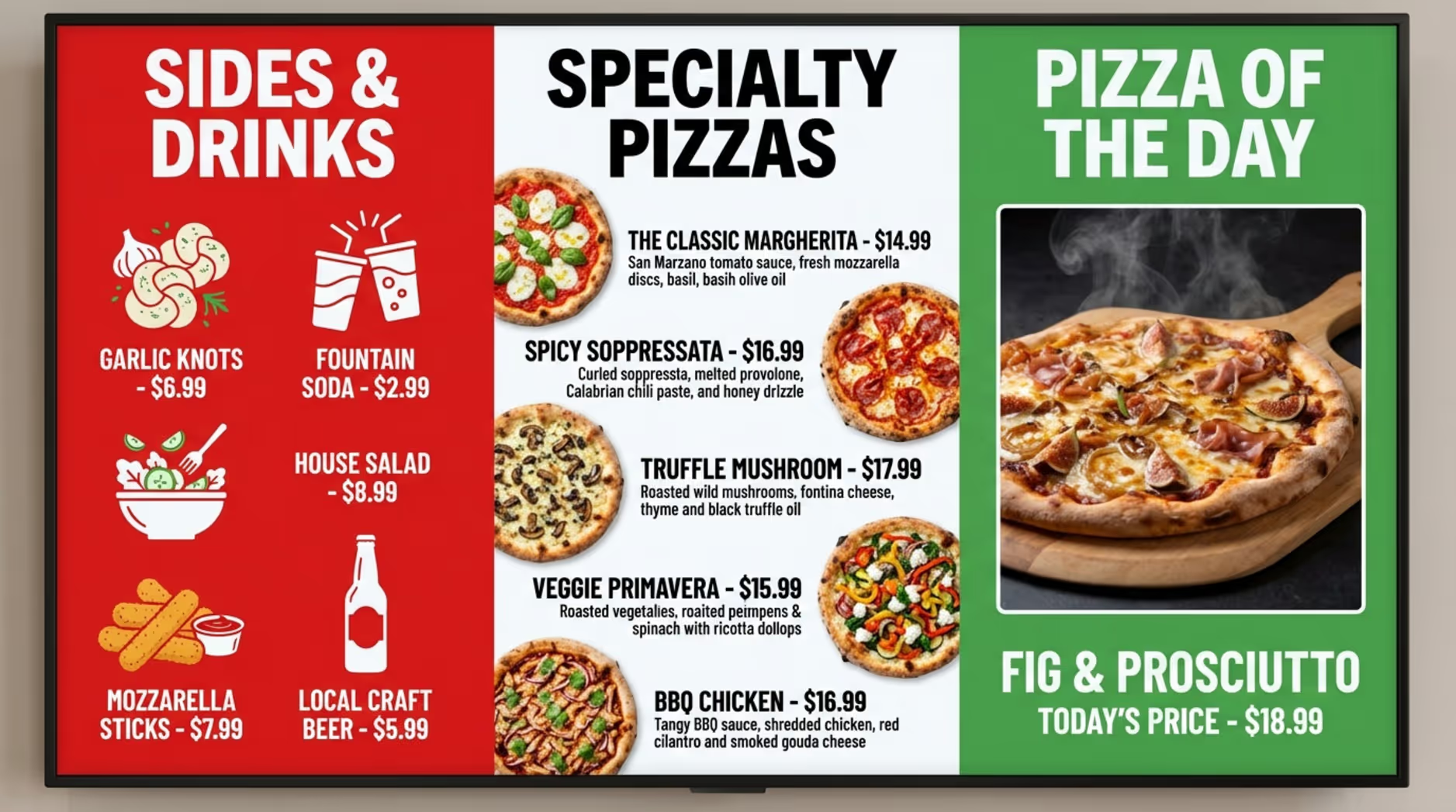
This logic speeds up ordering and reduces questions. You can also dedicate a specific zone on the screen strictly for daily deals so they stand out immediately.
Best Practices for Categorization and Readability
Keep fonts large, simple, and high-contrast so they are readable from a distance. Avoid overly complex fonts that look great up close but are hard to scan quickly.
Use your brand colors consistently, and leave enough empty space so the layout does not feel cluttered. Put the most important info first, and make sure prices align clearly with their corresponding items.
Role of Food Imagery and Video Content
Visuals do the heavy lifting in food service. High-quality images of melting cheese or fresh crust can encourage larger orders and make your menu highly appealing.
Industry experts like Nora Caley from Pizza Today note that short video clips, like a pizza coming out of the oven or a drink being poured, often communicate freshness better than static text ever could.
Incorporating Nutrition and Allergen Information
Highlighting gluten-free crusts, vegan cheese, or allergy warnings helps customers order safely. Digital menu boards allow you to adjust these details instantly if a recipe or supplier changes, keeping your information accurate without replacing a physical board.
Featuring Rotating Specials and Limited-Time Offers
Rotating specials keep your menu feeling fresh. Using your digital signage software, you can highlight a "pizza of the month" or test a new side dish.
Scheduling these limited-time offers to run on specific days helps you clear out inventory and gauge customer interest without committing to a permanent menu change.
Choosing the Right Digital Signage Hardware and Software for Pizzerias
To build a reliable digital menu board, you need screens (hardware) and a content management system (software). The right combination ensures your menus stay up and running smoothly without requiring a dedicated IT team. Look Digital Signage is a strong fit for pizzerias because it pairs simple cloud software with highly flexible hardware options.
Screen Types and Placement Strategies
Commercial-grade displays are generally a better investment than standard consumer TVs. While a home TV might be cheaper upfront, commercial screens are much brighter and designed to run reliably for long operating hours. This saves you money on replacements over time.
Place your screens behind the counter at a comfortable viewing angle. If you run a drive-thru, you will need high-brightness, outdoor-rated enclosures that can handle heat, cold, and glare to keep your messaging visible year-round.
Digital Signage Players and System Integrations
A digital signage player is the device that connects your screen to the internet and stores your content. For a streamlined setup, the plug-and-play Look HDMI Player offers incredibly reliable playback. Alternatively, if you already have supported smart TVs or devices, you can simply download the free Look App to connect your screens directly to the Look CMS.
Connecting your signage to your POS system can further automate updates, ensuring out-of-stock items disappear from the screen instantly and reducing manual work.
Cloud-Based vs. On-Premises Menu Management
Cloud-based digital signage is generally the best fit for restaurants. Platforms like Look CMS let you log in from any web browser to update your menu boards, whether you are in the back room or at home. This makes managing a single shop easy and scaling up to dozens of franchise locations seamless.
On-premises deployments are available for highly regulated industries, but a cloud-based setup provides the scheduling, remote management, and simplicity that busy food service teams need to keep screens running without heavy IT support.
Managing and Updating Your Digital Pizzeria Menu
The true value of digital signage is how easily you can manage it daily. Modern systems are built for operators, not IT experts. By taking advantage of scheduling and centralized control, you can ensure your screens always show the best version of your menu.
Automating Content Playlists and Scheduling Menus
With Smart Scheduling, you can automate your day. Set a playlist to show lunch specials from 11 AM to 2 PM, then seamlessly transition to family dinner deals at 5 PM.
This approach ensures your promotions align perfectly with your foot traffic and lets you feature higher-margin items during peak hours, completely hands-free.
Centralized Control for Multi-Location Pizzerias
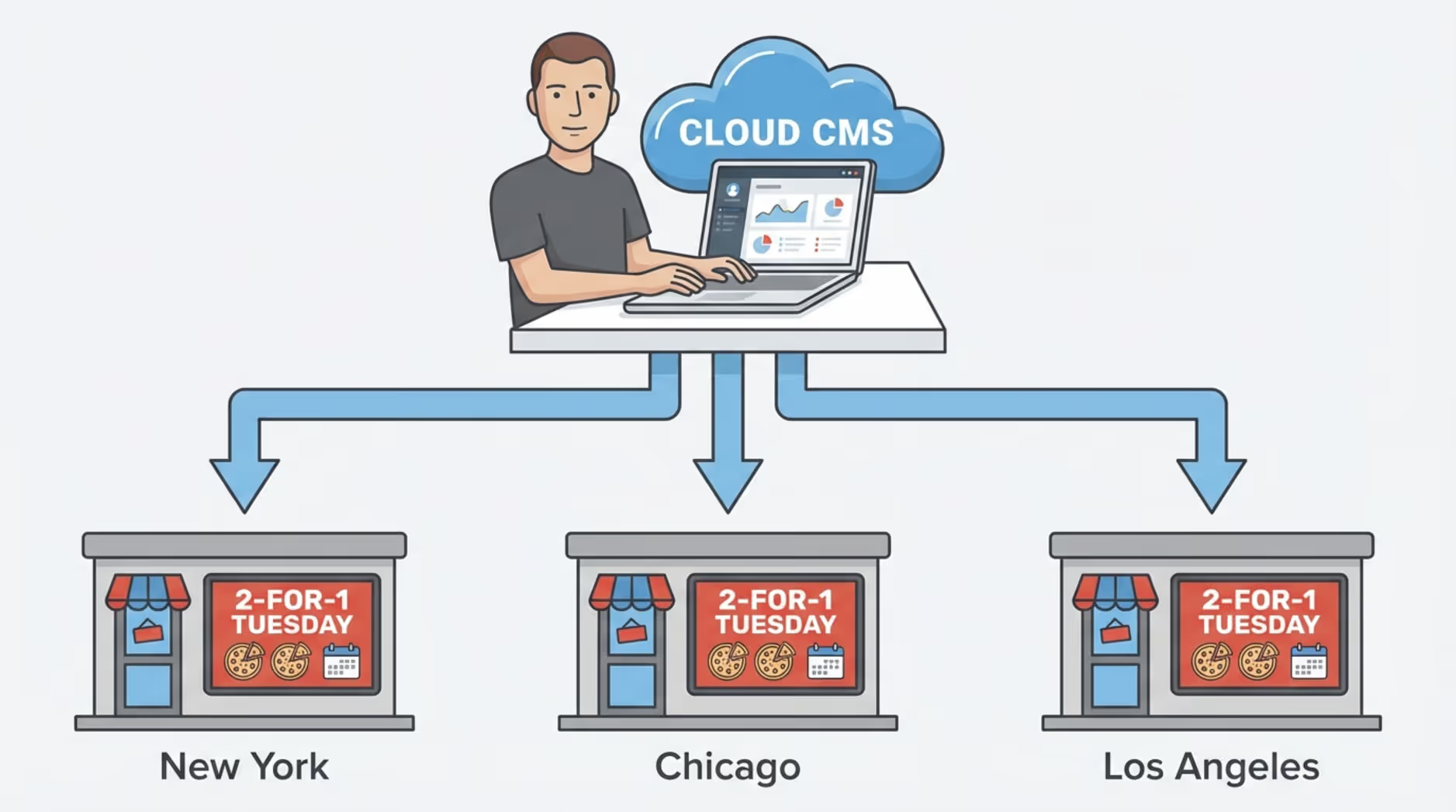
If you manage multiple locations, remote management is a major benefit. From a single dashboard, you can update pricing and branding across your entire network.
Instead of trusting each store to manually update their own signs, a central manager can make a change once and push it to selected screens everywhere. This saves time, reduces mistakes, and ensures a consistent customer experience.
Ensuring Easy, Remote Menu Updates
Whether you need to fix a typo or remove a sold-out dessert, remote updates mean you can push changes instantly from a computer or phone. You can apply updates to one screen or a whole network in seconds, turning stressful mid-shift menu changes into a simple task.
Maximizing Impact: Tips for Effective Digital Menu Board Content
Installing screens is just the beginning. To see real results, your content must be engaging, clear, and strategically arranged. Good content turns people who are "just looking" into customers ready to order your daily special.
Customizing Templates to Reflect Your Brand
You do not need a professional designer to get started. Look Digital Signage provides a library of Ready-made Templates designed specifically for menus and promotions. You can select a template, customize it with your brand colors, upload your logo, and drop in your menu items in minutes. This keeps your screens looking polished without a heavy design effort.
Dynamic Pricing and Real-Time Promo Integration
Adjusting promotions based on inventory or time of day can help reduce waste and drive sales. For example, you might run a late-night discount on remaining slices or a midday special on fountain drinks.
When integrated well, these real-time updates ensure customers always see accurate, relevant offers that feel like added value, rather than unexpected pricing changes.
Using Menu Zones for Diverse Offerings
Instead of cramming text onto one display, use Screen Layouts to divide your displays into distinct zones. You might use the main section for your core pizza menu, while a side zone runs a video loop of your appetizers or daily specials.
This helps customers process the information easily while still giving you room to promote higher-margin items.
Frequently Asked Questions about Digital Signage Menu Layouts
Upgrading your menu boards is a big step, and it is normal to have questions about the setup and long-term value. Getting clear answers helps you move smoothly to a modern, easy-to-manage system.
Are Digital Menu Boards Expensive for Small Pizzerias?
While there is an upfront investment in screens and players, digital signage typically pays for itself by eliminating recurring printing costs and saving staff time. For a budget-friendly start, small shops can use existing smart TVs and install a free player app, keeping initial costs low. Over time, the ability to clearly promote add-ons and deals often offsets the software subscription.
Can I Add Coffee or Dessert Items to My Digital Menu Board?
Yes. Digital menus are highly flexible. You can add a new dessert section or dedicate a single screen to coffee and after-dinner items. Because you are not limited by printed space, you can also schedule these specific categories to appear more prominently during slower afternoons or late-evening rushes.
Is Outdoor Digital Signage Suitable for Pizzerias?
Yes. For pizzerias with drive-thrus or walk-up ordering windows, outdoor digital signage is incredibly effective. These setups require specialized, weather-rated enclosures and high-brightness screens to combat glare and extreme temperatures, ensuring reliable playback year-round.
How Do I Choose Between Different Menu Board Options?
Start by looking at your daily operations. If your menu rarely changes and you prefer a rustic look, a traditional chalkboard might suffice. However, if you deal with fluctuating ingredient costs, run frequent specials, or manage multiple locations, we recommend Look Digital Signage. Starting with Look CMS and a simple media player setup gives you the fast updates, scheduling tools, and remote control you need to easily manage your screens as your business grows.







