

Table of Content
How can busy pizzerias reduce counter crowding and keep customers informed while their food is baking? Pizza pickup screens with digital signage are the clear answer. By moving away from manual updates and paper signs, you can use a cloud-based digital signage software to show real-time order status, promote menu add-ons, and keep your pickup area moving smoothly. It is a simple setup that saves your staff hours and makes the waiting experience much better for your guests.
What Are Pizza Pickup Screens With Digital Signage?
How Do Pizza Pickup Screens Work in a Restaurant Setting?
Pizza pickup screens work by connecting to the tools your pizzeria already uses, mainly the Point of Sale (POS) and the ordering system. When someone places an order online, in an app, or at the counter, that order status can be sent directly to the signage system. As the pizza moves through steps like “Preparing,” “Baking,” and “Ready for Pickup,” the screen updates right away, usually showing an order number or customer name.
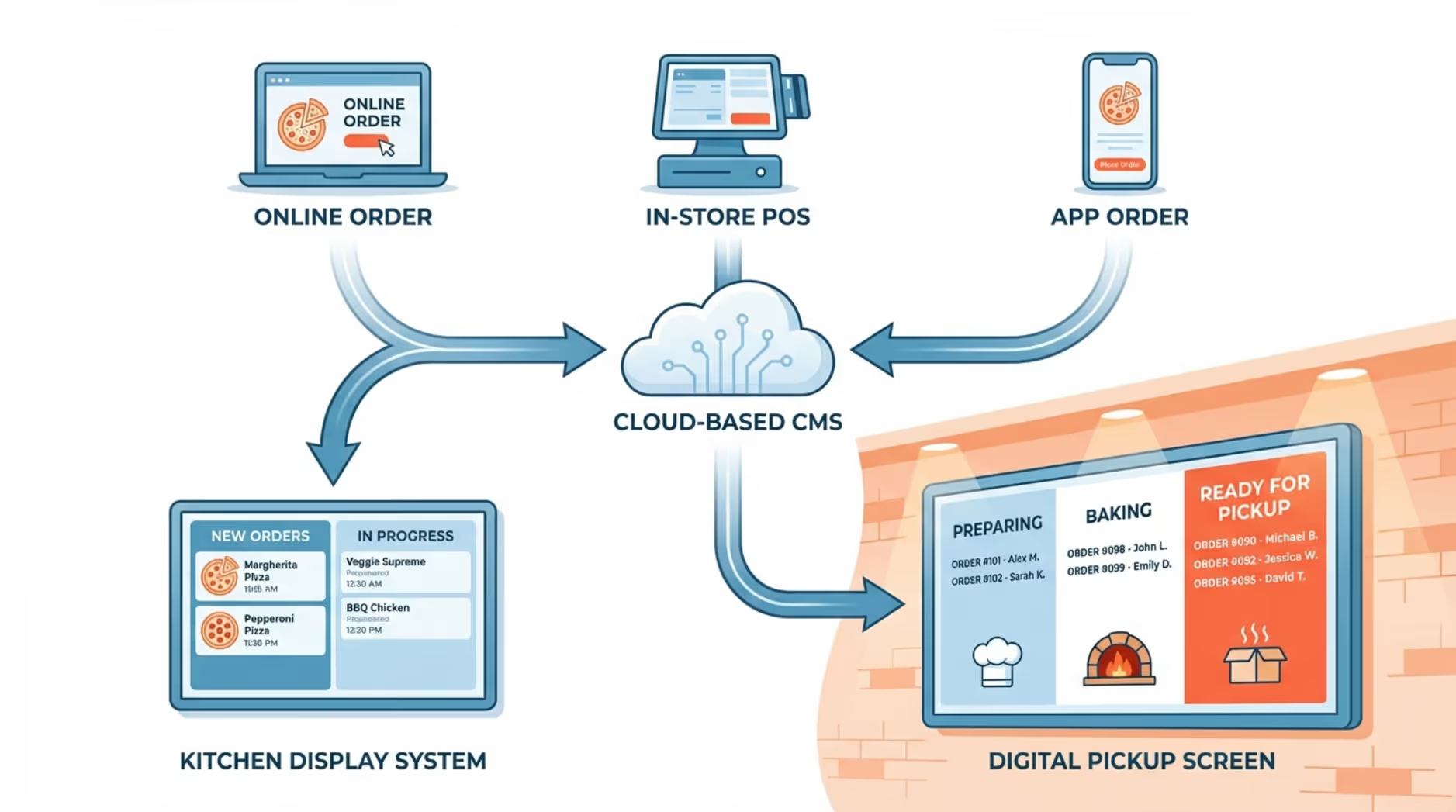
This keeps the information on your screens accurate without staff needing to update signs by hand or answer the same questions over and over. By using advanced Integrations (API, Zapier, and Embed), your digital signage platform can connect with POS systems like Toast or Square. This means menu changes, price updates, and order statuses show up on screens in real time. Most setups run through a central cloud-based CMS, so managers can control exactly what appears on each screen from anywhere.
What Types of Digital Signage Are Used for Pizza Pickup?
Digital signage for pizza pickup involves more than just a digital menu. Dedicated pickup screens are built specifically to show order status and pickup steps. You might mount smaller screens near the handoff counter or larger displays that people can easily see from a waiting area. They help reduce crowding and speed up the handoff process.
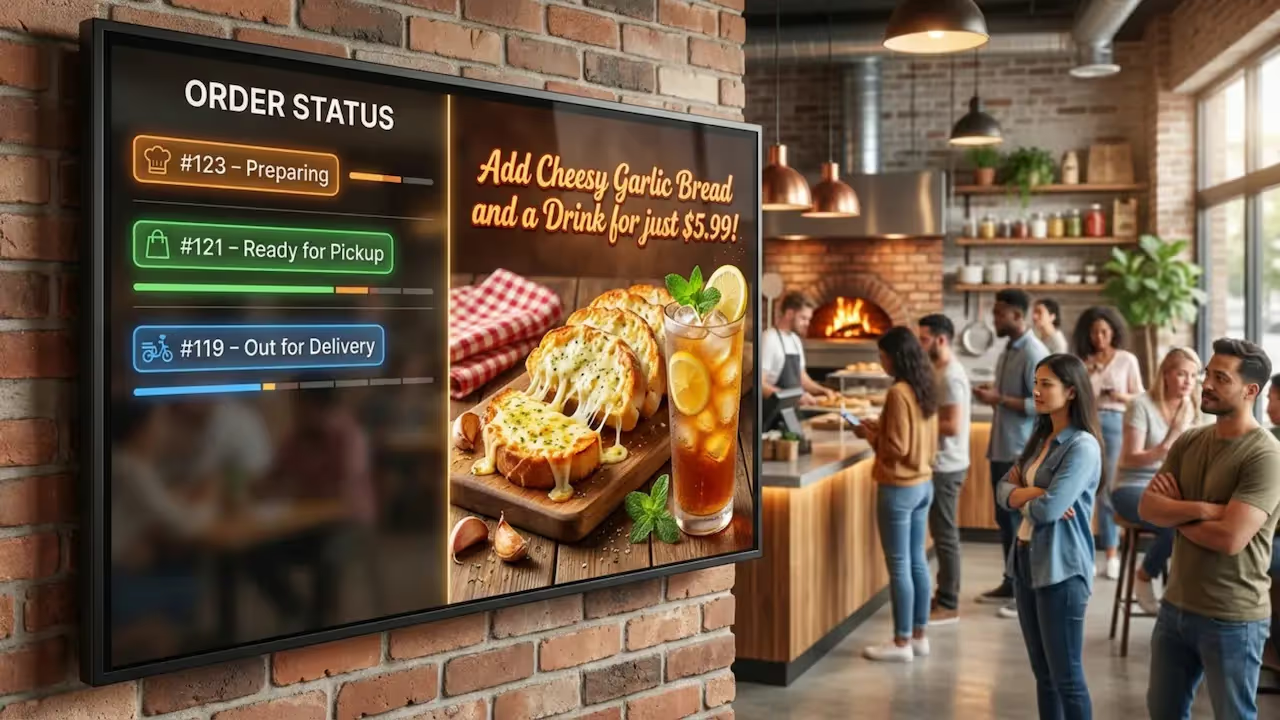
Many shops also add promotional screens to target customers while they wait. These screens use high-quality layouts to show off specialty pizzas, daily deals, or add-ons like garlic bread and desserts. Using features like Screen Layouts or Ready-made Templates, you can mix the main menu with current promos on a single display, helping customers decide faster and making extra purchases more likely.
Key Benefits of Digital Signage for Pizza Pickup Areas
Reduces Customer Wait Time and Improves Flow
A major benefit of digital signage in pickup areas is that it helps waits feel shorter and often speeds up the actual process. When customers walk in, they want quick answers. Without a clear order status, people get confused, lines slow down, and staff get stressed. A screen showing “Order #123 Ready for Pickup” gives a clear next step.
Bright, easy-to-read screens guide customers and set expectations. People know exactly where to look, allowing your staff to focus on making and handing out food instead of repeating updates. This reliable playback is especially helpful on busy nights like Fridays or game days when a shop can quickly become loud and crowded.
Improves Order Accuracy and Communication
Digital signage can help reduce mistakes and keep communication perfectly clear. If the kitchen, front counter, and delivery team are not on the same page, it often leads to confusion. With centrally managed screens, customer-facing details like prices, allergy notes, and daily specials, stay consistent and current.
When menu boards feature clear descriptions and correct pricing, customers are less likely to order the wrong thing. Fewer questions at the counter mean faster ordering and fewer errors. The ability to quickly mark an ingredient as “sold out” from your dashboard also helps avoid disappointment and keeps expectations realistic.
Supports Real-Time Order Status Updates
Real-time order updates are the main reason pickup signage works so well. In a fast-paced shop, prep times and availability change by the minute. Digital signage reflects these changes right away, so customers always see the most current information. As an order moves from received to cooked to ready, the screen updates automatically.
This visibility is incredibly helpful for guests. They can see what is happening without having to stop staff to ask. That lowers stress, builds trust, and makes the wait much easier. For owners with multiple locations, remote management helps keep the brand experience consistent while letting each store reflect its true kitchen status.
Increases Upsell and Promotion Opportunities
Digital signage is designed to help you sell more, especially in the pickup area where customers have their wallets out. Screens can promote combos, limited-time offers, and daily deals. Strong photos of add-ons like crust upgrades or drinks can lead to quick impulse buys and help increase your average order value.
Industry research shows that well-placed digital menus can often support higher combo sales simply because strong visuals make people hungry for more. Using Smart Scheduling, you can also automate promotions by time, like a “2 for Tuesday” deal or a “Free Topping Friday” message. The right offer at the right time helps prove ROI without any extra effort from your team.
Unifies Branding Across Pickup and Dining Areas
Consistent branding matters, even for a local neighborhood pizza shop. Digital signage helps keep your look and message perfectly aligned across menu boards, pickup screens, and dining area displays. This builds trust and makes your business look highly professional.
Instead of a messy mix of printed posters that might be outdated, digital signage uses unified templates. Fonts, colors, and layouts stay the same even when managers update a local store offer. It ensures the whole store feels polished and dependable from anywhere.
Popular Use Cases for Pizza Pickup Screens With Digital Signage
Displaying Order Status and Ready-for-Pickup Notifications
This is the most practical use of pickup signage. Customers naturally wonder when their pizza will be ready. An order status screen removes all that guesswork by showing order numbers and updating them through steps like “In Progress” and “Ready for Pickup.” Some shops even show estimated wait times.
First, staff get fewer interruptions, keeping your kitchen running efficiently. Second, it creates a calmer pickup area by stopping guests from crowding the register. Large, successful pizza chains use screens exactly like this to mix helpful waiting info with subtle brand messaging.
Promoting Daily Deals and Limited-Time Offers During Pickup
The pickup zone is a great place for marketing. Digital screens can promote daily deals, limited-time offers, and bundles that complement what customers just ordered. A screen might suggest a dessert or side that pairs perfectly with their pizza.
These offers can run automatically at set times, like lunch specials at midday or family bundles during the dinner rush. Clear food images work wonderfully for impulse buys, turning waiting time into extra sales without slowing down the line.
Highlighting New or Seasonal Menu Items
Pizzerias frequently introduce new pizzas, seasonal toppings, or specialty items. Pickup screens are the perfect place to feature these options. Instead of small table tents that people ignore, a bright display can show clear photos and short descriptions of what is new.
This can encourage customers to try something different on their next visit, or even add it to their current order. Because scheduling is essentially "set and forget," you can ensure these promos start and end on the exact right dates with zero daily effort.
Reducing Line Anxiety and Improving Guest Experience
Unclear steps and long lines frustrate guests. Digital signage provides clear directions: where to order, where to stand, and when to pick up. This cuts down on confusion and gives customers a clear next step without asking for help.
Screens can also loop fun brand content or community news to give people something to watch, making waits feel much shorter. When the content is helpful, screens do more than look good-they guide your customers, reduce friction, and often lead to better reviews.
Features to Look for in Pizza Pickup Digital Signage Solutions
Centralized Content Management
If you want digital signage to stay accurate, you need central control. We recommend Look Digital Signage as a strong fit for teams that want to manage every screen from one simple dashboard, no complex setup required. With the Look CMS, you can log in from anywhere, update menus, and push new pricing to your displays in minutes.
This centralized platform helps keep branding consistent across all your locations. It prevents old, expired information from staying on the screen, allowing franchise teams or single-store owners to launch campaigns quickly and confidently.
POS and Order System Integration
Pickup screens deliver the best results when they connect to your POS and online ordering tools. Look for systems that offer robust Integrations (API, Zapier, Embed) to link directly with your databases. This allows menus, stock levels, and order statuses to update without manual data entry.
Connecting with popular systems helps keep the experience seamless for customers ordering at the counter or on their phones. Without strong integration capabilities, your staff would have to manually update order numbers, which defeats the purpose of the screens.
Menu and Promotion Scheduling
To reduce manual work, you need Smart Scheduling. This feature automates what plays, when, and where. Your display can switch from lunch deals at noon to family combos at 5:00 PM without any staff action.
Smart Scheduling ensures you show the right items at the right time. It also prevents awkward situations where a customer tries to order a special that ended an hour ago just because an old sign was left up.
Order Tracking and Customer Notifications
For pickup, reliable order tracking is critical. This can mean simple "Ready" alerts or detailed steps like "In the Oven" or "Quality Check." Some advanced integrations even trigger text alerts so customers know exactly when to walk up to the counter.
This functionality cuts down on counter crowding during busy periods and helps everyone stay calm. It makes the pickup process highly efficient for both your staff and your guests.
Multi-Location Screen Control
If you run multiple stores, you need the ability to scale smoothly from 1 screen to thousands. Look Digital Signage allows a central team to launch seasonal campaigns, pricing updates, and new menu items across an entire network in just a few clicks.
Good systems also let you set up specific groups, so local managers can update their store hours or local offers without breaking global brand rules or messing up the main menu.
Support for High-Quality Images and Video
Pizza sells on visuals. A paper board cannot show the texture of melted cheese, but a great digital display can. To get this right without a design team, look for software that includes Ready-made Templates.
These templates allow you to drop in strong food photography, motion graphics, and short videos to grab attention better than plain text. High-quality visual layouts are proven to drive add-ons and encourage people to try premium items.
Reliable Offline Functionality
Internet access makes updates easy, but you need your screens to keep your network running smoothly even during an outage. Look Digital Signage offers Offline Playback, which caches your scheduled playlists locally on the device.
If the internet drops, your screens keep playing their content instead of going blank. When the connection returns, it syncs automatically. This ensures reliable playback and keeps your promos running during your busiest dinner rushes.
Integrating Pizza Pickup Screens With Existing Restaurant Technology
Synchronizing With POS and Online Ordering Systems
Building a connected setup is the goal. When someone places an order on your website or at the register, that data should populate your screens right away. This is why your signage software must work nicely with common POS platforms like Toast or Square through reliable API connections.
This synchronization keeps prices, offers, and statuses perfectly aligned. If an ingredient runs out, an update in the POS can trigger a change on the screen in real time, avoiding customer frustration.
Using APIs, Databases, and Real-Time Data Sources
In the background, digital signage relies on APIs and live data feeds to share information. Integrations allow your inventory system to talk to your Look CMS, so screens show accurate topping availability or precise order progress.
For example, if the database notes a specific crust is out of stock, the screen can automatically hide that item. Connecting these real-time data sources helps you build screens that actually reflect real store conditions, rather than just looping static slides.
Scheduling Content for Lunch, Dinner, and Events
Integration also means aligning your marketing calendar with your screens. By automating your content, screens can dynamically shift from midday lunch specials to late-night deals.
You can also schedule promotions for major events. You can load your "Super Bowl Party Packs" ahead of time and schedule them to switch to "Valentine's Day Specials" the very next morning. This saves your staff significant hours and ensures promotions always run on time.
Remote Monitoring and Multi-Site Management
Remote monitoring helps you oversee everything from a single dashboard. You can instantly verify what each screen is showing and push updates quickly without needing to drive to the physical location.
Monitoring tools also alert you if a display goes offline, so you can fix issues before the dinner rush begins. This gives multi-location operators the confidence that their messaging is safe, secure, and always visible.
How to Implement Pizza Pickup Screens With Digital Signage
Assessing Your Pizza Shop Layout and Pickup Flow
First, review your store layout and observe how pickup actually works today. Look at the customer path: where they enter, where lines naturally form, and where they stand while waiting. Identify the exact moments they tend to ask questions.
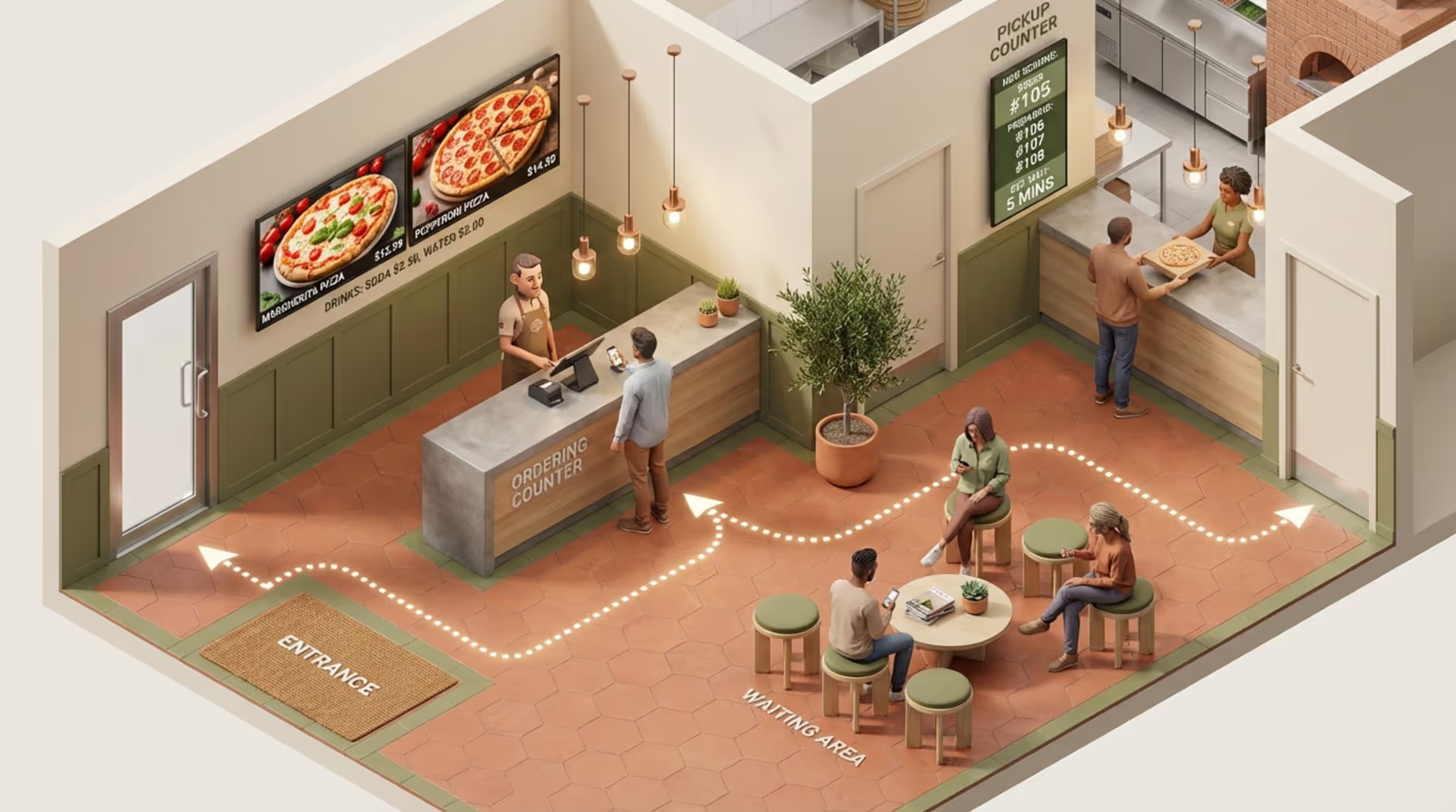
Choose screen locations that are highly visible. A screen near the front door can show daily specials, while an order status display should be mounted where waiting guests can easily see it. A great starting setup is often 2 menu board screens and 1 order status screen.
Choosing Compatible Hardware and Displays
Once you know where screens will go, you need the right hardware. Commercial displays are often best for long operating hours and high brightness. However, Look Digital Signage makes it easy to work with what you have.
You can install the free Look App on supported operating systems to turn your existing TVs into digital signage endpoints. Alternatively, for a dedicated and highly stable solution, you can use the Plug & Play Look HDMI Player. Either way, connecting your hardware to the Look CMS is designed for quick deployment.
Selecting Software With POS Integration
Your content management system (CMS) is the brain of your setup. POS integration and ease of use should be top priorities. Look Digital Signage is an ideal choice for teams that want a simple setup and powerful tools without needing an IT degree.
With Look DS, you get a cloud-based dashboard, drag-and-drop Screen Layouts, and the ability to schedule playback from anywhere. The best way to evaluate it is to start a free trial or try it on a demo screen first to see how fast you can build a playlist.
Customizing Screen Design and Branding
Once your hardware is up, focus on making the screens look great. Using Ready-made Templates inside the CMS, you can easily apply your logo, brand colors, and high-quality food photos to maintain a consistent look.
Keep the design easy to read. Use large text, strong contrast, and avoid cluttering the screen with too many words. The strongest digital signage is highly visual and offers a clear next step, matching the exact vibe of your pizzeria.
Training Staff and Monitoring Performance
Digital signage requires a little ongoing attention to perform its best. Ensure your staff knows how the order status screens work and how to answer basic customer questions about them.
To prove ROI, watch metrics like your average order value, line speed, and how often order mistakes happen. Use the built-in Playback Analytics to see what content runs most often, and adjust your playlists over time to keep optimizing your sales and daily operations.
Challenges When Using Digital Signage for Pizza Pickup
Avoiding Screen Overload and Message Clutter
A common mistake is cramming too much information onto one display. If content changes too quickly, has too much text, or uses chaotic animations, customers simply won't read it. This leads to slower lines and confused guests.
To fix this, keep your screens calm and practical. Separate your menu items from your promotions. For upsells, stick to one clear offer per slide. If you have a lot of information to share, use Screen Layouts to cleanly divide the display, or use multiple screens for different jobs.
Maintaining Menu Accuracy Across Multiple Locations
For franchises and multi-location shops, keeping prices and menus accurate everywhere can be difficult. Price mismatches or expired promos hurt customer trust, and manual store-by-store updates waste incredible amounts of staff time.
A cloud-based Look CMS solves this by giving you a central dashboard. You can group screens by location, update pricing globally, and rely on Smart Scheduling to ensure promotions automatically stop running the moment they expire.
Ensuring Reliable Order Updates in High-Volume Periods
Pickup screens must update rapidly during your busiest hours. If your system lags during the Friday night rush, it will cause more confusion than it solves.
This is why you need a reliable media player and software built for stability. Using the Look HDMI Player paired with Offline Playback ensures that even if your internet connection dips, your cached promotional playlists will keep your screens running smoothly while your real-time data catches up.
Safeguarding Device Security and Data Privacy
Security is important for any digital setup. If your signage connects to your POS, you need to know that data is protected, and you want to ensure no unauthorized person can change your menus.
A professional platform allows you to set up role-based permissions, secure logins, and controlled access. This means your marketing manager can update promos safely from anywhere, without accidentally altering core system settings or sharing broad passwords.
Getting Started With Digital Signage in Your Pizza Pickup Area
Evaluating Providers and Comparing Packages
When you are ready to upgrade, start by evaluating platforms that fit your specific business needs-whether you have a single shop or a growing franchise. You want a solution that offers easy scheduling, simple content creation, and reliable offline playback.
Look Digital Signage is designed specifically to help real-world businesses manage their screens effortlessly. You can view straightforward pricing that scales based on your screen count, and you can book a demo to see exactly how quickly you can go from your first login to publishing your first playlist.
Steps for Pilot Testing and Full Rollout
A smart rollout usually begins with a pilot test. Start with one busy location or a small set of screens, perhaps two menu boards and one order status screen. This allows you to test your layouts and see how the screens impact your daily operations.
Track your line speed and ask your staff for feedback during the pilot. Once you dial in the perfect playlists, you can easily use your central dashboard to scale that exact setup to your other locations smoothly.
Tips for Creating Effective Pickup Area Signage
Great signage communicates clearly while naturally driving sales. Here are a few practical tips:
- Use strong visuals: Pizza looks best in high resolution. Use crisp photos and short videos to make your food look irresistible.
- Keep it clear: Do not overcrowd the layout. Use large fonts and strong contrast. For upsells, one bold message per slide works best.
- Help people decide: Highlight your best sellers, simple combos, and quick add-ons. Use clear prompts like “Add Garlic Knots for $3” or “Scan QR to Order Catering.”
- Show the right offer at the right time: Rely on scheduling to push lunch deals midday and family bundles during the dinner rush.
- Keep your brand consistent: Stick to your approved templates so that your colors and fonts stay recognizable across all screens.
- Test and improve: Use data to prove ROI. Compare your sales reports against what played on the screens, and adjust your content based on what actually works.
Frequently Asked Questions About Pizza Pickup Digital Signage
What Is the Difference Between Menu Boards and Pickup Screens?
Menu boards are usually placed near the ordering register and show your main offerings, sizes, toppings, combos, and prices. Their primary job is to help customers choose what to buy.
Pickup screens are focused entirely on operations and handoff. They show real-time order status and pickup instructions. While they can run promotions, their main goal is to reduce wait-time anxiety and stop customers from asking staff if their food is ready. Many shops start with menu boards and add pickup screens once their order volume grows.
How Many Screens Does a Typical Pizza Shop Need?
The number of screens depends on your store's layout and pickup volume. A small shop often does well with 2 to 3 screens for the main menu, plus one promotional screen.
Busier locations almost always add a dedicated order status screen to manage the pickup flow. The golden rule is to give every screen a clear, specific job, rather than just adding screens for the sake of it.
What Content Performs Best on Pizza Pickup Screens?
The best content is highly visual, extremely simple, and actionable. Sharp, mouth-watering food photography is your best tool. Simple combo blocks and quick add-ons (like drinks or desserts) perform exceptionally well.
Limited-time offers create a sense of urgency. You can also display helpful information like allergy notes, community partnerships, or QR codes. Avoid walls of text; if people cannot read it in a few seconds, they will just ask your staff instead.
Can Digital Signage Help With Large Orders or Catering?
Yes. Digital signage is an incredibly strong tool for promoting high-margin catering orders. In-store screens are the perfect place to remind customers about these services while they are already enjoying your brand.
Effective catering promotions include photos of party bundles, simple lead times (“Order 24 hours ahead”), and a clear next step like “Scan QR code to view our catering menu.” You can easily schedule these messages to run during weekday afternoons when people are typically planning corporate lunches.
Does Digital Signage Require Constant Internet?
While an internet connection is recommended for real-time order updates and remote management, the best systems are built to handle drops in connectivity. Look Digital Signage features Offline Playback, which caches your scheduled content directly on the player.
This means that if your internet goes down, your promotional loops and menu boards will keep running reliably. However, to keep live order statuses accurate, a steady connection is eventually needed.
How Do I Measure ROI for Pizza Pickup Screen Solutions?
You can prove ROI by tracking both your sales data and operational efficiency. Look for improvements in these areas:
- Higher Average Order Value (AOV): Track how often customers add sides or drinks after you start running upsell prompts.
- Faster line speed: Observe if clearer menus reduce the time it takes to place an order.
- Fewer order mistakes: Monitor whether clear pricing and descriptions reduce customer complaints.
- Lower printing costs: Calculate the money saved by never printing paper menus or promotional posters again.
- More catering inquiries: Track the usage of QR codes displayed on your catering promo slides.
- Better daily efficiency: Measure the staff hours saved by managing updates from anywhere instead of manually updating physical signs.
When digital signage helps you increase sales while making your team's daily work much easier, it quickly pays for itself.







