

Table of Content
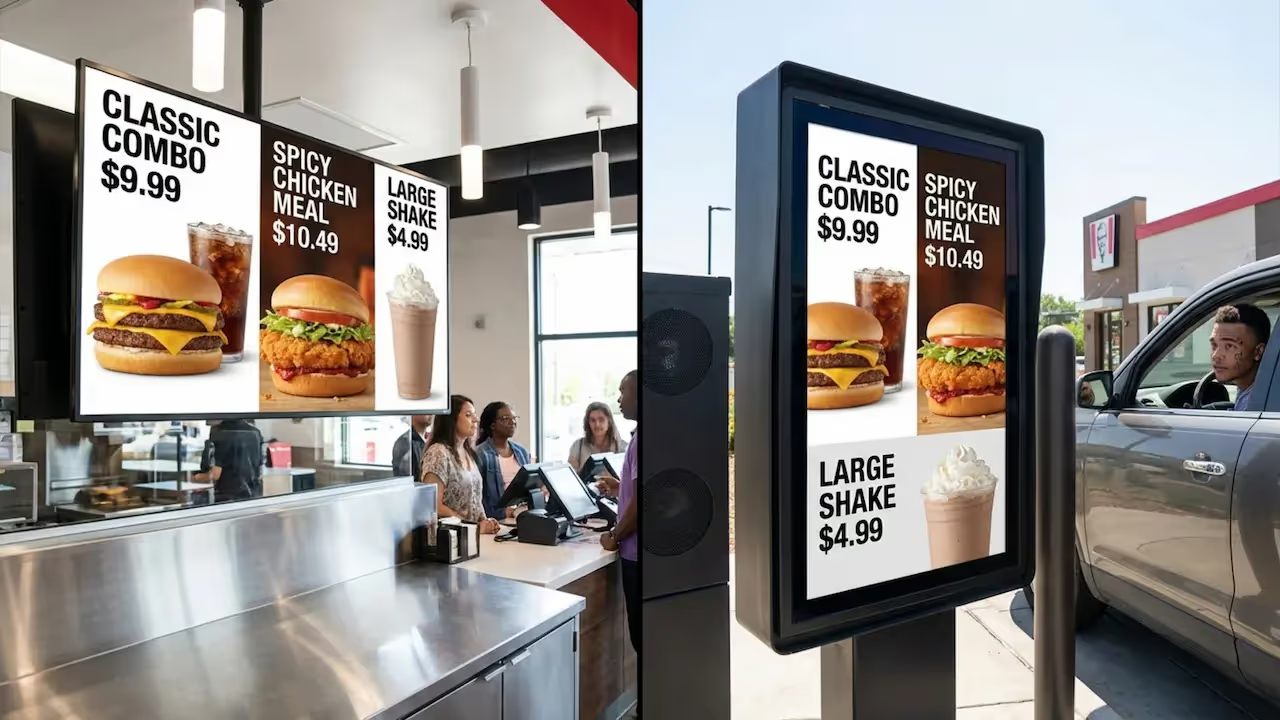
How do quick-service restaurants launch digital signage across multiple locations without disrupting daily operations? A structured rollout checklist provides the exact steps to select hardware, configure cloud-based software, and schedule content, ensuring screens go live smoothly and deliver measurable ROI from day one.
What Is a QSR Digital Signage Rollout Checklist?
A QSR digital signage rollout checklist is a practical roadmap for planning, buying, installing, and managing screens across your restaurant network. It shifts the project from simply hanging TVs on a wall to integrating a reliable communication tool that speeds up ordering and keeps your messaging consistent.
Think of it as a shared playbook. It aligns your IT, marketing, operations teams, and franchise owners. When every hour of downtime costs you sales, a solid checklist keeps the rollout moving and prevents costly technical missteps, ensuring you get it right on the first try.
Benefits of Using a Checklist for Digital Signage Deployment
A structured plan breaks a massive deployment into manageable steps. Whether you are replacing printed posters or scaling across dozens of franchises, a clear path reduces guesswork and prevents expensive do-overs.
It also drives better teamwork. When operations, marketing, and IT agree on timelines and task ownership, you reduce confusion. Spotting risks early, like shipping delays, poor site readiness, or complex software setup, means you can fix them before they disrupt the launch. With a smooth rollout, you can start proving ROI immediately, turning those screens into a data-driven engine for your business rather than just another operational cost.
Defining Objectives and Success Criteria
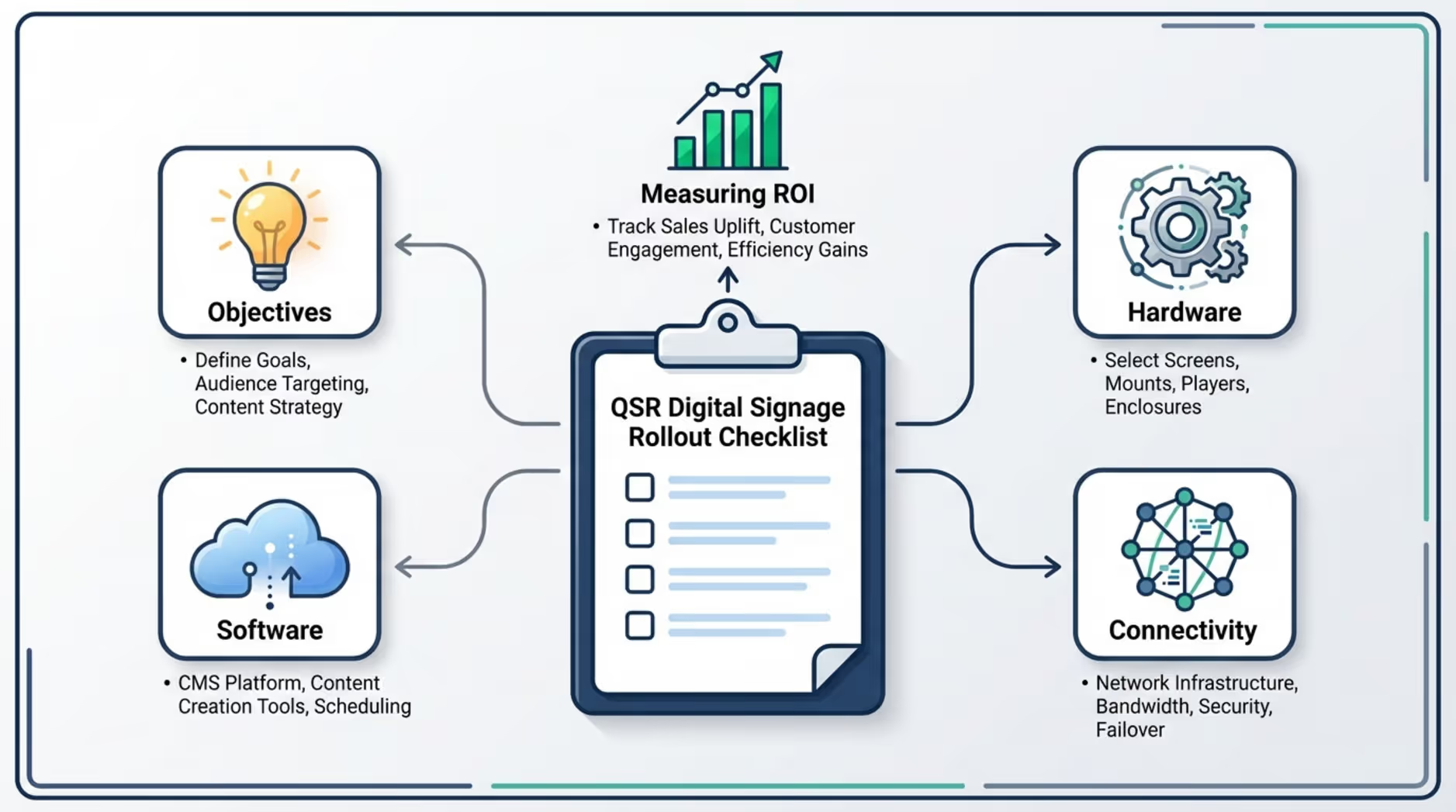
Before you buy a single screen or build a playlist, define exactly what the rollout should achieve. Without a clear goal, digital signage easily becomes an expensive decoration. Bring multiple departments together to identify the specific operational bottlenecks the screens can help solve.
Are you trying to speed up drive-thru lines, push high-margin combos, or keep staff updated in the breakroom? Whatever the target, tie it to a concrete business goal: saving time, reducing costs, or driving revenue.
Setting Clear Goals for the Rollout
Vague goals like "better customer experience" are hard to track. Instead, set measurable targets, such as increasing combo upsells by a specific percentage, reducing perceived wait times, or improving order accuracy.
Include operations, marketing, and IT from the start so the screens fit naturally into daily workflows. Assign clear owners for managing content and tracking performance. When someone owns the process, the system stays active and relevant long after launch.
Key Performance Indicators to Track
Connect your goals to KPIs. In a QSR, this often means tracking sales lift for promoted items, measuring dwell time, or analyzing interaction data from touch kiosks. Without data, you are just guessing at what works.
Set up a regular reporting rhythm to review the results. This allows you to adjust your approach, test new creatives, and optimize your playlists over time to keep ROI strong.
Selecting Digital Signage Hardware for QSR Environments
Your screens, mounts, and media players form the physical foundation of your network. Reliable playback requires hardware built for the environment. Assuming any off-the-shelf TV will work in a hot, greasy, or busy QSR is a common mistake that leads to midday failures and constant replacements.
Consumer-Grade vs. Commercial-Grade Devices
Consumer screens are built for living rooms, not for 16-hour shifts in a restaurant. Commercial-grade displays are designed for constant, heavy use. They handle higher temperatures, offer better brightness, and support longer daily run times without burning out. While they cost more upfront, they save you money in the long run by significantly reducing downtime and replacement costs.
Display Selection: Indoor vs. Outdoor Requirements
Environment dictates hardware. Indoor menu boards and promo screens need sufficient brightness to cut through harsh store lighting. Outdoor displays, like drive-thru screens, face extreme conditions. They require high-brightness panels to remain readable in direct sunlight, along with heavy-duty enclosures to protect against heat, rain, and cold.
Media Players: Performance and Compatibility Factors
The media player is the engine behind your content. Look for devices capable of smooth, high-resolution playback (like 4K) and remote management. Some commercial displays have built-in players (System-on-Chip), which work well if your digital signage software supports them.
For a reliable, simple setup that avoids complex IT hurdles, dedicated hardware like the plug-and-play Look player offers stable performance. It connects seamlessly to your displays, ensuring your menu boards and promotions keep your screens running smoothly shift after shift.
Mounting Solutions and Power Considerations
Mounts and power mapping are critical for safety and a clean look. Use secure, commercial-rated mounts and ensure proper airflow to prevent overheating. Run a site survey before installation to confirm outlet locations and data drops. Handling the electrical and structural needs upfront prevents last-minute drilling and messy cables.
Choosing Scalable Digital Signage Software
Hardware is what your customers see, but the software is how you control the experience. The right platform allows you to publish and manage content from anywhere, across one screen or a thousand, without a steep learning curve.
Look Digital Signage is an ideal solution for QSR operators who need to manage their entire network from one dashboard. It is designed to be approachable for non-technical teams while providing the robust features required for multi-location rollouts.
Features QSRs Should Look For in Software
When evaluating platforms, prioritize features that reduce manual work and protect uptime:
- Smart Scheduling: Automate menu changes based on the time of day (dayparting) or align limited-time offers across specific locations.
- Offline Playback: Ensure your screens keep playing cached content even if the store's internet connection drops.
- Security and Permissions: Control who can publish content with role-based access, keeping corporate branding secure while allowing local managers to update sold-out items.
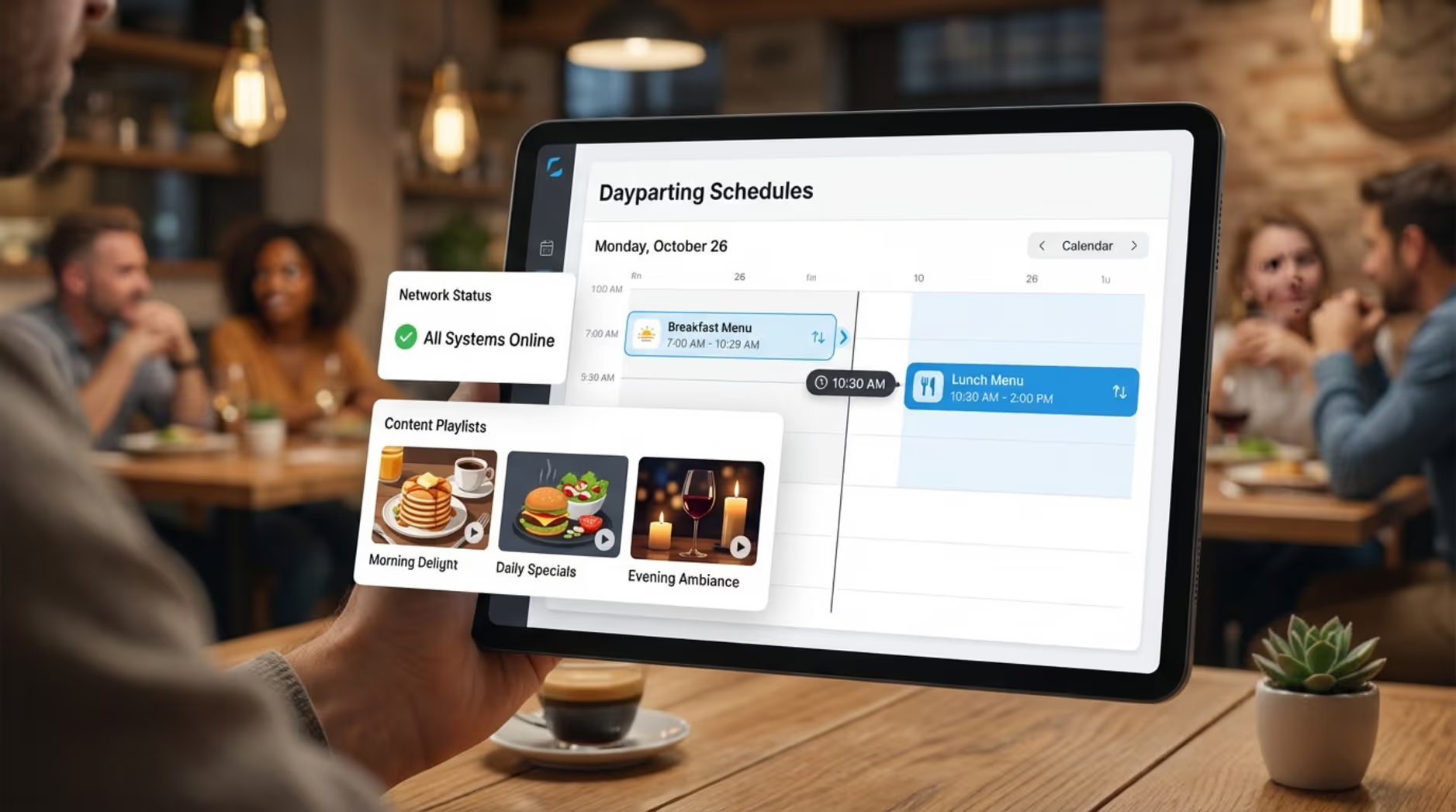
Look Digital Signage provides all of these capabilities natively, making it a strong fit for teams that want a reliable, set-and-forget system.
Content Management and Multi-Location Support
A centralized CMS eliminates the need to ship USB drives to franchise owners. You can update dozens of locations in minutes, ensuring the branding stays consistent. With tools like Screen Layouts in Look CMS, you can divide a single display to show a dynamic menu on one side and an animated promo loop on the other, adapting quickly to your store's specific needs.
Software Integration with QSR Systems
Screens become far more powerful when they react to real-time data. Look for software that integrates via APIs to pull live inventory or POS data. This ensures your digital menu boards automatically remove out-of-stock items or adjust pricing dynamically, reducing customer frustration and staff workload.
Planning Network Infrastructure and Connectivity
Even top-tier screens will fail without a stable network. QSR signage needs reliable internet for fast content updates and accurate playback reporting. Network planning often gets ignored, but it should start early with your IT team involved.
Internet Requirements for Reliable Content Delivery
Hardwired Ethernet is always the safest bet for critical screens like menu boards. Audit each location’s bandwidth to ensure it can handle high-resolution video downloads without buffering. Because QSR internet can be unpredictable, leveraging a CMS with offline playback is crucial to keep your screens running when the connection inevitably drops.
Network Security and Bandwidth Allocation
Keep your signage traffic segmented from sensitive systems like your POS. Using VLANs protects your core business data while allowing screens to update securely. Coordinate with IT to schedule heavy media downloads during off-peak hours so the updates do not slow down the store's operational network.
Designing a Purpose-Driven Content Strategy
Content is the reason you installed the screens in the first place. A smart strategy goes beyond static images; it considers the viewer's mindset and uses the screen to drive specific actions, like speeding up choices or prompting upsells.
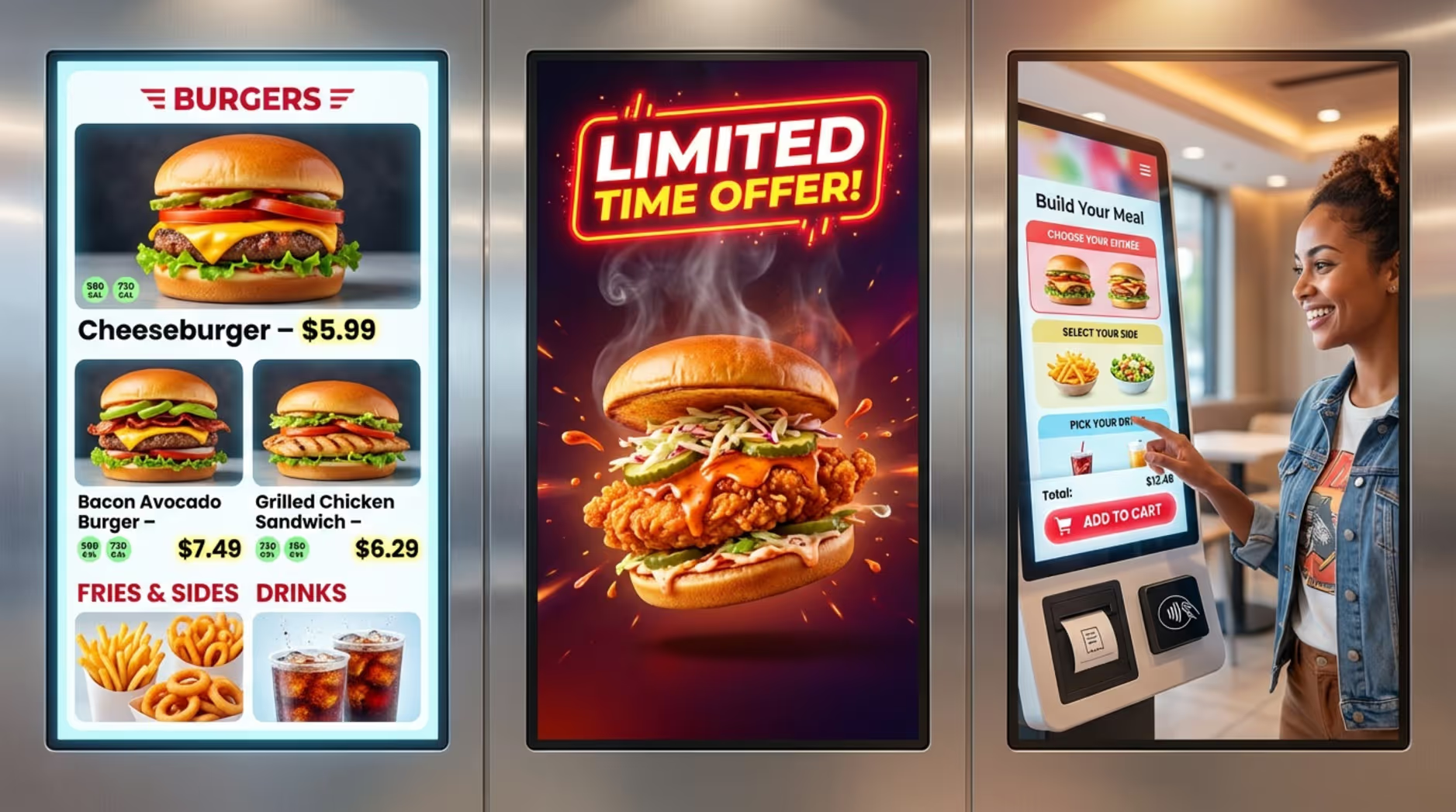
Content Types: Menu Boards, Promotions, Interactive Displays
QSRs rely on a mix of content. Menu boards provide clear pricing and reduce perceived wait times. Promotional screens highlight high-margin combos and limited-time offers. Interactive kiosks let customers order at their own pace, which can increase the average ticket size and free up staff. Remember to keep one clear message per screen and format videos for silent playback, as most restaurant environments are too loud for audio.
Scheduling and Dayparting for Dynamic Content
Relevancy is everything. Use smart scheduling to automatically switch from breakfast menus to lunch combos at exactly 10:30 AM. Pre-program seasonal campaigns so they deploy network-wide on the correct date. This set-and-forget approach ensures the right message hits the right audience without requiring daily manual updates from your team.
Standardizing Signage Design and Brand Guidelines
Brand consistency builds trust. Whether a customer visits a franchise in New York or Texas, the digital experience should feel familiar. Establishing design rules early prevents your screens from looking like a chaotic mix of different fonts and colors.
Consistent Branding Across All Locations
Lock in your visual identity-colors, typography, and layout rules. A cloud-based CMS allows corporate teams to control core brand assets while giving local operators just enough flexibility to update local prices, ensuring the digital experience feels consistent across regions.
Templates and Design Standards for QSR Signage
To launch content faster, rely on pre-built frameworks. Ready-made templates within Look Digital Signage allow teams to quickly customize on-brand menus and promos without needing a graphic designer for every minor tweak. Define the screen orientation and placement in your creative brief so the text is always legible from the ordering counter.
Addressing Compliance, Permits, and Approvals
A rollout is not just a technology project; it involves local regulations. Skipping the permitting phase can lead to heavy fines or forced removal of your new drive-thru boards.
Permitting and Regulatory Considerations for Signage
Zoning laws vary wildly. One city might allow high-brightness outdoor video, while the next town over strictly limits animation and screen size. Research local codes and secure landlord approvals early. Start the permitting process for your strictest locations first to build a realistic timeline.
Ensuring Accessibility and ADA Compliance
Factor in accessibility from day one. Interactive kiosks must meet ADA reach and height requirements. Even for standard menu boards, use high-contrast colors and large, readable fonts. Designing inclusively minimizes legal risk and ensures every customer can read your offers clearly.
Coordinating Suppliers, Vendors, and Site Preparation
Scaling a network across dozens of stores requires tight logistics. Each location will have unique structural quirks. Without clear project management, minor site differences will snowball into massive delays.
Allocating Vendors and Defining Responsibilities
Partner with vendors who understand the fast-paced nature of QSRs. Clearly define who handles cabling, who mounts the screens, and who configures the software. Having a single point of accountability for installation reduces the finger-pointing that often happens when hardware and software teams are siloed.
Site Readiness: Electrical, Structural, and Environmental Checks
Before the install crew arrives, verify that the wall can support the mount and that power outlets are live. Staging and pre-configuring your media players centrally before shipping them to the stores can drastically cut down on-site troubleshooting and keep the rollout on schedule.
Buffering Timelines to Prevent Delays
Delays are inevitable. Hardware gets backordered, and city inspectors run late. Build buffer time into every phase of your schedule. Plan a phased rollout so you can refine your installation process on a small batch of stores before deploying nationwide.
Installation and Rollout Execution Processes
Installation day is critical. Every hour a register or drive-thru lane is closed impacts your bottom line. Success here relies on strict adherence to your pre-planned checklists and using technicians who know how to work efficiently in a restaurant environment.
Pre-Installation Checklist and Staff Coordination
Run through a pre-install checklist to verify network readiness and hardware delivery. Brief the store managers on what to expect so they can plan staff shifts accordingly. Pre-loading your playlists onto the media players ensures that once the screen is plugged in, it immediately displays the correct content.
Day-of Installation Tasks and Troubleshooting
Installers will mount the screens, manage the cabling, and connect the devices to your network. They should run full playback tests to confirm the resolution is sharp and the schedules trigger correctly. Document the final setup with photos to make future remote support much easier.

Training, Monitoring, and Maintenance Plans
A successful rollout does not end on install day. To maintain reliable playback, you must establish clear routines for system monitoring and staff training.
Staff Training on Content Updates and Emergency Procedures
Train your local managers on the basics. They should know how to log into the CMS to update a sold-out item or restart a frozen screen. Providing simple, clear documentation empowers your frontline staff to handle minor issues without overwhelming your IT helpdesk.
Remote Monitoring and Issue Detection
You cannot fix a blank screen if you don't know it is offline. Utilize the proof-of-play and monitoring dashboards within your software to track device health. Set up automated alerts so your support team is notified the moment a location loses connection, allowing you to resolve the issue before the lunch rush.
Scheduled Maintenance and Vendor Support
Dust and grease accumulate quickly in a QSR. Schedule routine physical cleaning for your screens and regular firmware updates for your media players. Partner with software and hardware providers that offer responsive, helpful support when you hit a roadblock.
Measuring Performance and Optimizing the Digital Signage Network
The true value of digital signage is proven through data. Without analytics, it is impossible to know if your screens are driving sales.
Routine Data Analysis and Content Optimization
Track which promotions run during your highest sales hours. If a specific combo graphic isn't moving the needle, swap it out for a new layout. Gather feedback from the store cashiers-they hear directly from customers and can tell you if a menu board is confusing or highly effective.
Using Analytics for Continuous Improvement
Treat your screens as a dynamic testing ground. A/B test different headlines and visuals across comparable store locations to see which generates higher upsells. By regularly reviewing performance data, you can optimize your playlists to deliver the highest possible ROI.
Future-Proofing and Upgrading QSR Digital Signage
Restaurant technology evolves rapidly. From AI-assisted ordering to real-time dynamic pricing, your signage foundation needs to adapt without requiring a complete hardware rip-and-replace in two years.
Planning for Scalability and Technology Updates
Build your network with growth in mind. Choose a cloud-based software platform that seamlessly scales from one screen to thousands. Open APIs and flexible software architectures ensure you can integrate new POS systems or inventory trackers down the road.
Warranties, Software Updates, and Upgrade Discounts
Read the fine print on hardware warranties to protect your uptime. Opt for SaaS platforms that consistently roll out feature updates and security patches. Staying current with software ensures your system remains fast, secure, and ready for whatever your marketing team dreams up next.
Key Takeaways for a Successful QSR Digital Signage Rollout
Succeeding in the quick-service industry requires speed, consistency, and clear communication. A well-executed digital signage rollout supports all three. By approaching the project systematically-defining clear goals, choosing the right commercial hardware, relying on scalable cloud software, and maintaining the network proactively-you turn digital screens into a powerful operational asset.
Ready to make your next rollout easier? Start a free trial with Look Digital Signage and see how quickly you can connect your first screen and publish your first scheduled playlist.







