


Table of Content
Ever wondered how movie theaters keep people interested even before the trailers begin? A big part of the answer is cinema digital signage. These are not just fancy screens. Used well, they are a strong marketing tool that can change how cinemas talk to visitors, improve day-to-day work, and increase profits. Digital signage can shape the whole visit, from the moment a guest walks in to the moment they leave, already thinking about their next movie. This guide explains how to use digital signage in your cinema in a clear, simple way.
The big screen and powerful sound already make cinemas special, but digital signage can push that experience even further. It connects technology, information, and entertainment into one smooth journey that lifts every moment. It’s flexible, easy to change, and a key part of modern cinema marketing.

How Digital Signage Changes Movie Theater Marketing
Cinema digital signage changes marketing because it lets you share dynamic, real-time information in a way that paper posters cannot. Instead of printing and replacing signs all over the building, you can change what shows on every screen in minutes. This speed means you can adjust promotions to time of day, type of audience, or live events, such as a sudden surge of interest in a specific showtime.
Digital signage also makes marketing more eye-catching. Moving graphics, sharp images, and trailers grab attention much better than static photos. This creates a more exciting space, supports your cinema’s brand, and gives guests a visit they will remember. It goes beyond basic ads and becomes part of the entertainment itself.
Where Digital Displays Fit in the Cinema Experience
Digital displays are very flexible and can be used almost everywhere in a cinema, improving the visit at each step. Outside, window screens can catch the eye of people passing by. Inside, lobby displays can welcome visitors with bold posters and trailers, setting the tone for their visit.
At key spots, like ticket desks and concession counters, digital screens offer clear information and prompt people to buy. In waiting areas and hallways, they can show trivia, behind-the-scenes clips, or directions to screens. This steady but low-key presence makes sure information is always easy to find and your marketing messages appear again and again without feeling pushy.
Benefits of Digital Signage for Cinemas
Digital signage offers much more than a modern look. It is a planned investment that can bring clear gains in many areas, from happier guests to higher profits. It helps build a cinema that is smoother to run, more engaging, and more profitable.
Improves Guest Experience
Imagine arriving at a busy theater and, instead of lots of messy paper signs, you see clear digital screens showing exactly what you need. Digital signage removes common problems such as long queues and old information, which can quickly ruin the mood. Real-time updates about showtimes, seat availability, and special events keep people informed and reduce stress.
Interactive kiosks let guests buy tickets, pick seats, and check in by themselves, cutting down waiting and giving them more control. Fun content like trivia or behind-the-scenes clips keeps them entertained while they wait, turning boring moments into part of the fun. This smooth, clear, and entertaining visit makes people more likely to come back.
Streamlines Operations and Reduces Manual Work
For staff, digital signage is a huge help in daily work. No more printing, cutting, and replacing posters and menus. A central content management system lets you change showtimes, prices, or offers on every screen with a few clicks. This saves time and labor, so your team can spend more effort helping customers.
Digital signage also reduces mistakes. Automated schedules show the right content at the right time, lowering the chance of wrong showtimes or incorrect deals. This smoother way of working creates a more professional, calm environment for both staff and guests.
Increases Ticket and Concession Sales
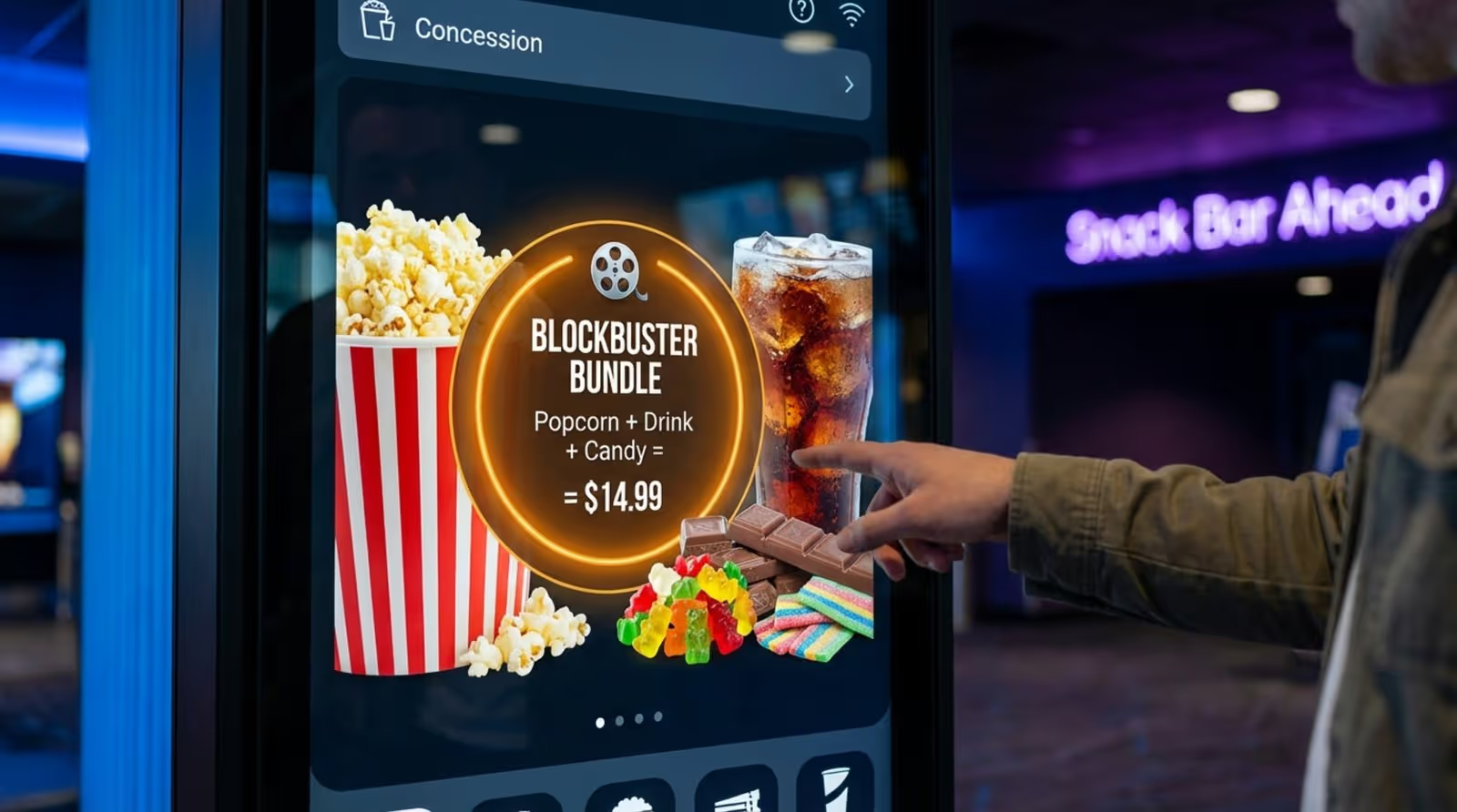
Digital signage can directly drive sales. Bright, moving displays at concession counters can highlight tasty combos, appealing snack photos, and short-term offers that nudge people to buy more. Great visuals and simple animations can trigger cravings and increase impulse buys, raising the average spend per customer.
You can also use screens to promote future blockbusters, special events, and early-bird ticket offers, building excitement and boosting advance sales. Features like QR codes for loyalty sign-ups or instant discounts give people extra reasons to spend and come back. When you present deals and new items clearly, ticket and concession sales both grow.
Creates New Revenue Streams with Advertising
Digital signage can also bring in new income through advertising. Cinemas can work with local businesses, sponsors, and national brands to show their ads on screens placed in key areas. This provides them with valuable exposure while giving your cinema extra revenue.
This extra income can help cover the cost of buying and running the signage system. By creating simple ad packages based on screen location, time on screen, or audience type, cinemas can build a more diverse business model and improve long-term financial stability.
Types of Digital Signage Used in Cinemas
Digital signage comes in many forms, each serving a different need in the cinema. Together, they create a clear, consistent experience for visitors.
Showtime and Schedule Boards
These are the core screens in any cinema. Placed near entrances and in lobbies, schedule boards show live movie times, start times, and screen numbers. They are built for quick reading, helping people plan their visit fast.
Modern boards can link to the ticket system to show seat availability and sold-out shows, reducing guest frustration. They can also cycle through coming attractions and special events while still focusing on current show information.
Digital Concession Menus
Printed menus are quickly going out of style. Digital concession menus show snacks, drinks, and combos in bright, attractive layouts. They make it simple to promote daily deals, limited-time offers, and upsells with strong visuals and clear text.
A major plus is how quickly you can update them. If you run out of an item or change a price, you can adjust the menu in minutes. You can also run seasonal menus or tie offers to specific movie releases, keeping your food and drink options fresh and timely.
Lobby and Entryway Displays
These large screens help create the mood as soon as visitors arrive. In lobbies and entryways, they often show trailers, striking movie artwork, and ads for upcoming films or special events.
They can also guide people around the building, showing directions to screens, restrooms, or other key spots. Some cinemas use them for interactive content, social media feeds, or themed visuals that match current movies, turning the lobby into part of the storytelling.
Interactive Kiosks and Ticketing Terminals
Interactive kiosks give customers a self-service option, cutting queues and speeding things up during busy times. People can use these to buy tickets, select seats, check in for bookings, and sometimes choose concessions.
Kiosks can suggest upgrades, like premium seats or combo deals, helping grow revenue. They appeal to guests who prefer fast, independent service and reduce pressure on the standard box office.
Digital Movie Posters and Video Walls
Digital movie posters replace paper posters with screens that show artwork, trailers, and other promotional content in motion. One screen can rotate through several titles and be updated in seconds when movies change.
Video walls take this idea further. Built from several screens linked together, they can show large, striking visuals and trailers that grab attention from far away. They often become a main visual feature that upgrades the look and feel of the cinema.

Cinema Digital Signage: Step-by-Step Implementation Guide
Starting with digital signage may seem like a big task, but breaking it into clear steps makes it much easier. Follow this practical guide to set up digital signage in your cinema and get strong results.
1. Set Clear Marketing Goals
Before buying any screens, decide why you want digital signage. What do you want it to do? Increase ticket sales, grow concession revenue, improve guest experience, or help staff communicate better?
Set clear, measurable targets. For example:
- “Increase concession sales by 15% in three months.”
- “Cut average waiting time by 10%.”
These numbers shape your whole plan, from what you show on screens to where you place them, and they give you a way to check if it’s working. Without clear goals, you risk spending money on screens that don’t support your business.
2. Identify Audience Segments
Once your goals are set, think about who you are talking to. Different groups react to different messages. Are you mainly serving families, teens, couples, or art-house fans? Your answers will guide both content and screen placement.
Look at each area of your cinema. A screen near a kids’ corner might show family movie trailers and child-friendly snack deals. A display in a bar or lounge might promote indie films, special screenings, or themed nights. Adjusting your content to each group makes your messages more relevant and more likely to drive action.
3. Choose the Right Digital Signage Hardware
Picking hardware is a key step that affects performance and lifespan. It’s about more than screen size. Think about:
- Brightness: Higher brightness for windows or bright areas.
- Durability: Screens built for long daily use.
- Orientation: Landscape or portrait depending on content.
For bright areas or windows, use high-brightness screens (around 1500-2500+ nits) with anti-blackening tech so they stay visible in sunlight. For indoor areas, choose commercial digital signage screens instead of consumer TVs, which are not built for 24/7 use and often are not bright enough.
You will also need media players, small devices that store and send content to screens. Some professional screens have these built in; others need separate players. Make sure your screens and players work smoothly with your content management system.
4. Select and Set Up a Content Management System
The Content Management System (CMS) is the control center of your signage network. It lets you create, schedule, and manage content on all screens from one place. A strong CMS makes updates fast, keeps displays consistent, and lets you schedule content easily.
Look for a CMS that:
- Is simple to use.
- Includes design tools or templates.
- Supports images, videos, social feeds, and live data.
Cloud-based digital signage systems are popular because you can manage them from anywhere. After choosing a CMS, connect it to your hardware, set user accounts, and build your schedule rules. This system is what really lets your digital signage do its job.
5. Plan Display Locations in Your Theater
Where you place screens matters a lot. Think through the guest journey and note:
- High-traffic spots (entrances, lobbies).
- Decision points (box office, concessions).
- Waiting areas (lounges, hallways).
Consider viewing distance and angle. A showtime board must be readable from far away. A concession menu should sit close enough for people to read details. Check for access to power and stable internet. For outdoor or semi-outdoor spots, choose weather-resistant displays with secure mounts to prevent damage or theft. Place screens where they naturally catch the eye and give useful information.

6. Design Compelling Content for Screens
Even the best hardware is useless without good content. Aim for content that is visually strong, simple, and linked directly to your goals. Use:
- High-quality images and video.
- Short, bold headlines.
- Consistent colors and fonts that match your brand.
Keep messages brief on screens people pass quickly (“point of transit”), like corridor displays. In places where people wait (“point of wait”), you can show longer clips, quizzes, or extended trailers. Mix different content types to keep things fresh. If you’re not confident in design, use CMS templates or hire a designer who knows how to create content for digital screens, including motion and video.
7. Test and Optimize the System
Before full rollout, careful testing is key. Install screens in their real locations and check:
- All screens turn on and display properly.
- Content plays in the right order and at the right times.
- Interactive features respond smoothly.
Fix any technical problems, alignment issues, or network troubles. Watch how people react: Can they read the text easily? Do they seem confused? Ask staff and a small group of customers for honest feedback and adjust content, fonts, or layouts as needed. Aim for smooth, problem-free operation that supports your original goals.
8. Launch and Monitor Performance
Once testing is complete, you’re ready to launch your cinema digital signage system. But the work doesn’t stop there. Keep tracking how it performs against your goals. Follow metrics like:
- Changes in concession sales.
- Growth in advance ticket bookings.
- Loyalty sign-ups or QR code scans.
Review which messages perform best and adjust your content plan. Digital signage is flexible, so keep trying new layouts, offers, and schedules. Regular updates help maintain interest and protect your investment.
Content Ideas to Maximize Cinema Digital Signage Impact
Once your hardware and software are running, the real impact comes from the content you show. Strong, relevant content turns screens into active marketing tools. Here are some ideas to get more value from your digital signage.
Promote Upcoming Movies and Special Screenings
Promoting upcoming movies is obvious, but the way you do it matters. Instead of just a static poster, use:
- High-energy trailers.
- Short teaser clips.
- Countdowns to big release dates.
Highlight major films with bold graphics and clear messages like “Midnight premiere - extra footage” or “Advance tickets available now.”
Don’t ignore niche events. Use dedicated campaigns for film festivals, classic movie nights, or indie film runs. Add behind-the-scenes footage, director interviews, or sneak peeks to draw fans deeper into the story and build real excitement.
Highlight Combo Deals and Limited-Time Offers
Concessions are a big source of income, and screens can help increase those sales. Use rich images of popcorn, sweets, and drinks that make people hungry or thirsty. Show:
- Combo options with clear pricing.
- Limited-time offers.
- Bundles that save money.
Add simple animations, like a drink filling up or popcorn pouring into a bucket. Time-based offers, like “Happy hour” discounts with a countdown, push people to decide quickly. Show upsell suggestions, such as “Upgrade to large for only $1 more,” to gently raise the spend per customer.
Feature Interactive Promotions and Loyalty Programs
Interactive content boosts engagement and can collect useful data. Run movie trivia on lobby screens, with questions tied to current films or film history. Show leaderboards and offer small rewards, like a free drink, for high scores.
Digital signage is also great for promoting loyalty programs. Show the benefits clearly:
- Points for each ticket.
- Birthday treats.
- Exclusive screenings or early access.
Use QR codes so people can sign up quickly or join promotions like “Scan to win” or “Buy 3 popcorns, get the 4th free.” This supports sales and builds a base of repeat customers.
Show Real-Time Seat Availability and Movie Updates
Help guests make quick choices by sharing live information. Show seat availability for each showtime so visitors can see at a glance which screenings have space. This is very helpful if you offer reserved seating.
You can also show last-minute updates, such as:
- Short delays.
- Screen changes.
- Added showtimes for popular movies.
Sharing honest, timely updates builds trust and cuts confusion, leading to a calmer experience.
Display Community Events and Private Booking Options
Cinemas often serve as local meeting points, and your screens can help support that role. Promote:
- Local events hosted at your venue.
- Charity screenings.
- Partnerships with nearby businesses.
You can even give local charities some free screen time for positive community impact and new visitors.
Use displays to advertise private hire options for:
- Corporate events.
- Birthday parties.
- Group screenings.
Show photos of past events and list available services. This helps open up extra income outside normal ticket sales.
Best Practices to Boost Cinema Marketing with Digital Signage
Good content is only part of success. How you plan, schedule, and manage your screens also matters. These best practices will help your signage stay effective over time.
Align Content with Major Movie Releases
Timing plays a huge role. Match your content to big film releases and industry events. Before a major premiere, fill your screens with:
- Trailers and teasers.
- Behind-the-scenes clips.
- Countdowns and themed offers.
You can also run special events, such as horror marathons before Halloween or sci-fi weekends.
Use awards season too. Around events like the Oscars or Golden Globes, promote nominated films and themed screenings. Matching your signage to what people are already talking about keeps your marketing fresh and interesting and helps draw extra foot traffic.
Synchronize Social Media and On-Site Displays
Your digital signage should work together with your online channels. Tie on-site screens to your social media by:
- Promoting hashtag campaigns on lobby displays.
- Running photo or review contests that guests join via social.
- Showing live social feeds with guest posts (moderated where needed).
Share previews on social media of special content that will appear on your in-cinema screens to give people a reason to visit. This connection between online and on-site marketing strengthens your message and widens your reach.

Personalize Content for Different Audience Segments
Even if you show the same films as other cinemas, you can stand out by speaking directly to your local audience. Use screens to highlight what makes your location special and reflect your community.
Think about who visits at different times:
- Mornings: parents with young children or retirees.
- Afternoons: students or casual viewers.
- Evenings: date nights, groups of friends, late-night fans.
Target each group with relevant messages, such as family screenings and deals, senior discounts, or student offers during holidays. This way, each visitor sees content that feels meant for them.
Gather Feedback for Continuous Improvement
Digital signage is flexible, so keep improving it based on real feedback. Don’t just set it up and ignore it. Ask guests and staff what works and what doesn’t.
Ways to gather feedback:
- Run quick on-screen polls.
- Use QR codes that link to short surveys.
- Review sales data after major campaigns.
Check which content drives the most engagement or sales. Look at numbers weekly and be ready to adjust timing, visuals, or messages. This regular review keeps your signage strategy up to date and aligned with your business goals.
Common Challenges and Solutions in Cinema Digital Signage
Digital signage brings many benefits, but it also comes with some challenges. Knowing these in advance and having clear solutions will make your rollout and ongoing use much smoother.
Maintaining Up-to-Date Content Across Screens
One of the best parts of digital signage is how fast you can update content. But with many screens showing different information, keeping everything current can be hard. Old showtimes, wrong prices, or outdated promos can quickly damage trust.
The answer is a strong, easy-to-use CMS with good scheduling tools. A good CMS lets staff update all screens from one dashboard. You can:
- Pre-schedule changes (e.g., breakfast to lunch menus).
- Set automatic updates linked to showtimes.
- Connect to ticketing and stock systems.
When systems are linked, showtimes and concession availability can update automatically, cutting manual work and the risk of errors.
Ensuring Consistent Brand Visuals
With many screens showing different content, it can be hard to keep your brand look steady. Mixed fonts, colors, and styles can confuse guests and make your cinema seem less polished, especially when you use artwork from multiple studios.
To solve this, create clear brand rules and use templates inside your CMS. Build a small set of base templates for:
- Posters.
- Social graphics.
- Menu boards and promos.
Include your logo, color scheme, and approved fonts in each template. Many CMS tools let you lock in design elements so staff can adjust text or images without breaking the look. Investing in a few strong base designs makes it easier for your team to keep everything aligned.
Managing Hardware Durability and Maintenance
Screens in public spaces face constant use, changing temperatures, dust, and sometimes rough handling. If you don’t plan for this, you may face broken screens, overheating, or frequent outages.
Start by picking the right equipment:
- Commercial-grade screens for long operating hours.
- Weatherproof models and enclosures for outdoor or semi-outdoor areas.
- High-brightness panels for sunny locations.
Plan regular maintenance, including cleaning, checking mounts and cables, and inspecting vents or filters. Agree on a support plan with your vendor so you have fast help if something fails. This care reduces downtime and increases the life of your hardware.
Measuring Return on Investment
Even if guests love the new screens, you still need to show that the system pays off financially. Without clear numbers, it’s hard to justify the cost or decide how to improve.
Connect your goals to specific metrics such as:
In Look Digital signage CMS, use analytics to see how often content plays and which items get the most interactions. Combine this with sales data and guest feedback surveys to build a clear picture of your return and decide where to adjust.
Ready to Get Started? Next Steps for Seamless Cinema Digital Signage
This step-by-step guide may be ending, but your cinema’s digital signage story is just starting. Digital displays keep changing, offering new ways to talk to and entertain your audience. Treat your system as a living part of your cinema, not a one-time setup.
As you grow, you might explore:
- AI-driven content suggestions that adjust based on time of day or audience mix.
- Augmented reality features where guests use their phones to interact with characters or themes triggered by your displays.
- Personalized messages for loyalty members, such as greeting them by name or showing custom offers.
Stay curious, keep testing new ideas, and use the flexibility of digital signage to strengthen the movie-going experience at your cinema.





