
Table of Content
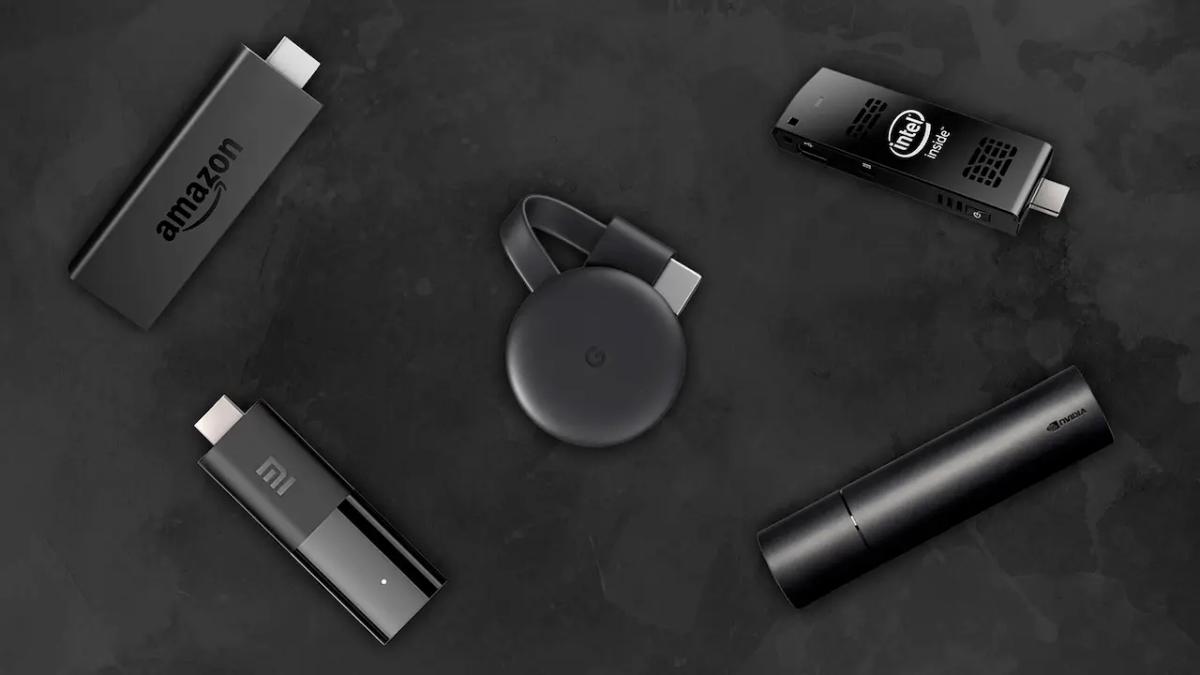
Are cheap digital signage players a realistic option for today’s businesses? Yes. Low-cost devices like Amazon Fire Sticks, Google Chromecasts, and Raspberry Pis can be an excellent starting point for small and medium-sized businesses that want digital screens without spending a lot upfront. But while they are affordable and easy to get started with, they often have trade-offs in speed, durability, and advanced features, which can limit how well they work in demanding or busy locations.
By 2026, getting started with digital signage is easier and cheaper than ever. You no longer need to spend thousands on special hardware just to show a digital menu or a promo video. With consumer streaming devices, even a small café or startup can use eye-catching screens. To choose the right option, though, you need to look past the low price and understand how these cheap players behave in a real business setup.
What Is a Digital Signage Player and Why Does Price Matter?
Definition of a digital signage player
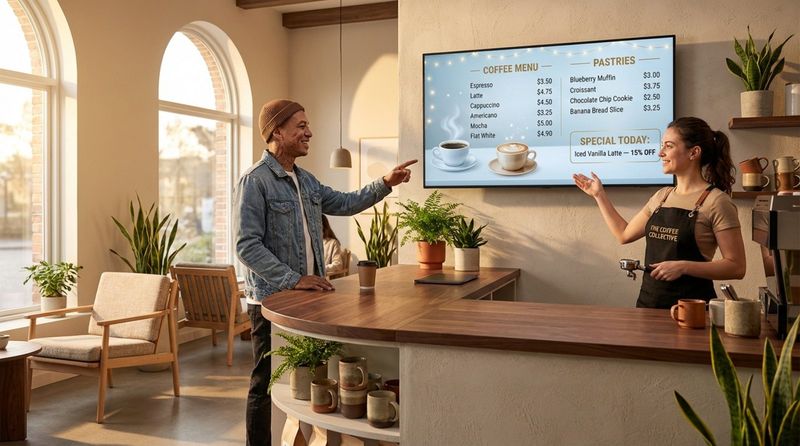
A digital signage player is the “brain” behind your screen. It is a small device that sits between your screen and your content source. It receives content from your Content Management System (CMS) or the cloud and turns it into a signal your TV or monitor can display. These players download, store, and schedule media files-from basic JPEG images to 4K video loops-so they appear on the screen at the right time.
Digital signage players come in different shapes. Some are tiny HDMI “sticks,” others are small set-top boxes, and some are microcomputers like the Raspberry Pi. Whatever the shape, their main job is to deliver content smoothly so you can talk to your audience in real time, without needing a full computer connected to every display.
Cost considerations in digital signage deployments
Price is often the biggest barrier when a business wants to start using digital signage. For a small company, the cost of hardware can take a big chunk out of the marketing budget. That’s why cheap players-often consumer streaming devices used in a new way-are so attractive. They let you run a trial for under $50 per screen, instead of buying commercial players that might cost five to ten times more.
But cost is not just about the purchase price. Smart owners look at the Total Cost of Ownership (TCO), including maintenance, power use, support time, and downtime. A cheap player may save money on day one, but if it crashes during the lunch rush or needs constant manual reboots, those savings can disappear quickly. The goal is to find a balance between low cost and steady performance over the long term.
What Features Define Cheap Digital Signage Players?
Hardware specifications on a budget
Most cheap digital signage players use a “System-on-Chip” (SoC) design, which combines the main components on a single small board. In this price range, you can usually expect a quad-core processor and around 1.5GB to 2GB of RAM. These specs are low compared with a modern PC, but they are usually enough to run a signage app and play standard HD content.
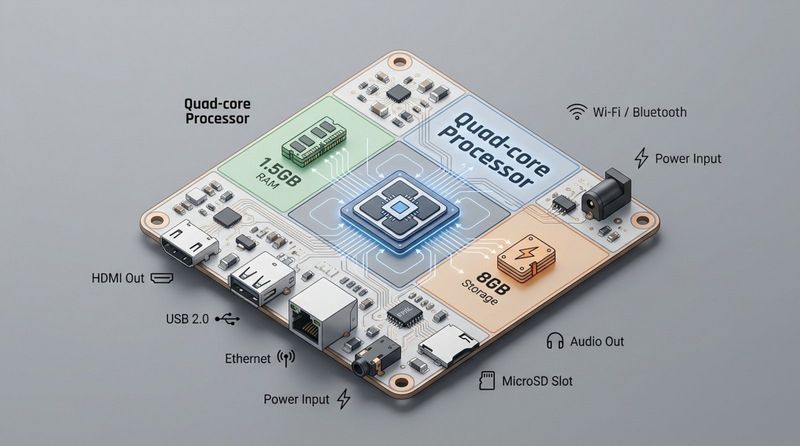
Storage is one of the main differences between budget and pro hardware. Low-cost devices often include 8GB of internal storage. That’s fine for caching images and short clips, but it can be limiting if you want to store a lot of 4K videos locally. Since these devices were built mainly for streaming over the internet rather than nonstop local playback, they focus on efficiency, not raw power.
Supported media formats and compatibility
Modern cheap players are surprisingly flexible. Even the least expensive sticks in 2026 can handle several popular video formats such as MP4, AVI, and MOV, and image formats like JPEG, PNG, and GIF. This makes it easier to reuse content you already have without paying for extra conversion tools.
Many of these devices also work with well-known cloud CMS platforms. By installing a native app from the Amazon Appstore or Google Play Store, you can turn a streaming stick into a signage player in a few minutes. However, cheap devices may struggle with “heavy” content, such as complex HTML5 animations or interactive touch apps, which need more graphics power than these devices usually provide.
Connectivity options and limitations
Most cheap players depend mainly on Wi-Fi. This makes installation straightforward-no network cables to run-but it can also be a weak spot if your Wi-Fi is unstable. A weak signal or frequent dropouts can stop content updates or break live data feeds like social media tickers or weather widgets.
The stick format also limits ports. Budget devices rarely include Ethernet or several USB ports. That locks you into wireless setups in many cases. If your site has poor Wi-Fi, a lot of interference, or strict IT rules that block wireless devices, you may need adapters or extra hardware. This adds cost and makes the setup more complex.
Popular Cheap Digital Signage Player Options
Amazon Fire TV Stick
The Amazon Fire TV Stick is probably the most common low-cost signage device. The HD model often sells for around $19.99, and the 4K Max for about $40. It runs on Fire OS (a custom Android version) and offers a familiar setup process for people used to home streaming.
For signage, the Fire Stick gives a nice mix of price and features. It is small, easy to hide behind a screen, and supports major signage apps like Look DS or Fugo. The downsides are forced firmware updates from Amazon and an interface focused on consumer streaming, which can sometimes get in the way of a pure signage setup.
Google Chromecast
Now sold as the Google TV Streamer, this device is popular for those who want a clean Google-based system. Depending on the model, it usually costs between $60 and $100 and supports 4K HDR and Dolby Vision. It works well for signage, especially if you use ChromeOS device management, which makes remote control easier.
Its big plus is native Android app support, which lets you install a CMS player directly. It is small, reasonably powerful, and a good choice for businesses that want an affordable device they can manage from a phone or computer.
Raspberry Pi
The Raspberry Pi is the favorite DIY option in digital signage. A Raspberry Pi 4 or 5 board typically costs between $35 and $120. Unlike a Fire Stick, it is a full microcomputer. It is flexible, low-power, and can run two screens at once through its dual micro-HDMI outputs.
The downside is setup difficulty. A Raspberry Pi is not plug-and-play. You need to install an operating system (like Raspberry Pi OS or Ubuntu), choose or build an enclosure, and configure the software yourself. It’s a strong choice for technical users who want full control and the option to add extra hardware like sensors or cameras.
Xiaomi Mi Stick 4K
The Xiaomi Mi Stick 4K is a serious rival in the Android TV category, usually around $70. It has a quad-core Cortex-A53 processor and 2GB of RAM, which is enough for smooth 4K playback. It is light and runs Android TV 11, making it a solid alternative to Amazon and Google devices.
It is easy to carry, supports Google Assistant, and has Chromecast built-in. This offers some extra ways to send content to the device. It’s a good mid-range budget choice for those who want Android TV without heavy Amazon branding.
Other affordable devices and alternatives
Outside the big brands, there are many unbranded or lesser-known Android TV boxes and low-cost players such as the Look HD-2222 Lite. These often provide more ports (Ethernet, USB, etc.) than simple sticks while keeping prices low. However, build quality can vary a lot, and software updates may be unreliable.
Another option is the Nano-PC 3, a cheaper device made specifically for signage. It offers a simple setup like a TV stick but comes in a stronger case and is configured for nonstop playback. These purpose-built low-cost devices often give better long-term stability than basic consumer streaming sticks.
Pros of Choosing Cheap Digital Signage Players
Low upfront investment
The biggest benefit is price. If you can buy a working signage player for roughly the cost of a casual dinner, starting a digital signage project becomes low-risk. That frees up money for better content or higher-quality screens while still moving into digital displays.
The low price also makes replacement easier. If a $30 Fire Stick wears out after two years of constant use, you can swap it with little pain. Some businesses even plan to replace these devices regularly, using this short life cycle to upgrade to newer tech every few years.
Ease of setup and widespread availability
Cheap players are built for consumers, so setup is usually very simple. You plug them into the TV, connect to Wi-Fi, and follow the on-screen steps. You don’t need an IT team or a specialist installer. Many businesses can go from “just opened the box” to “content on screen” in under 15 minutes.
They are also easy to buy. If one fails, you can usually walk into a local electronics store and get a replacement right away. For businesses with several locations, this broad availability makes it easier to keep every screen running without waiting for shipments from a niche vendor.
Adequate solutions for simple signage needs
Many businesses only need basic signage: a slide show of daily offers, a welcome message, or a looping promo video. Cheap devices handle these tasks well. If you don’t need touch features, complex layouts, or real-time data, a low-cost player often gives you most of what a pro player offers at a fraction of the price.
They are also ideal for pilot projects. If you’re unsure whether digital signage will pay off, you can test a few screens with budget hardware. If the test works, you can later move to professional players, now confident that the investment makes sense.
Cons and Drawbacks of Cheap Digital Signage Players
Potential performance limitations
Cheap players manage simple tasks well but can struggle when workloads increase. A common problem is lag when showing 4K video alongside other elements such as a news ticker. In split-screen layouts where the processor is under pressure, you may see choppy motion, freezing, or app crashes.
These devices also aren’t tuned for very high-bitrate video. If your marketing team creates very sharp, cinematic content, a cheap device might downgrade quality or fail to play it smoothly. For brands that rely heavily on premium visuals, this “budget” feel can harm brand perception.
Limited durability and reliability
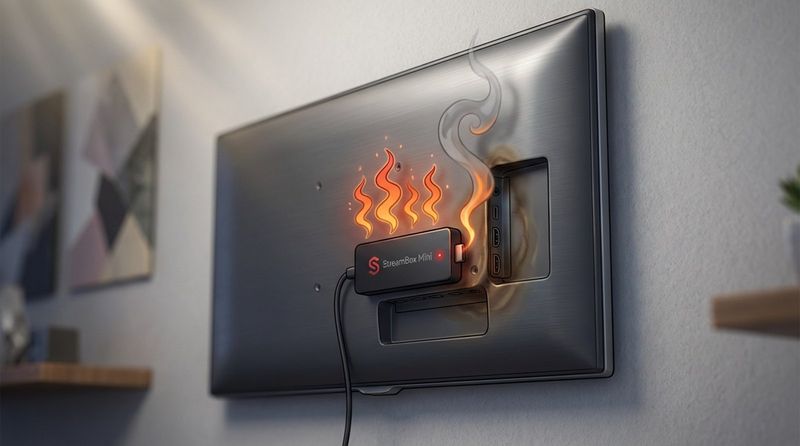
Consumer streaming sticks are made for home use-typically a few hours a day, not nonstop operation. In business environments where they run all day, they can overheat and start to fail or freeze often. They don’t include the cooling solutions that commercial players use.
Power interruptions are another weak point. Many cheap players do not automatically restart the signage app after a reboot. Each time the power flickers, someone may have to grab the remote and reopen the app. For sites with several screens, this becomes a real daily annoyance.
Restricted software compatibility
Because many cheap players run locked-down or custom operating systems (like Fire OS), they may not support every signage platform. You might be stuck in one vendor’s ecosystem or lose access to advanced tools like remote screen previews, which show you what’s currently playing from a central location.
They also often lack “Kiosk Mode,” which stops users from exiting the signage app.
Support and firmware update concerns
A $40 device usually doesn’t come with strong support. If a firmware update breaks your signage app, you may have little help from the manufacturer, as companies like Amazon and Google focus on home streaming users. A new update might also remove or change something that your signage software depends on.
These devices also tend to have shorter support lifecycles. Consumer gear is replaced quickly, and a budget stick may stop receiving security patches or new app support after only a few years. That means more frequent replacements than with professional players, which often stay supported for many years.
Comparing Cheap Players to Professional and Affordable Alternatives
Side-by-side feature and performance comparison
| Feature | Consumer Stick (e.g., Fire Stick) | Professional Player (e.g., Look HD-2222 Lite) |
|---|---|---|
| Price | $60 | $129 |
| RAM/Storage | 1.5GB / 8GB | 2GB / 16GB |
| Connectivity | Wi-Fi only | Wi-Fi + Ethernet |
| 24/7 Operation | Not Recommended | Certified |
| Setup | Consumer-guided | Plug-and-play / Remote |
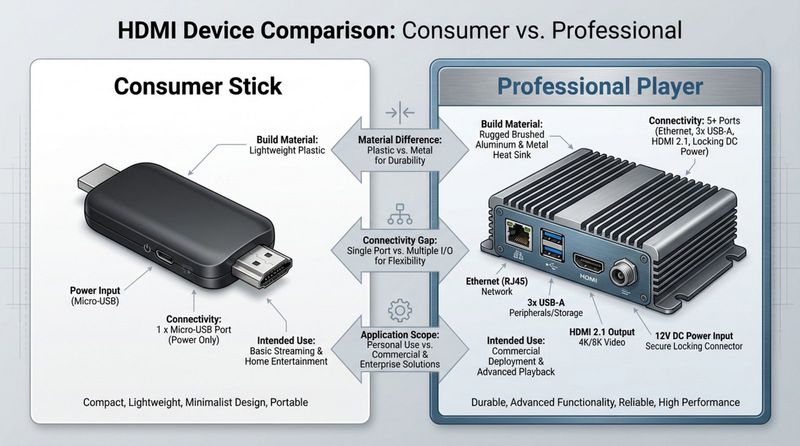
This comparison shows that professional players sit between cheap sticks and high-end hardware. They cost more than a basic Fire Stick but add important pro features such as Ethernet for stable networking and more internal storage for local content. In testing, these dedicated players handle multi-zone split screens smoothly, without the stutter that often appears on consumer sticks.
Cost analysis: upfront investment vs. long-term value
The low purchase price of a cheap player can be tempting, but long-term value can tell a different story. If a $40 stick overheats and fails every year and staff spend 30 minutes each month fixing issues, the true cost over several years may exceed that of a $150 pro player that runs smoothly for five years.
Professional players are also often more energy-efficient in nonstop scenarios. A Windows PC might draw around 200 watts, while a dedicated signage device or modern SoC player uses far less. Over time, the lower power bill can help narrow or even offset the price difference between cheap and professional hardware.
When to choose a professional-grade player
Professional devices like BrightSign or IAdea are best for large or mission-critical setups. If you run 50+ screens across multiple locations, remote management, security, and reliable operation are must-haves. These players are built to handle tough conditions, such as hot kitchens or dusty factories.
Pro hardware is also the better choice if your content is essential to your business. If your digital menu boards are the only way customers see prices or offers, you cannot risk regular lockups. In such cases, paying more for commercial-grade stability and access to proper support is usually the smarter option.
Factors to Consider Before Selecting a Cheap Digital Signage Player
Intended usage scenarios and content type
Start by asking: “What will I show on the screen?” If you only need static images or simple video loops in a controlled indoor space, a cheap device will likely be fine. But if you want touch features, live data feeds, or synchronized video walls, low-cost hardware may quickly feel too weak.
Location is also important. A Fire Stick might work well in a break room but struggle in a window-facing display that gets direct sunlight and heat. For hotter, dirtier, or outdoor-facing environments, a device with a metal case and better cooling is often needed to avoid repeated failures.
Scalability and future-proofing
Think about growth. If you plan to expand from one screen to twenty, can your chosen cheap players scale with you? Many low-cost devices don’t offer strong remote management, so changing a Wi-Fi password or restarting a player might mean visiting each screen in person, which becomes hard to manage as you expand.
It’s also wise to think about future media demands. 4K is standard now, but future video formats and compression methods may require more processing power. Choosing devices with slightly stronger specs today can help you avoid replacing your whole fleet when your software or content becomes more demanding.
Warranty, support, and ongoing costs
Always check warranty terms. Many consumer products either don’t cover commercial use or exclude 24/7 operation. By contrast, professional signage players usually include commercial warranties and longer support periods, which can save you money and frustration if something goes wrong across a batch of devices.
Also, look at ongoing costs. Some cheap devices need extra power adapters, Ethernet dongles, or separate device management subscriptions. Make sure you calculate the full cost of everything you need to get the device working properly in your setup, not just the sticker price of the player itself.
Tips for Finding the Best Cheap Digital Signage Player
Research and comparison using technical specs
Avoid buying purely on price. Aim for devices with at least 2GB of RAM and a quad-core processor. For 2026, this is a good minimum for smooth 4K playback and standard signage apps. If a product hides its specs or lists very low values, that’s usually a bad sign.
Check the operating system version as well. An Android device stuck on very old versions like Android 9 or 10 may have trouble running the latest apps or security updates. Aim for the newest OS you can reasonably get, to keep the device usable for longer.
Reading online reviews and reliability reports
Online reviews are useful if you read them carefully. Focus on reviews from business users or power users who run devices for long hours. A product that scores highly for watching movies at home might perform poorly when used 12 hours a day for signage. Search reviews for words like “overheating,” “reboot,” or “freeze.”
Digital signage forums and user communities can be even more helpful. Members often share real-world feedback and tips for making cheap devices more stable-for example, using a higher-quality power adapter instead of the included one, which can fix a surprising number of random crash issues.
Taking advantage of discounts, promotions, and bulk deals
Because many cheap players are consumer products, they often go on sale during big shopping events. Days like Black Friday, Prime Day, and back-to-school periods can be good times to buy several units at lower prices. If you know you will need multiple screens over the year, buying them all during a sale can free up budget for other parts of your project.
If you need larger numbers, contact suppliers and ask about bulk pricing. Even with cheaper gear, some sellers will reduce the price per unit if you buy 10, 20, or more at once. This is especially true for Android TV boxes and Raspberry Pis, where higher volumes can lead to better deals.
Cost vs. Functionality: Should You Buy a Cheap Digital Signage Player?
Whether a cheap player is right for you depends on how advanced your signage plans are and what your content demands. In 2026, more businesses are focusing on “Green Signage,” where energy use matters as much as purchase price. Cheap SoC players are very power-efficient and often draw less than 5 watts. For businesses running many screens, this low power use can cut energy bills and should be part of the cost comparison, not an afterthought.
Another growing topic is the “hidden labor cost” of low-cost hardware. While the device is cheap, the staff time spent fixing frozen players or hunting for remotes is not. If your team is not very technical, the simpler setup of a dedicated player might actually be cheaper overall once you factor in wages and lost time. As more screens ship with built-in SoC players inside the display itself, the external budget “stick” may, over time, be replaced by all-in-one screens that offer the simplicity of a cheap player with the stability and remote control features of professional signage systems.


