Product
How it worksFeaturesAppsFree digital signage templatesDigital signage hardwareOn-premise digital signage
Solutions
Choose your business and find out how to increase efficiency
retail
Retail

Supermarket & shopping mall

Grocery store

Pet store

corporate
Corporate

Meeting & conference room

HR

Lobby

Breakroom

education
Education

School

University

event
Events
Digital signage for government, preview
Government
Hospitality
Hospitality

Resort

Hotel

Night club

Spa

Beauty industry

digital signage for healthcare
Healthcare

Hospital

Medical center

Veterinary

Pharmacy

Dental

Waiting room

Manufacturing Preview
Manufacturing
menu
Digital menu

Quick service restaurant (QSR)

Cafe

Bar

Drive thru

Pizzeria

Food truck

Digital signage for restaurants, preview
Restaurant, cafe & bar
Digital Signage for Entertainment, amusement parks
Entertainment

Arena and stadium

Cinema

Museum

Amusement park

Casino

fitness
Fitness
banking
Banking
advert
Advertising

Digital out-of-home (DOOH)

Indoor

transportation
Transportation

Airport

Gas station

Bus station

Train station

Parking

Car Dealership
Car dealership
real estate preview
Real estate
Digital signage for church, Preview
Сhurch
Resources
Use casesFAQKnowledge baseBlogDownloads
Company
About usReseller programWhite labelContacts
Pricing
AI Wizard
new
Log inTry for free
English
English
Italian
Spanish
Portuguese
French
Deutsch
Русский icon
Русский
Home
Knowledge base
Screen Layouts
Screen Layout Applications

Screen Layout Applications

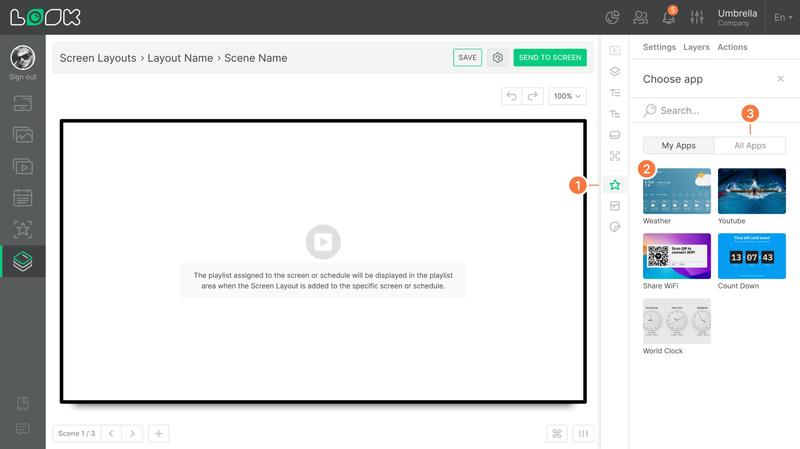
With the Apps widget, you can add free applications such as weather, flight schedules, clocks, and many more.
Adding an application to screen layout
  1. Click the Apps icon or press A on your keyboard to choose an application.
  2. In the side panel, select an app from the previously added ones and click on the app to add it onto the artboard.
  3. If you want to add a new app (or if you don’t have any apps yet), open the All apps tab in the side panel, choose the app you need, and add it by entering the required settings — just like in the main Apps section.
Screen layout app settings
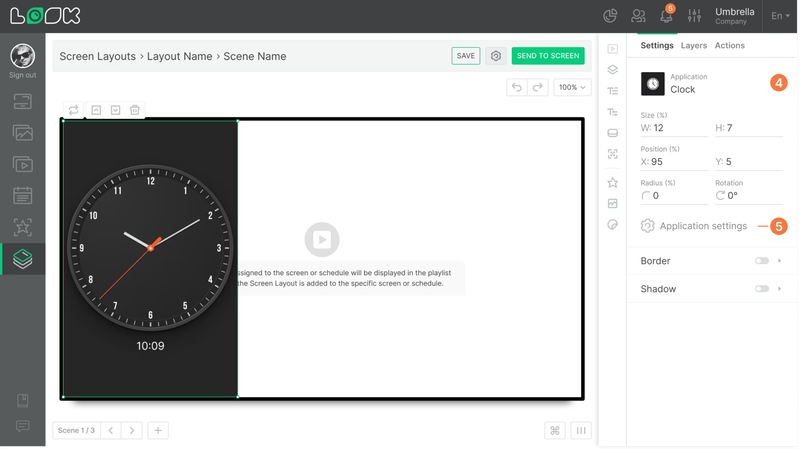
  1. The main sidebar will provide standard settings available for most widgets (size, position, corner radius, rotation, border, and shadow).
  2. Once the app is added to the artboard, a new option — Application settings — will appear in the main settings, allowing you to adjust the already existing app.
If you change the settings of an existing app, those changes will be applied everywhere the app is used (in playlists, screen layouts, and the home screen).  
Can't find your answer?
Contact Support
Screen Layouts
Screen Layout Interface
Screen Layout Editor Interface
Screen Layout Settings
Visual screen layout editor
Screen Layout Playlist
Screen Layout Layers
Screen Layout Button
Screen Layout Text
Screen Layout Assets
Screen Layout List of Layers
Add Screen Layout to Screen or Schedule
Adaptive orientation
Screen Layout Shortcut & Grid
Screen Layout Scenes
Screen Layout QR Code
Screen Layout Media
Screen Layout Applications
Screen Layout Ticker
Categories
Getting started
Getting started
Hardware
Hardware
Screens
Screens
Company
Company
Actions
Actions
Content
Content
Playlist
Playlist
Schedules
Schedules
Screen Layouts
Screen Layouts
Apps
Apps
Billing
Billing
Product
How it worksFeaturesAI WizardWizardAppsFree digital signage templatesDigital signage hardwareOn-premise digital signagePricing
Company
About usReseller programWhite LabelContacts
Solutions
Retail Hospitality BankingCorporateHealthcare FitnessAdvertising Education TransportationEventsReal estateManufacturingRestaurants, cafes & barsEntertainmentCar dealershipGovernmentChurchDigital signage solutions
Resourses
FAQUse casesKnowledge baseLook academyBlogWhat is digital signageDigital signage displaysDownloadsAlternativesTroubleshootingRSS
Instagram linkFacebook linkX iconLinkedIn linkYouTube Icon
Look DS LLC. Address: 1201 N Orange Street Suite #7003, Wilmington, DE 19801, United States
info@lookdigitalsignage.com
capterra-best-valueSoftware Sugest Awardsoftware-advice-customer-supportget-app-category-leaderG2-spring-2025-HighPerformer-Small-Businesscapterra-short-list-2025
Look Digital Signage Software Logo Footer
Privacy Policy
Terms of Service
Service Level Agreement
©2026 LOOK DS LLC