
Table of Content
Town hall meetings with digital signage are modern, tech-based corporate events that swap static slides for bright, real-time digital screens. With high-resolution displays and cloud software, companies can turn boring meetings into interactive sessions that improve message recall, connect remote and on-site staff, and keep everyone-from executives to frontline workers-aligned with the company’s goals. This method goes beyond basic one-way talks and creates a living flow of information that is both engaging and easy to access.
In today’s busy corporate environment, where people are flooded with information, digital signage acts as a clear visual focal point. It helps leaders cut through crowded inboxes and nonstop chat messages by placing key updates where people can’t miss them. With this technology, town halls become more than just another meeting; they turn into a strong channel for connection and openness that continues to have impact long after the event is over.
What Are Town Hall Meetings with Digital Signage?
A town hall meeting with digital signage is the planned use of electronic screens to support a company-wide gathering. In the past, town halls usually meant one presenter talking in front of a projector. Now, that idea has grown into a multi-screen, multi-location event. Digital signage lets you share live video, real-time data, and interactive content across all your offices and facilities at once.
These meetings aim to support open conversation. Instead of employees just listening, they see active, changing content that invites them to take part. Whether it’s a screen in a satellite site or a large display in the main lobby, the technology makes sure the “town hall” reaches the whole workforce at the same time, not just the people in one room.
How Does Digital Signage Work in a Town Hall Setting?
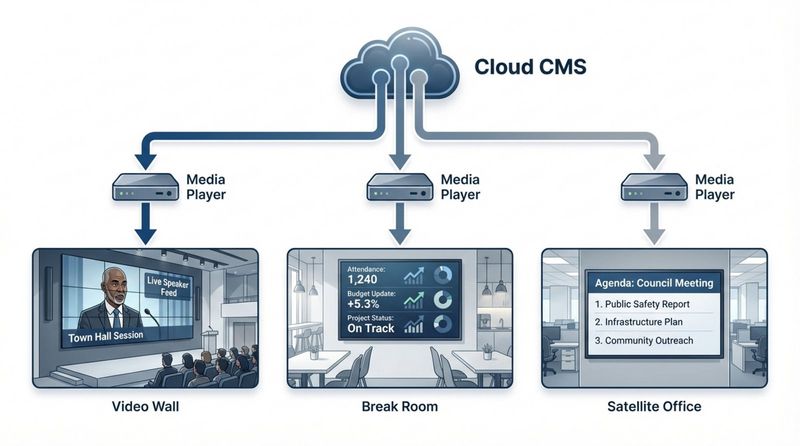
This setup usually has three key parts: high-resolution screens (LCD, LED, or OLED), media players, and a content management system (CMS). Media players-small computers-connect to the screens and play content managed through platforms like Look Digital Signage. These cloud tools let admins choose and control what shows on every screen from one central dashboard.
During the town hall, the CMS can switch between different media types. For example, a speaker may appear in one section of the screen, while a live Power BI dashboard with sales data or a YouTube product demo plays in another. This flexible layout supports layered communication that keeps people focused and interested throughout the meeting.
What Communication Challenges Do Town Hall Meetings Traditionally Face?
Many town halls fall into “death by PowerPoint.” Long slide decks and dull speeches cause people to disengage quickly. Internal communication also struggles to keep up with growing, hybrid workforces. Research from McKinsey shows the average worker spends about 28% of the week managing email, so town hall invites and recaps are often lost in a sea of less important messages.
Reaching the “deskless” workforce is another big challenge. Around 80% of workers worldwide don’t sit at a desk-these are people in factories, hospitals, and stores, many without corporate email. Traditional town halls can leave them feeling forgotten. Digital signage helps by bringing key messages into shared physical spaces where they already are, such as break rooms, cafeterias, or production lines.
Why Use Digital Signage for Town Hall Meetings?
The main reason to use digital signage for town halls is its strong ability to grab attention. People already consume most information through screens, and signage bridges digital and physical spaces. It offers more flexibility and impact than print or standard emails, helping important company messages get seen and clearly understood.
Digital signage is also a smart way to save time and money. It cuts printing costs and lets you update content instantly across many locations. Every site, no matter the distance or time zone, can receive the same message at the same moment.
Increases Clarity and Message Retention
People process visuals far faster than text. With active graphics, short videos, and clear headlines, digital signage helps the main points of a town hall stick. Instead of reading through a crowded slide, an employee can understand a key performance indicator (KPI) or strategic goal in seconds.
Retention grows further because signage can run in the background over time. You can schedule key takeaways from the town hall to appear on screens for days afterward. This repeat exposure improves awareness and recall, turning one announcement into lasting knowledge.
Enables Real-Time Communication and Updates
Timing matters for honest communication. During a big announcement or sudden shift in strategy, digital signage lets leaders push updates to everyone right away. This speed helps maintain trust and reduces the chance that rumors will fill gaps in information.
Real-time tools also support changes during the meeting. If numbers update or new feedback arrives mid-session, the displays can change immediately. This adds a live, current feel and keeps the event from seeming scripted or out of date.
Supports Hybrid and Multi-Location Participation
With hybrid work, “the office” is spread across many locations. Digital signage connects remote and satellite employees by showing the same high-quality content on local screens everywhere. This sync helps a worker in a regional warehouse feel just as connected to the CEO’s message as someone in the front row at headquarters.
Platforms like Firstup or Look DS can also send the same content to phones or desktops. This multi-channel approach means that whether someone is on the road, at home, or on the shop floor, they can still follow the town hall.
Facilitates Two-Way Engagement and Interaction
Modern town halls focus on leaders talking with employees, not just at them. Digital signage can show live streams of employee questions, so speakers can respond on the spot. This visible feedback loop shows that leaders are paying attention to staff concerns.
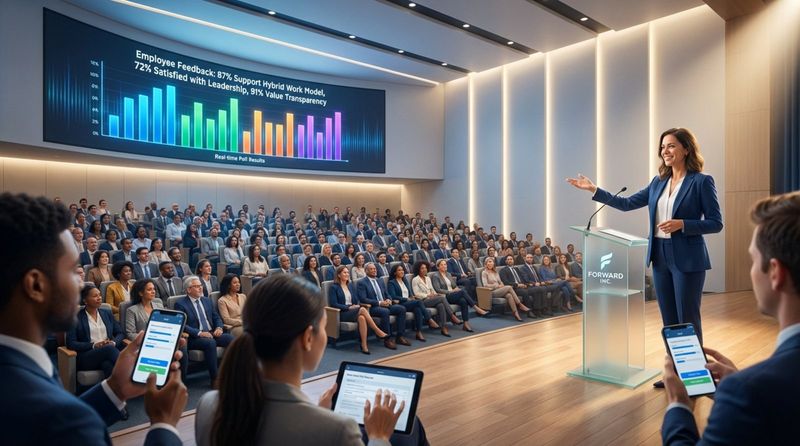
You can also plug in tools like live polls and surveys. As employees vote on their phones, a bar chart or word cloud fills in on the screen. This shared moment turns the town hall into a group activity where everyone sees their input count.
How Digital Signage Shapes Company Culture During Town Hall Meetings
Culture is the invisible structure of a company, and communication holds it together. When town halls use digital signage, they send a strong signal: the company is modern, open, and people-focused. Clear, visible communication helps break down silos and builds a culture where staff feel informed and empowered.
By moving recognition from small HR emails to big, visible screens, companies can raise morale. When employees or teams see their success shown across the organization, it supports the company’s values and encourages others to aim for similar results.
Fosters Organizational Transparency and Trust
Trust grows when employees feel they receive honest information on time. Digital signage supports openness by putting data and leadership messages out in plain sight. When everyone sees the same metrics and the same leaders on screen, it reduces rumors and mixed versions of the story.
Sharing consistent messages across screens, email, and intranet strengthens this trust further. It signals that everyone, at every level and location, gets the same information. This steady openness is a key part of a strong, high-trust workplace.
Promotes Inclusivity Across All Locations
Inclusivity means giving all employees equal access to information. Digital signage is especially helpful for “non-wired” workers who are rarely at a computer. Placing screens in cafeterias, hallways, locker rooms, and break areas helps keep these workers informed.
Local content zones on the screens can make inclusivity even stronger. While the main town hall message might be global, part of the display can show local news, language versions, or regional updates. This mix of global focus and local flavor helps every employee feel recognized.
Builds a Sense of Belonging and Shared Purpose
Seeing your own team or project on a big screen creates pride and a sense of belonging. It makes the company feel like a community, not just a chart of departments. Digital signage can share “day in the life” photos or short video stories so people can see how different roles support the wider mission.
This shared purpose supports long-term retention. When employees see goals, wins, and values around them every day, they feel more connected to the organization and stay motivated to help it grow.
Powerful Content Ideas for Town Hall Digital Signage
The impact of digital signage depends heavily on good content. A single static slide on a TV is not enough. To truly improve communication, content should be varied, engaging, and visually strong. A mix of data, video, and social elements keeps people interested and helps different learning styles.
Strong programs often follow a steady pattern, updating operational content daily and cultural content weekly or monthly. This prevents screens from fading into the background and keeps employees checking them regularly.
Showcase Live Data Dashboards and Key Performance Metrics
Connecting tools like Power BI to your digital signage turns your walls into live performance centers. During a town hall, showing real-time data helps leaders clearly explain how the company is doing against its goals. Whether it’s revenue, customer satisfaction, or output levels, watching the numbers move builds a sense of ownership and urgency.
Sharing this data also helps employees see the reasons behind leadership decisions. When they can view the numbers themselves, they’re more likely to support new plans and understand current challenges.
Display Meeting Agendas and Dynamic Visual Timelines
Keeping a town hall on schedule is easier when the agenda is visible. Moving timelines can show which part of the meeting is in progress and what’s next. This helps employees follow along and know what to expect.
Countdown timers are another useful tool. They can show when the meeting starts, how long is left in a Q&A, or when breaks end. These visual hints keep the event running smoothly and respect everyone’s time.
Highlight Leadership Announcements and HR Updates
Big news-like leadership changes, mergers, or policy updates-should stand out. Digital signage can use bold graphics and motion to highlight these items. After the town hall, these messages can stay on the screens to remind people of key points.
HR can also use this space to promote benefits updates, training deadlines, and wellness programs. Placing these reminders where people walk every day boosts participation without depending only on email.
Recognize Employees with Leaderboards and Spotlights
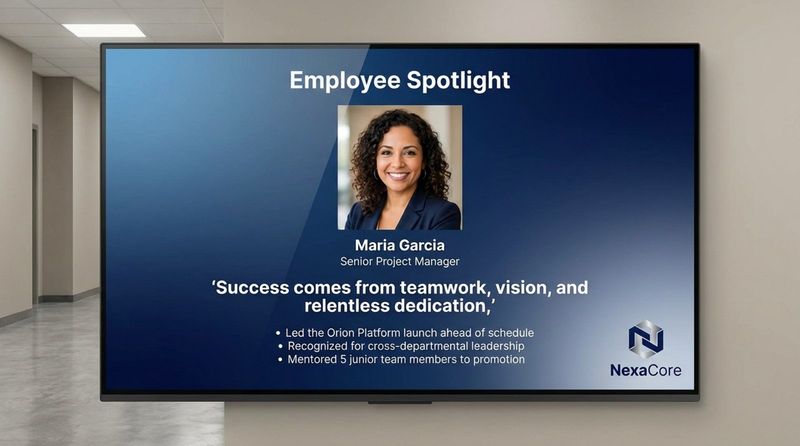
Public praise is a powerful way to raise engagement. Use your screens to feature “Employee of the Month,” work anniversaries, or major project wins. Leaderboards can track sales goals, safety records, or quality scores, encouraging friendly competition and a culture of appreciation.
This content puts a human face on the company. It shows that leadership values the people behind the results, which is a strong driver of satisfaction and loyalty.
Play Video Testimonials and Culture Moments
Video is especially engaging and can bring a town hall to life. Short clips of employees sharing a recent win, or videos from volunteer days and team events, can build emotional connection. Tools like YouTube and Vimeo connect easily to most signage platforms, making it simple to share this content.
These “culture moments” remind staff that the organization is about more than targets and numbers. They highlight values, community, and personal stories and help create a more relatable image of the company.
Share Event Highlights and Instant Feedback Results
After a major event or key town hall segment, you can use the screens to show highlights. This might be a photo collage from the session or a summary of final decisions. It quickly brings people up to speed, even if they missed part of the meeting.
Showing the results of live polls or surveys right away also makes people feel heard. When employees see their responses visualized on screen and discussed by leaders, they’re more likely to join in future feedback efforts.
Best Practices for Deploying Digital Signage at Town Hall Meetings
To get strong results from digital signage, you need careful planning. IT teams handle hardware and network security, while Internal Communications shapes the messages and visuals. A shared governance approach helps avoid mixed messages and keeps the brand look and feel consistent on every screen.
One key guideline: keep content short and visual. Screens are not for long paragraphs. Think of them as visual prompts. Use headlines under 10 words, clear images, and limited motion for the best impact.
Plan Content and Messaging with Clear Objectives
Before you start a digital signage project for town halls, decide exactly what you want to achieve. Are you aiming to raise awareness of a new direction? Improve morale? Increase safety compliance? Clear goals will drive your content choices and later help you see whether the program is working.
After setting goals, build a content calendar. This keeps your screens fresh and prevents them from going unused, which can send the wrong message to employees.
Map Screen Locations and Define Zones for Maximum Impact
Placement plays a huge role in success. Put screens in “communication intersections”-spots where people naturally stop, like lobbies, cafeterias, and elevator areas. For good visibility, use screens at least 42 inches across and place them about 6 feet or more from where people stand.
On each screen, you can divide space into “zones” for different content. For example, use a large area for the main video, a side strip for a news ticker, and a footer for time and weather. This layout lets you share several messages at once without clutter.
Integrate with Hybrid Tools for Seamless Remote Access
To reach all employees, connect your digital signage with tools you already use, like Microsoft Teams, Zoom, or Slack. This lets you share the same key messages across office screens, laptops, and phones at the same time, so remote workers stay in step with the office.
For example, you can stream the town hall to both wall screens on site and mobile devices for field staff. This shared experience reinforces the message and supports better recall for everyone.
Automate Content Updates and Scheduling
Automation turns digital signage from a manual chore into a smooth system. Use scheduling features to plan content in advance. Set timers so pre-event countdowns give way to the live stream right as the town hall begins.
When you connect signage with HR or BI tools, content can update itself based on live data. If a team hits a target, screens can switch to a congratulatory message instantly. This keeps content timely without extra workload.
Engage the Audience with Polls, Q&A, and Live Feeds
Interaction is a key part of any strong town hall. Show a QR code on your screens that links to a live poll or Q&A form. As people submit questions or vote, results can appear in real time for everyone to see. This turns the audience into active contributors.
You can also show live social media posts using a company hashtag. Sharing this stream on screen builds excitement and invites more employees to post and participate.
Analyze Engagement and Improve for Future Town Halls
Most digital signage platforms provide useful analytics. You can track how long people look at screens, how often content appears, and how frequently it changes. These insights reveal which content types draw attention and which get skipped.
Use this information to keep improving. If you see that video stories draw more views than static HR notices, adjust your content mix. Regularly tuning your approach helps your town hall communication stay effective and engaging over time.
Addressing Common Questions about Digital Signage for Town Halls
Many companies have questions about how digital signage works in practice and how secure it is. These systems often carry sensitive internal information and reach large parts of the workforce, so leadership and IT teams need clarity before rolling them out. Knowing what the tools can and cannot do helps set up a smooth deployment.
Below are answers to frequent questions about hardware, security, and content from organizations that want to modernize their town hall communication.
Does Digital Signage Work for Large or Hybrid Teams?
Yes. Digital signage is especially useful for large and hybrid organizations. Since 80% of employees worldwide do not sit at a desk, many standard digital channels miss a big part of the workforce. Digital screens fill this gap by providing a shared source of information that doesn’t depend on a laptop or email.
For hybrid teams, linking office screens with mobile and desktop alerts means everyone receives the same update at the same time. This helps remote staff feel as included as on-site employees when key news is announced.
Where Should Screens Be Placed for Highest Visibility?
The best approach is to position screens where employees already spend short bursts of time. Lobbies, canteens, break rooms, and corridors act as natural “communication intersections.” For industrial or warehouse staff, screens near time clocks, loading docks, or locker rooms can work very well.
Think about sightlines and how long people stay in one spot. If workers usually stand in a place for 10-30 seconds (like waiting for coffee or an elevator), you have just enough time to show a brief, clear message. Avoid areas where screens could distract from safety or where people rush past without looking.
What Content Types Deliver the Best Engagement?
A simple rule for digital signage is: short, visual, and relevant. Live data dashboards, quick polls, and employee recognition pieces tend to get the most attention. People naturally care about information that affects them directly or celebrates their peers.
Short videos and limited motion graphics also perform well because they catch the eye. Use motion carefully so it does not overwhelm viewers. Strong programs mix operational content (metrics, updates) with culture-related content (wellness, community, and recognition).
How Secure Are Digital Signage Systems for Internal Events?
Enterprise platforms like Poppulo and Look DS are built with several layers of security, including encrypted data transfer, secure APIs, and single sign-on (SSO). These controls help make sure that only approved users can publish content and that outside threats are blocked.
In industries like banking and healthcare, these tools are regularly audited and aligned to standards such as SOC 2, ISO 27001, and GDPR. IT teams can manage and monitor all devices from one central dashboard, giving full oversight of the signage network.
Action Steps to Improve Town Hall Communication with Digital Signage
Shifting to a digital-first town hall approach can happen in stages. Start with a clear view of your needs and work toward a fully connected, automated system over time. With a structured plan, you can show clear gains in engagement and alignment from your technology investment.
The best path is to begin small, prove the value, then grow. This lets you find what works for your culture and fix technical issues early, before rolling out across the whole organization.
Define Goals for Effective Visual Communication
Start by meeting with communications, HR, and leadership to agree on what success means. Are you trying to raise safety scores? Improve survey response rates? Make sure everyone knows the top three company priorities? Write these targets down and use them to guide every content decision.
Next, define who you’re mainly speaking to. A manufacturing company may focus screens on safety and output for plant workers, while a headquarters might highlight culture and executive updates. Matching your goals to each audience keeps content relevant.
Start with Pilot Implementation and Scale Up
Before adding screens everywhere, run a pilot in one or two busy locations. This lets you test equipment, software, and content style in a real setting. You can also gather early feedback from employees about what they like and what distracts them.
During this pilot, pay close attention to networking and hardware performance. Check that Wi-Fi or LAN connections are stable and that media players run smoothly. Once the test phase works well and key issues are fixed, extend the network to more sites.
Monitor Results and Optimize Ongoing Content Strategy
After your signage network is live, continuous improvement becomes the focus. Review analytics in your CMS regularly to see which screens get the most views and which content types drive the most interest. Use what you learn to adjust your content plan and try new formats.
Ask employees directly for their views too. During town halls, invite feedback on how useful the screens are and what they’d like to see. By combining data with real comments, you can keep your digital signage active, relevant, and strongly linked to your overall communication goals.
Looking ahead, town hall communication is moving toward more personalized and intelligent experiences. New tools such as AI-driven scheduling and predictive analytics are starting to help organizations show each team exactly what they need, exactly when they need it. A production crew might see a safety alert triggered by live sensor data, while the sales team sees a new-deal celebration-both while watching the same global town hall. This shift from broad “broadcast” messages to more focused “narrowcast” content helps every employee feel the message speaks directly to them and strengthens the connection between leaders and staff. As these tools mature, building a flexible, responsive communication system will become standard for any company that wants to succeed with a global, hybrid workforce.


