

Table of Content
Designing a creative office space with digital signage starts with placing dynamic screens where they matter most: welcoming visitors at the entrance, helping people book meeting rooms, sharing fun “water cooler” content in break areas, showing personal data dashboards at desks, and highlighting team milestones everyone can celebrate together. Instead of relying on static posters and scattered email threads, digital signage turns your office into a live communication hub. It helps you blend technology with interior design so the workplace becomes a source of daily inspiration and smoother workflows, not just a place to sit.
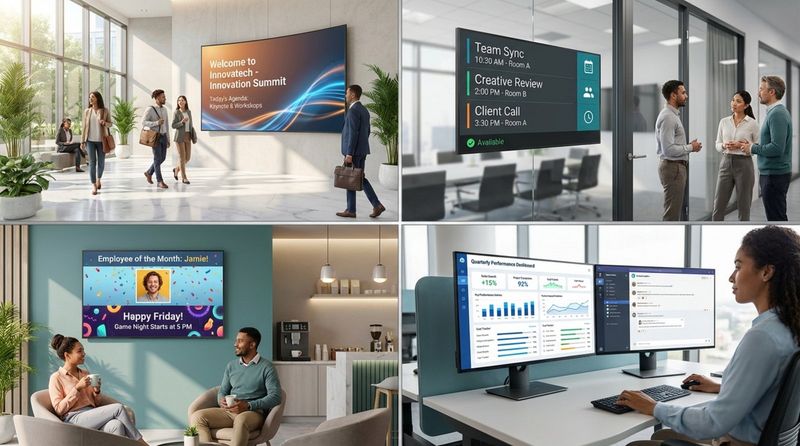
The real sign of success for a company today isn’t just how quickly it buys new tech, but how well those tools work together to create a more engaging and inspiring office. With 38% of US workers at home and 27% in hybrid setups, the office has to work harder to feel worth the trip. Digital signage connects the digital and physical spaces, helping the 60% of employees who feel more engaged with company initiatives when information is shown clearly and visually.
Why Digital Signage Changes Creative Office Space Design
Digital signage changes the game because it replaces the “disheartening and isolating” feeling of staring at an email inbox with shared visual experiences that everyone can see. Traditional office design leans on fixed items like posters or wall art that people quickly stop noticing. Digital displays, on the other hand, make it easy to show “dynamic content with ease,” with real-time updates that keep the space feeling current and alive. From a rotating gallery of employee artwork to a live feed of company wins, these screens become natural gathering points.
These tools don’t just look good-they make daily work run smoother. When signage is built into your office setup, tasks like room booking or attendance tracking become simple and quick. This move toward a more “vibrant and collaborative workspace” boosts creativity by taking friction out of the workday. When the space handles logistics with clear visual signals, employees can spend more time on big ideas and creative problem-solving.
Key Benefits of Digital Signage for the Modern Workplace
One big benefit of digital signage is its ability to build a culture of openness and engagement. Digital screens can turn complex data and long reports into clear visuals that everyone can understand. This helps each person see how their work connects to wider company goals. That level of visibility is a strong motivator; when employees can see progress and milestones in real time, productivity and performance often improve. It turns distant company targets into visible, shared achievements.
Digital signage can also save money over time. Printed signs require constant reprints, manual changes, and physical upkeep. Digital systems can be managed remotely from any device with internet access. This is especially helpful for offices with multiple locations or teams that move between home and office. With a few clicks, a manager can update safety rules, introduce a new hire, or change the content for a special event-cutting down on both time and printing costs.
Essential Considerations for Designing with Digital Signage
Before you mount any screens, think through how your hardware and software will fit into the physical space. A creative office needs more than “a TV on a wall.” You want screens placed where they stand out in a good way, without interrupting focus. This means planning around sightlines, lighting conditions, and how people move through the area so that the right people see the right messages at the right moments.
Security and content management matter just as much. A cloud-based digital signage platform lets you manage everything from one place, but it also needs strong access controls. Creative offices often do best when content doesn’t only come from leadership. By assigning roles such as “Moderator” or “Guest” to team leads, you can let departments share local content (like a design team’s latest work) while keeping sensitive settings-such as billing and core configuration-protected.
Choosing the Right Hardware for Office Needs
It may be tempting to use consumer tablets or home TVs to cut initial costs, but commercial-grade hardware is usually the better long-term choice. Commercial displays are built for “always-on” use, with higher durability and brightness than typical living-room screens. Devices like Crestron Room Scheduling panels or Elo touchscreen monitors are built for heavy office use and are much less likely to fail during an important client visit.
For smaller needs-like desk-side displays or interactive kiosks-options such as Mimo Adapt-IQ or Jarvis Commercial Android tablets offer flexible, portable screens that still look professional. Some companies use iPads and similar devices for their familiar feel and lower starting price, but these are not usually meant for 24/7 use. They may need more frequent maintenance and special mounting to look clean and polished.
Integrating Digital Signage with Office Layout and Branding
To create a unified experience, digital signage should reflect your brand identity. Bring your color palette, logo, and fonts into your on-screen designs. When someone walks through your space and sees the same brand look in the lobby, wayfinding, and breakroom displays, it creates a consistent, professional feel. This “branded wayfinding” helps visitors and employees move around more confidently while reinforcing who you are.
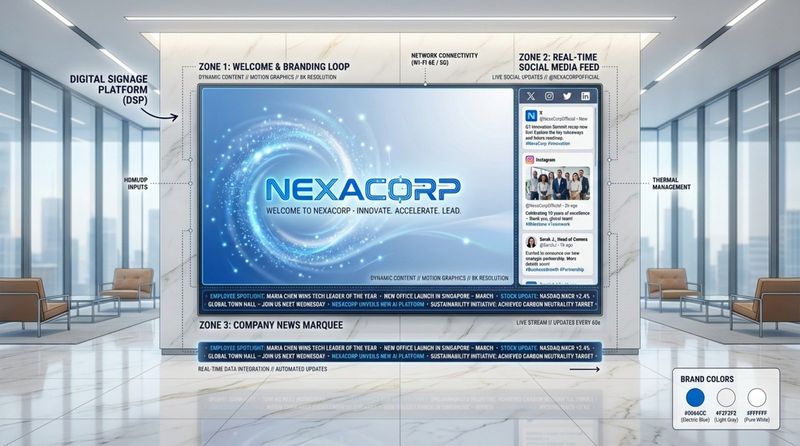
Screen layout is a powerful design tool as well. With a layout editor, you can split a single large display into multiple sections. For example, a lobby screen might show a welcome message in one area, a live social media feed in another, and a video recap of recent community work in a third. This multi-zone setup keeps content varied and interesting, so screens don’t turn into “background noise” for people who see them every day.
Best Practices for Content Management and Security
Good content management keeps your screens from going stale. Nobody wants to look at the same “Welcome” slide for months. Set up rotating playlists and use ready-made templates so your visuals look clean and consistent without needing a full-time designer. Automated scheduling helps too: for example, you can set birthday messages or work anniversaries to appear only on the right day, keeping content timely and relevant.
From a security side, multi-user access is key. IT can keep control over the main system while teams like Marketing or HR manage content for their own zones. This shared but controlled model invites “creative input from employees” while still protecting the overall network. Messages get to the right groups without flooding everyone with information they don’t need.
1. Set the Tone: Welcoming Entrances with Digital Signage
The lobby is your first impression point. It’s where visitors, clients, and staff get their first real sense of your company. It’s an ideal spot to “welcome innovation” by using large, bold displays that set a positive tone. For employees, this entrance acts as a mental shift point, helping them move into “work mode” when they see fresh updates, recent wins, and an energetic visual atmosphere. The lobby becomes more than a waiting room-it becomes a live snapshot of your current momentum.
Creative lobby content could include a “social media wall” with real-time customer comments or a video wall highlighting recent projects. Smooth transitions between content-such as moving from a client testimonial to footage of a team offsite-build a story about your brand. This kind of storytelling has far more impact on loyalty and excitement than a simple logo mounted on a wall.
Creating a Memorable First Impression
To truly stand out, lobby signage should both inform and, where possible, interact. An interactive directory or digital map helps visitors find their way quickly, cutting down on the awkward “where do I go?” moments. When guests walk in and see a personal “Welcome [Guest Name]” banner next to a loop of your company’s awards and milestones, they feel seen and taken seriously from the start.
Showcasing Company Culture and Core Values
The lobby is the perfect place to share the “why” behind what you do. Showing your efforts around sustainability, charity work, or community projects can start meaningful conversations and remind employees of the broader purpose of their work. Clips from volunteer days, quotes from staff about what the values mean to them, or short stories about impact all help humanize your brand. They reinforce your mission from the moment someone steps inside.
2. Boost Collaboration: Digital Signage in Meeting and Conference Rooms
Meeting rooms are often home to frustrating issues like double bookings and wasting time searching for a free space. Digital signage helps fix these problems by giving clear, real-time information. Screens outside meeting rooms can instantly show if a room is reserved or in use, with simple color codes (red for busy, green for free) that are easy to spot at a glance.
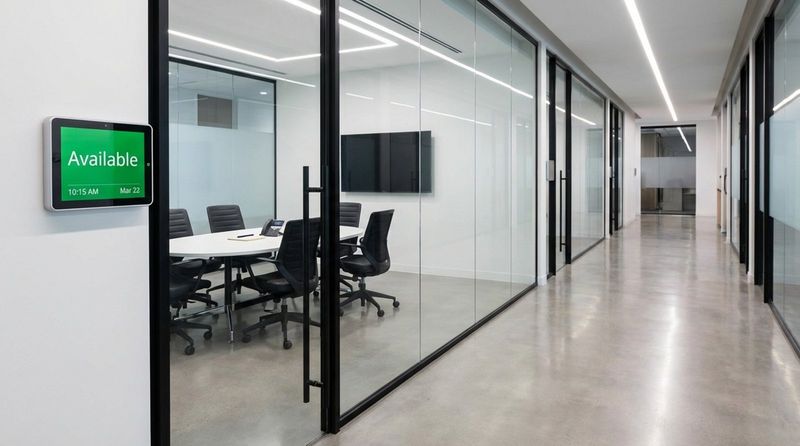
In hybrid offices, this visibility matters even more. Remote staff can check live room maps from home to see which spaces are open and who plans to be in the office, helping them pick the best days to come in. By connecting room displays to tools like Zoom, Slack, or Google Calendar, you create a “well-oiled and modernized” workplace where scheduling never blocks teamwork.
Improving Meeting Efficiency and Scheduling
Meetings run more smoothly when room signage is linked directly to company calendars. With integrations through tools like Zapier, details such as the meeting title, agenda, and key documents can appear on the room screen as soon as the session begins. This gets everyone aligned from the first minute. If a meeting finishes early or no one shows up, the system can update the room’s status right away, freeing it for others to use.
Presenting Data and Insights in Real Time
Inside the room, displays shift from scheduling boards to hands-on collaboration tools. Instead of fixed slide decks, teams can use interactive screens to turn complex data into clear charts and dashboards. Pulling up real-time performance numbers or live campaign results during discussions lets the group make decisions based on facts instead of guesses. The conversation moves from “I think” to “The numbers show,” which supports more creative and effective planning.
Supporting Remote and Hybrid Work Environments
Digital signage is a strong link for hybrid teams. For people calling in from home, interactive screens in the meeting room help them follow along and contribute in real time. They can see shared sketches, whiteboard notes, and dashboards as clearly as those in the room. This levels the playing field so that everyone’s input counts, no matter where they are sitting, and supports a more inclusive way of working.
3. Energize Break Areas: Engaging Content for Community Spaces
Breakrooms are often the center of office culture, and with thoughtful use of digital signage, they can become active “sources of positivity.” This is where light, fun “water cooler content” works best-material that helps people relax for a few minutes. Wellness tips, short positive messages, or a daily “question of the day” can spark casual chats between people from different teams. A simple coffee break turns into a shared moment, not just a solo pause.
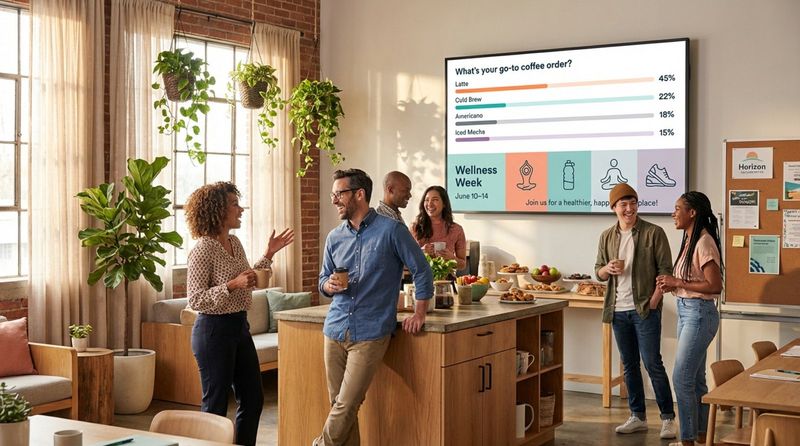
To keep the “breakroom buzz” going, change the content often. Nobody wants to see the same quiz or quote day after day. With digital signage templates, it’s easy to build fresh, on-brand content that rotates during the day. This keeps the space lively and makes the breakroom a place people look forward to using.
Inspiring Employees During Downtime
Creative ideas can come from many places. Use breakroom screens to show “design inspiration,” fun facts, or industry news that sparks thought without feeling like work. You can also highlight a “staff game leaderboard,” book club picks, or employee hobbies and side projects. Shining a light on the person, not just the job title, builds morale and helps people feel seen and connected.
Promoting Wellness, Events, and Activities
Break areas are an ideal place to promote wellbeing and social events. Instead of a messy bulletin board with flyers, a clean digital display can rotate messages about yoga sessions, local meetups, training opportunities, or the next office get-together. With touchscreens, you can go further-run quick polls, quizzes, or suggestion boards so employees can help shape upcoming events. This sense of input helps them feel like true partners in building the office culture.
4. Empower Teams: Personalized Digital Displays at Workstations
Personalized information is a growing focus in creative office design. By placing digital signage near desks or team areas, you can share focused information that supports each group without flooding them with noise. A sales team might see a live dashboard of progress toward monthly targets, while the marketing team might view real-time social engagement or ad performance. People get content that is immediately useful for their work.
This kind of support is easier with “screen grouping.” You can group displays by team or purpose and assign each group its own playlist and schedule. Sales, finance, and marketing might share the same sales figures on their screens, while the design team sees creative references and project timelines. Each team gets what it needs, in a visual format that’s easy to absorb.
Department-Specific Information and Dashboards
Team-focused displays help everyone stay aligned and proactive. A development group may show a “burndown chart,” bug counts, or system health status. A support team might display current call wait times or satisfaction scores. This level of visibility lets teams monitor their own performance and celebrate small and big wins throughout the day. It builds a sense of ownership and keeps goals front and center.
Encouraging Creative Input From Employees
Creativity grows when people have some say over their surroundings. Let teams help decide what appears on “their” screens. A design team might share a work-in-progress mood board, early sketches, or design inspiration. A sales team might post quick shout-outs when someone closes a big deal. With controlled multi-user access, this kind of sharing is safe and easy, giving employees a real voice in shaping the visual feel of the office.
5. Unify Office Culture: Centralized Communication Through Digital Signage
In a busy office, it’s easy for important messages to get buried in email. Shared digital signage brings key updates into the open by putting company-wide news on visible screens. Whether it’s a note from leadership or a reminder about a new recycling plan, everyone sees the same message at the same time. This consistency helps keep culture aligned and reduces confusion.
Story-based content-photos from a volunteer event, snapshots from a team outing, or behind-the-scenes clips-brings energy into the space. It reminds people they are part of something larger than their own task list. Seeing coworkers recognized for joining wellness programs or reaching big goals encourages others to join in, creating a loop of positive engagement.
Celebrating Achievements and Milestones
Recognition is one of the best ways to build happiness and loyalty. Digital signboards are ideal for celebrating birthdays, work anniversaries, new certifications, or the successful end of a tough project. These aren’t just names scrolling by; they become shared events the whole office can see. With automated scheduling, “Happy Birthday” or “Congrats on 5 years” messages appear right on the correct date, adding a personal touch without extra admin work.
Broadcasting Company News and Updates
Beyond celebrations, digital signage is a strong tool for clear communication. Use it to share strategy updates, new product launches, policy changes, and safety notices. When employees can quickly grasp the reasons behind a shift, they’re more likely to support it. Short, plain-language messages on screens are often far more effective than long, dense emails. This builds a habit of open, straightforward communication across the business.
What Makes a Creative Office Space Successful with Digital Signage?
A creative office isn’t measured by how many screens it has, but by how those screens help the people who use the space. Success happens when digital signage acts like an invisible helper-guiding visitors, sharing updates without interrupting, and helping everyone feel part of a shared mission. It creates an environment where “the discussion flows more naturally” because clear visual tools have already dealt with basic logistics.
For long-term success, companies must avoid a “set it and forget it” attitude. The most creative spaces keep changing. That means checking how content performs, updating visual styles to match current branding, and checking regularly that the technology still fits how people work. A creative office behaves like a living system, and digital signage acts like its heartbeat.
Measuring the Impact on Productivity and Morale
“Creativity” might feel hard to measure, but the impact of digital signage can be tracked. Use employee surveys and performance data to look for changes. Are meetings starting on time more often? Do people feel better informed about goals and priorities? Are there more casual interactions in shared spaces? By watching these signals, facility and workplace managers can see how their digital signage setup is affecting both results and overall culture.
Gathering Feedback to Continuously Improve the Environment
The best way to improve a creative office is to ask the people who use it every day. Use your digital screens as a feedback tool. Run a weekly poll about office services, or add a QR code that leads to a short suggestion form for events, amenities, or content ideas. This two-way use of signage helps the office keep improving based on real staff needs and preferences, turning the space into a shared project instead of a top-down design.
Looking ahead, creative office design is moving toward “Smart Signage” that connects with building systems. Screens can use motion sensors to trigger certain content when someone walks by or adjust brightness based on room light to save energy. The growing trend of “biophilic design”-bringing nature and tech together-is also shaping new ideas. Imagine a living wall of plants shaped into your logo, with a transparent digital layer in front showing real-time updates. This mix of natural and digital elements points to the next stage of office design: spaces that support productivity while also helping people feel relaxed, healthy, and inspired.


