

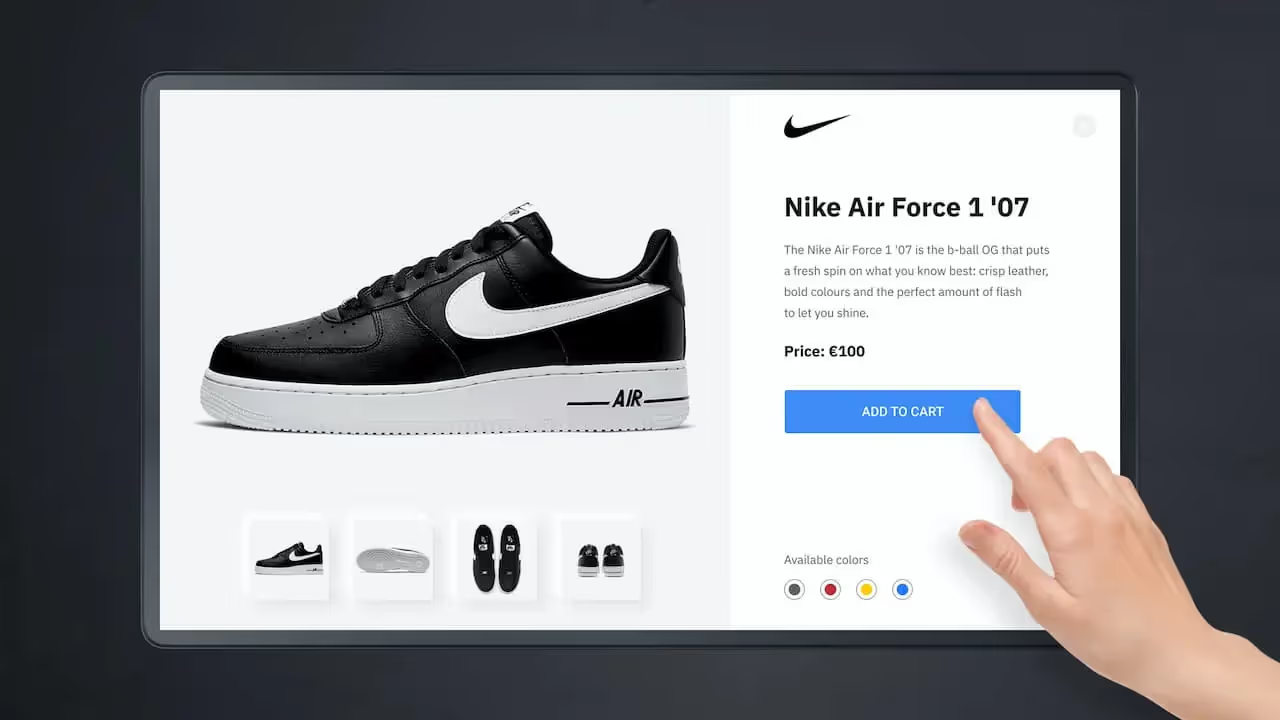
Table of Content
Interactive digital signage is more than a fancy screen; it’s a modern communication tool that turns passive watching into active involvement. Unlike traditional, non-interactive displays, interactive digital signage invites people to directly interact with the content using touch, motion sensors, or their own phones. Think of a giant smartphone on the wall - people can tap, swipe, and move through information that fits what they need at that moment. This kind of system is quickly changing how businesses and organizations talk to their audiences, creating a responsive and personal experience that old-style ads can’t match. It changes the flow from one-way broadcasting to a two-way exchange, making each interaction more meaningful and easier to remember.
We now live in a time shaped by digital interaction, where platforms like TikTok and YouTube thrive on participation and user-generated content. “Interactive content” is no longer a nice extra - people expect it. Younger generations, in particular, grow up with touchscreens as a normal part of life. Because of this comfort with interaction, many users expect any public, educational, or workplace screen to let them control what they see. This familiarity builds a strong expectation for interactive experiences and pushes businesses to move beyond static screens if they want to truly engage and serve their audiences.
How Does Interactive Digital Signage Differ from Traditional Digital Signage?
The main difference between traditional digital signage and interactive digital signage is the direction of communication. Traditional signage follows a “push” model, similar to a digital billboard. It runs through a fixed playlist of messages in a set order. Menu boards in fast-food restaurants or rotating ads on highway screens are good examples. They are made for quick viewing and deliver information in one direction, without expecting a response.
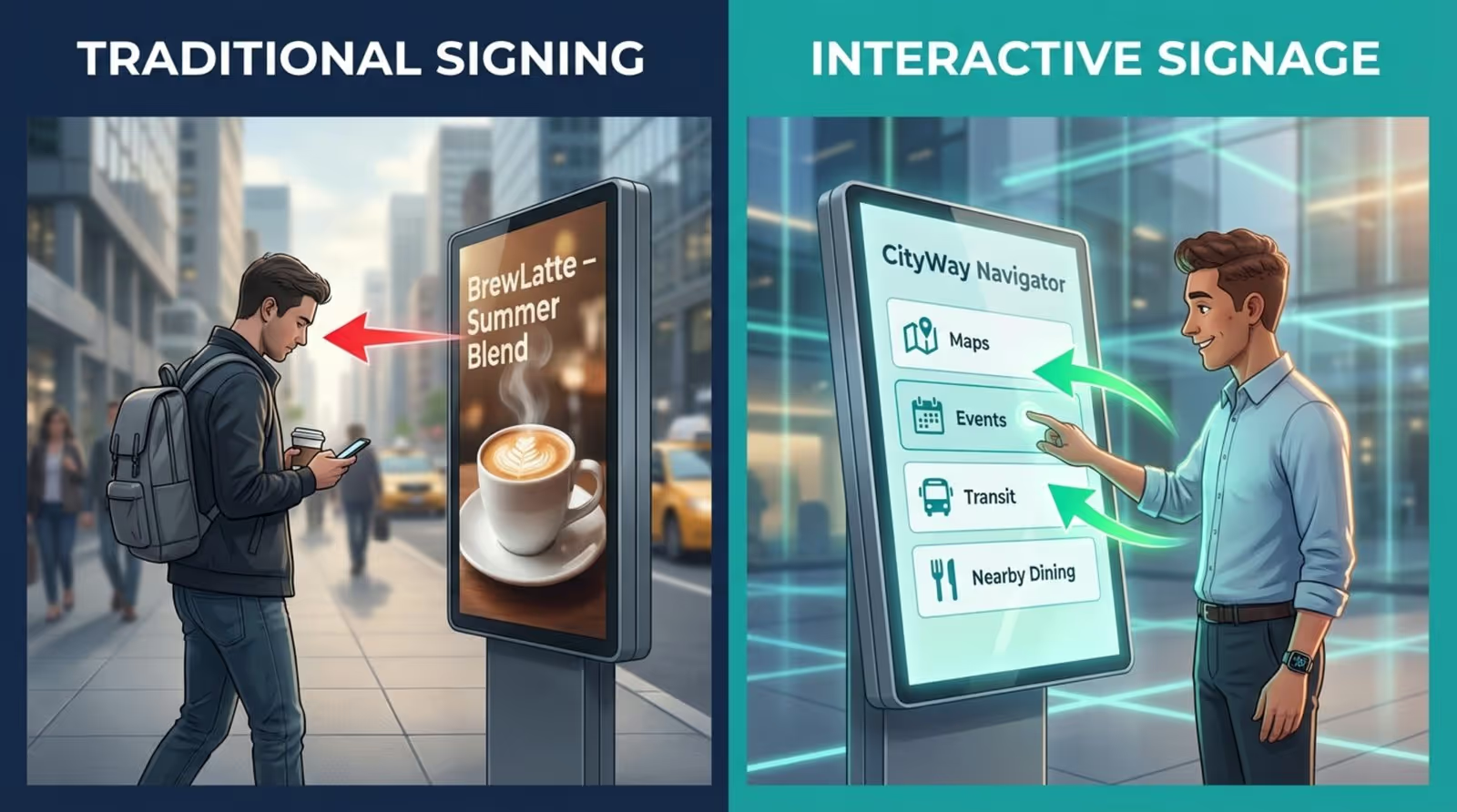
Interactive digital signage, on the other hand, follows an “active” engagement model. It turns the viewer into a user who can make choices. Instead of just receiving messages, people can respond, explore, and shape their own experience. This makes it possible to present a large amount of information at once, organized into menus and sections that people can access through direct interaction. Users can quickly find the exact details they want, gaining a sense of control similar to using apps and websites. This key difference turns a static ad into an engaging two-way exchange.
What Technologies Power Interactive Digital Signage?
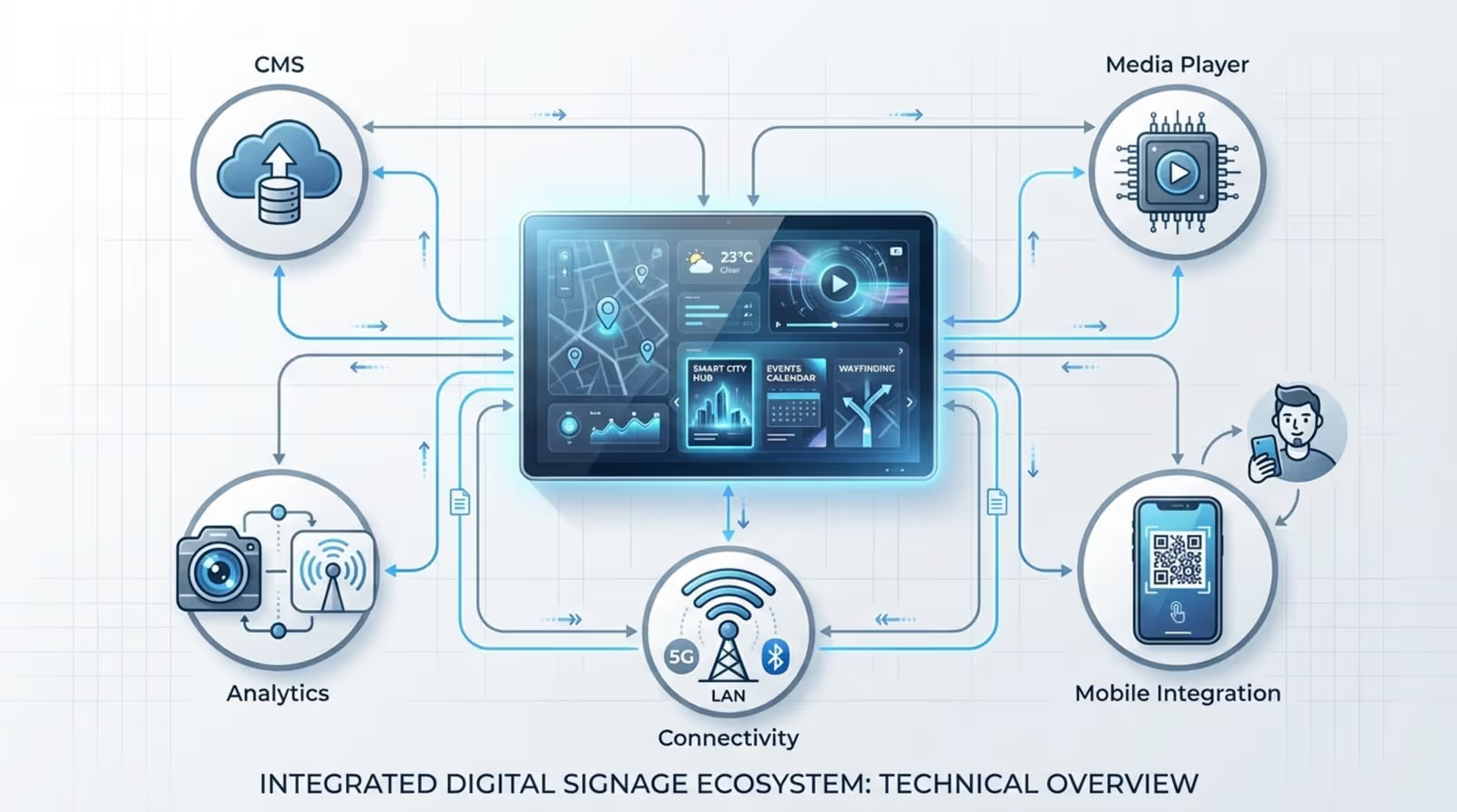
Interactive digital signage runs on several technologies working together. At the center are high-sensitivity LED or LCD touchscreens that respond smoothly to touch. These screens act like large tablets, giving people a familiar way to interact with content.
Beyond touch, other tools support the experience. Media players and strong Content Management Systems (CMS) handle and update content in real time so messages can change instantly from any location. Sensors and cameras detect movement, presence, and sometimes approximate age or gender (in anonymous form) to show content that fits the current viewer or situation. Mobile and IoT connections, such as QR codes or phone pairing, let people continue the interaction on their own device, carry information with them, or control the screen remotely. Content is often stored in the cloud so updates can go out instantly and stay consistent across many screens.
What Are the Core Features of Interactive Digital Signage?
Interactive digital signage is about more than just displaying content; it’s about creating an experience. It includes features that support rich, active interactions, going well beyond anything a standard screen can do. These features make users feel involved and in control, turning a display into a central communication point.
These capabilities can adapt to many different spaces and purposes. From a busy retail store to a calm office lobby, interactive digital signage can inform, entertain, and gather data, always keeping the user’s needs at the center.
Touchscreens and Gesture Controls
The most familiar feature of interactive digital signage is the touchscreen. These durable, sensitive screens let people tap, swipe, pinch, and zoom just as they would on a phone or tablet. This familiar way of interacting lowers the barrier for users of all ages. Whether someone is using an interactive map, browsing a product list, or checking in at a kiosk, touchscreens give quick feedback and a strong sense of control.
Some systems also use gesture control. With these, users interact without touching the screen, using hand or body movements instead. This is useful where hygiene is important or where a more “futuristic” experience is desired. Both touch and gesture input move the user experience from simple watching to active participation.
Voice Activation and Smart Sensors
Voice control and smart sensors are becoming common parts of interactive digital signage. Voice User Interfaces (VUI) make hands-free interaction possible: users speak commands or questions, and the system responds. Using AI and natural language processing, these systems can understand many types of questions, much like Siri or Alexa. This supports accessibility for people with disabilities and offers a touchless option, especially helpful in healthcare or other public settings where reducing contact matters.
Smart sensors and cameras add more awareness. They can sense when someone is nearby, track movement, and detect basic demographic details in anonymous form. The screen can then show content that fits the situation, such as greetings, targeted offers, or changes based on how many people are looking at the screen. This reactive behavior makes the experience feel smarter and more personal.
Personalization and Data Capture
A key strength of interactive digital signage is its ability to personalize content while collecting useful data. As users move through menus, set preferences, or enter information, the system can adjust on the fly. That might mean showing recommended products in a store, greeting a visitor by name in a lobby, or answering a specific question at a wayfinding kiosk. The result is a more relevant and impactful experience for each person.
At the same time, every interaction creates data. Anonymous information such as which options are chosen most, how long users stay on a screen, and when usage peaks provides strong insight for businesses. These details help teams understand behavior, improve content choices, refine layout, and strengthen services. In this way, digital signage becomes both a communication channel and an analytics tool.
Integration with Mobile Devices
Given how central smartphones are today, connecting interactive digital signage with mobile devices is a natural step. This extends the experience beyond the physical screen. Users can scan QR codes to open detailed pages, save information, download coupons, or join loyalty programs on their phones, linking the in-person and online journey.
Mobile integration can also let users control the public screen or start an interaction at the kiosk and continue it later on their phones. For example, someone might browse products on a large display and then send their chosen items to their phone for later purchase. This adds convenience and opens another path for ongoing engagement and data collection, turning the system into a multi-channel communication tool.
How Does Interactive Digital Signage Outperform Static Displays?
Switching from static to interactive digital signage is more than a visual update; it changes how people consume and respond to information. Static displays are good for general one-way messages, but interactive systems connect with audiences more deeply, leading to clearer communication and stronger relationships.
People are naturally drawn to things that react to them and let them explore. Static content can feel flat and easy to ignore, especially in an environment full of competing messages. Interactive digital signage stands out by inviting action and rewarding attention.
Increases Retention and Recall
One big advantage of interactive digital signage is that it helps people remember information much better. Research shows that users spend about three times longer looking at interactive screens than static ones. This extra time matters because actions like tapping, swiping, or speaking create a richer and more memorable experience. When people search for information themselves, instead of passively viewing it, their brains process and store it more effectively.
This active involvement builds stronger memories. Instead of a quick glance at a fixed ad, moving through menus and making choices creates lasting connections in the brain. As a result, important messages, product details, or directions shown on interactive screens are more likely to stick.
Fosters Two-Way Communication
Static displays talk “at” people, with no built-in way for viewers to respond. This one-direction model often feels distant and easy to tune out. Interactive digital signage changes that pattern and supports a two-way exchange.
People can reply to prompts, ask for more details, leave feedback, and choose what to see. They might answer a quick poll, submit a comment, or jump to content that addresses a specific question. This makes the experience more active and personal, helping users feel more connected to the brand or organization. At the same time, businesses get direct input and a better sense of what their audience wants.
Enables Adaptive and Dynamic Content
Static signage shows the same message to everyone, all the time, until someone manually changes it. Interactive digital signage is different: it can change what it shows in real time based on user input, time of day, or other conditions.
An interactive screen might switch promotions based on the hour, offer language choices, or show information based on what a user viewed earlier. Content can be updated instantly from the cloud to reflect new products, inventory, news, or alerts. This flexibility keeps the display fresh and relevant and helps it serve as an ongoing, up-to-date resource instead of a fixed notice.
What Makes Interactive Digital Signage a Must-Have Today?
With fast-changing customer expectations and rapid tech growth, interactive digital signage is now a key tool for many businesses and organizations. It supports modern needs around communication, engagement, and efficiency, making it a strong asset in a crowded market.
Common touch devices, smarter sensors, and strong analytics tools have all helped push interactive signage into regular use. It goes beyond following trends and helps reshape how brands connect with people, delivering real results through better experiences and useful data.
Enhances Customer Engagement and Experience
Interactive digital signage is a powerful way to raise customer engagement and improve the overall experience. People today want fast, personal, and relevant interactions; passive screens rarely satisfy those needs. Interactive displays invite people to take part, control content, and dig deeper. This makes the interaction more enjoyable and creates a stronger bond with the brand.
Whether someone is exploring products at their own pace, using a map to move through a building, or customizing an order at a kiosk, the ability to self-serve and get answers quickly creates a sense of control and satisfaction. Positive experiences like these encourage people to return and keep interacting with the brand.
Boosts Marketing Impact and Conversion
For marketing teams, interactive digital signage can greatly improve campaign impact and conversion. Traditional ads can easily blend into the background, but interactive elements catch attention and hold it longer. By turning ads into conversations, businesses can present offers, product information, and calls to action in more engaging ways.
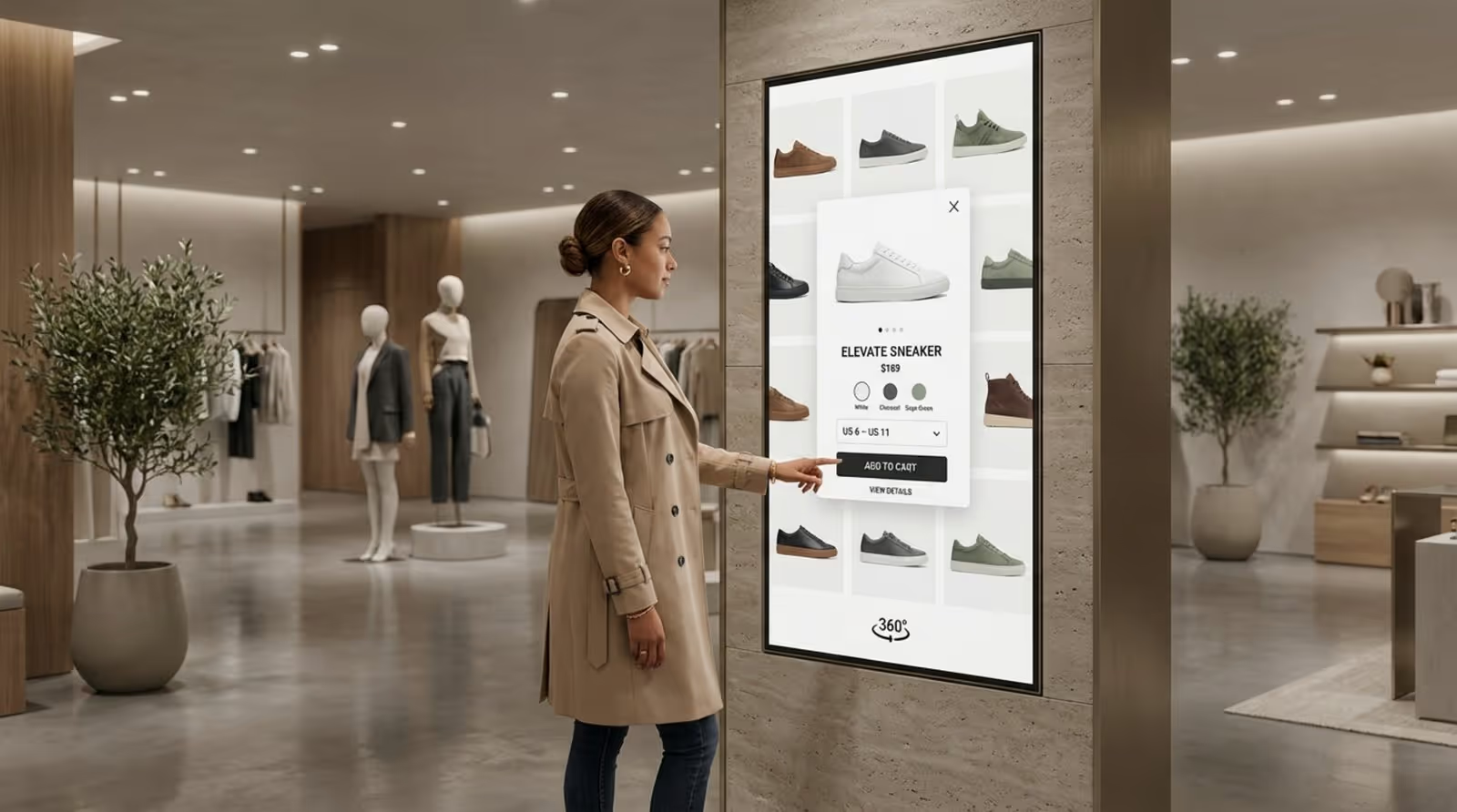
In retail, for example, interactive screens let customers browse wide product ranges, read reviews, compare items, and even try products virtually. This deep, self-guided research helps buyers feel more confident and more likely to make a purchase. Personalized suggestions based on user actions make messages more relevant, leading to stronger results from marketing efforts.
Provides Real-Time Information and Assistance
In many places, people need accurate, current information right away. Interactive digital signage is well-suited for this, helping both operations and user satisfaction. In airports, interactive screens can instantly reflect flight delays or gate changes, calming confusion. In healthcare settings, patients can check in, find departments, or view schedules without waiting for staff help.
On-demand access means users get exactly the information they want, when they want it, without waiting or sorting through unrelated details. This reduces pressure on staff, who can then focus on tasks that truly require human attention, and helps keep everyone informed with the latest updates, from menus and weather to emergency notices.
Collects Actionable User Data
Another strong benefit of interactive digital signage is the data it collects. Every tap, scroll, and visit time can be recorded in anonymous form and later analyzed. This behavior data reveals what people like most, what they ignore, and how they move through information.
With this insight, organizations can refine content, update layouts, improve user flows, and make better business decisions. It can inform product choices, marketing tactics, staffing plans, and space design. The screen becomes a source of ongoing feedback that helps keep experiences aligned with real user needs.
Where Is Interactive Digital Signage Used?
Interactive digital signage is flexible and useful in many fields. Any place where people look for information, directions, or services can benefit from it. From crowded malls to quiet waiting rooms, interactive screens can turn ordinary spaces into active information hubs.
Its wide adoption across many sectors shows how well it works. Instead of serving a single niche, interactive signage supports user experience and operations in many different environments.
Retail Environments
Retail is one of the main areas using interactive digital signage to reshape the shopping experience. In stores and malls, screens act as virtual helpers, letting customers browse full product catalogs, check prices, compare features, and read reviews. Some systems support virtual try-ons for clothes or makeup, and some let shoppers complete purchases right at the screen.
Interactive wayfinding kiosks help people move through large malls, find shops, and locate services. This improves satisfaction, speeds up the shopping trip, and can drive higher sales by giving instant access to rich product details.
Corporate and Workplace Settings
In workplaces, interactive digital signage supports internal communication, efficiency, and engagement. In office lobbies, visitors can check themselves in, reducing the load on reception desks. Employees can book meeting rooms, view which spaces are free, and read company updates.
These displays can also show KPIs, safety messages, cafeteria menus, or local weather, helping staff stay informed and aligned. For hybrid offices, interactive screens can manage shared desks and workspaces, helping employees find and reserve spots easily.
Education and Campus Solutions
Schools and universities use interactive digital signage to help students, staff, and visitors find their way and stay informed. On large campuses, interactive maps and directories guide people to classrooms, buildings, offices, and events with clear directions.
Beyond navigation, screens can show class timetables, event calendars, alerts, and news. Students can quickly check upcoming events or important announcements from central touchpoints around campus.
Healthcare Facilities
In hospitals and clinics, interactive digital signage improves patient experience and workflow. Check-in kiosks let patients register, confirm details, or update information without waiting in long lines. Wayfinding screens guide people to the right departments or rooms.
Interactive displays can also deliver health education, explaining conditions, treatments, or wellness tips in simple formats. Language options and voice control improve accessibility for people with different needs and reduce the need for physical touch, supporting hygiene standards.
Events, Transit, and Public Spaces
Interactive digital signage is a natural fit in busy public areas like event centers, airports, and city streets. At events, interactive schedules and exhibitor lists help attendees plan their day, locate sessions, and discover stands or zones that matter to them.
In transit hubs, screens show real-time departures, arrivals, gate changes, delay notices, and maps. Travelers can look up routes, buy tickets, or get directions without needing staff. In city environments, public kiosks can provide maps, attraction guides, service information, and safety alerts for both locals and visitors.
What Are Common Examples of Interactive Digital Signage?
The real value of interactive digital signage appears in everyday examples. These uses show how businesses and organizations apply interaction to solve problems, support users, and raise engagement across many areas.
From finding your way in a new place to making shopping easier and more enjoyable, these examples highlight how deeply interactive signage is already woven into daily life.
Wayfinding Kiosks and Interactive Maps
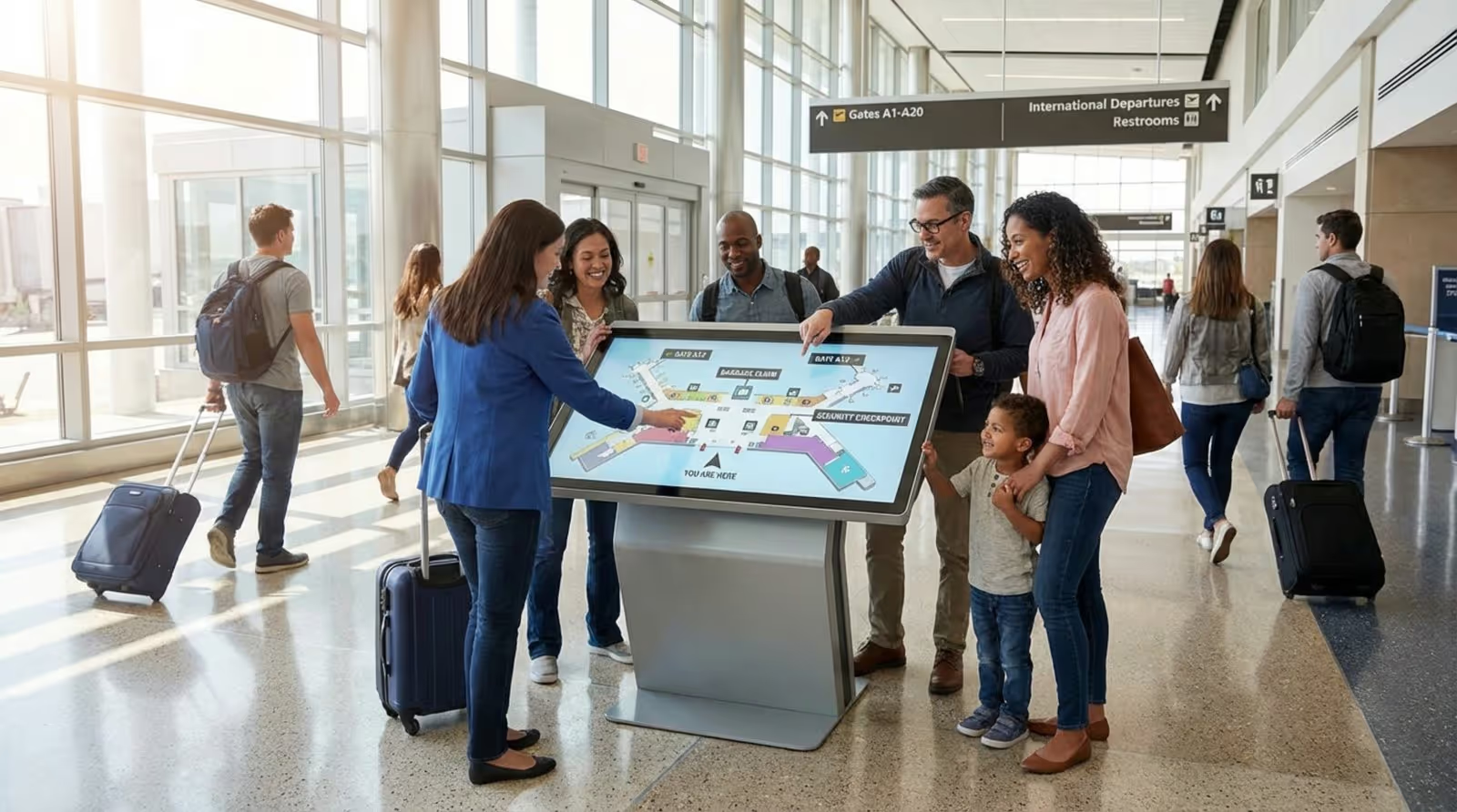
Wayfinding kiosks and interactive maps are among the most common and useful forms of interactive digital signage. They are especially important in large or complex places like malls, airports, hospitals, campuses, and big office buildings. Instead of relying on printed maps, people can use a touchscreen to search for where they need to go.
Users can search by name, department, store, building, floor, or event. After selecting a destination, the system shows a route from their current location, often with step-by-step directions. Advanced systems can send those directions to a phone via SMS or QR code or even show live shuttle tracking. This reduces confusion and saves time for both visitors and staff.
Product Catalogs and Virtual Try-Ons
In retail, interactive product catalogs let customers explore full inventories beyond what is on display. Shoppers can browse categories, view clear product images, read descriptions, check prices, compare items, and see reviews all on-screen.
Virtual try-ons use augmented reality so people can see how clothing, glasses, accessories, or makeup might look on them without using a fitting room. This makes shopping more fun and helps customers feel more certain about their choices, combining the strengths of online and in-store experiences.
Self-Service Check-In and Ordering
Self-service systems supported by interactive digital signage are now common in hotels, quick-service restaurants, and healthcare. Check-in kiosks let guests or patients quickly confirm their arrival, update details, or access room and appointment information with minimal staff involvement.
In quick-service restaurants, ordering kiosks allow customers to view digital menus, customize meals, see nutritional details, and pay on-screen. This speeds up service, cuts down on mistakes, and lets staff put more attention on preparing food and supporting guests.
Social Media and Gamified Screens
Many interactive screens now combine social media and game elements to draw people in. Displays can show live feeds with posts, hashtags, and user content, encouraging people to share their own photos or comments and see them appear on the screen.
Gamified screens turn interaction into a game with quizzes, polls, or mini-games that reward participation. This can make marketing feel more like entertainment, increasing how long people engage and how well they remember the message.
What Should You Consider Before Deploying Interactive Digital Signage?
Starting an interactive digital signage project is exciting, but success takes careful planning. It involves more than buying a screen and adding content. A thoughtful approach helps the system support real goals, fit into existing workflows, and deliver good value. Skipping this planning can lead to poor user experiences, technical problems, and wasted money.
Before starting, set clear goals, know your audience, and think through how the system will be installed and used day-to-day. This planning helps you roll out a solution that truly supports your communication and engagement needs.
Choosing the Display Technology
The type of screen you choose has a big impact on your project. Not every display works well for interactive use. High-sensitivity LED or LCD touchscreens are often used because of their response speed and clarity, but other factors matter too.
Screen size, resolution, brightness, and durability all play important roles. Displays in busy areas must be tough enough to handle constant touching. They need enough brightness to stay visible in bright rooms or sunlight and must react quickly to touch. High-sensitivity LED or LCD touchscreens placement and angle also matter: a well-positioned kiosk at a comfortable angle may get far more use than a flat wall-mounted screen. Choosing reliable hardware from solid vendors helps keep the system running smoothly for the long term.
User Interface and Content Design
Even the best hardware will fail if the interface is confusing. The goal is to make the experience as simple to use as a smartphone, without needing instructions. Good layouts stay simple but complete enough to let users finish their main tasks.
Helpful design rules include: clear and consistent buttons and icons, short labels, easy-to-read fonts, and enough empty space on the screen so it doesn’t feel cluttered. A consistent style across all screens reinforces your brand and helps users feel at home. Content should be organized around real tasks and questions, so people can find what they want in as few steps as possible. Testing with actual users is key to spotting problems and improving the experience before you go live.

Accessibility and Usability Testing
Accessibility and usability testing are key parts of any interactive signage project. Accessibility means people with different physical abilities, heights, or language needs can still use the system. That might mean placing screens at wheelchair-friendly heights, offering voice options, or supporting multiple languages.
Usability testing means watching real people use the system in realistic situations. Their behavior and feedback will show where they get stuck or confused. This helps you refine the content and layout so that more users can get what they need quickly and easily.
Privacy, Security, and Data Compliance
As interactive systems gather user data, privacy and security must be taken seriously. While most systems collect only anonymous usage data, that data still needs to comply with relevant regulations like GDPR or CCPA. Users should know what is being collected and why, and information should be stored and transmitted securely.
Security steps include protecting the network, using encryption, and keeping software up to date. Organizations should define clear rules on how long data is kept and how it is used, so they maintain trust and avoid legal risk. Clear communication about data practices builds confidence among users.
Integration with Existing Systems
To get the most value, interactive digital signage often needs to connect with other systems you already use. These might include room booking calendars, inventory tools, CRM platforms, or older signage networks. A wayfinding kiosk may pull live room schedules, while a retail display may show current stock levels pulled from inventory software.
Integration cuts down on manual updates and keeps content fresh. It allows automatic changes without constant staff effort. When planning, check how well the interactive software and hardware will fit with your IT setup, and work with vendors who can support needed connections.
What Are the Future Trends for Interactive Digital Signage?
Interactive digital signage continues to change quickly, pushing toward more immersive and personal experiences. As technology and user expectations grow, we can expect interactive screens to become smarter, more responsive, and more blended with their surroundings.
The main goal is to build environments that respond to people and situations in real time, merging physical spaces and digital content into one smooth experience.
AI-Driven Personalization and Recommendations
Artificial Intelligence (AI) will play a big role in the next stage of interactive digital signage. AI can study user actions, anonymous demographic information, and outside factors like time or weather to adjust content on the fly. A retail display might suggest products based on what users previously viewed, while a food menu might promote hot drinks on a cold day.
Over time, AI systems “learn” from ongoing interactions, making screens feel smarter and more personal. This predictive behavior helps offer the right content at the right time, raising engagement and conversion.
Voice and Multisensory Interaction
While touch will stay important, future interactive signage will increasingly support voice and other senses. Voice tools will continue to improve, allowing users to speak naturally to screens. This helps in crowded, high-traffic, or health-sensitive spaces and makes systems easier to use for people with disabilities.
Other senses will support the experience, too. Sound cues can draw attention or guide users. Subtle scent systems in some environments may support branding or mood. Haptic feedback (gentle vibrations) can make interactions feel more physical and engaging, especially in game-like applications.
Immersive and Mixed Reality Experiences
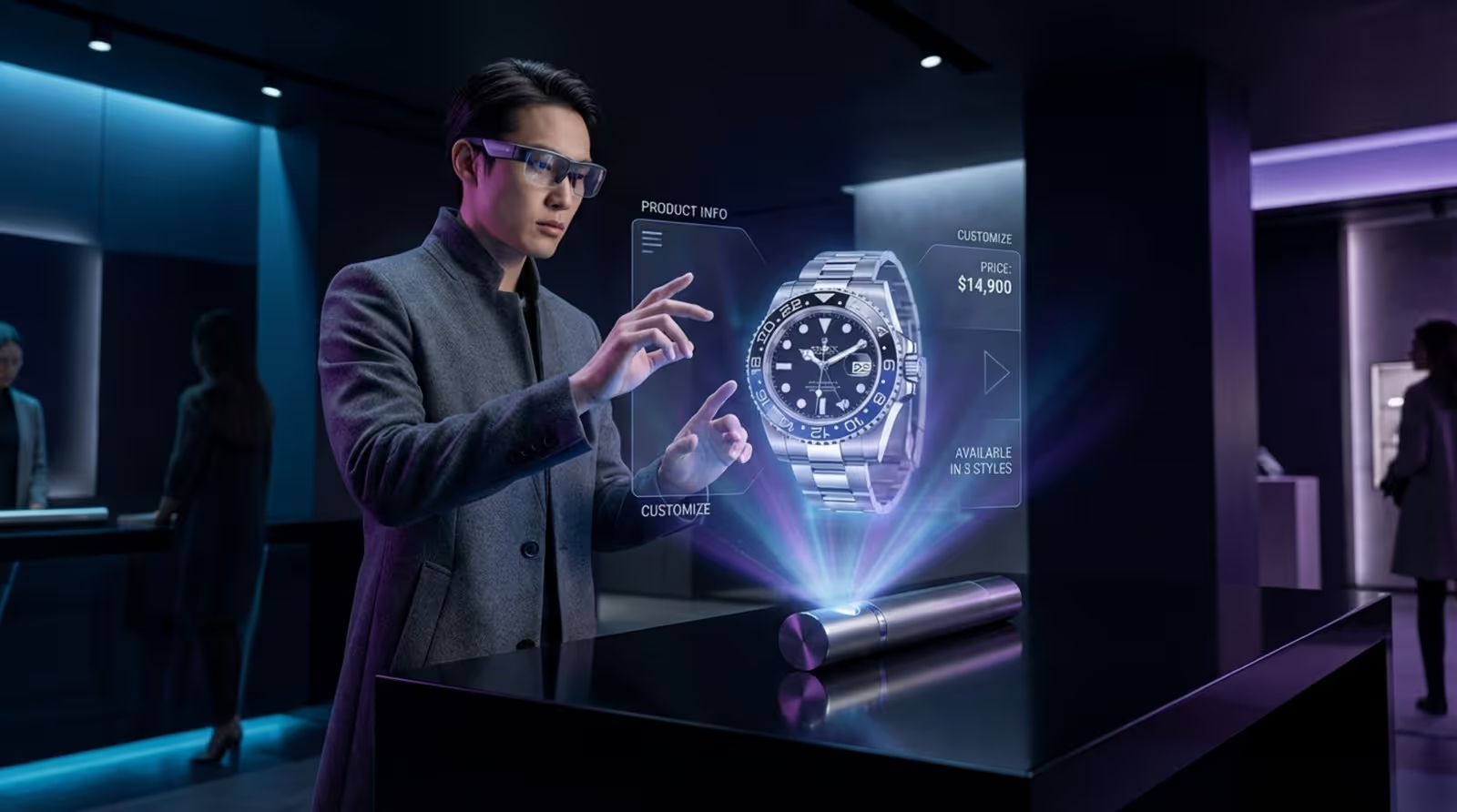
Technologies like Augmented Reality (AR) and Mixed Reality (MR) will further connect digital signage with the physical world. AR features might let users point their phone at a display or product to see extra information, demonstrations, or how items would look in their own space.
More advanced MR setups may project digital objects into real spaces, such as interactive floor projections, holographic displays, or smart mirrors that show detailed virtual try-ons. These experiences can turn simple viewing areas into active, engaging spaces.
Key Takeaways: Why You Need Interactive Digital Signage Right Now
Looking across its features, uses, and future direction, interactive digital signage clearly represents a major shift in how organizations connect with people. As users demand more control, personalization, and real-time information, interactive screens provide a strong way to stand out, inform, and convert.
People do not want to be passive viewers anymore; they want to participate and shape their own path through information. By adopting interactive digital signage, you are not just adding new screens-you are building a flexible communication platform that strengthens relationships, supports operations, and generates valuable insights. The benefits, from higher satisfaction and loyalty to better data and smarter decisions, are too strong to ignore. Waiting means missing opportunities in a market that is already moving toward interactive experiences. Now is the time to turn your displays into active, responsive tools that match how modern audiences expect to interact.





