

Table of Content
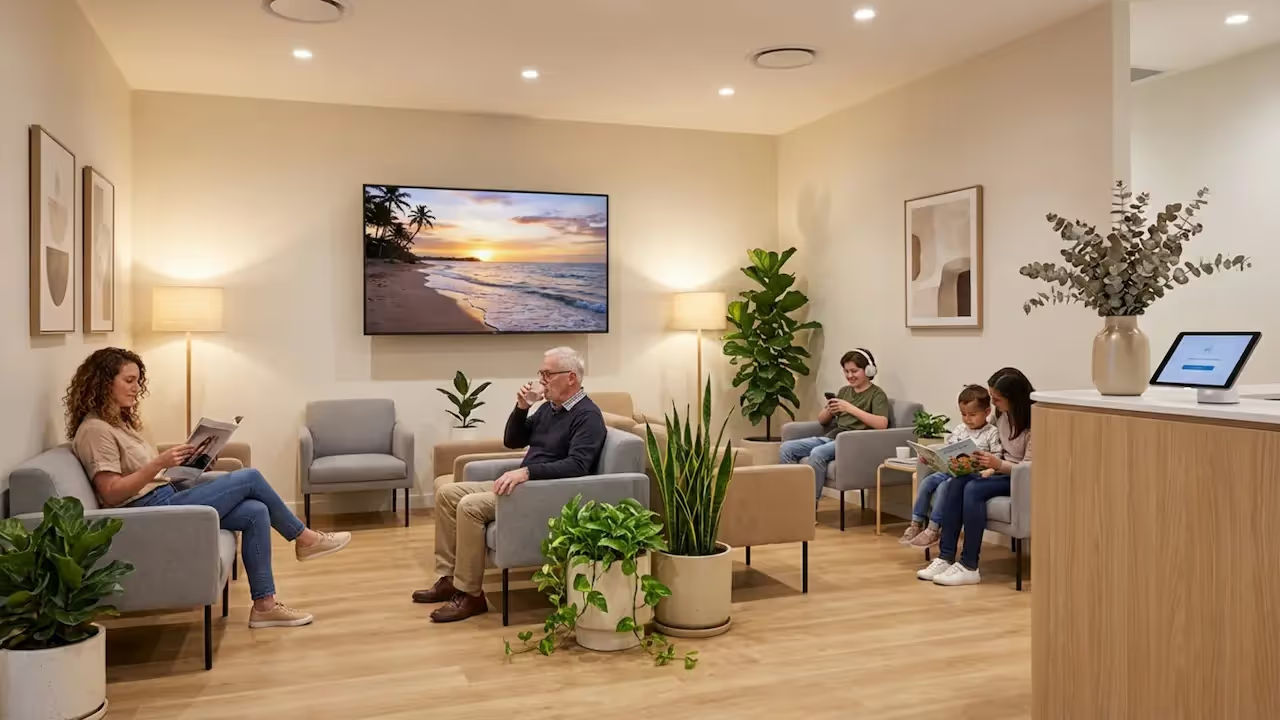
How can dental clinics reduce patient anxiety and make wait times feel shorter without adding extra work for the front desk? By upgrading the waiting area with digital signage. Instead of relying on a stack of outdated magazines or an unpredictable daytime TV channel, you can use screens to display calming videos, share oral health tips, and answer common questions automatically. This simple setup helps set clear expectations, keeps your messaging consistent, and creates a more modern, welcoming environment for your patients.
What Are Dental Waiting Room Screens With Digital Signage?
Dental waiting room screens with digital signage are a practical update to the traditional clinic lobby. Rather than simply hanging a TV on the wall, you are creating a dedicated communication channel. The content is chosen specifically for dental patients to help calm nerves, explain basic oral health habits, and gently highlight the clinic’s services.
The goal is to build a space that keeps patients informed and comfortable while helping your staff share important messages without repeating the same details all day. When you manage what plays on the screen, patients get a clearer idea of what your practice offers and often feel better about their time spent waiting.
Key Components of Dental Digital Signage
A reliable digital signage setup usually relies on a few core pieces working together:
- Digital screen - This could be a smart TV already in your waiting room, a commercial display designed for 24/7 use, or even a tablet for smaller reception desks. You can often start with the hardware you already have.
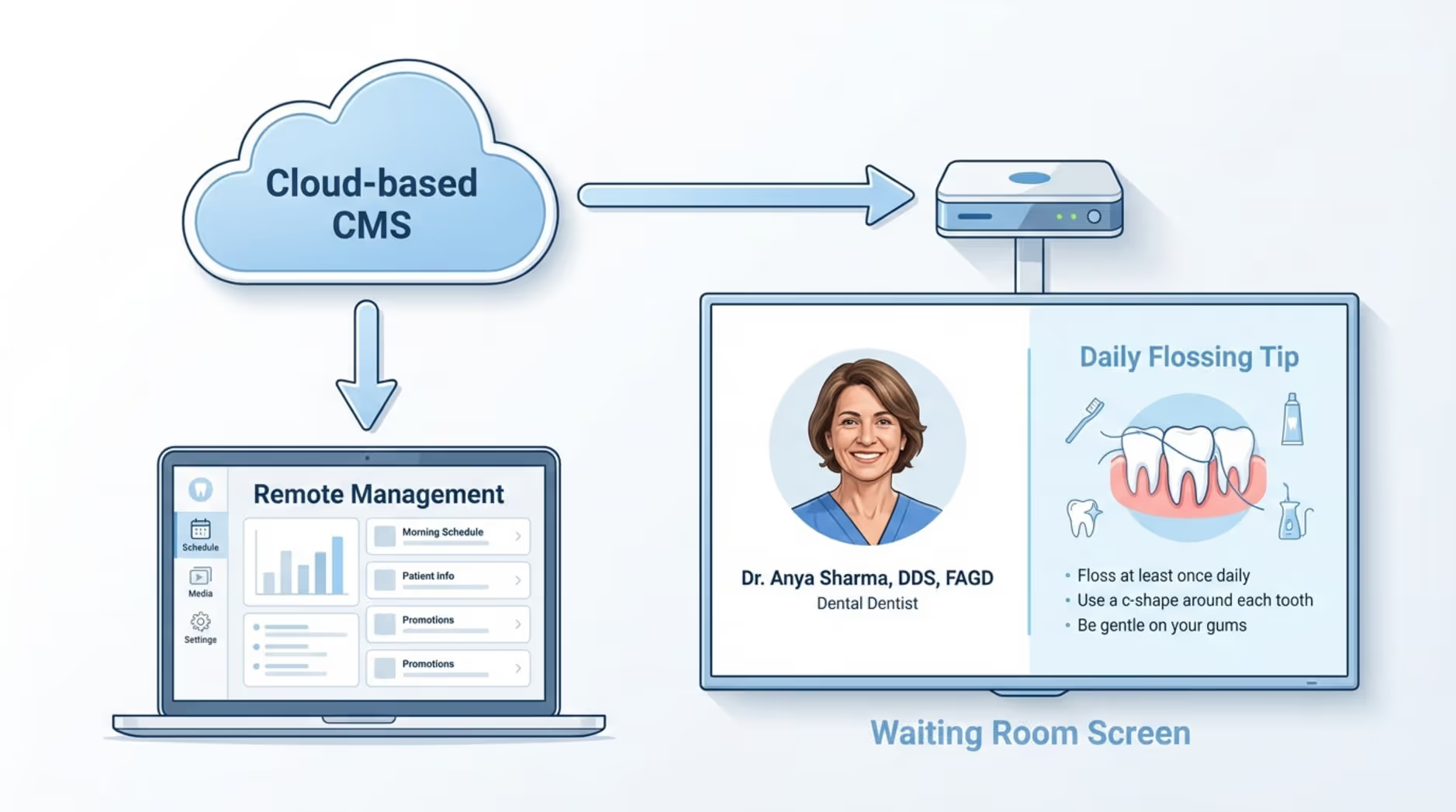
- Media player - This connects your screen to the system that delivers the content. While some smart TVs have this capability built in (using the free Look App), a dedicated plug-and-play device like the Look HDMI Player is often the best choice for reliable, uninterrupted playback.
- Digital signage software (cloud-based) - This is the platform your team uses to upload, schedule, and update content. With a solution like Look CMS, you can manage screens from anywhere using a simple web dashboard, with no complex IT setup required.
How Digital Signage Is Used in Dental Waiting Areas
In a dental clinic, digital signage can handle several tasks at once, transforming a blank wall into a helpful resource.
One primary use is patient entertainment, such as nature videos, aquarium footage, or kids’ cartoons in family practices. This distraction can help people feel calmer and make the wait feel significantly shorter.
These screens are also an excellent tool for patient education. They can play short clips about proper brushing techniques, the importance of regular checkups, or how certain foods affect enamel. Finally, digital signage acts as a central communication hub, displaying:
- Updated office hours
- Upcoming holiday closures
- New staff introductions
- Queue updates or appointment timing
This proactive communication helps set expectations and reduces frustration at the front desk.
Why More Dental Clinics Are Investing in Digital Signage Solutions
Dental clinics frequently look for practical ways to improve patient care, save staff time, and stand out from other local practices. Digital signage is often a strong fit because it directly addresses patients' nerves. Studies suggest that about 36% of Americans experience dental anxiety, and a long wait in a silent room can amplify that stress. A screen displaying calm, engaging content can help distract patients and make the lobby feel much less tense.
Clinics also recognize the efficiency of remote updates over printed posters. Paper flyers become outdated quickly and are easily ignored. Digital screens capture attention-often generating up to 400% more views than static posters-and help people remember the message better. Updating to a digital format also signals to patients that your clinic values comfort and utilizes modern technology, which can support smoother operations and a stronger business reputation.
Benefits of Using Digital Signage Screens in Dental Waiting Rooms
Implementing digital signage can elevate both the patient experience and the daily flow of your practice. The advantages go well beyond modern aesthetics, supporting education, comfort, and clinic growth.
Improves Patient Experience and Comfort
Digital signage can make waiting feel far less tedious. Instead of staring at blank walls, patients are greeted with clear visuals, practical tips, and friendly updates. This shows that you respect their time and helps position your clinic as thoughtful and up-to-date.
Research into distraction and entertainment in healthcare spaces indicates that engaging media can reduce perceived wait times, lower anxiety, and improve the overall visit. With the right mix of content, your patients are engaged rather than just "waiting."
Reduces Patient Anxiety and Perceived Wait Times
Silence in the waiting area-or a loud, generic daytime talk show-can heighten pre-appointment nerves. Digital signage can counter this by displaying relaxing content, like nature landscapes or soothing aquatic scenes. For pediatric or family clinics, light trivia and animated shorts can keep children occupied and parents relaxed.
Engaging video and visual content can often reduce perceived wait times by up to 35%. When patients enter the treatment room feeling calm, the entire appointment tends to run more smoothly for both the patient and your staff.

Enhances Patient Education
The waiting room is an ideal environment to share bite-sized dental facts. Instead of front-loading all instructions while the patient is in the chair, your screens can provide education in short, easy-to-digest segments. Effective topics include:
- Proper brushing and flossing techniques
- The long-term value of routine checkups
- Dietary tips for healthier teeth
Because digital displays capture more attention than static brochures, patients are more likely to recall the information, follow care instructions, and ask informed questions during their visit.
Promotes Dental Services and Special Offers
Digital signage allows you to highlight your services in a way that feels natural, not pushy. You can showcase treatments patients might not be aware of, such as professional whitening, clear aligners, or veneers. Before-and-after photos (shared with permission) are highly effective at proving results.
Promotions are also easy to rotate and schedule. For example, you can display:
- “10% off whitening treatments this month”
- “Ask us about a free, clear aligner consultation today”
- Information on new financing or payment plans
This approach can drive inquiries for elective treatments without requiring your team to manually explain every available offer.
Strengthens Practice Branding and Reputation
A consistent, professional brand builds patient trust. Digital signage supports this by running content that aligns perfectly with your clinic’s visual identity and core values. You might display:
- Dentist credentials and ongoing training
- Community involvement or charity events
- Local sponsorships
Screens can also reinforce your reputation by displaying patient reviews, testimonials, and success stories. Integrating social media feeds can keep the screen feeling fresh and authentic, encouraging referrals and repeat visits.
Top Content Ideas for Dental Waiting Room Screens
Your screen is only as effective as the content it plays. A well-planned playlist balances education, comfort, and practice promotion.
Showcase Dental Treatments and Preventive Care
Use short videos or slide shows to demystify procedures. Patients often feel much more comfortable when they understand what a treatment involves. Highlight preventive care, cosmetic options, and restorative work, using before-and-after imagery to show achievable results.
Share Oral Hygiene Tips and Health Information
Quick, actionable tips are easy to read and remember. Using digital signage templates, you can quickly design slides that remind patients to:
- Replace their toothbrush every 3-4 months
- Rinse with water after consuming sugary snacks
- Stay hydrated to reduce the risk of dry mouth and cavities
You can easily adjust these tips seasonally, like offering sugar reminders around the holidays or hydration tips during the summer.
Feature Dentist Profiles and Staff Introductions
Familiarity breeds comfort. Introduce your team with brief profile slides featuring a friendly photo, their role, qualifications, and a fun personal fact. This helps humanize your staff and makes patients feel more at ease before they even sit in the chair.
Highlight Patient Testimonials and Success Stories
Positive reviews give new patients confidence in their choice of clinic. Rotate recent five-star ratings, short quotes, or video testimonials on your screens. Stories about cosmetic transformations or positive pediatric visits work exceptionally well here.
Display Practice Announcements and Reminders
Answer common administrative questions proactively. Displaying your office hours, accepted payment methods, insurance updates, and after-hours contact details can significantly reduce repetitive questions at the reception desk.
Promote Cosmetic and High-Value Procedures
Elective treatments require ongoing awareness. Use your screens to explain the benefits of services like veneers or orthodontics, highlighting limited-time offers. This subtle internal marketing can help increase bookings for higher-margin services.
Entertain Patients with Relaxing Content
Balance your clinical information with light, entertaining media. Nature footage, weather updates, local news tickers, or trivia can break up the educational slides and make the wait feel shorter and less clinical.
Present Live Queues or Appointment Schedules
Uncertainty is a major source of waiting room frustration. If your practice software allows it, displaying general queue updates or approximate wait times helps patients feel informed and in control, reducing stress even if the clinic is running slightly behind schedule.
How Dental Practices Set Up Waiting Room Digital Signage
Getting your screens running doesn't require an IT degree. With a modern cloud-based platform, the process is straightforward: choose your hardware, mount it properly, and manage your content remotely.
Selecting the Right Digital Screen
Many clinics successfully start with a standard smart TV they already own. However, if your screens need to run 8 to 12 hours a day, a commercial-grade display is usually recommended for better durability and to prevent image burn-in.
If your waiting room has large windows with direct sunlight, consider a high-brightness display to cut through the glare and ensure your content remains easy to read.
Planning Effective Screen Placement
Placement dictates visibility. The main waiting area is the priority since patients spend the most idle time there. Mount the screen at a comfortable viewing height, ensuring it is visible from the majority of the seating.
As you scale, you might also consider adding screens:
- Behind the reception desk (for announcements)
- Near the checkout counter (for follow-up reminders)
- In the treatment rooms (for patient education)
Preparing Engaging Content for Dental Patients
To keep patients engaged, vary your media. Mix oral health tips with calming videos, staff profiles, and testimonials. Keep text minimal and duration short, around 15 to 30 seconds per item, so patients can absorb the message in a quick glance.
Managing and Updating Content Easily
We always recommend Look Digital Signage as a highly suitable solution for dental clinics. With Look CMS, your team can manage every screen from one simple web dashboard, in minutes, from anywhere. You don't need design or technical expertise; the platform is built for everyday users. You can upload media, organize it into a playlist, and publish it to your lobby screens instantly. Remote management means you never have to manually update USB drives or print new posters again.
Tips for Maximizing the Impact of Dental Waiting Room Digital Signage
Turning a TV into a powerful communication tool requires a bit of strategy. Here is how to get the best return on your screens.
Use Visuals and Video to Capture Attention
Motion draws the eye. Rely on high-quality images, short videos, and clean graphics rather than dense paragraphs of text. Visual before-and-after transitions or short animated explainers are far more effective at communicating dental concepts.
Rotate Content Regularly
If patients see the exact same loop at every six-month checkup, they will stop looking. Use Smart Scheduling to automate your content. You can set specific promotions to run only during certain months, or daypart your content so morning patients see different messages than afternoon visitors. Set it, and let the software handle the rotation.
Incorporate Practice-Specific Branding
Ensure your digital signage looks like an extension of your clinic. Use your logo, brand colors, and consistent fonts via Screen Layouts. This level of polish reassures patients that they are in a professional, detail-oriented environment.
Gather Feedback from Patients and Staff
Ask your front desk staff which questions they still answer constantly, and turn those answers into screen content. Likewise, pay attention to which videos or tips patients mention. Use this data to continually refine your playlists.
Frequently Asked Questions About Dental Waiting Room Screens With Digital Signage
How does dental waiting room screen software work?
The system relies on a cloud-based dashboard, a media player, and your screen. Your staff logs into a web portal to upload images, create layouts, and build playlists. Once you schedule the content, it is sent via the internet to the media player connected to your TV. The screen updates in near real-time. Because it is cloud-based, you can manage a single clinic or multiple practice locations from one computer.
What types of screens are suitable for dental waiting rooms?
Most standard TVs or commercial monitors will work. If you have an existing smart TV, you can often just download a compatible player app. If you are buying new, commercial displays are best for reliable playback over long hours. For heavily sunlit lobbies, high-brightness commercial screens are recommended to prevent glare.
Can dental practices advertise products or services on digital signage?
Yes. Digital signage is an excellent way to promote high-value services like teeth whitening, clear aligners, and cosmetic procedures. You control the playlist 100%, allowing you to run your own internal marketing campaigns to drive awareness and increase case acceptance without feeling overly sales-focused.
How do you ensure the screen content remains engaging and relevant?
The key is variety and automation. Mix educational slides with relaxing videos, clinic news, and subtle promotions. Use scheduling tools to keep the content fresh-automatically swapping out summer hydration tips for fall back-to-school checkup reminders. This keeps the screens useful for returning patients.
Is training required for dental staff to operate digital signage?
Modern platforms are designed to be approachable and supportive for non-technical teams. Daily operations like swapping an image or updating a playlist usually just take a few clicks. With intuitive software, your practice manager or marketing team can confidently manage the screens with virtually no complex setup or heavy IT training required.







