


Table of Content
How can you choose a mount that keeps your commercial displays secure and professional without overspending? The answer lies in balancing industrial strength with installation ease, ensuring your digital signage network scales smoothly from one screen to thousands. By prioritizing heavy-duty construction and thoughtful cable management over unnecessary features, you protect your hardware investment and ensure safety in public spaces.
Price alone does not define value in a professional setting. A reliable mount blends into your retail store, office, or restaurant environment and supports your hardware quietly. In 2026, the best options support remote management workflows by providing easy access to media players like the Look HDMI Player while preventing tampering. Whether you need a simple fixed bracket for a menu board or an articulating arm for a meeting room, the goal is a setup that supports reliable playback and keeps your screens running safely.
What Makes a TV Mount the Best Value for Money?
Key Features That Influence Value and Cost
The biggest factor in value for digital signage is durability and security. Heavy-duty, cold-rolled steel is essential because it withstands the rigors of public environments. When comparing commercial mounts, look for theft-deterrent features like padlock holes or security screws. While these may cost slightly more upfront, they prevent expensive hardware loss in high-traffic areas. A mount that holds its position without sagging is vital for maintaining professional aesthetics.
Another indicator of value is the inclusion of professional installation hardware. Cheap mounts often cut costs on screw packs, forcing your facility manager to run to the hardware store. High-value mounts include a comprehensive variety of VESA screws and robust wall anchors suitable for different substrates. This "all-in-one" approach helps you get your screens up and running in minutes, reducing labor costs across a multi-location rollout.
Overview of Types: Fixed, Tilting, Full-Motion, and Specialty Mounts
Understanding mount types helps you allocate your budget effectively. Fixed mounts are the industry standard for digital signage. They hold the display flat against the wall, creating a clean, poster-like appearance. Because they have no moving parts, they are incredibly durable and cost-effective, making them the go-to choice for hallways and lobby directories where viewing angles rarely change.
Tilting and full-motion mounts offer necessary flexibility for specific scenarios. Tilting mounts allow you to angle screens downward, which is critical for menu boards mounted above eye level to maintain readability and reduce glare. Full-motion (articulating) mounts are useful for corners or maintenance access. While specialty mounts, such as ceiling poles or video wall brackets, tackle complex architectural challenges. Value here is measured by stability; a wobbly mount in a public space is a liability.
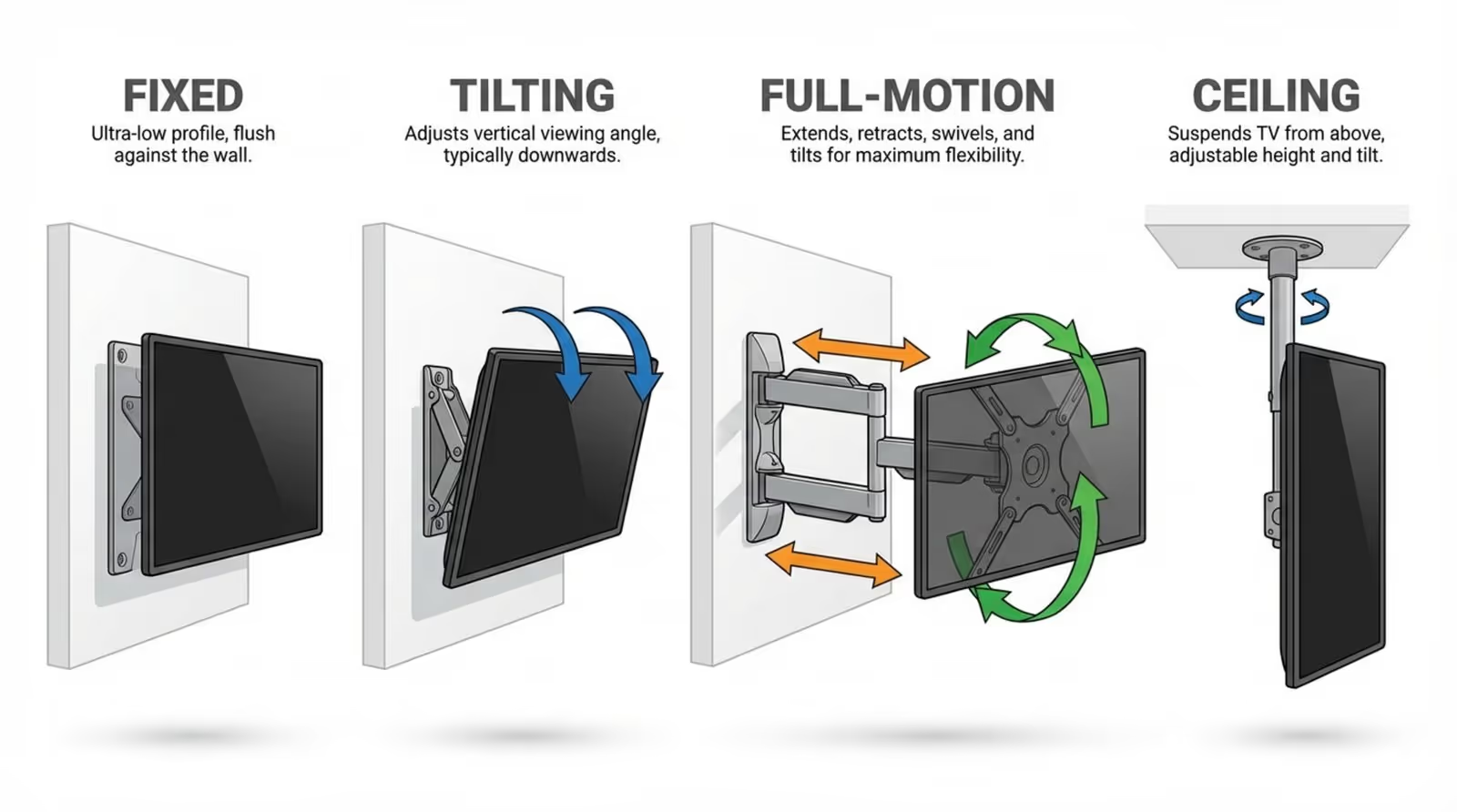
Types of TV Mounts: Which Is Right for Your Screen?
Fixed TV Mounts: Benefits and Best Scenarios
Fixed mounts work best for information screens positioned at eye level, such as internal communication boards in HR departments or wayfinding screens in hospitals. With a low profile, they sit close to the wall, complying with ADA (Americans with Disabilities Act) protrusion limits in corridors. This simplicity translates to high reliability and the lowest total cost of ownership.
The main trade-off is port access. To maximize value, choose a fixed mount with a kickstand feature or quick-release pull cords. This allows your technicians to easily lift the screen to access the Look HDMI Player or check connections without unmounting the entire display. For networks that use the Look App on smart TVs, fixed mounts are often the most logical choice.
Tilting TV Mounts: Pros, Cons, and Use Cases
Tilting mounts are essential when screens must be placed higher up, such as digital menu boards in QSRs or flight information displays in airports. By tilting the screen down 5 to 15 degrees, you ensure the content remains readable and colors stay accurate for customers standing below. This simple adjustment can significantly improve the effectiveness of your promotions.
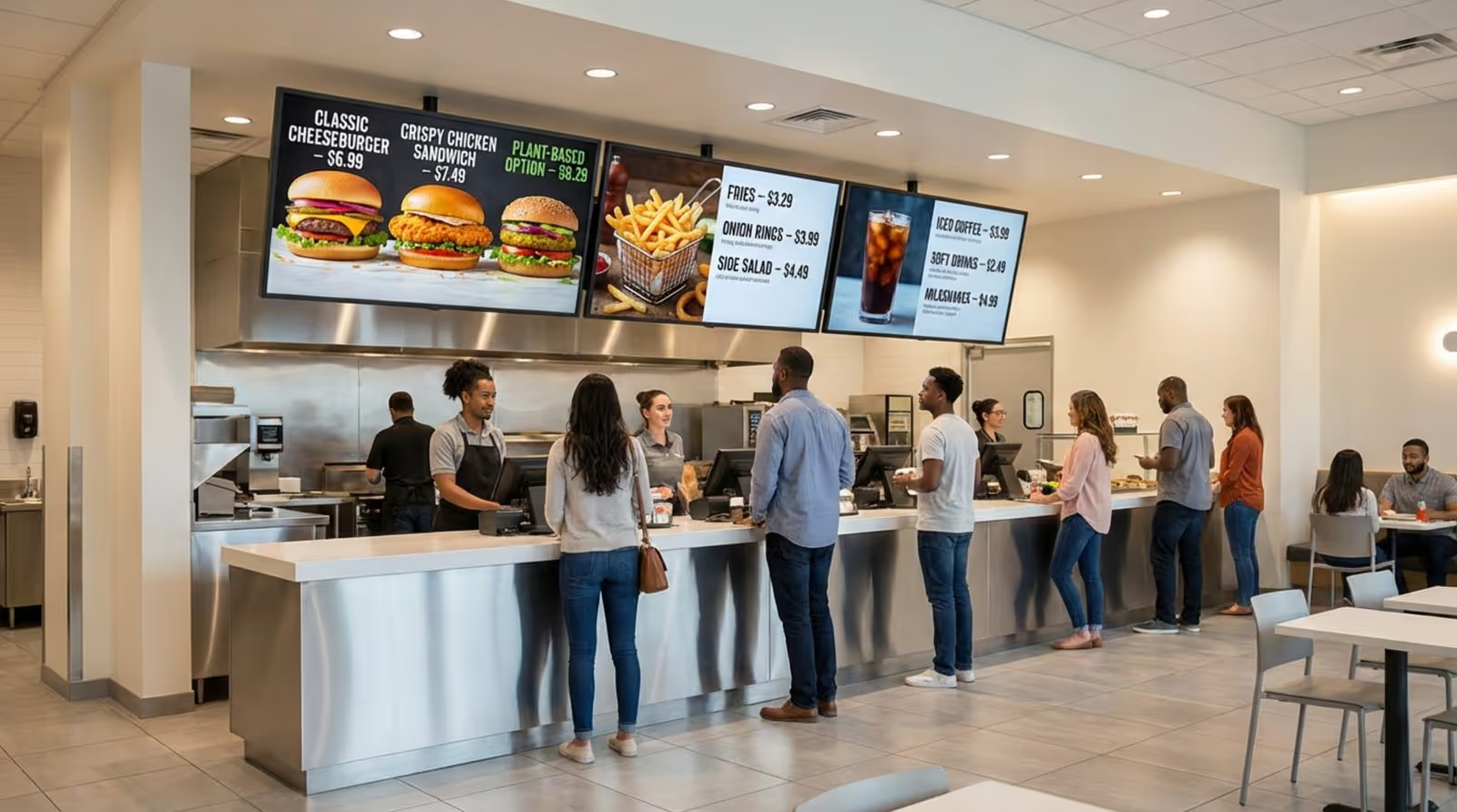
Since these mounts sit slightly further from the wall, they offer better airflow behind the screen-crucial for displays running 12-16 hours a day. Look for models with "tool-less" tilt tension knobs. This allows store managers to adjust glare simply by hand, ensuring your content is always visible without waiting for a maintenance ticket.
Full-Motion and Articulating Mounts: When Flexibility Matters
Full-motion mounts offer maximum versatility, allowing you to pull the screen out and swivel it. These are ideal for multi-purpose spaces, such as conference rooms or collaborative workspaces, where the screen needs to face different groups at different times. They also provide excellent service access for rear-mounted media players in tight recesses.
In a commercial context, value comes from heavy-duty hinges that won't drift over time. If you use Look Digital Signage to manage interactive scenarios or touchscreens, ensure the mount is rated for the pressure of users tapping the screen. A rigid, dual-arm design prevents the "bounce" that ruins the user experience on interactive kiosks.
Ceiling and Corner Mounts: Unique Solutions for Challenging Spaces
When wall space is scarce-common in glass-fronted retail stores or open-plan offices-ceiling mounts are the solution. They allow you to place digital signage in the center of traffic flows. Value in this category is defined by the pole length adjustability and cable management through the tube, keeping the installation clean and professional.
Corner mounts utilize dead space to provide information coverage across a wide room. While more expensive than standard flat mounts, they eliminate the need for custom carpentry or wall reinforcement in corners. These are particularly useful in waiting rooms or restaurant dining areas where visibility from all angles is key.
How to Choose the Right TV Mount for Your Needs
Matching a TV Mount to Your TV’s Size and Weight
Never exceed a mount's weight limit, especially in public areas. Commercial displays often weigh more than consumer TVs due to metal casings and protective glass. While a mount may list a size range (e.g., 40"-80"), the weight capacity is the critical safety metric. Aim for a mount rated at least 20% higher than your display's weight to account for the added weight of media players and cables.
Consider the footprint of the wall plate. For larger screens (75"+), you need a wide wall plate that spans multiple studs to distribute the load. Before purchasing, verify your display's weight without the stand and ensure the mount supports it. Secure hardware is the foundation of a safe digital signage network.
Understanding VESA Patterns and Compatibility
VESA patterns (e.g., 400x400mm) are the standard for mounting holes. Commercial displays generally follow these standards, but specialized high-brightness window displays or stretch screens may have unique layouts. Always check the spec sheet of your display hardware against the mount.
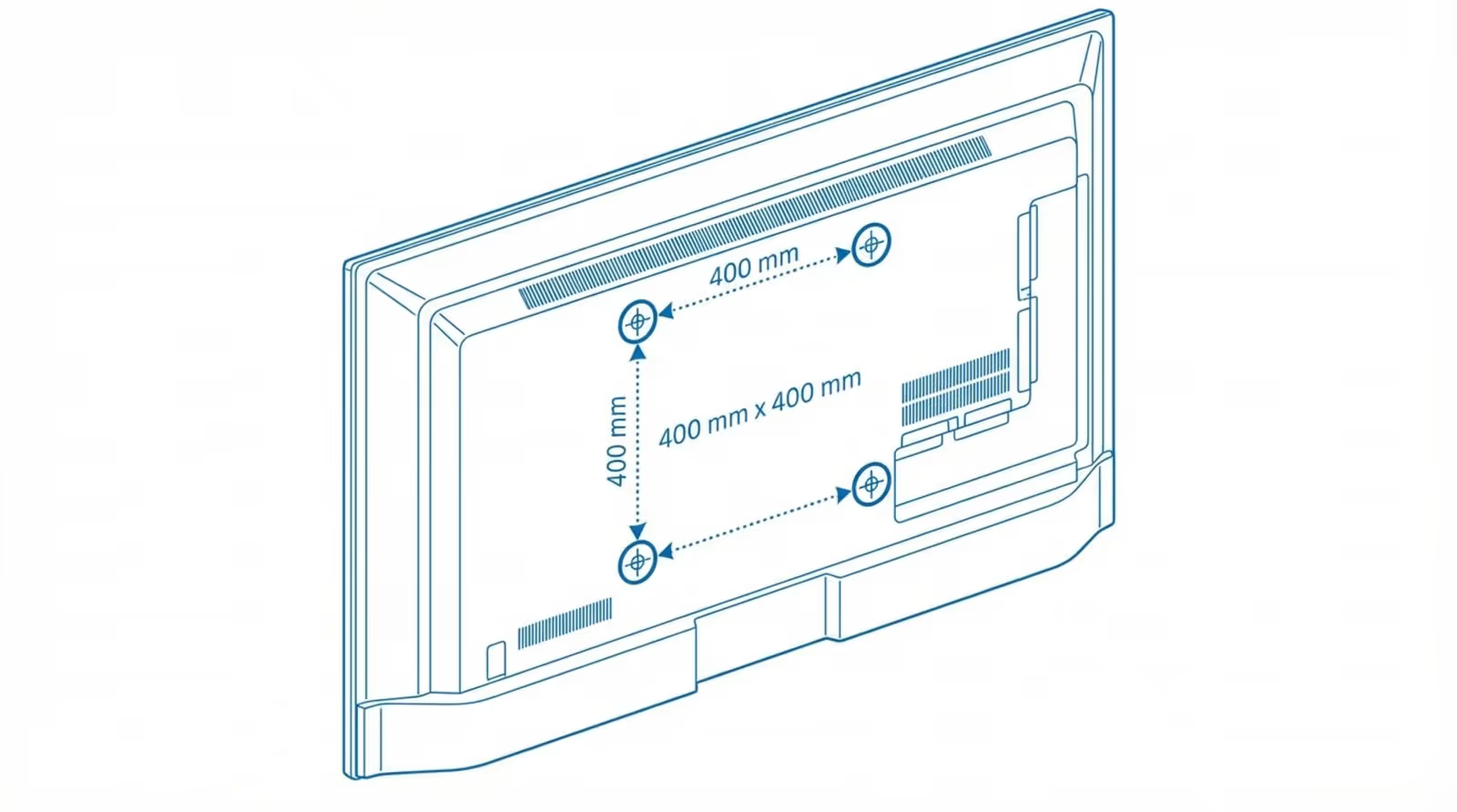
To ensure compatibility across a mixed network of screens, choose "universal" mounts with adjustable rails. This flexibility allows you to upgrade screen models later without ripping the mount off the wall. This future-proofing is a smart way to protect your infrastructure budget.
Considerations for Wall Types and Home Layout
Commercial buildings rarely use standard wood studs. You are more likely to encounter metal studs, concrete, or brick. Standard lag bolts included with mounts often do not work for metal studs. You must use toggle bolts or specific anchors designed for commercial framing. Using the wrong anchor can lead to catastrophic failure.
Analyze the environment. In high-traffic retail or hospitality settings, screens should be mounted out of reach or secured with locking mechanisms. If you are using Look CMS to schedule content remotely, you want the peace of mind that the physical screen is just as secure as your cloud data.
Safety, Stability, and Cable Management Features
Safety is paramount. Look for UL-certified mounts, which have been tested to hold four times their rated weight. This certification helps mitigate liability risks in public spaces. Stability ensures that screens don't shift during cleaning or accidental bumps.
Cable management is what separates a professional installation from a messy one. Good commercial mounts feature open wall plates for routing power and data cables directly into the wall. This keeps cords hidden, preventing accidental unplugs that cause downtime. A clean setup directs all attention to your content, not the wires.
Budget Considerations Versus Long-Term Value
While $15 mounts exist, they are rarely suitable for business use. Investing in the $50-$100 range typically yields commercial-grade steel, better anti-theft features, and easier leveling adjustments. A cheap mount that takes twice as long to install costs you more in labor than you save on hardware.
Think of the mount as insurance for your deployment. If you are running a professional platform like Look Digital Signage to manage your content, your hardware should reflect that same level of reliability. A sturdy mount ensures your screens stay up, while Look ensures your content stays fresh.
Top-Rated TV Mounts for Every Budget and TV Size
Best Overall: Mounts Combining Performance and Affordability
The best overall commercial mounts are usually professional-grade tilting mounts. They offer the sweet spot of glare reduction, ease of installation, and low profile. They fit standard VESA patterns and often include a post-installation leveling screw, allowing you to straighten the screen perfectly even if the wall plate is slightly off-level.
These models often come with open-frame designs, providing ample space behind the TV to mount a small PC or the Look HDMI Player using velcro or zip ties. This keeps your media player hidden but ventilated, supporting reliable playback without additional shelving.
Best Budget TV Mounts for Value Seekers
For large-scale rollouts where budget is tight, simple fixed rails are the best value. They are incredibly strong and virtually indestructible. They are perfect for menu boards or corporate announcement screens where the viewing angle is fixed. By sacrificing motion, you gain stability and lower costs.
Even at a budget price point, prioritize brands that use steel over plastic components. Ensure they include a locking bar-a simple metal rod that slides through the brackets to padlock the screen to the wall. This is a critical feature for any screen in a public area.
Best TV Mounts for Large Screens (65”+)
Large format displays require robust mounts with wide wall plates. The best value options here are rated for 150+ pounds and support VESA patterns up to 600x400 or 800x400. These mounts distribute the heavy load across a wider area of the wall, essential for safety with 75-inch or 85-inch screens.
For these large screens, "micro-adjustment" features are worth the investment. These allow installers to fine-tune the height and level of the screen by turning a screw, ensuring that screens in a row (like a menu board) align perfectly without re-drilling holes.
Best TV Mounts for Small and Medium Screens
For 32" to 50" screens used in shelf-edge signage or small meeting rooms, compact articulating mounts offer great value. They allow you to angle the screen towards the viewer in tight spaces. Since these screens are lighter, single-stud mounts are often sufficient and faster to install.
Premium Picks: When to Invest in High-End TV Mounts
Premium mounts are necessary for specialized applications like video walls or architectural installs. Video wall mounts feature "pop-out" mechanisms that allow you to push a screen to release it, giving access to the cabling behind without dismantling the whole wall. This is essential for servicing large display arrays.
While expensive, pop-out mounts save hours of labor during maintenance. If you are managing a mission-critical video wall powered by Look CMS layouts, the ability to quickly service a single screen justifies the higher hardware cost.
Comparing the Top Value Leaders: Quick Reference Guide
Comparison Table: Specs, Weight Limits, and Adjustability
Key Differences in Installation, Compatibility, and Warranty
Warranties on commercial hardware are often longer than consumer gear. Look for lifetime warranties on the metal structure. This signals that the manufacturer stands behind the steel quality. In a business environment, you want "install and forget" reliability.
Compatibility with accessories is also key. Some commercial mounts include specific slots or brackets for mounting digital signage media players or power bricks. This integrated approach simplifies cable management and keeps the installation tidy, which is helpful when deploying the Look HDMI Player across multiple sites.
TV Mount Installation: Tips for a Secure, Hassle-Free Setup
What Tools Are Needed for Installation?
Professional installation requires precise tools. Ensure your team is equipped with:
- Professional-grade stud finder (capable of detecting metal studs)
- Power drill and impact driver
- Torpedo level (magnetic is best)
- Socket set for lag bolts
- Cable management supplies (zip ties, velcro, raceways)
- Vacuum for dust control in active business environments
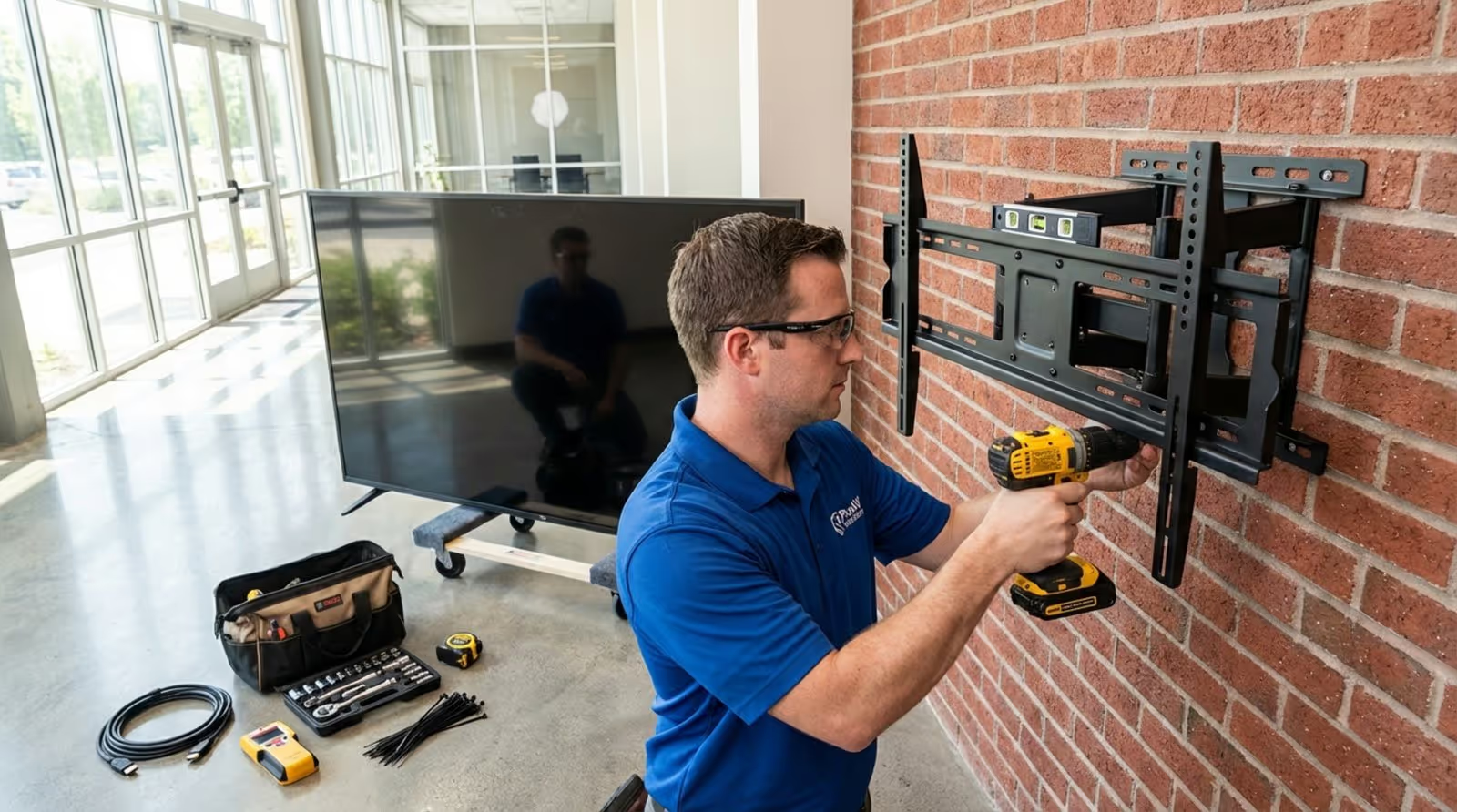
Having the right tools prevents damage to facility walls and ensures the job is done quickly, minimizing disruption to business operations.
Common Mistakes to Avoid During Mounting
The most common mistake in commercial installs is using the wrong anchor for the wall type. Never use plastic drywall plugs for heavy displays; they will pull out. Always bridge two studs or use appropriate toggle bolts for metal framing. Safety is your top priority.
Another error is poor placement of the power outlet. Ensure the outlet is recessed or positioned so it doesn't conflict with the mount's wall plate. Before drilling, check where the Look HDMI Player will sit to ensure it doesn't block the tilt mechanism or get crushed against the wall.
Should You Install a TV Mount Yourself or Hire a Pro?
For a single screen in a back office, a facility manager or IT generalist can likely handle the install. However, for public-facing screens, menu boards, or video walls, hiring a professional AV integrator is recommended. They carry the necessary liability insurance and have the expertise to ensure screens are perfectly aligned and secure.
Professional installers also ensure cables are routed according to fire codes. While Look Digital Signage makes the software side simple enough for anyone to use, physical installation carries risks that are often best managed by pros.
Mounting on Drywall, Brick, and Uncommon Surfaces
Retail spaces and converted warehouses often feature brick or concrete walls. Use concrete sleeve anchors or Tapcons for these surfaces. For drop ceilings or glass walls, rely on specialized pole mounts or floor stands. Adaptability is key in commercial real estate.
When dealing with metal studs-common in office buildings-use toggle bolts (like Snaptoggles). These flip open inside the wall to provide a secure hold on the thin metal channel. Standard wood screws will strip out of metal studs immediately.
How to Hide Cables for a Clean Look
Visible cables look unprofessional and invite tampering. Whenever possible, run cables behind the wall using pass-through plates. If firewall regulations prevent in-wall routing, use color-matched raceways (surface molding) to conceal wires neatly.
A clean install complements the capabilities of your software. With Look Digital Signage, you can update content remotely from anywhere, meaning you rarely need to touch the physical screen. Hiding the cables completes the "hands-off" experience, leaving only your dynamic content visible to the audience.
Frequently Asked Questions About Value TV mounts
How Do I Know If a Mount Will Support My TV?
Check the weight capacity first-this is non-negotiable. Then verify the VESA pattern compatibility. Finally, ensure the mount allows enough clearance for your specific media player or power cables. Most commercial mount manufacturers offer "mount finder" tools on their websites to match their products to specific commercial display models.
Is It Safe to Mount a TV in Any Room?
Generally, yes, but environmental factors matter. In kitchens (QSRs), grease and heat can affect both the mount and the screen. Use mounts with easy-to-clean finishes. In high-traffic corridors, ensure the screen doesn't protrude more than 4 inches to comply with ADA safety regulations.
What Is the Difference Between VESA and Non-VESA Mounts?
Almost all modern commercial displays use VESA standards. Non-VESA mounts are proprietary and rare today. Stick to VESA-compliant hardware to ensure you can easily swap out screens in the future without changing the mount. This modularity is essential for long-term network management.
Can Full-Motion Mounts Handle Heavy TVs?
Yes, but you must buy dual-arm commercial models. These are engineered to prevent sagging even when fully extended. Regular inspection of the arm joints is recommended in high-use areas to ensure they remain tight and level.
Final Recommendations and Buying Advice
Most Reliable Value-for-Money Picks
For most businesses, a commercial-grade tilting mount offers the best balance of price, function, and reliability. It manages glare, fits almost any wall, and protects your investment with steel construction. Pair your hardware with a scalable software solution like Look Digital Signage to maximize the utility of every screen.
Best Practices for Making Your Final Choice
Plan your software and hardware together. A great mount is useless if the screen is black; a great software platform needs a screen that stays up. Choose a mount that allows easy access to your Look HDMI Player for the initial setup. Once mounted, use the Look CMS to connect your screen, pair it in seconds, and start publishing content immediately. The best value comes from a system that is easy to install physically and effortless to manage digitally.





