
Table of Content
How can businesses get reliable 4K digital signage without buying expensive industrial hardware? The Amazon Signage Stick offers a professional-grade media player priced at $99.99, bridging the gap between consumer streaming sticks and costly commercial players. Designed for stability and ease of use, it provides a simple path to turn any HDMI-ready screen into a powerful communication tool.
Meet the New Amazon Signage Stick for Digital Signage
What is the Amazon Signage Stick?
The Amazon Signage Stick is a compact, plug-and-play media player designed specifically for professional environments. Unlike standard streaming devices meant for living rooms, this hardware is engineered to run 24/7 in business settings. It allows organizations to display dynamic content-such as digital menus, retail promotions, safety alerts, and corporate metrics-on any HD screen.
This device addresses the needs of small and mid-market teams that need reliable playback without complex IT setups. It features a quad-core processor and 4K video support, serving as a solid entry point for businesses scaling from one screen to hundreds. When paired with the right software, it allows you to manage your entire network from a central location, ensuring your messaging stays consistent across all sites.
How Does the Amazon Signage Stick Differ from Other Amazon Devices?
While it physically resembles the Fire TV Stick, the Amazon Signage Stick serves a different purpose. Consumer Fire TV devices are filled with apps, advertisements, and entertainment menus. In contrast, the Signage Stick offers a streamlined, "clean" environment focused solely on running digital signage software.
Crucially, this device supports "Kiosk Mode," which automatically launches your digital signage application when the device powers on. If a power outage occurs, your content returns to the screen automatically without requiring staff to pick up a remote. This eliminates the consumer-focused interface entirely, making it much faster to deploy and manage across multiple locations.
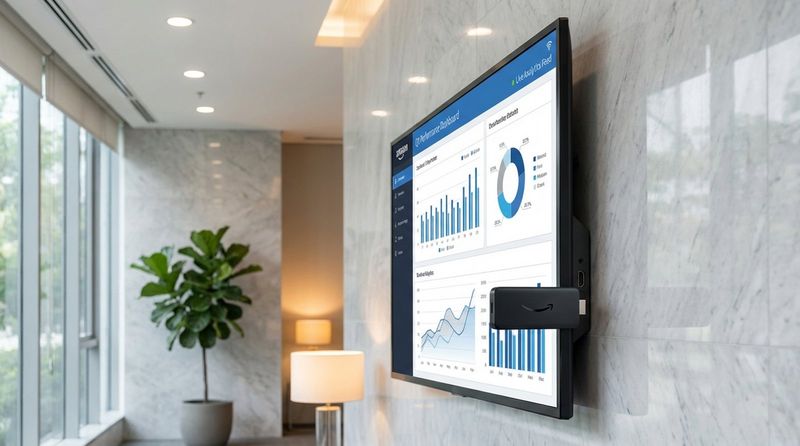
Key Features and Benefits of the Amazon Signage Stick
Purpose-Built for Digital Signage
The Amazon Signage Stick is designed to solve common issues like overheating and lag that occur when consumer sticks run for days on end. It is built to keep your screens running smoothly, ensuring that your communication channels remain active without constant rebooting.
By locking the device to your signage application, it prevents staff or customers from accidentally exiting to a home screen. This "set and forget" reliability allows business owners to focus on operations rather than troubleshooting media players.
Easy Integration with Content Management Software
Hardware is only half the equation; the software you choose determines how easy it is to manage your content. The Amazon Signage Stick is designed to work with cloud-based platforms like Look Digital Signage. Using a professional solution like Look DS allows you to create content, build playlists, and schedule playback directly from a web browser.
With Look Digital Signage, you can take full advantage of the hardware's capabilities. You can access ready-made templates to design professional slides in minutes, or use screen layouts to display multiple zones of content at once. Whether you are running a single menu board or a global network, the software ensures the user experience is smooth and responsive.
Reliable and Secure Operation
Security is vital when connecting devices to your business network. The Amazon Signage Stick utilizes a secure boot loader that restricts the device to running only trusted software. This prevents unauthorized applications from compromising your screens.
Additionally, the device supports data encryption and receives regular updates. These updates protect against emerging security risks and ensure compatibility with modern media formats, giving IT teams confidence in the long-term stability of the deployment.
Powerful Remote Management
Managing screens efficiently means doing it remotely. By pairing the hardware with Look CMS, you gain full control over your network from anywhere. You can monitor the status of every screen, push content updates in real-time, and verify that your playlists are running correctly.
This centralized approach removes the need for site visits or juggling multiple physical remotes. If a screen needs a content refresh or a schedule change, you can handle it instantly from your dashboard.
Affordable Professional Signage
At $99.99, the Signage Stick significantly reduces the barrier to entry for professional signage. Amazon often supports business use cases with volume incentives through Amazon Business accounts, making it cost-effective for larger rollouts.
This pricing model makes high-quality digital signage accessible to everyone. From local cafes and clinics to non-profits, organizations can deploy impactful screens without the heavy investment typically associated with industrial AV hardware.
Compact and Versatile Design
Measuring just 99mm x 30mm x 14mm, the device hides neatly behind almost any display. This ensures a clean, professional installation without bulky media players or visible cabling. It connects directly to the HDMI port, though it requires a separate power source for optimal performance.
Weighing only 43.5g, it places minimal strain on HDMI ports. Whether you are installing a vertical menu board or a horizontal lobby display, the hardware remains unobtrusive and out of sight.
Advanced Connectivity Options
To support high-definition content, the Signage Stick features Wi-Fi 6E support. This tri-band capability (2.4GHz, 5GHz, and 6GHz) provides faster, more stable connections, which is essential in crowded environments like malls or office buildings where interference is common.
It also includes Bluetooth 5.2 for accessory connectivity and HDMI 2.1 support. These features ensure smooth video playback and compatibility with modern display standards, helping your content look its best.
Specifications of the Amazon Signage Stick
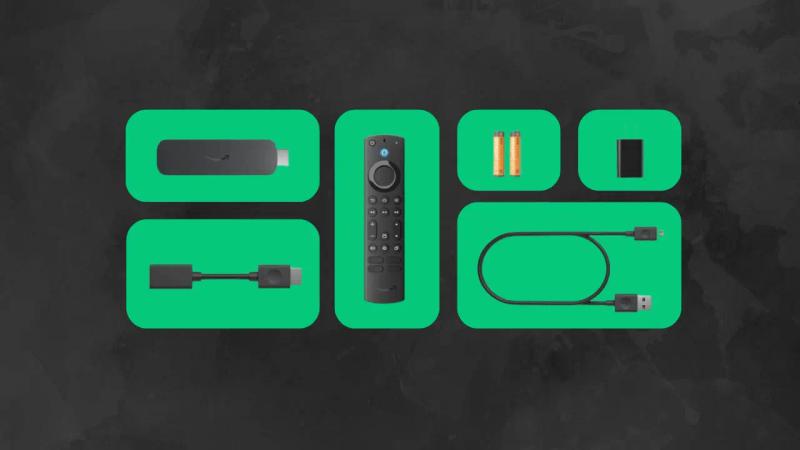
Performance and Playback Capabilities
The device is powered by a Quad-core 2.0GHz processor and an 850MHz GPU, optimized for 4K video playback and smooth graphics. With 2GB of memory, it handles transitions and dynamic content without stuttering.
It also includes 16GB of internal storage. This is particularly useful for offline playback, a key feature supported by Look Digital Signage, which caches your content locally. This ensures your screens keep playing seamless playlists even if the internet connection drops temporarily.
Supported Content Types and Resolutions
The Signage Stick supports 4K UHD playback at up to 60fps and a wide range of video formats including HDR10, H.265, and H.264. This flexibility allows marketing teams to produce high-quality visuals without worrying about compatibility issues.
Audio capabilities are equally robust, supporting HDMI audio passthrough for formats like AAC and MP3. This makes the device suitable for environments where audio is part of the experience, such as waiting rooms or retail spaces with background music.
Connectivity and Power Requirements
For reliable updates, a stable internet connection is required, preferably via a Wi-Fi 6E router to utilize the full bandwidth. The device connects via HDMI and draws power through a micro-USB port.
It is highly recommended to use the included power adapter plugged into a wall outlet rather than a TV's USB port. This ensures the processor receives consistent power, preventing random reboots and ensuring reliable uptime.
Amazon Signage Stick vs. Traditional Amazon Devices
Main Differences Between Amazon Signage Stick and Fire TV Devices
The primary difference lies in the interface and intent. A standard Fire TV Stick boots into a consumer-focused home screen filled with entertainment options. The Amazon Signage Stick boots directly into your signage application.
Furthermore, the Signage Stick is built for thermal management during extended use. While consumer sticks may throttle performance if left on 24/7, this device is tuned for constant operation. It also omits consumer features like Alexa to focus entirely on commercial performance.
Advantages of Using Signage Stick for Digital Signage Deployments
Using dedicated hardware significantly improves reliability. Kiosk Mode eliminates the need for staff to manually launch apps, reducing daily friction. It also secures the screen, preventing unauthorized app installations.
When combined with Look Digital Signage, you unlock advanced capabilities like smart scheduling. This allows you to set specific content to play at specific times-such as switching from breakfast to lunch menus automatically-something that is difficult to manage on standard consumer devices.
Setup and Getting Started
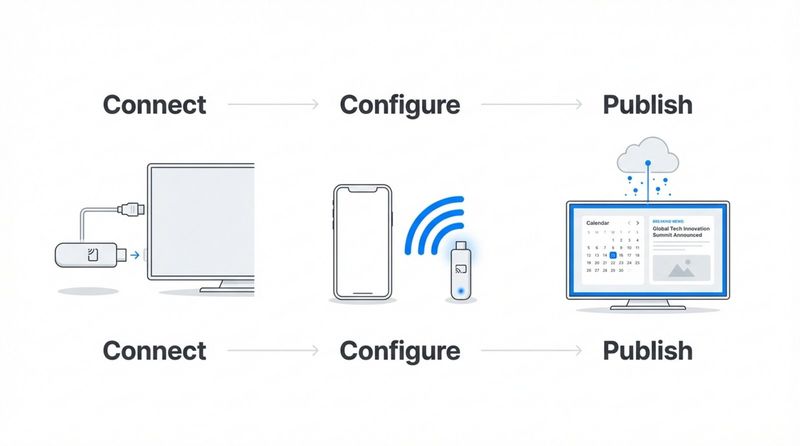
Simple Setup Process in 3 Steps
Deploying the hardware is straightforward, even for teams without technical expertise. The general process involves:
- Connect: Plug the stick into your display’s HDMI port and connect it to a power outlet.
- Configure: Connect the device to Wi-Fi and link it to your account using the setup tools provided.
- Publish: Pair the device with your Look CMS account to begin managing content remotely.
How to Display Content on the Amazon Signage Stick
Once the hardware is installed, the software takes over. By using Look Digital Signage, you can pair the screen to your dashboard in seconds. Simply enter the pairing code displayed on the screen into your Look CMS account.
From the dashboard, you can upload images and videos, or use the Content Creator to design slides from scratch. You can build playlists, set schedules, and publish updates to one screen or thousands in minutes. Features like offline playback ensure your content downloads to the device and keeps running smoothly, regardless of internet fluctuations.
Industry Applications and Use Cases
Education: K-12 and Higher Education Solutions
Schools can utilize this affordable hardware to streamline campus communication. Displays can show cafeteria menus, class schedules, and student achievements. With Look DS, administrators can manage screens across different buildings from a single office, ensuring announcements and safety alerts are distributed instantly.
Retail Environments and Digital Menu Boards
For retail and QSR environments, the stick is an excellent engine for digital menu boards. Using Look Digital Signage templates, store managers can update prices, remove out-of-stock items, and highlight promotions in real-time. Smart scheduling ensures the right menu appears at the right time of day without manual intervention.

Corporate and Industrial Communications
In corporate offices, these devices power lobby displays and breakroom screens to keep staff informed. By using screen layouts within Look CMS, you can display company news alongside live weather widgets or KPI dashboards. In warehouses, screens can display safety reminders and production goals to keep teams aligned.
Other Sectors Benefiting from Digital Signage
Healthcare facilities use these displays to reduce perceived wait times by showing health tips and clinic information in waiting areas. Community centers can promote events and volunteer opportunities. The flexibility of the hardware, combined with easy-to-use software, makes it adaptable to virtually any industry.
Security and Scalability for Organizations
Data Protection and Device Security Features
Secure data transmission and boot processes protect your network integrity. The device is designed to resist unauthorized firmware modification, a critical feature for organizations managing sensitive data or public-facing screens.
Managing Multiple Devices Across Locations
Scalability is key for growing businesses. Look Digital Signage simplifies this by allowing you to group screens by location, city, or purpose. You can push a global brand video to every screen while allowing regional managers to update local content, all from one dashboard.
Built to Scale for Large-Scale Deployments
The low hardware cost combined with cloud-based management makes it easy to scale. You can start with a single pilot screen and expand to hundreds of locations without needing complex on-premise servers. The "one stick per screen" model allows for flexible growth as your budget permits.
User Feedback and Professional Reviews
Early User Experiences
Initial feedback highlights the value of a dedicated business device. Users appreciate the "set it and forget it" nature of the hardware compared to consumer alternatives. Small business owners, in particular, value the ability to achieve a professional look without hiring external IT consultants.
Critical Considerations and Limitations
While the hardware is robust, a successful deployment depends heavily on the software you choose. Users occasionally note that setup requires a stable network environment. Additionally, ensuring you select a compatible CMS like Look Digital Signage is crucial for accessing features like remote management and offline playback.
What Industry Experts Love About the Device
Experts praise the focus on SMB needs, specifically the inclusion of Wi-Fi 6E and 4K support at an accessible price point. The move away from consumer interfaces is widely seen as a necessary step for professional reliability.
Purchasing Information and Availability
Where to Buy the Amazon Signage Stick
The device is available directly through Amazon and Amazon Business. Utilizing an Amazon Business account often provides access to volume pricing and tax-exempt purchasing, which is beneficial for bulk orders.
Warranty and Support
The hardware comes with standard warranty coverage. For the software side, Look Digital Signage offers dedicated support to help you get the most out of your screens, including onboarding assistance and troubleshooting via chat inside your dashboard.
Amazon Signage Stick Frequently Asked Questions
What is the Amazon Signage Stick used for?
It turns HDMI-ready screens into professional digital signage displays. Businesses use it to run menus, advertisements, internal communications, and information boards reliably.
Can you use the device in multiple locations?
Yes. When paired with cloud-based software like Look Digital Signage, you can manage devices across multiple cities or countries from a single online dashboard.
Is it compatible with Fire TV and other Amazon products?
It shares some hardware architecture with Fire TV but uses a distinct, business-focused operating system. It does not run consumer entertainment apps and is optimized for commercial signage.
Can the Signage Stick handle 4K content?
Yes, it supports 4K UHD video playback at 60fps, provided you have a compatible 4K display and content.
Conclusion: Embracing the Future of Visual Communication
As businesses continue to modernize, the demand for reliable, easy-to-manage screens grows. The Amazon Signage Stick offers a strong hardware foundation, but to truly unlock its potential, you need the right software. By pairing this device with Look Digital Signage, you gain a complete solution that lets you design, schedule, and manage content effortlessly. Whether you are launching your first screen or upgrading a network, this combination provides the stability and flexibility needed to keep your messaging clear and effective.


