


Table of Content
Can you launch a professional digital signage network without investing in expensive commercial hardware? Yes. Consumer streaming devices-like the Amazon Fire TV Stick 4K Max, Google Chromecast, and Xiaomi Mi Box S-offer a cost-effective entry point. While dedicated commercial players (like the Look HDMI Player) offer superior durability for 24/7 use, these budget-friendly alternatives allow businesses to display impressive 4K content and manage screens remotely for a fraction of the price.
Digital signage transforms how you communicate with customers and staff, but cost is often a barrier. By pairing these affordable "TV sticks" with Look Digital Signage software, you can turn standard TVs into dynamic marketing channels. This guide breaks down the best low-cost hardware options and how to maintain stability and performance on a budget.

What is a Digital Signage Media Player?
How Do Media Players Work with Digital Signage?
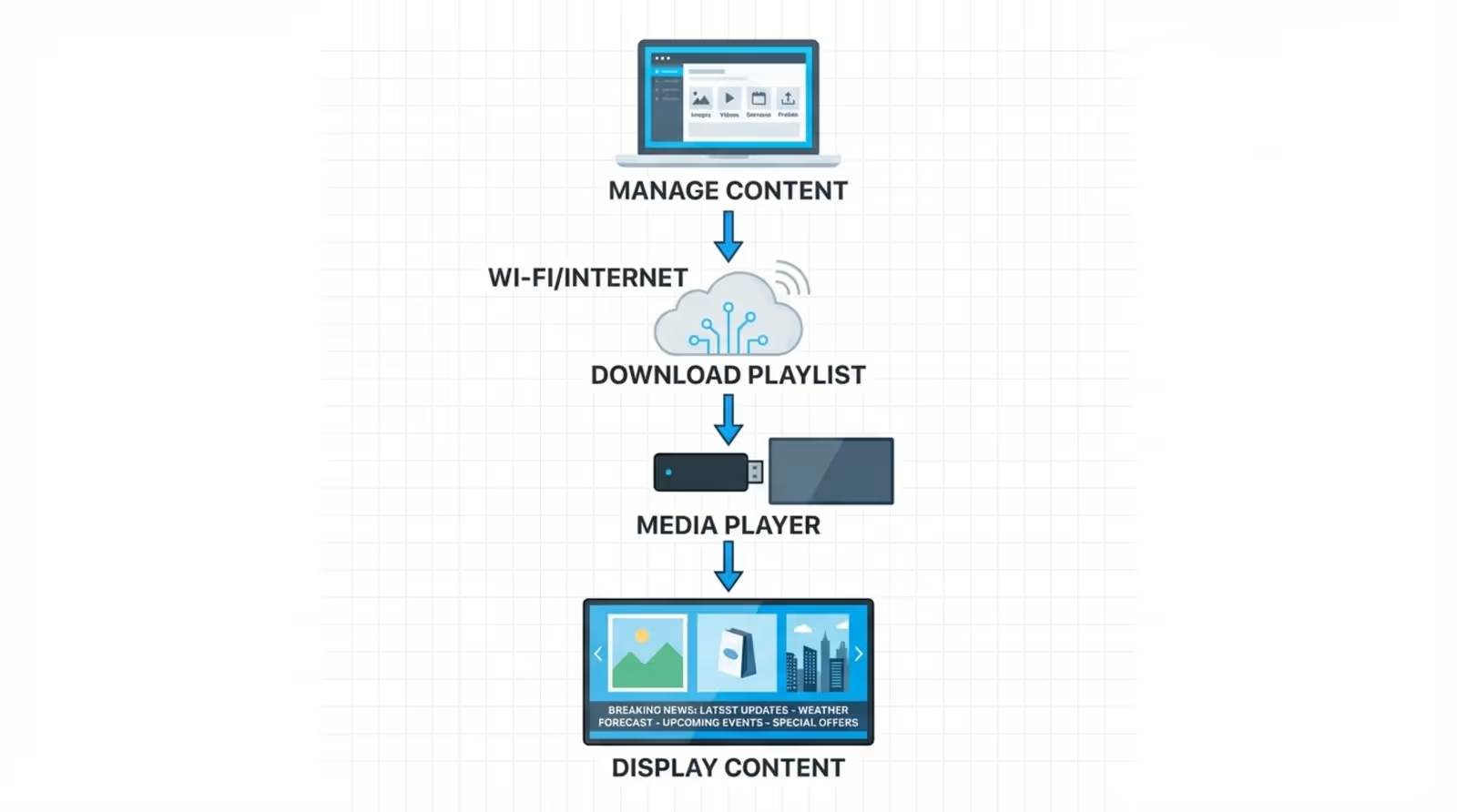
A digital signage media player acts as the engine of your display. It is the physical device that connects to your screen via HDMI, connects to the internet, and runs the software that plays your content. Modern budget players often use a System-on-a-Chip (SoC) design, combining the processor and memory into a single unit to handle images, 4K videos, and web streams efficiently.
Once connected, the player runs the Look App (available for supported operating systems like Android and Fire OS). It communicates with the cloud-based Look CMS to download your media and playlists. This setup allows you to manage one screen or a hundred from a single web dashboard, ensuring your messaging is consistent across all locations without manual intervention.
Why Is the Media Player Important?
The media player determines the smoothness and reliability of your content. While a USB drive plugged into a TV can show a static image, it cannot handle scheduling, remote updates, or seamless video loops. A dedicated media player ensures smooth transitions and supports offline playback-a critical feature of Look DS that keeps your content running even if the internet connection drops.
Furthermore, a connected player enables remote management. Instead of visiting every screen to swap USB drives, you can publish updates from anywhere in minutes. This is essential for operations managers who need to ensure compliance and freshness across multiple sites.
Why Choose Budget-Friendly Media Players?
Benefits of Affordable Hardware
The primary advantage is cost efficiency. A commercial-grade setup can be expensive, but consumer players like Fire Sticks often cost between $40 and $60. This allows small businesses to deploy digital signage quickly with minimal financial risk. These devices are widely available online or in retail stores, meaning you can often purchase a device and get your first screen live on the same day.
They are also user-friendly. Because they are designed for home streaming, the setup process is intuitive. You do not need a specialized IT team to install the Look App and pair the screen with your account.
Common Drawbacks and Limitations
It is important to be realistic about trade-offs. Consumer players are not typically built for 24/7 operation in commercial environments. They lack advanced heat dissipation and may struggle in hot or dusty locations. Unlike professional options, such as the Look HDMI Player, consumer sticks rarely support Power over Ethernet (PoE) or hardware-level remote reboots.
Stability relies heavily on Wi-Fi. Most budget sticks lack an Ethernet port, meaning your playback quality depends on your local Wi-Fi strength. For mission-critical screens, this can be a risk, whereas professional players often offer wired connections for maximum uptime.

When Do Budget Options Make Sense?
Budget players are an excellent fit for waiting rooms, cafes, small offices, and retail pilots where screens operate for 8-12 hours a day rather than 24/7. They are ideal for testing your content strategy with Look Digital Signage before scaling up. If your content consists primarily of images, standard video loops, and basic dashboards, these devices perform reliably.
Key Features to Consider in a Budget-Friendly Media Player
Performance and Reliability
To prevent lag or choppy transitions, look for devices with at least a quad-core processor and 2GB of RAM. This specification is generally sufficient to handle the Look App and cache 4K content smoothly. A reliable player ensures your screens display content correctly, protecting your brand image.
Compatibility and Connectivity
Ensure the device connects easily via HDMI and supports modern Wi-Fi standards (Wi-Fi 6 is preferred for faster media downloads). Compatibility with your software is crucial-Look DS is optimized for Android and Fire OS, making devices on these platforms the safest bet for smooth performance.
Ease of Setup
For teams without technical resources, "plug-and-play" is vital. Devices running Android TV or Fire OS allow you to download the Look Digital Signage player directly from the app store. This simplifies the process: plug it in, download the app, and pair the screen.
Security and Updates
Stick to reputable brands that provide regular firmware and security updates. This protects your network from vulnerabilities. Using a trusted device alongside Look’s secure, cloud-based architecture helps ensure that only authorized content appears on your screens.
Scalability
Choose a player that allows you to start small and grow. While you might start with one screen, the Look CMS is designed to scale from a single display to thousands. Selecting hardware that is easy to procure and configure ensures you can expand your network smoothly as your business grows.
Best Budget-Friendly Media Players for Digital Signage
Amazon Fire TV Stick 4K Max
Priced around $49.99, the Fire TV Stick 4K Max is a top contender. It features a fast quad-core processor and supports Wi-Fi 6E, ensuring quick content updates. It runs the Look App smoothly, making it a strong choice for retail environments where content needs to look sharp and load fast.
Google Chromecast with Google TV (4K)
At approximately $49.99, this device offers a clean Android TV interface and decent specs (2GB RAM). It is widely used in educational settings and small businesses. Its integration with Google's ecosystem makes it a familiar choice for many users.
Xiaomi Mi Box S
The Xiaomi Mi Box S (approx. $60) is a standalone Android TV box. It offers USB connectivity, which can be useful for peripherals, and supports 4K HDR. It is a solid, budget-friendly option for straightforward digital signage playlists.
NVIDIA Shield TV
At $149.99, the NVIDIA Shield TV bridges the gap between budget and pro. It uses the powerful Tegra X1+ processor and includes a Gigabit Ethernet port. If you need to run complex, data-heavy content or display 4K video 24/7 without the cost of an industrial PC, this is the best "budget-adjacent" choice.
TiVo Stream 4K
Selling for roughly $39.99, this dongle runs Android TV and supports Dolby Vision. It is a cost-effective option for US-based deployments that need a simple, reliable player for standard signage duties.

A Note on Roku
While the Roku Express 4K+ is a popular consumer device, please note that Look Digital Signage is not compatible with Roku OS. We recommend choosing Android or Fire OS devices to ensure full compatibility with the Look App and features.
Feature Comparison of Leading Budget Media Players
Operating System and App Support
Android TV and Fire OS are the preferred platforms for digital signage apps. They allow for easy installation of the Look App and support essential features like auto-start on boot (where available) and reliable media rendering.
Processing Power and Memory
Avoid devices with less than 2GB of RAM. The Fire TV Stick 4K Max and NVIDIA Shield provide the necessary headroom to play modern content without stuttering. The Shield’s superior processor makes it the safest bet for more demanding layouts.
Connectivity
While HDMI is standard, internet connectivity varies. If your location has spotty Wi-Fi, the NVIDIA Shield’s Ethernet port is a significant advantage. For sticks like the Fire TV or Chromecast, you may need to purchase a separate Ethernet adapter to ensure stable connection for content updates.
Look’s Expert Insights: How to Choose the Best Media Player
Top Factors for Selecting a Media Player
Our experts recommend defining your use case first. If you are running a menu board that changes daily, a Fire TV Stick is often sufficient. However, if you require granular control, 24/7 uptime, or strict security compliance, you may eventually want to upgrade to the Look HDMI Player or similar professional hardware.
Always run a pilot test. Buy one device, install the Look App, and run your intended content for a few days. This confirms that the hardware handles your specific media files and layouts without overheating or crashing.
Recommendations for Common Scenarios
- Retail & Cafes: Amazon Fire TV Stick 4K Max (Fast, affordable, compact).
- Corporate & High-Traffic: NVIDIA Shield TV (Ethernet support, higher durability).
- Education: Google Chromecast with Google TV (Easy management, good value).
Mistakes to Avoid
Do not underestimate the importance of ventilation. Hiding a stick behind a TV in a recessed wall can cause overheating, leading to restarts. Also, avoid generic "no-name" Android boxes; they often lack security updates and can be unstable. Stick to the proven devices listed above for a predictable experience.
How to Install Look Digital Signage on Your Media Player
Step-by-Step Installation
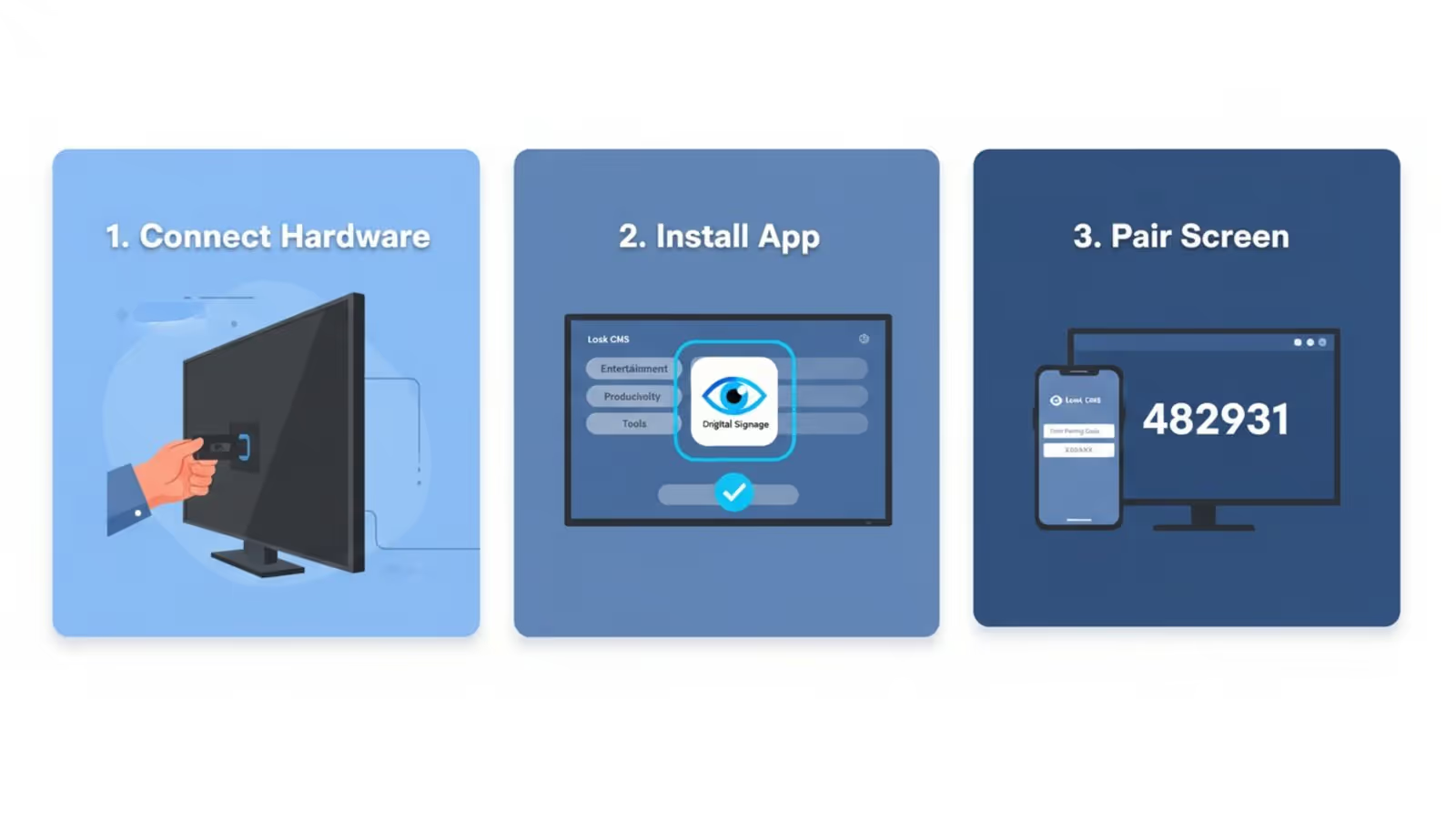
Getting your screen live with Look DS takes just minutes:
- Connect: Plug your chosen media player into the TV and connect to Wi-Fi.
- Install: Go to the Google Play Store or Amazon Appstore on the device and search for "." Install the free app.
- Pair: Launch the app to see a 6-digit pairing code. Log in to your Look CMS account on your computer, navigate to "," and enter the code.
Managing Content
Once paired, you can control everything remotely. Use the Look CMS to upload assets, design screen layouts, and build playlists. With Smart Scheduling, you can automate your content-for example, switching from breakfast to lunch menus at a specific time daily-ensuring your screens are always relevant without manual updates.
Frequently Asked Questions
Is a Dedicated Media Player Necessary?
Yes. While some Smart TVs have built-in browsers, they are often slow and unreliable for signage. A dedicated player running the Look App ensures your content plays smoothly, supports offline playback, and allows for remote management.
What Are the Risks of Budget Devices?
The main trade-off is durability. Consumer sticks are not designed for 24/7 usage and may have shorter lifespans than professional hardware. They typically lack remote power cycling features, meaning you might occasionally need to manually unplug them if they freeze.
Can I Upgrade Later?
Absolutely. Because Look DS is cloud-based, your content, schedules, and settings live in your account, not the hardware. You can start with a Fire Stick and swap it for a professional player later without losing your work-simply pair the new device and your playlists will resume immediately.
Maximize Your Digital Signage Impact
Choosing the right hardware is the first step toward a successful digital signage network. By selecting a capable budget-friendly player and pairing it with Look Digital Signage, you can achieve professional results without a heavy upfront investment.
Ready to see how it works? Start a free trial of Look today. Connect your chosen media player and experience how easy it is to manage your screens, schedule content, and engage your audience from anywhere.





