


Table of Content
Digital signage scheduling is the practice of making sure your screens show the right message to the right people at the right moment. It goes far beyond just putting content on a display. It is a planned mix of visuals, messages, and timing that turns simple screens into strong communication tools. With a clear plan for when and where your content appears, you can grab attention, share useful information, and prompt people to act.
Good scheduling helps avoid information overload, reduces “content fatigue,” and makes sure every item on the screen has a clear role. Whether you run a single menu board in a café or many displays in a large company, smart scheduling is what raises digital signage from background decoration to a key part of your business.
What is digital signage scheduling?
Digital signage scheduling is the automated process of organizing and sending content to digital screens. Think of a TV guide, but instead of shows, you prepare a changing mix of images, videos, and text built for specific audiences at specific times. Automation plays a big part here, so your content stays fresh and relevant without constant manual updates.
Modern scheduling tools let you show content at exact times of day, on certain days of the week, or in response to outside triggers such as weather or social media trends. This level of control helps your messages match the current situation and increases their impact.
How does digital signage scheduling work?
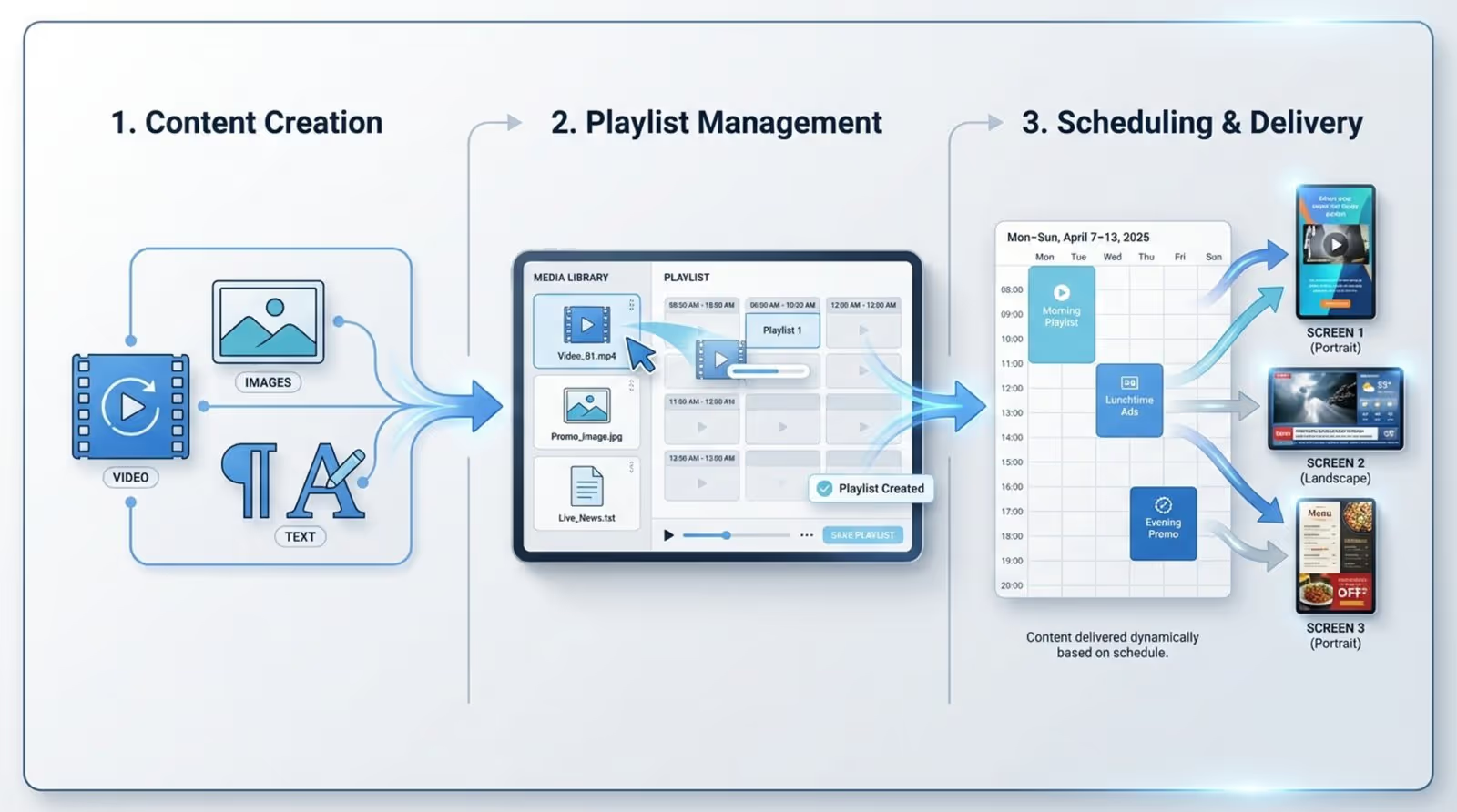
Signage scheduling usually starts with content creation. Once you have your images, text, and videos ready, you group them into playlists. A playlist is a planned sequence of content, similar to a music playlist, but for screens. You then assign these playlists to specific screens or groups of screens.
A strong content management system (CMS), like Look Digital Signage, runs this whole process. Inside the CMS, you set rules for when and how each playlist should run. You might create daily or weekly schedules, set exact start and end times, and define how long each piece of content should appear. For example, in a system like Look Content Manager, you go to the “Schedule” tab, create a new schedule, give it a name, choose the days it runs, add your playlists, and then set start and end times for those playlists. After that, the system automatically sends the right content to the right screens at the chosen times.
What are the key benefits of digital signage scheduling?
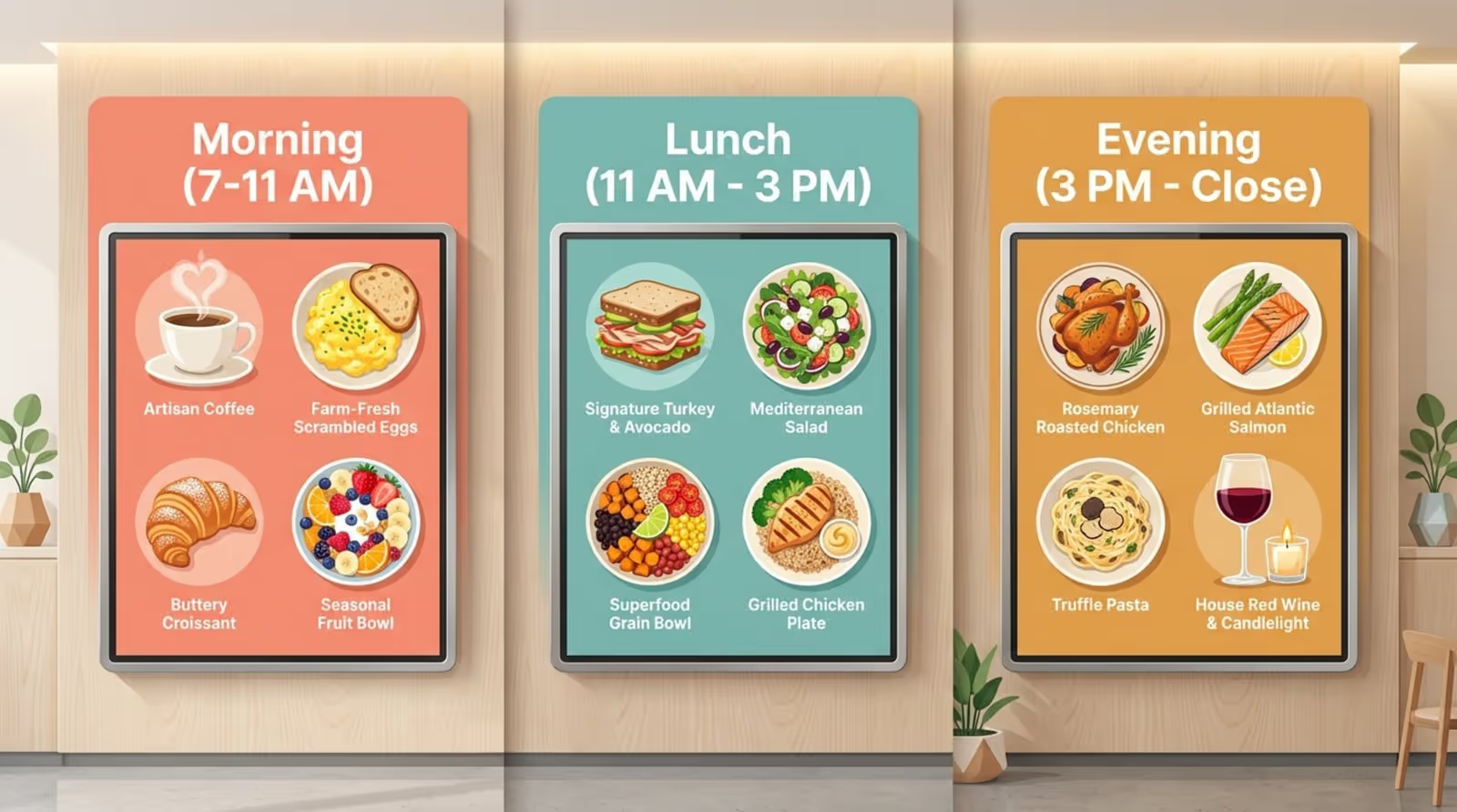
Careful planning of your digital signage content brings many benefits. It keeps your messages relevant and timely. For instance, a coffee shop could show breakfast offers in the morning, switch to lunch deals at midday, and show evening promotions later on, all automatically. Messages that match what people want at that moment tend to get more attention and better reactions.
Good scheduling also keeps content from becoming boring or overused, which quickly makes viewers stop looking. Regularly changing and rotating content keeps screens fresh and interesting. It also helps with internal efficiency. Automation cuts down the manual work needed to update screens, so staff can focus on other tasks. For companies with many locations, being able to control all displays from one place helps keep branding consistent and processes smooth.
Planned scheduling also helps key messages have maximum effect. By linking content to busy times and specific audience groups, you increase the chances that important messages reach many interested viewers and support your business goals.
Why is effective scheduling so important for digital signage?
Effective scheduling is the core of a strong digital signage strategy. Without it, even the best visuals and messages may be ignored. The goal is to create a smart, responsive communication channel that changes based on place and audience. This turns your screens from simple noticeboards into tools that encourage interaction.
A solid schedule helps your investment in digital signage bring real results, such as higher sales, better staff communication, or a smoother customer experience. It helps your content be noticed, understood, and acted on by the people you want to reach.
Maximizing audience engagement with smart timing
Timing is a major factor in digital signage. Good timing means showing content when people are most ready to see it and when it fits their situation. Take a busy train station: a short 30-second playlist with quick travel updates and local offers works better there than a long corporate video. In a medical waiting room, where people stay longer, you might run a longer loop (for example, two 30-minute playlists) with health tips, news about services, and patient stories to inform and distract from the wait.
By studying how people move through your space and what they are likely thinking at different times of day, you can set schedules that catch attention more often. You might push breakfast items in the morning, lunch items later, then evening events at night, so each screen always shows messages that fit the current moment.
Keeping content relevant and fresh
Digital signage quickly loses impact if it shows old, wrong, or overly repeated content. Good scheduling keeps a constant flow of current material. Regular rotation helps avoid viewer fatigue and keeps screens lively. This does not mean creating brand-new items every day; you can update numbers, adjust layouts, or simply change the order of items in a playlist to create a new experience.
Scheduling also lets you match content to real-world conditions. A store that sells outdoor gear can promote raincoats when rain is in the forecast, or a corporate office can show news and traffic in the morning then cafeteria menus at lunchtime. This kind of timely content makes the screens more useful and engaging, and people start to rely on them.
Reducing operational workload with automation
Updating content by hand on many screens in many places can take a lot of time. Automation in digital signage scheduling helps fix this. Modern CMS platforms let you build detailed schedules far ahead of time. You can set content to run on specific dates, at certain hours, and for future events like holiday sales or public announcements. Once you’ve set the schedule, the system updates the screens on its own.
This “set and schedule” approach cuts daily work for staff. They can focus more on creating strong content and planning, and spend less time on manual uploads. For large networks, automation also helps keep branding and messaging the same in all locations, something that is hard to manage if everything is done manually.
What features should the best digital signage scheduling tools offer?
Choosing a good scheduling tool is key to running a strong digital signage network. The best tools do more than just play content; they offer wide features that help you build flexible, responsive, and effective screens. They make hard tasks easier, help deliver content smoothly, and give you room to adjust as your business and audience habits change.
When you compare platforms, look for systems that combine a simple, clear interface with powerful controls behind the scenes. You want software that is easy to use day to day but still gives you detailed control over what runs where and when.
Dayparting and time-based scheduling
A core feature of good scheduling is dayparting, which means showing different content at different times of day. The best tools give you strong dayparting options, so you can split the day into time blocks and assign certain playlists or messages to each block. For example:
- 6:00-11:00 - breakfast menu
- 11:00-15:00 - lunch offers
- 15:00-close - dinner and evening specials
This way, people always see content that fits that part of the day.
Good time-based scheduling also lets you set content to play:
- On certain days of the week
- Within fixed date ranges (for seasonal campaigns)
- At exact times, down to the minute
This level of detail helps you send the right message at the right time and avoid showing content that no longer makes sense.
Calendar and playlist management
A clear calendar view is very helpful for planning and managing your content. The best tools give you a calendar-style screen where you can quickly see what’s playing, where, and when. This makes planning easier and helps you spot missing content or overlapping schedules.
Strong playlist management is just as important. Before scheduling, you need to organize your media. A good system lets you:
- Create, edit, copy, and delete playlists
- Group related images, videos, and text into sequences
- Reorder items easily
- Set custom durations for images and text (videos usually keep their own length)
Platforms like Look DS ask you to build playlists first, as they are the basic building blocks of your schedule. Simple tools for changing playlists give you flexibility and help you refine the viewing experience.
Multi-device and multi-location support
If your business has many screens or multiple locations, you need central control. The best scheduling tools give you strong multi-device and multi-location features so you can manage everything from one dashboard. You can plan and push content for screens in different branches, cities, or even countries from a single place.
This central control helps you keep branding steady, make sure all locations show approved content, and launch large campaigns everywhere at the same time. Options like remote screenshots (offered by Look DS) are especially useful, as they let you see what’s currently playing, confirm that content is correct, and solve problems without going on-site.
Integration with content management systems (CMS)
Close integration with a strong Content Management System is very helpful. The CMS is where you store and manage all your content. The best scheduling tools are built into a CMS or connect to it directly. That way, the process from content creation to scheduling is smooth.
With a well-connected CMS you can:
- Pull assets straight from your content library
- Build playlists quickly
- Assign playlists to schedules without switching apps
Features like ready-made templates, drag-and-drop layout design, and quick content updates make daily work easier and speed up the whole digital signage process.
Drag-and-drop interface and user permissions
Easy use matters. A drag-and-drop interface makes building playlists and schedules much simpler, even for people who are not technical. You can drag content items into place, adjust their order, and change durations by clicking and moving elements around the screen layout.
Controlled user access is also important, especially in larger teams. Good tools let you set different roles and permissions, such as:
- Content creators - can upload and edit media
- Editors - can build playlists
- Publishers/admins - can approve and schedule content on all screens
This structure keeps your network secure, avoids unwanted changes, and supports a clear approval process.
Which digital signage scheduling tools are leading the market?
The digital signage software market is active, with many vendors offering strong scheduling features. The “best” option depends on your needs, budget, and how complex your network is. Still, a few platforms often stand out for rich features, simple interfaces, and the ability to grow with your business.
These leading tools treat scheduling as more than a simple timetable. They focus on smart content delivery that adjusts to different places and audiences, combining automation, flexibility, and strong control features.
Comparison of top digital signage scheduling software
Here is a brief look at some well-known platforms:
All of these tools aim to simplify digital signage by offering a mix of customization, automation, and connections to other systems.
Pricing models and free trial options
Pricing for digital signage scheduling software usually depends on factors such as:
- Number of screens
- Feature set (basic vs advanced)
- Length and type of subscription (monthly, yearly, enterprise contracts)
Many providers offer tiered plans, from simple packages for a few screens to full enterprise offers with advanced support.
Free trials are common and very useful. For instance, Look DS offers a 14-day free trial so you can test scheduling and other functions without limitations.

How to choose a tool for your business size and needs
Choosing a digital signage scheduling tool starts with a clear view of what you need. Ask yourself:
- What is the main goal (sales, internal news, directions, branding, or a mix)?
- How many screens and locations do you have now and expect to have later?
- Who will manage the content (specialist team or general staff)?
If you run just one or two screens, a simple, low-cost or free solution may be enough. For larger networks, you will want strong multi-device features, central control, and a platform that can grow with you. Look for:
- Easy drag-and-drop tools
- Clear content library and playlists
- Brand-safe templates
- Options for real-time content and system integrations (POS, Google Analytics, etc.)
Support, security, and uptime are also key factors. Use free trials to test the software with your own screens and workflows before making a long-term choice. The right platform will support your needs today and still work as your network grows.
Best practices for digital signage content scheduling
Having a good tool is only part of the story. Your results also depend on how you plan and manage your schedules. Good habits turn digital signage from simple screen time into a useful communication channel that supports your main business goals.
Following clear best practices will make your work more organized, reduce mistakes, and increase the impact of every message on your screens.
Build and manage a centralized content library
A single, well-ordered content library makes scheduling much easier. Without it, finding one specific image or video across different drives, folders, or team members can waste a lot of time and cause errors.
Set up one central place for all digital signage assets. Organize it by:
- Topic or subject
- Season or holiday
- Campaign or promotion
- Target audience or location
Include images, videos, text snippets, and interactive widgets where needed. Keeping this library current means your team always uses approved, high-quality content. It also helps keep design and messaging consistent and makes it easy to update or retire older material.
Set clear goals and performance metrics
Before you start scheduling, define what you want your digital signage to achieve. Without clear goals, it is hard to judge success. Possible goals include:
- Increase sales of a certain product
- Shorten perceived waiting time
- Improve staff engagement
- Boost awareness of services or events
Then set measurable key performance indicators (KPIs). For example:
- Sales figures for promoted items
- QR code scans or link clicks
- Survey results from employees or customers
- Drop in repeated questions at help desks
Review these metrics regularly. Use the data to improve both your content and your schedules. Treat the schedule as a living plan that changes when you learn what does and doesn’t work.
Maintain regulatory and accessibility compliance
Digital signage must follow advertising rules and accessibility standards, especially in public spaces or regulated sectors like healthcare and finance. For example, UK regulations say safety signs must be clear, easy to read, properly maintained, well lit, and large enough to see from a reasonable distance.
For interactive screens, following rules such as the Americans with Disabilities Act (ADA) matters a lot. This may include:
- Keeping touch elements at a reachable height (no more than 44 inches)
- Providing speech output for key information
- Using large, readable text and clear fonts
General design tips that support accessibility include using sans-serif fonts, strong contrast between text and background, and avoiding cluttered layouts. Always check local laws and industry rules to make sure your content is accessible and compliant.
What are proven tips for successful digital signage scheduling?
Beyond broad best practices, certain specific tips can raise your scheduling from “good enough” to “very effective.” These are methods that experienced users often rely on to squeeze more value out of every screen.
By adding these ideas to your process, you can make sure your content is not just visible but remembered and acted on, bringing ongoing value to your organization.
Analyze audience demographics and peak times
Knowing who watches your screens and when they are present is basic to good scheduling. This means looking at:
- Age groups and interests
- Typical behavior (hurried, relaxed, waiting, passing by)
- Daily and weekly traffic patterns
You can gather this information by observing foot traffic and dwell time, or by using sensors, cameras, or analytics tools. For example, if data shows your key audience is most active between 11:00 and 13:00, that is when you should play your main offers and calls to action. Match content styles to the crowd: family content during daytime hours in a mall, or more adult-focused content later in the evening in a bar or lounge.
Mix media formats and rotate content regularly
To keep viewers interested, combine different content types and refresh them often. Use a mix such as:
- Static images
- Short videos
- Animated text or tickers
- Live data (news, weather, social feeds)
Do not rely on one format only. Changing pace and style helps keep people watching. Also, update content regularly. People quickly ignore items they have seen many times. You do not always need brand-new campaigns; small changes to text, new pictures, updated numbers, or rearranged playlists can make a big difference.
Adjust message duration based on the situation. In corridors or foyers with people walking by, use very short messages. In waiting rooms, you can run longer content, but still keep each item visible for at least about 12 seconds so viewers can read without feeling rushed.
Leverage data analytics for schedule optimization
Data is one of your best tools for improving schedules. Your CMS may already show logs of content playback and basic screen activity. For deeper insights, connect your signage to tools like:
- Google Analytics (via QR codes or URLs)
- POS systems (to match sales with displayed content)
- Social media analytics (to match campaigns with on-screen messages)
By comparing when content ran with sales, web visits, or engagement, you can see which messages work best and at what times. Use this information to change play times, adjust message order, or drop underperforming items. Over time, this data-driven approach helps you get more value from the same screens.
Align scheduled content with business objectives
Every item on your screens should support a clear goal. Attractive designs are helpful, but they should also drive a result. Before you schedule anything, ask what outcome you want.
Examples:
- Retail: Highlight offers and include a direct call to action (“Buy today,” “Scan for discount”).
- Healthcare: Share patient stories and health tips to build trust and encourage healthy behavior.
- Offices: Promote values, share updates, and highlight achievements to boost staff engagement.
When your content and overall business goals line up, your digital signage becomes a focused communication channel instead of random decoration.
Prepare for special events and seasonal campaigns
Planning ahead for events and seasons is a big part of successful scheduling. These events may include:
- Public holidays
- Local festivals or sports events
- Sales and product launches
- Company anniversaries or milestones
A good tool lets you create event-based playlists and schedule them to start and end on specific dates and times. That way, holiday content goes live automatically and turns off when the period ends.
Planning early helps your screens always feel current. Seasonal offers, countdowns to events, and themed messages attract attention and strengthen your marketing calendar. Smooth changes between normal content and special campaigns keep your network feeling active and well managed.
What advanced tricks improve digital signage impact?
Once you are comfortable with the basics, you can start using more advanced features. These methods use automation, data, and context to make content feel more personal and timely.
By bringing in these techniques, your screens can become more than fixed loops of media-they can react to real-world changes and audience behavior.
Automate scheduling with templates and rules
Advanced systems allow far more than fixed time slots. You can build templates that automatically fill with content from data sources. Examples include:
- A restaurant template that reads daily specials from a spreadsheet
- An office screen that shows the latest company news or KPIs from an internal database
Rules can further automate behavior. For instance:
- Show a certain ad only while a product is in stock
- Switch to emergency instructions if a safety system triggers an alert
- Display different content on weekdays vs weekends without manual changes
This rule-based approach cuts down on human error, speeds up updates, and keeps content correct and timely with less effort.
Incorporate dynamic and real-time content feeds
Adding real-time content makes screens feel alive and current. Examples include:
- News headlines
- Weather forecasts
- Social media posts with selected hashtags
- Live scores, stock prices, or traffic updates
These feeds can run alongside your main promotions or act as the main draw in some locations. Connecting to RSS feeds, social media APIs, or internal data sources turns your displays into real-time information hubs that people will want to check again and again.
Use conditional triggers based on location, time, or weather
Conditional triggers let your signage react to external conditions. You set rules like:
- Show welcome messages and store maps during opening hours; show security and contact info after closing.
- In a clothing store, push rain jackets and umbrellas when it is raining; sunglasses and hats when it is sunny.
- In a large venue, promote items related to each department right where people are standing.
This kind of context-aware scheduling makes content more meaningful and more likely to influence behavior because it matches what the viewer is experiencing at that moment.

Test, measure, and adjust scheduling for ongoing improvement
Improving digital signage is an ongoing process. Treat your schedules like experiments. For example, you might test:
- Two different versions of a promotion at the same time in different locations
- Different message durations for the same content
- Alternate playlist orders at peak vs off-peak times
Use CMS analytics, external tools, and feedback (surveys, staff comments, customer input) to see what works best. Adjust based on real results, not guesswork. Regular reviews and updates help your network stay effective and aligned with changing business needs and audience habits.
How to avoid common digital signage scheduling mistakes
Good tools and content can still fall short if scheduling errors creep in. Some common problems can weaken your results and reduce viewer interest. Knowing these pitfalls ahead of time makes them easier to avoid.
By planning against these issues, you keep your screens useful, professional, and worth the investment.
Prevent outdated or repetitive messaging
Nothing makes people ignore screens faster than out-of-date or endlessly repeated content. Examples include:
- Holiday promotions running long after the holiday is over
- The same short loop playing for weeks without change
Set a routine to review content regularly. Remove or archive items that are no longer timely. Refresh playlists often, even if you are only making small visual or text changes. Use date ranges, dayparting, and event-based schedules so content naturally appears and disappears at the right times. Aim to keep viewers curious about what will appear next.
Maintain brand consistency across screens
For companies with multiple screens or locations, brand consistency matters a lot. Differences in logo versions, color shades, fonts, or tone can confuse people and weaken your brand image. Every screen should feel like it belongs to the same organization.
To achieve this:
- Use a central CMS and shared templates with locked brand elements.
- Stick to approved colors (using exact codes), fonts (such as Arial or Helvetica), and logo files.
- Give creators clear brand guidelines.
- Use remote screenshots and regular checks to review what is actually live on screens.
This approach helps you deliver a unified experience wherever people encounter your signage.
Monitor for technical issues and network connectivity
Even the best schedule is useless if the screens are off, frozen, or offline. Technical and network issues can interrupt content delivery and affect how people see your brand.
To reduce these risks:
- Use monitoring tools that alert you when a player goes offline or content fails to play.
- Check media player status regularly.
- Prefer wired connections where possible for better reliability.
- If using Wi-Fi, avoid guest networks that change passwords often.
- Work with IT to allow necessary traffic through firewalls.
Remote screenshots and status dashboards let you spot and fix problems quickly, cut downtime, and keep content flowing smoothly.
Key takeaways to boost digital signage scheduling results
Strong digital signage scheduling combines good tools, clear goals, and an audience-focused approach. Think of your screens as active storytellers that adjust what they “say” based on who is watching and what is happening at that time.
Keep testing, measuring, and updating your approach. Digital habits change, and your scheduling should change with them. Try new content types, include real-time data where useful, and use rules that respond to conditions like time, place, and weather. When you pair modern tools with a clear understanding of your audience and a habit of ongoing improvement, your digital signage can become a powerful extension of your brand and a reliable driver of real-world results.





