

Table of Content
Information is all around us, so catching people’s attention and sharing messages clearly matters more than ever. So, what is a digital reader board? In simple terms, a digital reader board (also called a digital message board or electronic reader board) is a screen that shows messages, ads, and other key information in a visual way. It’s a modern, dynamic replacement for printed or static signs, changing how organizations talk to their audiences. Think about the menu screens at a fast-food restaurant - those are digital reader boards, giving customers information in a clear, attractive, and easy-to-read format.
A message only works if people notice and remember it. If the display is dull, the message gets lost. Digital reader boards stand out because they present information with strong visuals, movement, and color. This makes it easier for your audience to see, notice, and remember what you’re saying. By mixing technology with design, digital reader boards are changing communication in many settings, from offices and schools to busy public areas.
How Does a Digital Reader Board Work?
A digital reader board runs through a mix of hardware and software working together. The process starts with the digital signage software CMS. This is where users create and organize the content: text, images, videos, and other media. You can think of the CMS as the brain of the system, where all the material is carefully created and organized on a schedule.
After the content is ready, a media player handles it. The media player can be built into the display or be a separate device. Its job is to receive the scheduled content from the CMS, process it, and turn it into a signal the screen can show. The processed content is then sent to a screen, where it appears as bright and clear visuals. A control system usually manages this whole chain, allowing for manual changes, scheduling, and monitoring so the display keeps running smoothly.
Types of Digital Reader Boards
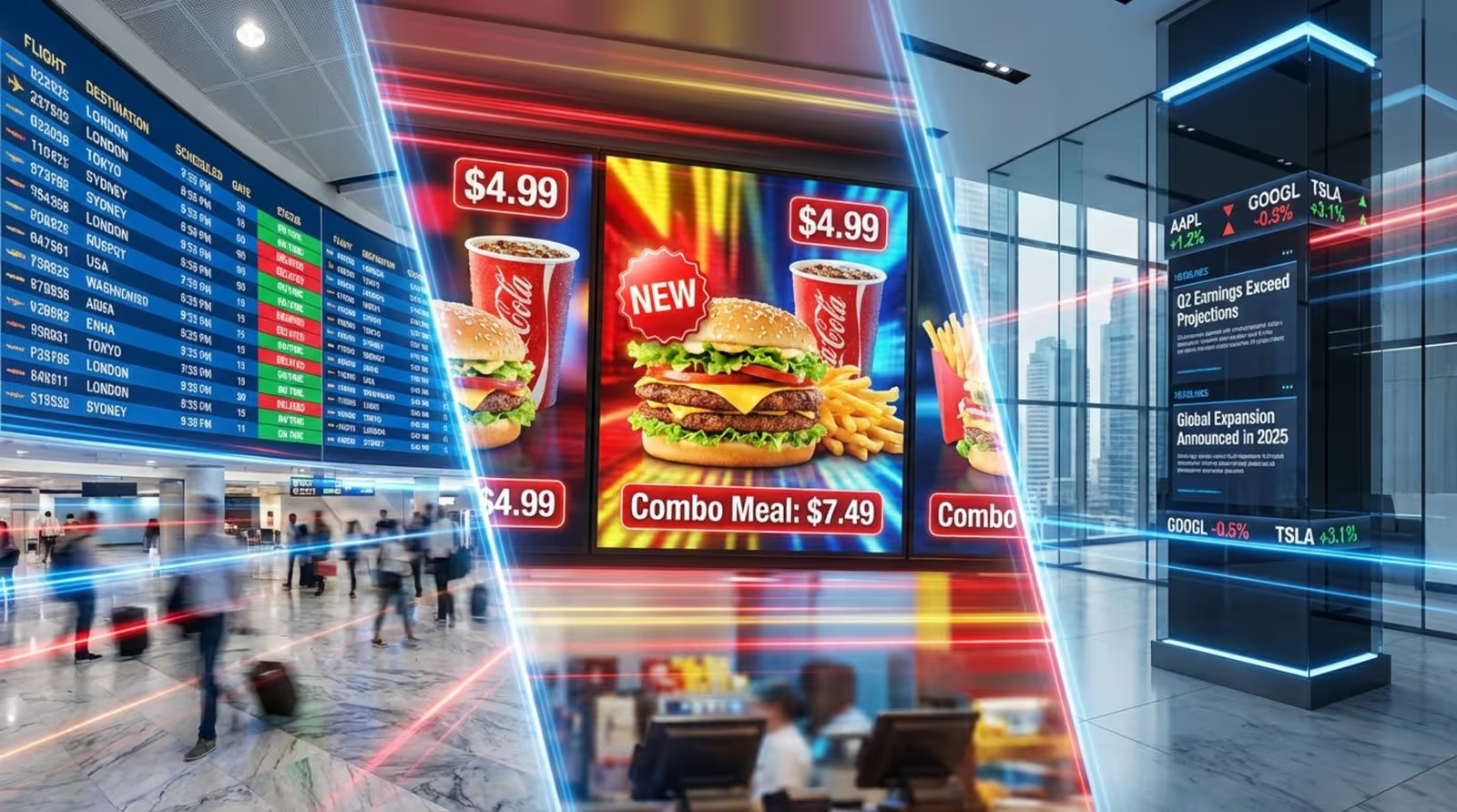
Digital reader boards come in many forms, each suited to different spaces and communication needs. Common types include large screens in places like airports, train stations, and malls, showing scrolling text, images, and video. These displays are built to be easy to read from far away and can be customized to fit the branding of the venue.
There are also more specialized versions:
- Interactive boards: Use touchscreens so people can tap and explore options, get suggestions, or make purchases in retail environments.
- Video walls: Combine several screens into one large display for big visual impact.
- Offline or low-power signs: Such as e-paper displays, useful where power use must be low or networks are limited.
The best type depends on what you want to show, who needs to see it, and where it will be installed. This variety shows how flexible digital reader boards can be.
Key Facts About Digital Reader Boards
Digital reader boards are advanced communication tools built on specific display technologies and control systems. Knowing a few basic facts helps when planning and using them in your organization.
Display Technologies and Components
Most digital reader boards use either LED (Light Emitting Diode) or LCD (Liquid Crystal Display) screens:
- LED screens: Very bright, energy-efficient, and long-lasting. Great for outdoor signs and big indoor displays where strong visibility matters.
- LCD screens: Known for sharp images and high resolution. Often chosen for indoor locations that need detailed graphics, such as menus or dashboards.
Besides the screen, other key parts include:
- Content Management System (CMS): The central software that lets you create, schedule, and manage content from a distance.
- Media player: Integrated or external, it processes the content and sends it to the display.
- Control system: Handles tasks like monitoring, brightness settings, and scheduling so the display keeps working reliably.
Typical Sizes and Formats
Digital reader boards can be very small or very large. You might see:
- Small screens around 32 inches in offices, reception areas, or small shops.
- Medium screens (40-65 inches) in corridors, lobbies, or meeting areas.
- Very large screens over 100 inches or multi-screen walls in large venues and public squares.
Common formats include portrait (vertical) and landscape (horizontal) layouts, single screens, and multi-screen setups that form video walls. The size and format should match:
- How far away people will be when they view it.
- How much information you want to show at once.
- The visual effect you want to create.
Connectivity and Control Options
Modern digital reader boards use flexible connection and control methods. Many systems rely on cloud-based CMS platforms so you can update content from any internet-connected device. This remote control can save a lot of time, especially when you manage many screens in different locations.
Common network options include:
- Wi-Fi
- Ethernet (wired internet)
- Cellular (4G/5G) for remote or outdoor areas
Control tools usually let you:
- Schedule content by time or day.
- Set playback loops and playlists.
- Monitor display status and get alerts if something goes wrong.
Systems can also connect to kiosks, interactive screens, and other signage to form a wider digital network with consistent messaging.
Installation and Maintenance Requirements
Good results with digital reader boards depend on proper installation and regular care. For larger or outdoor screens, a professional installer is often recommended to handle mounting, wiring, network setup, and safety checks.
When planning installation, think about:
- Power outlets and cable paths.
- Network access (Wi-Fi, Ethernet, or mobile data).
- Environment: temperature, humidity, dust, and direct sunlight.
Maintenance needs are usually lower than with printed signs, but still important. Regular tasks include:
- Checking that screens and media players are working.
- Updating software and firmware.
- Refreshing content so it doesn’t feel old or irrelevant.
Many vendors offer service plans, including remote monitoring and support, to keep your boards running well over time.
Benefits and Features That Distinguish Digital Reader Boards
Digital reader boards represent a new way to communicate visually. Their strengths and special features make them stand out compared with traditional notice boards and printed posters.
Advantages Over Traditional Message Boards
Old-style corkboards with printed notices can quickly become messy, outdated, and easy to ignore. Digital reader boards replace piles of paper with moving, colorful content. This kind of display helps attract attention in busy spaces.
Research shows that people process visual content far faster than plain text and remember it better days later. This means messages on digital boards are more likely to stick in people’s minds.
They also tend to save money over time. While buying screens and software costs more upfront than a corkboard, you avoid ongoing printing, paper, and manual posting. They also reduce paper waste, which supports environmental goals. With instant, remote updates, staff no longer need to walk around changing signs by hand, which saves labor and time, especially in large or multi-site organizations.
Interactive and Remote Update Capabilities
A major advantage of digital reader boards is how quickly and easily you can change what they show. Instead of printing new posters or swapping signs, you can open your digital signage software and update content in real time.
This is especially useful for:
- Emergency alerts or safety warnings.
- Flash sales or short-term promotions.
- Menu or schedule changes.
Some boards also support interactive features like touch input, polls, quizzes, or social media feeds. This turns viewers into active participants, allowing them to explore more details, submit opinions, or even complete purchases on the spot.
Centralized remote control is very helpful for brands with many locations. A single team can manage screens across a whole region, keeping messages consistent and up to date.
Customization and Scheduling Options
Digital reader boards can show different content based on who is watching and when they are watching. You can change content by:
- Time of day (morning, lunch, evening).
- Day of the week.
- Location or audience group.
For example:
- A lobby screen might show news and announcements in the morning, recognition messages at lunchtime, and event reminders later in the day.
- A school display can cycle through timetables, club events, and student highlights.
- A store can show new arrivals in the morning and promotions or clearance items in the evening.
Digital signage software usually lets you build playlists, set display times for each item, and control which content appears on which screen. You can also mix text, photos, videos, and animations to keep the display interesting and useful.
Applications of Digital Reader Boards Across Industries
Because they are flexible and easy to update, digital reader boards work well in many different fields. Organizations use them to improve internal communication, guide visitors, and grow customer engagement.
Corporate Communication and Office Use
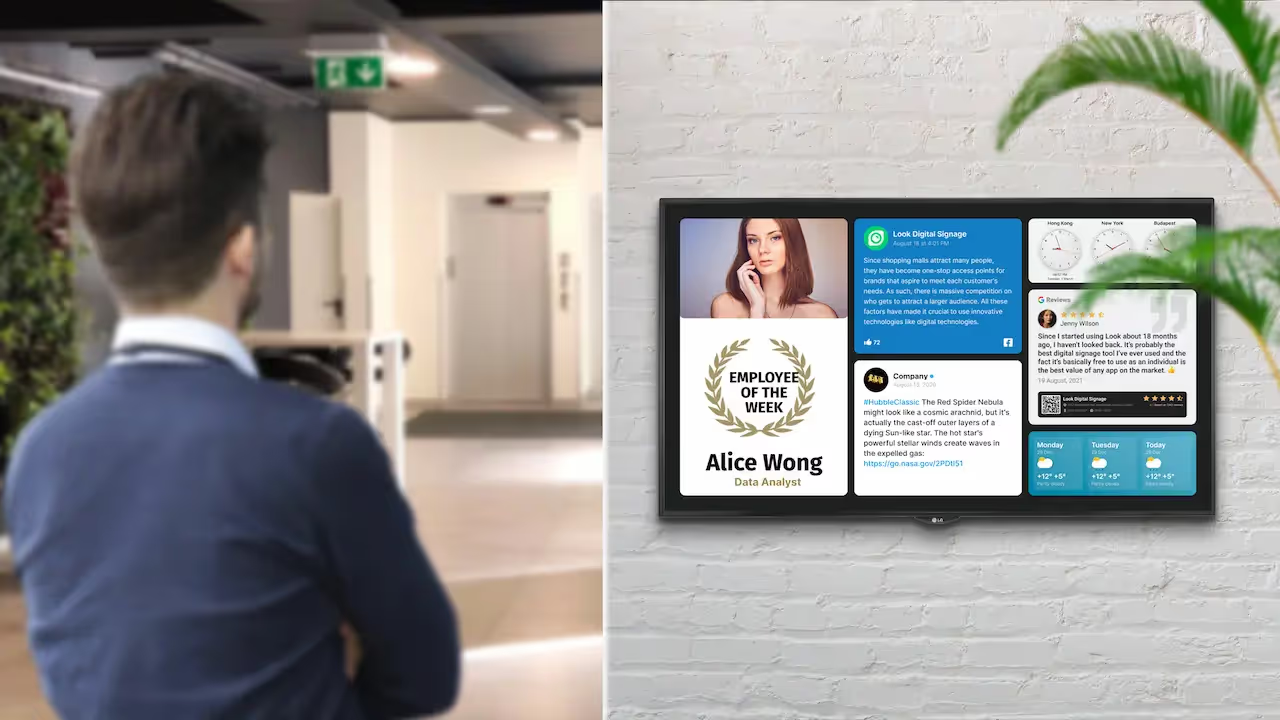
In offices and corporate settings, clear communication helps teams stay informed and aligned. Digital reader boards support this by showing:
- Company news and announcements.
- Employee recognition and milestones.
- Key performance indicators (KPIs) and live dashboards.
- News headlines and social media feeds.
Placed in lobbies, corridors, and break rooms, these screens give staff the same information at the same time, which helps reduce confusion and improves connection to company goals.
Educational Institutions and Schools
Schools, colleges, and universities use digital reader boards to communicate quickly and reduce paper use. Typical uses include:
- Campus announcements and event calendars.
- Student achievements and awards.
- Real-time menu boards in dining halls.
- Digital galleries showing art, projects, or research.
Carleton College, for example, installed flat-screen displays around campus to move away from paper posters. The digital system reduced clutter, cut printing costs, and made it easier to spread information across the institution.
Retail, Hospitality, and Public Spaces
In shops, hotels, and public areas, digital reader boards help drive sales and improve visitor experience. In retail stores, they can:
- Highlight current trends and new products.
- Promote discounts and loyalty programs.
- Offer product details or recommendations on interactive screens.
In hotels and hospitality venues, digital boards can:
- Welcome guests and show check-in information.
- Promote on-site restaurants, spa offers, or events.
- Share local tips and maps.
In public spaces such as transport hubs and city centers, they are used for:
- Directions, wayfinding, and maps.
- Emergency alerts and public safety messages.
- Tourism and brand advertising.
Gas stations and roadside signs can display weather warnings, AMBER Alerts, or community announcements, which helps build trust with local residents.

Healthcare and Medical Facilities
Hospitals, clinics, and medical centers rely heavily on clear, up-to-date information. Digital reader boards support this by showing:
- Appointment schedules and waiting lists in reception areas.
- Health tips, hygiene reminders, and vaccination messages.
- Wayfinding directions inside large facilities.
- Internal notices for staff about shifts, training, or policy updates.
By giving patients and visitors accurate information in real time, these boards can help reduce anxiety and improve how people move through the facility.
Event Management and Transportation Hubs
Event planners use digital boards at conferences, trade shows, and concerts to keep things organized. Common uses include:
- Session schedules and room assignments.
- Speaker profiles and sponsor messages.
- Maps and directions around the venue.
- Last-minute updates or emergency instructions.
Transportation hubs like airports and train stations depend on digital boards for:
- Live flight or train times, gates, and delays.
- Security and boarding information.
- Weather updates and service notices.
- Promotions for shops and services in the terminal.
Restaurants and Food Service
Restaurants, cafés, and fast-food chains were early fans of digital reader boards, mainly for digital menu boards. These allow teams to update:
- Daily specials and seasonal items.
- Prices and combo offers.
- Nutrition and allergen information.
In staff-only areas, screens can show shift schedules, HR updates, and training reminders. Fast menu changes help highlight new dishes or time-limited deals, which can lead to higher sales and a better customer experience.
How to Create a Digital Reader Board
Building a digital reader board is more than just buying a screen. It’s a process that involves planning, content design, setup, and ongoing care. Think of it as setting up a digital channel that speaks directly to your audience. Here’s how to do it step by step.
Step 1: Define the Purpose and Audience
Start by clearly stating why you want a digital reader board. Ask yourself:
- Do I want to inform, educate, promote, entertain, or motivate?
- What specific results am I hoping for (e.g., more event attendance, better staff awareness, more sales)?
For example, a school board might exist to share event reminders and celebrate achievements. A retail board might focus on promotions and driving purchases.
Next, identify your main audience:
- Students, employees, visitors, customers, or the public?
- What information do they care about?
- How much time do they have to look at the screen?
Content that fits your audience’s needs and habits will perform far better than random or crowded displays.
Step 2: Choose the Right Hardware and Location
Once you know your goals and audience, select your hardware and where to place it. Key points for the screen include:
- Size: Large enough to read from the usual viewing distance.
- Resolution: Full HD (1920x1080) is a common and clear choice.
- Brightness: Higher brightness for outdoor or sunlit areas.
- Type: Indoor vs. outdoor-rated, portable stands, or wall/ceiling mounts.
- Extra features: Touchscreen, built-in Android or media player, speakers.
Placement matters a lot. Try to install boards where people naturally pause or pass by:
- Lobbies and entrances.
- Hallways and waiting areas.
- Cafeterias and break rooms.
Mount the display at eye level if possible, avoid glare from windows and lights, and match the content to the location (menus near food areas, safety info near exits, etc.).
Step 3: Select Digital Signage Software
The CMS or digital signage software is the main tool you will use day to day. When choosing one, look for:
- A simple, easy-to-learn interface.
- Pre-made templates you can edit for your industry.
- Remote management via Wi-Fi, Ethernet, or cloud.
- Support for images, video, audio, and live data feeds.
- Scheduling features and playlists.
- Optional extras like interactivity or analytics.
Look Digital Signage Software offer app for many devices and include a free trial period so you can test features before paying.
Step 4: Design and Curate Engaging Content
Content is what your audience actually sees, so it needs to be clear and interesting. When creating ontent:
- Use short, simple text with headlines and bullet points.
- Pick high-contrast colors and large fonts for readability.
- Add motion with videos, slideshows, or subtle animations.
- Stick to a clean layout with plenty of empty space.
Consider adding:
- Real-time content like weather, news, or social media feeds.
- Interactive elements like polls or QR codes linking to more information.
- Clear calls to action (e.g., “Visit our website,” “Register today,” “Ask at reception”).
Update content regularly so people don’t learn to ignore the screen. Tools such as Canva, Google Slides, or the CMS’s bulit-in design tools and digital signage templates can help you create graphics even if you don’t have advanced design skills.
Read also Look DS guide on Best AI Image Generator for Your Digital Signage Content
Step 5: Set Up, Install, and Maintain the Display
Once you have your hardware, software, and content, you can complete the setup. Basic steps include:
- Mount the screen securely or place it on a stand.
- Connect it to power and to the media player (HDMI or built-in).
- Connect the media player to the internet.
- Install your CMS app or connect the device to your CMS account.
- Publish your first content playlist.
After launch, keep an ongoing routine:
- Check screens often for technical issues.
- Review and refresh content on a regular schedule.
- Use any available analytics to see what works and adjust your approach.
Think of your digital reader board as a live channel, not a “set and forget” project. Regular updates keep it relevant and worth watching.
Tips for Maximizing Visibility and Engagement
To get the most from your digital reader board, keep these tips in mind:
- Use variety: Mix text, images, video, and interactive content so viewers don’t get bored.
- Include live elements: Weather, time, news tickers, or social feeds add a sense of “now.”
- Tell simple stories: Use short narratives (before/after, challenge/solution) to make messages more memorable.
- Personalize where possible: Show content aimed at specific groups (students vs. visitors, staff vs. customers).
- Invite participation: Show user photos, testimonials, or event highlights to build a sense of community.
Common Questions About Digital Reader Boards
Organizations often ask similar questions when they think about installing digital reader boards. Here are answers to some of the most common ones.
Are Digital Reader Boards Expensive to Operate?
Many people assume digital reader boards are very costly to run, but this is often not the case. While you do pay upfront for screens, media players, and CMS licenses, the ongoing costs can be lower than print-based communication.
With traditional boards, you pay again and again for:
- Design and printing of posters, flyers, and notices.
- Physical distribution and staff time to put them up and take them down.
Digital reader boards remove most of these repeat costs. Modern LED screens also use less power than older types of displays, helping to keep electricity bills down. Remote updates cut down on labor costs, especially for multi-location setups. When you add in better engagement and the chance to use ad space for revenue, digital reader boards often pay off over time.
Can You Use a TV as a Digital Reader Board?
Yes, you can. A regular smart TV can often serve as a basic digital reader board, especially in small offices, classrooms, shops, or waiting rooms. To do this you usually need:
- A smart TV (Android TV or similar) or a TV plus a streaming device (like Amazon Fire TV Stick or Chromebox).
- A stable internet connection.
- Digital signage software that runs as an app on that device.
Software such as Fugo or Rise Vision supports many consumer TVs and streaming sticks, letting you send content from your browser to the screen.
Dedicated commercial displays do have advantages, including stronger brightness, longer life under 24/7 use, and better support for signage features. But for many smaller projects, using a TV is a practical and budget-friendly way to get started.
How Secure Are Digital Reader Boards?
Security matters for any connected device, and digital reader boards are no different. Most modern systems use several layers of protection, including:
- Encrypted data transfer between the CMS and the media player.
- User accounts with passwords or two-factor authentication.
- Role-based access so only approved staff can edit content or settings.
On the hardware side, you can use locked mounts, secure enclosures, and hidden cabling to protect screens from theft or tampering.
For strong security, choose vendors that focus on data protection, provide regular software updates, and can work with your IT team’s existing network rules and firewalls.
Examples of Successful Digital Reader Board Implementations
Seeing how others use digital reader boards can give you ideas for your own setup. Here are a few real-world examples from different areas.
Educational Case Study
Carleton College wanted to reduce paper posters, cut visual clutter, and modernize its internal communications. The college installed flat-screen digital displays across the campus, turning them into hubs for promoting events, sharing news, and highlighting student success.
This move:
- Lowered printing and distribution costs.
- Reduced paper waste and supported sustainability goals.
- Created a cleaner, more organized look on campus.
- Made it easier to keep students and staff informed with up-to-date content.
Corporate and Retail Success Story
In busy retail and advertising settings, grabbing attention for even a few seconds can be very valuable. KFC’s “First Bite” campaign is one example of using a large outdoor digital reader board to do this. The brand ran a 30-second ad on a huge digital screen to celebrate the experience of tasting their fried chicken.
The size and location of the display made the ad highly visible, creating buzz and interest among passersby. This shows how large-format digital boards can support high-impact campaigns and build brand awareness.
Healthcare Application Example
Hospitals and clinics often face crowded waiting rooms and information overload. A digital board in such a space can show:
- Appointment queues and wait-time estimates.
- Health guidance and tips for common conditions.
- Visitor rules, holiday hours, and cleanliness standards.
- Directions to key departments and facilities.
During busy seasons like holidays, these boards help patients and visitors understand what to expect and where to go. For staff, internal screens can share updates about new hires, training sessions, or procedure changes, helping everyone stay aligned and improving day-to-day operations.
Final Thoughts on Using Digital Reader Boards Effectively
As communication shifts more and more to digital channels, the simple notice board has grown into the flexible digital reader board. This change is about more than switching from paper to pixels. It changes how organizations draw attention, share information, and connect with people in visually busy environments.
Moving from printed posters to digital screens brings many gains: lower long-term costs, less waste, greater control, and real-time updates. Whether you want to connect workers in a corporate office, inform students on campus, attract shoppers in a store, or guide visitors in a public space, digital reader boards offer a powerful, scalable way to do so.
They can show text, images, video, data, and interactive features, all aimed at specific groups and times of day. By using them thoughtfully-with clear goals, good content, and regular updates-you can turn your screens into strong communication tools that help your messages stand out and be remembered.





