


Table of Content
Resort wayfinding with digital signage is a flexible network of electronic screens and interactive kiosks that helps guests move around large, often complicated properties while showing real-time information and personalized content. By swapping static, paper-based maps for high-resolution screens and smart software, resorts can give step-by-step directions, promote on-site amenities, and instantly share important safety alerts. This technology turns the guest journey from a possibly confusing walk into a smooth, modern experience that raises satisfaction and improves daily operations.
Modern resorts are like small cities, often covering several buildings, pools, and activity areas. In this setting, digital wayfinding works like a "virtual concierge," making sure that whether a guest is searching for a certain ballroom, a hidden spa, or the nearest towel station, the answer is always easy to find. It connects the physical property with digital convenience, helping travelers feel "at home" from the moment they enter the lobby.
What Is Resort Wayfinding With Digital Signage?
How does digital signage change wayfinding in resorts?
In the past, wayfinding was a passive process. Guests would gather around a worn wooden map or a printed brochure, trying to figure out where they were in a maze of hallways. Digital signage turns this into an active, responsive experience. Instead of a single static map, digital screens can show 3D property maps that highlight the guest’s current location and display a clear, animated route to their destination. This shift from fixed to dynamic information makes it easier for guests to understand where they are, so they spend less time worrying about directions and more time enjoying their stay.
Digital wayfinding also makes it possible to personalize the experience in ways traditional signs never could. For example, a guest can scan a QR code on a lobby kiosk to send a map directly to their smartphone, then follow a blue-dot navigation route across the resort. This connection means wayfinding is not limited to one screen; it stays with the guest wherever they go and can link with mobile apps and local maps to include nearby attractions and transport options.
Core hardware and software for resort wayfinding
A strong digital wayfinding setup uses commercial-grade hardware and advanced software. Unlike regular consumer TVs, commercial displays are built for 24/7 use, with high brightness and anti-glare coatings so they stay readable in bright lobbies or outdoor pool areas. These screens usually connect to small, powerful media players-the “brains” of the system-that handle high-resolution graphics and interactive features. Some resorts install large video walls in key spaces, while others use compact 10-inch tablets outside meeting rooms to build a clear information structure across the property.
On the software side, a Content Management System (CMS) controls what appears on the screens. Hardware-neutral platforms from providers like 22Miles or ComQi let resort staff update content on hundreds of displays with only a few clicks. The CMS can connect to existing property management systems (PMS) like Opera or event tools like Delphi to automatically show daily schedules, room assignments, and personalized welcome messages. This connection keeps information accurate and helps prevent guests from going to the wrong room for a conference or wedding.

Key Benefits of Digital Signage for Resort Wayfinding
Improves guest navigation and satisfaction
A main goal for any resort is to create a calm, stress-free setting, and getting lost can quickly ruin that feeling. Digital wayfinding makes navigation easier by giving clear, simple directions. Studies show that personalized messages and easy paths can raise guest satisfaction scores by around 20%. When guests can find their own way to the spa, gym, or a specific restaurant, they feel more confident and relaxed.
Interactive kiosks can also do more than point the way; they can help guests discover new things. A guest heading to the pool might see a message about "Happy Hour" at the poolside bar, turning a basic search into a pleasant surprise. This mix of practicality and discovery makes the resort feel more open and friendly, and it encourages guests to visit areas they might have missed.
Reduces staff workload and operational costs
Front desk and concierge teams often spend time answering the same simple questions, such as "Where is the ballroom?" or "When does the restaurant open?" Digital wayfinding kiosks answer these basic questions automatically, so staff can focus on more complex requests and personal service. With self-service directions and information available 24/7, resorts can keep strong support for guests without adding more staff, even during busy check-in times.
From a cost angle, moving to digital cuts ongoing expenses for printing and handing out paper maps, brochures, and event schedules. Traditional signs are costly to update and create waste when plans change. With digital screens, updates are instant and do not involve printing costs. Over time, savings on paper, ink, and labor can be large, helping both profit goals and sustainability targets.
Enables real-time updates and emergency alerts
Resorts are active places where plans can change quickly because of the weather or last-minute updates. Digital signage lets managers send changes across the entire property in seconds. If bad weather moves a poolside yoga class indoors, that update can appear on every screen right away. This quick response keeps guests from relying on old information, which is a common problem in big hospitality spaces.
During an emergency, digital signage becomes an important safety tool. The system can instantly stop all normal content and show bold, clear instructions, such as evacuation routes, shelter-in-place notices, or health and safety messages. Because these screens sit in busy spots, they are one of the fastest ways to reach many guests at once, cut confusion, and help keep people safe.
Drives engagement and strengthens resort branding
Digital signage also supports branding by repeating the resort’s visual style. Using on-brand templates, consistent colors, and high-quality images, the screens help create a clean, modern look. Whether the property is a small boutique hotel or a large casino resort with more than 600 screens, the digital network keeps the brand voice clear from the lobby to the elevators.
Engagement grows when resorts show social media feeds, guest reviews, and lively videos of on-site activities. Seeing live Instagram posts of other guests enjoying a sunset cruise or a special spa treatment creates a sense of community and “FOMO” (fear of missing out), which often leads to more bookings for those experiences. In this way, signage becomes more than just a tool for directions-it becomes a storytelling channel that highlights the resort lifestyle.
Most Effective Resort Locations for Digital Wayfinding Displays
Lobby and reception zones
The lobby shapes the guest’s first impression, making it the most important place for digital signage. Large screens or interactive kiosks in the reception area can greet guests by name, show an overview of the property, and offer self-service check-in options to cut wait times. This is an ideal place for a "Concierge Board" that shows local attractions, weather forecasts, and the main events of the day, setting expectations for a tech-friendly stay.
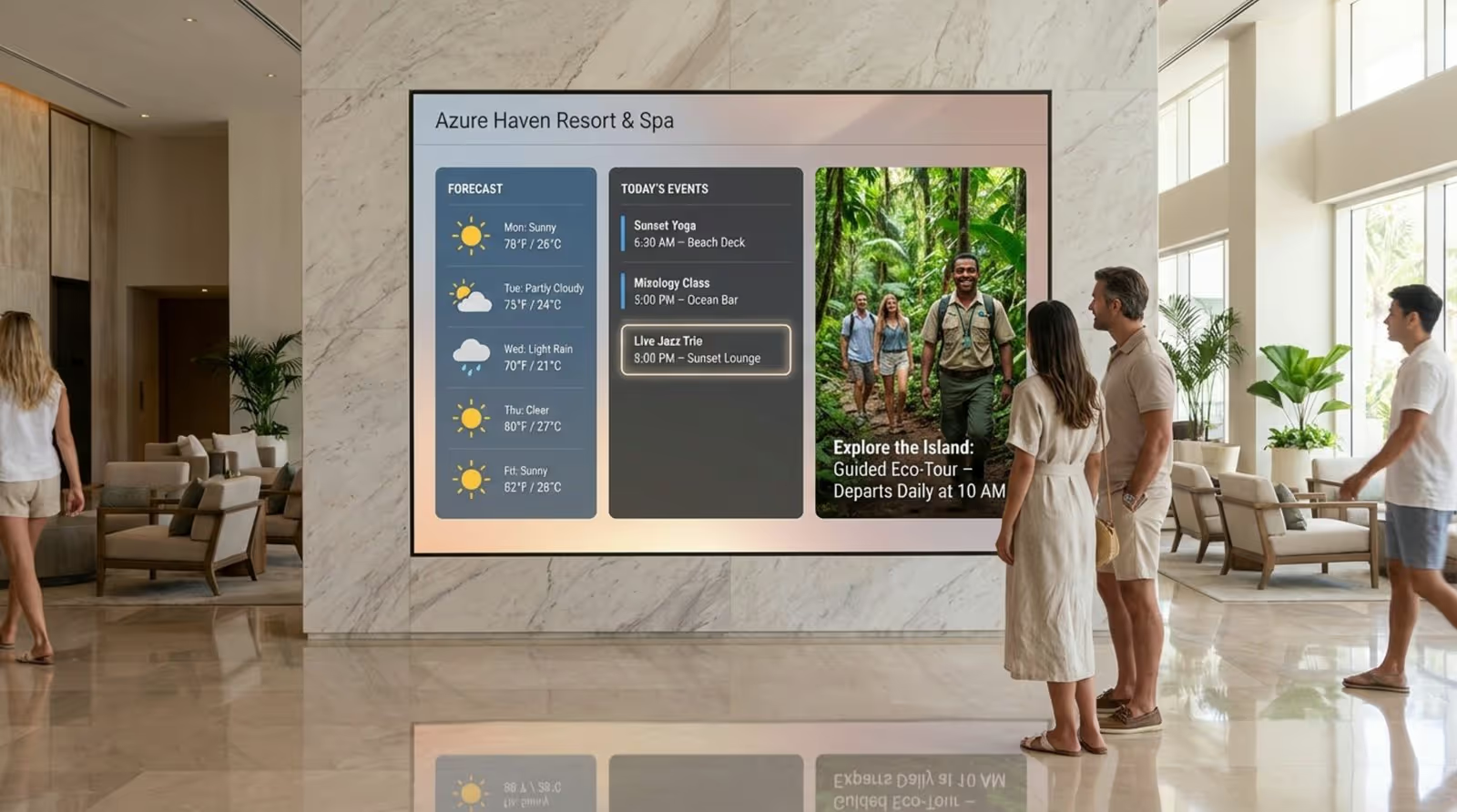
Well-placed lobby screens can also support arrivals and departures. For resorts near airports or transit centers, showing live flight updates or shuttle times is very helpful for guests getting ready to leave. By giving this information on where guests enter and exit, the resort shows care for the guest’s whole trip, not just the time spent on-site.
Elevators, corridors, and intersections
Elevators and hallways are often ignored, but they offer valuable chances to share information because guests are already standing and waiting. Small screens in elevators are perfect for short messages like daily specials or loyalty program reminders. Since the viewing time is brief, the content here should be simple, clear, and easy to read in a few seconds.
Corridor intersections are the “decision points” of a resort. Directional displays at these junctions help guests confirm they are going the right way to their room or a certain amenity. These signs should use clear fonts and high-contrast arrows for good readability from a distance. By adding frequent “you are on the right path” signs, the resort reduces the stress of wandering through long, similar-looking hallways.
Event spaces and meeting rooms
For resorts that host conferences, weddings, and company events, digital signage around event spaces is key. Small "room signs" (usually 10 to 15 inches) outside meeting rooms can show the current event name, that room's daily schedule, and even the expected headcount. This replaces paper inserts and helps attendees find their sessions quickly.
Larger "Reader Boards" in pre-function areas can show the full day’s schedule across all ballrooms. When linked with event management software, these boards update automatically as sessions start or end. For private events like weddings, content can be customized with photos of the couple or personal welcome notes, adding a custom touch that planners and guests really appreciate.
Restaurants, bars, and amenity areas
Digital menu boards in resort restaurants and cafes allow instant changes to daily specials, prices, and out-of-stock items. High-quality photos of signature dishes can increase appetite and spur extra orders. Beyond menus, screens in dining areas can promote upcoming theme nights, wine tastings, or live music, helping fill seats during slower times.
In fitness centers and spas, digital signage can inform and inspire. Gyms can show class schedules and trainer profiles, while spas can display calming visuals and details about top treatments. By sharing this information right where guests are already thinking about wellness and relaxation, the resort raises the chances of extra bookings.
Outdoor spaces and recreational facilities
Outdoor digital signage needs special, weatherproof hardware with very bright screens to handle direct sunlight. These displays work especially well near pools, golf courses, and beach clubs. They can show pool hours, safety rules like “No Diving,” and schedules for outdoor events such as water aerobics or kids’ games.

Outdoor screens are also useful for promoting food and drink offers at the tiki bar or advertising upcoming excursions. By keeping guests informed while they relax outside, the resort helps them see all available options, even when they are away from the main building. This extends the digital experience across the entire property.
Popular Uses for Wayfinding Digital Signage in Resorts
Interactive property maps and directions
The most common use of digital signage in resorts is the interactive property map. These touchscreens let guests search for places such as “Room 402” or “The Blue Lagoon Pool” and then show a highlighted route from where they are standing. More advanced systems offer 3D maps that guests can rotate and zoom to view different floors or buildings, giving a clearer idea of the layout than a flat paper map.
To improve ease of use, these maps often include “Quick Access” buttons for common locations like the lobby, main restaurant, or exit. This gives fast, one-tap navigation. Many resorts also offer a “Take it with you” option, where guests scan a QR code to open the map and directions on their own phone through Google Maps or a resort app.
Event schedules and meeting room assignments
Managing the flow of hundreds of attendees is a big job for resort teams. Digital signage makes this easier by showing real-time event schedules that are simple to find and read. When connected to tools like Delphi or Momentus, the screens can pull data directly from event planners, so any last-minute room changes appear right away across the property.
These schedules are helpful beyond business events. For families on vacation, digital boards can show daily “Kids’ Club” activities, movie times, or live entertainment schedules. By putting all this information in clear, central locations, the resort becomes easier to use for every type of guest, no matter why they are staying.
Promoting amenities, dining, and activities
Digital signage is a strong tool for increasing sales. With vivid videos and appealing photos, resorts can show off spa services, dining options, and unique experiences to guests who are already on-site. A display by the elevator might loop a short clip of a relaxing hot stone massage, while a lobby screen highlights a sunset dinner package. These subtle prompts are more effective than static posters and can raise bookings for on-site services.
Time-based promotions are another advantage. A resort can set “Happy Hour” ads to show only between 4:00 PM and 6:00 PM, or promote breakfast deals in the morning. This timing keeps the content in sync with what guests are most likely to want at that moment, making each message more effective.
Safety information and emergency procedures
Beyond daily guidance, digital signage plays a key role in safety. Screens can show standard rules, such as pool depth warnings or fire safety tips, in a more engaging way than simple printed notices. During a real emergency, turning every screen into a clear instruction guide can greatly improve response and reduce confusion.
For resorts in areas with frequent storms, hurricanes, or heavy snow, signage can show live updates from local weather services. Guests stay informed and calmer when they can see what is happening and what steps the resort is taking to protect them. This helps build trust and shows that guest safety is a top priority.
Concierge services and virtual guest assistance
Interactive kiosks can act as a "Virtual Concierge," giving guests details on local tours, nearby restaurants, and transport options without waiting in line. Guests can scroll through a list of points of interest, view menus, and even book tickets right on the screen. This self-service style is popular with tech-savvy travelers who prefer to explore information on their own.
Some resorts go further by adding AI assistants to their digital signage. These assistants can answer common questions through voice or touch, such as "What time is checkout?" or "Where can I find gluten-free options?" This responsive, interactive service helps guests feel supported even when staff are busy helping others.
Designing Engaging Wayfinding Content for Resorts
Custom visuals aligned with resort branding
For digital signage to work well, it should look like a natural part of the resort’s design. That means following the property’s visual style closely, including brand colors, fonts, and logo placement. Using generic, off-the-shelf layouts can make the system feel out of place and cold. Instead, resorts should use custom content that matches the quality and feel of their physical spaces.
Good photography and video are key. Showing real images of the resort’s rooms, pools, and signature dishes, rather than stock photos, builds trust and authenticity. When what appears on the screens matches what guests see around them, digital signage adds to the feeling of quality and attention to detail.
Optimized readability and accessibility
Digital signage is only helpful if people can read it quickly and easily. Designers should focus on large, clean fonts and strong contrast (for example, dark text on a light background or the reverse). Thin or overly fancy fonts should be avoided, as they can be hard to read from a distance or for guests with limited vision. Information should be arranged clearly, with key details, like room names or directional arrows, standing out the most.
Accessibility also covers where and how screens are installed. Interactive kiosks should be mounted at a height that guests in wheelchairs can reach. The user interface should be simple, with large, easy-to-tap buttons and a straightforward menu layout that does not send users through many layers just to find a basic map.
Multilingual support and international guest needs
Because resorts often welcome guests from many countries, multilingual support is very helpful. Digital signage can rotate through several languages on the same screen or let users pick their preferred language on a touchscreen. This small feature can make international visitors feel more comfortable and reduce confusion that might hurt their experience.

Beyond direct translation, designers should also use universal icons and symbols for common features like restrooms, elevators, and exits. These simple images are widely understood and speed up navigation for everyone. Showing key safety and directional messages in more than one language at the same time is another good practice for a more inclusive setup.
Balance of directional and promotional content
While digital signage can help drive sales, its main job in wayfinding is to help guests get where they want to go. If screens are crowded with ads, the helpful information can get buried. A good approach is to keep a clear split-such as using most of the screen (around 70%) for maps or schedules, and the remaining space for rotating promotions.
Another method is to use short “in-between” segments, where a short promotional video plays for 30 seconds, followed by a 15-second map or “You Are Here” view. This keeps the screens useful and informative while still supporting marketing goals. When promotions stay relevant and low-pressure, guests see them as helpful tips rather than aggressive advertising.
Common Mistakes and How to Avoid Them
Placing signage in low-visibility areas
A frequent mistake is putting expensive digital displays where guests barely notice them. A screen hidden behind a column or stuck in a dim corner will get little use. To avoid this, resort managers should walk the property like a guest and look for natural sight lines and spots where people tend to pause, such as near elevators or at the entrance to a restaurant wing.
Lighting also matters. Reflections from windows or strong overhead lights can wash out a screen and make it hard to read. Using bright, anti-glare commercial displays is a good start, but installers should also adjust the angle of the screen to reduce glare at different times of day. If people cannot see the screen clearly, it brings little value.
Information overload on displays
Trying to share too much on one screen is another common problem. Overloaded content leads to tiny text and busy layouts that overwhelm guests. A useful rule is the “rule of three”: limit each slide to about three main points or directions. Use bullet points and plenty of empty space so each message stands out and can be grasped in a second or two.
For interactive kiosks, menu structures should stay shallow. If a guest must tap through many layers just to find the pool map, they may give up and ask staff instead. Keep the most requested items-maps, hours of operation, event lists-on the home screen, and label buttons in clear, everyday language.
Failing to update content regularly
Few things frustrate guests more than following a digital sign to an event that has already ended or to a restaurant that is closed. Letting content go out of date quickly lowers trust in the system. To prevent this, resorts should set a content schedule and assign clear responsibility for managing updates.
A CMS with automation tools can help a lot. For example, campaigns can have start and end dates so they disappear on their own after a promotion ends. Tying signage directly to live property databases, such as event calendars, lets information update automatically without manual work.
Neglecting hardware maintenance and security
Digital signage is a long-term investment that needs upkeep. A blank screen or glitchy display looks unprofessional and may signal technical or security problems. Resorts should follow a simple maintenance routine, including cleaning touchscreens, checking for damage, and keeping media players on current software and firmware versions.
Network security is equally important. Many digital signage systems are cloud-based and connected to the resort network, so they should be protected with strong firewalls and access controls. Using commercial-grade hardware and trusted software vendors helps keep the system secure and prevents unwanted content from appearing on screens.
Measuring Success: Evaluating the Impact of Digital Wayfinding
Key performance indicators for guest engagement
To support investment in digital wayfinding, resorts should track results through clear Key Performance Indicators (KPIs). For interactive screens, “Interaction Counts”-how many times guests touch the screen or tap a specific menu-show how much people are using the system. If a certain map or menu gets hundreds of taps each day, the system is clearly helping guests.
Other helpful KPIs include “Dwell Time” (how long guests look at a screen) and “Conversion Rates” for offers. For example, if a screen promotes a spa discount with a QR code, the resort can track how many people scan that code and then book a treatment. This makes it easier to connect digital signage directly to revenue.
Collecting feedback and usage analytics
Numbers alone do not tell the full story. Direct feedback from guests also matters. Resorts can add simple “Rate this experience” buttons or short surveys on kiosks to collect quick opinions about how clear and useful the wayfinding is. This feedback helps identify parts of the interface or content that may be confusing.
Most modern CMS platforms include analytics dashboards that show which routes are used most on maps and which pages get the most views at different times of day. By studying these patterns, managers can better understand guest behavior. For instance, if many guests search for the gym early in the morning, the resort can highlight the gym’s location and hours on lobby screens during that time frame.
Adapting strategy based on data insights
Data should lead to real changes. Resorts should review analytics and feedback regularly and adjust their digital signage plans accordingly. If a promotion does not drive clicks or scans, the design, timing, or offer might need to change. If guests keep asking staff for a location that already appears on the map, the map’s layout or labeling might need a redesign.
Keeping this ongoing cycle of measuring, reviewing, and adjusting helps the digital wayfinding system grow along with guest needs. Over time, the signage becomes an active part of resort operations, improving its ability to guide, inform, and delight visitors.
Future Trends in Resort Wayfinding With Digital Signage
Integration with mobile devices and guest apps
The future of resort wayfinding points to a “phygital” model, smoothly joining physical screens with mobile experiences. The goal is for a guest to start a route on a lobby kiosk and then instantly continue it on their phone. This gives guests turn-by-turn help even in areas without fixed screens, such as gardens, pathways, or distant villas.
Tools like 22Miles’ “Carry2Mobile” are already moving this idea forward. By using QR codes or NFC (Near Field Communication), resorts can send guests a personal, mobile-friendly map without asking them to download a large app. This “no-download” convenience is popular with guests who want quick access to information with minimal effort.
AI-driven personalization and dynamic directions
Artificial Intelligence (AI) will open the door to highly personalized digital signage. By using data from previous stays or current bookings, a smart kiosk could recognize a returning guest and automatically suggest their usual restaurant or give the fastest route to the tennis court they booked earlier. This kind of “anticipating needs” service matches the expectations of modern luxury travelers.
AI can also update routes based on what is happening around the property right now. If a corridor is closed for cleaning or an elevator is offline, the system can instantly redirect guests to another route. This keeps directions accurate and practical at all times and pushes the real-time value of digital signage even further.
Touchless and gesture-based interfaces
Health concerns and convenience are encouraging more touch-free options. Future digital signage is likely to use gesture control, letting guests move through a map with hand motions or voice commands. A guest might simply say, “Show me the way to the Italian restaurant,” and the map will appear with a clear route.
Another touchless method is mobile control. Guests scan a QR code to use their own phone as a remote for a larger screen. They can browse menus or explore a 3D map on the big display while tapping only on their personal device. This setup combines the impact of a large screen with the comfort of using one’s own phone.
Sustainable and energy-efficient display technologies
As more resorts focus on eco-friendly practices, digital signage technology is becoming more energy-efficient. New LED and OLED displays use less power than older models and include “Smart Brightness” sensors that dim the screen at night or in darker spaces. This lowers energy use and extends hardware life.
Software scheduling features let resorts turn screens off or shift them into low-power “sleep mode” late at night when guest traffic is low. These habits reduce costs and appeal to eco-conscious travelers who care about a property’s environmental impact. Digital signage shows that high-tech service and responsible energy use can go hand in hand.
Looking ahead to the mid-2020s and beyond, digital signage will play an even larger part in resort operations. It is no longer just a way to point people around; it helps shape the overall feel and identity of a destination. By carefully blending these systems into both the building design and service approach, resort operators can help make every guest journey as memorable as the destination itself. Whether through creative video walls that build a unique mood or smart navigation powered by AI, digital signage is becoming the central nervous system of the modern, connected resort.





