


Table of Content
In today's busy corporate environment, where information spreads quickly and employee expectations keep changing, simply sending out messages is no longer enough. The question is not just, "Can digital signage improve employee experience?" but, "How much can it really change it?" The answer is: a lot. Digital signage for employee experience is more than a screen on the wall; it is an active communication channel that helps engage, inform, and motivate your staff. It uses electronic displays to share many types of messages directly with employees, whether they are in break rooms, meeting rooms, common spaces, or checking content on their own devices. This method moves beyond traditional, easy-to-miss communication and helps create a more lively, connected, and productive workplace.
What is digital signage for employee experience?
Digital signage for employee experience is the planned use of digital screens in the workplace to share important content in a clear and visually appealing way. These displays are powered by digital signage software and act as central screens for company news, social media feeds, real-time updates, emergency alerts, and more.
Think of it as a modern, constantly updated bulletin board that can be changed within seconds and adjusted for specific groups of people. You can place it in corporate lobbies, break rooms, factory floors, warehouses, and office meeting rooms. The main goals are to improve internal communication, raise employee engagement, and build a workplace where people are better informed and feel more connected.
Why employee experience matters in the workplace
Employee experience has gone from being a trendy phrase to a key factor in organizational success. With trends like "quiet quitting" and the "Great Resignation," more companies see that a strong employee experience is not just a bonus, but a basic need. It means building a workplace where people feel respected, listened to, and linked to both their daily tasks and the organization's purpose.
A good employee experience is more than simple job satisfaction; it helps create a sense of belonging and meaning. When people truly enjoy their work and feel supported, the whole organization benefits. It is a smart investment that brings returns in many areas, from higher productivity to a stronger company culture.
Impacts on engagement and retention
There is a clear link between a positive employee experience and higher engagement and retention. Engaged employees are not just clocking in and out; they are emotionally and mentally involved in their work and the company's success. They are usually more motivated, more productive, and more loyal. Many are even willing to put in extra time without feeling overwhelmed, and they tend to offer new ideas and communicate better with colleagues.
On the other hand, disengaged employees can hurt performance and profit. Studies show that many employees are not engaged at work, which leads to higher turnover. Replacing staff is expensive-often around 150% of a person's yearly salary when you include training, hiring efforts, and lost productivity. By improving employee experience, companies can cut turnover costs, keep high performers, and build a more experienced and stable team.
Benefits for organizational culture and communication
Good employee experience strongly shapes company culture and internal communication. When the experience is positive, people cooperate more, work more smoothly together, and achieve goals faster. Happy, trained employees are also better with customers, which helps improve customer service, satisfaction, and loyalty to the brand.
Open communication between leaders and staff is also a key part of success. Keeping everyone informed, especially when things change quickly, supports transparency and reduces confusion. Digital signage helps with this by sharing business news, updates, and key milestones in a clear and visible way. This lifts morale, builds excitement, and helps create a strong, recognizable company culture.
How digital signage improves employee experience
Digital signage is not just a piece of modern equipment; it is a powerful communication tool that can raise the quality of employee experience. By changing how information is shared and viewed, it helps people feel more informed, more connected, and more appreciated. Here are the main ways it does this.

Improving internal communications
One of the biggest advantages of digital signage is the way it changes internal communication. In many workplaces, important messages get lost in crowded inboxes or on noticeboards that no one checks. Digital signage cuts through this clutter. It offers a clear, visible channel for key information and helps everyone see the same message at the same time, which supports openness and reduces confusion.
HR and communications teams can use digital signage to share policy updates, event reminders, training offers, and more-without sending more emails that people may ignore. Because messages appear instantly and where people actually look, information flows better. Staff stay aligned with company goals and change communication, and this steady, timely flow helps build trust and shared understanding.
Increasing employee engagement and motivation
Digital signage is a strong tool for raising engagement and motivation. By sharing lively, real-time content that feels relevant, it helps employees feel closer to their workplace. Companies like Coca-Cola and Nike already use digital signage to support fun, positive work environments and increase morale.
The visual appeal of digital screens-with photos, motion graphics, and short videos-draws more attention than plain text. This format helps people absorb information more easily. Digital signage can also share stories, updates, and content created by employees, which supports a feeling of community and shared goals.
Encouraging real-time information sharing
In today’s fast-moving work settings, being able to share information in real time is extremely valuable. Digital signage is strong in this area. It can show instant updates that matter in active environments, such as dashboards, project status, or industry headlines. Employees can stay updated without reading long emails or waiting for meetings.
This is especially helpful for operational messages such as schedule changes, IT downtime, or urgent alerts. Because the messages on digital displays are consistent and up to date, everyone sees accurate information. This quick communication lowers risk in time-sensitive moments and keeps the workforce alert and ready to act.
Recognizing achievements and celebrating milestones
Employees who feel unseen or unappreciated may lose motivation quickly. Digital signage gives you a strong way to recognize people in public and build a culture of thanks and encouragement. You can celebrate wins with the whole company by showing work anniversaries, promotions, or "Employee of the Month" posts.
You can also highlight project completions, birthdays, and simple thank-you messages. Showing photos and names helps people across different locations recognize one another, which supports a sense of community. This frequent, visible recognition helps people feel valued, which is especially important for younger staff used to quick feedback in their daily lives.
Promoting workplace culture and core values
Digital signage helps build a sense of community and belonging, which supports a positive company culture. It offers a steady place to repeat and reinforce core values and the company mission, as well as department and organization-wide goals. When combined with strong visuals, these messages can feel more real and meaningful.
For example, you can share pictures from charity work, updates on sustainability programs, or stories showing how people live the company values. You can highlight diversity and inclusion efforts, team spotlights, or "On this day in our company" stories. By showing culture-related content often, digital signage helps build a united, inspired environment where people feel part of something bigger.
Key use cases of digital signage in the workplace
Digital signage is flexible and can support many parts of the employee journey. It can welcome new hires, support daily work, and keep people safe. Here are some of the most common and useful ways to use it.
Onboarding and training
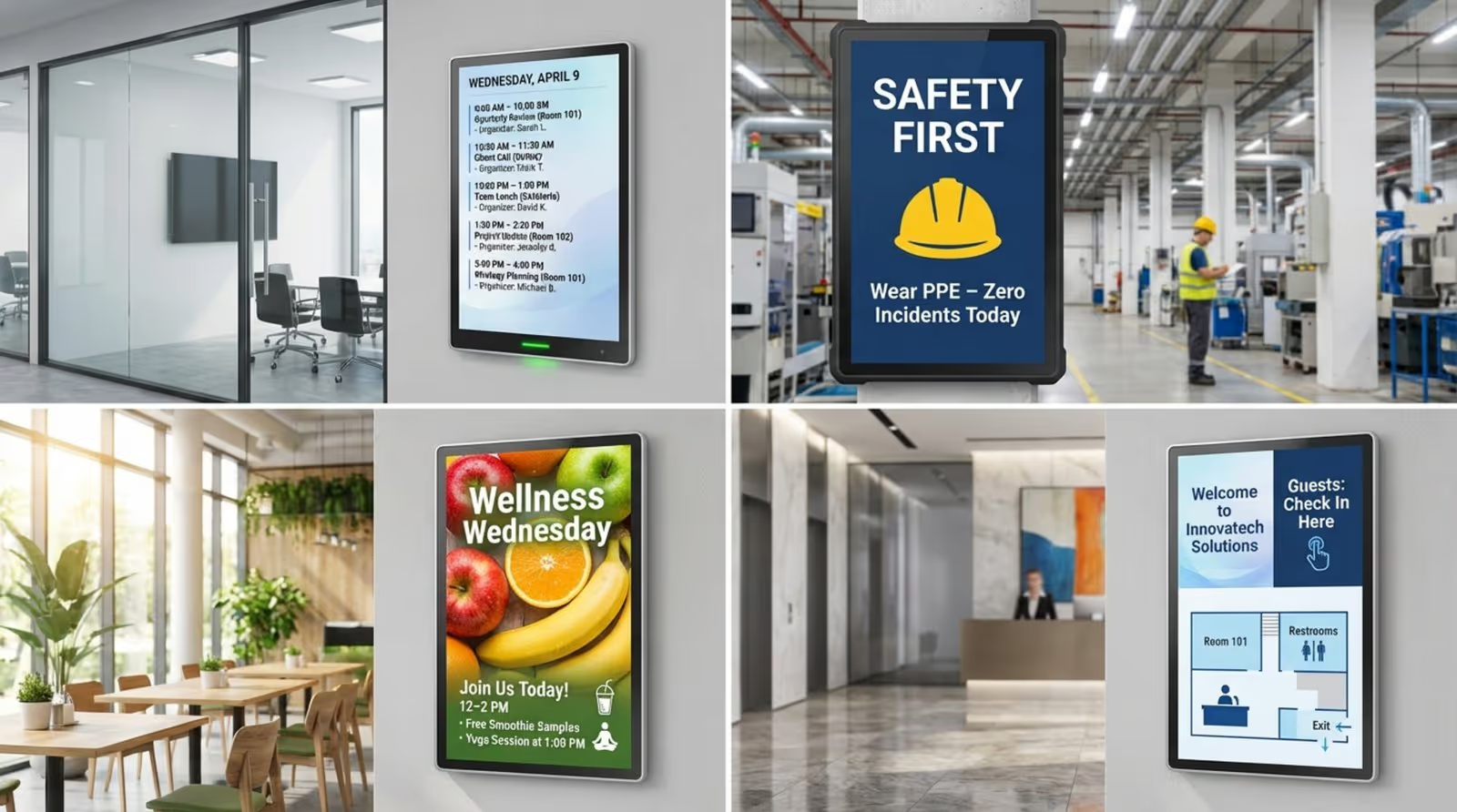
Digital signage can make onboarding smoother and more welcoming. New employees can be introduced on screens with their photo and a short bio, helping others recognize them and say hello. It can also show building maps, department charts, and key policies, helping new hires settle in faster and feel less overwhelmed.
For ongoing training, digital signage is a strong support tool. It can advertise workshops, courses, and e-learning options, and show links or QR codes to training videos and resources. Research shows that people often learn and remember information better when it is presented visually. Short, visual content on screens can make learning easier and more memorable than long brochures or plain newsletters.
Company announcements and updates
Keeping staff informed about news and changes is important for engagement and openness. Digital signage gives you a quick and visible way to share announcements, such as leadership updates, new product launches, changes in policy, or project milestones.
For time-sensitive messages, screens are often more effective than email because they stand out more than a message buried in an inbox. Printed posters go out of date quickly, but digital screens can be updated right away, so people always see the latest information. This keeps everyone aligned and cuts down on confusion and rumors.
Health, safety, and compliance reminders
In workplaces like factories, warehouses, and labs, safety is a top priority. Digital signage is very useful for promoting health and safety and for supporting compliance. It can show emergency alerts, PPE reminders, or wellness program messages in a clear and eye-catching way.
Because content can be updated right away, you can quickly reflect new health rules, safety instructions, or hazard warnings. Screens near high-risk areas can loop short messages like "Wear safety goggles" or "Report spills now." Bright visuals and motion make these reminders easier to remember. You can also show contact details for reporting issues and encourage staff to speak up about unsafe conditions.
Event and meeting room schedules
Digital signage makes it easier to manage meeting rooms and events. Screens outside meeting rooms can show who booked the room, how long the meeting will last, and when the room will be free again. When connected with tools like Outlook or Google Workspace, the information stays accurate and automatic.
This helps employees find available space quickly and use rooms more efficiently. Screens in common areas can also promote events, webinars, or training, and even show countdowns to launches or team-building days, making it easier for everyone to stay involved.
Emergency alerts and timely notifications
One of the most important roles of digital signage is sharing information during emergencies. In cases of extreme weather, security issues, or evacuation, screens can show clear instructions and exit routes right away.
Because these messages appear instantly and are highly visible, people can react faster than they would to an email or message that might not be checked in time. In factories, screens can warn workers of hazards or shutdowns, while in schools they can guide students and staff during critical events. This speed and visibility make digital signage a key tool for protecting people’s safety.
What to think about before implementing digital signage for employees
Setting up digital signage is more than just installing screens. It needs proper planning so that it truly supports employee experience. Before you start, you should plan how it will fit into your communication approach, technology stack, and budget.
Aligning digital signage with communication strategy
The first step is to match your digital signage plans with your wider internal communication strategy. It should work alongside other channels, not sit on its own. Start by clearly defining what you want digital signage to achieve. Do you want to improve engagement, share information faster, celebrate staff, support change, or some mix of these?
Clear goals will guide choices on content, screen locations, and tools. When everything is aligned, your messages will be consistent and relevant. For example, if your company focuses on sustainability this quarter, your screens should highlight that theme and support your newsletters, intranet content, and employee app messages.
Identifying target employee groups and touchpoints
Different employees need different messages. Effective digital signage depends on giving the right content to the right people at the right time. Identify who needs which information and where they are most likely to see it. Think about job roles, work patterns, and locations.
Digital signage lets you segment your audience. Factory staff may see real-time production data, while office staff see HR reminders or project updates. Placing screens in busy spots like lobbies, cafeterias, break rooms, near elevators, or in warehouses helps more people see them. Also think about remote staff: desktop widgets, mobile apps, or web-based signage can bring similar content to people working from home.
Selecting hardware and software solutions
Good results depend on choosing the right screens and software. For hardware, you can use standard TVs, but commercial digital signage screens are often brighter, more durable, and better suited for long use. Consider size, brightness (especially for bright areas), resolution, and whether you need touch interaction.
For software, choose digital signage software that connects smoothly with your existing tools, like your intranet, email platform, or employee app. Look for features such as:
- Central content management
- Automatic scheduling and playlists
- Branding options (logos, fonts, colors)
- Support for different media types
- Scalability for more screens or locations
Ease of use is key. Non-technical staff should be able to create and update content without heavy training.
Integration with existing tools and data sources
To get the most value, digital signage should connect to your existing business tools and data. This allows screens to show live information from your systems instead of requiring manual updates. For example, metrics from your CRM, ERP, or order management systems can appear as live dashboards.
It can also pull in social media feeds, news headlines, or alerts from messaging tools. A platform that can publish content to several channels-screens, apps, intranet-helps keep messaging consistent across the organization and reduces the work of managing multiple systems.
Budgeting for digital signage investment
Digital signage brings long-term benefits, but it does need upfront and ongoing spending. Costs usually include:
Cost TypeExamplesHardwareScreens, wall mounts, media players, cablingSoftwareLicenses or subscriptions, hosting, integrationsMaintenanceSupport, repairs, replacements, updatesContentDesign time, video production, writing, templates
While the initial spend may look high, better communication, lower printing costs, higher productivity, and improved retention often offset it over time. A cost-benefit review can help you justify the project and plan the right scale and pace of rollout.
Keeping content relevant and updated
Content is the core of your digital signage project. Even the best screens and software will fail if the content is boring, outdated, or irrelevant. A common mistake is leaving the same slides up for weeks or months. When that happens, people stop paying attention.
You need a plan to update content regularly. Adapt messages to different groups and locations so the information is always useful and interesting. Combine types of content, such as:
- Company news and announcements
- KPIs and performance dashboards
- Employee recognition and birthdays
- Event promotions and social activities
Use visuals like images, videos, charts, and icons to grab attention and make complex ideas easier to understand. Assign clear responsibility for content planning, creation, and approval so the system stays active and relevant.
Best practices for digital signage content in the workplace
Once your screens and software are set up, content is where the value appears. The goal is not just to fill the screen, but to share messages that people notice, understand, and remember. These practices can help.
Planning consistent and engaging content
Strong digital signage content is both consistent and interesting. Think of your screens as telling an ongoing story through the day, week, and quarter. Build a simple content calendar that aligns with company goals, seasons, campaigns, and key events.
Avoid overloading screens with too much information. Focus on a small set of clear messages and repeat them in different ways rather than cramming everything into one loop. Use several short playlists and refresh visuals often-even small changes can keep screens feeling alive. High-quality images, animations, and short videos help catch the eye and make content more memorable.
Incorporating interactivity and feedback
Modern digital signage does not have to be a one-way channel. Adding interactive elements can make employees active participants. Examples include:
- Showing social media posts or internal chat highlights
- Displaying employee photos, ideas, or stories
- Using QR codes to link to surveys, forms, or intranet pages
- Sending quizzes or simple games to personal screens for training
If people scan QR codes, answer polls, or complete quizzes, you can measure that interaction and see how effective your content is. This also helps you prove the value of your digital signage program.
Personalizing messaging for audience segments
Digital signage works best when content feels relevant. Instead of sending the same message to everyone, use audience targeting to show different content on different screens. For example:
- Sales areas: current sales numbers, leaderboards, campaign updates
- Production: output figures, quality stats, safety reminders
- HR areas: benefits updates, wellness tips, policy reminders
Localization matters too. Content should reflect local language, customs, and interests. For instance, screens in one office could highlight local charity events or transport changes. This personal touch helps people feel that the communication speaks directly to them.
Maintaining transparency and building trust
Honest, open communication supports trust, and digital signage can help with that. Employees want to know where the company is heading, how it is performing, and what changes are coming. Screens are a good place to share mission statements, progress updates, and plans in a clear way.
Anything you would usually post on your intranet-such as major internal news or policy changes-can also appear on screens. Sharing key news on internal channels before it appears in public shows respect for staff. Keep messages consistent across all channels so people receive the same story wherever they look.
Showcasing company goals and real-time metrics
Digital signage is well-suited to showing goals and live performance data. You can display dashboards with KPIs, charts, and progress bars that show how teams and projects are doing. This can include metrics such as sales, quality scores, service levels, or safety days without incidents.
When performance is strong, it boosts morale. When goals are behind, it can prompt action and cooperation. You can also add gamification elements, such as leaderboards or progress toward team challenges. Combining these metrics with positive messages from leaders and customer feedback helps strengthen a sense of shared purpose.
Potential challenges and risks of digital signage deployment
Digital signage brings many benefits, but it also comes with challenges. Being aware of these issues early helps you plan for them and avoid common mistakes.
Information overload and screen fatigue
A key risk is giving employees too much information, too often. If screens are cluttered, busy, or never change, people will stop paying attention. Just like an overflowing inbox, a crowded screen quickly becomes something people ignore.
To avoid this, keep messages short and simple. Use bullet points, icons, and visuals instead of long paragraphs. Limit the number of messages in each loop and refresh them on a regular schedule. Use clear priorities to decide which messages deserve screen time.
Privacy and data protection concerns
When you show personal or performance-related information on screens, privacy issues come into play. Photos, birthdays, work anniversaries, and recognition content all involve personal data. You also may be linking your signage system to business systems that hold sensitive information.
Make sure you follow data protection laws and your own internal policies. Get consent before using personal details on screens, especially in public or shared spaces. Use access controls, encryption, and other standard security measures to protect integrated systems. Be open with staff about what is shown, where it comes from, and how it is used.
Technical issues and ongoing maintenance
Digital signage depends on hardware, software, and networks, all of which can have issues. Screens can fail, media players can freeze, software can have bugs, and internet connections can drop. When that happens, you may end up with blank screens or old content, which harms trust in the system.
Set up clear processes for technical support. Decide who monitors screen status, who responds to problems, and how quickly. Keep software updated and plan for hardware replacement cycles. Choose vendors known for stable products, good documentation, and helpful support, so your team is not left to solve everything alone.
How to measure success and optimize employee digital signage
Putting screens on the wall is only the starting point. To get real value, you need to measure results and keep improving your approach. Tracking the right data helps you see what works and what needs changing.
Setting measurable objectives (KPIs)
Before launch, define what success looks like. Set clear goals and decide on KPIs that you will track over time. Possible goals include:
- Higher employee engagement scores
- Greater awareness of policies or benefits
- Faster spread of urgent announcements
- Higher attendance at events or training
Examples of KPIs:
- QR code scans or link clicks from screens
- Survey results on message recall and usefulness
- Participation in events promoted on signage
- Drop in repeated questions to HR or IT on topics covered on screens
These numbers give you a baseline and a way to track progress over time.
Collecting feedback and analyzing engagement
Once your system is live, ask employees what they think. Short surveys, polls, or feedback forms can reveal which content they like, which they ignore, and what they want more of. You can also gather comments through managers or team meetings.
Use analytics tools within your signage software as well. Track which playlists run where, how long content is shown, and how often people interact with elements like QR codes. If your platform supports it, review dwell time and content performance by screen or location. If signage links to other systems, you may be able to relate screen exposure to changes in behavior, such as more intranet visits or higher course completion rates.
Adapting strategy based on results
Use what you learn to adjust your approach. Digital signage should be flexible. Review your KPIs and feedback regularly and make changes where needed. If a style of message is not getting results, try a different layout, headline, or format.
You can test different versions of content on a small group of screens and compare performance before rolling out the best option across the company. Be ready to change your content mix, timing, or even screen placement as your workforce and business needs change. This ongoing cycle of testing and improvement keeps your signage useful and aligned with your goals.
Frequently asked questions about digital signage and employee experience
Many organizations have similar questions as they think about using digital signage for internal communication. Here are answers to some of the most common ones.
Should all types of organizations use digital signage?
Digital signage can help many types of organizations, but the setup and scale will vary. Offices, factories, hospitals, retail chains, and schools all share a need for clear communication, engaged employees, and quick updates. For busy workplaces where staff do not sit at desks all day, screens are especially useful because people may not check email often.
For multi-site or shift-based organizations, digital signage can help share a common message and culture across locations. The key is to match the solution to your size, environment, and staff needs rather than using a one-size-fits-all approach.
Can digital signage replace other forms of communication?
Digital signage should work alongside other communication channels, not replace them. It is perfect for short, visual messages, reminders, and alerts, but it is not ideal for long, detailed content or complex two-way conversations.
Screens can act as a starting point and direct people to more detailed information on your intranet, in documents, or in apps. They can also reinforce messages sent by email or discussed in meetings. When combined with other tools, digital signage helps build a complete communication system that reaches employees wherever they are.
What are the costs of ongoing digital signage management?
After the initial setup, there are several ongoing costs to plan for:
- Software subscriptions or license renewals
- Content creation and design time (internal or external)
- Technical support and troubleshooting
- Replacement or upgrade of hardware over time
- Energy use of screens and media players
Content work is often the biggest ongoing effort, because screens need fresh, relevant material. However, these costs are usually balanced by benefits such as less printing, smoother communication, fewer misunderstandings, and better engagement and retention.
Final considerations before implementing digital signage in your workplace
As you prepare to add digital signage to your workplace, remember that the project is ultimately about people, not just technology. The real goal is to build a place where employees feel seen, heard, and part of a shared story.
Think about how screens will support your staff. What messages will help them do their jobs better? What stories will make them proud to work for your organization? How can screens help connect people who might not interact otherwise-between shifts, sites, or departments?
Some of the biggest gains may be small moments: an employee smiling when they see their team’s success on a screen, colleagues better understanding a change because they saw a clear explanation, or someone feeling more included because their milestone was recognized. Digital signage can inform, but it can also encourage and bring people together. Treated as an ongoing, two-way conversation, it can help build stronger teams, support a positive culture, and contribute to the long-term success of your organization.







