

Table of Content
Digital display boards are often promoted as a big step forward for corporate communication, but they can also become disruptive in the office if they are not planned and managed well. The promise of dynamic, engaging, real-time information is huge, offering better communication, higher engagement, and improved efficiency. Yet several key issues can turn these tools from assets into problems, hurting productivity and even damaging company culture. These issues usually arise from a mix of technical mistakes, human error, and weak planning, and can lead to information overload, privacy concerns, and ongoing technical troubles.
Digital signage can completely change how internal communication works. It can speed up the flow of information, make updates instant, and grab attention much better than print or email. But the same fast-changing nature that makes it useful can work against you if it is not controlled. Understanding what can go wrong is the first step to reducing these problems, so digital display boards support a well-informed, engaged, and productive workforce instead of becoming a constant source of irritation and wasted time.
Top disruptive factors affecting digital display boards in offices
Information overload and employee distraction
In today’s digital world, people already face too much information, and digital display boards can make this worse if they are not managed well. Many companies fail to filter and select content properly, so screens end up filled with too much and often irrelevant information. This “content clutter” can quickly overwhelm staff, water down key messages, and make it hard for employees to notice what really matters. When screens show a nonstop stream of data, people stop reacting to it, and every message starts to feel less important. This can hurt company culture and weaken efforts to build a connected and informed workforce.
The human brain can only handle a certain amount of information at once. When a screen shows too many items or too much detail at the same time, viewers quickly feel overloaded. It’s like a restaurant menu with hundreds of options, where customers struggle to choose. In the same way, crowded digital displays can cause employees to mentally switch off, turning the screens into background noise. Instead of being a helpful tool, they become a steady distraction and lose their value as a communication channel.

Resistance to new technology adoption
Any new technology, including digital signage, often faces pushback from staff. This may come from fear that it will disturb their normal routines, confusion about what it is for, or simple discomfort with replacing familiar tools like printed memos or email. Employees who are used to traditional methods may see the move to digital screens as pointless or unsettling.
If this resistance is ignored, digital display boards may never be used to their full potential, and the results will fall short of expectations. To reduce this, companies should explain clearly why they are using digital signage and how it will help employees. Training, open communication, and support with day-to-day use are key to helping staff accept the change and use the system properly so the investment pays off.
Inadequate staff training and user errors
One of the most common problems with digital signage projects is poor training. Many organizations skip detailed training even though experts regularly stress how important it is. While content management tools are often marketed as easy to use, they can still be confusing for non-technical staff, leading to mistakes and underuse. If people do not know how to create engaging content, plan schedules, or solve simple issues, screens can quickly become static, outdated, or show wrong or confusing information.
Research into technology use in workplaces shows that staff avoid systems they find complex. This means information on screens can become old very fast if no one feels confident enough to update it. Scheduling content is especially hands-on and hard to learn from a manual alone. Guided sessions and practice are needed so users gain real skills. Without this, errors are almost guaranteed, causing inconsistent messages, glitches, and an unprofessional look that weakens trust in the whole system.
Privacy and data security risks
As more organizations use digital signage for internal communication, the way employee data is used and shown raises strong privacy and security concerns. Staff may feel uneasy if their personal information, such as behavior data or location, is used for targeted messages or other purposes. This can weaken trust in management and create a negative culture where people feel watched and exposed.
There is also a risk beyond internal privacy. Poorly protected signage systems can be hacked or infected with malware. If this happens, screens might show offensive, fake, or harmful content, which can damage the company’s image and cause confusion or panic. Companies need strong data protection practices, strong cybersecurity controls, and should avoid showing any sensitive or negative information that could harm employee privacy or morale. Limiting admin access, placing devices on secure network segments, and keeping software updated are key steps to reduce these risks.
Poor display placement and visibility issues
Where you place digital display boards matters far more than many people think. Bad placement can reduce visibility, cut the impact of messages, and even distract staff. Installing screens too close to desks or in busy, noisy spots can interrupt people while they work, making it hard to focus on the content and on their tasks. On the other hand, placing screens in quiet corners or low-traffic areas means few people see them at all, wasting the investment.
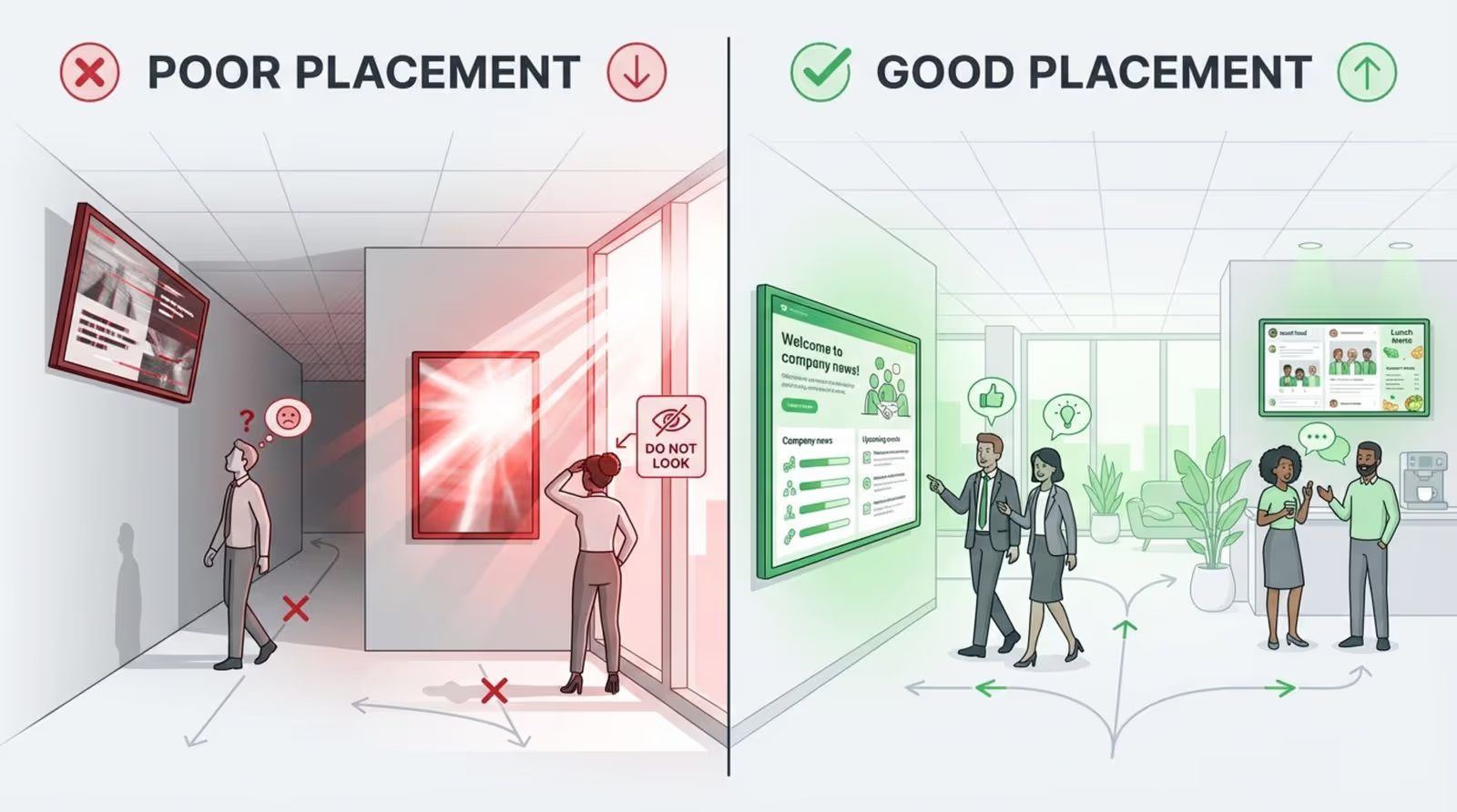
Light and reflections also matter a lot. Screens near windows can reflect sunlight and act like mirrors, making them almost impossible to read. Mounting height affects comfort: if screens are too high or too low, people avoid looking at them. Careful planning of placement, taking into account light, walking paths, and viewing angles, helps improve visibility and impact. Screens that are hard to see or read are simply money and effort thrown away.
Technical failures and unreliable connectivity
Like any technology, digital display boards can suffer from failures. Frozen screens, black displays, image distortion, or content that does not play correctly all reduce trust and annoy staff. These problems may come from a lack of maintenance, old software, or faulty hardware. Quick fixes are important, because long outages or ongoing issues can seriously disrupt communication and make the whole system seem unreliable.
Digital signage software often depends on a steady internet connection, especially in cloud-based setups. Weak or unstable connections can delay updates, break content playback, and cause downtime. Some offices also struggle with limited bandwidth, where several screens compete for network resources, leading to stuttering video or slow loading. Strong IT support, active network monitoring, and backup plans such as local content storage or a second internet connection help keep screens running and reduce interruptions.
Lack of regular content updates
A major reason digital display boards fail is a lack of ongoing content updates. Digital signage is meant to be dynamic; its strength is showing fresh, useful, and interesting information. When content becomes old, out of date, or overly repetitive, staff quickly lose interest and stop looking. Engagement drops, and the screens stop serving their purpose.
Many companies rush to install screens and software but do not invest in a long-term content plan. Without a clear process for creating, selecting, and scheduling content, screens become digital noticeboards that show old material. Using a content management system (CMS) with automatic scheduling and content libraries helps keep information current and varied. This reduces viewer fatigue and keeps people paying attention.
Budget constraints and resource allocation problems
Digital display boards can save money over time by reducing printing and distribution, but upfront and ongoing costs can still be high. A tight budget may push companies to buy cheaper screens or basic software that lack useful features, lower picture quality, or poor reliability, which reduces overall impact. On top of hardware and software purchasing, ongoing costs like licenses, content design, and maintenance can catch organizations by surprise.
Resource planning is another frequent problem. Businesses need people with the right skills to create content, maintain hardware, and handle software. If internal teams are already busy, tasks like content updates or system checks may be ignored. Good budgeting looks beyond purchase prices to the full cost of ownership, including recurring software fees, support, and future hardware replacement. Some companies can reduce pressure on internal teams by using cloud services, templates, or outsourcing parts of content production or technical support.
Why do digital display boards disrupt office productivity?
Although digital display boards are meant to support communication and efficiency, they can disturb productivity if they are not planned and managed carefully. The same features that make them powerful tools can become sources of distraction, confusion, or even frustration. Over time, this can slow work down and harm staff morale.
The disruption is not always obvious. Sometimes it shows up as constant minor distractions or a slow drop in attention to messages. Because these displays are dynamic and eye-catching, they need ongoing control and a clear plan to stay helpful. Without a strong purpose and careful daily management, digital display boards can end up wasting time and money instead of supporting work.
Impact on workplace communication flow
Digital display boards aim to simplify communication, but poor management can disturb the natural flow of information in the office. If screens are crowded with too many items or irrelevant content, they create noise instead of clarity. Employees may feel they are sorting through a flood of data just to find what matters, making it easier to miss key messages, even if they appear on many screens.
Problems also arise when digital signage is treated as the main communication channel without tying it into email, chat tools, and other internal systems. Some staff may rely heavily on the screens, while others stick to email or messaging apps. This leads to a patchy information environment where people are not on the same page. The result can be confusion, delays, and weaker teamwork because people are not getting consistent information in the same way.
Employee engagement and morale challenges
If set up poorly, digital display boards can actually hurt engagement and morale. When content looks cheap, is outdated, or feels irrelevant, employees soon ignore it and may view the screens as a waste of money. Blurry images, choppy videos, or obvious errors on screens send a message that the organization does not care about quality, which can quietly affect how staff see their workplace and leadership.
Privacy worries can deepen this effect. If staff sense their data is being tracked or used without clear explanation, they may start to distrust the system and those who manage it. When screens feel like watching tools instead of helpful noticeboards, the relationship between employees and management can suffer. Also, a constant stream of top-down messages with no chance for feedback or interaction can make people feel ignored. Real engagement grows from clear, useful, respectful communication. If screens fail to deliver that, they turn into another source of irritation.
Potential for miscommunication or message fatigue
The fast, changing nature of digital display boards brings a risk of miscommunication and message fatigue. If slides change too often or content cycles too quickly, people may not have enough time to read and understand each message. Important details can slip by unnoticed, which is especially risky for safety messages, urgent alerts, or policy changes.
Message fatigue happens when staff see the same or similar content again and again, or when too many messages appear with no clear ranking. If every message seems equally urgent, none of them stands out. Over time, employees stop paying attention even to truly important information. A clear content strategy that focuses on short, targeted, and well-timed messages helps prevent confusion and burnout, keeping communication effective and focused.
How to prevent disruption from office digital display boards
Preventing disruption is not about avoiding digital display boards, but about careful planning and solid day-to-day management. Used well, these tools can strongly support communication and work performance. The key is to understand what can go wrong and put practical steps in place to reduce those risks. This calls for a broad approach that looks at technology, content, people, and ongoing upkeep together.
By working on readiness, rules, security, relevant content, and good setup, companies can turn digital display boards into helpful tools that support communication and productivity. This is not a one-time task, but an ongoing process of checking, adjusting, and improving so the technology fits staff needs and not the other way round.
Evaluating technology readiness and staff buy-in
Before installing digital display boards, organizations should check if their technology and teams are ready. This includes reviewing the current IT infrastructure to see if it can handle the extra load, with special attention to network stability and bandwidth. It also means checking the skill level of the people who will manage content. If skills are limited, investing in training or choosing simple, cloud-based tools becomes important.
At the same time, possible employee resistance needs to be addressed early. Clear communication about the purpose and benefits of digital signage helps reduce fear and misunderstanding. Involving key staff in planning and rollout can build a sense of ownership. Hands-on training sessions and ongoing support give employees confidence to use the system and help turn potential critics into supporters.
Establishing clear content governance policies
A clear content governance policy forms the backbone of stable, low-disruption digital signage. This policy should spell out who creates, reviews, and approves content and what the workflow looks like. Without clear roles and steps, screens can quickly fill with off-brand, outdated, or even inappropriate material. The policy should also define content standards, including brand rules, tone of voice, and visual rules like font sizes and color contrast for readability.
Using a CMS with automatic scheduling features is highly helpful. It allows content planners to build calendars, rotate messages, and control when and where content appears. Routine content checks should be part of the process, with scheduled reviews to remove or update old items. With clear rules and regular review, organizations can keep their signage focused, relevant, and easy to understand, reducing clutter and message fatigue.
Prioritizing cybersecurity measures
Because digital signage systems can be a doorway into wider company networks, cybersecurity cannot be an afterthought. Admin access to the management system should be limited to a small number of trained users, with strong, unique passwords and multi-factor authentication. Wherever possible, signage devices should run on a separate, protected network area, away from sensitive servers and data.
Keeping operating systems and signage software updated is key to closing known security holes. Security monitoring tools that watch for strange activity or login attempts and send alerts help teams react quickly. Limiting the file types and content sources the system will accept also lowers the risk of malware. These steps protect both the content on the screens and the company’s broader IT environment.
Regular content review and audience relevance
To keep digital display boards helpful, content must be checked regularly and kept relevant to the audience. Old or out-of-place messages quickly cause people to ignore the screens. Organizations should continually review what is shown, how often it appears, and who sees it. Content should match the location and the needs of the people who walk past.
For example, a lobby display might show company news and visitor-friendly content, while a screen in a staff kitchen highlights internal updates, events, and HR reminders. A screen near meeting rooms might show booking details and upcoming reservations. If analytics tools are available, they can help track which content works best. Using this data, teams can refine messages, timing, and layout to keep information engaging and prevent message fatigue.
Careful positioning and hardware maintenance
The physical setup of digital display boards has a big impact on how useful and how disruptive they are. Good positioning means taking lighting, traffic patterns, and viewing distance into account. Screens should be mounted at a comfortable height, easy to see from normal walking paths, and away from direct light that causes glare. A site survey can help decide where to place screens, what size to use, and whether anti-glare glass or adjustable mounts are needed.
Ongoing hardware maintenance is just as important. Regular checks for issues like frozen images, color problems, or sound failures help catch problems early. Software updates, cleaning, and hardware inspections should happen on a set schedule. Having a support agreement or internal process for fast repairs reduces downtime. For critical areas, backup power options such as UPS units can keep key screens working during short power cuts. With consistent care, digital display boards can keep delivering clear messages without frequent interruptions.
Common questions about disruptive factors and digital display boards in offices
What are the most frequent technical issues?
The most common technical problems with office digital display boards relate to connectivity, playback, and hardware. Unstable or weak internet connections are a frequent issue. They can cause delays in content updates, choppy video, or screens that still show old information. This is often seen in setups that depend on Wi-Fi networks that do not have enough bandwidth or are already heavily used.
Software glitches are another regular source of trouble. These include frozen screens, crashes, wrong layouts, or missing content. Causes can include outdated apps, conflicts between software versions, or incorrect settings in the CMS. On the hardware side, screens may flicker, show strange colors, or fail completely. Cables can wear out, and dust or poor cooling can shorten the life of components. Power issues, such as sudden outages or bad power distribution, can also take displays offline. Active monitoring, preventive maintenance, and quick access to IT support help reduce both the number and the impact of these problems.
Should sensitive data be displayed on office screens?
Private or sensitive data should not be shown on office digital screens, especially in common areas. The risk of exposing confidential information far outweighs any benefit. A hacked or misconfigured system could make personal employee data, financial figures, or client details visible to anyone who passes by. Even simple scheduling mistakes could put sensitive slides on public screens by accident, leading to serious privacy and legal issues.
Some signage systems also offer audience tracking features, such as cameras or sensors. If these are used without clear notice and without following privacy laws, they can cause strong concern and mistrust. To avoid these problems, companies should have strict rules against showing sensitive content on shared displays. Any data used for measurement and analytics should be anonymized. Clear signs should inform people if any cameras or sensors are in use. When in doubt, keep private information off shared screens entirely.
How often should digital display board content be updated?
How often you should update content depends on what the screen is for and where it is located, but the main rule is to keep it fresh and useful. In busy areas or for displays that show time-sensitive details like meeting room availability, live news, or emergency alerts, updates may need to happen in real time or several times a day. For general content such as values, highlights of staff achievements, or upcoming events, daily or weekly changes can be enough.
Letting content sit unchanged for too long is one of the fastest ways to lose attention. A content calendar helps plan what to show and when. Most CMS tools offer scheduling functions, so you can load new material in advance and let it switch automatically. Adding feeds like company social media or RSS news streams can also help keep information current with less manual work. The goal is to refresh often enough to keep interest high without changing so fast that people cannot absorb what they see.





