


Table of Content
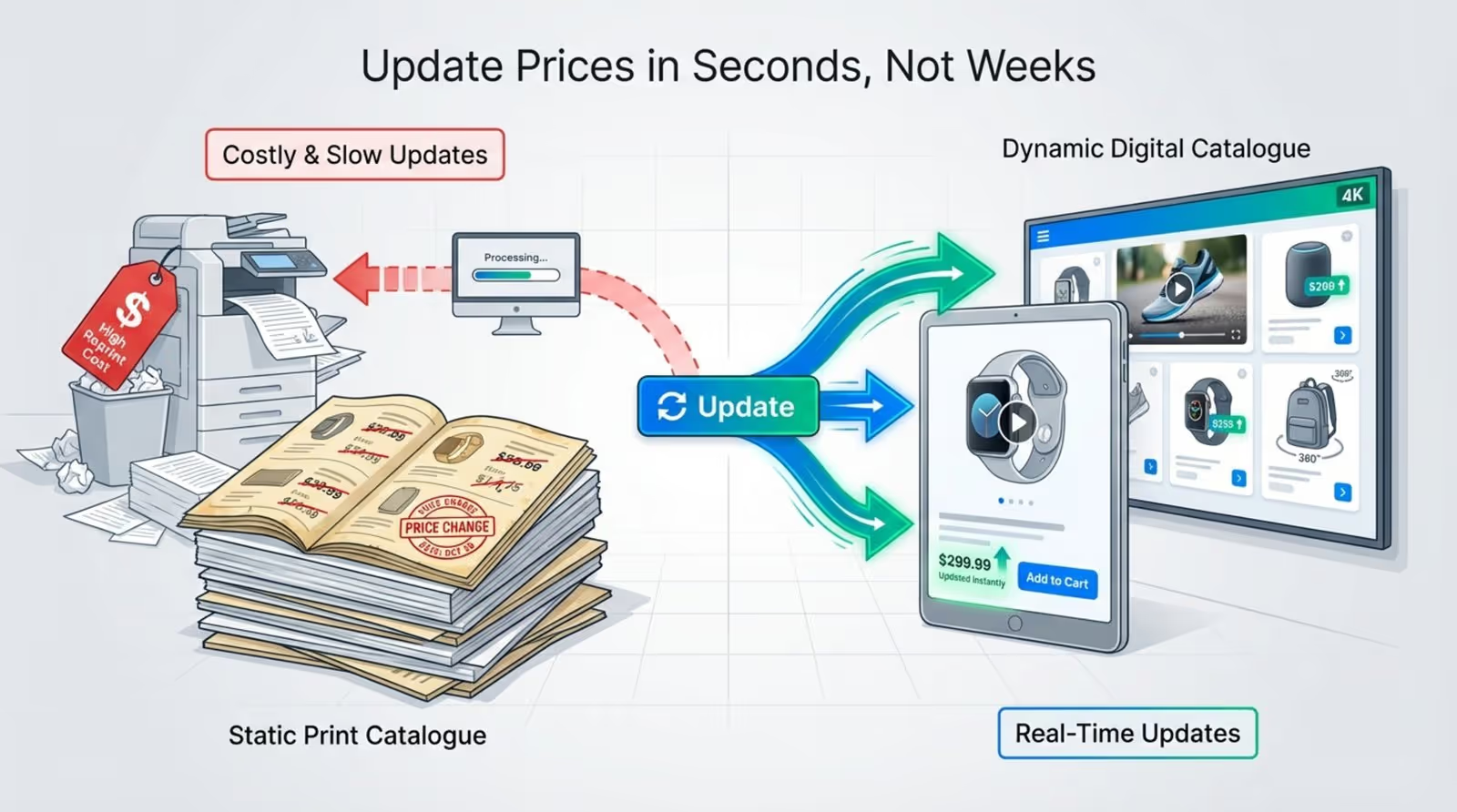
How often do you have to reprint your entire catalogue just to change a few prices or correct a typo? A digital catalogue solves this problem by turning static product lists into dynamic, interactive experiences that you can update in minutes. Instead of waiting on printers and shipping, you can manage your content from anywhere and publish it to any screen immediately.
This approach saves time and keeps your messaging consistent. Whether you are displaying a menu on a digital board, a product line on an in-store kiosk, or a portfolio on a tablet, moving from print to digital allows you to react to market changes instantly. It cuts out the lag between decision and display, ensuring your customers always see your best and most current offers.
What is a digital catalogue?
How does a digital catalogue differ from a print catalogue?
A digital catalogue is a live, electronic version of your product or service inventory. While a printed catalogue is obsolete the moment it hits the press, a digital version is flexible. It allows you to include video, animations, and real-time data that paper simply cannot handle. Rather than flipping static pages, users can tap, swipe, and search, making the experience faster and more engaging.
The workflow is also far more efficient. Print requires long lead times for design, proofing, and distribution, plus significant costs for materials and logistics. A digital catalogue eliminates these physical barriers. You can deploy changes across your entire network instantly. While print relies on passive viewing, digital formats can include "shoppable" links or interactive scenarios where a click leads directly to a purchase or a request for information.
Types of digital catalogues
There are several formats to consider based on your needs. A common choice is the Digital Flipbook, which mimics the page-turning effect of a magazine. These are often PDF-based and work well for users who want a familiar reading experience on a tablet or desktop.
For more functionality, an Interactive Web Catalogue acts like a mini-website, offering filters, search tools, and live inventory status. For physical spaces, Digital Signage Loops are essential. These are designed for screens in stores or lobbies, focusing on high-impact visuals and motion to capture attention rather than deep reading. This format is ideal for keeping screens running with fresh promotions without constant manual intervention.
Where are digital catalogues typically displayed?
You can publish digital catalogues on almost any screen. In retail, they often appear on interactive kiosks where shoppers can browse endless aisles not available in the physical store. Sales teams frequently use tablets to present high-resolution catalogues during client meetings, ensuring they have the latest specs at their fingertips.
Corporate and hospitality environments use large wall displays and smart TVs to showcase services or portfolios. By streaming a catalogue to a reception screen, you turn a passive waiting area into an informative touchpoint that promotes your brand 24/7.

Why create a digital catalogue for your screen?
Improves accessibility and reach
Digital catalogues remove physical limitations. Unlike a printed book that can only be in one place at a time, a digital version is accessible to anyone with a screen or internet connection. This allows you to scale from 1 screen to thousands without printing a single extra page.
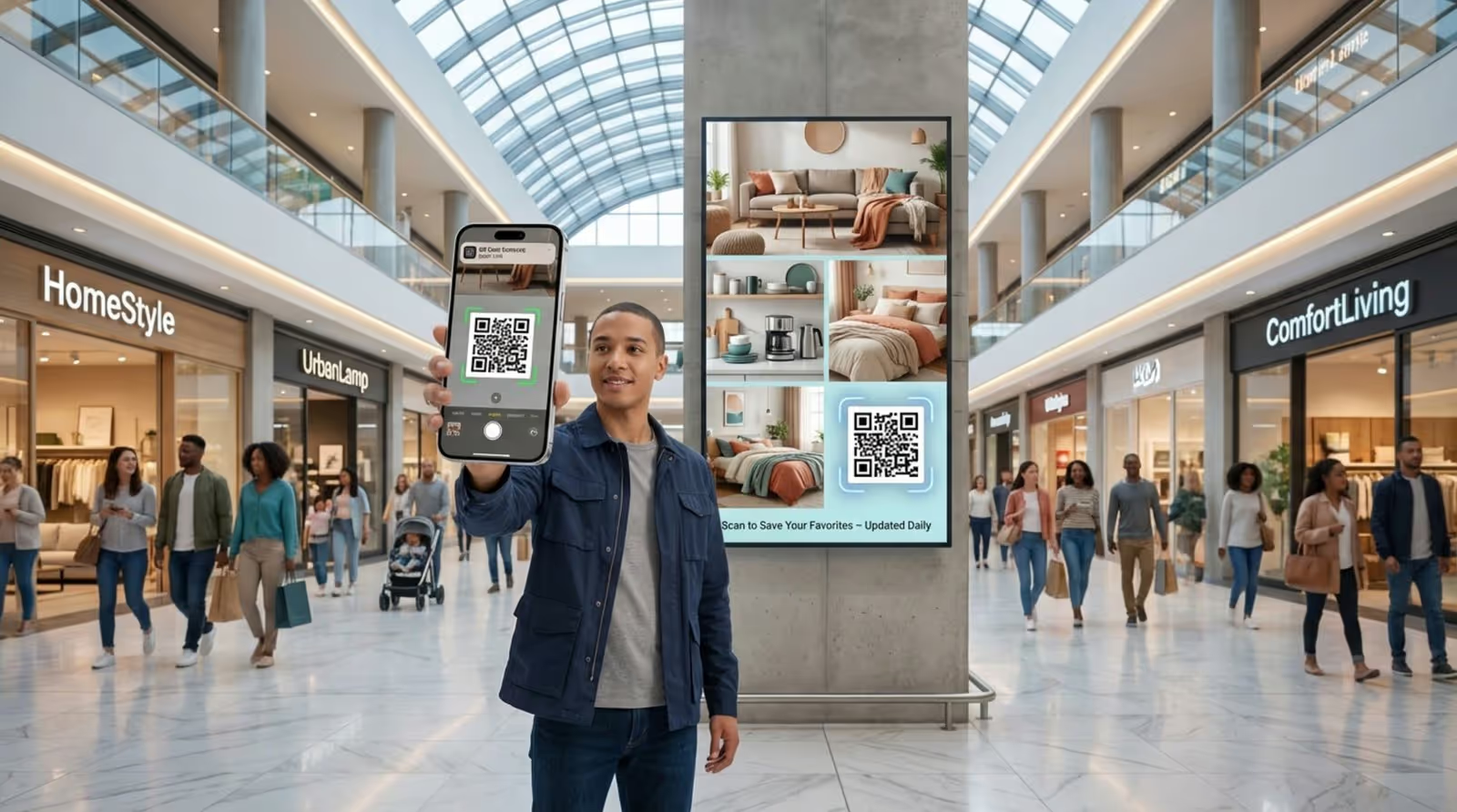
Digital formats also improve accessibility. You can integrate features like text-to-speech or zoom capabilities for visually impaired users. By using QR codes on your digital signage, you can bridge the gap between a public screen and a personal mobile device, allowing customers to take the catalogue with them after they leave your location.
Reduces print and distribution costs
Switching to digital reduces printing and updates costs significantly. High-quality print runs are expensive, and the hidden costs of storage, shipping, and disposal of outdated materials add up quickly. Digital publishing eliminates these recurring expenses.
Budget previously spent on ink and paper can be reallocated to better photography or video assets. Updating a price or swapping a product image costs nothing but a few minutes of time, making this a much leaner and environmentally friendly operational model.
Enables real-time updates and inventory management
In many industries, stock levels and pricing fluctuate daily. A digital catalogue allows for real-time updates. If a product sells out, you can remove it from your screens instantly to avoid customer frustration. If a new model arrives, it can be live on your display network immediately.
This flexibility is crucial for short-term campaigns. You can schedule a flash sale to run for just two hours and revert to standard pricing automatically. This keeps your messaging accurate across all locations and reduces the workload for staff who no longer need to manually swap out posters or price tags.
Improves brand experience with interactive features
Digital catalogues allow you to tell a richer story. Static images are often not enough to close a sale; video clips, audio, and 360-degree views help customers understand the value of a product. These dynamic elements build a stronger connection than flat text ever could.
Interactivity transforms a viewer into a participant. Features like "compare products," interactive maps, or simple contact forms keep users engaged longer. On touch screens, this exploration increases dwell time and helps guide the customer smoothly toward a purchasing decision.
What are the essentials for a successful digital catalogue?
User-friendly navigation and design
If a catalogue is hard to navigate, users will ignore it. Navigation must be intuitive, with clear categories, a visible search function, and obvious "back" buttons. The goal is to let the user find what they need with minimal friction.
Consistency is key. Keep buttons and menus in the same location on every page to build muscle memory. Avoid clutter; a clean layout with ample white space looks professional and helps focus attention on the products. A simple, tidy interface usually outperforms a complex, flashy one.
Mobile and desktop compatibility
Your content must adapt to different screen orientations. A layout designed for a landscape TV might not work on a vertical kiosk or a mobile phone. Responsive design ensures your catalogue is readable regardless of the device.
Performance is equally important. Large files can slow down playback or loading times. Ensure your design is optimized so pages load instantly, preventing users from clicking away out of impatience.
High-quality images and multimedia
On a screen, the visual quality reflects your brand quality. Use high-resolution images that stay sharp on large 4K displays. Since customers cannot touch the physical item, they rely on visual detail to make decisions.
Incorporate video where it adds value, such as a product demo or a 360-degree rotation. However, use audio sparingly-especially in public spaces-or provide subtitles so the message is clear even without sound.

Detailed product or content information
While visuals grab attention, data proves the value. Ensure every item includes essential details such as:
- Dimensions and specifications
- Material composition
- Available colorways
- Current pricing
Use bullet points to make this data scannable. For B2B contexts, include SKU numbers and bulk pricing. The catalogue should answer the viewer's questions so they don't have to hunt for a staff member.
Clear branding and visual consistency
Your digital catalogue is an extension of your brand. Use your standard fonts, color palette, and logo placement. This visual consistency builds trust and ensures the catalogue feels like an integrated part of your business.
Maintain a consistent style for photography. If your brand is minimalist, keep backgrounds clean and text sparse. If your brand is vibrant, use bold colors and dynamic layouts. The visual tone should match what customers see on your website and physical packaging.
SEO optimization for discoverability
If your catalogue is published online, it needs to be searchable. Avoid trapping text inside images where search engines cannot read it. Use descriptive keywords in your headings and product descriptions.
Clean URLs and proper metadata help your catalogue appear in search results. Adding alt text to images improves accessibility and helps search engines understand your visual content, driving more organic traffic to your products.
What tools and platforms are available for digital catalogue creation?
Comparison of catalogue software and online platforms
Creating and publishing a catalogue usually involves two steps: design and management. For design, tools like Adobe InDesign or Canva are excellent for building the visual layout. However, simply designing a PDF is often not enough for dynamic screen playback.
To manage and publish that content to screens, you need dedicated software. Look Digital Signage is a cloud-based platform designed specifically for this. It allows you to upload your creative assets, organize them into playlists, and schedule them across any number of screens from a single dashboard. Unlike basic PDF viewers, Look DS ensures reliable playback and provides tools to manage the screens remotely.
Must-have features in digital catalogue makers
When selecting your software stack, prioritize these capabilities:
- Remote Management: Update content on screens in different cities without leaving your desk.
- Smart Scheduling: Automate when specific catalogues or offers appear (e.g., breakfast menu vs. lunch menu).
- Offline Playback: Ensure your screens keep running even if the internet connection drops.
- Proof-of-Play: detailed logs to verify that your content actually played as scheduled.
- Interactivity: Support for touch scenarios or QR code integration.
How to create a digital catalogue step by step
1. Define goals and audience
Clarify your objective before you start. Are you trying to inform staff, guide visitors, or drive direct sales? Your goal dictates the format. A technical catalogue for engineers needs data tables, while a lifestyle catalogue for a fashion retailer needs video and high-impact imagery.
2. Prepare and organize your content
Gather your assets into a central repository. Organize images, videos, and copy by category. Verify that all product data is current. Fixing a typo in a spreadsheet now is much faster than editing a finished layout later. This preparation phase is critical for a smooth design process.
3. Choose a catalogue creation platform or software
Select tools that fit your technical comfort level. You might use a design tool to create the visuals, but you will need a Content Management System (CMS) to publish them effectively. Look Digital Signage is the right choice here, as the Look CMS allows you to combine images, videos, and dynamic apps into a cohesive playlist without complex setup.
4. Design layout, navigation, and structure
Establish a master template. Ensure navigation elements are consistent. If you are using Look CMS, you can utilize the Screen Layouts feature to create multi-zone displays-for example, showing a rotating product catalogue in one zone while a news ticker or promotional video runs in another.
5. Add multimedia elements: images, videos, and interactivity
Populate your layout with your assets. Use the Content Creator inside Look CMS to assemble slides if you don't have external design software. Add videos to demonstrate products. Keep animations smooth and purposeful to enhance the experience without distracting from the information.
6. Link navigation and call-to-action buttons
Clear calls to action (CTAs) are essential. Tell the user what to do next, whether it is "Scan to Buy," "Touch for More Info," or "Visit Reception." Ensure these prompts are large enough to be read from a distance or tapped easily on a touch screen.
7. Test usability and proof content
Before rolling out, test your catalogue on the actual hardware you plan to use. Colors and font sizes can look different on a large TV compared to a laptop monitor. Verify that all links work and that the flow makes sense to someone seeing it for the first time.
8. Optimize for responsiveness and SEO
Finalize your settings. If deploying to the web, check your SEO tags. If deploying to screens via Look DS, ensure your files are optimized for playback performance. Check that your internet connection is stable enough for the initial download, though Offline Playback will handle subsequent runs.
How to publish and display your digital catalogue on a screen
Supported screen types and digital signage options
Hardware choice depends on your environment. Touch-screen kiosks are ideal for interactive catalogues where users drive the experience. Standard Smart TVs or commercial displays work well for passive loops. For a simple setup, you can even use tablets mounted on stands.
To connect these screens to your content, you need a player. The Look HDMI Player is a plug-and-play option that turns any HDMI screen into a digital signage display. Alternatively, if you have OS-based TVs, you can simply install the free Look App to get started without buying new hardware.
Step-by-step process to display a catalogue on your screen
First, connect your screen or media player to the internet. Next, log in to your CMS dashboard (like Look CMS). Upload your catalogue assets or create them using built-in templates. Organize these assets into a playlist.
From the dashboard, assign this playlist to your screen. You can use Smart Scheduling to define exactly when the catalogue should play-for example, setting a specific seasonal catalogue to run only during December. Once you hit publish, the player downloads the content and begins playback locally.
Common publishing methods: links, QR codes, and embedding
You can extend the life of your screen content by connecting it to mobile devices. Adding a QR code to your screen layout allows viewers to scan and take the catalogue with them on their phone. This is a powerful way to bridge offline viewing with online conversion.
For web publishing, you can embed the catalogue on your website or share a direct link via email. Look DS also allows you to integrate web-based content directly onto your screens via URL, ensuring your signage always matches your website.
Best practices for screen-based catalogue viewing
Legibility is the priority. Use high-contrast text and avoid small fonts. If your screen is in a bright window, ensure the display brightness is high enough to compete with sunlight. Consider the "attract loop"-a dynamic cover page or video that runs when the screen is idle to draw people in.
Security is vital for interactive public screens. Ensure your device is in "kiosk mode" so users cannot exit the catalogue application. Clean touch screens regularly and ensure the hardware is securely mounted to prevent tampering.
Tips for promoting and measuring the impact of your digital catalogue
Sharing and distributing your catalogue
Maximize visibility by integrating your catalogue across channels. Promote it in email newsletters and on social media. In-store, use signage to direct customers to interactive kiosks. The more touchpoints you create, the higher the engagement.
At trade shows or events, a digital catalogue on a large screen serves as a powerful sales magnet. It allows booth staff to pull up specific products instantly rather than rummaging through paper brochures.
Integrating shoppable features and lead capture
Reduce friction in the buying process. Use QR codes to link directly to checkout pages. For B2B environments, consider gating premium content (like a technical spec sheet) behind a simple email signup form to capture leads directly from the screen interaction.
By connecting your signage to your wider sales ecosystem, you turn a passive display into an active sales channel.
Tracking engagement and optimizing performance
Data drives improvement. Use Playback Analytics in Look CMS to monitor uptime and content frequency. If you are using interactive web catalogues, track clicks and dwell time to see which products are attracting the most attention.
Review this data regularly. If a certain product page isn't getting views, try changing the image or its position in the playlist. Digital allows you to test and optimize continuously based on real evidence.
Frequent challenges and solutions in digital catalogue publishing
Avoiding common design and UX mistakes
Overloading the screen is a common error. Viewers need time to absorb information. Keep text concise and let images do the heavy lifting. Ensure buttons are clearly labeled so users know exactly what will happen when they tap.
Navigation should be shallow; users should reach their destination in three clicks or fewer. If the structure is too deep, users will abandon the session. A search bar is a helpful fallback for complex inventories.
Making accessibility and device compatibility work
Ensure your content works for everyone. High contrast helps readability, and simple navigation aids less tech-savvy users. When designing, test on the lowest-quality screen you expect to use to ensure the experience remains good even on older hardware.
For web-based catalogues, ensure compatibility with standard browsers. For signage, reliable software like Look DS handles the technical rendering, ensuring consistent playback regardless of the screen brand.
Updating catalogues and managing content changes
The ease of updating can lead to complacency. Establish a routine to review your content. Smart Scheduling helps here by allowing you to set expiration dates for seasonal content, so you don't accidentally display a "Summer Sale" in October.
Centralize your asset management. By keeping your images and data in one organized system, you ensure that an update to a product photo propagates everywhere it is used. This reduces the risk of conflicting information across different screens.
Key takeaways for creating and publishing a digital catalogue successfully
The shift to digital catalogues is about more than just saving paper; it is about agility. As technology evolves, integrating AI and interactive elements will become standard. Staying adaptable means you can adopt these new tools quickly to keep your audience engaged.
By focusing on clear design, reliable hardware, and flexible software from Look DS, you can build a catalogue system that scales with your business. It transforms your screens from simple displays into powerful, data-driven communication tools that support your sales goals and improve the customer experience.





