

Table of Content
How can hotels improve guest communication and drive revenue without adding more staff? Digital signage is the answer. By replacing static paper signs with centrally managed screens, hotels can update information in minutes, keep messaging consistent across locations, and create a smoother experience for every guest.
Modern hospitality relies on speed and clarity. Digital signage allows hotel managers to publish content to any screen-from lobby video walls to elevator displays-ensuring the right message reaches the right guests at the perfect time.
What is digital signage for hotels?
Digital signage in a hotel environment is a network of screens controlled by a central Content Management System (CMS). Unlike standard TV broadcasts, this is a dedicated communication channel designed to run 24/7. It allows you to manage content remotely, ensuring that every display works to support your business goals.

This technology connects your physical space with digital tools. Management can instantly publish images, videos, social media feeds, and dynamic data like flight schedules or weather updates. It transforms static walls into "smart" communication points that are easy to manage from anywhere.
How does digital signage work in hospitality settings?
A digital signage network consists of four elements: hardware, software, content, and connectivity. The hardware includes the screen and a media player. For a simple setup, solutions like the Look Player provide a plug-and-play experience, though many smart TVs can run signage apps directly without external devices.
The software acts as the brain of the operation. A cloud-based platform like Look Digital Signage lets you upload media, build playlists, and schedule content. The player downloads this content via the internet and stores it locally, ensuring reliable playback even if the connection drops.
Common types of hotel digital signage displays
Hotels typically use a mix of screen types. Medium-sized LCD screens are standard for hallways and waiting areas to highlight services. In bright areas, such as glass-walled lobbies, high-brightness displays ensure content remains visible in sunlight.
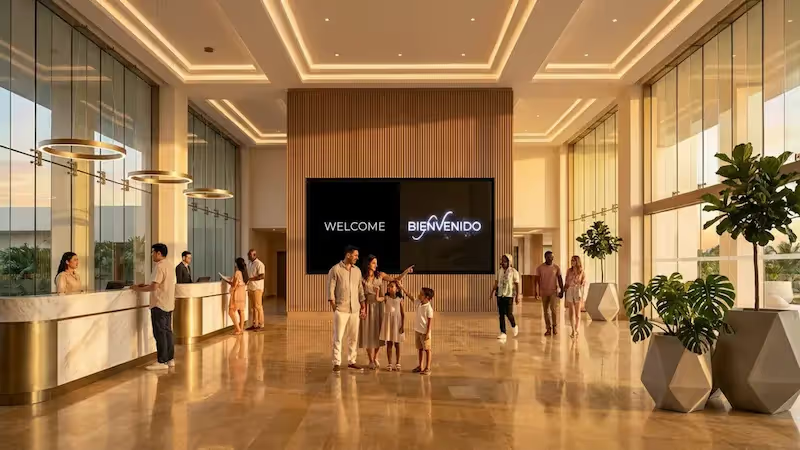
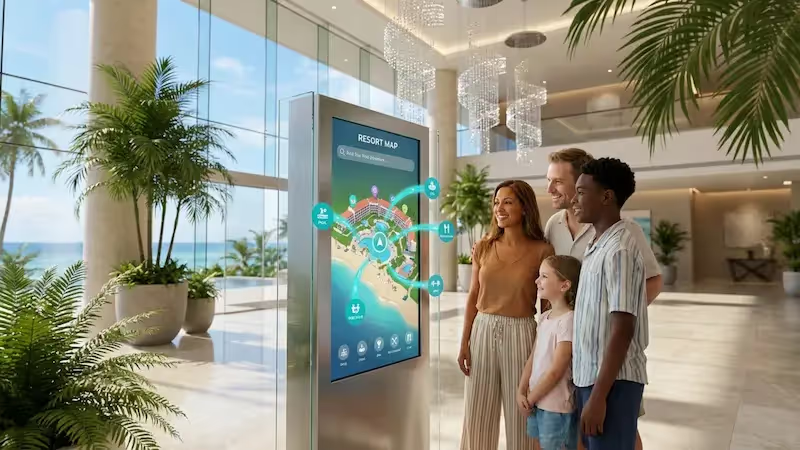
For high-impact areas like reception, video walls create a premium atmosphere. Touchscreen displays are also increasingly common, acting as self-service concierge points where guests can check in or browse local recommendations at their own pace.
Why use digital signage in hotels?
Hotels adopt digital signage to solve operational headaches and improve the guest experience. It provides a modern aesthetic that printed signs cannot match and offers a practical way to manage communication at scale. Instead of manually replacing posters, staff can update screens in minutes.

Beyond aesthetics, digital signage is a practical tool for efficiency. It relieves pressure on front-desk staff by answering frequently asked questions and provides a flexible platform for marketing that is easier to manage than print.
Improves guest experience and engagement
First impressions matter. High-quality screens in the lobby can greet guests and provide immediate value, such as wayfinding or event schedules. displaying digital art or local news reduces perceived wait times during check-in.
Engagement increases when screens are interactive. Using tools like Interactive Scenarios within Look, you can build touch-friendly menus or directories. This gives guests control over their stay, leading to higher satisfaction scores.
Streamlines information delivery and communication
Updating paper menus and event boards is slow and costly. Digital signage eliminates this lag. If a conference room changes or a restaurant creates a new special, you can update the relevant screens instantly from your dashboard.
This also benefits internal teams. Screens in staff areas can display rotas, housekeeping updates, or safety reminders. This keeps non-desk employees informed and aligned with hotel standards without relying on bulletin boards.
Reduces operational costs and paper waste
While there is an upfront cost for hardware, digital signage reduces the long-term expense of printing. Designing, printing, and distributing flyers for every event or seasonal offer adds up. Going digital can save significant budget and staff hours.
It also supports sustainability goals. Reducing paper waste is a priority for many eco-conscious brands. Furthermore, modern commercial screens often feature power-saving modes that can be scheduled to dim or turn off during quiet hours.
Boosts in-house promotions and revenue opportunities
Digital screens are powerful tools for upselling. Because content is dynamic, you can use Smart Scheduling to show breakfast deals in the morning and "Happy Hour" promotions in the evening. Motion and bright visuals capture attention far better than static cards, often leading to increased spending per guest.
Hotels can also generate revenue by selling ad space to local partners. Tour operators or local restaurants are often willing to pay for visibility on your in-room or lobby screens, offsetting the cost of the system.
Facilitates wayfinding and event navigation
Large hotels can be difficult to navigate. Digital wayfinding screens help guests find their way to pools, gyms, or conference halls without needing to ask for help. This reduces frustration and frees up staff to handle more complex requests.

For conference venues, digital signage is essential. Screens outside meeting rooms can display the current event, speaker names, and upcoming agenda. You can automate these updates by integrating your calendar, keeping events organized seamlessly.
Supports brand image and personalization
Consistency builds trust. Look Digital Signage allows you to lock templates and brand assets, ensuring that every screen in every location follows your brand guidelines. You can maintain a premium look across your entire network without micromanaging individual sites.
Personalization is also scalable. You can schedule welcome messages for large groups or VIPs. Seeing a personalized greeting on a lobby screen makes guests feel valued and encourages loyalty.
Where should digital signage be placed in hotels?
Placement determines success. Screens should be installed in high-traffic zones or areas where guests naturally pause. The goal is to be helpful, not intrusive. A screen in the elevator captures attention because guests have nowhere else to look, while a lobby screen serves as a central information hub.
Context is equally important. Content in a gym should differ from content in a bar. Tailoring playlists to the specific location ensures the messaging feels relevant and service-oriented.
Best locations for maximum guest impact
Identify "dwell time" areas where guests are waiting or stationary. Elevators, reception queues, and lobby seating areas are ideal. Mounting screens at eye level ensures they are seen without effort.
Outward-facing screens can also attract passersby. High-brightness window displays can showcase room rates or restaurant menus to foot traffic, drawing new customers into the property.
Lobby and reception area
The lobby sets the tone for the stay. A video wall or large display behind the reception desk can share check-in information, while self-service kiosks reduce queues. This is the best place to showcase hotel amenities.
Use Screen Layouts to split the screen-showing a promotional video in one zone while displaying live weather and news tickers in another. This provides value while subtly promoting your services.
Conference and meeting rooms
Digital door signs add a professional touch to business events. These small screens can display room availability and schedules. When integrated with your calendar system, they update automatically, preventing double bookings and confusion.
Inside the event space, larger screens can run sponsor loops or live presentations. This flexibility is a major selling point for event planners looking for modern venues.
Elevators and hallways
Elevators offer a captive audience for short, punchy messages. Since the ride is short, focus on single, clear promotions like a spa treatment or a dinner special. Guests are highly likely to read these messages.
In hallways, digital signage assists with navigation. Directional arrows and room number guides help guests find their way. You can also intersperse these with reminders about checkout times or breakfast hours.
Restaurants, bars, and digital menu boards
Digital menu boards streamline food and beverage operations. With Smart Scheduling, your screens can automatically switch from breakfast to lunch menus at a specific time. This ensures accuracy and saves staff from manually swapping physical boards.
In bars, screens can promote high-margin items. High-quality images of signature cocktails or desserts can trigger impulse purchases. You can also use screens to create atmosphere with branded visuals or entertainment.

Guest rooms and interactive kiosks
In-room TV screens can serve as a digital concierge. Guests can use them to view room service menus, check hotel policies, or find local attractions. This adds a layer of modern convenience to the room experience.
Interactive kiosks in common areas act as 24/7 information stations. Guests can print boarding passes or book amenities without waiting for front desk staff. For international guests, multi-language support is a valuable feature.
How do hotels use digital signage effectively?
Effective digital signage requires a strategy. It is not enough to simply hang screens; you must plan what to show and when. The most successful hotels use signage to solve specific problems, such as reducing perceived wait times or clarifying wayfinding.
Visual consistency is key. Use ready-made templates to ensure your content always looks professional and on-brand. Whether running a boutique hotel or a large chain, your screens should look polished and deliberate.
Real-time updates and event schedules
Live information builds trust. Displaying real-time flight data in an airport hotel lobby or traffic maps in a city center property adds tangible value. Guests rely on your screens for useful data, which keeps them looking.
For events, the ability to push instant updates is critical. If a session room changes, you can update the signage immediately from your dashboard, minimizing confusion and keeping the event running smoothly.
Welcome messaging and VIP guest greetings
Personalized messages create memorable moments. You can schedule content to welcome specific conference groups or wedding parties. A simple "Welcome to the Smith Wedding" on the lobby screen makes the group feel special.
For VIPs, a personalized greeting in a lounge or executive area demonstrates high-level service. These small touches contribute significantly to guest loyalty.
Promoting special offers and upselling services
Target your promotions based on location and time. A screen near the gym is the perfect place to advertise post-workout smoothies or spa massages. A lobby screen in the evening is ideal for promoting room upgrades or late checkout options.
Use high-quality visuals. The Content Creator inside Look CMS allows you to combine text and images easily. Appetizing photos and clear calls to action drive conversions effectively.
Self-service check-in and check-out kiosks
Speed is a priority for business travelers. Self-service kiosks allow guests to handle check-in and check-out independently. This reduces congestion at the front desk during peak hours.
These kiosks can also upsell services during the process, offering breakfast add-ons or room upgrades. This automates revenue generation while improving the guest experience.
Wayfinding maps and QR code navigation
Static maps can be confusing. Digital wayfinding allows for clear, bright maps that are easy to read. Adding QR codes allows guests to scan the map and take it with them on their mobile devices.
This "scan and go" approach bridges the gap between your screens and the guest's phone, providing a seamless navigation experience across the property.
Social media displays and guest reviews
Social proof influences behavior. Displaying a moderated feed of guest Instagram photos or positive TripAdvisor reviews encourages others to share their experiences. This creates a sense of community and validates the quality of your hotel.
Look Apps include widgets specifically for social media feeds, making it easy to integrate this content into your playlists without complex technical setup.
Emergency alerts and safety information
In an emergency, digital signage becomes a critical safety tool. You can override regular content to display evacuation routes or fire alarm alerts instantly. Clear visual instructions help keep guests calm and informed.
Day-to-day, screens can display pool safety rules or gym etiquette. Keeping these rules visible ensures compliance and reduces liability risks.
What are the steps to implement digital signage in hotels?
Implementation should be methodical. Start by defining your goals-do you want to reduce printing costs, improve wayfinding, or increase restaurant sales? Once the goal is clear, you can select the right tools.
The process involves selecting hardware, choosing a CMS, and planning your content. Choosing a solution that scales easily allows you to start small-perhaps with just the lobby-and expand to other areas later.
Selecting hardware and display solutions
Commercial-grade screens are recommended for 24/7 operation, as they are built to resist overheating and image retention. However, you can often use existing TVs if you pair them with an external media player.
If you have smart TVs or Android-based displays, you may not need extra hardware. The Look App can be installed directly on supported devices. For other screens, the Look HDMI Player offers a reliable, plug-and-play solution.
Choosing hotel digital signage software
Your software choice defines how easy the system is to manage. Look Digital Signage is a strong fit for hotels because it balances power with simplicity. It allows for remote management of one screen or a thousand from a single dashboard.
Key features to look for include Offline Playback (so screens keep running if the internet cuts out), Smart Scheduling, and a library of Templates. These features ensure your team can manage the network efficiently without needing IT support.
Creating engaging visual content
Content must be readable and attractive. Keep text short and use high-contrast colors. If you don't have a design team, the Look AI Wizard can help you generate layouts and headlines quickly.
Mix promotional content with informational content to keep guests interested. A playlist that cycles through weather, hotel amenities, and local news is more engaging than a loop of ads.
Integrating with existing hotel systems
Automation saves time. Look for software that offers API access or integrations like Zapier. This allows you to connect your signage to other data sources, such as your event calendar or POS system.
When systems talk to each other, content updates happen automatically. This reduces manual work and ensures that the information displayed is always accurate.
Content scheduling and automation tips
Use scheduling to match the rhythm of the hotel. Breakfast menus should disappear automatically at 11:00 AM. Bar promotions should only appear in the evening. Smart Scheduling handles this logic for you.
You can also set validity dates for campaigns. If a promotion ends on Sunday, set it to expire automatically so you don't advertise a deal that is no longer available.
Training staff for effective use
Your team needs to feel comfortable using the CMS. Look for a platform with an intuitive interface. Train front-desk and marketing staff on how to make quick updates or change playlists.
When staff see how easy it is to update a screen compared to printing a sign, they will champion the technology. Ongoing support from your software provider helps keep the team confident.
Managing and maintaining signage networks
Remote management is essential for maintenance. Through the Look dashboard, you can monitor the status of every screen. If a device goes offline, you can often reboot it remotely or troubleshoot without visiting the physical location.
Regularly check that screens are clean and physically secure. A well-maintained screen reflects the high standards of your hotel.
What are the costs and considerations for hotel digital signage?
Costs vary depending on the scale of your deployment. A simple setup using existing TVs and a software subscription is very affordable, while a comprehensive network with video walls involves higher capital expenditure.
Consider the Total Cost of Ownership (TCO), which includes hardware, software subscriptions, installation, and content creation. Compare this against the savings in printing and the potential revenue from upsells.
Hardware and software pricing factors
Hardware costs depend on screen size and grade. Consumer TVs are cheaper but may not last as long in a commercial setting. Media players are a one-time cost, while software is typically a predictable monthly or annual subscription.
Look Digital Signage offers scalable pricing based on the number of screens, making it easy to budget for both small pilots and full rollouts.
Installation and maintenance expenses
Installation costs vary based on complexity. Mounting screens in elevators or high on lobby walls requires professional installation. Ensure you have power and internet connectivity at each location.
Ongoing maintenance is minimal with a cloud-based system. Remote updates reduce the need for on-site IT visits, saving money over time.
Content production and customization
Content creation is an ongoing need. Using built-in tools like Templates and the Content Creator helps keep these costs low by allowing internal teams to produce professional visuals without hiring agencies.
Budget for occasional professional photography or video shoots to ensure you have high-quality assets to display.
ADA compliance and accessibility requirements
Digital signage must be accessible. Ensure that interactive kiosks are mounted at a height accessible to wheelchair users. Use clear, large fonts and high contrast for guests with visual impairments.
Meeting these standards is a legal requirement in many regions; it is also part of providing an inclusive hospitality experience.
Evaluating ROI and measuring signage performance
To measure success, track the performance of promoted items. If you promote a spa special on digital screens, track the increase in bookings. Use unique QR codes on screens to track engagement directly.
Playback Analytics in Look CMS can show you exactly what played and when, helping you correlate screen activity with sales data.
What are common questions about hotel digital signage?
Hoteliers often ask about security, scalability, and complexity. The good news is that modern cloud-based solutions are designed to be secure and user-friendly, regardless of the hotel's size.
Whether you run a single boutique location or a global chain, the core benefits-efficiency and engagement-remain the same.
Which digital marketing strategies work best with signage?
The "soft sell" works best. Provide value first-information, entertainment, or news-and then weave in your promotions. Guests are more likely to pay attention to a screen that helps them than one that just advertises to them.
Use social proof and time-sensitive offers to create urgency. "Last chance for Happy Hour" is more effective than a generic bar logo.
How secure is hotel digital signage?
Security is a top priority. Look Digital Signage uses secure cloud infrastructure to protect your data. For organizations with strict IT policies, an On-Premise version is available to keep everything within your local network.
Physically, ensure media players are hidden or locked away to prevent tampering in public areas.
Is digital signage suitable for small hotels?
Absolutely. Small hotels often benefit most because digital signage acts as a force multiplier for small teams. A single kiosk can handle questions when the front desk is busy, and a digital menu board makes a small cafe look professional.
With affordable hardware and flexible subscription plans, small properties can implement a professional system without a large budget. You can start with one screen and grow as needed.
Key takeaways for effective digital signage in hotels
Digital signage is a practical investment that modernizes hotel operations. It saves staff time, reduces printing costs, and provides guests with the seamless, digital-first experience they expect.
By choosing a reliable platform like Look Digital Signage, you can manage your entire network from anywhere, ensuring your messaging is always fresh and accurate. Whether you are guiding guests to a conference or promoting a dinner special, digital signage puts control in your hands. To see how quickly you can get your first screen live, start a free trial today.