Product
How it works Features Apps Free digital signage templates Digital signage hardware On-premise digital signage
Solutions
Choose your business and find out how to increase efficiency
retail
Retail

Supermarket & shopping mall

Grocery store

Pet store

corporate
Corporate

Meeting & conference room

HR

Lobby

Breakroom

education
Education

School

University

event
Events
Digital signage for government, preview
Government
Hospitality
Hospitality

Resort

Hotel

Night club

Spa

Beauty industry

digital signage for healthcare
Healthcare

Hospital

Medical center

Veterinary

Pharmacy

Dental

Waiting room

Manufacturing Preview
Manufacturing
Modern glass building with illuminated entryway and light trails from passing cars.
Enterprise
menu
Digital menu

Quick service restaurant (QSR)

Cafe

Bar

Drive thru

Pizzeria

Food truck

Digital signage for restaurants, preview
Restaurant, cafe & bar
Digital Signage for Entertainment, amusement parks
Entertainment

Arena and stadium

Cinema

Museum

Amusement park

Casino

fitness
Fitness
banking
Banking
advert
Advertising

Digital out-of-home (DOOH)

Indoor

transportation
Transportation

Airport

Gas station

Bus station

Train station

Parking

Car Dealership
Car dealership
real estate preview
Real estate
Digital signage for church, Preview
Сhurch
Resources
Use cases FAQ Knowledge base Blog Downloads
Company
About us Reseller program White label Contacts
Pricing
AI Wizard
new
Log in Try for free
English language
English
English
Italiano
Español
Português
Português (BR)
Français
Deutsch
Русский
中文
Try for free

14 days • No credit card • Cancel anytime

  • Home
  • Knowledge base
  • Apps
  • Facebook Feeds App Setup
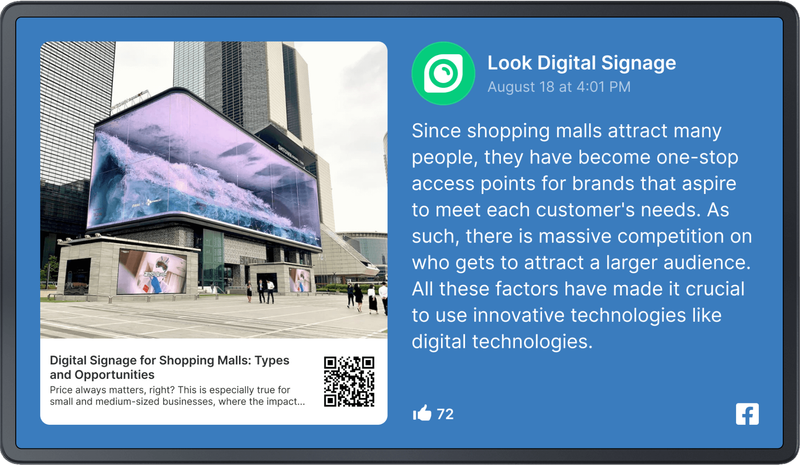
Facebook Feeds App Setup

Facebook Feeds

Share posts from your Facebook business page right on your digital screens with the built-in Facebook Feeds app.

Adding and Configuring

  1. Log in to your Facebook account and select one or more business pages you want to share.

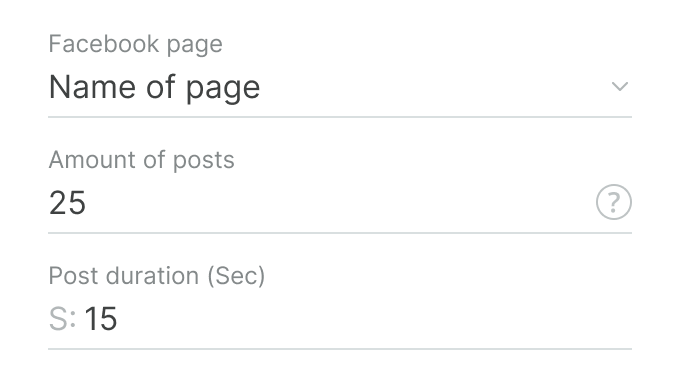
Facebook Feeds Settings 01
  1. Select a specific page, specify the number of last published posts you want to show and the playback time per post.
Facebook Feeds Settings 01
  1. Customize the text size and choose a theme for the app.
  2. Click the Add content button.
You can change an app's settings after it has been added to the content. To do this, use the Application Settings tab in the content settings.
Can't find your answer?
Contact Support

Apps

Clock App Setup
Countdown Timer App Setup
Embeddable Code App Setup
ESPN App Setup
Euronews Setup
Facebook Feeds App Setup
Facebook Setup
Flight Schedule Setup
Google Reviews App Setup
Google Slides Setup
Instagram App Setup
News Apps Setup
Power BI Setup
RSS App Setup
Slider Setup
Twitter Setup
Weather App Setup
WiFi Share Setup
YouTube App Setup

Categories

Getting started
Screens
Actions
Company
Content
Playlist
Schedules
Screen Layouts
Apps
Billing
Hardware
Product
How it works Features AI Wizard Apps Free digital signage templates Digital signage hardware On-premise digital signage Pricing
Company
About us Reseller program White Label Contacts
Solutions
Retail Hospitality Banking Corporate Healthcare Fitness Advertising Education Transportation Events Real estate Manufacturing Restaurants, cafes & bars Entertainment Car dealership Government Church Digital signage solutions Enterprise
Resourses
FAQ Use cases Knowledge base Look academy Blog What is digital signage Downloads Alternatives Troubleshooting RSS Best digital signage software Supported operating systems
Instagram link Facebook link X icon LinkedIn link YouTube Icon
Look DS LLC. Address: 1201 N Orange Street Suite #7003, Wilmington, DE 19801, United States
info@lookdigitalsignage.com
capterra-best-valueSoftware Sugest Awardsoftware-advice-customer-supportget-app-category-leaderG2-spring-2025-HighPerformer-Small-Businesscapterra-short-list-2025
Look Digital Signage Software Logo Footer
Privacy Policy
Terms of Service
Service Level Agreement
©2026 LOOK DS LLC