

Table of Content
An Airport FIDS, or Flight Information Display System, is the digital nerve center of a modern airport. It is an electronic system carefully built to share key flight information with everyone in the airport - passengers waiting for flights, airline teams, and airport staff coordinating daily operations. You can think of it as the main information hub of the airport, constantly updating and showing data so people know where to go and what to do next.
These systems have grown far beyond simple static boards. They are now advanced digital displays that show changing content in real time. Screens are placed in smart locations throughout the terminal so that important information is always easy to see. This helps guide passengers, cut down on confusion, and make the airport journey smoother. Overall, FIDS is a key communication tool between the airport and passengers, helping keep order and efficiency in a busy place.
How does a Flight Information Display System work?
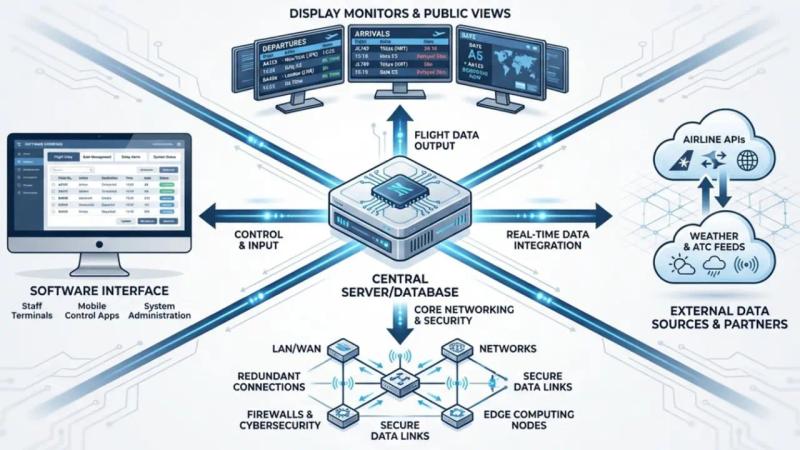
A Flight Information Display System works through a detailed setup built to collect, process, and share real-time flight data quickly and accurately. At the center of FIDS is a main database or server, like a digital brain, that stores a wide range of flight information such as schedules, gate details, and updates about delays or cancellations. This database acts as the main source of truth for all flight data.
The system connects with other airport systems like reservation, check-in, and departure control. This connection lets it automatically collect and refresh data without constant manual input. After gathering the details, FIDS organizes the information and sends it through the airport’s network to digital screens. Standard communication protocols such as TCP/IP are often used to keep data flowing smoothly and in real time between the central server and all displays. Airport staff can also use special terminals to interact with the system, update details, change gate assignments, or send emergency messages. This is an ongoing, active process, which keeps the information on screen current and dependable.
What information does FIDS present to passengers?
FIDS acts like a personal guide for passengers in the airport, giving them a wide range of useful information that helps lower stress and confusion. The displays show key details such as the airline name (often with its logo or IATA/ICAO code), origin city, and final destination city. For connecting routes, intermediate stops are also shown clearly.
Beyond basic flight data, FIDS gives live updates: planned and revised departure and arrival times, along with the current flight status, such as “boarding,” “delayed,” or “landed.” Passengers can see their gate numbers, any gate changes, and the correct check-in counters. For arrivals, FIDS directs them to the right baggage carousel. This clear and constantly updated information helps passengers stay informed at every step and move confidently through the airport.
Core Components of Flight Information Display Systems
Behind the bright screens and constant updates of an Airport FIDS lies a network of connected parts, each playing an important role in keeping the system running smoothly. These parts work together to deliver accurate, real-time flight data to the right place at the right moment, helping the airport run more efficiently for both staff and passengers.
Knowing these main components gives a better view of the engineering and setup needed to keep FIDS stable and reliable in busy airports. From the central server that holds the data to the monitors that show it, every part matters for the overall performance and success of a modern FIDS.
Database or Central Server
At the core of every Flight Information Display System is a strong central database or server. This functions as the system’s brain and stores all flight-related data. It carefully holds airline schedules, gate information, delay and cancellation updates, and more. The server’s main job is both to store and constantly receive and send data, acting as the main control center for FIDS.
The quality and stability of this database are extremely important. It must be strong enough to handle a steady flow of data from many sources while processing it quickly so that screens around the airport always show accurate and up-to-date information. To keep the system running even during technical trouble, the server setup usually includes high availability and backup options, highlighting how important this part is.
Display Monitors
The most visible part of FIDS is the display monitors. These screens are the main windows through which passengers and staff see flight details. They are placed in key spots across the airport - at check-in, in departure halls, near gates, and in baggage claim - to give maximum visibility and easy access. While some older terminals may still use split-flap boards, today’s systems mainly rely on digital LCD or LED screens.
Choosing the right display technology matters for clear reading from various angles and under different lighting conditions. Some newer FIDS setups include interactive screens or kiosks where passengers can search for their flight, view maps, or get extra details, improving the overall experience. These monitors are active tools that present large amounts of information in a clear, simple format that serves an international mix of travelers.
Software Interface
The central software interface is the operational backbone of FIDS. It lets airport staff and technicians manage, refresh, and control information across the system. This software automates key jobs like updating data and syncing it to all screens, reducing the need for constant manual changes. It is built to be easy to use so staff can quickly manage many displays spread across the airport.
Typical features include layout editors and template tools, giving airports the freedom to adjust how their screens look and keep them in line with their branding. Advanced rules can be set up so the system reacts automatically to certain events, for example, showing a message when a gate changes. The software also allows remote monitoring and control of devices, so technicians can watch and manage the system from one central place and react quickly to any issue.
Data Integration and External Data Sources
A FIDS depends on a steady feed of data from many outside systems. It connects to airline systems and airport databases to pull information directly from operational sources. This includes real-time flight schedules, statuses, gate details, and updates on delays or cancellations. Beyond this core data, FIDS can also combine extra information such as local weather reports, news, and sometimes social media feeds to give passengers richer content.
This smooth connection to external data sources is key to keeping information fresh and accurate. Any change - a last-minute gate shift or a major delay - is quickly shown on all related screens. The ability to gather data from many systems and show it in one clear, live display shows how advanced modern FIDS have become, turning them into central information hubs.
Networking Infrastructure
To link all these parts into one working system, a strong and reliable network is needed. This includes routers, switches, cables, and other control hardware that allow data to flow between each part of FIDS. The main job of the network is to move information quickly and reliably between the central server, the control software, and all display screens.
The network is built to keep steady connections so that there is no lag or break in the flow of updates. Because the data is sensitive and essential for operations, cybersecurity tools are also part of the network design to protect against attacks and keep the system safe. A well-planned, well-maintained network is the base that lets FIDS run accurately and without interruption.
Types of Airport FIDS Displays
Airports are large and busy, and people’s information needs change depending on where they are and what part of their journey they are in. For this reason, FIDS is not just one generic screen. Instead, there are multiple display types, each built to serve a specific role in different areas of the terminal. This way, the right information reaches the right people at the right time.
From the moment a passenger enters the building until they board or pick up their luggage, different FIDS displays guide them step by step. This focused method of sharing information helps control passenger flow, lower stress, and keep the whole travel process smoother.
Departure Information Displays
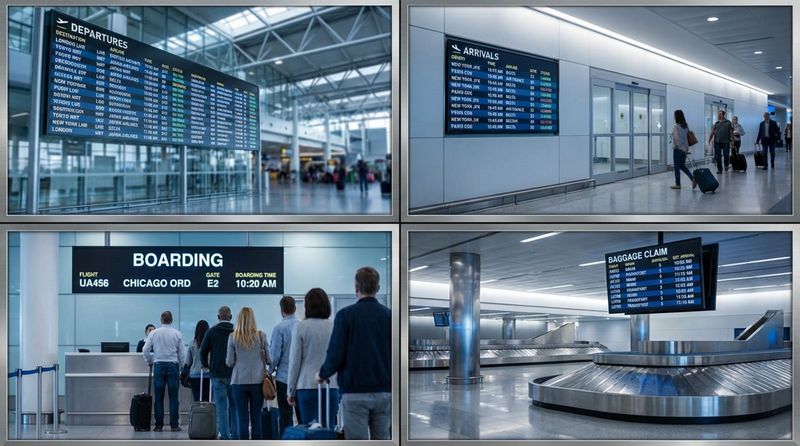
Departure Information Displays are often the most familiar FIDS screens in any airport. They are placed in central terminal halls, close to check-in counters and waiting areas, and focus only on outgoing flights. Passengers usually check these screens first as they start their trip.
These displays give a clear overview of departing flights, including airline name, flight number, destination, planned departure time, and real-time status such as “on time,” “delayed,” or “boarding.” They also show the gate number so passengers know exactly where to go. Large airports may have separate departure screens for specific airlines, which can make it easier for those airlines’ customers to find their flights.
Arrival Information Displays
Arrival Information Displays serve people waiting for incoming passengers and those who have just landed. These screens are usually placed in arrival halls, pick-up areas, and sometimes near baggage claim. They give an at-a-glance view of flights that are due to land or are arriving soon.
Arrival FIDS show airline name, flight number, origin city, planned arrival time, and the actual or estimated arrival time, including any delays. They may also show which baggage carousel will be used, helping passengers go directly to the right spot. These displays provide a quick, clear overview of all incoming flights, helping everyone adjust their plans and move smoothly through the arrivals area.
Gate and Boarding Displays
As departure time gets closer, passengers rely mainly on Gate and Boarding Displays. These screens are placed right at or near boarding gates and show detailed information about one or a small number of flights linked to that gate.
They provide up-to-the-minute information on boarding status, boarding groups or times, and last-minute changes such as gate switches. The content is usually shown in large, easy-to-read text so passengers in the gate area can see it without scanning through long lists. These focused displays help organize boarding, reduce confusion, and cut down crowding at the gates.
Baggage Claim Displays
After landing, passengers quickly look for their baggage. Baggage Claim Displays are there to help with this, placed around the carousels in the baggage hall. These FIDS tell passengers exactly which carousel will handle bags from each flight so they do not have to guess or wander.
Typical details include flight number, origin city, and assigned carousel. The screens update in real time to reflect any changes in baggage handling or carousel assignment. By sharing this information clearly, Baggage Claim FIDS help speed up luggage collection and make the arrival experience smoother.
Check-In and Kiosk FIDS
At the start of their airport visit, passengers come across Check-In FIDS and information kiosks. Check-In FIDS are usually mounted above or close to check-in desks, showing airline names, flight numbers, and desk or zone numbers. This helps passengers quickly find the right line for their flight.
Information kiosks often provide an interactive experience. Passengers can search for their flight, print boarding passes, or access airport maps and other services. This self-service approach lets travelers find answers quickly without always needing help from staff. Together, check-in screens and kiosks give early guidance and support at the very first stage of the journey.
Key Features of Airport FIDS
Modern Airport FIDS are much more than simple boards. They are digital systems with many features that help airports run more smoothly, improve the passenger journey, and even create new business income. These features reflect ongoing changes in airport technology and the need for flexible, reliable tools in busy travel environments.
All these advanced options turn FIDS into a multi-purpose tool that serves both operations and customer needs. From instant data updates to strong security, each feature helps keep the airport running smoothly and safely.
Real-time Data Updates
A key feature of Airport FIDS is the ability to show real-time data updates. In an airport, flight schedules, gate details, and statuses can change very quickly. A strong FIDS constantly pulls fresh data from the systems that run operations so that any change, such as a delay, cancellation, or gate move, appears on the screens almost at once.
Fast updates keep passengers informed, cut confusion, and are especially helpful during disruptions. They also reduce the need for manual changes by staff, which improves efficiency and lowers the risk of mistakes. Reliable real-time information is a central part of clear airport communication and helps everyone make better, timely decisions.
Customizable Display Content
Another key feature of advanced FIDS is the option to customize what appears on each screen. Airports and airlines can adjust the information and overall design so it fits their needs, branding, and local style. This is not just about which flight details are shown, but also logos, color schemes, fonts, and layouts.
With simple page editors and design tools, staff can control what content appears, when it appears, and on which screens. This makes it easier to keep a consistent visual style while still presenting information in a clear, easy-to-read way. Customization can also be location-specific, so certain screens can show special messages relevant to that area or to a particular group of passengers.
Mobile Integration and Passenger Apps
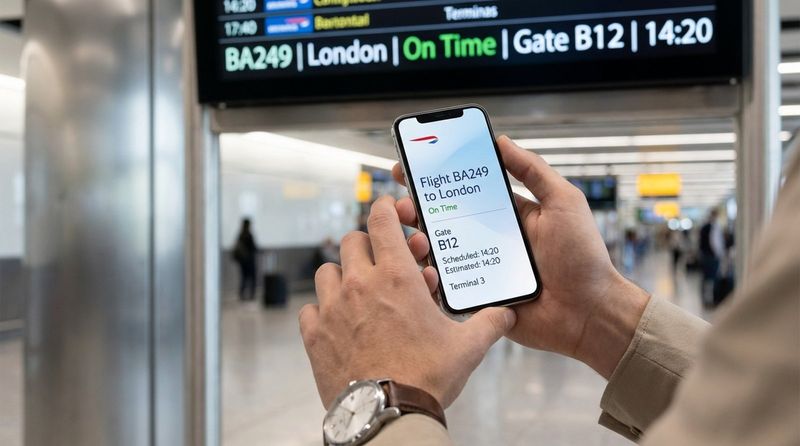
With most travelers using smartphones, linking FIDS to mobile platforms has become very useful. This feature brings flight information directly to a passenger’s phone, even when they are away from the nearest display. Many FIDS providers now offer companion apps for iOS and Android.
These apps usually show flight schedules, gate information, and baggage claim details. Some apps also use location-based alerts, sending messages as passengers move around the airport, such as reminders when they are near their gate or baggage area. This link between mobile and fixed displays gives travelers more control and keeps them informed throughout their trip.
Advertisement and Revenue Opportunities
Besides sharing flight details, FIDS screens can act as a strong advertising platform. Their central locations and constant visibility make them useful spaces for promoting shops, restaurants, services in the airport, and outside brands too. This turns FIDS into a source of extra non-flight-related income.
Many systems include ad management tools that let airports schedule and target ads by time, location, and audience. For example, duty-free or food offers can appear near departure gates, and local tourism campaigns can show near arrivals. This targeted approach increases the impact of ads, helps advertisers reach travelers more effectively, and builds added income for the airport.
Emergency Messaging Capabilities
During emergencies, FIDS can quickly switch from normal flight data to urgent safety messages. This ability is extremely valuable when there are security alerts, fires, bad weather, or other sudden events. Passengers and staff can see clear instructions on what is happening and what they should do.
FIDS can take input from systems like public address units, fire alarms, and building controls to show alerts right away. Messages may include evacuation routes, safety advice, and health notices, which proved especially important during global health events. Emergency messages often override standard content and may be shown in a sequence based on priority, helping keep people informed and calm.
Multilingual Support
Because air travel is global, multilingual support is a key part of modern FIDS. Airports welcome people from many countries, and screens that can show information in several languages help more passengers understand what they need to know.
Language options can be set so that screens cycle through different languages or let users choose their language on interactive kiosks. This reduces language barriers, makes the airport more welcoming, and lowers the chance of confusion for international travelers. By serving different language groups, FIDS becomes a truly global tool for sharing information.
User-Friendly Administration Interfaces
For the people running the system, having an easy-to-use administration interface is very important. These interfaces are built so that airport staff can quickly update flight data, manage layouts, and control screens without needing deep technical skills.
Modern FIDS platforms often include both desktop and web-based control panels. Features like drag-and-drop design, layout previews, and clear menus make it simpler to create or change screen content. Staff can check how screens will look before going live, which helps prevent mistakes. A good admin interface cuts training time and makes everyday system management faster and more accurate.
Scalability and Flexibility
Airport needs change over time, so a FIDS must be able to grow and adapt. A scalable system can handle more screens, more flights, new terminals, or new data sources without losing performance. This is important for airports that are expanding or updating their facilities.
Flexibility also means FIDS can fit different airport sizes and setups, from small regional terminals to large multi-terminal hubs. Many systems use modular designs so they can easily connect to other airport tools and even show extra digital signage content alongside flight data. This makes FIDS a long-term, future-ready solution.
| Scalability Feature | Benefit for Airport |
|---|---|
| Add new displays easily | Supports terminal expansion without major redesign |
| Connect to new systems | Integrates with future tools such as new check-in or security systems |
| Handle more flights and data | Keeps performance stable during growth in passenger traffic |
Cybersecurity and Data Protection
With rising digital threats, strong cybersecurity and data protection are must-haves for any FIDS. These systems manage sensitive flight information and tie into key airport operations, which makes them possible targets for hackers. Protecting both the data and the system is essential to maintain safe and reliable operations.
Modern FIDS use advanced security steps such as strict access controls, encryption, security audits, and logging. Many run on secure operating systems like Linux to reduce risk. These protections help guard against unauthorized access, data leaks, and tampering. Ongoing improvements in security keep FIDS stable and trustworthy, 24 hours a day.
Benefits of FIDS for Airports and Passengers
Putting a strong Flight Information Display System in place brings many gains for both airports and travelers. FIDS is not just a helpful extra. It has become a key tool that shapes how airports operate and how passengers move through their journey.
Benefits go beyond simple time and gate listings. They include better safety, clearer communication, and new ways to earn revenue. Together, these advantages make FIDS a central part of modern air travel.
Improves Passenger Experience and Satisfaction
One of the biggest benefits of FIDS is how it improves the passenger experience. Air travel can be stressful, but FIDS works like a steady guide. It gives real-time, accurate, and easy-to-read updates about flights, gates, and delays, which helps reduce worry and guesswork.
When passengers know what to expect - from boarding time to baggage carousel - they can plan calmly and move with more confidence. Studies have shown that clear information can reduce stress among travelers in a visible way. Features like multilingual support and infotainment (news, weather, destination videos) also help pass the time during waits, making the stay at the airport more pleasant.

Enables Efficient Wayfinding and Navigation
Airports can be confusing, especially for first-time visitors or people with short connections. FIDS helps turn a complex space into a clear route by showing gate locations, check-in zones, and other direction-based information in obvious, easy-to-spot places.
This is especially useful for transfer passengers who must quickly find their next gate. The mix of main departure boards, local gate displays, and baggage screens creates a full guidance system. This reduces crowding, lowers the risk of missed flights related to getting lost, and helps passengers save time and energy.
Enhances Airport Operational Efficiency
FIDS does not just help passengers; it also improves how the airport itself runs. By automating live updates, it reduces the need for staff to answer repeated questions or manually change signs. This allows staff to focus on more important tasks.
Airline employees, ground handlers, and control room staff all see the same reliable data, which improves coordination. When a change such as a gate move occurs, FIDS updates all connected screens at once. That leads to better use of staff and equipment, fewer errors, and smoother daily operations.
Reduces Delays and Miscommunication
Delays and poor communication are among the biggest pain points in air travel. FIDS tackles these issues by providing clear and consistent information to everyone at the same time. When gate changes, delays, or boarding updates appear instantly on all relevant screens, the risk of passengers missing flights due to old or wrong information drops sharply.
Airport and airline teams also benefit because they all work from the same data source. This shared view makes it easier to coordinate responses during disruptions, manage queues, and keep passengers informed. Better communication through FIDS can help shorten delays and lead to a more predictable travel day.
Supports Revenue Generation via Advertising
FIDS screens also help airports earn more money through advertising. Digital displays in busy areas like departure halls, security zones, and baggage claim attract a lot of attention, making them ideal places for ads.
Because FIDS content can be scheduled and targeted, airports can offer advertisers flexible options. For instance, a coffee shop can run morning ads near gates, while hotels and local attractions can advertise in arrivals. This targeted approach increases the impact of ads, helps advertisers reach travelers more effectively, and builds added income for the airport.
Boosts Airport Security and Emergency Responses
Security and quick action in emergencies are top priorities in any airport. FIDS helps by acting as a fast, wide-reaching communication channel. In an emergency, all screens can show alerts, instructions, and routes to safety, often in several languages to reach as many people as possible.
FIDS can also work alongside security systems to show reminders about safety rules or share alerts related to suspicious activity. As technology grows, links with tools like advanced analytics or biometric systems may further support security operations. By giving clear instructions and alerts when they are needed most, FIDS plays an important role in keeping passengers and staff safe.


