Table of Content
How can schools improve campus communication and keep students safe without adding to the administrative workload? Digital Signage provides a cloud-based platform that allows you to manage any screen, from anywhere, ensuring your messages are seen instantly. Whether you need to broadcast emergency alerts, update cafeteria menus, or highlight student achievements, the right software turns static screens into dynamic communication tools.
Modern schools are active, fast-paced environments. From morning arrival to afternoon dismissal, information needs to flow quickly and clearly. Digital signage software acts as the “brain” behind your displays, transforming standard LCD or LED screens into live channels that help keep students, staff, and visitors informed and engaged.
What Is Digital Signage Software for Schools?
How Does Digital Signage Improve School Communication?
Digital signage software for schools is a platform that lets staff create, schedule, and publish videos, images, and text to multiple screens simultaneously. Unlike standard TV setups, these systems are designed for reliable playback and central control. Instead of an IT specialist manually updating every display with a USB drive, a cloud-based CMS (Content Management System) allows admins to update hallways, cafeterias, and lobbies from any web browser.
This technology helps school leaders connect with students who are accustomed to digital media. With bright visuals, scrolling text, and dynamic video, schools can ensure messages are actually noticed. Digital displays often capture more attention than static paper signs, helping to cut through the noise in busy hallways.

The Shift from Traditional to Digital Displays in Education
The transition from cork boards and printed flyers to digital screens is driven by a need for efficiency and waste reduction. Paper communication is slow to update and creates recurring costs; by the time a flyer is distributed, the information may be outdated. Digital signage reduces the need for ink and paper, helping schools streamline their budgets.
Functionality is the other major factor. A paper poster cannot show a live countdown to an event, real-time weather updates, or instantly switch to an emergency notification. Digital displays can change content based on a schedule, showing breakfast menus in the morning, announcements during passing periods, and dismissal instructions in the afternoon.
Benefits of Digital Signage Software in School Settings
Real-Time Announcements and Emergency Alerts
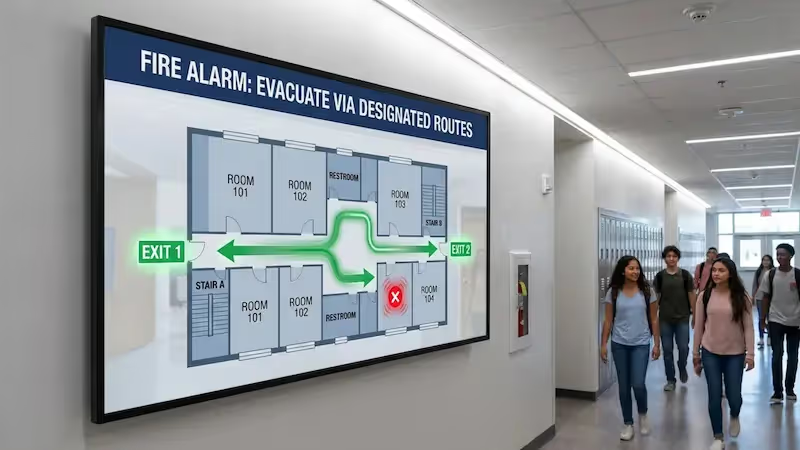
Safety is a primary reason schools adopt digital signage. Modern platforms allow you to override scheduled content instantly to display high-contrast emergency instructions. During a drill or an urgent situation, this visual communication complements audio alarms, which is essential for students with hearing impairments or in loud environments like gymnasiums.
Beyond emergencies, real-time updates keep the school day running smoothly. If a bus is delayed or a classroom location changes, staff can update every relevant screen in minutes. This reduces confusion and minimizes the number of questions directed to the front office.
Improved Student and Staff Engagement
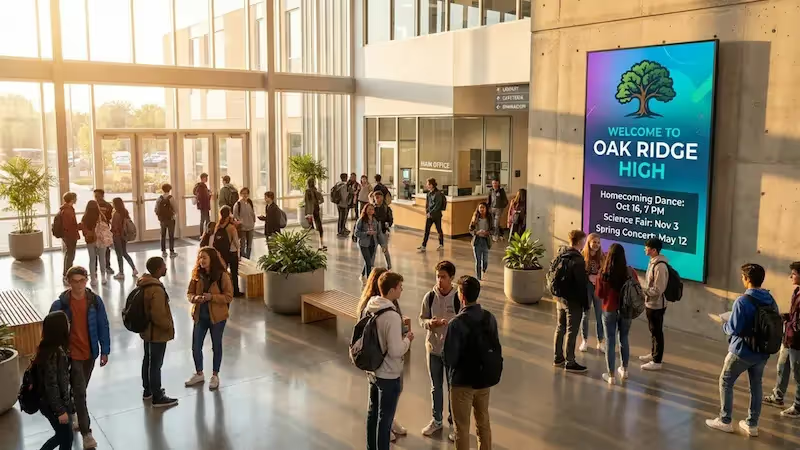
Digital signage is a practical tool for building community. By showcasing student artwork, recognizing "Student of the Month" achievements, and highlighting sports victories, schools can validate student efforts publicly. Using Interactive Scenarios, you can even create touch-enabled displays that allow visitors to browse digital yearbooks or hall of fame records.
For staff, screens in breakrooms can display professional development schedules, internal news, and reminders. This ensures that everyone remains on the same page regarding school policies and upcoming events.
Centralized and Efficient Content Management
A key operational benefit is the ability to manage an entire district's network from one dashboard. A communications director can publish a district-wide announcement to all schools with a few clicks, while still allowing individual principals to manage their local content. This balance keeps branding consistent while ensuring messages remain relevant to each specific building.
This setup also simplifies maintenance. Platforms like Look Digital Signage offer monitoring tools, allowing IT teams to check screen status remotely. If a screen goes offline, you can identify the issue without needing to visit the physical location.
Cost Savings and Eco-Friendly Alternatives
While installing commercial displays and media players involves an upfront investment, the long-term ROI is significant. Schools can reduce paper and printing costs substantially over time. Additionally, the efficiency gained by updating screens remotely, rather than manually replacing posters, saves countless staff hours.
From an environmental perspective, digital signage aligns with sustainability initiatives. reducing paper waste is a tangible step toward a greener campus. Furthermore, features like scheduled screen timers can turn displays off automatically outside of school hours to save energy.
Wayfinding and Easier Campus Navigation
Large campuses can be difficult to navigate for new students and visitors. Digital signage software can power screens that display maps and directory information. During open houses or parent-teacher conferences, these displays help guests find classrooms and offices efficiently.
Simple directional signage in hallways can also improve traffic flow. A strategically placed screen can point the way to the library, cafeteria, or main office, reducing congestion and freeing up staff to focus on other tasks.
Key Features to Look for in Digital Signage Software for Schools
Cloud-Based Content Management System
A cloud-based CMS is the standard for modern schools. It allows authorized staff to manage content from any device with internet access, whether they are in the office or working remotely. This flexibility is crucial for keeping communication current.
Cloud systems also receive automatic updates. This means your school benefits from the latest features and security patches without requiring your IT team to manually update every media player.
Scheduling Tools for Timed Announcements
Smart Scheduling is essential for automating school communication. A robust platform allows you to schedule content by time, day, and date. For instance, you can set lunch menus to appear only between 11:00 AM and 1:00 PM, while extracurricular announcements run after school hours.
Advanced scheduling can also accommodate complex school calendars, such as rotating block schedules. This ensures that the content displayed is always relevant to the current time of day.
Interactive and Touchscreen Capabilities
Interactive features transform passive viewers into active users. Software that supports touchscreens allows students and visitors to navigate through information, such as campus maps, event calendars, or digital catalogs. This is particularly effective in high schools and universities.
Interactivity also provides insight into what users are looking for. By observing which buttons are tapped most frequently, administrators can understand what information is most valuable to the school community.
Integration with External Tools and Data
To save time, your digital signage should play nicely with the tools you already use. Look for platforms that support integrations or web-based content from sources like Google Slides, social media feeds, or news apps. This allows you to pull in dynamic content automatically.
For example, you can link a screen zone to a weather widget or a live RSS feed. This "set and forget" approach keeps your screens fresh and informative without requiring constant manual design work.
Multi-Screen and Multi-Zone Display Support
Screen Layouts allow you to maximize the utility of every display. With multi-zone support, you can divide a single screen into different sections. One zone might play a welcome video, while a side panel displays a scrolling text ticker and the current time.

This is useful in multi-purpose areas like cafeterias. You can display menu items and nutritional information in one section while using the main area to promote upcoming school events or play student-produced videos.
Analytics and Content Performance Reporting
Data helps you make informed decisions. Playback Analytics can show you exactly what played and when. For schools managing advertising or sponsorship content on their screens, Proof-of-Play reports provide the verification needed to demonstrate value to partners.
Monitoring these metrics helps teams optimize their strategy. If you know that certain screens have higher visibility, you can prioritize important announcements for those specific locations.
Automated Emergency Notification Capabilities
As previously noted, the ability to override content for safety alerts is non-negotiable. The software should allow for immediate, network-wide content changes in the event of a lockdown or severe weather warning. Testing these triggers regularly ensures the system is ready when it matters most.
Reliable software also supports Offline Playback. This ensures that your safety messages and standard content continue to run smoothly even if the school's internet connection is temporarily lost.
Comparing Solutions: Finding the Right Fit for Your School
Template-Rich Solutions for Quick Content
Many schools lack a dedicated graphic designer. For these teams, access to a library of ready-made templates is vital. Platforms like Look Digital Signage offer a wide variety of customizable templates designed for educational settings, from "Student of the Month" layouts to event flyers. This allows staff to create professional-looking content in minutes without needing design skills.
Cost-Effective and Hardware-Flexible Options
Budget is often a primary concern for districts. Solutions that offer flexible hardware choices can significantly lower the Total Cost of Ownership (TCO). Look Digital Signage provides a free Look App for supported devices (like Android, Fire TV, and Smart TVs), allowing schools to use existing hardware. For those needing new players, the Look HDMI Player offers a plug-and-play experience at a reasonable price point.
Scalable pricing models allow schools to start small, perhaps with just a few screens in the lobby, and expand the network as budget allows.
Tools for Student Recognition and Interactive History
Recognizing student achievement builds school pride. While some niche software focuses solely on this, a versatile platform like Look CMS allows you to build Interactive Scenarios for digital halls of fame or donor recognition walls. You can upload photos, stats, and historical records into a touch-friendly interface that visitors can explore.
This approach gives you the flexibility to use the same software for general signage and specialized interactive kiosks, keeping your technology stack simple.
Multi-Platform Compatibility
Schools often have a mix of display types and operating systems. A robust software solution should support various platforms. Look Digital Signage is compatible with a wide range of operating systems, ensuring that you can manage a mixed fleet of screens from a single dashboard. This prevents the headache of managing different software for different hardware.
Cloud-Based vs. On-Premise Solutions
Schools must decide between cloud-hosted (SaaS) and on-premise deployments. Cloud-based solutions are generally preferred for their ease of use, remote access, and lower maintenance requirements. They require no local server infrastructure.
However, for universities or districts with strict data security policies, an on-premise solution may be required.
Free vs. Paid Digital Signage Platforms
While free or open-source tools exist, they often come with hidden costs in terms of reliability and staff time. Basic tools may lack essential features like remote scheduling, multi-zone layouts, or offline playback. They also typically lack dedicated technical support.
Paid platforms provide stability, security, and customer support. Investing in a professional solution ensures that you have access to help when you need it, and that your screens remain operational without constant troubleshooting.
Best Digital Signage Software for Schools
Look Digital Signage - Best Overall for Schools
With Look Digital Signage, you’re essentially giving your school a centralized, cloud-based digital signage CMS that puts full control of your entire display network into one intuitive dashboard. From there, you can design and deploy dynamic, visually engaging content using built-in templates built for campus-wide announcements, menu boards, lesson-related media, event communications, or student engagement messaging, without relying on specialist design skills.
You can automate your entire communication workflow using smart scheduling and connect the school systems via API or Zapier to pull data from event calendars, LMS platforms, news feeds, or emergency alert systems for dynamic, automated updates.
Look also supports interactive learning with YouTube streaming for instructional content delivery, QR-driven student interaction flows, interactive touch kiosks for feedback and polling, and embedded widgets like Power BI dashboards, weather, clocks, and social media feeds.
Key Features:
- Display class schedules, news, alerts, and social feeds simultaneously in one screen layout.
- Hosted on AWS with SSO support and role-based access control for trusted, secure management of education content networks.
- Content continues playing during internet outages.
- Real-time emergency alerts
Pros
- Very easy to set up and use, even for non-technical staff
- Works with existing hardware — no costly proprietary equipment required
- Supports various media formats and multiple languages for diverse campus communities
Best for: Schools seeking a user-friendly, hardware-agnostic solution that simplifies managing diverse screens through an intuitive, cost-effective dashboard.
Pricing: Up to $15/screen/month, more screens - lower price. 14-day free trial available.
Rise Vision
Rise Vision is built specifically for K-12 and higher-education campuses, offering deeper integration with school safety systems (Alertus, InformaCast), wireless screen sharing and digital signage. Its template library is packed with education-specific designs for academic milestones, cafeteria menu boards, and campus athletic schedules. It effectively replaces standalone alert systems and static bulletin boards with a unified district-wide network
Key Features:
- CAP-compliant emergency overrides
- Wireless screen sharing for teacher-led classroom instruction
- Integration with Google Workspace and Microsoft 365 for calendar and hall-of-fame sync
- Direct hardware support for Avocor interactive flat panels and Chrome/Android media players
Cons: Template customization is limited since text boxes and images can't be repositioned
Best For: K-12 schools that want a low-maintenance, template-driven system that supports student safety and engagement.
Pricing: From $11/screen/month (K-12 plan). 14-day free trial available.
Yodeck
Yodeck is particularly beneficial for budget-conscious K-12 schools, rural school districts, and specialized educational centers like libraries or STEM labs. It offers a free single-screen plan with full features that lowers the barrier to entry for small deployments, while still supporting centralized, cloud-based management for multi-campus screen networks.
The platform includes instant screen overrides for emergency messaging and offline playback for up to 30 days. It also supports wayfinding, real-time data displays, and helps institutions reduce print costs while improving sustainability.
Key Features:
- CAP-compliant emergency alerts with instant screen override
- Offline playback
- Role-based permissions
- Google Slides integration for quick announcement updates
- QR code app for event sign-ups, study materials, or club info
Cons: Raspberry Pi setup requires some technical comfort. Not built specifically for K–12–templates are general purpose, not education-focused
Best for: Schools piloting digital signage on a tight budget before committing to a full district rollout.
Pricing: Free for 1 screen. Paid plans start at $8/screen/month (free player with annual plan).
Carousel Digital Signage
Carousel favors schools already running Apple, but is not limited to it. For Apple-ecosystem districts managed through Jamf, it deploys directly onto existing Apple TVs with no additional players needed. For mixed or non-Apple environments, it also supports BrightSign, Samsung, LG webOS, Sony, Philips, and Chrome Enterprise. It has the deepest school safety integration on this list, connecting with both Raptor Technologies and CrisisGo via CAP.
Key Features:
- Signage extended to iPads, iPhones, desktops, and screensavers
- Google Calendar, Exchange, iCal, and rSchool athletics feed integration
- Social-emotional learning (SEL) template library organized by age group
- FileWave integration for unified device and signage management
Cons: No video streaming or YouTube on Apple TV. Weaker fit for schools without an IT team managing deployment
Best for: Large K-12 districts and universities seeking professional-grade, hardware-flexible software to manage complex communication across multiple campuses and devices.
Pricing: Starts at $250 per month for their Core plan, which covers up to 10 media players.
ScreenCloud
ScreenCloud is a massive signage solution, especially if your school relies heavily on real-time data visualization and secure, authenticated access. It provides more granular control over web-based content than most entry-level tools. You will find it most effective for secondary schools and universities that need to display dynamic, live-updating information from multiple cloud sources.
Key Features:
- Extensive library of 80+ automated apps and integrations
- Enterprise-grade security with SSO and SCIM support
- Hardware-agnostic software compatible with existing school devices
- Dashboards and data feeds via Microsoft Power BI and Google Sheets
- Embeddable web content
Cons: Recurring per-screen monthly fees can become a significant annual budget line.
Best for: Schools of any size — K-12 through university — that want a clean, manageable signage solution without enterprise complexity. Particularly strong for single admins managing multiple screens across one or several buildings.
Pricing: Starts at $24/screen/month. Enterprise is custom-quoted. 14-day free trial available.
Wallboard
Wallboard is a good software choice for education when the main goal is campus‑wide communication and information broadcasting, rather than highly interactive, student‑focused classroom teaching. It lets schools easily create and manage digital signage for hallways, cafeterias, and entrances, with content that can include calendars, event schedules, emergency alerts, and live data from sources like Google Sheets.
Its multi-campus management and user permissions help maintain branding consistency while enabling faculty, staff, and students to collaborate securely on content creation. However, it is not primarily an interactive whiteboard for lessons, so schools usually pair it with dedicated teaching tools like OpenBoard or myViewboard for classroom‑focused, student‑participation activities.
Key Features:
- CAP-integrated emergency triggers for instant lockdown or weather alerts across every screen
- Interactive campus wayfinding
- Role-based access control
- Automated data syncing with Google Drive, Microsoft 365, and social feeds for real-time news
Cons: Can feel overwhelming for very small, simple deployments
Best For: K-12 schools looking for a user-friendly way to automate daily announcements and emergency alerts across diverse hardware types and multiple locations.
Pricing: From $25/mo (Pro), $30/mo (Interactive), $50/mo (Multi-output). 30-day free trial is available.
Clevertouch
Clevertouch is essentially a hardware company that sells interactive touchscreens and non-touch signage displays. When you buy their screens, you get the software for free. If you're a school board member or IT director looking to eliminate recurring licensing costs, this model provides a lifetime management suite included in the initial hardware price.
Key Features:
- Vetted App Library with hundreds of free, ad-free educational tools
- Seamless File Migration
- Multi-Device Mirroring for displaying up to nine student screens simultaneously
- Google EDLA Certification
Cons: Cost-efficiency depends on standardizing your district with Clevertouch-branded hardware.
Best For: K-12 districts and universities seeking a hardware-first solution that eliminates software subscriptions while unifying classroom instruction and emergency communication.
Pricing: Included with Clevertouch hardware; subscription fees apply for 3rd party hardware.
NoviSign
If you are a university administrator or K-12 principal looking to integrate your physical displays with your virtual learning environment, NoviSign provides a bridge to platforms like Moodle. You can automatically pull course content, announcement threads, and grade updates directly into your hallway displays to keep students connected even when they aren't at their laptops.
- Moodle LMS Integration for automatically displaying course updates and student announcements
- Digital queue management
- Interactive polling for real-time student feedback or school-wide elections
- Embedded web content to show live school news portals and external learning resources
- Wayfinding kiosks for improving navigation
Cons: High-end interactive features depend on consistent, high-speed campus Wi-Fi
Best For: K-12 schools and colleges seeking an easy-to-use platform that combines traditional announcements with functional tools like student queue management and LMS data syncing.
Pricing: From $20/screen/month. 30-day free trial available.
Navori
Navori is a strong fit for large institutions that treat their screens as a critical part of their campus infrastructure. While many tools rely on basic web technology, this software is built for high-resolution performance and deep reliability. It is particularly effective for universities that need to delegate control to dozens of different staff members while keeping the overall system secure and centralized.
Key Features:
- AI-powered content triggers
- Native "QL" player engine for broadcast-quality 4K rendering at 60fps on Windows, Android, and SoC displays
- Real-time synchronization with school schedules, room occupancy, and internal databases
- CAP-integrated emergency alerts
- Role-based user permissions
Cons: The management dashboard has a steeper learning curve for new users
Best For: Large universities and K-12 districts that require a high-performance, enterprise-grade system to manage a complex network of screens with professional-quality video and automated school data.
Pricing: From $14/mo/player. Custom quote for self hosting and premium tiers.
Rocket Alumni Solutions — Best for Recognition
If you are a high school athletic director or university advancement officer looking to digitize your physical trophy cases and hall of fame plaques, Rocket Alumni Solutions provides a specialized interactive platform. Unlike general digital signage, this software is built specifically to archive decades of school history, allowing visitors to search for specific alumni, view historical team rosters, and watch championship highlights on touchscreen kiosks.
Key Features:
- Interactive Hall of Fame databases with searchable profiles for athletes, scholars, and distinguished alumni
- Auto-ranking athletic record boards that update dynamically without manual graphic redesigns
- Digital yearbook integration featuring animated flip-book viewers and scanned historical archives
- Virtual trophy cases to display 3D-like galleries of awards when physical shelf space is at capacity
- Sponsorship and donor suites with dedicated ad placements to generate revenue for athletic or arts departments
Cons: Significant initial time investment required for data migration and archiving
Best For: High schools and universities needing a dedicated interactive kiosk system to digitize and manage extensive athletic, academic, and alumni recognition records in a searchable, high-engagement format.
Pricing: Under 200 students at $3, 588 for public schools (annual). Custom annual licensing based on school size.
Skykit
Skykit is a strong fit for education, designed to help schools and universities broadcast real‑time messages, such as event schedules, emergency alerts, cafeteria menus, and data dashboards, across multiple screens on campus, with centralized control, scheduling, and integrations (for example, with Power BI, Tableau, or Google tools).
It handles content, device management, and security (including MFA and SSO) in one platform, which suits multi‑building districts and growing campuses. Schools also use it to strengthen branding, streamline communications, and even tie classroom content into hallway or entrance displays.
Key Features:
- Firmware-level lockdown for maximum device security and prevention of unauthorized student access
- Real-time data dashboards
- Centralized district-wide control with multi-location publishing and role-based approval workflows
- CAP-compliant emergency overrides
- Cellular-enabled hardware options for outdoor signs or areas with restricted or unreliable campus Wi-Fi
Cons: Higher total cost of ownership due to proprietary hardware requirements
Best for: Large-scale school districts and universities requiring a secure, full-stack solution to manage hundreds of screens with automated data-driven dashboards and high-security hardware.
Pricing: From $16.50/display/mo. Custom quote for pro and enterprise plans.
Summary Comparison Table
How to Select the Right Digital Signage Software for Your School
Reviewing School Needs and Use Cases
Start by identifying your primary goals. Are you trying to reduce paper waste? Do you need to improve emergency communication? Is showcasing student work your main priority? Clarifying these objectives will help you select a platform that fits your specific needs.
Gather input from office staff, IT, and teachers to understand where current communication gaps exist. A high school might need advanced scheduling for sports, while an elementary school might prioritize simple, colorful templates for daily announcements.
Budget and Total Cost of Ownership
Look beyond the monthly software fee. Consider the hardware costs, installation, and the time staff will spend managing the system. A platform that is intuitive and easy to use saves valuable time. Look Digital Signage offers transparent pricing that scales with your needs, helping you forecast costs accurately.
Check for educational pricing or volume discounts, which can make district-wide deployments more affordable.
Hardware Compatibility and Technical Requirements
Assess your current infrastructure. If you already have smart TVs, check if you can install a signage app directly onto them. If you need new hardware, consider reliable media players for a simple setup. Ensure your network can handle the data traffic, though features like Offline Playback help minimize bandwidth issues after content is downloaded.
Implementation Support and Training
Select a vendor that provides strong support resources. Access to tutorials, a knowledge base, and responsive customer service is crucial for a smooth rollout. Platforms designed for non-technical users will generally require less training, allowing your staff to get started quickly.
Vendor Stability and Long-Term Value
Choose a partner that is committed to the product's development. Look for a provider with a track record of reliability and regular software updates. Reading reviews and checking case studies can give you confidence that the solution works effectively in educational environments.
Best Practices for Deploying Digital Signage in Schools
Effective Display Placement on Campus
Place screens in high-traffic areas where students and staff naturally pause. Lobbies, cafeteria lines, and waiting areas are ideal "dwell zones." Hallway screens are also effective, but content there should be brief and easy to read as people pass by.
Consider mounting height carefully. For interactive screens, ensure they are accessible to all students, including those using wheelchairs. For general displays, mount them high enough to be seen over a crowd but low enough to be read comfortably.
Developing a Dynamic Content Strategy
Static screens are easily ignored. Aim to keep your content fresh by updating it regularly. A good mix includes automated content (like weather or date/time) alongside specific school news. Look CMS makes this easy with drag-and-drop playlists.

Maintain consistent branding by using school colors and logos. Keep text concise and legible-large fonts and high-contrast colors work best for visibility from a distance.
Staff Training for Content Updates and Screen Control
Empower more than just the IT department to update screens. With user management features, you can grant access to administrative assistants or specific teachers to manage content for their areas. This shared responsibility ensures content remains relevant and timely.
Provide templates to these contributors to ensure design quality remains high across the network.
Measuring Impact and Adjusting for Engagement
Use analytics to see what is working. If an interactive kiosk isn't being used, try changing its location or the content it offers. Regularly soliciting feedback from students and staff can help you refine your strategy to ensure the screens provide real value.
Trends Shaping the Future of School Digital Signage
Mobile and Remote Screen Management
Remote management is becoming increasingly powerful. Administrators can now control screens from a smartphone, allowing for instant updates even when they are away from their desks. This is particularly useful for urgent announcements like snow days or unexpected schedule changes.
Accessibility Enhancements for All Students
Modern signage is becoming more inclusive. Features like high-contrast modes and screen reader compatibility help ensure that digital communication is accessible to students with visual impairments. Multi-language support is also valuable for schools with diverse student populations.
Deeper System Integrations and Automation
The integration of digital signage with other campus systems is growing. Screens can connect to safety sensors, room booking systems, and calendars to automate information flow. This creates a responsive environment where information is always up-to-date without manual intervention.
Frequently Asked Questions about School Digital Signage Software
Which Digital Signage Software Is Best for Schools?
The best software balances ease of use with powerful features. Look Digital Signage is a strong choice for schools because it combines a simple, intuitive interface with robust scheduling, remote management, and safety features like offline playback and emergency alerts.
Can Digital Signage Integrate with Existing School Systems?
Yes. Look CMS offers integrations and app support that allow you to display content from external sources, social media, and other web-based tools, streamlining your communication workflow.
Is There Free Digital Signage Software for Education?
Some providers offer limited free versions. For example, you can get started with the Look App player for free on supported devices to test the system. However, for a full campus deployment, a paid subscription ensures you have access to essential features like advanced scheduling, storage, and technical support.
Does Digital Signage Increase Campus Safety?
Absolutely. Digital signage provides a rapid way to disseminate visual alerts across the entire campus. This is a critical component of a comprehensive safety plan, ensuring that instructions are clear and visible to everyone instantly.
What Kind of Content Works Best for School Displays?
A variety of content keeps viewers engaged. Effective examples include:
- Daily schedules and bell times
- Student recognition and awards
- Cafeteria menus with nutritional info
- Weather forecasts and news tickers
- Social media highlights from official school channels
- Countdowns to holidays or graduation
Can Students Contribute Content or Interact with Digital Signage?
Yes. Schools often involve media clubs or student councils in creating content. With Interactive Scenarios, students can also interact directly with screens to find information or view galleries.
How Much Do Digital Signage Solutions Cost for Schools?
Costs vary based on the number of screens and hardware needs. Software subscriptions generally scale per screen. Look Digital Signage offers competitive pricing suitable for education budgets. You can check the pricing page or book a demo to get a precise quote for your district.
Where Should Digital Signage Screens Be Placed on Campus?
Effective locations include main entrances, reception areas, cafeterias, libraries, and key hallway intersections. Placing screens where students and staff naturally congregate ensures your messages get the most visibility.
Final Thoughts on Choosing the Best Digital Signage Software for Your School
Selecting the right digital signage software is an investment in a more connected and safe school environment. Beyond the technical specs, consider how the platform will help you celebrate student success and streamline daily operations. When a student sees their artwork displayed in the hall, or a parent easily finds their way to the gym, it strengthens the school community.
By choosing a reliable, cloud-based solution, you can ensure that your communication network is easy to manage, scalable, and ready to meet the needs of your students and staff for years to come.