
Table of Content
How can hotels keep guests informed, update event schedules, and promote amenities instantly without constantly printing new signs? The answer lies in cloud-based digital signage software. For hospitality teams, Look Digital Signage offers a reliable, professional solution to manage every screen from one simple dashboard. It allows you to move beyond static posters and deliver dynamic, real-time content that improves the guest experience and highlights revenue-generating services like spas and dining.
In a fast-paced hospitality environment, digital signage is a practical communication tool, not just decoration. Whether you manage a boutique hotel or a large resort, the right platform lets your team update digital menu boards, share wayfinding info, and post emergency alerts in minutes. By choosing a system designed for non-technical teams, you can focus on guest satisfaction while ensuring your messaging is always consistent and current.

What is digital signage software for hotels?
Digital signage software for hotels is a platform that allows you to manage and publish content to screens throughout your property. Unlike standard consumer TV setups, a professional solution like Look CMS is built for the demands of 24/7 commercial environments. Staff use a central web-based dashboard to create playlists, schedule updates, and send content-such as welcome messages, weather widgets, and restaurant promotions-to displays in lobbies, elevators, and guest rooms.
This software acts as the control center for your visual communication. It connects to media players (devices connected to your screens) to ensure the right message plays at the right time. Because it is cloud-based, you can manage your entire network from a laptop, whether you are standing at the front desk or working remotely.
How does hotel digital signage work?
A digital signage network relies on three main components: the software (CMS), the hardware (media players and screens), and the content. You log into the dashboard to upload assets like images and videos, or use tools like the Look AI Wizard to generate layouts quickly. This content is organized into playlists and scheduled. For example, you might schedule a breakfast menu to play from 6:00 AM to 11:00 AM, followed automatically by lunch promotions.

Once the schedule is live, the software pushes the content over the internet to the media player connected to each screen. Systems like Look Digital Signage feature offline playback, meaning the media player downloads the content locally. This ensures your screens keep running smoothly even if the hotel internet connection drops.
What makes hotel digital signage different from standard solutions?
Hotel signage requires more flexibility than a standard retail display. It often needs to handle multiple formats-from video loops in the lobby to static event schedules outside conference rooms. A strong fit for hospitality, like Look DS, supports diverse content types and allows for complex scheduling to match the rhythm of hotel operations.
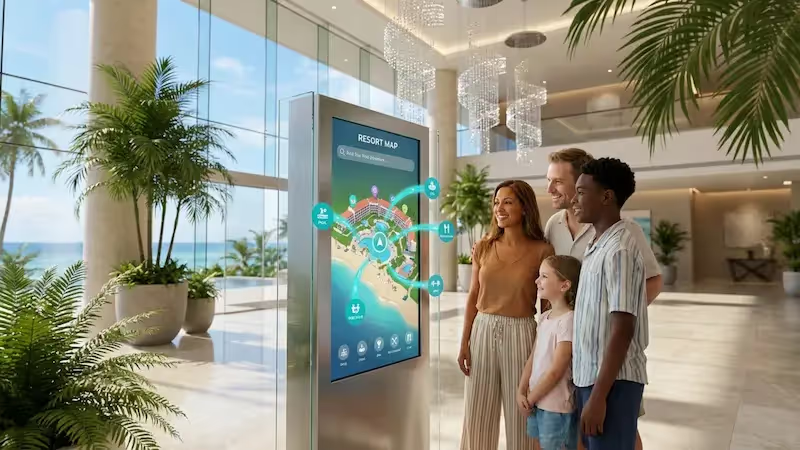
These solutions also support a "digital concierge" approach. You can use interactive scenarios to let guests explore local maps, view amenities, or check event times via touchscreens. This capability frees up front-desk staff while giving guests immediate access to the information they need.
Which types of displays and locations are common in hotels?
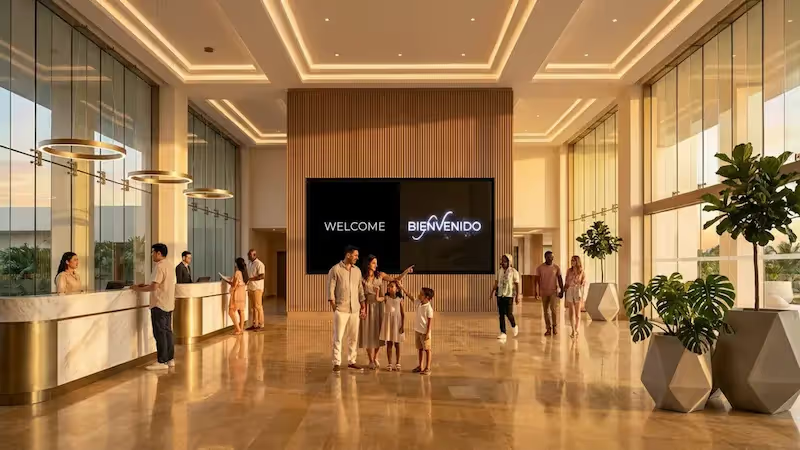
Digital signage adds value in almost every part of a hotel. The most visible spot is the lobby, where large displays or video walls set the brand tone. Elevators are another high-value location; smaller screens here capture attention during rides, making them ideal for promoting happy hours, spa packages, or local weather updates.
Beyond high-traffic areas, hotels use digital signage for wayfinding in corridors, digital menu boards in cafes, and meeting room screens that display daily agendas. With screen layouts features, you can even split a single screen to show live news on one side and hotel announcements on the other.
Why should hotels invest in digital signage software?
Investing in digital signage software helps hotels solve operational headaches and support revenue goals. In an era where guests expect modern conveniences, digital screens provide a polished, professional touchpoint. They replace cluttered bulletin boards and easel stands with clean displays that can be updated from anywhere.
The return on investment comes from saving staff time and reducing printing costs. By eliminating the need to design, print, and physically replace paper signs, your team can focus on guest services. Additionally, showcasing high-margin services at the right time-like promoting room upgrades or evening cocktails-turns your screens into an effective sales engine.
Improves guest experience and engagement
Digital signage simplifies the guest journey. Instead of waiting at the concierge desk to ask about pool hours or breakfast times, guests can find this information instantly on screens. Using interactive scenarios, you can create self-service kiosks that offer curated guides to local attractions, helping guests feel more at home.
Engagement also improves with dynamic visuals. High-quality video tours of the spa or restaurant can encourage guests to utilize amenities they might have missed. Clear, attractive visuals contribute to a modern atmosphere, often reflected in better guest satisfaction scores.
Increases operational efficiency and reduces costs
For your operations team, digital signage is a massive time-saver. If a conference room changes at the last minute, you can update the door signage instantly via the CMS, avoiding confusion. This level of agility is impossible with print. Using remote management, a single manager can oversee screens across multiple floors or even different properties without leaving their office.

Reducing print reliance also lowers long-term costs. There is no need to reprint menus for every price change or seasonal update. Digital updates are free and instant. Furthermore, automated information screens reduce repetitive questions at the front desk, allowing staff to handle more complex guest needs.
Drives additional revenue through promotions and advertising
Screens are powerful tools for upselling. You can use smart scheduling to display "Happy Hour" ads starting exactly at 4:00 PM or promote late check-out options on Sunday mornings. Because the content is bright and dynamic, it captures attention far better than a static table tent.
Hotels can also generate revenue by hosting partner content. You might offer ad space on lobby screens to local tour operators or luxury transport services. This creates a new revenue stream that can help offset the cost of the hardware and software.
Supports compliance and accessibility requirements
Safety is critical in hospitality. Digital signage software allows you to override scheduled content to display emergency alerts, such as fire evacuation routes or severe weather warnings, ensuring all guests are informed immediately. This rapid communication capability is a key safety feature.
It also supports accessibility. Screens can be mounted at wheelchair-accessible heights, and content can be designed with high-contrast text for better readability. Clear digital wayfinding helps all guests navigate the property confidently, reducing anxiety and improving flow.
Best Digital Signage Software for Hotels
1. Look Digital Signage
Look DS gives hotel operators a single cloud dashboard to manage every screen type across a property, from lobby displays and event boards to restaurant menus and wayfinding kiosks. You can group screens by function — lobby, F&B, conference, pool area — and push targeted playlists to each group, then schedule content transitions by time of day, day of the week, or specific campaign dates.
The built-in Content Creator includes hotel-specific templates for room catalogs, event listings, daily menus, and self-check-in layouts. The drag-and-drop Layout Designer splits any screen into multiple zones so you can combine a wayfinding map, event schedule, and promotional content on a single display.
For properties with a PMS or event calendar, Look syncs via API or Zapier to keep room availability, event schedules, and promotions auto-updated.
Key features:
- Built-in weather, news (CNN, BBC), YouTube, Google Reviews, and flight information (FIDS) apps that run natively without third-party plugins
- Interactive touchscreen builder for self-check-in kiosks, virtual concierge scenarios, and local attraction guides, with no coding required
- Role-based user permissions with SSO integration, so front desk, marketing, and F&B teams each control only their own screens
- Remote content management across all screen types with tag-based grouping and smart scheduling
- PMS integration via Zapier or API
Best for: Hotel groups and resort properties that need to schedule content across lobby and meeting room screens while keeping brand control centralized.
Pricing: Up to $15/screen/month. More screens — lower price. 14-day free trial, no credit card required. On-premise licensing available on request.
2. Monscierge
Monscierge is built specifically for hotels to enhance the guest journey from arrival to departure. Its Connect Lobby is an ADA-compliant interactive touchscreen that works as a digital concierge, where guests can check flight status, browse local restaurant recommendations, view maps, and explore property amenities in 26+ languages.
If your hotel hosts events, Connect Meetings pulls schedules directly from Delphi and CVENT and displays them on tablets outside each conference room, updating changes automatically. You can also rotate promotions for your spa, restaurants, loyalty program, or local business partners through the built-in ad manager.
Key features:
- Apple TV for Hospitality replaces cable with a streaming in-room TV experience that also surfaces hotel info, menus, and upsell offers
- Integration with major PMS and hospitality platforms including Oracle Opera, Amadeus Delphi, HotSOS, and Hapi for secure PMS connectivity
- Guest engagement tracking highlighting popular amenities and local recommendations
Best for: Full-service hotels and luxury resorts that want a dedicated hospitality guest-experience platform.
Pricing: Quote-based. Contact vendor for details.
3. Hoteza HotSign
Hoteza is a full guest journey platform, and HotSign is its digital signage module. It integrates directly with Opera/Fidelio PMS to automatically pull event and conference schedules onto screens outside meeting rooms, so your team doesn't have to update signage manually when things shift.
You can manage content across multiple properties from one cloud-based CMS, schedule playlists by date, time, or day of week, and assign different content to different screen groups — lobby, spa, elevator, restaurant. HotSign also supports RSS feeds for news, airport display boards, and weather forecasts, along with full HD video and image playlists.
Key features:
- Part of a broader Hoteza ecosystem that includes interactive TV, guest app, mobile check-in, AI concierge, and casting, all managed from one CMS
- Event management widgets display conference and meeting room schedules with automatic PMS-synced updates
- 200+ integrations with PMS, POS, GRMS, job dispatch, and mobile key systems including Opera, Protel, Mews, and StayNTouch
Best for: Hotels that want their digital signage to be part of a larger guest experience platform covering in-room TV, mobile check-in, and guest messaging under one system.
Pricing: Contact Hoteza for a quote; demo available on request.
4. NoviSign
With NoviSign you can create multi-zone layouts using 50+ drag-and-drop widgets to combine event listings, wayfinding maps with directional arrows, scrolling text tickers, and welcome messages on a single screen.
For hotels with conference facilities, NoviSign integrates with Amadeus Delphi to automatically pull event schedules onto room boards outside meeting spaces. You can also add digital menu boards for on-premise restaurants and bars, and schedule content by day, date, or set expiration dates for time-limited promotions.
Key features:
- 500+ customizable templates with hotel-specific options for lobby displays, event boards, and restaurant menus
- Live social media feeds from Instagram, Facebook, and Twitter for displaying guest content and property highlights
- Interactive touchscreen kiosk support for self-service guest information and concierge-style displays
Best for: Mid-size to large hotels that want a widget-rich design studio and direct Amadeus Delphi integration for conference and event signage.
Pricing: From $18/screen/month (annual billing); from $20/screen/month (monthly billing). 30-day free trial available.
5. SignageLive
SignageLive handles hotel signage across lobbies, reception desks, conference rooms, and common areas from one cloud-based CMS. For hotels near airports, its Screenfeed Connect partnership provides live flight information displays that you can run alongside your own promotional content on the same screen.
You can manage video walls in your reception area, display real-time room rates at the front desk, and show meeting room bookings with the ability to extend or cancel directly from the calendar. Content scheduling includes start and end times for promotions, so seasonal offers never accidentally overrun.
Key features:
- 500+ apps in the SignageLive Marketplace including Screenfeed news, weather, flight boards, social media feeds, and content creation tools like Canva and PosterMyWall
- ISO-27001 certified with SSO options through OneLogin, Okta, Microsoft Entra ID, and PingFederate
- Proof of play reporting and real-time player health monitoring with email and SMS alerts if a screen goes offline
Best for: Hotels and hospitality groups that prioritize enterprise-grade security and want access to a large marketplace of third-party content apps.
Pricing: From $270/display/year (~$22.50/month); custom plans available for larger networks. Contact vendor for trial options.
6. Uniguest Hotel Hub
Uniguest Hotel Hub brings digital signage, interactive TV, wayfinding, casting, and a digital guest directory under one cloud-based CMS, so you can manage every guest-facing screen from a single dashboard. The drag-and-drop content editor includes a library of design tools for building screen layouts and content schedules.
For properties with conference facilities, dedicated room signage syncs to your central calendar and displays event details outside meeting rooms. You can also integrate real-time feeds for weather, flight and shuttle schedules, and local attractions.
Key features:
- Interactive touchscreen wayfinding with 3D property maps, animated routes, and downloadable directions via QR code
- Digital menu boards integrated with EPOS for real-time food and beverage updates
- QR-accessible digital guest directory that replaces printed in-room compendiums on any mobile device
Best for: Mid-size to large hotels and resorts that want digital signage, in-room TV, wayfinding, and guest directories managed from one platform rather than multiple vendors.
Pricing: Contact Uniguest for custom pricing.
7. Poppulo
Poppulo has a Group Brand Takeover feature that lets conference groups customize every meeting room sign and readerboard across your property with their own branding. On top of that, Poppulo integrates with Amadeus Delphi to pull event schedules onto screens automatically. The hospitality Suite includes ready-to-use templates for meeting room signs, readerboards, menu boards, virtual concierge, and guest room TV, so on-site staff can create branded content without starting from scratch.
Key features:
- Role-based access so marketing, events, and F&B teams each control only their own screens
- Omnichannel communications reaching both guests and employees via signage, email, and mobile from one system
- 4K video playback across vertical and horizontal orientations, including multi-screen video walls
Best for: Large hotels and convention properties that want to upsell event branding packages alongside automated conference signage.
Pricing: Contact Poppulo for a custom quote. 14-day free trial available.
8. 22Miles
22Miles integrates directly with Delphi, Tripleseat, Momentus, and Opera to pull event schedules onto screens, which alone makes it worth a look for conference-heavy hotels. It supports 3D wayfinding that guests can use from touchscreen kiosks or pull onto their phone via Carry2Mobile, which generates a QR code on any digital sign. There's also a built-in AI Assistant that answers guest questions from signage, the hotel website, or event apps.
Key features:
- 4K support for displaying high-resolution visuals
- Open API for integrations
- 1,000+ ready-to-use templates with drag-and-drop design tools
Best for: Hotels and convention centers that need advanced interactive wayfinding with direct Delphi, Tripleseat, or Opera integration.
Pricing: Contact 22Miles for a custom quote. Demo available.
9. Fugo
Fugo has a built-in Design Studio that works like Canva for TV screens, so hotel staff can create lobby displays, event boards, and promotional content without a designer. You can build interactive touch flows for concierge kiosks where guests browse local guides, service listings, event schedules, and transportation info.
Content triggers automatically swap what's on screen based on time of day, events, or custom conditions. The app library includes Google and Yelp review widgets, social media walls via Walls.io, YouTube video and live stream embeds, and a QR code app for driving loyalty program signups.
Key features:
- Hospitality template library plus a PosterMyWall integration for creating digital posters customized to your property
- Dropbox folder sync so screens auto-update when your team uploads new files
- Fugo sells its own media players alongside third-party hardware support
Best for: Small to mid-size hotels that want a design-friendly CMS with interactive touchscreen capabilities and broad hardware compatibility.
Pricing: From $20/screen/month (annual billing); from $24/screen/month (monthly billing). 14-day free trial, no credit card required.
10. Nonius
Nonius is a hospitality technology provider, and digital signage is one piece of a broader ecosystem that includes Interactive TV, casting, Wi-Fi, voice AI concierge, and a mobile guest app. The signage side has a Hotel Corporate Channel that turns a lobby TV into a branded live feed with weather, RSS news, social media posts, daily rates, and your front desk team's names.
It supports over 150 hospitality integrations and includes an interactive Digital Concierge touchscreen giving guests access to hotel info, services, events, and nearby tourist attractions. Reception displays pull real-time flight schedules from FlightAware, updated every 5 minutes. For conference and event spaces, Nonius provides meeting room scheduling, wayfinding, and integrates directly with Amadeus Delphi.
Key features:
- Mobile support for resort wayfinding and maps
- Multi-property central management with location-based screen grouping and customizable zone naming
- Flexible resolution support across mixed display environments including portrait, landscape, and ultra-wide formats
Best for: Hotels and resort groups that want a single hospitality technology partner covering signage alongside TV, Wi-Fi, and guest experience tools rather than managing separate vendors for each.
Pricing: Free 30-day trial with full feature access; contact Nonius for subscription pricing.
11. REACH Media Network
REACH doesn't have native hotel-specific integrations like PMS or event management platforms, but it does support Microsoft 365 and Google Calendar for conference room scheduling. Every subscription includes free creative design services where their team builds custom branded layouts for your property.
The CMS comes with free templates and built-in apps for weather, social media, news, and calendars, and you can manage lobby displays, conference room schedules, wayfinding maps, and menu boards from one centralized dashboard. There's also a free plan for up to 20 displays, so you can test across your property before committing.
Key features:
- Content approval workflows with team workspaces and roles so different departments manage only their screens
- Dedicated onboarding, unlimited training, and 24/7 support included with every plan
- Microsoft Power BI integration for displaying operational dashboards on screens
Best for: Small hotels and resorts that prioritize hands-on design support and a free tier over hotel-specific integrations.
Pricing: Free plan available for up to 20 displays. Contact REACH for paid plan pricing.
12. AIScreen
AIScreen covers the hotel signage basics at a low price point: welcome messages, event schedules, wayfinding, menu boards, and promotions. You can pull in live data feeds for weather, flight info, and event schedules, and set up interactive kiosks for guest navigation. The template library has over 1,500 options, which helps get screens running fast without custom design.
Key features:
- Over 1,500 customizable templates for lobby displays, menu boards, event signage, and directories
- Smart scheduling for automated, time-targeted messaging
- Integration with event and meeting room signage
Best for: Budget-conscious hotels looking for a general-purpose CMS with broad device support and a large template library.
Pricing: From $10/screen/month. 14-day free trial; first screen free.
Key features to look for in digital signage software for hotels
When selecting software, look for a platform that balances power with simplicity. It should be robust enough to run 24/7 but easy enough for non-technical staff to use. Look Digital Signage is designed with this balance in mind, ensuring that marketing and operations teams can manage screens without constant IT support.
Here are the essential features your hotel signage system should have.
Content management and remote control
A clean, intuitive dashboard is essential. You should be able to drag and drop media files, organize playlists, and publish updates in minutes. Remote management is equally important; it allows you to monitor screen status, reboot devices, and update content from any location with internet access, ensuring your network is always healthy.
Customization and branding options
Your screens must reflect your hotel's brand identity. Look for software that includes a Content Creator or layout builder, allowing you to design on-brand slides with your specific colors, fonts, and logos. Access to ready-made templates specifically for hospitality can also speed up the creation of menus and welcome screens.
Real-time updates and emergency alerts
The ability to change content instantly is vital. Whether correcting a typo on a dinner menu or broadcasting an urgent notification, updates should appear on screen within seconds. Systems like Look CMS allow you to push changes immediately, ensuring your information is never outdated.
Wayfinding and interactive navigation
For larger properties, digital wayfinding helps guests find their rooms, conference halls, or amenities without frustration. Look for support for interactive scenarios if you plan to use touchscreens. This allows guests to tap a destination on a map and see the route, reducing the workload on your staff.
Integration with hotel systems and calendars
To maximize efficiency, your signage should play nice with other data sources. Integrations via API or tools like Zapier allow you to connect external calendars or data feeds. This enables automatic updates for event schedules or meeting room displays, so your team doesn't have to manually type out daily agendas.
Scalability and multi-location support
Whether you have one screen or a thousand, the software should scale with you. Look Digital Signage allows you to organize screens by groups (e.g., "Lobby," "Bar," "Pool") or by location. This makes it easy to send global brand messages to all properties while allowing local managers to control specific screens at their site.
Accessibility and ADA compliance
Ensure your software supports diverse content formats. This includes the ability to display large, legible text and high-contrast imagery. Simple, clear layouts help all guests, including those with visual impairments, access the information they need during their stay.
Best use cases for hotel digital signage
Digital signage is versatile. By placing screens strategically, you can address specific guest needs at every point of their stay.
Here are effective ways to use screens to improve the guest experience.
Lobby welcome screens
The lobby sets the first impression. Use screen layouts to combine a warm welcome message with live weather updates and beautiful imagery of your property. You can also display a "Guest of the Day" or welcome specific conference groups by name, adding a personal touch that guests appreciate.
Wayfinding and digital maps
Large resorts and conference hotels can be confusing. Digital wayfinding stations placed near elevators and major junctions help guests orient themselves. Unlike printed maps, digital versions can be updated instantly if a room name changes or a pathway is closed for maintenance.
Event and conference room displays
Small screens mounted outside meeting rooms are standard for modern business hotels. These displays can show the current session, upcoming schedule, and client logos. Using scheduling features, these screens can automatically switch to show the next day's agenda once the current meetings conclude.

In-room entertainment and information
Your in-room TVs can double as digital signage endpoints. You can display a digital guest directory, room service menus, or promotional videos for on-site amenities. This keeps the room clutter-free by removing paper binders and flyers.
Self-service kiosks
Interactive kiosks can handle routine tasks like check-in or reservations. Using interactive scenarios within Look CMS, you can build simple touch interfaces that allow guests to browse spa treatments or view restaurant availability, streamlining operations during peak hours.
Digital menu boards for restaurants and bars
In food and beverage areas, digital menu boards are a must. They allow you to change prices instantly and hide sold-out items. With smart scheduling, your screens can automatically transition from breakfast menus to lunch and dinner options without staff intervention.
Promotional and partner content
Use screens in high-dwell areas like elevators to cross-promote services. A short video clip of a massage treatment or a signature cocktail can drive impulse purchases. This internal advertising is non-intrusive but highly effective at increasing revenue per guest.
Social media and guest communication walls
Displaying social media feeds or positive guest reviews can build community and trust. Apps within the digital signage platform can pull in content from your social channels, encouraging guests to share their own photos and experiences online.
Reliability and Offline Playback
Hotel internet can sometimes be spotty. Look Digital Signage features offline playback, which caches content locally on the media player. If the internet goes down, your menus, wayfinding, and promos keep running seamlessly, ensuring the guest experience is never interrupted.
Scalability for Hotel Groups
For management groups running multiple properties, Look allows for scalable network management. You can group screens by hotel location or zone (e.g., "North Wing," "Lobby Bar"), making it easy to push brand-wide updates while giving local managers control over their specific screens.
How much does digital signage software cost for hotels?
Digital signage costs generally include two components: hardware (one-time) and software (ongoing). Hardware costs vary based on whether you use existing TVs or purchase commercial displays and media players. Software is typically priced as a subscription per screen.
For a professional solution like Look Digital Signage, pricing is transparent and designed to scale with your needs. You can start small with a single screen and add more as you expand.
Pricing models: subscription vs. perpetual
Most modern platforms use a subscription model (SaaS). This ensures you always have the latest features, security updates, and cloud access. Look Digital Signage offers flexible plans billed per screen, often with discounts for annual payments. This model is usually preferred for hotels as it lowers upfront costs and includes ongoing support.
Some legacy systems use a perpetual license, which requires a large upfront payment and often involves complex, self-hosted servers. For most hotels, the cloud-based subscription model offers better flexibility and lower maintenance overhead.
Factors that affect the total cost
The total cost of ownership involves more than just the monthly software fee. Consider the cost of commercial-grade screens if you plan to run them 24/7. However, using the Look App on compatible hardware you already own can significantly reduce initial spending. Simple setups might only require a subscription and a basic media player, while complex video walls will require more specialized hardware.
Setting up and managing hotel digital signage solutions
Getting started with digital signage should be a clear, step-by-step process. With a platform like Look, you can go from login to live screen quickly.
Choosing the right software for your property
Start by identifying your main goals. Do you need to update menus daily? Do you need wayfinding? Choose software that offers specific features like smart scheduling and screen layouts to meet these needs. Look Digital Signage offers a free trial, which is the best way to test if the dashboard is intuitive for your team.
Installation and integration
Physical installation involves mounting your screens and connecting the media players (like the Look HDMI Player). Once connected to the internet, you pair the screen to your CMS account using a simple code. From there, all management is done remotely via the dashboard.
Content creation and scheduling
Content is key. Use the Look AI Wizard or built-in templates to create your first playlist. Organize your content logically-for example, a "Morning Loop" for breakfast and news, and an "Evening Loop" for bar specials and events. This ensures the right message reaches guests at the right time.
Maintaining and updating signage content
Keep your content fresh to maintain guest interest. Assign a team member to review playlists weekly. With Look, you can set expiration dates for specific slides so that holiday promos or event announcements stop playing automatically when they are no longer relevant.
Training hotel staff
Because Look CMS is designed for non-technical users, training is straightforward. Ensure your front desk and F&B managers know how to make quick updates. This decentralizes the workload and ensures that the people closest to the guests can control the messaging.
Find the Right Fit for Your Property
Choosing the best digital signage for hotels comes down to matching the platform to your property’s needs. If you want a hospitality digital signage system with centralized control, flexible deployment, and pricing that scales, Look Digital Signage is the best pick for 2026. Start a free 14-day trial to see how it works with your screens and your team.
Frequently asked questions about hotel digital signage software
Here are answers to common questions hoteliers have when planning a digital signage network.