

Table of Content
What exactly is a digital signage service and how does it help businesses communicate? Put simply, it is a platform that allows you to manage content on any screen, from anywhere, replacing static posters with dynamic video, images, and live data. This technology turns standard displays into powerful communication tools that can be updated in minutes without complicated setup.
As we move through 2026, the shift from static print to dynamic screens is standardizing across industries. From a digital menu board in a quick-service restaurant to an internal communication screen in a corporate office, digital signage services are at work. This article explains how these systems function, the core hardware and software components involved, and why solutions like Look Digital Signage are designed to make this transition seamless.
What is a Digital Signage Service?
Digital Signage Defined
Digital signage is the use of electronic screens to display multimedia content for informational or advertising purposes. Unlike paper signs that require manual replacement, digital screens allow you to change messaging instantly. Because the human eye is naturally drawn to motion and light, these displays are far more effective at capturing attention in busy environments.
However, digital signage is more than just a TV on a wall. It is a complete ecosystem, comprising hardware, a player, and a content management system (CMS), that allows that screen to "communicate." By using video, rotating playlists, and live data, businesses can deliver clearer messages that drive engagement and reduce the workload on staff.
How Does Digital Signage Service Work?
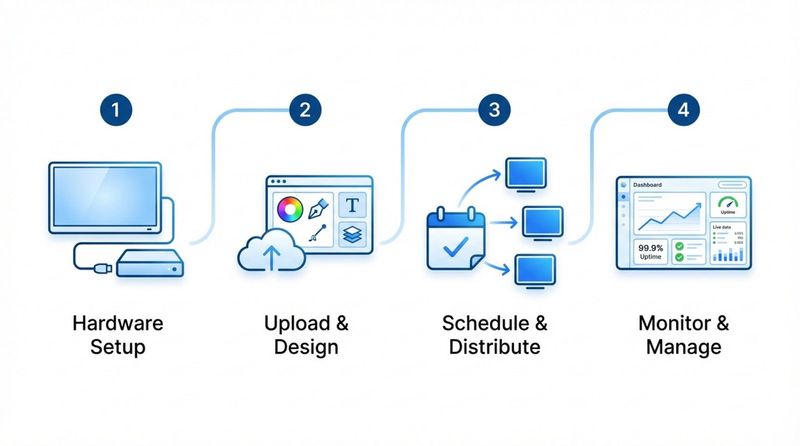
A digital signage service typically operates in four straightforward steps. First, you set up the hardware: this involves installing the screen and connecting a media player (or using a built-in app). Second, you access the cloud-based CMS-the "brain" of the operation-to upload your assets or design visuals using tools like ready-made templates.
The third step is scheduling and distribution. Using tools like Smart Scheduling, you determine exactly when and where your content plays. Finally, the system handles remote management. From your central dashboard, you can monitor screen health and ensure the right playlist is running, all without ever visiting the physical location.
Who Uses Digital Signage Services?
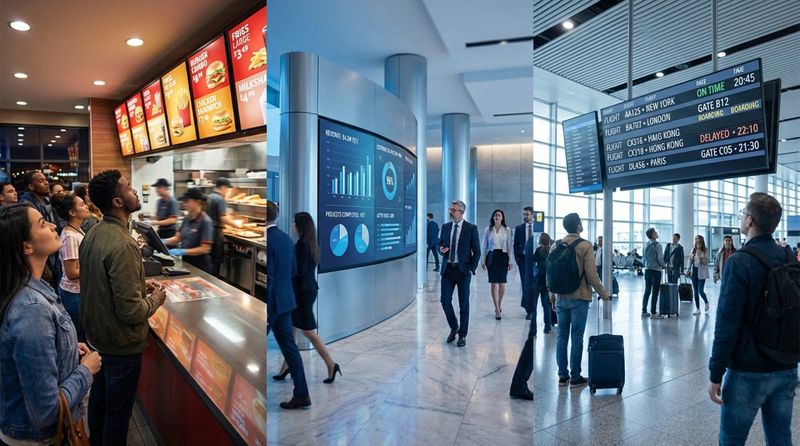
Digital signage is a strong fit for organizations of all sizes. In retail and grocery stores, it promotes offers and influences purchasing decisions at the shelf edge. Restaurants and cafes use it for digital menu boards, allowing them to update prices and hide sold-out items instantly. In corporate settings, HR teams use screens in breakrooms and lobbies to share policy updates, KPIs, and employee recognition.
Beyond commercial use, these services support critical operations. Airports and transit hubs use screens for real-time travel updates to reduce passenger confusion. Hospitals rely on wayfinding displays to guide patients, while schools use them for campus announcements and emergency alerts. Any team that needs to share information efficiently can benefit from this technology.
What Are the Components of Digital Signage Systems?
Digital Signage Hardware
Hardware forms the physical foundation of your network. This includes the display screens, which can range from standard monitors to professional-grade commercial hardware designed for 24/7 runtime and high brightness. While consumer TVs can work for simple setups, commercial hardware is generally recommended for reliability.
The critical component is the media player. This device connects your screen to the internet and renders the content. You can use an external device, such as the plug-and-play Look HDMI Player, or utilize the Look App on supported operating systems (like Android, Windows, Linux, and more) to turn existing hardware into a signage endpoint without buying new boxes.
Digital Signage Software
The software is the interface that bridges you and your screens. Modern solutions are predominantly cloud-based (SaaS), meaning they run on remote servers and are accessed via a web browser. This allows you to scale from one screen to thousands without worrying about local server maintenance. It also ensures you always have the latest features and security patches automatically.
Content Management System (CMS)
The CMS is where the work happens. A robust platform like Look CMS allows you to organize media, build layouts, and manage your network. The best systems are designed for non-technical users, offering drag-and-drop Screen Layouts and integrated design tools so you can create professional content without needing a graphic designer.
Digital Signage Content Types
Content varies based on your goals. Common formats include video loops, high-definition images, and text announcements. Advanced platforms also support Interactive Scenarios, allowing users to touch screens to navigate catalogs or wayfinding maps. Additionally, dynamic content-such as social media feeds, weather widgets, or RSS news-keeps screens fresh automatically without manual updates.
Key Features of Digital Signage Service
Centralized Content Management
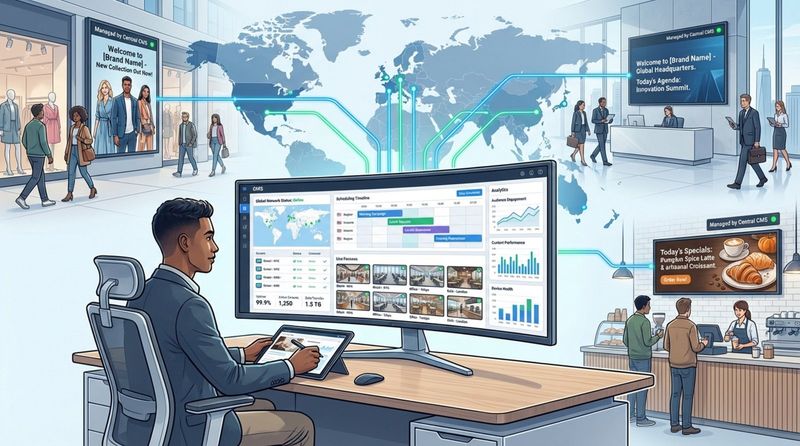
The primary advantage of a digital signage service is the ability to manage everything from one dashboard. Whether you run a single shop or a global network, you can push updates to all screens simultaneously. This ensures brand consistency and saves hours of time compared to updating USB drives manually at each location.
Remote Monitoring and Updates
Reliable playback is essential. Remote management features allow IT and operations teams to check device status in real-time. If a screen goes offline, the system can alert you. Many issues can be resolved remotely, significantly reducing maintenance costs and site visits.
Scheduling and Real-Time Updates
Timing is everything. With Smart Scheduling, you can automate content to match the time of day-for example, switching from a coffee menu to a lunch menu at 11:00 AM automatically. Real-time capabilities also allow you to interrupt scheduled content for urgent announcements or flash sales instantly.
Scalability and Flexibility
A cloud-based solution is designed to grow with you. You can start with a single screen pilot and scale smoothly to a large network without rebuilding your infrastructure. As your needs evolve, you can move from simple image slideshows to complex multi-zone layouts and 4K video.
Multi-Device and Cross-Platform Support
Flexibility in hardware choice helps manage budgets. Top-tier services support various platforms, including Android, Windows, and proprietary players. This allows you to mix and match hardware-using affordable tablets for shelf displays and high-performance players for video walls-while managing them all in the same CMS.
Cloud-Based Infrastructure
Cloud-based (SaaS) architecture minimizes setup time. There is no complex server installation required; you simply log in and start publishing. This model reduces upfront capital expenditure and ensures your software is always up to date.
User Permissions and Security
For larger teams, control is vital. Digital signage services offer granular user permissions, allowing you to define who can upload content, who can approve it, and who can publish it. This prevents unauthorized changes and keeps your screens secure.
Analytics and Reporting
Data transforms screens from decoration into business tools. Playback Analytics provide detailed reports on what content played and how often. With Proof-of-Play, you can verify that ad campaigns ran as scheduled, which is critical for ROI analysis and billing in advertising networks.
What Are the Benefits of Digital Signage Service?
Increased Customer Engagement
Digital screens are proven to capture attention more effectively than static print. By using motion and relevant visuals, businesses can increase dwell time and engagement. When content is timely and visually appealing, it creates a modern atmosphere that customers appreciate.
Better Marketing and Targeted Advertising
Digital signage allows for hyper-targeted messaging. You can tailor content to specific locations or times of day, ensuring the message is relevant to the audience currently in the space. This relevance improves conversion rates compared to generic printed signage.
Real-Time Content Updates
Speed is a major competitive advantage. Whether you need to correct a price, post a safety notice, or launch a promotion, digital signage lets you do it in minutes. This agility is impossible with print media.
Cost Efficiency and Reduced Maintenance
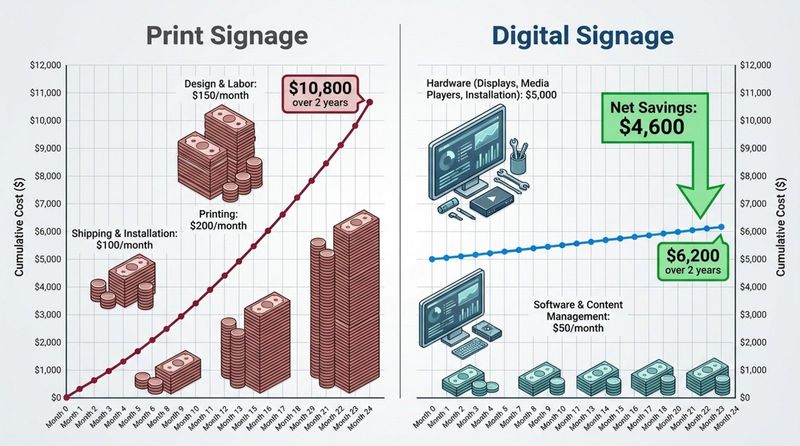
While the initial hardware investment is higher than printing a poster, the long-term savings are significant. You eliminate the recurring costs of design, printing, shipping, and installation for every new campaign. Over time, the Total Cost of Ownership (TCO) often favors digital.
Improved Content Security
Digital signage offers a controlled environment for your messaging. Unlike notice boards where anyone can pin up a flyer, digital screens are locked down via software. Centralized control ensures that only approved, on-brand content is displayed.
Consistent Branding Across Locations
Maintaining brand standards across multiple sites can be challenging. Digital signage centralizes asset management, ensuring that logos, fonts, and colors remain consistent everywhere. Operations managers can rest assured that every location is presenting the brand correctly.
Environmental Sustainability
Reducing paper waste is a priority for many modern businesses. By switching to digital updates, you significantly reduce the consumption of paper, ink, and the logistics associated with distributing physical signs.
Better Communication in Corporate Settings
For internal teams, digital signage cuts through the noise of email. It provides a passive yet persistent channel to reinforce company culture, share wins, and keep non-desk employees informed and aligned.
Actionable Insights through Analytics
Understanding performance is key to optimization. Analytics tools help you see exactly what is playing and verify network uptime, allowing you to make data-driven decisions to improve your communication strategy.
Choosing the Right Digital Signage Service for Your Needs
Key Considerations when Selecting a Solution
When selecting a platform, look for a balance of power and simplicity. We recommend Look Digital Signage for businesses that want a robust, feature-rich platform without the steep learning curve. Look DS provides essential tools like Content Creator, Offline Playback, and Smart Scheduling, making it an ideal choice for teams that need to keep screens running smoothly with minimal fuss.
Comparing SaaS vs On-Premises Options
Most businesses benefit from the flexibility of a SaaS (cloud) model. However, organizations with strict data governance policies-such as banks or government agencies-may require an on-premise digital signage solution. Look offers both deployment options, giving you the freedom to choose the infrastructure that meets your security requirements.
Content Format and Integration Support
Ensure the software supports the media you use most. Whether you need 4K video, HTML5 apps, or social media feeds, the platform should handle it natively. Look DS supports a wide range of formats and includes Look Apps to easily integrate dynamic content like news and weather.
Ease of Use and User Interface
Your team should not need an IT degree to update a screen. A clean, intuitive interface is crucial for adoption. Look’s dashboard is designed for efficiency, offering drag-and-drop tools and Ready-made Templates that help you publish professional-looking content in minutes.
Frequently Asked Questions about Digital Signage Service
What is the difference between digital signage software and CMS?
Digital signage software refers to the entire ecosystem that powers your screens. The CMS (Content Management System) is the specific web-based dashboard where you upload media, create playlists, and schedule content. In the Look ecosystem, the CMS is the control center you access via your browser.
What is a digital signage player?
A player is the device that physically connects to your screen and processes the content. It can be an external box, like the Look HDMI Player, or software running on a smart TV. Its job is to download content from the CMS and ensure reliable playback on the display.
Can digital signage displays be managed remotely?
Yes, remote management is a core feature. You can update content, change schedules, and monitor the health of your screens from anywhere with an internet connection, eliminating the need for on-site visits.
Is digital signage service cost-effective for small businesses?
Absolutely. While there is an upfront cost for screens, the ability to change content instantly without printing costs saves money over time. Flexible subscription models allow small businesses to start with one screen and scale as they grow.
How secure is digital signage content?
Cloud-based digital signage is highly secure. Platforms like Look use encryption for data transfer and offer user permission settings to control access. This ensures that your screens are protected from unauthorized access and tampering.
The Future of Digital Communication
The future of digital signage lies in automation and data. As tools evolve, features like the Look AI Wizard are making content creation faster and smarter, allowing businesses to generate localized visuals instantly. Moving forward, we will see even deeper integration with business data, where screens automatically adapt content based on real-time triggers, making communication more personal, efficient, and impactful.


