Table of Content
Retail digital signage is a network of digital screens and content management software that retailers use to display promotions, product information, pricing, advertising, and interactive content inside stores. It enables remote content updates, centralized campaign management, and integration with business systems such as inventory, pricing, and product catalogs.
A small retailer might use digital signage to replace printed posters and highlight daily offers. A supermarket chain might manage thousands of screens across aisles, entrances, and checkout areas. Both use the same underlying technology, but their requirements for hardware, software, integrations, and performance measurement differ considerably.
For retailers evaluating digital signage in 2026, the central question is not simply which screens to buy. It is how to build a reliable system that delivers relevant content and produces measurable business results.
What Is Retail Digital Signage?
Retail digital signage is a technology system that delivers visual content to electronic displays in physical stores. It combines screens, playback hardware, digital signage software, and network connectivity to manage what shoppers see and when they see it.
Unlike printed signs, digital displays can change content automatically based on schedules, store locations, product availability, or other business rules.
Common retail applications include:
- Promotional displays: Advertise discounts, seasonal campaigns, and product launches.
- Digital shelf displays: Show prices, offers, and product information near merchandise.
- Interactive kiosks: Help shoppers browse catalogs, locate products, or access self-service features.
- Digital menu boards: Present menus, prices, and promotions.
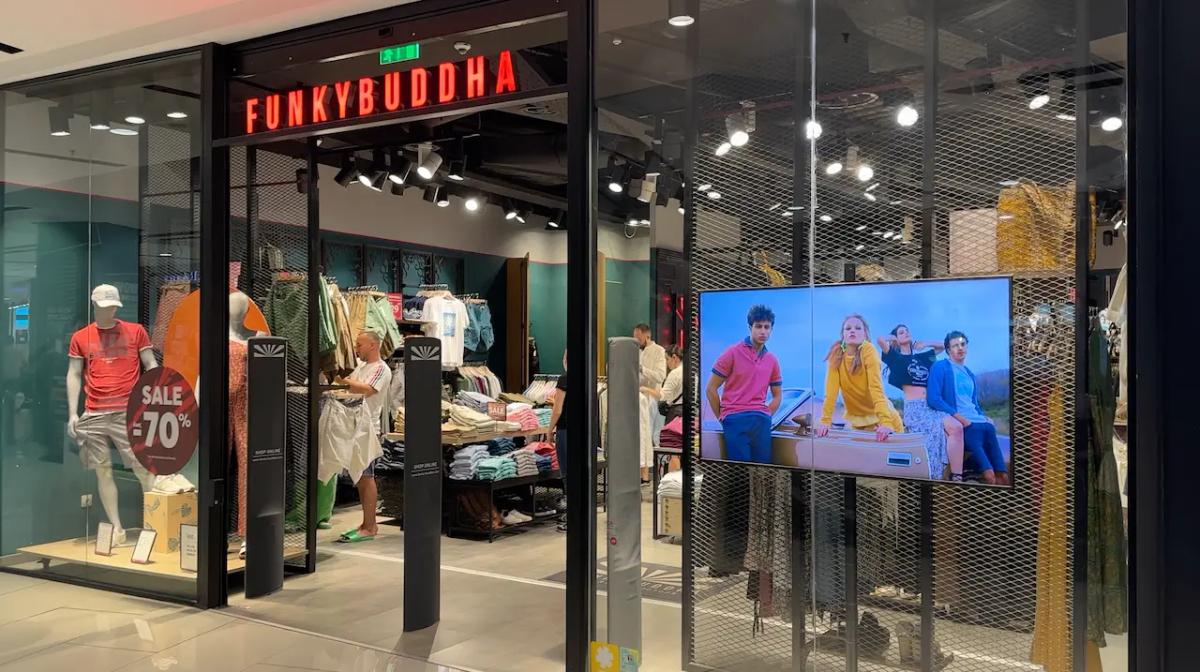
- Window displays: Promote products and attract attention outside the store.
- Checkout screens: Display loyalty offers and complementary products.
- In-store retail media: Deliver paid advertising campaigns from consumer brands.
Digital signage and retail media are related but distinct. Digital signage is the technology used to deliver content. Retail media is an advertising business model that can use those screens to reach shoppers.
How Does Retail Digital Signage Work?
Retail digital signage works by sending content from a content management system (CMS) to screens through a built-in operating system or an external media player. The CMS controls content, schedules, device groups, and, depending on the platform, monitoring and reporting.
A typical deployment follows five steps:
- Create content. Marketing teams upload images, videos, templates, or data-driven layouts to the CMS.
- Organize displays. Screens are assigned to stores, departments, or campaign groups.
- Schedule playback. Content is published according to dates, times, locations, or configured rules.
- Deliver content. Media players or compatible smart displays download and render the assigned media.
- Monitor performance. Administrators review connectivity, playback status, and campaign execution.
For example, a grocery chain could schedule breakfast promotions in the morning and dinner offers in the evening. If the platform integrates with inventory data, it may also suppress promotions for unavailable products.
That second capability requires more than basic scheduling. The CMS must support the integration, and the retailer needs reliable product identifiers, inventory data, and fallback rules.
Can Retail Digital Signage Work Without Internet?
Yes. Many digital signage systems can continue playing previously downloaded content without an internet connection, provided the player supports local caching and offline playback.
However, offline playback and offline management are different capabilities.
| Function | Typical Behavior Without Internet |
|---|---|
| Previously cached videos and images | May continue playing |
| Locally stored playlists | May continue on schedule |
| New remote content updates | Usually unavailable |
| Live inventory and pricing feeds | May become outdated |
| Remote monitoring | Usually unavailable |
| Cloud-based interactive features | May stop working |
Before purchasing, confirm whether content survives a reboot, whether schedules continue locally, and how the system handles expired promotions during an outage.
What Types of Digital Signage Are Used in Retail Stores?
The main types of retail digital signage are promotional screens, shelf-level displays, video walls, interactive kiosks, digital menu boards, and checkout displays. Each serves a different purpose within the customer journey.
| Display Type | Typical Use | Key Consideration |
|---|---|---|
| Promotional and aisle displays | Seasonal offers, product launches | Relevance to nearby merchandise |
| Digital shelf-edge displays | Prices, promotions, product details | Pricing-system integration |
| Video walls | Brand storytelling, visual merchandising | Viewing distance and installation cost |
| Interactive kiosks | Product search, catalogs, wayfinding | Touch software and accessibility |
| Digital menu boards | Menus, prices, promotional offers | Accuracy and scheduling |
| Checkout displays | Loyalty offers, advertising | Customer attention and context |
The right display format depends on what customers need at that location. A screen beside a product category should help shoppers make a decision. A window display has a different purpose: attracting attention and communicating a reason to enter.
What Hardware and Software Do You Need?
A retail digital signage system typically requires commercial displays or compatible smart screens, playback software, a CMS, network connectivity, and mounting hardware. Larger deployments also need monitoring, access controls, and integration capabilities.
Display Hardware
| Hardware | Best Suited For | Main Consideration |
|---|---|---|
| Commercial LCD displays | Aisles, entrances, checkout areas | Brightness, durability, operating hours |
| Direct-view LED | Large video walls and flagship stores | Viewing distance and installation cost |
| High-brightness displays | Storefront windows | Sunlight visibility and heat management |
| Touchscreen displays | Product discovery and self-service | Accessibility and maintenance |
| Electronic shelf labels | Shelf-level pricing | Integration with pricing systems |
Consumer televisions may be sufficient for some small installations. Commercial signage displays are generally better suited to extended operating hours, remote management, portrait orientation, and demanding lighting conditions.
Check operating-hour ratings, warranty conditions, brightness, orientation support, and ventilation requirements before deployment.
Media Players and Operating Systems
Digital signage content can run on an external media player or directly on a compatible smart display.
Common platform categories include:
- Android: Used across dedicated players and certain commercial displays.
- Windows: Often used for advanced applications and interactive kiosks.
- Linux: Common in dedicated appliances and custom deployments.
- Samsung Tizen: Used on supported Samsung commercial signage displays.
- LG webOS Signage: Used on supported LG commercial signage displays.
- ChromeOS: Available in certain managed signage and kiosk environments.
Support for an operating system does not mean every device or version is compatible. Ask vendors for exact supported models and firmware versions. For example, Look Digital Signage offers player applications for supported Android, Windows, Linux, Tizen, and webOS devices, among other platforms; compatibility should be checked for each device model.
Content Management Software
The CMS is the operational center of a signage network. It determines how efficiently your team manages content and how reliably screens receive updates.
For multi-store retail, prioritize:
- Centralized publishing across locations and screen groups.
- Campaign scheduling with start and expiration dates.
- Store-specific content overrides.
- Role-based permissions.
- Playback logs and device health monitoring.
- Offline content caching.
- APIs or integrations for product, pricing, and inventory data.
- Remote troubleshooting and device management.
A retailer with 100 locations may need headquarters to control national campaigns while allowing each store to publish approved local promotions. That requires both content grouping and permission controls. Look Digital Signage is one example of a CMS offering centralized screen management, scheduling, and user access controls.
Cloud vs. On-Premises Deployment
Cloud-based signage is generally easier to operate across geographically distributed stores, while on-premises systems provide more direct infrastructure control.
Cloud platforms typically handle CMS hosting and remote access. On-premises deployments require the retailer or its technology partner to maintain the underlying servers and software.
Hybrid architectures can combine centralized cloud management with local playback.
The right model depends on IT policies, connectivity, data requirements, and integration complexity.
How Much Does Retail Digital Signage Cost?
Retail digital signage costs include display hardware, media players, CMS subscriptions, installation, content production, connectivity, and ongoing maintenance.
There is no universal per-screen price that applies to every retailer. A single-screen installation and a centrally managed enterprise network have very different cost structures.
| Cost Component | Billing Basis | What Affects the Price |
|---|---|---|
| Display hardware | Usually upfront, per screen | Size, brightness, durability |
| Media player | Usually upfront, per device | Performance and built-in player availability |
| CMS software | Often per screen/month | Features, support, licensing terms |
| Installation | Per site or project | Mounting, electrical work, cabling |
| Content production | Per asset, campaign, or retainer | Video, animation, localization |
| Integrations | Project fee and possible ongoing charges | POS, inventory, APIs |
| Maintenance | Contract or operating expense | Field service, replacement, monitoring |
| Connectivity and energy | Recurring expense | Network and power requirements |
Public vendor pricing can help establish a software budget, but enterprise contracts may include minimum commitments, support tiers, and implementation fees. As one reference point, Look Digital Signage advertises software pricing starting at $6 per screen per month; confirm current terms and included features on its official pricing page. This is a software price reference, not an estimate of the complete installation cost.
Example: Three-Year Total Cost of Ownership
Consider a hypothetical deployment of 50 screens across 10 stores.
The following figures are illustrative budget assumptions, not verified market prices or vendor quotes.
| Expense | Calculation | Three-Year Cost |
|---|---|---|
| Displays | 50 × $900 | $45,000 |
| Media players | 50 × $150 | $7,500 |
| Installation | 50 × $250 | $12,500 |
| CMS licenses | 50 × $20 × 36 months | $36,000 |
| Content production | $500 × 36 months | $18,000 |
| Maintenance allowance | $3,000 × 3 years | $9,000 |
| Total | $128,000 |
All amounts are in USD. The example excludes taxes, financing, additional integration work, electricity, and connectivity.
In this scenario, the three-year total is $128,000, or approximately $71 per screen per month when upfront and recurring costs are averaged over the deployment period.
The main lesson is that CMS licensing represents only part of the investment. Hardware, installation, content operations, and support can materially change the economics.
What Are the Benefits of Digital Signage in Retail?
Retail digital signage can improve promotional flexibility, product discovery, brand consistency, and store operations. It can also support sales growth and advertising revenue, although results depend on content quality, screen placement, and campaign execution.
Faster Campaign Updates
Printed promotions require production, shipping, installation, and removal. Digital signage allows your team to replace content remotely without physically changing every sign.
A retailer running 80 stores can publish a national campaign centrally while assigning different offers to specific regions.
However, digital signage does not automatically solve pricing accuracy. If displayed prices are generated separately from the POS system, inconsistencies can still occur.
Better Product Discovery and Customer Experience
Digital signage can help customers find relevant information at the point of purchase.
An electronics retailer might display product comparisons next to competing devices. A beauty retailer could show application tutorials. A grocery store might promote recipes featuring products available in the same aisle.
The strongest content answers questions shoppers already have.
More Opportunities for Sales and Upselling
Digital signage can support sales by highlighting complementary products, limited-time promotions, and relevant offers.
A display near coffee machines might promote compatible capsules or cleaning supplies. That message may be more useful than an unrelated storewide advertisement.
The potential impact depends on whether customers notice the screen, whether the offer is relevant, and whether the promoted products are available.
More Consistent Branding Across Locations
Centralized content management helps retailers maintain consistent messaging across store networks.
Headquarters can control approved brand assets, campaign dates, and promotional templates. Regional teams can receive permission to customize selected elements without changing the overall brand presentation.
Retail Digital Signage Examples by Industry
The most effective applications depend on store format, customer behavior, and the decisions shoppers need to make.
| Retail Segment | Common Use Cases | Primary Objective |
|---|---|---|
| Grocery and supermarkets | Aisle promotions, recipes, sponsored advertising | Product discovery and promotional sales |
| Fashion and apparel | Video walls, product collections, interactive catalogs | Brand experience and cross-selling |
| Electronics | Product comparisons, demonstrations | Purchase confidence |
| Beauty and cosmetics | Tutorials, product education | Discovery and upselling |
| Convenience stores | Menu boards, checkout promotions | Fast promotional updates |
| Home improvement | Project guides, wayfinding | Customer assistance |
Grocery Stores and Supermarkets
Grocery retailers can use screens to promote products near the shelf, communicate time-sensitive offers, and support brand-funded advertising.
A display in the beverage aisle could promote a seasonal product category. If connected to merchandising systems, the content could be coordinated with inventory and pricing.
Fashion and Apparel Stores
Fashion retailers often use larger displays for campaigns, product collections, and visual merchandising.
Interactive screens can provide access to additional sizes, colors, and product information. However, these features require integration with product catalogs and, where relevant, store inventory.
Electronics and Specialty Retail
Electronics stores can use digital signage to explain technical differences between products.
A display beside two televisions might compare resolution, display technology, connectivity, and available features.
Content must remain accurate as models change. Integrating product information with a maintained catalog reduces the risk of outdated specifications.
Digital Signage and In-Store Retail Media Networks
In-store retail media networks allow retailers to sell advertising placements inside physical stores. Digital signage provides one of the main delivery channels for these campaigns.
A retailer might use the same network for its own promotions and paid advertisements from consumer brands.
This creates two potential sources of value: supporting retail sales and generating advertising revenue.
How In-Store Advertising Works
A typical campaign involves four stages:
- A brand purchases advertising inventory from the retailer or its media network.
- The retailer assigns the campaign to eligible stores, screens, and time periods.
- The signage platform delivers advertisements according to the campaign schedule.
- The retailer reports delivery and, where possible, business outcomes.
Some networks support programmatic advertising, where campaign buying and delivery are automated through advertising technology platforms.
Programmatic capability requires more than a conventional CMS. It may involve ad-serving integrations, inventory management, standardized reporting, and campaign priority rules.
How Is In-Store Retail Media Measured?
In-store retail media is measured through campaign delivery, estimated audience exposure, and business outcomes such as incremental sales.
The Interactive Advertising Bureau (IAB) and IAB Europe have developed retail media measurement frameworks and terminology intended to improve reporting consistency.
| Metric | What It Measures | Main Limitation |
|---|---|---|
| Proof of play | Whether an advertisement played | Does not prove someone saw it |
| Estimated impressions | Opportunities to see an advertisement | Depends on audience assumptions |
| Reach and frequency | Estimated audience and exposure frequency | Difficult to measure accurately in stores |
| Sales lift | Change in sales associated with a campaign | Other factors may explain the increase |
| Incremental sales | Additional sales attributable to a campaign | Requires a credible comparison |
| Advertising revenue | Income from media placements | Does not equal profit |
If sales increase during a campaign, the campaign may have contributed. But seasonality, discounts, inventory availability, and other promotions could also explain the increase.
Retailers planning to sell advertising should establish measurement requirements before selecting the platform.
How Do You Measure Retail Digital Signage ROI?
Retail digital signage ROI is calculated by comparing the financial benefits attributable to the deployment with its total cost over the same period.
ROI (%) = [(Financial Benefits − Total Costs) / Total Costs] × 100
The difficult part is not the formula. It is determining which benefits were actually caused by the signage.
Example ROI Calculation
Assume a retailer spends $40,000 on a digital signage pilot, including hardware, software, installation, content, and operating costs.
Suppose the retailer measures these benefits:
| Financial Benefit | Illustrative Amount |
|---|---|
| Incremental gross profit from product sales | $24,000 |
| Avoided printing and installation costs | $8,000 |
| Net advertising contribution | $20,000 |
| Total financial benefits | $52,000 |
ROI = [($52,000 − $40,000) / $40,000] × 100 = 30%
This example produces a 30% ROI over the measurement period.
These figures are hypothetical and do not represent typical or guaranteed results.
The calculation uses incremental gross profit rather than total sales revenue. If a campaign generates $10,000 in additional sales, the retailer cannot treat the entire amount as profit.
Which KPIs Should Retailers Track?
Choose KPIs based on the deployment's primary objective.
For promotional signage, track incremental sales, gross profit, conversion, and average basket value.
For operational signage, measure campaign deployment time, content accuracy, screen uptime, and avoided printing costs.
For retail media networks, track proof of play, estimated impressions, advertising revenue, and incremental advertiser outcomes.
How Can You Test Whether Digital Signage Actually Works?
Use a controlled pilot whenever possible.
Select comparable stores and assign some to the signage campaign while others continue with the existing promotional approach.
For a stronger evaluation:
- Define the primary KPI before launching.
- Use comparable stores or random assignment where practical.
- Keep pricing and other promotional activity as consistent as possible.
- Monitor stock availability and major operational changes.
- Compare results against the control group.
- Calculate incremental gross profit and full campaign costs.
This approach is more reliable than comparing sales immediately before and after installation.
How to Choose the Right Retail Digital Signage Software
Choose retail digital signage software based on screen hardware, store count, content workflow, integration requirements, security policies, and measurement needs.
A platform that works well for a five-screen boutique may not provide the controls needed for a 500-store network.
Key Features to Compare
| Requirement | Small Retail Business | Multi-Location Retailer |
|---|---|---|
| Content scheduling | Essential | Essential |
| Remote publishing | Important | Essential |
| Screen groups | Useful | Essential |
| Local store permissions | Optional | Important |
| Offline playback | Important | Essential |
| Device monitoring | Useful | Essential |
| POS and inventory integrations | Depends on use case | Often important |
| SSO and access controls | Depends on IT policy | Often important |
| API access | Optional | Important |
| Advertising measurement | If monetizing screens | Important for retail media |
What Software Options Are Available?
Retailers can choose from general-purpose signage platforms, display-manufacturer ecosystems, and specialized enterprise solutions.
For example, Look Digital Signage provides a cloud-based CMS for publishing and scheduling content across screens and locations. Its Content Creator includes templates and AI-assisted editing tools, while supported players can cache content for offline playback.
These categories should not be treated as interchangeable. Hardware support, device management, integrations, security capabilities, and commercial terms vary by platform and plan.
For budgeting, verify current subscription rates, billing terms, supported devices, and included features directly with each vendor.
What Should You Ask Vendors Before Buying?
Ask vendors to demonstrate capabilities rather than simply confirm that a feature exists.
Important questions include:
- Which exact display models and operating system versions are supported?
- Does playback continue without internet access?
- What happens to expired promotions during an outage?
- Can store managers edit content without changing national campaigns?
- How are failed devices and missed playback events reported?
- Are APIs, SSO, and advanced analytics included in the quoted plan?
- Who is responsible for device replacement and onsite support?
- Can you export content and reporting data if you change providers?
These details can have a greater impact on long-term operating costs than small differences in monthly subscription prices.
How to Implement Digital Signage Across Multiple Stores
A successful rollout starts with a defined business objective, a limited pilot, and standardized deployment procedures.
Step 1: Define the Business Objective
Decide whether the system is intended to improve promotional execution, increase product sales, support customer service, or generate advertising revenue.
Avoid making every screen serve every objective.
Step 2: Map Screens to the Customer Journey
Identify where shoppers enter, browse, compare products, and complete purchases.
Choose screen locations based on the decisions customers make in those areas. Evaluate viewing distance, lighting, traffic flow, mounting requirements, and accessibility.
Step 3: Select Hardware and Software Together
Confirm that the CMS supports the exact display or media player models you plan to install.
Test playback quality, network recovery, remote management, and content formats.
A low-cost screen can become expensive if it requires frequent onsite troubleshooting.
Step 4: Establish Content Governance
Assign responsibilities for creating, approving, publishing, and retiring content.
Define which campaigns are controlled centrally and which can be modified locally.
For price-sensitive promotions, establish a process to verify that displayed offers match the POS system.
Step 5: Run a Pilot
Deploy screens in a limited number of stores and measure performance against a baseline or control group.
Include enough time to evaluate operational reliability, content workload, and business outcomes.
A pilot should test the complete operating model, not just whether screens can play videos.
Step 6: Scale With Standardized Processes
After validating the pilot, standardize hardware configurations, installation procedures, content templates, naming conventions, and support processes.
Document what store employees should do when a screen goes offline or displays incorrect information.
What Are the Main Challenges of Retail Digital Signage?
The biggest challenges are content management, integration complexity, reliability, cybersecurity, and proving financial value.
Content Quality and Relevance
A screen network requires an ongoing content strategy. Repeating the same promotion for weeks can reduce its usefulness.
Retailers need a sustainable process for producing, approving, localizing, and retiring campaigns.
Integration With Retail Systems
Connecting signage to POS, inventory, or loyalty platforms may require APIs, middleware, and custom development.
The integration should define how often data updates, which system is authoritative, and what the screen displays when information is unavailable.
Cybersecurity and Privacy
Digital signage devices are network-connected endpoints and should be managed accordingly.
Retailers should evaluate device patching, application permissions, network segmentation, encrypted communications, and access controls.
If the system uses cameras, sensors, or customer-level analytics, additional privacy requirements may apply depending on the jurisdiction and data collected.
Accessibility and Visual Comfort
Interactive kiosks and customer-facing screens should be designed with accessibility in mind.
Consider readable text, sufficient contrast, appropriate mounting heights, reachable controls, and alternatives to touch-only interactions where necessary.
Retail Digital Signage Trends for 2026–2030
The most relevant developments are AI-assisted content operations, deeper retail data integration, in-store advertising automation, and more rigorous performance measurement.
These are technology and business directions, not guarantees that every retailer will adopt them by 2030.
AI-Assisted Content Creation and Optimization
AI tools can help marketing teams produce variations of promotional content, adapt messages for different locations, and organize campaigns.
More advanced systems may use contextual data to select content based on inventory, time of day, or other approved signals.
AI-generated content still requires controls for brand accuracy, product claims, pricing, and promotional compliance.
Real-Time Integration With Store Data
Retailers can connect displays with product catalogs, pricing, and inventory systems to make promotions more relevant and reduce manual updates.
The tradeoff is greater integration complexity. Data quality, API reliability, and fallback behavior become essential.
Programmatic In-Store Advertising
As retail media networks develop, more retailers may connect screen inventory to automated advertising systems.
This could make in-store advertising easier to buy across multiple locations and retailers.
The model depends on consistent inventory definitions, reliable delivery reporting, and credible audience measurement.
Better Measurement and Attribution
Retailers and advertisers increasingly need to distinguish campaign delivery from actual business impact.
Measurement approaches may combine store traffic estimates, POS data, controlled experiments, and statistical modeling.
The objective is not simply to report that an advertisement played. It is to determine whether the campaign produced additional business value.
Energy Efficiency and Lifecycle Management
Energy consumption and hardware replacement costs matter when operating hundreds or thousands of displays.
Retailers can evaluate display power requirements, automatic operating schedules, device lifespan, repairability, and remote maintenance capabilities.
Frequently Asked Questions
Can You Use a Regular TV for Retail Digital Signage?
Yes. A compatible consumer TV can be used for basic retail digital signage with a suitable media player or supported signage application.
However, commercial displays are generally better suited to demanding environments requiring extended operating hours, higher brightness, portrait orientation, and professional device management.
Do You Need a Media Player for Digital Signage?
Not always. Some commercial smart displays can run supported digital signage software directly.
An external media player may still be necessary if the display's built-in operating system is unsupported or lacks required features.
Can You Manage Digital Signage Across 100 Stores?
Yes. Enterprise-capable digital signage platforms can centrally manage content and devices across large store networks.
Practical limits depend on the provider, licensing terms, supported hardware, network architecture, and administrative features.
How Often Should Retail Digital Signage Content Be Updated?
Update content whenever pricing, promotions, product availability, or customer information changes.
Campaign frequency should follow the retailer's merchandising calendar. There is no universal refresh interval that guarantees better results.
Is Retail Digital Signage Worth the Investment?
It can be, when measurable financial benefits exceed the total cost of ownership.
The strongest business cases involve a specific operational problem, a measurable sales opportunity, or a viable advertising revenue model.
What Is the Difference Between Digital Signage and Electronic Shelf Labels?
Digital signage typically displays promotional, informational, or interactive content on electronic screens.
Electronic shelf labels primarily display shelf-level prices and product information. Some retail systems combine both technologies, but their hardware and management platforms may differ.