Table of Content
Hotel digital signage uses centrally managed screens to display guest information, event schedules, digital menus, wayfinding directions, and hotel promotions. With digital signage software, hotels can update content remotely across lobbies, restaurants, conference areas, and other locations without replacing printed materials or visiting individual screens.
Imagine a conference room changes at the last minute. The reception team needs to update the event schedule, guests need directions to the new location, and the signs outside meeting rooms need to reflect the change. With a connected digital signage system, staff can update the relevant displays from one dashboard instead of replacing signs throughout the property.
For hotel operators, the value goes beyond displaying attractive visuals. Digital signage can reduce repetitive work, improve access to guest information, and create opportunities to promote hotel services. The results depend on where you place the screens, how you manage content, and whether the system fits your existing operations.
What Is Hotel Digital Signage?
Hotel digital signage is a network of electronic displays used to communicate information to guests and employees. Hotels typically manage these screens through a content management system (CMS) that controls what appears on each display and when.
Unlike printed posters or standalone TVs, digital signage allows hotel staff to change content remotely. A marketing manager can schedule restaurant promotions, while an event coordinator updates conference information without accessing the physical screens.
A typical hotel digital signage system includes:
- Digital displays: Commercial screens installed in guest-facing or staff areas.
- Media players: External devices or built-in systems that run signage content.
- Digital signage software: A CMS for uploading, scheduling, and managing content.
- Network connectivity: Internet or local network access for content updates and device management.
- Content: Menus, images, videos, schedules, directions, and announcements.
Not every hotel needs an elaborate installation. A boutique property may operate three or four displays, while a convention hotel may manage dozens of screens across multiple floors and event spaces.
How Does Digital Signage Work in Hotels?
Hotel digital signage works by connecting displays to software that controls their content. Staff upload images, videos, menus, or announcements to a CMS, assign them to screens, and set playback schedules.
In a typical setup, a cloud digital signage CMS (content library, scheduling, and screen management) sends content and device commands to screens or media players in the lobby, restaurant, and conference areas. Optional data connections can include a PMS, POS, event management, or booking systems.
For example, a hotel can schedule breakfast information for the morning, conference directions during the day, and restaurant promotions in the evening. Once configured, the schedule runs automatically.
Some systems can also receive information from property management systems (PMS), point-of-sale systems (POS), or event management platforms. This can reduce manual work when room assignments, menus, or event schedules change. However, these connections require compatible software and may involve additional integration costs.
Cloud-Based vs. On-Premise Hotel Digital Signage
Cloud-based software allows authorized employees to manage screens through an internet-connected dashboard. On-premise software runs on infrastructure managed by the hotel or its IT provider.
| Feature | Cloud-based CMS | On-premise CMS |
|---|---|---|
| Hosting | Software provider | Hotel or IT provider |
| Remote access | Usually built in | Depends on network setup |
| Updates | Managed by provider | Managed internally |
| Cost structure | Recurring subscription | Licensing and infrastructure |
| IT requirements | Generally lower | Generally higher |
| Offline playback | Depends on caching | Can run locally |
For most independent hotels, cloud software is a practical starting point because it reduces the need to maintain dedicated servers. Properties with strict network policies or specialized infrastructure may prefer local deployment.
Internet connectivity also deserves attention. Many signage players can continue showing previously downloaded content during an outage, but new updates may not arrive until connectivity returns. Confirm offline playback behavior before choosing a platform.
Where Can Hotels Use Digital Signage?
Different hotel locations serve different purposes. A screen in the lobby might introduce hotel amenities, while a display outside a meeting room needs to show accurate event information.
Hotel Lobby and Reception
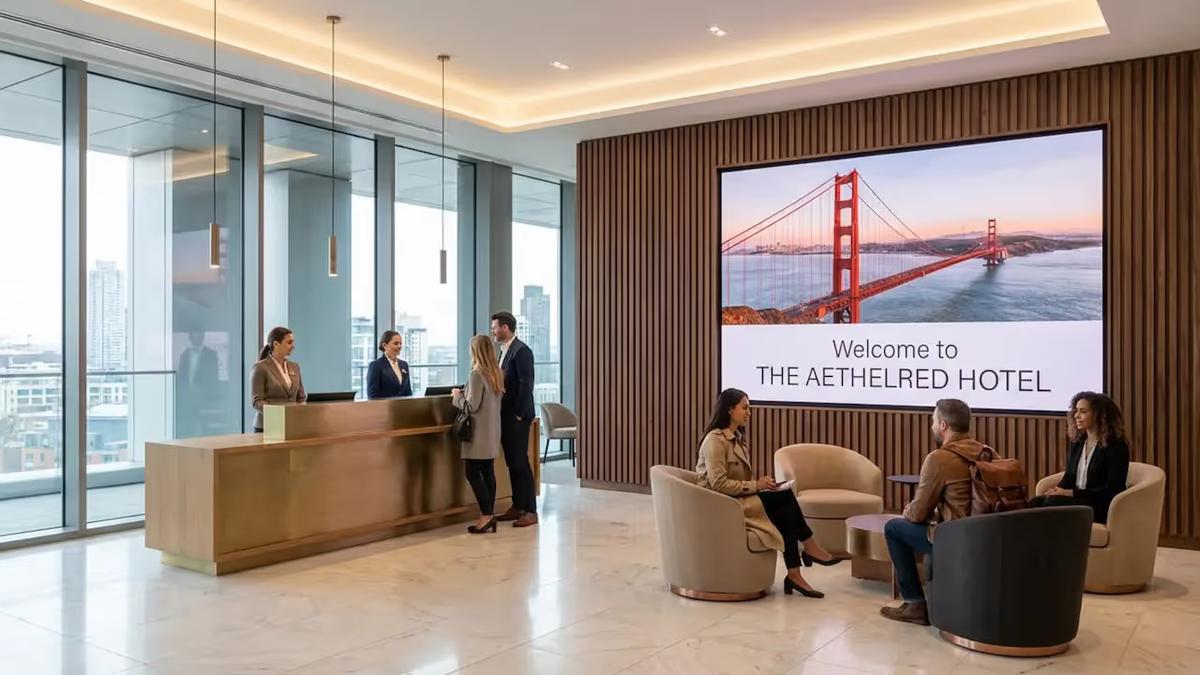
Lobby screens can display welcome messages, check-in instructions, local weather, hotel amenities, and transportation information. They also provide a place to promote restaurants, spas, and upcoming events without crowding the reception desk with printed materials.
Conference Rooms and Event Areas
Digital readerboards show meeting names, start times, and room assignments. Door-mounted displays identify individual meeting rooms, while larger screens provide event schedules and directions. Integration with event management software can automate updates.
Hotel Restaurants and Bars
Digital menu boards show menus, prices, daily specials, and promotional offers. Hotels can schedule breakfast menus in the morning and dinner or bar promotions later in the day. POS integration can help synchronize prices and availability where supported.
Wayfinding and Hotel Directories
Digital directories help guests locate elevators, restaurants, conference rooms, parking areas, and recreational facilities. Large resorts can use interactive maps, while smaller properties may only need directional screens at key intersections.
Spas, Fitness Centers, and Pool Areas
These displays can show opening hours, treatment offers, fitness class schedules, and facility rules. Outdoor installations need screens rated for the expected weather, temperature, and lighting conditions.
Other useful locations include elevator waiting areas, hallways, and staff-only spaces. Screens near elevators can promote amenities guests may otherwise overlook. Back-of-house displays can communicate staff schedules, operational announcements, and safety information.
Can Hotels Use Digital Signage on Guest Room TVs?
Yes. Hotels can use compatible hospitality TVs and guest entertainment systems to display welcome messages, hotel information, room service details, and promotional content.
However, in-room hospitality TV and public-area digital signage are not always the same system. Guest-room platforms may require IPTV software, PMS connectivity, casting support, and access to guest-specific information.
If you already have hospitality TVs installed, check whether your existing infrastructure supports the required content management functions before purchasing additional software.
What Are the Benefits of Digital Signage for Hotels?
The benefits of hotel digital signage depend on the problems you're trying to solve. Replacing a few posters may save printing costs, while automating conference signage can reduce a substantial amount of administrative work.
Better Guest Communication
Guests often need simple information: where breakfast is served, when the spa closes, or which room hosts their meeting. Displaying this information in the right location can make it easier to find without asking reception staff.
Multilingual content is particularly useful for international hotels. Rather than filling one screen with several languages, you can rotate localized messages or assign content to screens serving different audiences.
Less Printing and Manual Work
Printed menus, event schedules, and promotional posters need replacement whenever information changes. Digital displays allow staff to update these materials without printing and distributing new versions.
The savings are greatest when information changes frequently. A hotel with several daily conferences, rotating restaurant menus, and multiple promotional campaigns has more opportunities to reduce manual updates than a small property with mostly static information.
More Opportunities to Promote Hotel Services
Hotels can use digital signage to promote spa appointments, restaurant specials, late check-outs, room upgrades, and other services.
Location and timing matter. A spa promotion near the elevator may reach guests returning to their rooms, while a dinner offer in the lobby may be more relevant during the afternoon.
Digital signage does not guarantee additional sales. To measure its commercial impact, hotels need a way to connect campaigns with actual bookings or purchases.
Consistent Communication Across Properties
For hotel groups, centralized management helps maintain consistent branding while allowing individual properties to publish local information.
Head office can prepare approved templates and campaigns. Local teams can then adapt schedules, service details, or promotions to their property's needs.
What Equipment Do You Need for Hotel Digital Signage?
Most installations need a display, a compatible media player or built-in operating system, digital signage software, and network connectivity.
The hardware choice depends on the installation location, operating hours, content format, and available budget.
| Hardware | Best use | Key consideration |
|---|---|---|
| Commercial LCD display | Lobbies, restaurants, corridors | Brightness and operating hours |
| SoC display | Standard signage installations | Software and OS compatibility |
| External media player | Existing screens, specialized playback | Additional hardware and power |
| Touchscreen kiosk | Interactive directories, self-service | Touch interface and accessibility |
| LED video wall | Large lobbies, event spaces | Installation and maintenance cost |
| E-paper display | Static door signs, posters | Higher initial cost and slower refresh |
Commercial Displays vs. Regular TVs
Consumer TVs can work for small installations, but commercial displays are generally better suited to extended operating hours and business environments.
Professional signage displays may offer higher brightness, portrait orientation support, remote device management, and warranties designed for commercial use.
Before buying, check the manufacturer's rated operating schedule. Not every commercial display is designed for continuous 24/7 operation.
Do You Need a Separate Media Player?
Not always. Many commercial displays have built-in operating systems capable of running compatible digital signage applications.
For example, supported Samsung Tizen, LG webOS, and Android-based displays may run signage software without an external player. Compatibility depends on the specific model and operating system version.
External media players remain useful when you want to reuse existing displays or need functionality that the screen's built-in hardware cannot provide.
When Do LED Walls and E-Paper Make Sense?
LED walls are suited to large visual installations, such as premium hotel lobbies and conference centers. They can create a strong visual impact, but installation, maintenance, and content production can be expensive.
E-paper is better suited to information that changes infrequently, such as meeting room labels or static promotional posters. Its low energy consumption can be useful, although higher hardware costs and limited refresh capabilities make it less suitable for video-heavy content.
What Features Should Hotel Digital Signage Software Have?
The right software should make screen management easier for the people who actually use it. Your reception staff, marketing team, event coordinators, and IT department may all need different levels of access.
When evaluating hotel digital signage software, focus on the following capabilities.
Centralized Screen Management
You should be able to update one screen, a selected group, or an entire property from a single dashboard. This becomes particularly useful when managing multiple hotels.
For example, a hotel group might publish a brand-wide campaign while allowing each property to manage its own restaurant menus and local announcements.
Content Scheduling and Automation
Scheduling allows you to prepare content in advance and display it at specific times.
A restaurant can switch between breakfast, lunch, and dinner menus automatically. A conference hotel can schedule welcome messages for arriving groups and remove them when an event ends.
This reduces repetitive work and helps prevent outdated promotions from remaining on screen.
Templates and Multi-Zone Layouts
Hotel staff should be able to create professional content without relying on a designer for every update.
Templates help maintain consistent branding. Multi-zone layouts allow a single screen to show several types of information, such as a hotel announcement alongside weather and an event calendar.
Remote Monitoring and Playback Reporting
A screen that stops working may go unnoticed until a guest or employee reports it. Remote monitoring helps IT teams identify offline devices and playback issues.
Proof-of-play reporting adds another layer of visibility. It records whether scheduled content was displayed, which can be useful for internal campaigns and paid advertising.
However, proof-of-play does not establish how many guests actually saw an advertisement or whether they made a purchase.
Integration With Hotel Systems
A hotel may already use separate systems for reservations, restaurant transactions, conference bookings, and staff scheduling.
Connecting these systems to digital signage can reduce duplicate data entry. For example, an event schedule maintained in a booking platform could feed a conference readerboard automatically.
The important distinction is between native integrations and custom connections. API access does not automatically mean a CMS has a ready-made connector for every PMS or POS product.
How Can Look Digital Signage Help Hotels Manage Their Screens?
Look DS is a digital signage content management platform that hotels can use to manage guest information, promotional content, menus, and announcements across connected screens.
Hotels can use Look DS to create branded content, organize displays into groups, schedule playlists, and publish updates remotely. Its features include multi-zone layouts, content templates, playback analytics, proof-of-play reporting, and interactive scenarios.
The platform supports a range of devices, including compatible Android, Windows, Linux, Samsung Tizen, LG webOS, and Raspberry Pi systems. This gives hotels flexibility when deploying new screens or working with existing hardware.
Look DS also offers API and Zapier-based integration options. These can help connect hotel content to external data sources when the required interfaces are available. A direct PMS or POS integration may still require configuration or custom development.
For hotels with several departments or properties, centralized management and access controls can help separate responsibilities without creating independent signage systems for every location.
How Much Does Hotel Digital Signage Cost?
Hotel digital signage software can start at around $6 per screen per month, but the total installation cost also includes displays, media players where needed, mounting, networking, content creation, and integrations.
For a new installation, hardware and installation may account for most of the initial budget. For an existing network, recurring software and maintenance costs become more important.
Digital Signage Hardware Costs
A commercial 55-inch display may cost approximately €660–800 before tax in the German market, based on the 2025–2026 prices reviewed in the research.
Mounting, cabling, electrical work, and installation can add roughly €300–900 per location in a model budget. Actual costs depend on building conditions, installation height, and network availability.
Specialized installations, such as interactive kiosks and LED walls, generally require individual quotations.
Hotel Digital Signage Software Pricing
Software is commonly priced per screen, per month, or per year. Some platforms also charge separately for remote device management, enterprise support, or advanced integrations.
Look Digital Signage currently advertises pricing from $6 per screen per month, with volume pricing and a 14-day free trial. That provides a useful starting point for estimating the recurring CMS cost of a small hotel deployment.
For example, 10 screens at the advertised starting rate would cost $60 per month, or $720 annually, before any applicable taxes or additional project-specific services. Actual subscription pricing depends on the selected commercial terms.
Example Hotel Digital Signage Budgets
The following figures are illustrative project estimates from the underlying research, not published market averages.
| Hotel size | Typical installation | Initial cost (CAPEX) | Annual cost (OPEX) |
|---|---|---|---|
| Small hotel | 3–6 screens | €5,000–12,000 | €500–2,000 |
| Medium hotel | 12–25 screens plus event signage | €25,000–60,000 | €5,000–15,000 |
| Large resort | 50–200+ screens, potentially LED and IPTV | €150,000 to several million | €30,000–150,000 |
The most useful comparison is total cost of ownership over three to five years, not just the first month's subscription. Include software, hardware replacement, content production, integrations, electricity, and support.
How Can Hotels Measure Digital Signage ROI?
Digital signage ROI measures whether the financial benefits of the installation exceed its total costs. Hotels should calculate it using actual operating savings and incremental profit, rather than assuming that every promotion generates additional revenue.
The standard formula is:
ROI = (Total Benefits − Total Costs) / Total Costs × 100%
What Should Hotels Measure?
The most useful metrics depend on the installation's purpose.
| Objective | KPI | Measurement method |
|---|---|---|
| Reduce printing | Annual printing costs | Compare before and after deployment |
| Save staff time | Hours spent updating signs | Staff time tracking |
| Promote hotel services | Incremental contribution margin | POS reports, QR codes, promotional codes |
| Improve event operations | Time spent updating readerboards | Event team records |
| Improve reliability | Screen uptime (%) | Device monitoring |
| Generate advertising income | Net sponsorship revenue | Advertising contracts and reports |
For commercial promotions, revenue alone can be misleading. A restaurant promotion that generates €5,000 in additional sales does not generate €5,000 in profit. Food costs, labor, and other variable expenses must be deducted.
Example ROI Calculation for a 15-Screen Hotel
Consider a hypothetical medium-sized hotel with the following costs and benefits.
| Metric | Base scenario |
|---|---|
| Initial investment | €30,000 |
| Annual operating cost | €8,000 |
| Annual benefits | €28,000 |
| Annual net benefit | €20,000 |
| Simple payback period | 1.5 years |
| Three-year ROI | +56% |
These are model assumptions, not measured hotel performance. The calculation excludes financing costs and discounting.
The estimated €28,000 in annual benefits consists of €3,000 in printing savings, approximately €10,000 in labor savings, €12,000 in incremental contribution from hotel services, and €3,000 in sponsorship income.
But the outcome changes significantly if the benefits are lower than expected:
- Base scenario: three-year ROI of +56%.
- Conservative scenario: three-year ROI of −22%.
If annual benefits fall by half to €14,000, the same project would take approximately five years to recover its initial investment, and its three-year ROI would be negative.
This is why a pilot matters. Before installing dozens of screens, test a small deployment and measure whether it actually reduces staff work or increases profitable sales.
Real-World Examples of Hotel Digital Signage
Hotel digital signage installations range from a few information screens to networks covering entire resorts. The following examples illustrate different deployment approaches documented in the research.
Resorts World Las Vegas
Resorts World Las Vegas uses a large digital signage and IPTV installation covering approximately 5,200 displays and LED elements.
The deployment includes synchronized visual content, digital menu boards connected to point-of-sale systems, event displays, and screens in guest and operational areas.
Its value as a case study lies in the integration of signage with the resort's wider operations. Publicly verified financial ROI figures were not provided in the research.
Clarion Hotel Helsinki Airport
The Clarion Hotel Helsinki Airport project includes 778 hospitality TVs, large-format LED installations, and digital wayfinding displays.
The installation demonstrates how different screen types can serve distinct purposes within the same property, from in-room entertainment to guest navigation and large-scale visual communication.
The Cosmopolitan of Las Vegas
A documented infrastructure modernization at The Cosmopolitan reduced the number of required media players by more than half compared with its earlier setup of nearly 70 players.
This example highlights a less visible benefit of digital signage planning: reducing unnecessary hardware can simplify maintenance and lower operational complexity.
Hilton Eilat Queen of Sheba
A digital signage deployment at Hilton Eilat Queen of Sheba began with lobby kiosks and expanded into meeting room signage and in-room communications.
The phased approach is relevant for hotels that want to test a limited use case before extending signage to other departments.
These examples demonstrate different installation models, but they should not be treated as proof of universal revenue growth or guaranteed cost savings.
How to Implement Digital Signage in a Hotel
A hotel digital signage rollout can take several weeks for a small installation or several months for a property requiring extensive hardware, networking, and integrations.
The safest approach is to start with a limited number of screens, test the content workflow, and expand once the system performs reliably.
Step 1: Define Your Objectives
Start with the operational problem rather than the equipment.
Do you want to reduce printed materials, improve conference navigation, promote hotel services, or manage screens across multiple properties?
Choose measurable goals. For example, you might aim to reduce the time staff spend preparing event signage or track how many restaurant bookings originate from a screen-specific QR code.
Step 2: Choose Screen Locations
Identify where guests need information and where they are likely to notice it.
Consider viewing distance, lighting, available wall space, electrical access, and network connectivity. A bright lobby may require a different display from a dim conference hallway.
Avoid installing screens simply because space is available. Every location should have a defined communication purpose.
Step 3: Select Software and Hardware
Choose digital signage software that supports your existing equipment and content requirements.
If you're considering Look Digital Signage, you can start with its 14-day trial and test content scheduling, layouts, and screen management on compatible hardware before expanding.
For a basic hotel installation, the setup process generally involves installing the signage application or connecting a compatible media player, registering the screen in the CMS, and assigning content.
Step 4: Create a Content Schedule
A hotel needs different information throughout the day. Instead of managing every change manually, create recurring schedules.
| Time | Lobby screens | Restaurant screens | Conference screens |
|---|---|---|---|
| 6 AM–11 AM | Breakfast and daily information | Breakfast menu | Morning events |
| 11 AM–3 PM | Hotel services and attractions | Lunch menu | Meeting schedules |
| 3 PM–6 PM | Spa and activity promotions | Afternoon offers | Upcoming events |
| 6 PM–11 PM | Evening activities | Dinner and bar menus | Evening functions |
These are example scheduling windows. Actual times should match the hotel's operating hours and guest behavior.
Step 5: Test Integrations and Offline Playback
If you plan to display information from a PMS, POS, or event platform, test the data flow before launch.
Check how quickly changes appear, what happens when a source becomes unavailable, and whether outdated information remains visible.
Also test a temporary internet disconnection. Screens should behave predictably, and staff should know how to respond when live information cannot update.
Step 6: Train Staff and Assign Responsibilities
Decide who can create content, approve campaigns, update schedules, and manage devices.
A practical arrangement might give marketing control over promotional content, event coordinators access to conference screens, and IT responsibility for hardware and connectivity.
Clear ownership prevents outdated menus, expired offers, and conflicting announcements.
Step 7: Launch a Pilot and Measure Results
For a medium-sized property, the research proposes a pilot with approximately three to six screens and six to eight weeks of performance measurement.
Use the pilot to assess technical reliability, staff workload, content relevance, and commercial results. Expand the network only when the workflow is stable and the additional screens have a clear purpose.
What Content Should Hotels Display on Digital Signage?
Good hotel digital signage content answers a question, communicates a change, or encourages a relevant action.
A screen doesn't need to show everything the hotel offers. It needs to show the right information for its location and audience.
Some practical content ideas include:
- Guest information: Check-in times, breakfast hours, Wi-Fi instructions, and facility opening hours.
- Hotel services: Spa treatments, restaurant reservations, fitness classes, and room upgrades.
- Event information: Conference schedules, meeting room assignments, wedding welcomes, and directions.
- Local information: Weather forecasts, transportation, nearby attractions, and airport updates.
- Promotional content: Seasonal packages, loyalty programs, dining offers, and upcoming activities.
- Operational notices: Temporary closures, maintenance updates, and safety instructions.
Look DS provides content creation tools, editable templates, scheduling, and built-in applications for dynamic information such as weather, news, and flight schedules. Its AI-assisted tools can also help teams prepare and edit signage content.
For content that changes frequently, automated data sources can reduce the need for manual updates. However, the information should still have a designated owner responsible for accuracy.
What Are the Best Practices for Hotel Digital Signage?
Effective hotel signage should be easy to read, relevant to its location, and simple for staff to maintain.
Keep messages short. Guests often see screens while walking through a lobby or waiting for an elevator. Use clear headings, readable fonts, and enough contrast between text and background.
Match content to the location. Restaurant screens should prioritize menus and dining information. Conference screens should focus on schedules and directions. Avoid filling every display with the same promotional playlist.
Plan for multiple languages. International hotels may need content in several languages. Choose languages based on actual guest demographics and keep translations consistent.
Use commercial-grade hardware where appropriate. Check brightness, ventilation, operating hours, mounting requirements, and accessibility before installation.
Monitor screen performance. Remote monitoring and playback reports help identify offline devices and failed content delivery before problems persist.
Protect guest information. Public screens should not expose reservation details or personal information without appropriate safeguards. If the system uses cameras, guest profiles, or audience analytics, assess the applicable privacy requirements before deployment.
For European properties, GDPR obligations may apply to audience measurement involving personal data. Camera-based analytics can require additional safeguards and, in certain circumstances, a data protection impact assessment.
What Are the Latest Trends in Hotel Digital Signage?
Hotel digital signage is moving toward centralized content management, automated information updates, and closer integration with other guest-facing systems.
AI-Assisted Content Creation
AI tools can help marketing teams create promotional visuals, adjust layouts, and prepare content for different screen formats.
This is useful for hotels that frequently update restaurant offers, seasonal campaigns, or event materials but don't have dedicated designers for every property.
AI-generated content still needs human review, particularly when it contains prices, opening hours, or other operational details.
Interactive Digital Concierge Services
Interactive screens can provide information about hotel facilities, local attractions, and transportation without requiring guests to visit reception.
QR codes can extend the experience to a guest's phone. For example, a screen may display an overview of local attractions while a QR code opens a detailed guide or booking page.
Integration With Hotel Operations
Hotels increasingly need consistent information across public displays, booking platforms, hospitality TVs, and guest applications.
Automated connections can help reduce conflicting information, but the integration requirements should be evaluated before purchasing software.
Energy-Efficient Displays
E-paper displays offer very low energy consumption when showing static content. They can be useful for room labels, directories, and information boards that change infrequently.
Their higher purchase prices and slower refresh rates make them less suitable for animated promotional content.
Data-Driven Content Management
Playback reports, screen monitoring, and campaign tracking give hotel operators more information about how their signage network performs.
These metrics can guide content decisions, although playback data should not be confused with verified audience attention or sales conversions.
Frequently Asked Questions About Hotel Digital Signage
How much does hotel digital signage cost?
Digital signage software can start at around $6 per screen per month with Look DS. Hardware, mounting, installation, and integration costs are additional. In the research's illustrative budgets, small hotel installations cost approximately €5,000–12,000 initially, while more complex properties may require significantly larger investments.
What is the best digital signage software for hotels?
The best hotel digital signage software depends on hardware compatibility, screen count, content scheduling, remote management, and integration requirements. Look Digital Signage is an option for hotels that need centralized content management, multi-zone layouts, scheduling, and support for multiple device platforms.
Can hotels use regular TVs for digital signage?
Yes, regular TVs can be used with compatible digital signage software or external media players. However, commercial displays are generally better suited to long operating hours, bright environments, and remote device management. Check the display's operating specifications before installation.
Can hotel digital signage work without an internet connection?
Yes, compatible signage players can continue displaying locally cached content during temporary internet outages. New updates and certain live data sources may remain unavailable until the connection returns. Look DS supports cached playback on its media players.
Can hotel digital signage integrate with a PMS?
Yes, integration is possible when the PMS and digital signage platform provide compatible APIs, connectors, or data-sharing methods. Such connections can support event schedules, room information, and other operational updates. Native support for a particular PMS should be confirmed before deployment.
How can hotels measure digital signage ROI?
Hotels can calculate ROI by comparing total financial benefits with total costs over a defined period. Useful measures include reduced printing expenses, saved staff hours, incremental contribution from promoted services, and advertising revenue. A pilot helps establish whether these benefits occur in practice.
Can one digital signage system manage multiple hotels?
Yes. A centralized CMS can manage screens across multiple properties while allowing different locations to publish their own content. Look DS supports screen grouping and centralized management, which can help hotel groups coordinate brand campaigns and property-specific information.
Can hotel digital signage display emergency announcements?
Yes, digital signage can display emergency instructions and safety notices. Some systems support urgent content overrides or automation through external alerting tools. Hotels should test these functions and should not rely on ordinary promotional displays as a replacement for certified emergency notification systems.
Choosing the Right Digital Signage Solution for Your Hotel
The right hotel digital signage system depends on how much information your staff needs to update, how many screens you manage, and whether the software fits your existing workflows.
For a small property, a few compatible displays and a cloud CMS may be enough to manage welcome messages, menus, and promotions. Conference hotels and resorts may need more advanced scheduling, integrations, interactive displays, and device monitoring.
Start with the locations where timely information matters most. Test the content workflow, measure the results, and expand when there is a clear operational or commercial reason.
If your hotel needs centralized screen management, Look Digital Signage offers tools for creating, scheduling, and publishing content across compatible displays. You can evaluate the platform through its 14-day free trial before committing to a larger deployment.