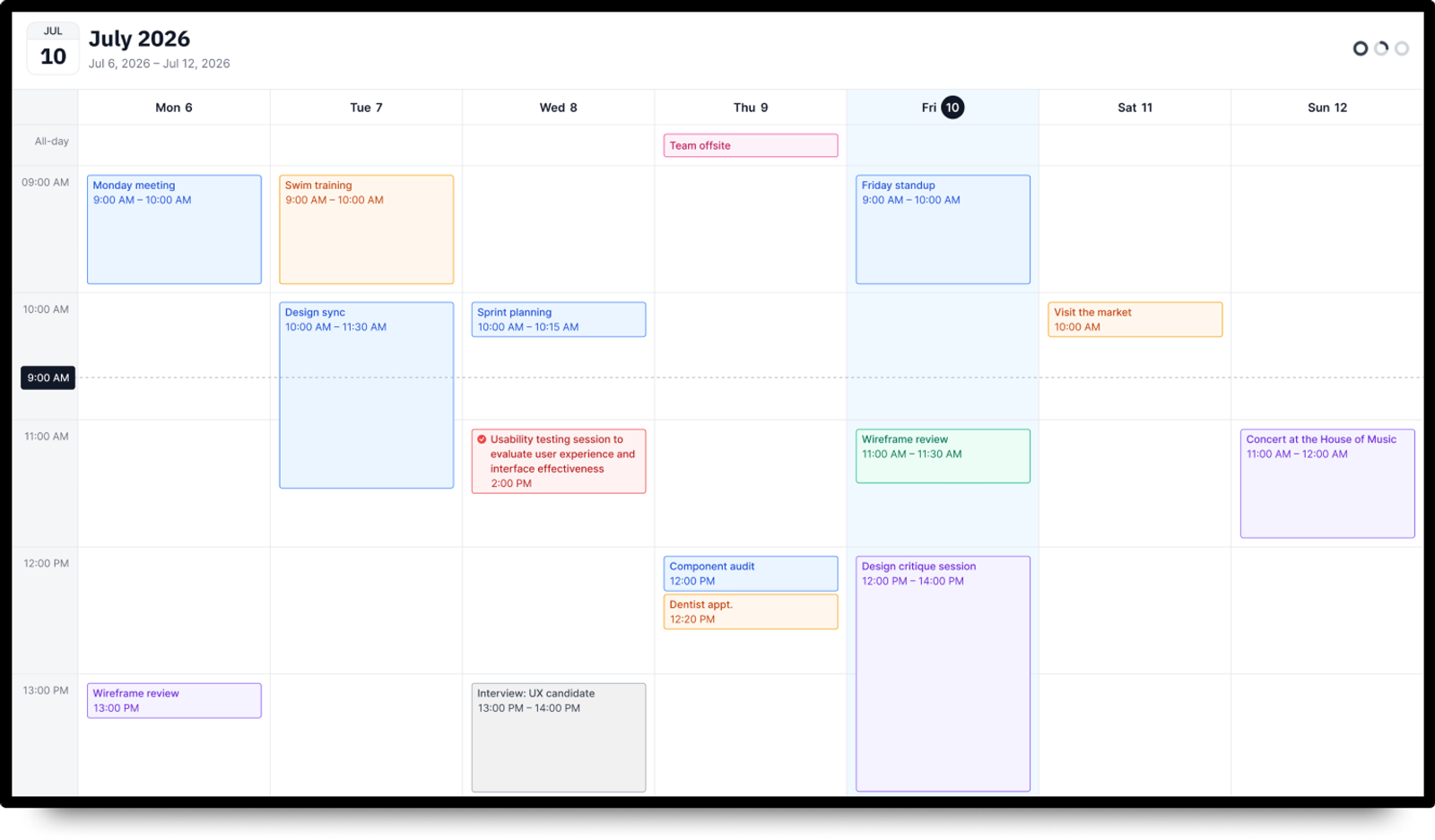
Half the questions in an office are about who is in which room and when. The Calendar app answers them on the wall. Connect a Google or Microsoft calendar, choose how it should look, and the screen keeps itself up to date.
There is nothing to touch and nothing to click. The app just shows what is in the calendar right now, and scrolls on its own when the events do not fit on one screen.
Four ways to show it
Month. The familiar grid, seven columns by weeks, events listed inside each day. Today is marked, and when a day is full the cell shows how many more events are hidden. You can set how many months run in sequence and how long each one stays on screen, so a screen near the entrance can walk visitors through the season ahead.
Week. A seven day timeline with the hours down the left side and a line marking the current time. All day events sit in their own row at the top. Set the hours you actually care about, say 6:00 to 22:00, and decide how many of them fit on one screen. The rest scrolls in on a timer.
Day. One day, either as a timeline with a mini calendar and a clock beside it, or as a plain list of cards if the times matter less than the order.
Upcoming. Just the next events, one after another, with the time on each card. Pick how many to show. This is the one meeting rooms and reception desks usually end up on.
Settings that matter on a wall
Language, first day of the week, 12 or 24 hour time. The last two are pre filled from your location, so in most cases you will not touch them.
Light or dark theme, to match the room and the rest of your playlist rather than fight it.
Display duration in seconds for every mode, which controls how fast the screen moves on when there is more to show than fits.
Built for the screen it lands on
The layout is designed at 1920x1080 and stays fluid from there. Columns and cells stretch and shrink with the zone you put the app in, and on bigger panels everything scales together: type, spacing, event chips, row heights. On a 4K screen the density looks the same as on a Full HD one, so text does not shrink into nothing.
The app works full screen or inside a zone of a multi zone layout, next to a video, a news feed or your own branding.
Time zones
The app follows the time zone of the calendar it is showing. If the calendar has one set, every event is shown in that zone no matter where the player sits. If it does not, the times follow the device. Recurring events are handled the same way, so a weekly stand up stays at 10:00 and does not drift.
Where people put it
Office lobbies and open spaces, meeting room doors, coworking hubs, schools and universities, gyms with a class schedule, churches, clinics with a doctor rota, workshops and studios.